Overview: what Defender for Cloud Apps does and licensing
What it is
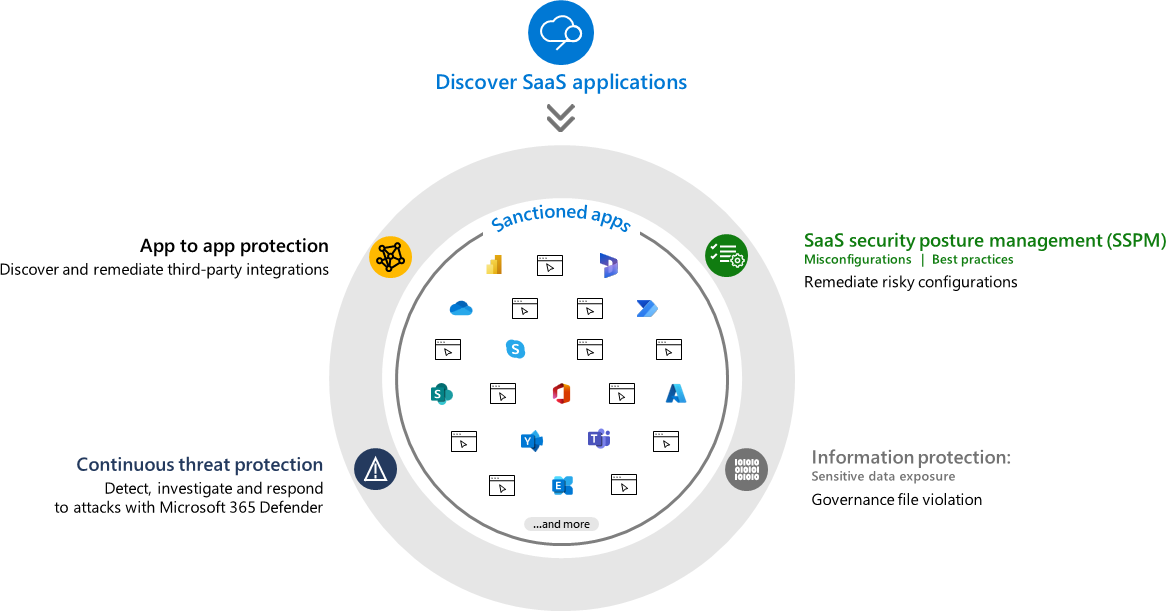
Defender for Cloud Apps (MDA, formerly Microsoft Cloud App Security) is Microsoft's CASB plus a SaaS security posture layer. Learn lists four feature areas: core CASB (shadow IT discovery, app visibility, app-based threat protection, information protection), SaaS Security Posture Management (misconfigurations per connected app, surfaced in Secure Score), threat protection inside Defender XDR, and app-to-app protection for OAuth apps.
I think about it by data path, because that decides what you deploy and what you can see. Cloud Discovery reads traffic logs (firewall, proxy, or the MDE sensor) and matches them against a catalogue of 31,000 plus apps. App connectors use each SaaS provider's APIs to pull users, activities, files and configuration out of band; Microsoft 365 is the one everyone connects first. Conditional Access App Control routes a browser session through MDA via Entra Conditional Access so access and session policies apply in real time. App governance watches OAuth apps registered in Entra ID, Google and Salesforce, their permissions, and what they do with them.
What it is not: not an endpoint agent, not a proxy for all traffic, and no longer a separate console. Everything lives under Cloud Apps in the Defender portal, and its alerts, incidents and the CloudAppEvents table are Defender XDR objects. The deeper articles in this folder cover Cloud Discovery, Conditional Access App Control, app governance and policies and alerts. For the wider picture see the XDR integrations map.
Licensing and prerequisites
Learn is thin on SKU mapping. Every MDA page points at the Microsoft 365 licensing datasheet (aka.ms/M365EnterprisePlans). What Learn does say:
- Per user. One licence per protected user, no productivity licence needed, bought in the Microsoft 365 admin centre marketplace. A trial comes with a Microsoft 365 E5 trial.
- The Defender XDR prerequisites page lists the SKUs that light up the Defender portal: Microsoft 365 E5 or A5, Microsoft 365 E3 with the Defender Suite add-on or the EMS E5 add-on, EMS E5 or A5, Office 365 E5 or A5, and the standalone line "Microsoft Defender for Cloud Apps or Cloud App Discovery".
- Two editions. Full Defender for Cloud Apps: 34,000 plus apps, automated log upload and MDE integration, cross-SaaS DLP, Purview integration, session control for any app, app governance. Office 365 Cloud App Security: 750 plus apps, manual upload only, Office DLP, Office 365 anomaly detection and session control for Office 365 apps only. Which one you get "depends on your license". TODO: confirm from the datasheet that Office 365 E5 maps to the Office 365 edition and that E5 Security and EMS E5 carry the full product. Learn does not state it.
- App governance is included with any valid MDA licence. Not offered when the billing address is in Singapore, Poland, Italy, Qatar, Israel, Spain, Mexico or Taiwan.
- The Microsoft 365 connector needs at least one Microsoft 365 licence in the tenant. SSPM for a workload needs a licence that includes that workload.
- Discovery through MDE needs MDE Plan 2 or Defender for Business on the device plus an MDA licence.
Roles. Security Administrator is the minimum to set MDA up and add other admins. Cloud App Security Administrator is full access inside MDA only. Security Operator and Security Reader are read-only and blocked from App connectors, Discovery settings, IP ranges and system settings. File monitoring for Microsoft 365 files needs Application Administrator or Cloud Application Administrator. Turning on app governance needs Global, Security, Compliance, Compliance Data or Cloud App Security Administrator; the last cannot then see app governance data.
Microsoft 365 connector prerequisites: unified audit logging on in Purview, mailbox auditing on per mailbox, Power BI and Dynamics 365 auditing on if wanted (24 to 72 hours before data lands). Do not disable the five first-party Entra apps MDA depends on: 972bb84a-1d27-4bd3-8306-6b8e57679e8c, ac6dbf5e-1087-4434-beb2-0ebf7bd1b883, 9ba4f733-be8f-4112-9c4a-e3b417c44e7d, 0858ddce-8fca-4479-929b-4504feeed95e, 71559765-2fa9-4207-b59f-a8bd85269d4a.
Network. Data centre and API URL are under Settings > Cloud apps > System > About. Outbound TCP 443 to the portal names (*.us.portal.cloudappsecurity.com, us2, us3, eu, eu2, or your exact tenant host) and CDN names such as cdn.cloudappsecurity.com. Session controls need *.mcas.ms, *.admin-mcas.ms, *.access.mcas.ms and the regional *.saml.cas.ms names. Log collectors need inbound FTP or Syslog, outbound 443 to the tenant API and the data centre blob URL, and outbound 53. The maintained IP list is the MicrosoftCloudAppSecurity service tag. App connector source IPs are per data centre, so IP-restricted admin APIs need them allow-listed. Mail notifications come from six ranges starting 65.55.234.192/26.
How it works
Each data path lands data in the same tenant store, and the same policy engine, alert pipeline and XDR hooks sit on top.
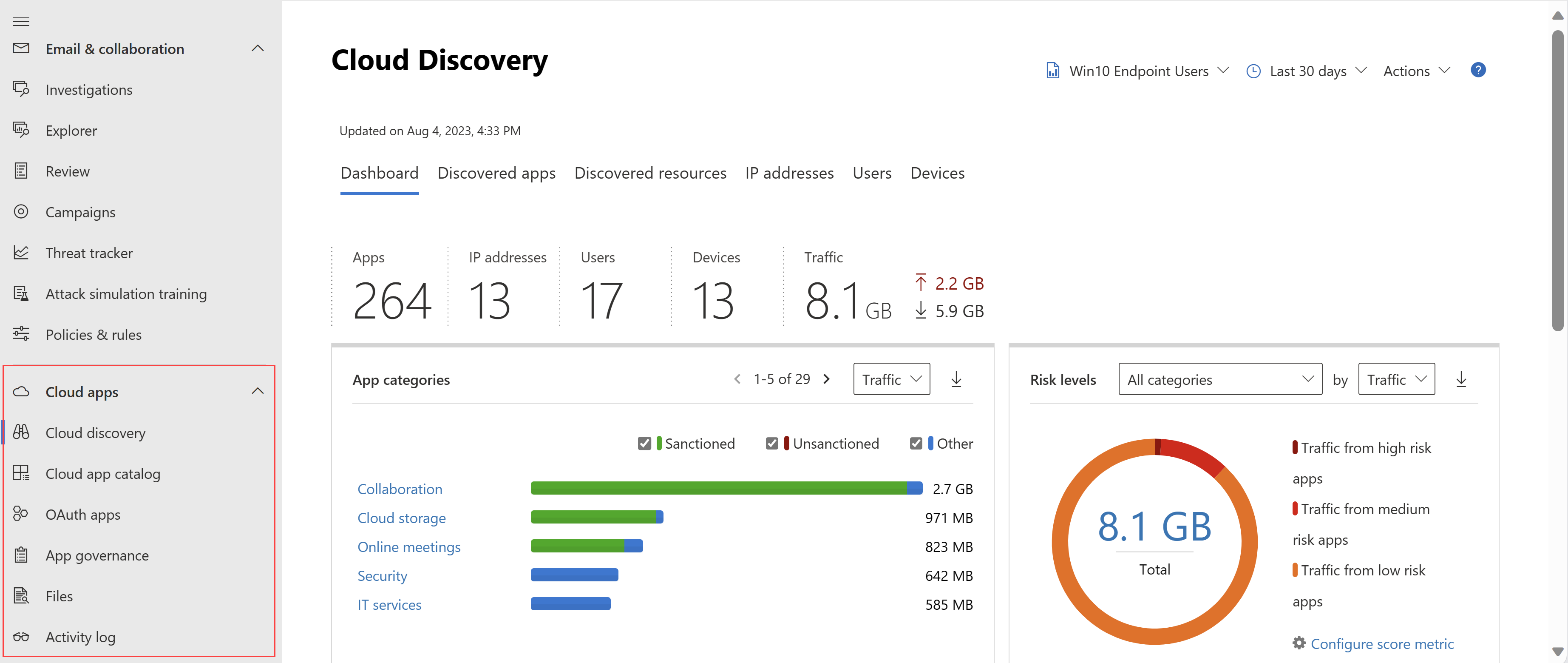
Cloud Discovery. Logs are uploaded, parsed per vendor, matched to the catalogue, scored, reported. Snapshot reports are manual uploads. Continuous reports come from the log collector (Docker, Syslog or FTP in), the MDE integration, a secure web gateway (Zscaler, iboss, Corrata, Menlo), or the Discovery API. Data is reprocessed four times a day. The MDE path is one toggle: within two hours every onboarded Windows 10 1809 plus, Windows 11 or macOS device feeds user and device attributed traffic. MDE Network Protection is then the block point for unsanctioned apps.
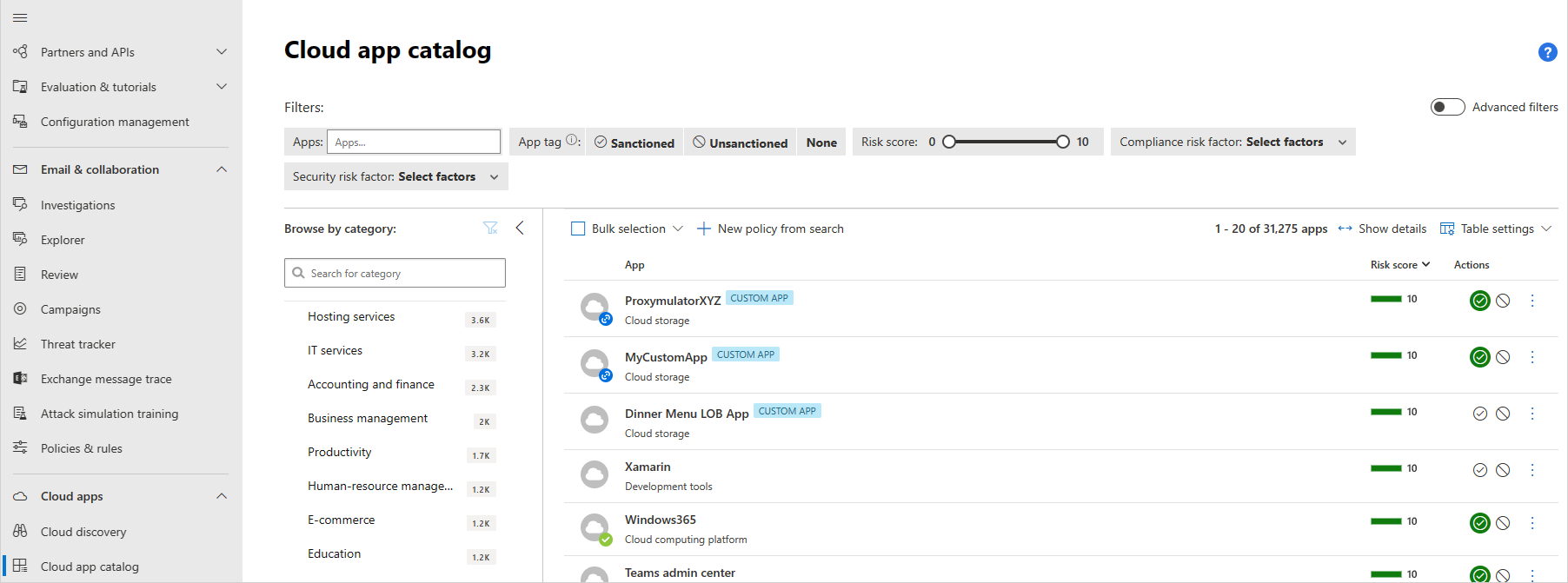
The catalogue and risk score. Each app gets a 0 to 10 score from 90 plus factors in four categories: General, Security, Compliance and Legal. Boolean factors score 0 or 10, the total is a weighted average, and weights are equal until you change them under Cloud Discovery > Score metrics. You can override one app's score with a note. Sanctioned and Unsanctioned are built-in tags. Apps not in the catalogue are invisible unless you create a custom app.
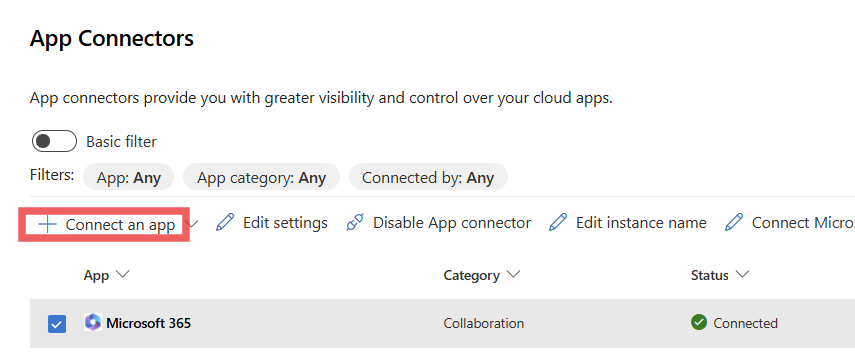
App connectors. The connector authenticates with admin consent, pulls the user list, then activities and files, then keeps rescanning. Depending on the provider that gives account info and governance (suspend, revoke password), audit trail, app permission visibility and revocation, data scans every 12 hours plus near real-time on change, and file quarantine. Provider API throttles apply, so a full-tenant file scan can take days. Multiple instances of one app are supported except for Microsoft 365 and Azure. Since January 2026 all Microsoft 365 components are selected by default; tenants connected earlier should reselect defaults and reconnect, as some detections need every component.
Conditional Access App Control. A Conditional Access policy with the session control "Use Conditional Access App Control" sends matching sign-ins to MDA. In Edge the protection is in-browser. Elsewhere the session is reverse proxied and the host gains an .mcas.ms suffix. Access and session policies then block download, cut, copy or print, require labelling on download, block unlabelled uploads, scan for malware, require authentication context, or monitor. Per app, interactive browser sessions only, TLS 1.2 plus. Entra ID apps onboard automatically; other IdPs via SAML 2.0 manually.
App governance. A dashboard of non-Microsoft OAuth apps across Entra ID, Google and Salesforce with permissions, consenting users, API usage and data transfer, plus policies and detections that alert into XDR with Detection source App Governance. Both the MDA and Defender portals must have been opened once or alerts do not flow.
Information protection. MDA applies Purview sensitivity labels, blocks downloads to unmanaged devices and strips external collaborators from files. MDA file policies retire on 6 January 2027 and should be rebuilt as Purview DLP or auto-labelling policies.
XDR integration. MDA alerts land in the Defender queues with serviceSource microsoftDefenderForCloudApps (app governance uses microsoftAppGovernance). Connected app activity is written to CloudAppEvents once the Microsoft 365 activities component is selected: Exchange, SharePoint, Teams, Dynamics, Power BI, Power Automate and Viva Engage plus Dropbox, Salesforce, GitHub and Atlassian, with enrichment columns such as UncommonForUser, LastSeenForUser, IsAnonymousProxy, AuditSource and OAuthAppId. MDA permissions moved into Defender unified RBAC in December 2025, on by default for new tenants since August 2026.
Configure
This is first-time setup. Per-pillar depth is in the linked articles.
- Portal
- PowerShell
- Graph API
The settings tree is Defender portal > System > Settings > Cloud apps:
- System: Organization details, IP address ranges, Mail settings, API tokens (legacy), About (data centre and API URL).
- Cloud Discovery: Automatic log upload, Microsoft Defender for Endpoint, Score metrics, Continuous reports, snapshot reports.
- Information Protection: Files (Enable file monitoring), Microsoft Information Protection. Legacy ground given the 2027 retirement.
- Threat Protection: anomaly detection settings.
- Connected apps: App Connectors, Conditional Access App Control apps.
- App governance: the Use app governance switch.
Connect Microsoft 365:
- Confirm the prerequisites above and sign in as Security Administrator or higher.
- Settings > Cloud apps > Connected apps > App Connectors > Connect an app > Microsoft 365.
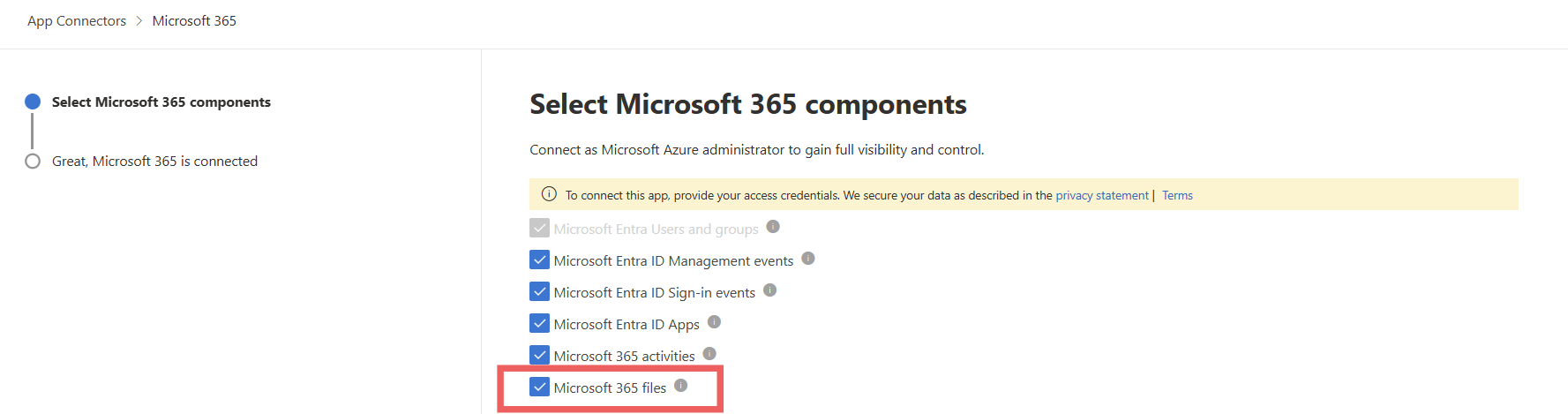
- On Select Microsoft 365 components keep the defaults (all selected). Microsoft 365 activities is the component that populates
CloudAppEvents; Microsoft 365 files is the one that needs file monitoring turned on separately.
- Connect, then Follow the link > Connect Microsoft 365 and consent. Done when it reports success.
- Back on App Connectors confirm Connected. The previous week of data arrives straight away; components whose APIs were off show events from connection time only.
- Optional: Settings > Cloud apps > Information Protection > Files > Enable file monitoring.
MDE discovery feed: Settings > Endpoints > General > Advanced features > Microsoft Defender for Cloud Apps > On > Save preferences. Then Settings > Cloud apps > Cloud Discovery > Microsoft Defender for Endpoint for alert severity.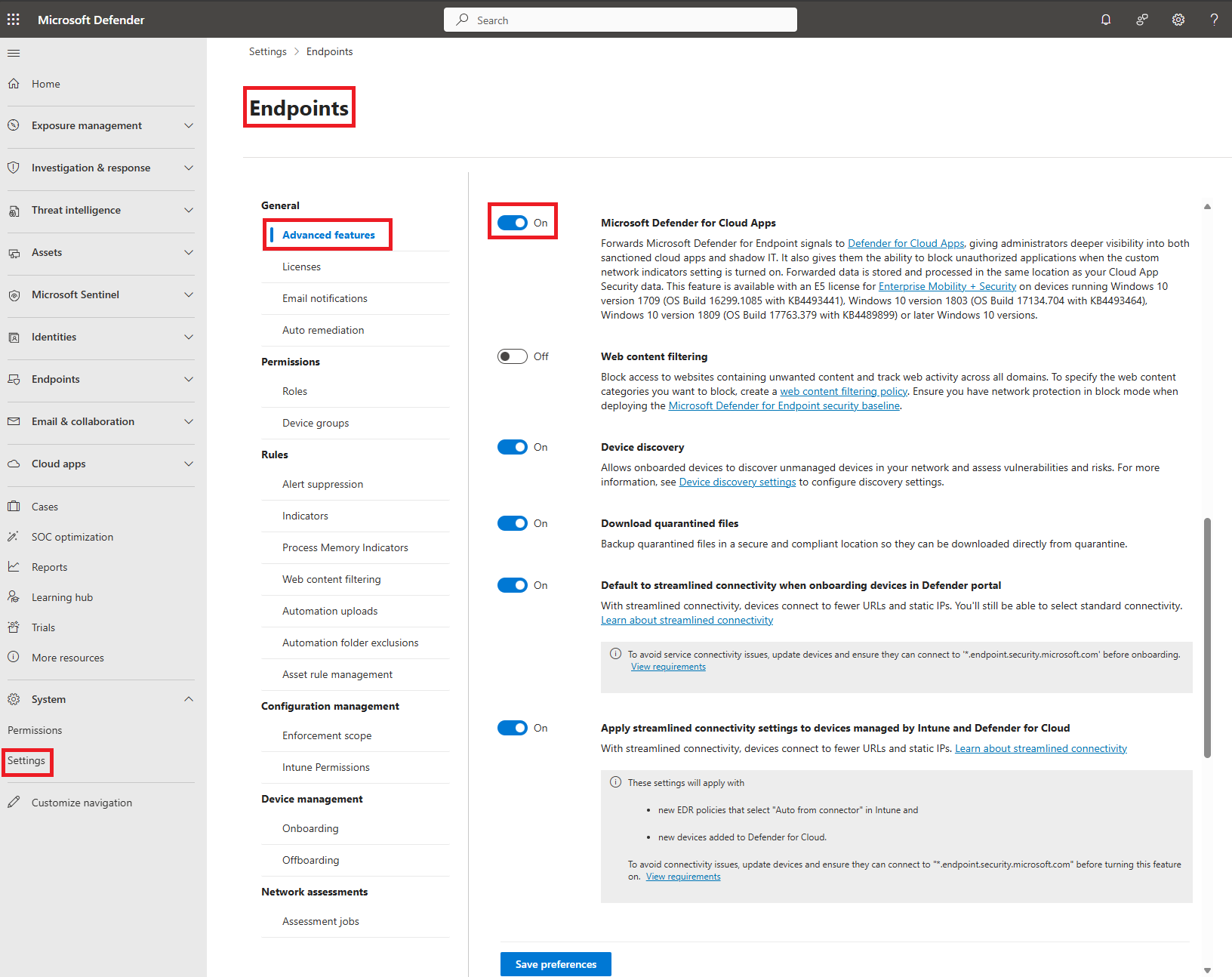
App governance: Settings > Cloud apps > App governance > Use app governance. Wait up to 10 hours. If the option is missing, region or capacity is the reason; join the waitlist.
Delegate without Entra roles: Permissions > Cloud apps > Roles > Add user, pick a built-in MDA role. App/instance admin and User group admin are closed to new assignments.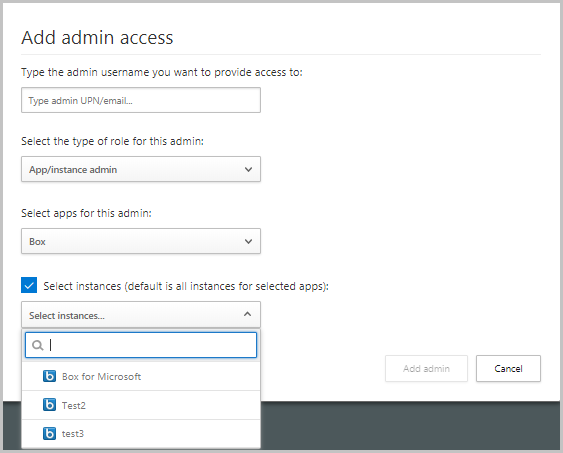
Then create policies under Cloud apps > Policies > Policy templates, one per risk category.
There is no MDA PowerShell module. Learn documents a REST API at https://<tenant>.<region>.portal.cloudappsecurity.com/api; the host is under Settings > Cloud apps > System > About, append /api. Documented resources: activities, alerts, entities, files, subnet, plus discovery upload and block scripts. No documented endpoint lists connected app connectors, so the sample reads alerts. Limits: 100 items per page, 30 requests per minute per tenant.
# Tested on: TODO
# Application context token (Learn: api-authentication-application). App registration needs the
# "Microsoft Cloud App Security" API permission (type the legacy name), e.g. Investigation.Read,
# with admin consent granted.
$tenantId  = '<TENANT_ID>'
$appId     = '<APPLICATION_ID>'
$appSecret = '<APPLICATION_SECRET>'
$resourceAppIdUri = '05a65629-4c1b-48c1-a78b-804c4abdd4af'   # MDA resource GUID from Learn

$authBody = [Ordered]@{
    resource      = $resourceAppIdUri
    client_id     = $appId
    client_secret = $appSecret
    grant_type    = 'client_credentials'
}
$auth  = Invoke-RestMethod -Method Post -Uri "https://login.microsoftonline.com/$tenantId/oauth2/token" -Body $authBody
$token = $auth.access_token

# Base URL: Settings > Cloud apps > System > About, API URL, plus /api
$base = 'https://<tenant>.<region>.portal.cloudappsecurity.com/api'
$headers = @{ Authorization = "Bearer $token" }

# Last 100 alerts, newest first
$alerts = Invoke-RestMethod -Method Get -Uri "$base/v1/alerts/" -Headers $headers
$alerts.data | Select-Object title, severity, resolutionStatus, @{n='time';e={ [DateTimeOffset]::FromUnixTimeMilliseconds($_.timestamp) }} | Format-Table

# Filtered POST: alerts from the last 7 days, limit 10 (filters per Learn operator table)
$body = @{ filters = @{ date = @{ gte_ndays = 7 } }; skip = 0; limit = 10 } | ConvertTo-Json -Depth 5
Invoke-RestMethod -Method Post -Uri "$base/v1/alerts/" -Headers $headers -ContentType 'application/json' -Body $body

# Legacy personal token alternative (Settings > Cloud apps > System > API tokens), deprecated:
# $headers = @{ Authorization = "Token <token>" }
Timestamps are milliseconds since epoch. Legacy tokens inherit the issuing user's privileges.
MDA alerts via the Graph Security API. Permission SecurityAlert.Read.All (delegated user needs Security Reader or higher).
GET https://graph.microsoft.com/v1.0/security/alerts_v2?$filter=serviceSource eq 'microsoftDefenderForCloudApps'&$top=50
App governance alerts use serviceSource eq 'microsoftAppGovernance'. Page with @odata.nextLink.
Hunting against CloudAppEvents. Permission ThreatHunting.Read.All. Default lookback 30 days; Timespan is ISO 8601 and the shorter of query filter and Timespan wins.
POST https://graph.microsoft.com/v1.0/security/runHuntingQuery
Content-Type: application/json
{
  "Query": "CloudAppEvents | where Timestamp > ago(1d) | summarize Events = count() by Application, ActionType | top 20 by Events",
  "Timespan": "P1D"
}
Response is huntingQueryResults with schema and results. Graph has no surface for MDA settings or connectors.
Verify
- App Connectors shows Microsoft 365 Connected with no warning. Test now is the on-demand check.
- Cloud Discovery has data within two hours of the MDE toggle.
- Secure Score shows SSPM recommendations under Cloud apps or Identity once a supported app is connected.
- App governance Overview renders instead of the enable prompt, within 10 hours.
- Alerts queue filtered on Service source Defender for Cloud Apps returns rows; the Graph call above matches.
// Is the Microsoft 365 connector feeding hunting? Volume by workload, last 24 hours
CloudAppEvents
| where Timestamp > ago(24h)
| summarize Events = count(), Users = dcount(AccountObjectId), LastSeen = max(Timestamp) by Application, AuditSource
| order by Events desc
// Map AppInstanceId to the connector ID, from Learn
CloudAppEvents
| distinct ApplicationId, AppInstanceId, binary_or(binary_shift_left(AppInstanceId, 20), Application)
| order by ApplicationId, AppInstanceId

Troubleshoot
| Symptom | Likely cause | Fix |
|---|---|---|
Microsoft 365 connector error AF20012 tenant incorrectly configured | No Microsoft 365 licence assigned in the tenant | Assign at least one Microsoft 365 licence, Test now |
Connector error AF20023 subscription was disabled | Unified audit logging off | Enable auditing in Purview, reconnect |
Connector error AADSTS70008 refresh token expired | Consent token expired or consenting account changed | Reconnect Microsoft 365 from App Connectors |
Connector IgniteException or ContextManagerServiceException | Domain or user no longer valid | Reset settings, reconnect |
| Connector shows Connected but Exchange, Teams or Power BI events missing | Mailbox auditing off, or Power BI and Dynamics auditing just enabled | Turn on mailbox audit per mailbox; allow 24 to 72 hours for Power BI, Dynamics, malware detections |
| Connected before January 2026 and some detections never fire | Not all components selected | Reselect all defaults on the component page and Connect again |
| No data in Cloud Discovery from MDE | Toggle just enabled, OS below Windows 10 1809, or devices behind a forward proxy | Wait two hours, check OS build, ship the proxy logs via a log collector |
| Log collector status Created | On-prem deployment never finished | Complete the Docker deployment steps |
| Log collector status Disconnected | No data from any linked source in 24 hours | Check Syslog or FTP path with collector_config and netstat, outbound 443 open, then support with the diagnostic script bundle |
| Governance log says log format does not match | Wrong data source picked or corrupt export | Compare with the sample on the upload page, pick Other to have a parser built |
| Discovery uploaded fine but dashboard empty | Dashboard filters exclude the data | Reset filters |
| MDA alerts not in XDR incidents or app governance alerts missing | App governance needs both portals provisioned; wrong serviceSource filter | Open both MDA and Defender portals once; filter on microsoftDefenderForCloudApps or microsoftAppGovernance |
CloudAppEvents returns nothing | Microsoft 365 activities component not selected, or MDA not licensed | Reselect the component on the connector |
| Security Operator cannot open App connectors or Discovery settings | By design, those pages are restricted for operator and reader | Use Security Administrator or Cloud App Security Administrator |
| API call returns 429 | 30 requests per minute per tenant | Back off; use the 100 item page size and skip |
| App governance option missing from settings | Region not supported, capacity, or billing address in an excluded country | Join the waitlist; excluded countries cannot enable it |
Gotchas and limits
- The portal moved. No standalone console; the old
<tenant>.<region>.portal.cloudappsecurity.comhost survives only as the API URL under About. MSSPs reach a customer withhttps://security.microsoft.com/?tid=<tenant_id>. - Per-user licensing, and the MDA licence is what unlocks the full edition. TODO: confirm SKU mapping from the datasheet.
- The Microsoft 365 connector takes Security Administrator or Global Administrator consent. Security Operator cannot touch connectors. File monitoring also needs Application Administrator or Cloud Application Administrator.
- Microsoft 365 and Azure connectors are single instance per MDA tenant.
- File policies retire 6 January 2027; the Files page went in September 2024. New DLP work belongs in Purview.
- Entra sign-in data via the connector is interactive and legacy protocol only. Non-interactive sign-ins are in the Entra sign-in log, not
CloudAppEvents. - Suspend user reverts on hybrid-synced accounts because on-prem AD wins. Guests do not support suspend, confirm compromised or require sign-in again.
- Session controls are browser-only. The Teams desktop app ignores them.
- MDE discovery on macOS audits TCP close only, so UDP is invisible.
- API: 30 requests per minute per tenant, 100 rows per response. Tokens from deprovisioned users are kept but rejected; revoke them.
- The app connectors overview page (enable-instant-visibility-protection-control) errored at source check time and was not read; protect-connected-apps covered the same ground.
Further reading
- Defender for Cloud Apps will retire its file policies on January 6, 2027, in favor of Purview, Guillaume Lambert, October 2026. Walks the migration wizard and lists what does not carry over (auto-labelling, third-party apps, quarantine and sharing removal), which Learn leaves vague.
- Purview DLP vs Defender for Cloud Apps Session Controls, Tiago S. Carvalho, September 2026. A decision framework for when a session policy beats a DLP policy, including file size ceilings and what happens when both hit the same browser event.
- MDCA (Microsoft Defender for Cloud Apps), Microsoft's Cloud Access Security Broker, 51SEC, July 2026. Side-by-side of the full product, Office 365 Cloud App Security and Cloud App Discovery with use cases, useful while Learn refuses to spell out SKUs.
Only three qualified in the October 2025 to October 2026 window. The Tech Community posts on app governance and AI app discovery predate it.
My notes
TODO: Sohail's notes after verification.
Changelog
| Date | Change | Source |
|---|---|---|
| 2026-10-22 | Drafted from Learn, with Learn images and diagrams | [1] |