Policies, anomaly detection, alerts and troubleshooting
What it is
Policies are how Defender for Cloud Apps (MDA) turns connected-app telemetry into alerts and actions. A policy is a filter over activities, files, OAuth apps or discovery traffic, plus alert settings, plus optional governance actions that MDA runs through the app's own API. Learn lists eight policy types. Two of them, OAuth app and malware detection, are built in and cannot be created. Access and session policies belong to Conditional Access App Control and app discovery policies to Cloud Discovery. This article covers the rest: activity, anomaly detection and file policies, the governance actions behind them, the activity log you investigate in, and where the alerts go once they exist.
Anomaly detection is the part most people never touch and most people complain about. It is UEBA across your API connectors: a set of built-in detections that are on by default, learn for seven days, then compare each session with the past month of a user's behaviour. Since June 2025 Microsoft has been moving these detections to a dynamic model it maintains itself. Several legacy policies are disabled and replaced with renamed ones. That matters for any automation keyed on alert titles.
Alerts raised by MDA land in the Defender portal alert queue with the ca prefix and are correlated into incidents like any other XDR source. See incidents and alerts for the XDR side and the overview for how connectors work.
Licensing and prerequisites
- Defender for Cloud Apps licence (Microsoft 365 E5, E5 Security, or standalone). Anomaly detection, activity policies and governance actions all need an API connector for the app. The Microsoft 365 connector with the Microsoft 365 activities component selected is the floor, and it is also what populates
CloudAppEventsin Advanced Hunting. - File policies: the first file policy in a tenant needs Microsoft Entra service principal permissions, which are granted automatically only when no file policy exists yet. Label actions need Purview Information Protection integration. File policies retire on 6 January 2027; Learn says to migrate to Purview DLP or auto-labeling.
- Malware governance actions need Security Operator, Security Administrator or Cloud App Security Administrator.
- Sentinel integration (the direct MDA path) needs a Sentinel licence and at least Security Administrator. It is commercial cloud only. GCC, GCC High and DoD go through the Defender XDR connector.
- MDA REST API: a personal API token from Settings > Cloud apps > API tokens, or app context through Entra. Throttle is 30 requests per minute per tenant and 100 items per page.
- Graph:
SecurityAlert.Read.Allforalerts_v2,ThreatHunting.Read.AllforrunHuntingQuery. Delegated callers also need Security Reader or higher. - Exchange Online detections such as suspicious email deletion show up in the MDA activity log once Defender for Office 365 is enabled.
How it works
Policy types
| Type | Category | Source | Can create | Notes |
|---|---|---|---|---|
| Activity | Threat detection | API connector | Yes | Single or repeated activity match. Governance on users. |
| Anomaly detection | Threat detection | API connector, UEBA | Built-in only, but scope and sensitivity are editable | Seven-day learning, past-month baseline. |
| OAuth app | Threat detection | Microsoft 365, Google, Salesforce connectors | No | Built in. See app governance. |
| Malware detection | Threat detection | API connector | No | Built in, disabled by default. Optional sandboxing for Box, Dropbox, Google Workspace. |
| File | Information protection | API connector | Yes, max 50 | Content inspection plus context filters plus actions. Retires 6 January 2027. |
| Access | Conditional Access | Reverse proxy | Yes | Real-time sign-in control. |
| Session | Conditional Access | Reverse proxy | Yes | Real-time in-session control. |
| App discovery | Shadow IT | Discovery logs | Yes | Alerts on new apps. |
Every policy carries a risk category (access control, compliance, configuration control, cloud discovery, DLP, privileged accounts, sharing control, threat detection). The category is informational and drives search, nothing else.
Policy evaluation
An activity policy is evaluated against events the connector pulls after the policy exists. Learn is explicit: alerts are raised only for activity that happens after creation, and deployment can take up to 15 minutes. A single activity match fires per event. A repeated activities match fires only when N matching events land inside the window, optionally scoped to the same app or the same user in the same app. The daily alert limit caps alerts, not governance actions. Policies that match more than 200,000 events a day or 100,000 in three hours can be disabled automatically.
File policies scan content at rest when created and then new content as it arrives. Only the governance action of the first policy to match a file is guaranteed to apply, so two label policies on the same file do not both run.
Anomaly detection
The engine scores activity with more than 30 risk indicators grouped into eight factors: risky IP, login failures, admin activity, inactive accounts, location, impossible travel, device and user agent, activity rate. There is a seven-day initial learning period for the tenant and a separate seven-day learning period per new user for impossible travel. Unusual file access learns for 21 to 45 days and unusual ISP for an OAuth app for 30. After that each session is compared with the past month.
What the main detections flag, with the current names where Learn gives them:
| Detection | What it flags | Learning | Name after June 2025 |
|---|---|---|---|
| Impossible travel | Two activities from distant countries faster than travel time. Country-level granularity, bordering countries ignored. Both IPs tagged corporate means no alert unless sensitivity is High. | 7 days per user | Unchanged |
| Activity from infrequent country | Location the user or tenant has not used recently or ever | 7 days | Unchanged |
| Activity from anonymous IP | Anonymous proxy per Microsoft TI | None stated | Activity from a TOR IP address, Anonymous proxy activity |
| Activity from suspicious IP | IPs tied to password spray or botnet C2 | None stated | Successful logon from a suspicious IP address, Activity from a password-spray associated IP address |
| Ransomware activity | High upload or delete rates plus known ransomware extensions | 7 days | Ransomware payment instruction file uploaded |
| Activity performed by terminated user | Entra-deleted account still active in AWS, Salesforce and so on | None stated | Activity by a deprovisioned user |
| Suspicious inbox forwarding | Rule forwarding mail externally | None stated | Suspicious email forwarding rule created by third-party app |
| Suspicious inbox manipulation rules | Rules that delete or move messages or folders | None stated | Unchanged |
| Suspicious email deletion activity | Hard deletes in one session from an uncommon ISP, country or user agent | None stated | Unchanged, preview tag dropped |
| Unusual administrative activity | Admin actions above the user's baseline | 7 days | Unchanged |
| Unusual multiple file download | Download count above baseline | 7 days | Unchanged |
| Unusual file share, file deletion, impersonated activity | Same pattern for each action class | 7 days | Unchanged |
| Unusual file access | Access to financial or network data files in SharePoint or OneDrive | 21 to 45 days | Suspicious file access indicative of lateral movement, and a malicious-IP variant |
| Multiple failed login attempts | Failed sign-ins above baseline, one alert while the pattern continues | 7 days | Unchanged |
| Multiple delete VM activities | VM deletions above tenant baseline | None stated | Unchanged |
| Suspicious OAuth app file download | OAuth app pulling many files from SharePoint or OneDrive | None stated | Unchanged |
| Unusual ISP for an OAuth app | App connecting from an ISP it has not used | 30 days | OAuth application activity from an unknown ISP |
Impossible travel, infrequent country, anonymous IP and suspicious IP do not apply to failed or non-interactive logins.
Tuning has two levers. Scope sets which users and groups a policy covers; anyone outside the include list is never alerted on, and excludes override includes. Sensitivity exists on impossible travel only and controls which suppressions apply: Low applies system, tenant and user suppressions, Medium applies system and user, High applies system only. Tenant suppression means something the tenant has seen before, such as an ISP you already alerted on. User suppression means a location that user normally uses.
Governance actions
Governance actions are app-specific and run through the connector.
| Action | Apps per Learn | Effect |
|---|---|---|
| Suspend user | Google Workspace, Box, Office, Salesforce | No access or sign-in, active sessions locked out. Reverted if the account syncs from on-premises AD |
| Require user to sign in again | Google Workspace, Office | Revokes refresh tokens and session cookies |
| Confirm user compromised | Office | Sets Entra risk to High so Identity Protection policies act |
| Remove a collaborator | Google Workspace, Box, OneDrive, SharePoint | Removes one named collaborator |
| Remove external users, make private | Google Workspace, Box, OneDrive, SharePoint | Strips external or all sharing |
| Put in user quarantine | Box, OneDrive, SharePoint | Moves to a quarantine folder in the user's root. SharePoint and OneDrive only for Shared Documents and the Documents library |
| Put in admin quarantine | SharePoint, OneDrive, Box | Moves to the admin drive, admin must approve |
| Apply or remove sensitivity label | Box, OneDrive, Google Workspace, SharePoint | Purview label. Remove works only on unprotected labels MDA applied |
| Trash | Box, Dropbox, Google Drive, OneDrive, SharePoint, Cisco Webex | Moves to trash, permanent delete on Webex |
Every run lands in Cloud Apps > Governance log with success or failure, and some actions can be retried or reverted from there. Nested actions resolve to the stronger one, unrelated actions both run, and conflicting actions such as two different change-owner targets give unpredictable results.
Activity log
The activity log is the raw event stream from every connector, enriched with IP category, location, device and user agent tags. Activity type names come from the app's API and MDA does not rename them. The drawer on any event shows matched policies, raw data, user insights (open alerts, matches, activities, distinct countries, ISPs and IPs in the past 30 days) and IP insights, from which you tag an IP as corporate, VPN or risky. Tagging home VPN ranges as VPN is the documented fix for most impossible travel noise.
Alert lifecycle
MDA alerts appear in Incidents & alerts > Alerts in the Defender portal with the ca prefix. Status is New, In progress or Resolved. Classification is Not set, True positive, Informational expected activity or False positive, each with a determination. In the MDA API the same alert carries resolutionStatusValue 0 Open, 3 false positive, 4 benign, 5 true positive; the legacy Dismissed and Resolved values 1 and 2 map onto those. Alert tuning rules in XDR can resolve MDA alerts automatically but the Hide option is MDE only and Set as behavior is not supported for every source.
Getting alerts and activities out
Three paths. The direct MDA to Sentinel integration sends alerts to SecurityAlert and discovery logs to McasShadowItReporting; preview, still supported. The generic SIEM agent is a Java 8 JAR that pulls alerts and activities over 443 and emits CEF syslog; no new agents since 19 June 2025, retirement paused in December 2025. The Defender XDR connector brings MDA alerts in as part of incidents and streams CloudAppEvents as a billable raw table (commercial and GCC only). When Sentinel is onboarded to the Defender portal, the XDR connector is set up for you and the standalone MDA alerts connector is disconnected. See Sentinel data connectors.
Configure
- Portal
- PowerShell
- Graph API
Create an activity policy:
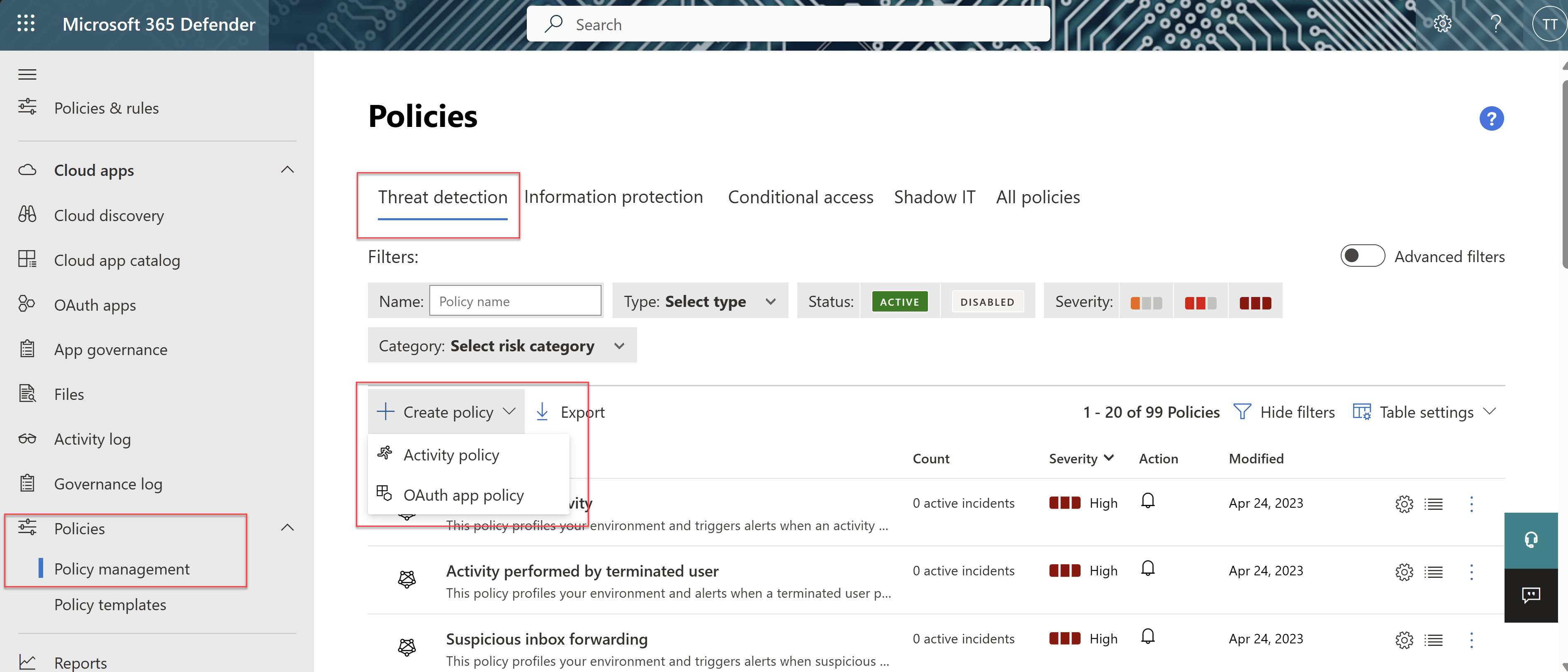
- Defender portal > Cloud Apps > Policies > Policy management > Threat detections tab > Create policy > Activity policy. Or start from Policies > Policy templates and press the plus on a template row; policies created that way stay linked to the template.
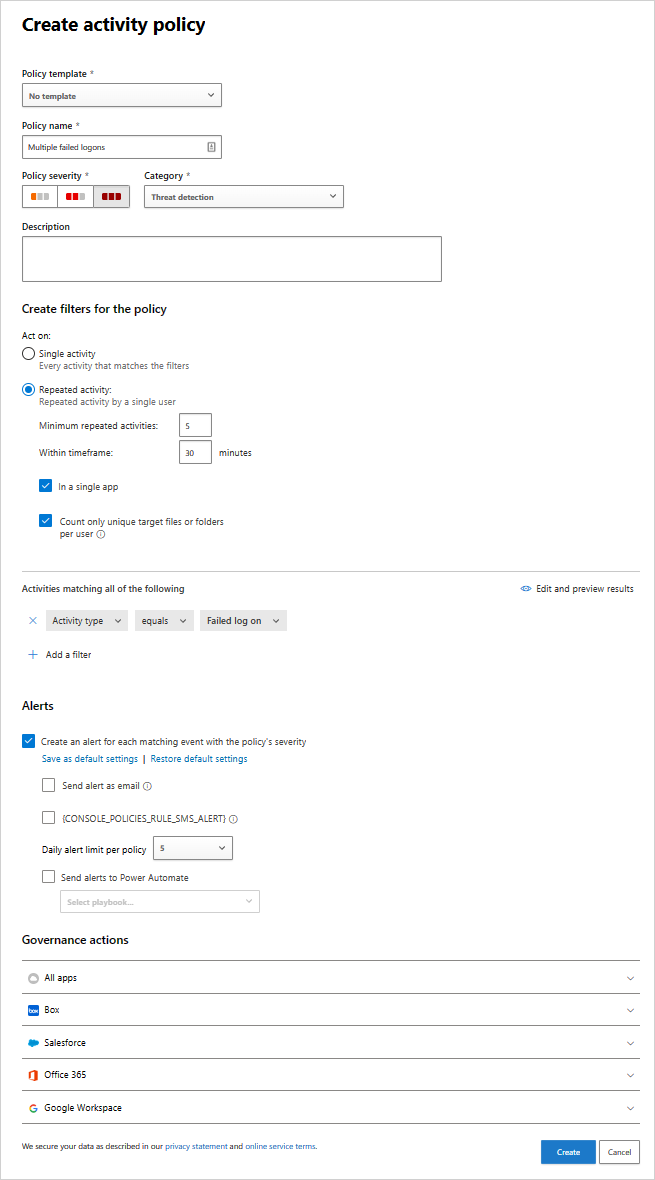
- Name, description, severity. Severity decides whether email notification fires.
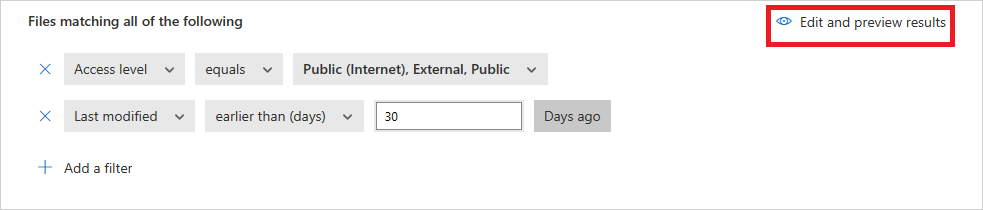
- Activity filters. Use Edit and preview results before you save. For a location exclusion add Location does not equal plus Location is set, because does not equal alone also matches events with no location.
- Choose Single activity or Repeated activities. For repeated, set the count and window and tick In a single app or Same user, same app as needed. Learn's example is 10 failed logins in 2 minutes.
- Alerts: alert per matching event, email, daily alert limit, Power Automate.
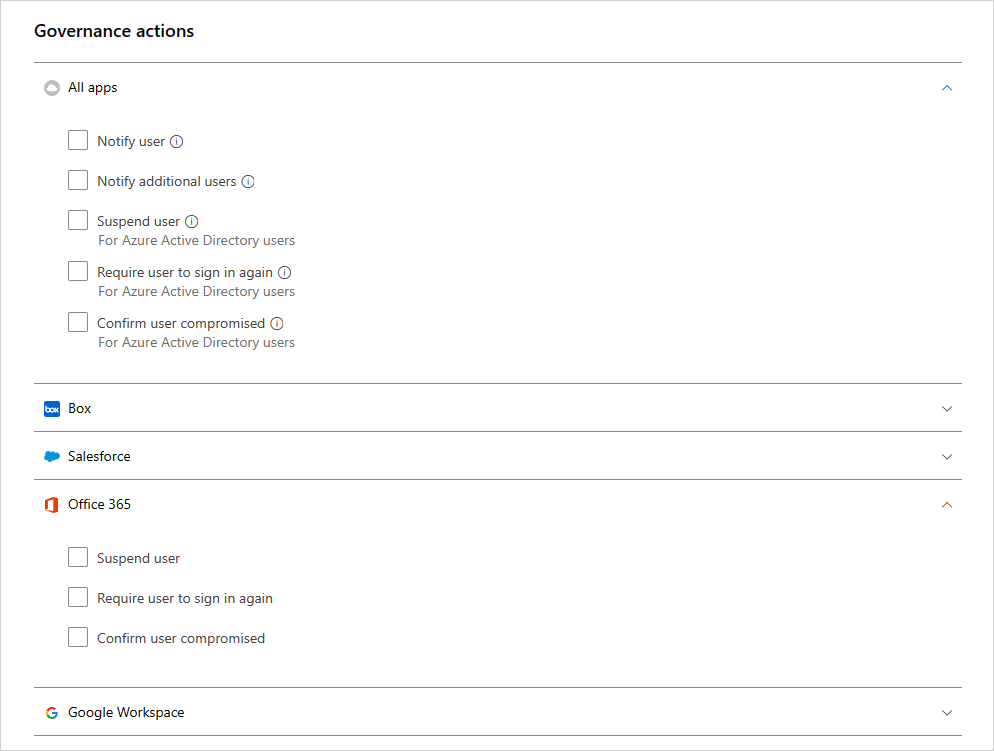
- Actions: pick governance actions per connected app. Save. Allow 15 minutes for deployment.
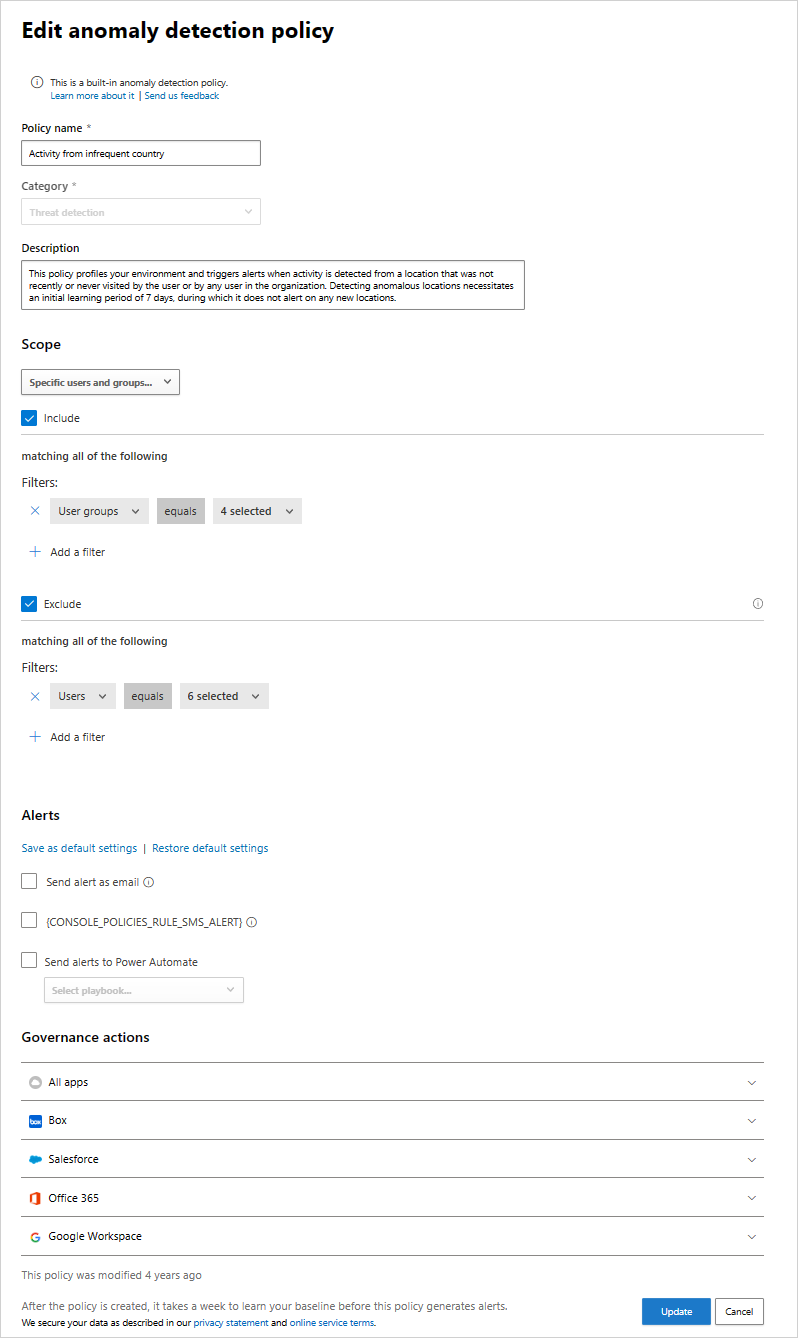
Tune an anomaly policy scope:
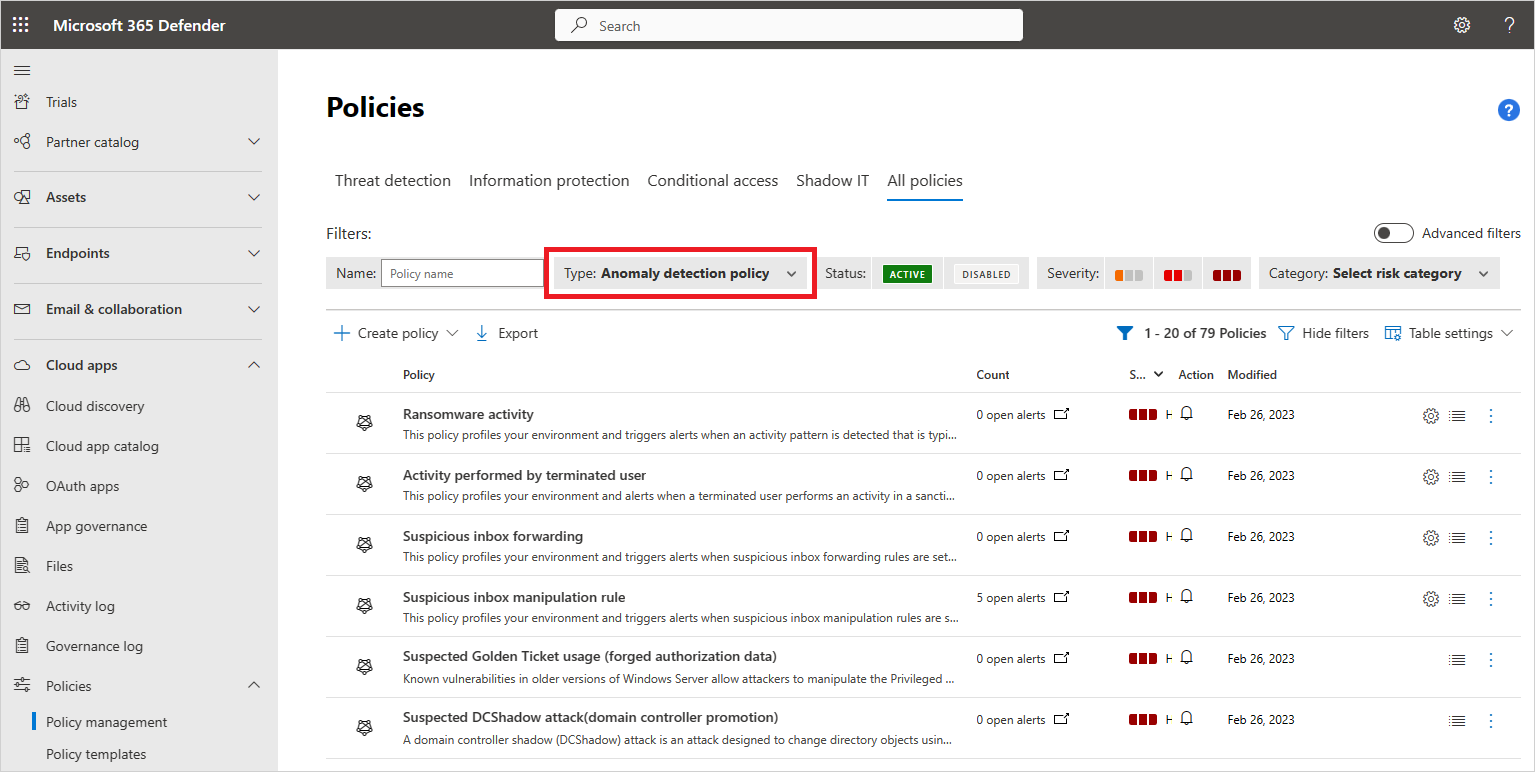
- Cloud Apps > Policies > Policy management, filter Type to Anomaly detection policy.
- Open the policy, for example Activity from infrequent country.
- Under Scope change All users and groups to Specific users and groups. Include the groups you want covered. Exclude the frequent traveller group. Excluded users never alert even if they are in an included group.
- On Impossible travel only, set the sensitivity slider. Low for a tenant with heavy VPN and travel, High when you want tenant and user suppression off.
- Governance actions per app if you want automatic suspend or sign-in reset. Update.
Create a file policy with a label action:
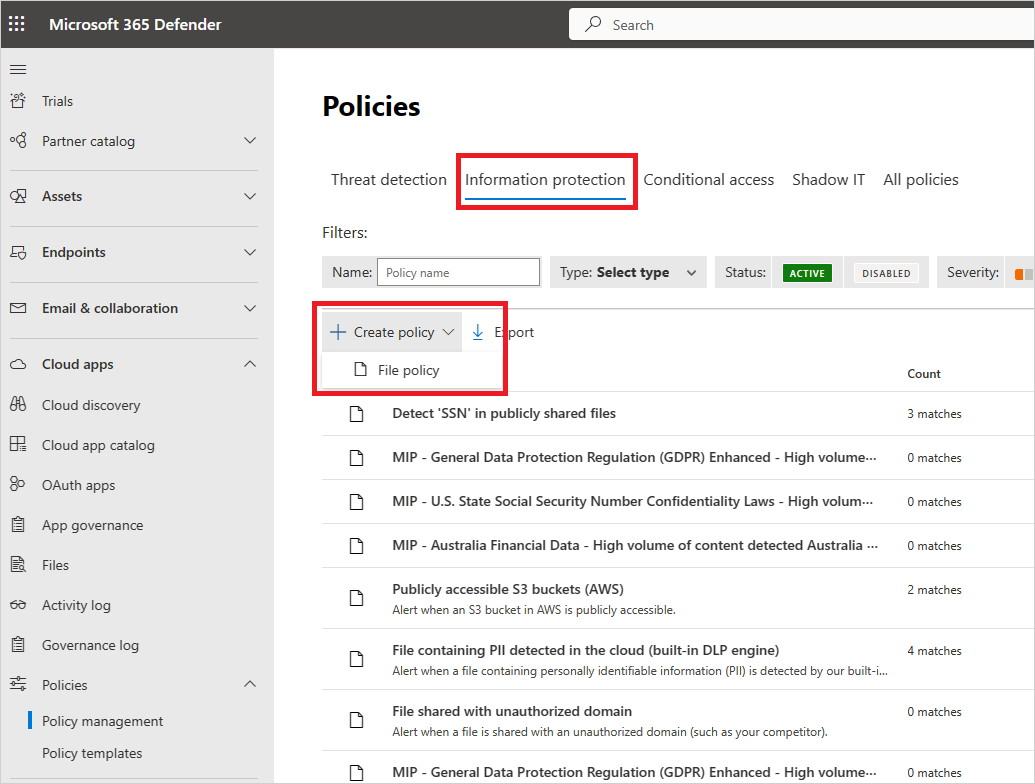
- Cloud Apps > Policies > Policy management > Information Protection tab > Create policy > File policy.
- Name, severity, category (defaults to DLP).
- Filters, as narrow as possible. Example: Access level equals Public, App equals SharePoint Online. Note the Sensitivity label filter restricts the policy to Office files.
- Apply to: all files, all files excluding selected folders, or selected folders. Select user groups for owners.
- Content inspection method: Data Classification Services is the recommended one. Set minimum match count, exclusions and unmask last four if needed.
- Alerts as for activity policies.
- Governance actions: under the Microsoft 365 app pick Apply sensitivity label and choose the Purview label. Save, then confirm the first match in Policy management > View all matches.
Investigate: Cloud Apps > Activity log, open an event, use the drawer to pivot by user, IP, location or 48-hour window, and tag the IP from the IP insights tab.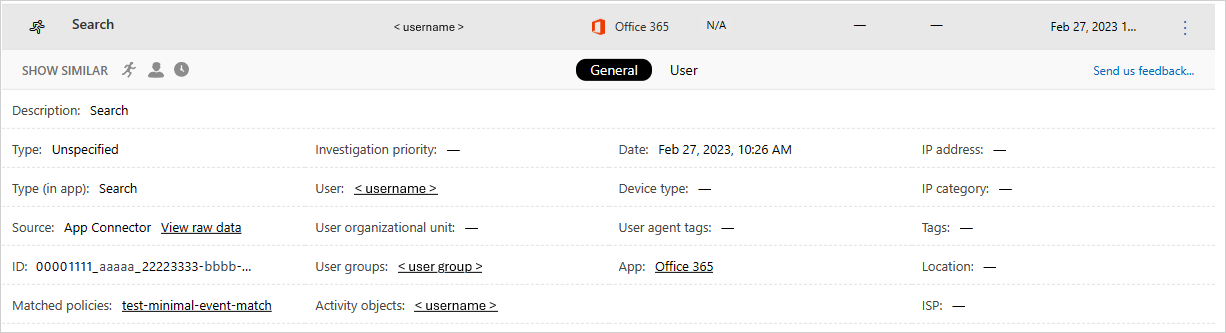
# Tested on: TODO
# MDA REST API with a personal API token (Settings > Cloud apps > API tokens).
# Base URL from Settings > Cloud apps > System > About, plus /api.
# Limits from Learn: 30 requests per minute per tenant, 100 items per page.
$base  = 'https://<tenant_id>.<tenant_region>.portal.cloudappsecurity.com/api'
$token = Read-Host -AsSecureString 'MDA API token' | ConvertFrom-SecureString -AsPlainText
$hdr   = @{ Authorization = "Token $token"; 'Content-Type' = 'application/json' }

# Activities in the last day from risky IPs (ip.category 3) that are admin events
$body = @{
    filters = @{
        'date'          = @{ gte_ndays = 1 }
        'ip.category'   = @{ eq = @(3) }
        'activity.type' = @{ eq = $true }
    }
    sortField     = 'date'
    sortDirection = 'desc'
    skip          = 0
    limit         = 100
} | ConvertTo-Json -Depth 5

$all = @()
do {
    $r = Invoke-RestMethod -Method Post -Uri "$base/v1/activities/" -Headers $hdr -Body $body
    $all += $r.data
    $o = ($body | ConvertFrom-Json); $o.skip += 100; $body = $o | ConvertTo-Json -Depth 5
    Start-Sleep -Seconds 2   # stay under 30 req/min
} while ($r.hasNext)
$all | Select-Object -First 20 | Format-Table

# Open high-severity alerts from the last 7 days
$alertBody = @{
    filters = @{
        alertOpen = @{ eq = $true }
        severity  = @{ eq = @(2) }
        date      = @{ gte_ndays = 7 }
    }
    limit = 100
} | ConvertTo-Json -Depth 5
$alerts = Invoke-RestMethod -Method Post -Uri "$base/v1/alerts/" -Headers $hdr -Body $alertBody
$alerts.data | Select-Object _id, title, severityValue, resolutionStatusValue, timestamp

# Bulk close as true positive. Deprecated dismiss and resolve routes map to the close_* ones.
$close = @{
    filters = @{ id = @{ eq = @('<alertId1>', '<alertId2>') } }
    comment = 'Confirmed compromised account, user reset'
} | ConvertTo-Json -Depth 5
Invoke-RestMethod -Method Post -Uri "$base/v1/alerts/close_true_positive/" -Headers $hdr -Body $close
MDA alerts through the unified alerts API. serviceSource is one of the documented filterable properties.
GET https://graph.microsoft.com/v1.0/security/alerts_v2?$filter=serviceSource eq 'microsoftDefenderForCloudApps' and status eq 'new'&$top=50
Update classification on one alert:
PATCH https://graph.microsoft.com/v1.0/security/alerts_v2/{alertId}
{
  "status": "resolved",
  "classification": "falsePositive",
  "determination": "notMalicious"
}
Hunting against CloudAppEvents. Needs ThreatHunting.Read.All. Default lookback is 30 days unless Timespan is set.
POST https://graph.microsoft.com/v1.0/security/runHuntingQuery
{
  "Query": "CloudAppEvents | where Timestamp > ago(1d) | where UncommonForUser != '' and UncommonForUser != '[]' | project Timestamp, AccountDisplayName, Application, ActionType, IPAddress, CountryCode, UncommonForUser | take 50",
  "Timespan": "P1D"
}
The queries below are the ones worth putting behind that call.
// 1. New inbox rules that forward or delete, the raw signal behind the inbox manipulation detections
CloudAppEvents
| where Timestamp > ago(7d)
| where Application == "Microsoft Exchange Online"
| where ActionType in ("New-InboxRule", "Set-InboxRule", "UpdateInboxRules")
| extend P = parse_json(RawEventData).Parameters
| where tostring(P) has_any ("ForwardTo", "ForwardAsAttachmentTo", "RedirectTo", "DeleteMessage", "MoveToFolder")
| project Timestamp, AccountDisplayName, ActionType, IPAddress, CountryCode, ISP = Isp, UserAgent, P
// 2. Same user, two countries inside an hour: a cheap impossible travel cross-check
CloudAppEvents
| where Timestamp > ago(1d)
| where isnotempty(CountryCode) and isnotempty(AccountObjectId)
| summarize Countries = make_set(CountryCode), IPs = make_set(IPAddress), Events = count() by AccountObjectId, AccountDisplayName, bin(Timestamp, 1h)
| where array_length(Countries) > 1
| order by Timestamp desc
// 3. Mass download by one account from SharePoint or OneDrive
CloudAppEvents
| where Timestamp > ago(1d)
| where ActionType in ("FileDownloaded", "FileSyncDownloadedFull")
| summarize Downloads = count(), Files = dcount(ObjectName) by AccountDisplayName, Application, IPAddress, bin(Timestamp, 1h)
| where Downloads > 100
| order by Downloads desc
// 4. Admin operations from anonymous proxies or non-corporate IP categories
CloudAppEvents
| where Timestamp > ago(7d)
| where IsAdminOperation == true
| where IsAnonymousProxy == true or IPCategory !in ("Corporate", "VPN")
| project Timestamp, AccountDisplayName, Application, ActionType, IPAddress, IPCategory, IsAnonymousProxy, CountryCode, UserAgentTags
// 5. Which connectors and apps are actually feeding the table, with the AppInstanceId to connector ID conversion from Learn
CloudAppEvents
| where Timestamp > ago(1d)
| summarize Events = count(), Last = max(Timestamp) by Application, ApplicationId, AppInstanceId, AuditSource
| extend ConnectorId = binary_or(binary_shift_left(AppInstanceId, 20), ApplicationId)
| order by Events desc
Verify
- Policy deployed: Policy management shows it enabled with a match count climbing after 15 minutes. File policies: View all matches, Matching now tab.
- Activity policy fired: Alerts queue filtered to service source Defender for Cloud Apps shows an ID starting with
ca. The activity drawer lists the policy under Matched policies. - Anomaly learning done: no portal indicator. Count seven days from the connector's first successful pull.
- Governance action ran: Cloud Apps > Governance log shows the task and its status. A label action also shows on the file in SharePoint.
- Data reaching XDR: query 5 above returns rows per connected app. Empty
CloudAppEventsmeans the Microsoft 365 activities component is not ticked. - Sentinel: rows in
SecurityAlertfrom the MDA provider. TODO: confirm the exact ProviderName and ProductName strings in the dev workspace; Learn names the table, not the values. - SIEM agent: status Connected. Connection error after 2 hours down, Disconnected after 12.
AlertInfo
| where Timestamp > ago(7d)
| where ServiceSource == "Microsoft Cloud App Security"
| summarize Count = count() by Title, Severity, DetectionSource
| order by Count desc
Troubleshoot
| Symptom | Likely cause | Fix |
|---|---|---|
| Connector shows HttpRequestFailure 400 AF20012 tenant incorrectly configured (Microsoft 365) | No Microsoft 365 licence assigned in the tenant | Assign at least one Microsoft 365 licence, reconnect |
| Connector error AF20023 subscription was disabled, or DataServiceException tenant does not exist | Unified audit logging off | Enable auditing in Purview, then reconnect the Microsoft 365 connector |
| Connector error TokenRefreshException AADSTS70008 refresh token expired | Consent token aged out | Reconnect the app through the connector wizard with an admin account |
| Connector error 401 or 404 on Exchange Online | Wrong credentials, or the connecting user has no Exchange mailbox or licence | Reconnect with a licensed admin |
| Box invalid_grant or Unauthorized, Google 401, Okta 401, ServiceNow 403 | Token revoked, app deleted in the SaaS admin console, or the connecting user lost admin | Reconnect using an admin account per the connector article |
| Salesforce NoHttpResponseException on Get Permissions | Salesforce session locked to originating IP | Setup > Session Settings, clear Lock sessions to the IP address from which they originated |
| Slack team_not_authorized | Discovery API not enabled on the Slack plan | Ask Slack support to enable the Discovery API |
| Workday 403 permission denied, 400 invalid_grant, 401 invalid_client | Missing audit permissions, locked system account, or expired OAuth client token | Fix permissions, check View Sign-on History on the Workday account, regenerate the token |
| Problem running the Google Workspace API | Account marked unlimited when it is not, wrong scopes, or daily API quota hit | Clear the unlimited option, re-check scopes, wait a day |
| Connector healthy but activities missing | Scoped deployment excludes the user or app, connector does not collect that activity type, or the event lives in another log | Check scoped deployment, the connector's activity options, then Entra sign-in logs and Purview audit before calling it a failure |
| Activity policy never matches | Created after the activity, still deploying, or a does not equal filter missing the is set companion | Wait 15 minutes, test with Edit and preview results, add the is set filter |
| Activity policy disabled by itself | More than 200,000 matches a day or 100,000 in 3 hours | Narrow the filters, or save the filter as a query instead of a policy |
| Guest users not caught by User From Group filter | Domain-based group matching does not see guests | Use the External users group |
| Policy shows a Legacy tag | Uses the old user filter | Replace it with the User name filter |
| File policy will not save, query size error | Too many or too broad filters, usually Collaborators with a huge group | Remove filters one at a time starting with Collaborators |
| Cannot create first file policy | Entra service principal permissions not granted | They are granted automatically only when no file policy exists; open a support case if the grant failed |
| File monitoring silently off | No enabled file policy for 7 days | Create or enable at least one file policy |
| Label action did not apply | A second policy matched first, or Purview integration not configured | Only the first matching policy's action is guaranteed. Check integration under Settings |
| Suspend user reverted within minutes | Account synced from on-premises AD | Disable in AD, or use confirm user compromised and let Identity Protection act |
| Remove label action fails | Label is protected or was not applied by MDA | Remove label only works on unprotected labels MDA applied |
| User quarantine fails in SharePoint | File outside Shared Documents or the OneDrive Documents library | Use admin quarantine or move the file |
| Governance action failed on a file | File locked | MDA retries automatically; check the governance log |
| Impossible travel noise from home users | VPN egress untagged | Tag the ranges as VPN under IP address ranges, or lower sensitivity |
| Infrequent country noise from travellers | Policy scoped to everyone | Exclude a frequent travellers group from that policy |
| No anomaly alerts after enabling | Inside the 7-day learning window, or connector data has not arrived yet | Wait, data can take several hours per connector |
| Automation stopped matching anomaly alerts | Legacy policy renamed under the dynamic detection model | Re-key automations to the new titles listed above |
| CloudAppEvents empty in Advanced Hunting | Microsoft 365 activities component not selected on the connector, or MDA not deployed | Settings > Cloud apps > App connectors, tick Microsoft 365 activities |
| MDA alerts missing in Sentinel after onboarding to the Defender portal | Standalone MDA alerts connector disconnected by design | Use the Defender XDR connector; alerts and incidents are free, raw tables are billed |
| CloudAppEvents not in Sentinel for GCC High or DoD | Table unsupported in those clouds | Hunt in the Defender portal instead |
| SIEM agent Connection error or Disconnected | Agent down more than 2 or 12 hours, token owner removed, Java below 8, TLS below 1.2 | Restart the JAR, regenerate the token, fix the runtime |
| Cannot add a generic SIEM agent | Blocked since 19 June 2025 | Use the Sentinel integration, the XDR streaming API or Graph alerts_v2 |
| API returns 429 | Over 30 requests per minute per tenant | Back off; paginate with skip and limit, 100 max per page |
| Alert count in activity log higher than the matching events | Known display behaviour | Ignore, Learn says the count can run slightly high |
Gotchas and limits
- Seven days is the floor, not the ceiling. Impossible travel restarts the clock per new user, unusual file access needs 21 to 45 days, unusual ISP for an OAuth app 30. Expect a noisy first month and do not tune on week-one data.
- Anomaly policies are built in. You cannot create one, clone one or change its logic. Scope, sensitivity (impossible travel only) and governance are the whole toolbox.
- Microsoft's dynamic detection model renames policies and may change alert volume without notice. Learn says no action is needed; your Power Automate flows and analytics rules keyed on titles disagree.
- Daily alert limit does not cap governance actions. A bad filter plus suspend user is a self-inflicted outage.
- 50 file policies per tenant, and the whole feature retires on 6 January 2027. Do not build new work on it. Learn also warns not to run Purview DLP and MDA file policies against the same locations at once.
- Governance needs the connector's consent to be intact and broad enough. Reconnecting a connector with a less privileged account breaks actions silently until the governance log shows failures.
- Activity policies only see the future. No retroactive match on creation, even though the connector backfilled history.
- Sensitivity label filter restricts a file policy to Office files.
- MDA policies and the activity log do not consume Identity inventory correlations.
- The direct Sentinel integration is preview, commercial only, alerts and discovery logs. Activities reach Sentinel only through the XDR connector as
CloudAppEvents, billed. - The MDA REST API caps at 100 rows per page and 30 calls a minute per tenant across every token.
totalis approximate; paginate onhasNext. Large pulls belong in Advanced Hunting or the streaming API.
Further reading
- Expanding Purview DLP and Information Protection to Foreign Platforms, Tony Redmond, Office 365 for IT Pros, August 2026. Covers the practical migration from MDA file policies to Purview DLP for Box, Google and Salesforce, including the warning about running both at once.
- MC1402307: Defender for Cloud Apps improvements to threat protection capabilities, Message Center archive via Merill Fernando, June 2026. The actual rollout notice for the dynamic detection model replacing Activity performed by terminated user, with the operational to-do list Learn leaves out.
- MC1077861: Defender for Cloud Apps SIEM agents will retire, Message Center archive via Merill Fernando, December 2025. Tracks the retirement dates moving and the December 2025 pause, which the Learn page does not reflect.
- DLP Cut from Defender for Cloud Apps, Customers Must Move to Purview DLP, Wes Miller, Directions on Microsoft, July 2026. Licensing impact analysis of the file policy retirement; the full text is behind a membership paywall.
Nothing from a practitioner blog on anomaly tuning or CloudAppEvents hunting qualified inside the October 2025 to October 2026 window; the good ones predate it.
My notes
TODO: Sohail's notes after verification.
Changelog
| Date | Change | Source |
|---|---|---|
| 2026-10-22 | Drafted from Learn, with Learn images and diagrams | [1] |