Security alerts, workflow automation and the Sentinel/XDR integration
What it is
A Defender for Cloud security alert is the output of a workload protection plan. Enable Defender for Servers, Storage, Key Vault, Containers or any other plan from the workload plans article and that plan starts producing detections for its resource type. Each alert names the affected resource, explains what was seen and gives remediation steps. Alerts live in the Azure portal for 90 days, even if the resource was deleted in the meantime.
An alert on its own is only half the story. Defender for Cloud correlates related alerts into security incidents, and since the Defender XDR integration went GA those same alerts and incidents also land in the Defender portal, where they correlate with MDE, MDI and MDO signals. If Sentinel is in the picture there is a third copy in the SecurityAlert table. This article is about the plumbing between those three places and the four knobs that control it: email notifications, suppression rules, workflow automation and continuous export.
It is not about tuning individual detections. The alert catalogue is in the alerts reference, split into 17 pages by resource type: Windows machines, Linux machines, DNS, Azure VM extensions, App Service, Containers, SQL Database and Synapse, open-source relational databases, Resource Manager, Storage, Cosmos DB, Azure network layer, Key Vault, DDoS Protection, Defender for APIs, AI workloads and deprecated alerts. Learn notes that some newer MDE and Defender Threat Intelligence alerts may show up before they are documented. For the general Defender for Cloud model see the overview.
Licensing and prerequisites
- Alerts need at least one Defender for Cloud workload plan on the subscription. Foundational CSPM alone produces recommendations, not alerts. Which alerts you get depends on which plans are on.
- Email notifications: Security Admin, Subscription Owner or Contributor to configure. No extra cost.
- Suppression rules: Security Admin or Owner to create and delete, Security Reader or Reader to view. Management group scope needs Azure Policy.
- Workflow automation: Security Admin or Owner on the resource group, write permission on the target resource, Logic App Contributor to create or edit the logic app, Logic App Operator to run it. Consumption logic apps only. Logic Apps are billed separately.
- Continuous export: Security Admin or Owner on the resource group plus write on the target. Event Hubs needs write on the Event Hubs policy. Log Analytics needs
Microsoft.OperationsManagement/solutions/readif theSecurityCenterFreesolution already exists on the workspace, otherwiseMicrosoft.OperationsManagement/solutions/action. Azure Policy deployment needs policy assignment rights. - Sentinel connector: read and write on the Sentinel workspace, Contributor or Owner on each subscription to connect it, Contributor or Security Admin for bi-directional sync, the
SecurityInsightsresource provider registered on every subscription, and at least one Defender plan per subscription. Sentinel bills on ingested volume. - Defender XDR integration: nothing to enable. Permissions are tenant-wide through Defender XDR Unified RBAC with the Defender for Cloud scope, or Global Administrator or Security Administrator without Unified RBAC.
- Sample alerts: Subscription Contributor.
How it works
Detection and severity
Learn names four detection sources: behavioural analytics, per-deployment anomaly baselines, Microsoft threat intelligence, and continuous tuning from customer feedback. Severity encodes two confidences: how sure the detection is, and how malicious the intent is.
| Severity | Meaning | Learn example |
|---|---|---|
| High | High probability the resource is compromised. Investigate now. | Mimikatz execution |
| Medium | Suspicious, might be compromise. Medium confidence in the finding, medium to high in intent. | Sign-in from an unusual location |
| Low | Possibly benign, or a blocked attack. Low confidence in intent. | Log clearing |
| Informational | Not actionable alone. Only useful inside an incident. |
Most alerts carry a MITRE ATT&CK tactic, based on ATT&CK v9: PreAttack, Initial Access, Persistence, Privilege Escalation, Defense Evasion, Credential Access, Discovery, Lateral Movement, Execution, Collection, Command and Control, Exfiltration, Impact. The tactic shows as the kill chain intent in the alert pane and as Tactics in the SecurityAlert table.
Lifecycle
An alert starts Active. The CLI and REST surface four state operations: activate, inprogress, resolve and dismiss. The portal exposes a Change status dropdown that works on one alert or a filtered bulk selection. Dismissed alerts leave the main list but stay queryable with a status filter. A suppression rule is just an automatic dismiss for alerts that match its conditions; deleting the rule does not re-open what it already dismissed. Learn does not document an SLA for status propagation inside Defender for Cloud. Sync to Sentinel and Defender XDR takes a few minutes.
Incidents are a separate object type in the same list. Filter by alert name Security incident detected on multiple resources to see only incidents. The same alert can be inside an incident and also appear standalone.
Three destinations
Three paths carry an alert out of the Azure portal:
- Defender XDR: automatic. Every non-informational alert, including AWS and GCP alerts and alerts from internal and external providers, appears in the Defender portal alert queue with a cloud resource asset tagged Azure, Amazon or Google Cloud. Incidents are integrated too, with cloud resources on the attack story and Assets tab, and each VM gets an entity page. Status changes on Defender for Cloud alerts sync both ways. Status changes on MDE alerts raised on cloud resources do not sync in either direction; those alerts exist in both products but are owned by MDE. Advanced hunting gets
CloudAuditEventsfor ARM and KubeAudit control plane activity,CloudProcessEventsfor process-level activity, andCloudStorageAggregatedEventsfor storage access patterns. Defender for Cloud alerts and incidents also ride the Defender XDR public API, which Learn names as the simplest single export path for third-party tools. See XDR incidents and alerts. - Sentinel connector: pulls alerts into the
SecurityAlerttable withProductName == "Azure Security Center". Two connector flavours exist. Subscription-based (Legacy) is enabled per subscription. Tenant-based (Preview) collects from every subscription in the tenant and is built to line up with the Defender XDR incident integration. One-way status sync from Defender for Cloud to Sentinel is the default. Bi-directional sync adds the return trip: closing a Sentinel incident that contains the alert closes the original. Note the asymmetry Learn calls out: changing an alert's status never changes the status of a Sentinel incident that contains it. Cross-tenant subscriptions cannot be synced, even with Lighthouse. If Sentinel is onboarded to the Defender portal the tenant-based connector is not listed there because alerts already arrive through Defender XDR, but you should still install the Defender for Cloud solution from Content Hub for the content. See Sentinel data connectors. - Continuous export: a Defender for Cloud automation that writes alerts and recommendations to a Log Analytics workspace or an Event Hub, in the same or another subscription or tenant. Streaming sends on every state change. Snapshots send the full current state once a week per subscription with
IsSnapshotset. Log Analytics createsSecurityAlertandSecurityRecommendationtables. Records above 32 KB are dropped with a Data limit has been exceeded alert. Event Hub output is JSON and is the route to QRadar, Splunk, ArcSight, Sumo Logic, syslog and the rest. Learn calls continuous export the preferred export method. Tenant-wide export is an Azure Policy assignment at the root management group.
Workflow automation
Workflow automation is the same Microsoft.Security/automations resource as continuous export, with a Logic App action instead of a workspace or Event Hub action. The scope is the subscription or a resource group under it. Sources are event types; rule sets filter them. All rules inside a rule set must match, and multiple rule sets are ORed.
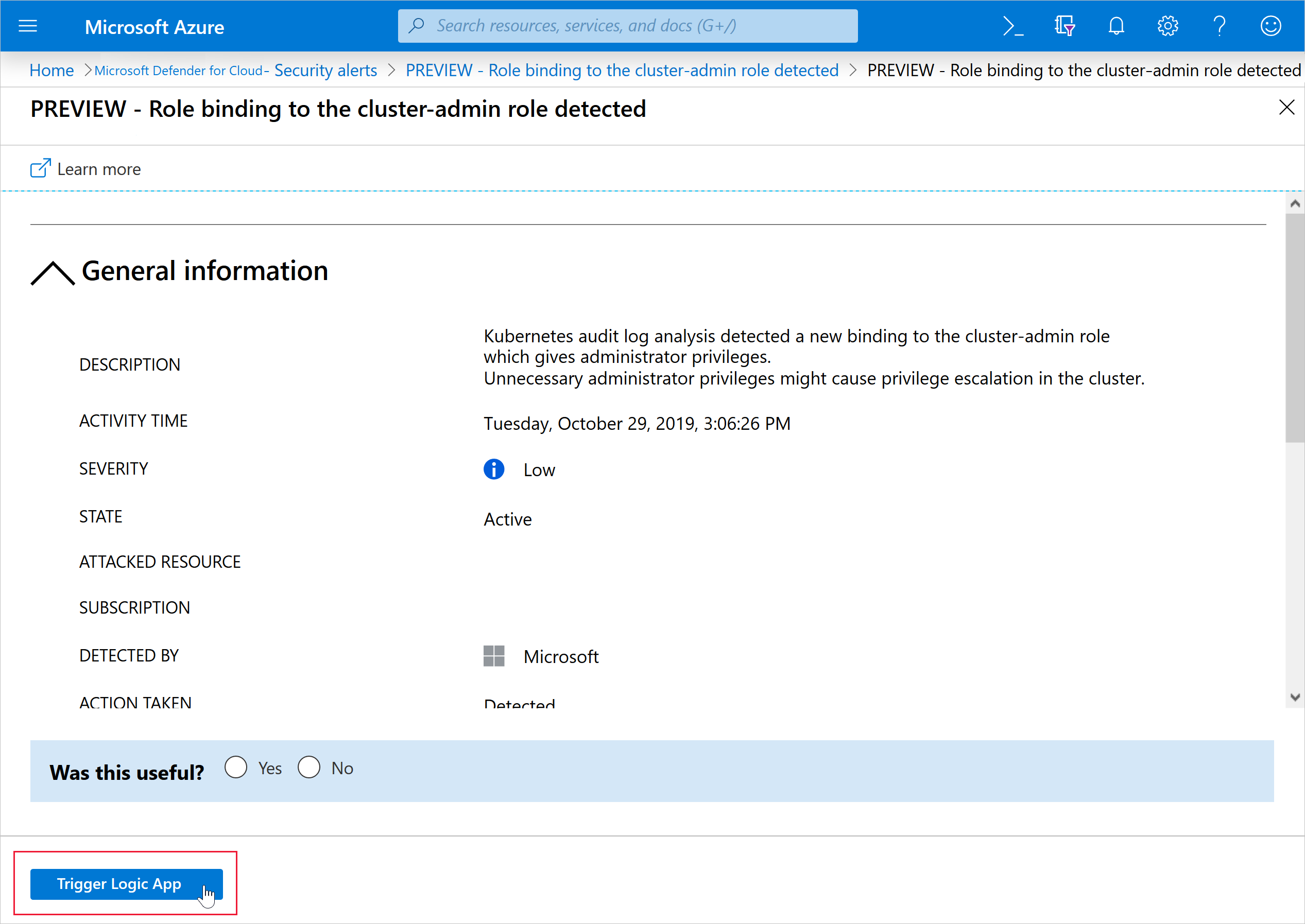
Inside the logic app there are three Defender for Cloud triggers: When a Defender for Cloud Alert is created or triggered, which can be filtered by severity; When a Microsoft Defender for Cloud recommendation is created or triggered; and When a Defender for Cloud regulatory compliance assessment is created or triggered. The older trigger When a response to a Microsoft Defender for Cloud alert is triggered is not supported by workflow automation. A recommendation trigger breaks silently when that recommendation is deprecated or replaced; watch the release notes. The Add workflow automation dropdown only lists logic apps that already contain one of the supported connectors, so build the logic app first. You can also run a logic app by hand from any alert or recommendation with Trigger logic app. Raw event schemas for the generic HTTP connector are at https://aka.ms/ASCAutomationSchemas.
Configure
- Portal
- Azure CLI / PowerShell
- REST / ARM
Email notifications
- Defender for Cloud > Environment settings > subscription > Email notifications.
- Pick roles, type addresses (comma separated), or both. Default is subscription owners on High alerts and attack paths.
- Set the minimum alert severity and the minimum attack path risk level. Save.
Per address the service caps at four High, two Medium or one Low alert email a day, and one Critical attack path email per 30 minutes down to one Low per three hours. It is a nudge, not a feed.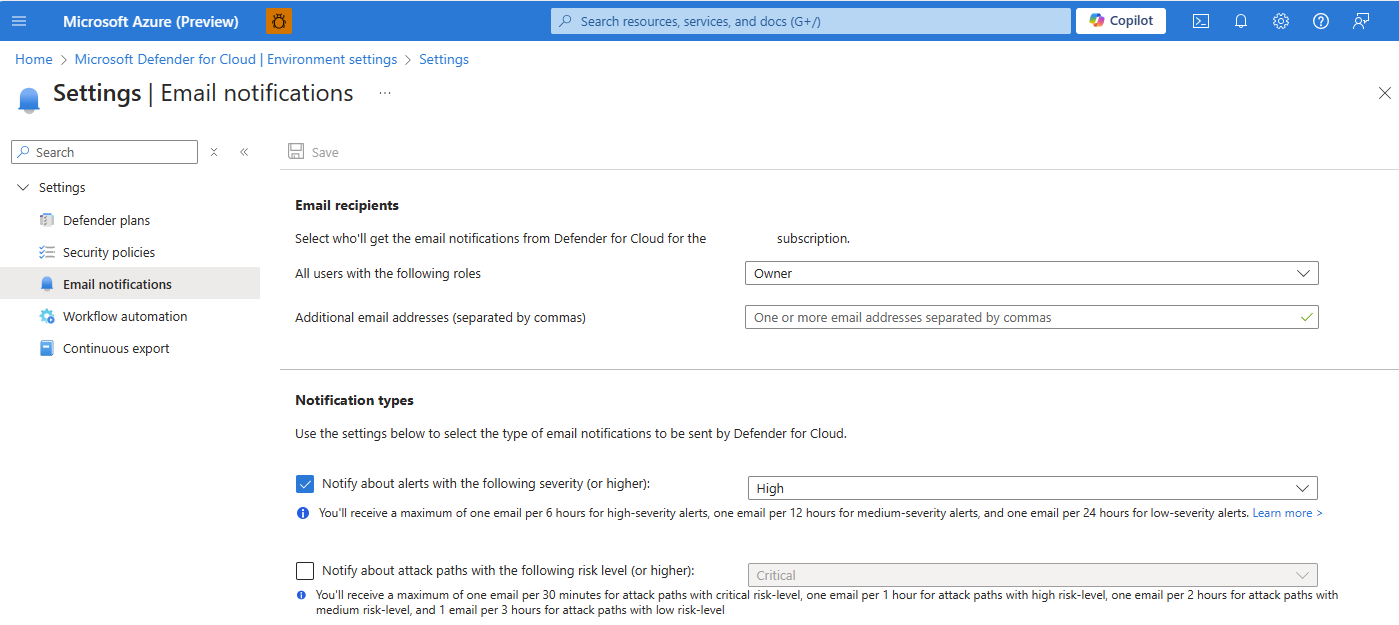
Suppression rule
- Defender for Cloud > Security alerts > Suppression rules > Create new suppression rule. Or open an alert, Take action > Suppress similar alerts > Create suppression rule, which pre-fills the alert type.
- Scope: subscription(s). Alert types: All or Custom. Add entity conditions to narrow to specific resources or values.
- Name (2 to 50 characters, letters, numbers, dash, underscore), reason, optional comment, expiry (Custom date or None). Simulate to see what it would have dismissed. Apply.
A rule only lists alert types that have fired at least once in the scope. Management groups need Azure Policy.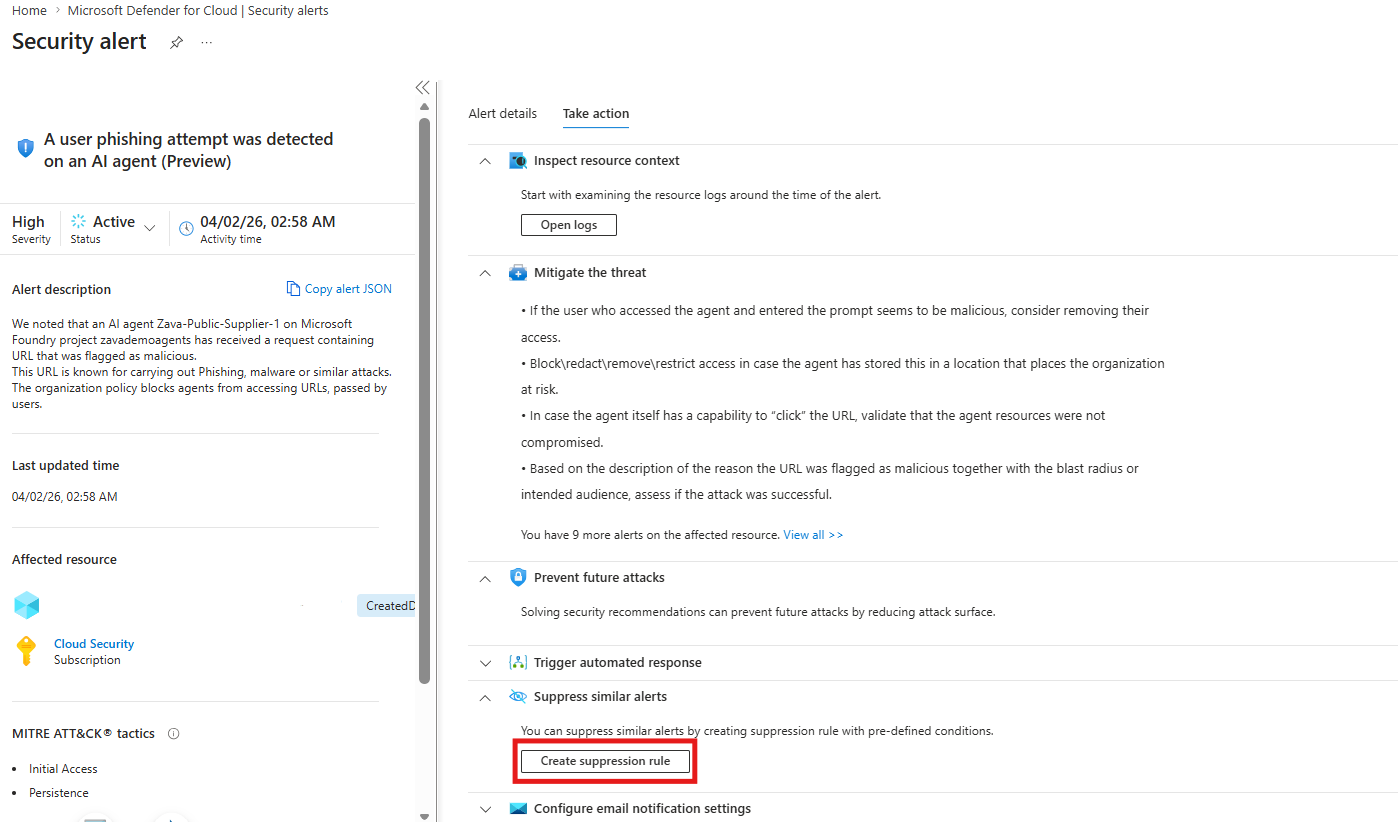
Triage an alert
Security alerts > pick an alert. The side pane gives severity, status, time, description, affected resource and MITRE intent. View full details opens the Alert details tab (IPs, files, processes) and the Take action tab with Inspect resource context, Mitigate the threat, Prevent future attacks, Trigger automated response and Suppress similar alerts. When done, Change status > Dismissed, and answer Was this useful. Bulk: filter, tick, Change status.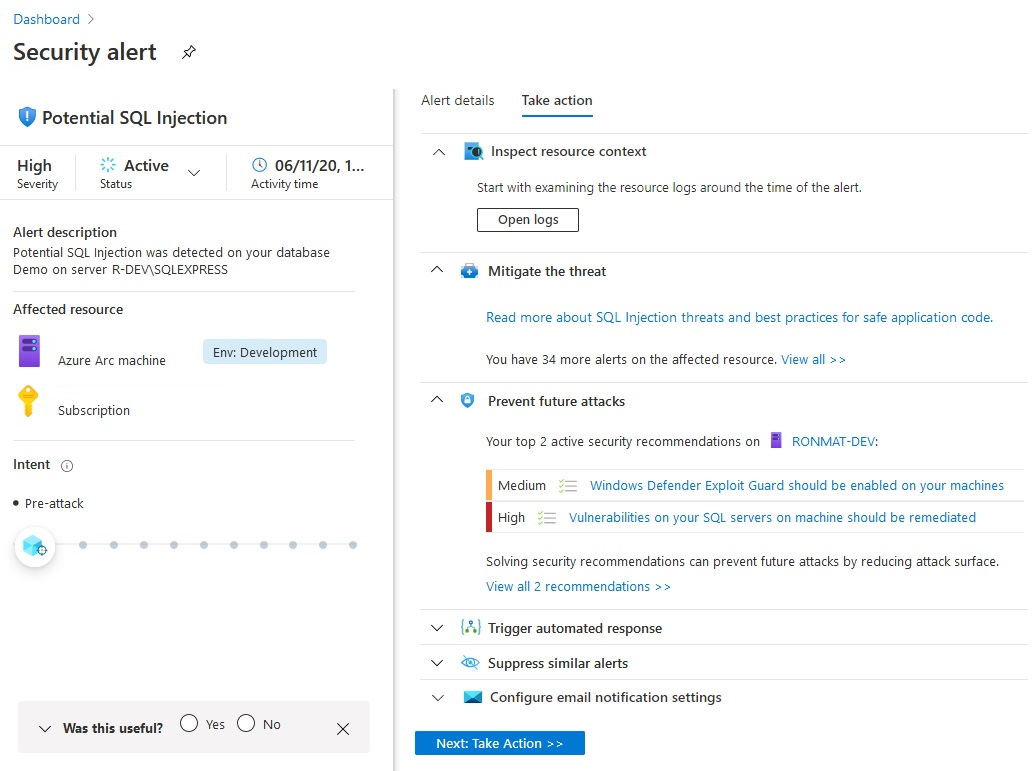
Workflow automation
- Build the consumption logic app first: Logic Apps > Add > Review + create. Open the designer and start from one of the three Defender for Cloud triggers. Give the logic app the connections it needs (Teams, Outlook, ServiceNow and so on need their own credentials).
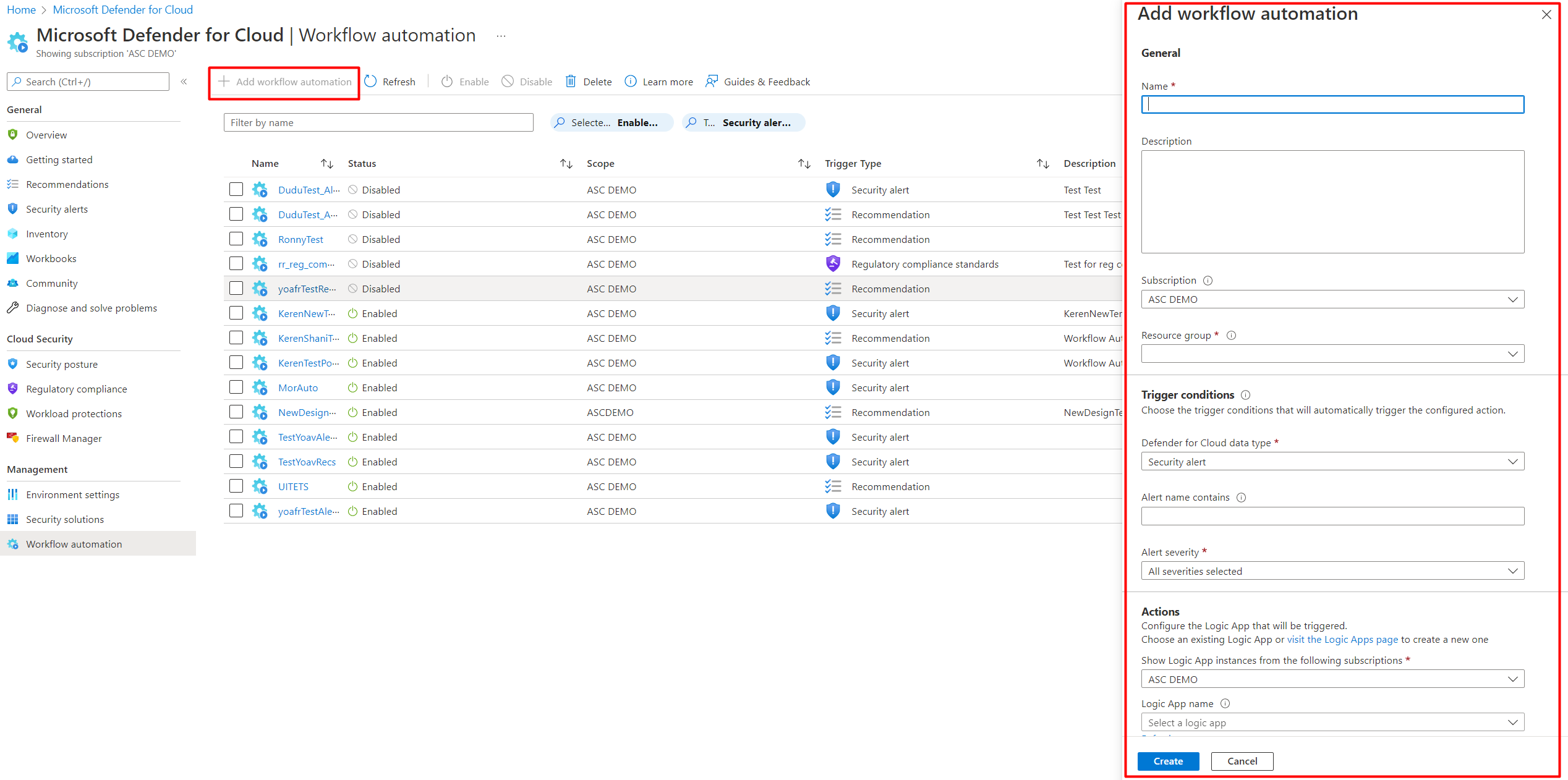
- Defender for Cloud > Workflow automation > Add workflow automation.
- Name, description, subscription, resource group. Trigger conditions: data type (alert, recommendation, regulatory compliance), then filters such as alert name contains SQL or severity.
- Actions > Refresh > pick the logic app. Create.
At scale, assign the DeployIfNotExist policies at a management group: Deploy Workflow Automation for Microsoft Defender for Cloud alerts f1525828-9a90-4fcf-be48-268cdd02361e, recommendations 73d6ab6c-2475-4850-afd6-43795f3492ef, regulatory compliance 509122b9-ddd9-47ba-a5f1-d0dac20be63c. Add a remediation task to cover existing subscriptions.
Continuous export
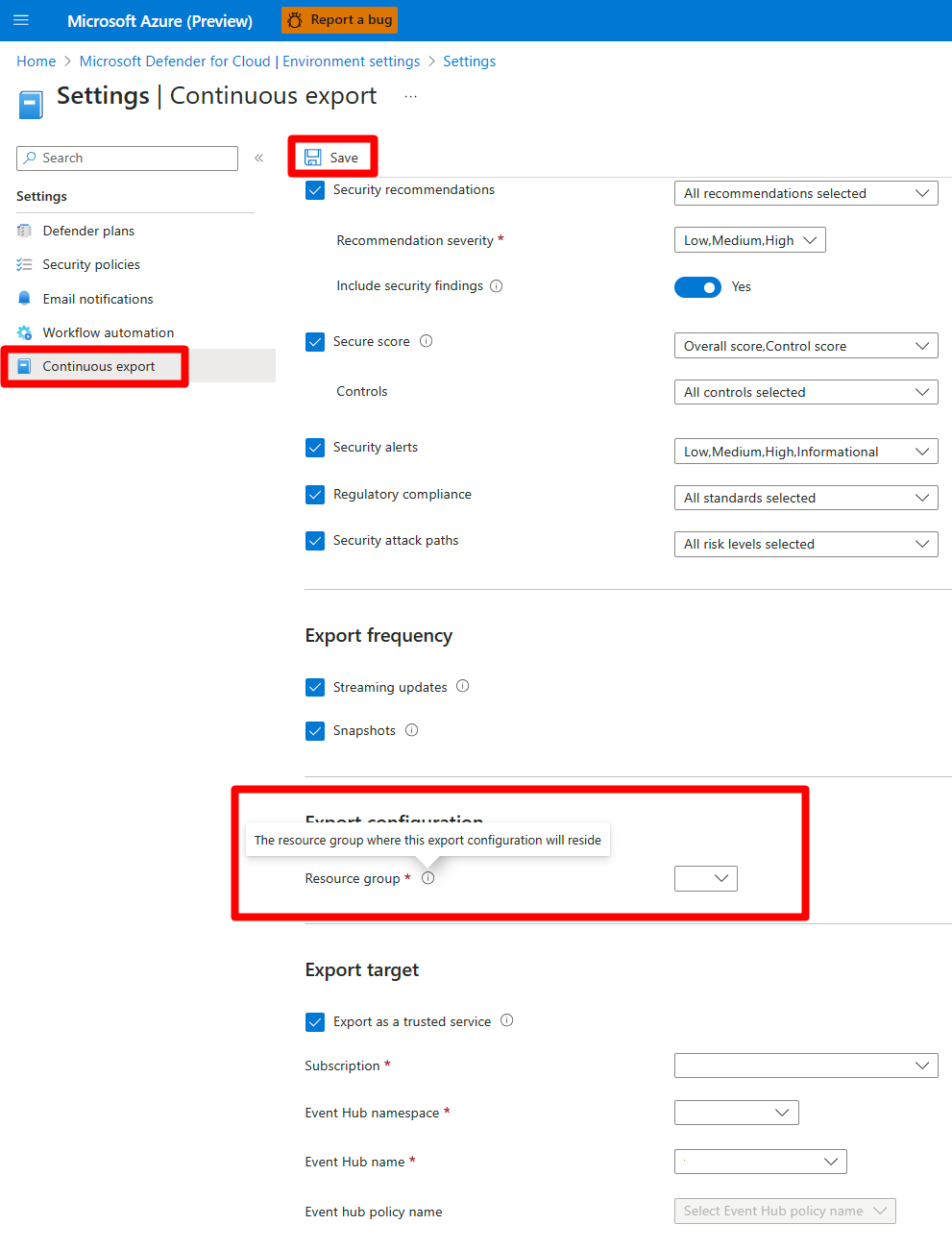
- Defender for Cloud > Environment settings > subscription > Continuous export.
- Pick the tab for Event Hub or Log Analytics workspace.
- Tick the data types. For alerts add a severity filter if you want. Set Include security findings to Yes if you want vulnerability sub-assessments under the five supported recommendations (SQL databases, SQL servers on machines, container registry images, machines, system updates).
- Export frequency: Streaming, Snapshots, or both.
- Export target: subscription, then the Event Hub namespace, hub and policy, or the workspace. Save.
Policy IDs for management group deployment: Event Hubs cdfcce10-4578-4ecd-9703-530938e4abcb, Log Analytics ffb6f416-7bd2-4488-8828-56585fef2be9.
Sentinel connector (Azure portal Sentinel)
- Sentinel > Content hub > install Microsoft Defender for Cloud (3.0.0 or later).
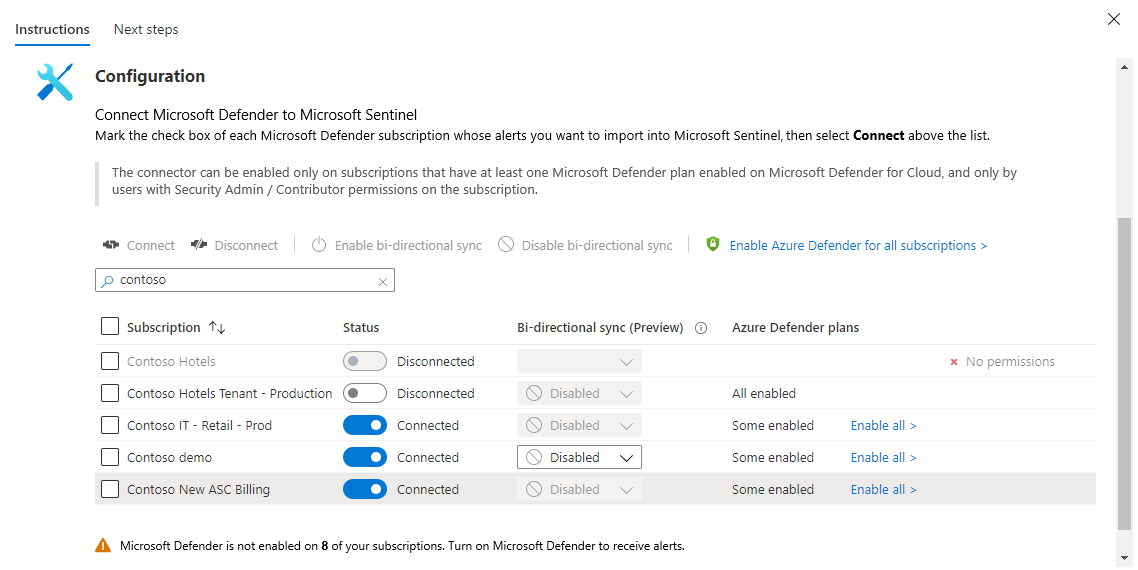
- Configuration > Data connectors > Tenant-based Microsoft Defender for Cloud (Preview) > Open connector page. Use Subscription-based (Legacy) only if you have a reason.
- Toggle Status on for each subscription, or tick several and Connect. Set Bi-directional sync to Enabled per subscription if you want Sentinel closes to flow back.
- Check the Microsoft Defender plans column. Blank means no plans and no alerts; Some enabled offers Enable all.
- Under Create incidents, Enabled turns on the built-in Microsoft Security analytics rule. Leave it off if Defender XDR incident integration is on, see below.
Defender XDR incident integration, no duplicates
If the Microsoft Defender XDR connector in Sentinel has incident integration on, Defender for Cloud incidents arrive through it. Learn's sequence: enable the tenant-based connector so the incidents carry alerts and entities, disconnect the subscription-based (Legacy) connector, and disable every Scheduled or Microsoft Security analytics rule that creates incidents from Defender for Cloud alerts. For alert types you do not want as incidents, close them on arrival with an automation rule or tune them in the Defender portal. With several workspaces in the Defender portal, correlated incidents stream to the primary workspace.
Sample alerts
Security alerts > Sample alerts > subscription > plans > Create sample alerts. They appear within minutes, reference simulated resources, and flow through email, automation, export and Sentinel like real ones. Use them to test the whole chain before a real incident does.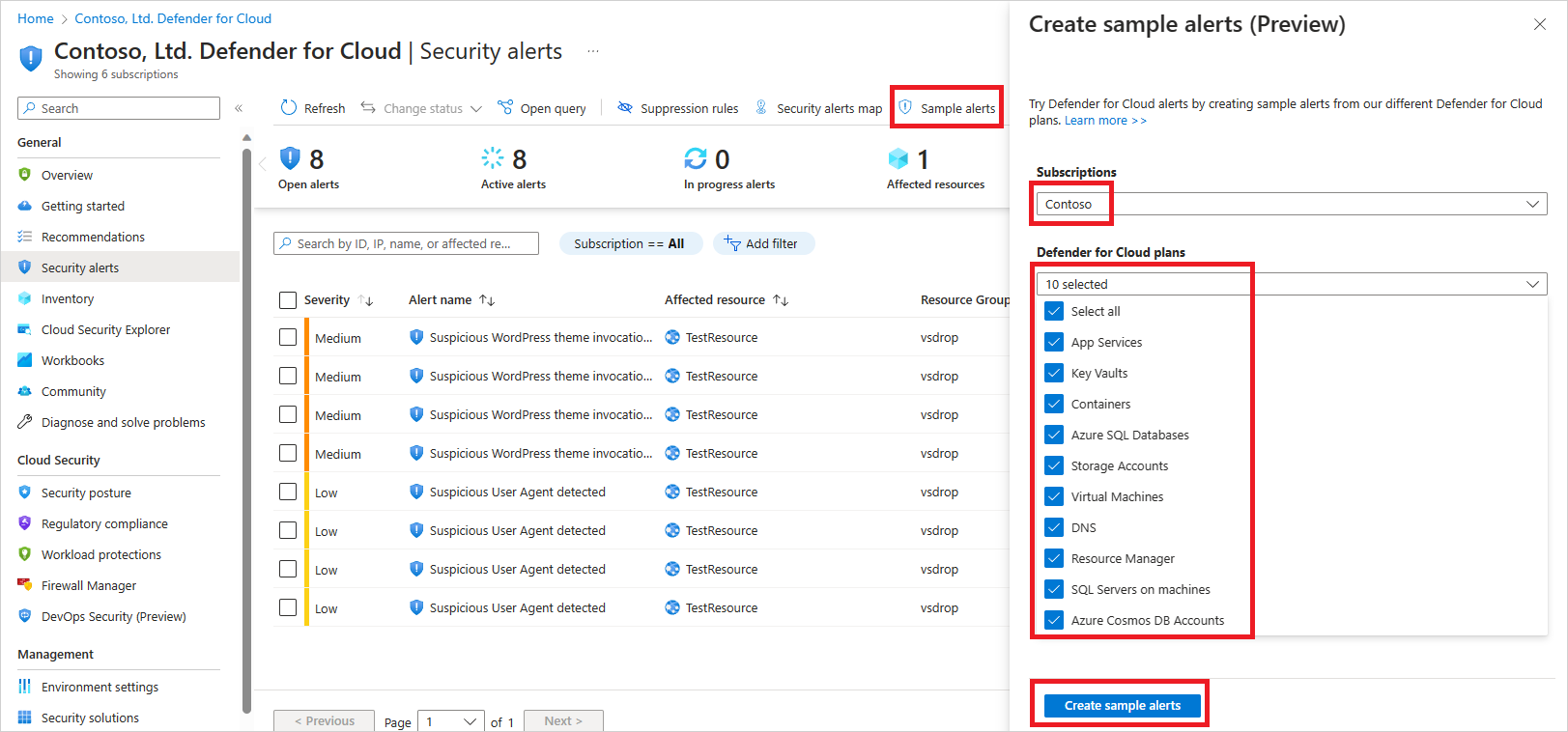
# Tested on: TODO
# Alerts: list, show, change state. --location is the ascLocation, e.g. centralus.
az security alert list -o table
az security alert list -g myRg -o table
az security alert show --location centralus -n "<alertName>"
az security alert update --location centralus -n "<alertName>" --status inprogress
az security alert update --location centralus -n "<alertName>" --status resolve
az security alert update -g myRg --location centralus -n "<alertName>" --status dismiss
az security alert update --location centralus -n "<alertName>" --status activate

# Automations cover both workflow automation and continuous export.
az security automation list -o table
az security automation show -g myRg -n alertsToLogicApp

# Continuous export of alerts to an Event Hub (Learn's own example shape)
az security automation create_or_update -g myRg -n exportAlertsToHub -l eastus \
  --scopes '[{"description":"sub","scopePath":"/subscriptions/<subId>"}]' \
  --sources '[{"eventSource":"Alerts","ruleSets":null}]' \
  --actions '[{"actionType":"EventHub","eventHubResourceId":"/subscriptions/<subId>/resourceGroups/<rg>/providers/Microsoft.EventHub/namespaces/<ns>/eventhubs/<hub>","connectionString":"<send connection string>","SasPolicyName":"Send"}]'

# Validate a model before you commit it
az security automation validate -g myRg -n exportAlertsToHub -l eastus \
  --scopes '[...]' --sources '[...]' --actions '[...]'

az security automation delete -g myRg -n exportAlertsToHub

# No az security command exists for suppression rules, email contacts or the Sentinel connector.
# Use REST (next tab) or Azure Policy for those.
# Tested on: TODO
# Az.Security
Get-AzSecurityAlert | Select-Object AlertDisplayName, Severity, State, CompromisedEntity | Format-Table
Get-AzSecurityAlert -ResourceGroupName myRg
Get-AzSecurityAlert -ResourceGroupName myRg -Location westeurope -Name "<alertName>"

# Learn documents Dismiss for -ActionType. Other values are not documented on the cmdlet page.
Set-AzSecurityAlert -Location centralus -ResourceGroupName myRg -Name "<alertName>" -ActionType Dismiss

# Automations. Learn shows New-AzSecurityAutomation taking PSSecurityAutomationScope,
# PSSecurityAutomationSource and PSSecurityAutomationAction arrays. The helper object cmdlets
# are not documented on that page; build them in your session and verify. TODO: confirm object constructors.
New-AzSecurityAutomation -Name alertsToLogicApp -ResourceGroupName myRg -Location centralus `
  -Description "High alerts to Logic App" -Scope $scopes -Source $sources -Action $actions
Alerts: list and change state (api-version 2022-01-01). ascLocation comes from the Locations API.
GET https://management.azure.com/subscriptions/{subscriptionId}/providers/Microsoft.Security/alerts?api-version=2022-01-01
GET https://management.azure.com/subscriptions/{subscriptionId}/resourceGroups/{resourceGroupName}/providers/Microsoft.Security/alerts?api-version=2022-01-01
POST https://management.azure.com/subscriptions/{subscriptionId}/resourceGroups/{resourceGroupName}/providers/Microsoft.Security/locations/{ascLocation}/alerts/{alertName}/dismiss?api-version=2022-01-01
Swap dismiss for activate, resolve or inprogress. Success is 204 No Content. Learn confirms the resource group level dismiss route; the sibling routes follow the same pattern and should be checked against the Alerts reference.
Email notifications (security contact):
PUT https://management.azure.com/subscriptions/{subscriptionId}/providers/Microsoft.Security/securityContacts/default?api-version=2020-01-01-preview
{
  "properties": {
    "emails": "soc@contoso.com;oncall@contoso.com",
    "notificationsByRole": { "state": "On", "roles": ["Owner"] },
    "alertNotifications": { "state": "On", "minimalSeverity": "Medium" },
    "phone": ""
  }
}
Learn's example uses semicolons between addresses while the portal says commas. Check the response before relying on it.
Suppression rules use the Alerts Suppression Rules API (UPDATE, GET, LIST, DELETE at subscription scope). Learn gives no body example; take the alert from the Alerts API first, then build the rule. TODO: capture a working body from the dev tenant.
Workflow automation or continuous export, same resource, api-version 2023-12-01-preview. Logic App action:
PUT https://management.azure.com/subscriptions/{subscriptionId}/resourceGroups/{resourceGroupName}/providers/Microsoft.Security/automations/{automationName}?api-version=2023-12-01-preview
{
  "location": "Central US",
  "properties": {
    "description": "High severity alerts to Logic App",
    "isEnabled": true,
    "scopes": [ { "description": "sub", "scopePath": "/subscriptions/{subscriptionId}" } ],
    "sources": [
      {
        "eventSource": "Alerts",
        "ruleSets": [
          { "rules": [ { "propertyJPath": "properties.severity", "operator": "Equals", "expectedValue": "High", "propertyType": "String" } ] }
        ]
      }
    ],
    "actions": [
      {
        "actionType": "LogicApp",
        "logicAppResourceId": "/subscriptions/{subscriptionId}/resourceGroups/{rg}/providers/Microsoft.Logic/workflows/{workflowName}",
        "uri": "https://prod-xx.logic.azure.com/workflows/..."
      }
    ]
  }
}
Continuous export to Log Analytics: same body, sources without ruleSets, and actions replaced by {"actionType": "Workspace", "workspaceResourceId": "/subscriptions/{subscriptionId}/resourceGroups/{rg}/providers/Microsoft.OperationalInsights/workspaces/{workspace}"}. Event Hub: actionType EventHub with eventHubResourceId, connectionString, sasPolicyName. eventSource values: Alerts, Assessments, SubAssessments, SecureScores, SecureScoreControls, RegulatoryComplianceAssessment, AttackPaths, each with a Snapshot twin. Operators: Equals, NotEquals, GreaterThan, GreaterThanOrEqualTo, LesserThan, LesserThanOrEqualTo, Contains, StartsWith, EndsWith. uri and connectionString are write-only. Updates need etag.
Sentinel subscription-based connector (SecurityInsights, api-version 2024-03-01):
PUT https://management.azure.com/subscriptions/{subscriptionId}/resourceGroups/{resourceGroupName}/providers/Microsoft.OperationalInsights/workspaces/{workspaceName}/providers/Microsoft.SecurityInsights/dataConnectors/{dataConnectorId}?api-version=2024-03-01
{
  "kind": "AzureSecurityCenter",
  "properties": {
    "subscriptionId": "{connectedSubscriptionId}",
    "dataTypes": { "alerts": { "state": "Enabled" } }
  }
}
That kind is the legacy per-subscription connector. The tenant-based connector and bi-directional sync are not in the 2024-03-01 DataConnectorKind list. TODO: check the newer SecurityInsights API versions for the tenant-based kind.
Verify
- Create sample alerts for the plans you own. Within minutes you should see them in Security alerts, in the Defender portal alert queue (non-informational only), in email if the severity clears the threshold, in Logic App run history, and in
SecurityAlertin both the Sentinel workspace and the continuous export workspace. - For a real detection on a VM, run the Learn EICAR test: Windows elevated command prompt with the documented
powershell.exe -NoExit ...line that downloadsinvoice.exefrom127.0.0.1, orcurl -O https://secure.eicar.org/eicar.com.txton Linux. Alert within about 10 minutes. App Service: browse to/This_Will_Generate_ASC_Alerton the site, allow 1.5 to 4 hours. Storage and Key Vault: access a SAS URL or the vault through Tor. - Defender for Cloud > Workflow automation shows each automation with its status. Logic app run history shows the trigger payload.
- Event Hub: namespace > Metrics for incoming messages, or Capture to read the JSON.
- Sentinel connector page shows Connected per subscription and the last data received time.
// 1. Defender for Cloud alerts in the last 7 days by severity and product component
SecurityAlert
| where TimeGenerated > ago(7d)
| where ProductName == "Azure Security Center"
| summarize Count = count() by AlertSeverity, ProductComponentName
| order by Count desc
// 2. Who is noisy: top alert names and the resources behind them
SecurityAlert
| where TimeGenerated > ago(30d) and ProductName == "Azure Security Center"
| summarize Alerts = count(), Resources = dcount(CompromisedEntity), Sample = any(CompromisedEntity) by AlertName
| top 20 by Alerts
// 3. MITRE tactic spread, useful before building suppression rules
SecurityAlert
| where TimeGenerated > ago(30d) and ProductName == "Azure Security Center"
| mv-expand Tactic = todynamic(Tactics)
| summarize count() by tostring(Tactic), AlertSeverity
| order by count_ desc
// 4. Status sync check: alerts still New in the workspace but older than a day
SecurityAlert
| where ProductName == "Azure Security Center"
| summarize arg_max(TimeGenerated, *) by SystemAlertId
| where Status == "New" and TimeGenerated < ago(1d)
| project TimeGenerated, AlertName, AlertSeverity, CompromisedEntity, Status
// 5. Duplicate detection across connectors: same SystemAlertId arriving more than once
SecurityAlert
| where TimeGenerated > ago(7d) and ProductName == "Azure Security Center"
| summarize Copies = count(), Sources = make_set(SourceSystem) by SystemAlertId, AlertName
| where Copies > 1
TODO: confirm in the dev tenant that Status and SourceSystem behave as assumed in queries 4 and 5. Learn documents the ProductName filter only.
Troubleshoot
| Symptom | Likely cause | Fix |
|---|---|---|
| Alert in Defender for Cloud, nothing in Sentinel | Subscription not connected, no Defender plan on it, SecurityInsights provider not registered, or subscription is in another tenant | Connector page: toggle the subscription on, check the Defender plans column, register the provider. Cross-tenant does not work, even with Lighthouse |
| Alert in Sentinel but the incident has no alerts or entities | Incidents arrive via Defender XDR but the legacy connector does not cover that subscription | Switch to the tenant-based connector |
| Two incidents for one Defender for Cloud attack | Defender XDR incident integration on, plus the Create incidents rule or a custom analytics rule still active, or both connectors enabled | Disable the Microsoft Security and Scheduled rules for Defender for Cloud, disconnect the legacy connector, keep tenant-based |
| Alert closed in Sentinel, still Active in Defender for Cloud | Bi-directional sync off, or you closed the alert instead of the incident | Enable bi-directional sync per subscription. Only closing the incident closes the source alert. Allow a few minutes |
| Alert dismissed in Defender for Cloud, Sentinel incident still open | By design. Alert status never changes incident status | Automation rule in Sentinel keyed on alert status, or close the incident by hand |
| MDE alert on an Azure VM shows different status in the two portals | By design. MDE alerts on cloud resources do not sync status | Treat the Defender portal as the source of truth for MDE alerts |
| Informational alert missing in Defender portal | By design. Informational alerts are not integrated | Query it in Azure portal or SecurityAlert |
| Logic App never runs | Trigger is the unsupported legacy response trigger, logic app is Standard not Consumption, the recommendation in the trigger was deprecated, or the automation scope is a different subscription | Rebuild on one of the three supported triggers in a consumption app, check release notes, check scope. Test with Trigger logic app from an alert |
| Logic App missing from the Add workflow automation dropdown | It has no Defender for Cloud connector trigger yet | Add the trigger in the designer, Save, come back and Refresh |
| Continuous export shows no data | Export just created with streaming only and nothing has changed; target in another subscription without write permission; Event Hub policy lacks Send | Enable snapshots or create sample alerts; grant the role on the target; fix the policy |
| Data limit has been exceeded alert | A record over 32 KB | Learn offers no workaround. Reduce exported data types or accept the drop |
| Recommendation workflow stopped weeks ago | Recommendation deprecated or replaced | Update the trigger to the new recommendation key |
| No email on a High alert | Threshold or role mismatch, or daily cap of four High emails per address already hit | Check Email notifications on that subscription. Caps are per address per day |
| Suppression rule does not list the alert type | That type has never fired in the scope | Rules only cover types seen at least once. Create it from the alert once it fires |
| Agentless alert persists after fixing the agent-based one | Agentless result waits for the next scan | Wait for the next scan cycle |
Gotchas and limits
- The two Sentinel connectors and the Defender XDR connector are three different pipes into the same
SecurityAlerttable. Pick tenant-based plus XDR incident integration and turn the rest off. Anything else gets you duplicate incidents, as Learn and every practitioner test in the last two years confirm. - Once Sentinel is onboarded to the Defender portal the Defender for Cloud connector disappears from that portal's data connector list. The alerts still arrive through Defender XDR. Do not go hunting for a missing connector.
- Tenant-based connector is still Preview at source check. Subscription-based is labelled Legacy and Learn says not recommended.
- The Defender XDR view is tenant-wide. There is no per-subscription scoping of visibility, only the alert subscription ID filter in the queues. Factor this into Unified RBAC design for multi-team tenants.
- Email caps are per address. Four High alert emails a day is the ceiling, so email is a wake-up call, not a workflow. Route the workflow through Logic Apps or Sentinel.
- Workflow automation is consumption Logic Apps only. Standard logic apps are not an option.
- Continuous export with streaming only is silent until something changes. Turn on snapshots or fire sample alerts when you need to prove the pipe.
- Snapshot records carry
IsSnapshot. Filter them out in alert counts or you double count once a week. - Deleting a suppression rule does not reactivate alerts. Simulate first, set an expiry, and review the Dismissed filter periodically.
- Learn documents only
Dismissas a value forSet-AzSecurityAlert -ActionType. The CLI documents all four states. Preferaz security alert updatefor scripted triage until the cmdlet page is updated.
Further reading
- Continuous Export to Log Analytics: Getting Defender for Cloud Data Where You Need It, Bartosz Wysocki, November 2025. Walks through the exported tables beyond alerts and recommendations, with KQL and a streaming versus snapshot comparison from a working tenant.
- Breaking down security silos: Microsoft Defender for Cloud Expands into the Defender Portal, Microsoft Defender for Cloud blog, December 2025. Microsoft's own framing of what moves into the Defender portal and why, useful for the XDR side of this article. Page shows a modified date only.
- Microsoft Sentinel Deployment Guide: Workspace Design, Data Connectors, and Detection Rules, Eric Bang, May 2026. Puts the Defender for Cloud connector in priority order against the other Microsoft connectors and explains the XDR bi-directional sync in deployment terms.
- 12 Questions and Answers About Sentinel into the unified Defender portal, Vincent van Dijk, June 2026. Covers what changes for analysts once Sentinel lives in the Defender portal, including where Defender for Cloud alerts surface.
The best hands-on duplicate testing (Managed Sentinel and BlueVoyant, March 2024, and Jakub Fras on continuous export at scale, February 2025) predates the window.
My notes
TODO: Sohail's notes after verification.
Changelog
| Date | Change | Source |
|---|---|---|
| 2026-10-22 | Drafted from Learn, with Learn images and diagrams | [1] |