Onboarding Azure subscriptions, AWS accounts and GCP projects
What it is
Defender for Cloud has three front doors. An Azure subscription walks in on its own: open the blade once and the Microsoft.Security provider is registered, the Microsoft cloud security benchmark (MCSB) initiative is assigned, and Foundational CSPM, recommendations, inventory, secure score and the compliance dashboard are on for free. Paid plans are a second step, per subscription or, with Azure Policy, per management group.
AWS and GCP come in through a security connector, an Azure resource of type Microsoft.Security/securityConnectors in a subscription and resource group you pick. Behind it, a CloudFormation template or a gcloud script creates roles, an identity provider or workload identity pool, and plan-specific resources in the other cloud. Defender for Cloud reads that cloud with federated, short-lived credentials. No access keys are stored.
Product context is in the overview, plan choice in workload plans, and getting the MDE sensor onto servers afterwards in onboarding through Defender for Cloud.
One check before you start: an AWS account already connected to Microsoft Sentinel cannot be connected to Defender for Cloud until you follow the Sentinel-connected AWS guidance.
Licensing and prerequisites
- Foundational CSPM is free on every connected subscription, account and project. Defender CSPM, Servers, Containers, SQL and open-source databases are paid. The 30-day trial covers them except malware scanning in Defender for Storage, which bills from day one.
- Azure roles: Reader or Security Reader to view. Contributor, Security Admin or Owner to enable or disable plans. Owner to unlock every capability of a plan and to add initiatives or standards. The management group onboarding page asks for Security Admin.
- AWS connector: Contributor on a subscription with Defender for Cloud enabled, access to the AWS account. Defender CSPM wants Owner plus IAM rights to assume the monitoring role. CIEM needs Security Admin plus
Application.ReadWrite.Allduring onboarding. Servers needs Owner for Arc auto-provisioning and the SSM Agent withAmazonSSMManagedInstanceCoreon each EC2 instance. Containers needs an EKS cluster and room for an SQS queue, a Firehose stream and an S3 bucket in the cluster region. - GCP connector: same Azure side. The script's project needs the
iam,sts,cloudresourcemanager,iamcredentialsandcomputeAPIs enabled; the script can do it. Servers needs Owner and the OS Config agent for Arc. - Not available: the AWS connector in Azure Government or 21Vianet. For AWS organizations only the management account works.
- Workspace: the Log Analytics agent retired in August 2024. Only the Azure Monitor Agent for Defender for SQL servers on machines still needs one; FIM data also lands in one.
How it works
Azure: scopes, Azure Policy and MCSB
The management group tree scopes everything on the Azure side. The root group's ID is the tenant ID, new subscriptions land in it by default, and policy and RBAC assigned in the tree are inherited by every child. Resource Manager caches the hierarchy for up to 30 minutes.
Defender for Cloud rides that inheritance twice. Standards first: MCSB is assigned per subscription when Defender for Cloud is enabled, and the scale guide says to assign it once at the root group instead so every future subscription inherits it. AWS accounts get MCSB plus AWS Foundational Security Best Practices by default; GCP projects get MCSB plus GCP Default.
Plans second. Pricing is a per-subscription resource, Microsoft.Security/pricings/<planName>, with pricingTier of Free or Standard. A management group cannot hold one. It can hold a DeployIfNotExists policy that creates one in every child subscription. Learn's built-in "Enable Microsoft Defender for Cloud on your subscription" registers the subscription with pricingTier defaulting to free; a remediation task catches subscriptions that already exist. For paid plans there is "Configure Azure Defender for Servers to be enabled" and the "Configure Microsoft Defender for Cloud plans" initiative of twelve DINE policies. The pricings API also has enforce: set True at subscription level and descendants cannot override.
A subscription runs Plan 1 or Plan 2 of Defender for Servers, never both. For both, split subscriptions into two management groups with a policy each.
Agents today
Policy-based components arrive through DeployIfNotExists policies at subscription level.
| Component | Plan | Targets | Policy-based |
|---|---|---|---|
| Azure Monitor Agent | Defender for SQL servers on machines | Azure VMs, Arc machines | Yes, Owner needed |
MDE extension MDE.Windows / MDE.Linux | Defender for Servers | Azure VMs, Arc machines | No, provisioned by the integration |
| Vulnerability assessment | Defender for Servers | Azure VMs, Arc machines | Yes |
| Guest configuration | None required | Azure VMs only, preview | Yes |
| Azure Arc agent | Servers, SQL on machines, Containers | Multicloud and on-prem | Auto-provisioned on EC2 and GCE by the connector |
| Defender sensor and Azure Policy for Kubernetes | Defender for Containers | AKS, Arc-enabled Kubernetes | Yes |
Agentless scanning is the other path. Defender CSPM or Servers Plan 2 snapshot each running VM's disks, analyse the copy in an isolated regional environment, keep only metadata, and delete the snapshot within minutes. It runs every 24 hours on a fixed schedule and skips machines that are off. It covers software inventory, vulnerabilities, secrets, EDR settings and, on Plan 2 only, malware. Azure grants the VM scanner operator role automatically. AWS gets a scanner role with snapshot and KMS rights, tag-scoped to CreatedBy = Microsoft Defender for Cloud. GCP gets MDCAgentlessScanningRole with compute.disks.createSnapshot and compute.instances.get, plus the KMS encrypter/decrypter role for CMEK disks.
AWS: what the connector creates
The template creates an OpenID Connect identity provider bound to a Microsoft-managed Entra application, and one IAM role per capability whose trust policy only that federated identity can satisfy. Defender for Cloud gets an Entra token, presents it to AWS STS, and STS checks audience, signature, thumbprint and role conditions before issuing temporary credentials.
Roles by plan: CspmMonitorAws for read-only discovery, DefenderForCloud-AgentlessScanner for snapshots and KMS, SensitiveDataDiscovery for S3, DefenderForCloud-Ciem and DefenderForCloud-OidcCiem for STS, DefenderForCloud-DefenderForServers for JIT, DefenderForCloud-ArcAutoProvisioning for the SSM and IAM actions that install Arc, DefenderForCloud-DataSecurityPostureDB for RDS. Containers has its own set.
A management account connector deploys a StackSet to every member account, then auto-creates a member connector per account, new ones included. Editing the management connector edits the members; deleting it deletes them. The management account still needs its own stack. Defender for Servers tags Arc resources with AccountId, Cloud, InstanceId and MDFCSecurityConnector, and the template adds a 30-day automation scan that checks each EC2 instance has the IAM profile SSM needs. Arc servers for deleted instances, or ones Disconnected or Expired, are removed after seven days.
GCP: workload identity federation
The gcloud script creates a workload identity pool, one provider per plan, service accounts, and project-level IAM bindings. Defender for Cloud gets an Entra token signed RS256 and valid for an hour, exchanges it at Google STS, which validates audience and signature against the provider, then impersonates the service account with the Google token. Organization onboarding scopes access to the organization's projects; single project onboarding to that project.
Arc auto-provisioning on GCP goes through VM Manager and the OS Config agent. Defender for Cloud does not install that agent, but it can flip an installed idle one from inactive to active, which GCP bills. Instances without Arc appear under "GCP VM instances should be connected to Azure Arc" with a Fix button. Tags: Cloud, InstanceName, MDFCSecurityConnector, MachineId, ProjectId, ProjectNumber.
Multicloud inventory and scan interval
Once a connector is healthy, AWS and GCP resources sit in Inventory next to Azure ones; filter by Resource type and Environment. Connectors scan every 4, 6, 12 or 24 hours, but some collectors run hourly regardless, on GCP ComputeInstance, ContainerCluster, instance groups and Artifact Registry. Changing region or interval needs no rerun of the template or script; changing plans or features does.
Configure
- Portal
- Azure CLI / PowerShell
- REST / ARM
Enable plans on one Azure subscription
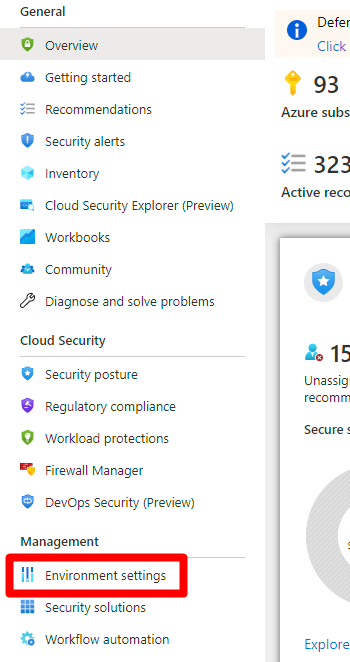
- Azure portal > Microsoft Defender for Cloud > Environment settings.
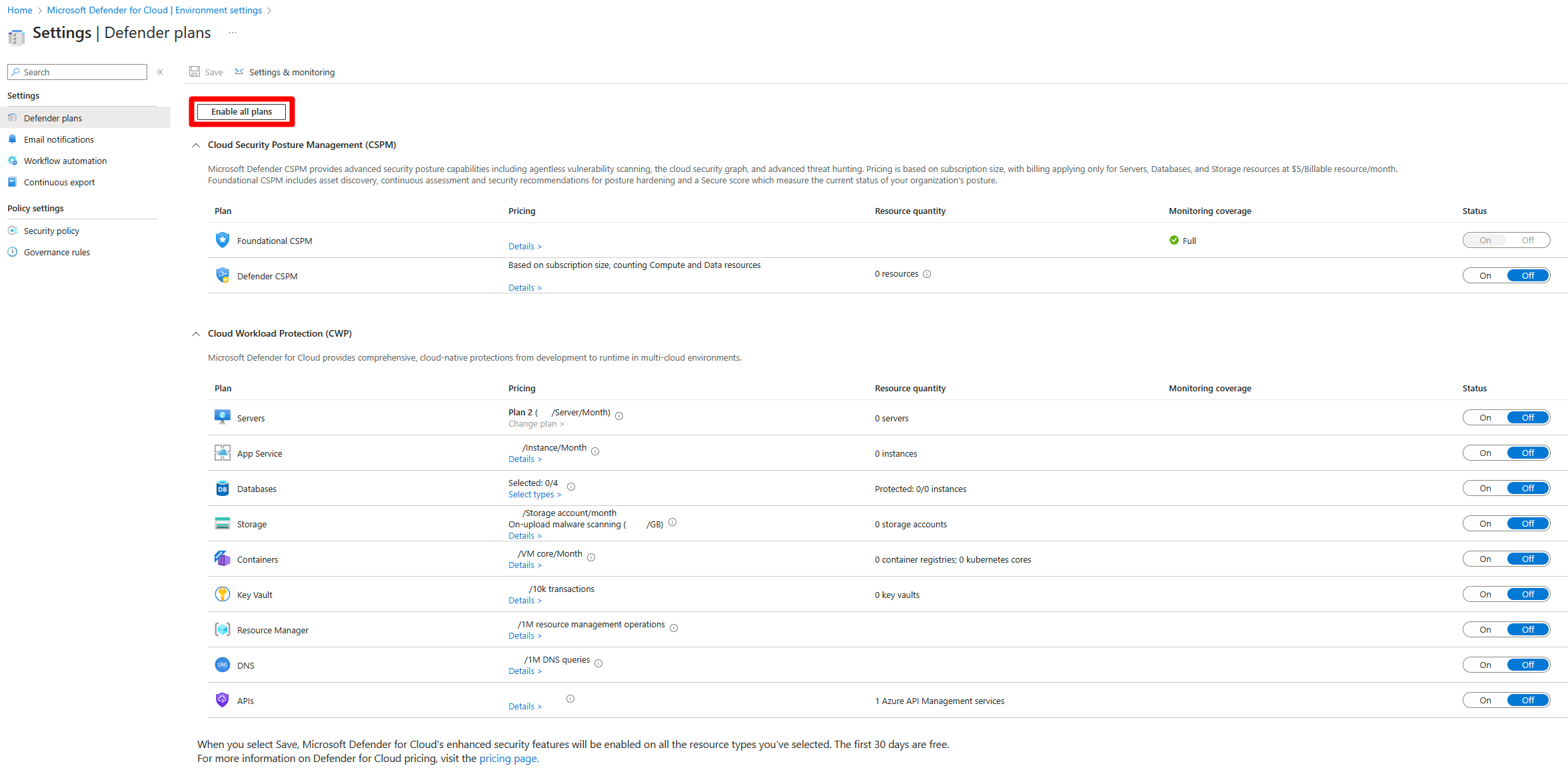
- Pick the subscription or workspace.
- Enable all, or toggle plans, then Save. Each plan deploys its monitoring components from here. Turning a plan off stops collection after a short time but leaves extensions installed.
Enable at management group scope
- Register the provider at the management group:
az provider register --namespace Microsoft.Security --management-group-id <mgId>. - Azure Policy > Definitions > "Enable Microsoft Defender for Cloud on your subscription" > Assign, scope the management group. No parameters needed.
- Remediation > Create a remediation task, so existing subscriptions get onboarded, not just new ones.
- Review + create > Create.
- For paid plans assign "Configure Microsoft Defender for Cloud plans" or "Configure Azure Defender for Servers to be enabled" the same way. The enable policy defaults
pricingTiertofree; setstandardin the deployment to switch plans on. ItsexistenceConditioncountsfreeandstandardas compliant; tighten tostandardif compliance should mean paid.

Settings and monitoring toggles
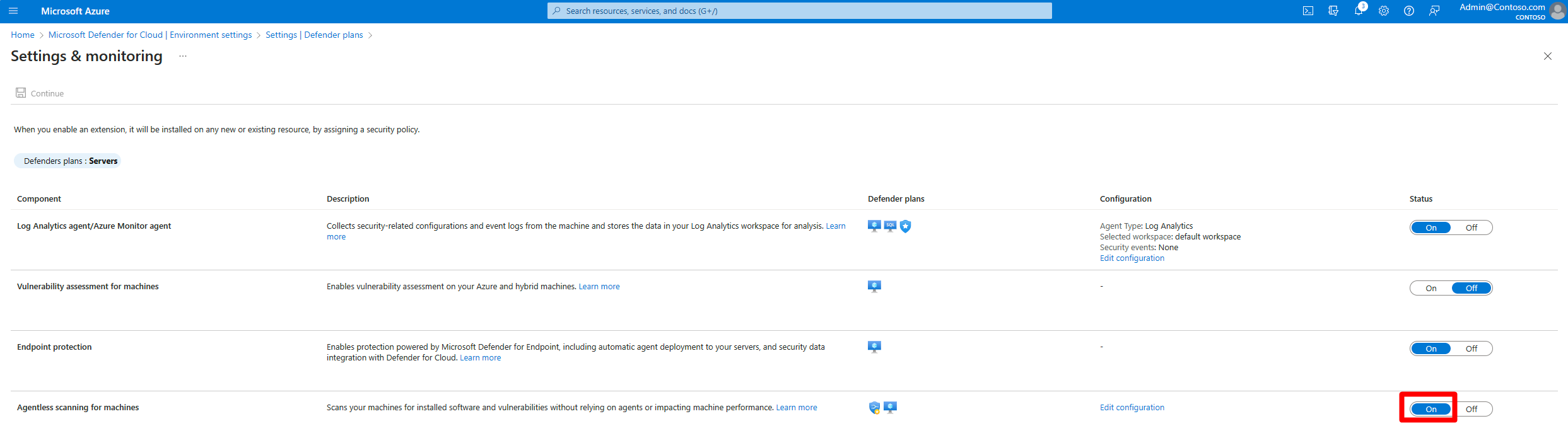
Environment settings > subscription > Defender for Servers > Settings. Learn lists four:
| Toggle | Default | Plan | Notes |
|---|---|---|---|
| Vulnerability assessment | On | P1 or P2 | MDVM through the MDE sensor |
| Endpoint protection | On | P1 or P2 | MDE integration plus automatic sensor provisioning. Security Admin or Owner to change |
| Agentless scanning for machines | On when P2 or Defender CSPM is on | P2 or CSPM | One switch per environment, no per-capability control. Exclude machines by tag on the linked page |
| File integrity monitoring | Off | P2 | Needs a workspace |
Add an AWS connector
- Environment settings > Add environment > Amazon Web Services.
- Name, then Onboard: Management account or Single account.
- AWS regions (all ticked by default), connector Subscription, Resource group, Location, scan interval, AWS account ID. Management account only: account IDs to exclude.
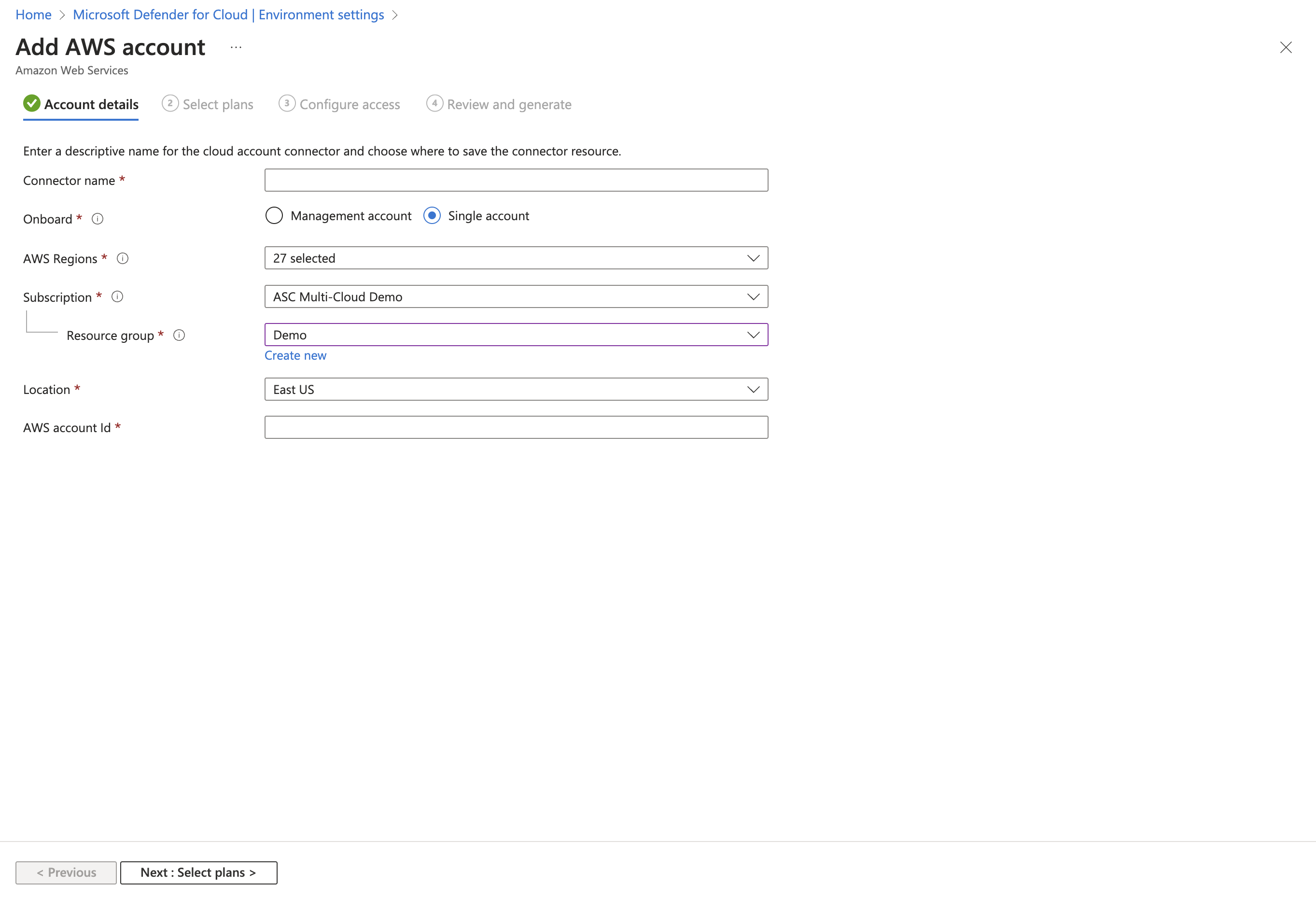
- Next: Select plans. Each plan row has Settings for features such as Arc auto-provisioning and agentless scanning.
- Configure access. Default access covers current and future capabilities; Least privilege covers only today and asks again later.
- CloudFormation or Terraform. Host the template in your own S3 bucket, or let AWS create one, which can trigger the "S3 buckets should require requests to use Secure Socket Layer" recommendation. Learn gives a bucket policy for that.
- Run the stack. A management account needs a stack and a StackSet. "You must enable organizations access to operate a service managed stack set" means trusted access is off; enable it on the StackSets page and rerun.

- Next: Review and generate > Create. Recommendations appear within a few hours.
Update the stack whenever you add a plan, change plan features, Microsoft ships a new template, or you see AccessDenied, EntityAlreadyExists or Lambda runtime errors.
Add a GCP connector
- Environment settings > Add environment > Google Cloud Platform.
- Subscription, Resource group, Location, scan interval.
- Organization: organization ID, optional project numbers and folder IDs to exclude. Single project: project number and project ID.
- Next: Select plans. All default to On. Defender for Servers Settings holds the Azure Arc agent toggle; Off means you install Arc yourself.
- Next: Configure access. Pick the permissions type, copy the generated
gcloudscript and run it in Cloud Shell in the scope being onboarded.
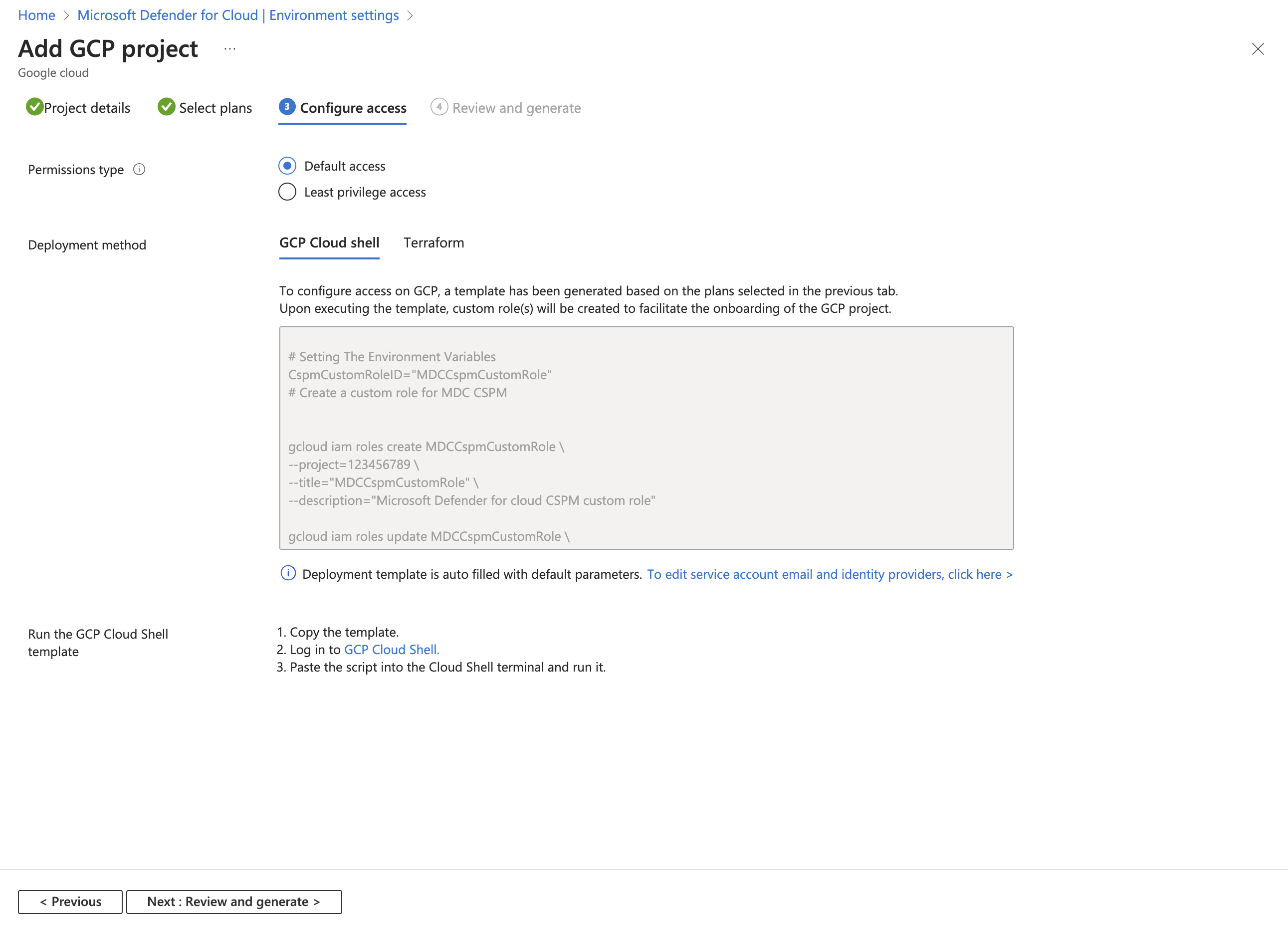
- Next: Review and generate > Create.
Regenerate and rerun the script when plans, features or scope change, Microsoft updates it, or connector health reports missing permissions.
Remove a connector
Environment settings > the connector > Delete. Deleting a management account connector deletes its member connectors. If the delete fails, look for a resource lock in the Activity log. Learn does not say what stays behind in AWS or GCP. TODO: confirm in the lab; expect the stack, IAM roles, OIDC provider, workload identity pool and service accounts to remain until deleted there.
# Tested on: TODO
# Plans on the current subscription
az security pricing list -o table
az security pricing show -n VirtualMachines

# Defender for Servers P2 with agentless scanning on and a tag exclusion
az security pricing create -n VirtualMachines --tier standard --subplan P2 \
  --extensions name=AgentlessVmScanning isEnabled=True \
  additionalExtensionProperties='{"ExclusionTags":"[{\"key\":\"A\",\"value\":\"B\"}]"}'

# Defender CSPM
az security pricing create -n CloudPosture --tier standard

# Register the provider at a management group before the DINE policy runs
az provider register --namespace Microsoft.Security --management-group-id <mgId>

# MCSB at the root management group. Learn documents portal assignment;
# the CLI form below is mine, look up the initiative name first.
MCSB=$(az policy set-definition list \
  --query "[?displayName=='Microsoft cloud security benchmark'].name" -o tsv)
az policy assignment create --name mcsb-root \
  --display-name "Microsoft cloud security benchmark" \
  --policy-set-definition "$MCSB" \
  --scope "/providers/Microsoft.Management/managementGroups/<tenantId>"

# Prove connectors exist
az graph query -q "resources | where type =~ 'microsoft.security/securityconnectors' | project name, location, properties.environmentName, properties.hierarchyIdentifier"
# Tested on: TODO
# Az.Security
Set-AzSecurityPricing -Name "VirtualMachines" -PricingTier "Standard" -SubPlan P2
Set-AzSecurityPricing -Name "CloudPosture" -PricingTier "Standard"

# Learn notes that for CloudPosture the agentless extensions are NOT enabled by this cmdlet.
# Pass them explicitly, or use the Azure Policy definition or the community repo scripts.
Set-AzSecurityPricing -Name "CloudPosture" -PricingTier "Standard" -Extension '[{"name":"AgentlessVmScanning","isEnabled":"True","additionalExtensionProperties":null},{"name":"SensitiveDataDiscovery","isEnabled":"True","additionalExtensionProperties":null}]'
Learn has no az or Az command for creating an AWS or GCP connector. Use REST, Terraform or the portal.
Plan on a subscription. scopeId is subscriptions/<id> or, for Plan 1 of VirtualMachines only, a VM, VMSS or Arc machine resource ID.
PUT https://management.azure.com/{scopeId}/providers/Microsoft.Security/pricings/{pricingName}?api-version=2024-01-01
{
  "properties": {
    "enforce": "True",
    "pricingTier": "Standard",
    "subPlan": "P2"
  }
}
enforce is subscription-level only. Extensions go in properties.extensions as name plus isEnabled strings, for example AgentlessVmScanning, MdeDesignatedSubscription, FileIntegrityMonitoring.
AWS connector. PATCH updates, DELETE removes, GET lists with nextLink paging.
PUT https://management.azure.com/subscriptions/{subscriptionId}/resourceGroups/{resourceGroupName}/providers/Microsoft.Security/securityConnectors/{securityConnectorName}?api-version=2024-03-01-preview
{
  "location": "Central US",
  "properties": {
    "hierarchyIdentifier": "123456789012",
    "environmentName": "AWS",
    "environmentData": {
      "environmentType": "AwsAccount",
      "scanInterval": 4
    },
    "offerings": [
      {
        "offeringType": "CspmMonitorAws",
        "nativeCloudConnection": {
          "cloudRoleArn": "arn:aws:iam::123456789012:role/CspmMonitorAws"
        }
      }
    ]
  }
}
hierarchyIdentifier is the AWS account ID or GCP project number. GCP uses environmentType GcpProject with projectDetails holding projectId, projectName, projectNumber, workloadIdentityPoolId. Offering types: CspmMonitorAws, DefenderForServersAws, DefenderCspmAws, DefenderForContainersAws, DefenderFoDatabasesAws (Microsoft's spelling) and the Gcp equivalents. Learn has no GCP body example. TODO: GET one from a portal-created connector first.
Verify
- Environment settings > Connectivity status. Click through to Environment details for each permission or configuration issue, with remediation steps and sometimes a script.

- Inventory, filtered by Resource type and Environment, with the Defender for Cloud column On.
- Coverage workbook for plan state per subscription and resource.
- Resource Graph for the connector resource:
resources
| where type =~ "microsoft.security/securityconnectors"
| project name, location, env = properties.environmentName, id = properties.hierarchyIdentifier
- AWS: CloudTrail Lake or Athena, filter
userIdentity.arnonassumed-role/CspmMonitorAws/MicrosoftDefenderForClouds_<tenantId>. - GCP: Log Explorer with
protoPayload.authenticationInfo.principalEmail : "microsoft-defender". - Agentless: a green toggle proves nothing. Check a test machine has results within 24 hours.
- Management group policy: Azure Policy > Compliance. Unregistered subscriptions show non-compliant until the remediation task runs.
Troubleshoot
| Symptom | Likely cause | Fix |
|---|---|---|
| Connector shows Not healthy | Template or script out of date after a plan change, or a role missing | Open Environment details, run the remediation steps, regenerate and rerun the template or script |
| No AWS data at all | Connector subscription not selected in the Directories + subscriptions filter, or the account was connected to Sentinel first | Fix the portal filter. For Sentinel, follow the Sentinel-connected AWS article and edit the template |
| New AWS root account, nothing appears | Too early | Wait at least 12 hours after the root account was created |
CloudFormation Access denied | Running user lacks IAM rights, or StackSet trusted access is off | Use a role with the proper IAM permissions, enable organizations trusted access, rerun |
CloudFormation Already exists or duplicate resource | Global resources created in more than one region | Deploy in one region first, remove leftovers, retry |
| CloudFormation unsupported Lambda runtime | Old template | Download the latest template and update the stack or StackSet |
| StackSet hangs in the portal | Orchestration or trusted access issue | Enable trusted access, update the StackSet manually from the AWS console or CLI |
| Azure connector error after a successful stack | Stack name or settings do not match what the connector expects, or the member stack is missing | Align names, make sure both management and member stacks exist, retry from the portal |
| GCP onboarding fails | Missing compute.regions.list, no Entra right to create the service principal, or WorkloadIdentityPoolId, WorkloadIdentityProviderId, ServiceAccountEmail missing in the project | Grant the permission, rerun the script, check the resources exist |
| GCP connector cannot fetch onboarding files | Arc endpoints blocked | Allow the Azure Arc endpoints through the firewall |
| GCP agentless results never arrive | Organization policy blocks disk, image or snapshot access, or Domain Restricted Sharing, or VPC Service Controls | See the three GCP resolve articles linked from the troubleshooting page |
| EC2 instances never get Arc | SSM Agent missing or no AmazonSSMManagedInstanceCore profile, or Owner missing on the subscription | Install SSM Agent, attach the profile, wait for the 30-day automation scan or fix the instance manually |
| GCE instances never get Arc | OS Config agent not installed, or Azure Arc agent toggle Off | Install OS Config, or use the Fix on the GCP VM instances should be connected to Azure Arc recommendation |
| Arc machines vanished from Defender for Cloud | Instance deleted, or Arc status Disconnected or Expired for seven days | Expected cleanup. Reconnect live machines |
| Agentless scans stopped on AWS | 250 or more Defender-tagged snapshots accumulated because ec2:DeleteSnapshot failed | Grant delete on snapshots tagged CreatedBy=Microsoft Defender for Cloud, check SCPs and permission boundaries |
| Connector delete fails | Resource lock | Check the Activity log, remove the lock, retry |
| Second connector for the same account refused | One connector per cloud account per Entra tenant | Delete the stale connector first |
| Policy at management group shows compliant but plans are off | Default existenceCondition counts free as compliant | Change the condition to standard only and set pricingTier in the deployment |
Gotchas and limits
- Management group cost surprise. A DINE policy with
pricingTieratstandardturns paid plans on in every subscription that ever joins the group, sandboxes included. Agree it with whoever pays before assigning at root, and decide whetherenforceshould lock it. - Plan 1 and Plan 2 of Defender for Servers cannot share a subscription. Policy at scale means two management groups.
- Enable all starts the 30-day clock on every plan. Storage malware scanning bills from day one.
- Workspace region. The Defender for SQL on machines initiatives create a workspace in the machine's region, one per region, unless you use the user-defined workspace variant. Posture data lives in the Defender for Cloud backend by tenant geography, not your workspace.
- AWS regions. All ticked by default. CSPM read-only calls hit every selected region several times a day and land in CloudTrail; the calls are free, your SIEM ingestion is not. Filter
CspmMonitorAwsor trim regions. Open-source databases skips Tel Aviv, Milan, Jakarta, Spain and Bahrain. - Least privilege access is a snapshot. New resource types stay invisible until you rerun the template or script.
- Agentless. The AWS scanner role carries
kms:CreateKeyfor aDefenderForCloudKeyalias; reviewers will ask. Azure CMK disks need Get, Wrap Key and Unwrap Key for application ID0c7668b5-3260-4ad0-9f53-34ed54fa19b2. VMs over 14 disks are skipped, over 4 TB only the OS disk is scanned, and UltraSSD, Premium v2, ReFS, ZFS, UFS, Databricks VMs and licensed Marketplace AMIs are out. - Connector deletion leaves cloud-side resources. Nothing in the delete flow reaches into AWS or GCP. TODO: verify the cleanup order in the lab.
- Enabling Servers on GCP can wake an idle OS Config agent, which GCP charges for.
- Keep a portal view under 10,000 resources.
Set-AzSecurityPricingonCloudPostureleaves agentless extensions off unless passed.- The
multicloudLearn URL now redirects to the security policy concept page andenable-all-plansto the Azure subscription page. The watcher will see that.
Further reading
- Securing multicloud (Azure, AWS and GCP) with Microsoft Defender for Cloud: Connector best practices, Microsoft Defender for Cloud blog, April 2026. The one-connector-per-account rule and the delete order for management account connectors, neither stated plainly on Learn.
- Building a cloud security posture baseline with Microsoft Defender for Cloud, CloudGate, September 2026. An eight-step rollout order that starts at management group, AWS management account and GCP organization scope.
- How to Integrate Azure Arc-Enabled Servers with Microsoft Defender for Cloud, Nawaz Dhandala, OneUptime, February 2026. Service principal bulk Arc onboarding for when connector auto-provisioning is off.
Only three qualified in the window. Jakub Fras's inventory deep dive and Microsoft's AWS and GCP cleanup guide are good but undated inside it.
My notes
TODO: Sohail's notes after verification.
Changelog
| Date | Change | Source |
|---|---|---|
| 2026-10-22 | Drafted from Learn, with Learn images and diagrams | [1] |