Overview: CSPM, CWPP and how the plans fit
What it is
Defender for Cloud is Microsoft's CNAPP. Learn frames it as three pillars: CSPM (posture of cloud resources), DevSecOps (code and pipeline security) and CWPP (threat protection for running workloads). It covers Azure, AWS, GCP, on-premises machines through Azure Arc, and Azure DevOps, GitHub and GitLab. An Azure subscription is the control plane even when the protected resources live elsewhere.
The product is layered, and the layers are what confuse people. The bottom layer is foundational CSPM: free, on the moment a subscription is opened in Defender for Cloud, and it gives asset inventory, Microsoft cloud security benchmark (MCSB) recommendations, Secure Score, remediation tooling and workflow automation. The second layer is Defender CSPM, a paid plan named CloudPosture in the API. It adds the risk engine: agentless scanning, attack path analysis, cloud security explorer, governance rules, data-aware posture, regulatory standards beyond MCSB, CIEM, API and AI posture, and advanced DevOps posture. The third layer is the workload protection plans, one per resource type, which produce security alerts.
It is not a SIEM and not an EDR. Alerts land in Defender XDR and can be streamed to Sentinel. The EDR on servers is Defender for Endpoint, delivered through the Servers plan. It does not manage Entra, Intune or Microsoft 365 posture. The rest of this folder covers onboarding Azure, AWS and GCP, Secure Score and compliance, the workload plans and alerts and Sentinel. Servers start at the Defender for Servers overview; the portal side is in the Defender XDR overview.

Learn notes that Defender for Cloud is moving into the Defender portal. Some features already live there; the Azure portal is still the full experience, and each Learn page states which portal it covers.
Licensing and prerequisites
Pricing shape, from the introduction, CSPM concept and get-started pages:
| Layer | Cost | Scope | Notes |
|---|---|---|---|
| Foundational CSPM | Free | Every subscription or connector opened in Defender for Cloud | Inventory, MCSB, Secure Score, recommendations, workbooks, basic DevOps posture |
| Defender CSPM | Paid, per billable resource | Subscription, AWS account, GCP project | Billed only for the resource types in the billable table below |
| Workload plans | Paid, per plan | Subscription, some per resource, Servers and SQL on machines also per workspace | Each plan has its own meter |
| Defender Experts for Servers | Sold separately, opt-in | Servers plan | Managed detection and response |
Defender CSPM bills only for listed resource types even though it assesses everything. On Azure: VMs, scale sets and classic VMs (deallocated excluded), storage accounts with blob containers or file shares, SQL servers, PostgreSQL and MySQL flexible servers, Synapse workspaces, and, once the components are on, Function Apps and Web Apps (billed from 2026-04-01) and Container Apps and Container Instances (billed from 2026-07-01). On AWS: EC2, S3, RDS, Lambda (8 functions per unit) and ECS on Fargate (2 workloads per unit). On GCP: compute instances, storage buckets (hot tiers only) and Cloud SQL.
- 30-day free trial per plan, or until a usage limit is hit. Malware scanning in Defender for Storage has no trial.
- Defender for DNS is not sold to new subscriptions; its alerts come with Servers Plan 2.
- October 2026: Microsoft announced the Defender Workload Unit as one billing unit for every plan. Learn still describes per-plan meters. TODO: re-check when the pricing pages change.
Roles, from the permissions page (Azure RBAC only, no Entra directory roles):
| Action | Security Reader | Security Admin | Contributor on subscription | Owner on subscription |
|---|---|---|---|---|
| View alerts and recommendations | Yes | Yes | Yes | Yes |
| Enable or disable Defender plans | No | Yes | Yes | Yes |
| Edit security policy, assign standards | No | Yes | No | Yes |
| Dismiss alerts | No | Yes | Yes | Yes |
| Exempt recommendations | No | Yes | No | Yes |
| Apply Fix on a resource | No | No | Yes | Yes |
Owner is needed to enable every capability of a plan. The CSPM tutorial is explicit: a lower role can flip Defender CSPM on, but the agentless scanner needs permissions only Owner has, so attack paths and security explorer never fill with vulnerabilities. Viewing Defender for Cloud alerts in Defender XDR needs a Unified RBAC role for Defender for Cloud, or Global Administrator or Security Administrator in Entra without Unified RBAC.
Cloud support: every plan is GA in Azure commercial. Azure Government lacks Defender for AI Services, APIs, DevOps security, CIEM, EASM, serverless protection and custom recommendations. Azure China retires Defender for Cloud on 2026-10-01.
How it works
Plan layering
Think of it as a stack where each layer needs the one below.
Foundational CSPM is the assessment engine. It runs MCSB policy against inventory and produces recommendations. Secure Score is the aggregate. Nothing is deployed to resources.
Defender CSPM adds the cloud security graph: a context engine fed by inventory, connections, lateral movement possibilities, internet exposure, permissions and vulnerabilities. Attack path analysis walks that graph from an external entry point, through lateral movement, to a critical target, and runs active reachability scans before showing a path. Cloud security explorer is the query builder over the same graph. Risk prioritisation ranks recommendations by exposure, permissions and lateral movement rather than raw severity. Attack paths need Defender CSPM plus either agentless scanning or the Servers plan vulnerability assessment.

Agentless scanning is included in both Defender CSPM and Defender for Servers Plan 2. Defender for Cloud snapshots the VM's root and data disks in-region, reads OS configuration and file system out of band, sends metadata to the Microsoft engines (vulnerabilities go to Defender Vulnerability Management) and deletes the snapshot. Nothing is installed and the VM needs no connectivity. It covers Azure VMs, EC2 and GCP compute. Malware scanning on the snapshot needs Servers Plan 2. Permissions are granted automatically: on Azure the VM scanner operator role; CMK disks also need Key Vault key read, wrap and unwrap.
The workload plans are the CWPP half. Each enables detections for one resource type from behavioural analytics, anomaly baselines, Microsoft threat intelligence and research signatures, and each has its own alert catalogue and meter. A plan at subscription level covers every matching resource; Storage, SQL and open-source databases can also be set per resource, Servers Plan 1 per machine, and Servers and SQL on machines also at workspace level.
Enablement scope and multicloud
Plans are a Microsoft.Security/pricings resource under a subscription. AWS accounts and GCP projects are connectors under a subscription, and plans are toggled on the connector. The connector creates per-plan roles in the other cloud, for example CspmMonitorAws for discovery and DefenderForCloud-AgentlessScanner for snapshots on AWS, MDCCspmCustomRole and MDCAgentlessScanningRole on GCP. On-premises and other-cloud machines become Azure resources through Arc, which is what lets the Servers plan push extensions and posture features attach. Default standards follow the cloud: MCSB everywhere, plus AWS Foundational Security Best Practices on AWS and GCP Default on GCP.
Alert flow
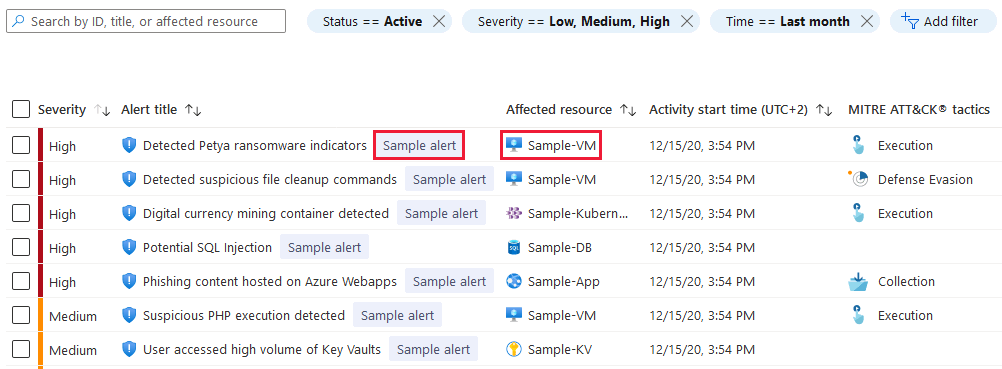
Alerts carry a severity of High, Medium, Low or Informational, map to MITRE ATT&CK, and stay visible for 90 days even if the resource is deleted. Everything except Informational reaches the Defender XDR alert queue automatically once Defender for Cloud is enabled; there is no subscription-level opt-in, and access in the Defender portal is tenant-wide. Status syncs both ways for Defender for Cloud alerts, but not for Defender for Endpoint alerts on cloud resources, which show in both products with independent status. Advanced hunting gets CloudAuditEvents, CloudProcessEvents and CloudStorageAggregatedEvents.
For Sentinel, Learn's current guidance: ingest incidents through the Defender XDR incidents connector, add the Tenant-based Microsoft Defender for Cloud (Preview) connector so those incidents carry alerts and entities, disconnect the Subscription-based (Legacy) connector, and turn off analytics rules that built incidents from Defender for Cloud alerts. Continuous export to Log Analytics or Event Hubs is the path for third-party SIEMs and the one Learn calls preferred. Details in alerts and Sentinel.
Configure
- Portal
- Azure CLI / PowerShell
- REST / ARM
Open the subscription:
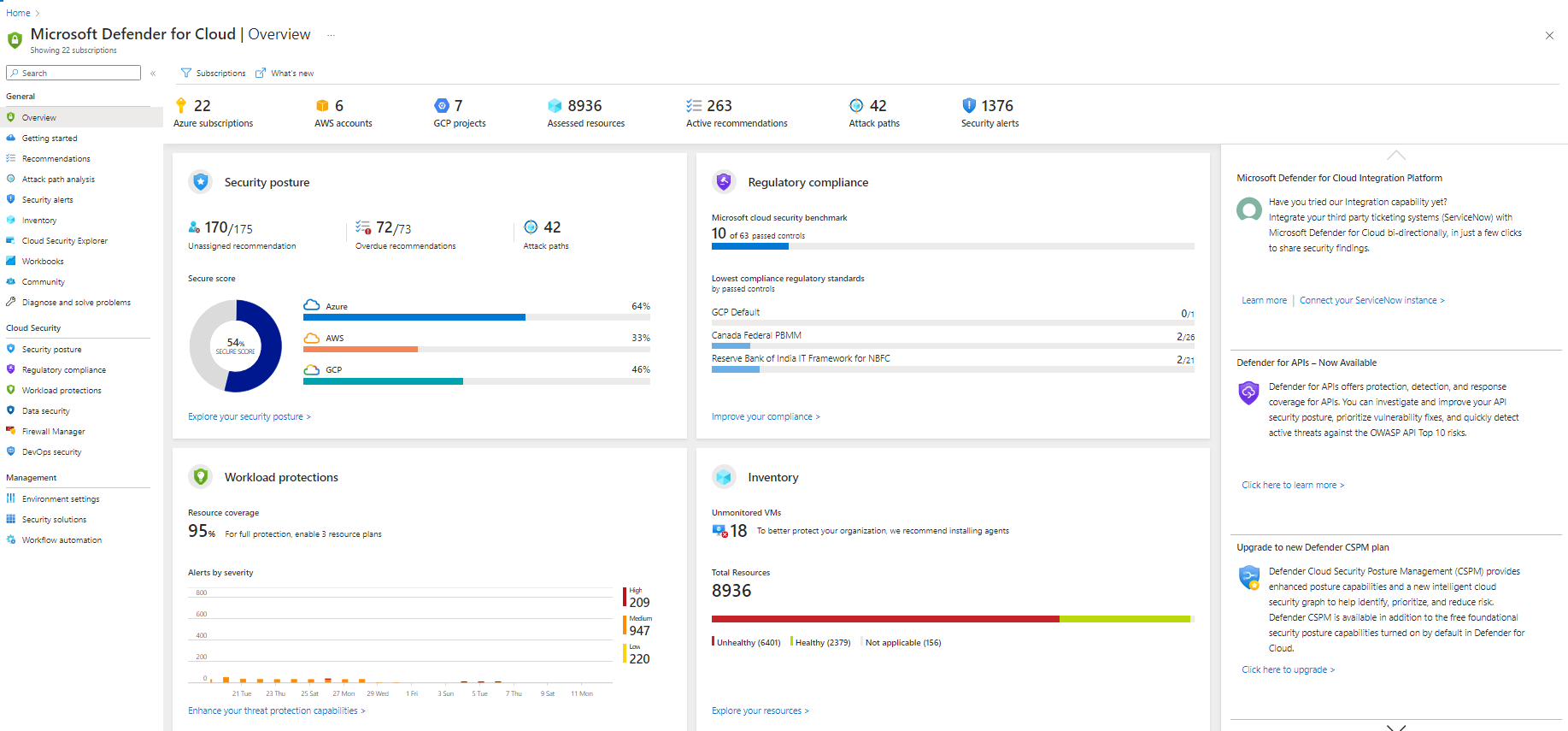
- Azure portal > search Microsoft Defender for Cloud. Opening the overview is what enables foundational CSPM on the subscription. Within minutes recommendations and inventory start to appear.
- Environment settings > select the subscription (or AWS account or GCP project).
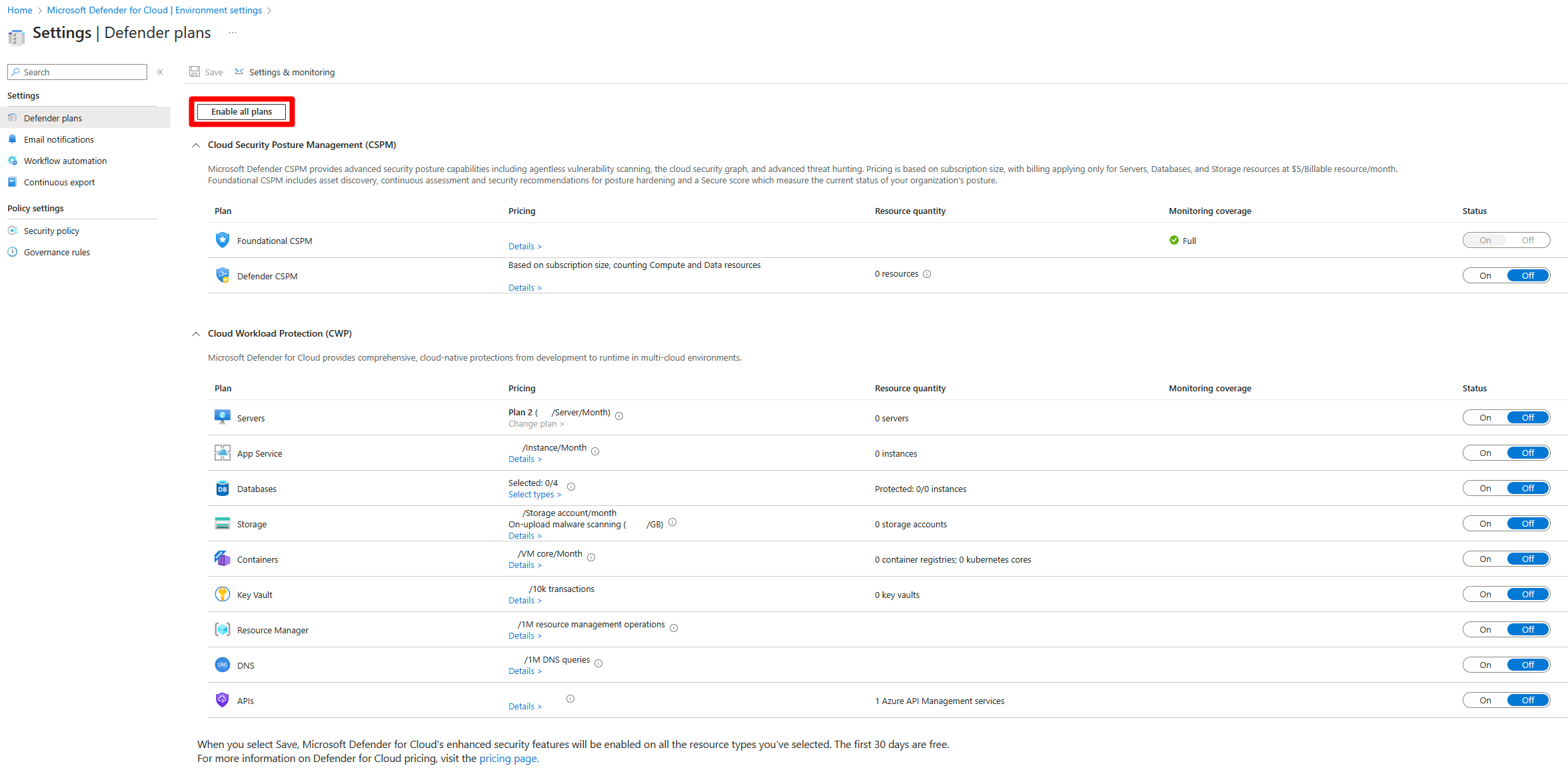
Enable Defender CSPM:
- Toggle Defender CSPM to On, Save. Do this as Owner, or the agentless scanner stays off.
- Settings on the Defender CSPM row. Turn on the components you want: agentless scanning for machines, agentless discovery for Kubernetes, agentless container vulnerability assessments, sensitive data discovery, CIEM (up to 24 hours to populate), serverless protection, serverless containers. Serverless protection and serverless containers start their own billing when turned on. Continue, then Save.

- Optional: on agentless scanning select Edit configuration and enter a tag name and value. Machines with that tag are skipped.
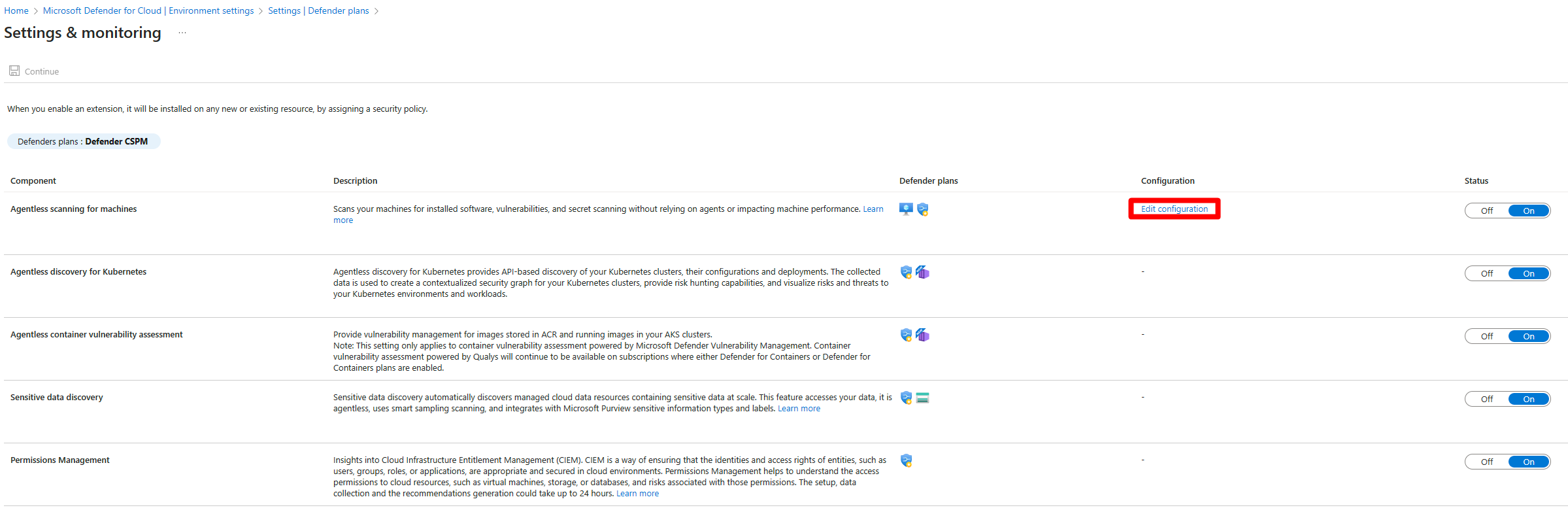
Enable a workload plan:
- On the same page toggle the plan, for example Servers, Storage or Containers. Servers defaults to Plan 2. Settings on each row exposes its components. Save.
- Storage, SQL, open-source databases and Servers P1 can instead be set on the individual resource blade.
- To turn a plan off, toggle it Off and Save. Extensions stay installed and stop collecting after a short time.
Review recommendations:
- Defender for Cloud > Recommendations. Filter by Exposed asset, Asset risk factors, Environment or Workload. The list is ordered by risk level, which combines severity with the asset's risk factors.
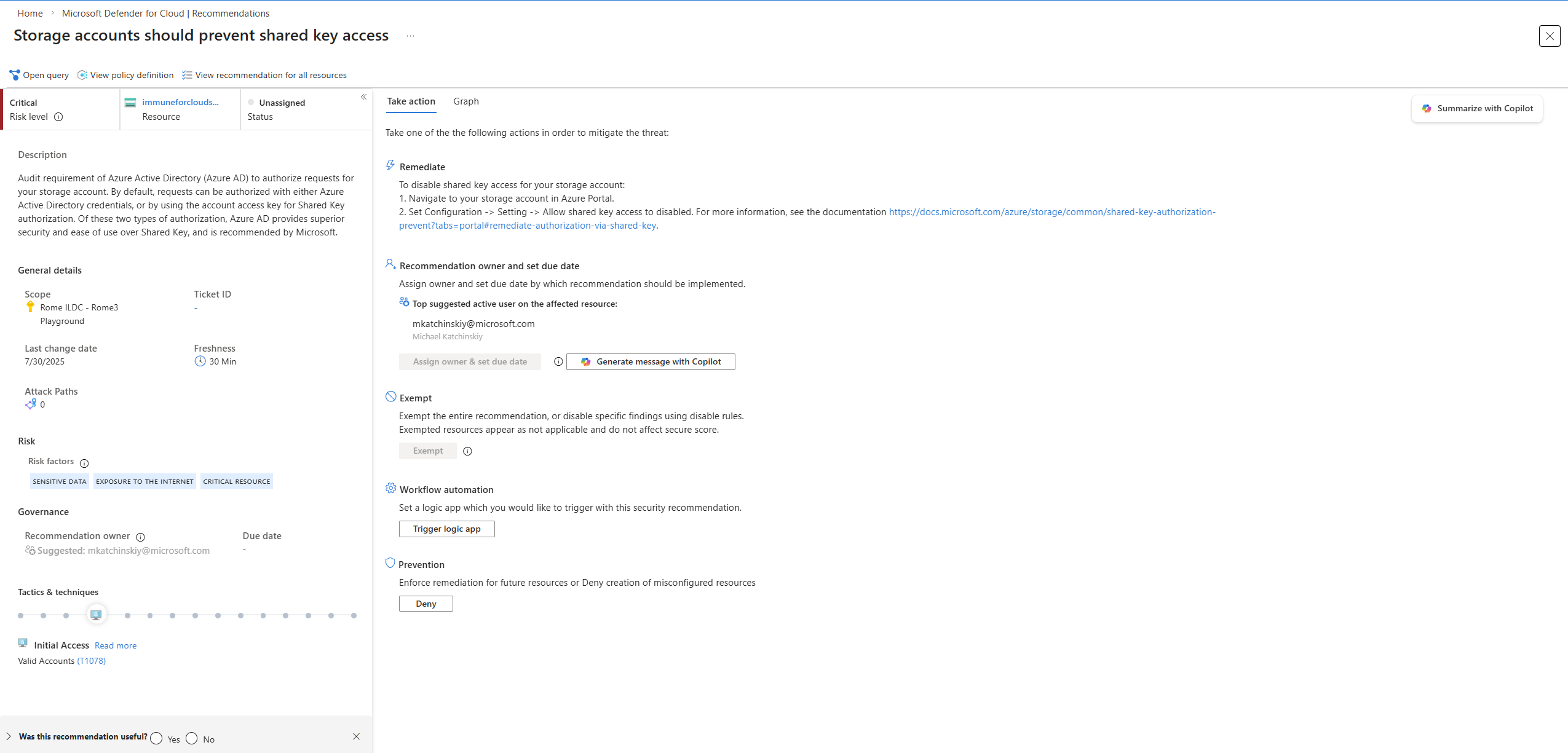
- Open a recommendation > Take action. Remediate gives steps; where a Fix exists, View remediation logic first. Assign owner and due date creates a governance rule (Defender CSPM). Exempt is the supported way to accept a risk; disable rules are being deprecated. The Graph tab shows attack paths through the finding.
Key settings and what they do:
| Setting | On | Off | Recommended | Needs |
|---|---|---|---|---|
| Defender CSPM | Graph, attack paths, explorer, governance, standards, risk ranking | MCSB and Secure Score only | On for any subscription with internet-facing or data workloads | Owner to enable fully |
| Agentless scanning for machines | Snapshot-based vulnerability, secrets, software, EDR check | Posture from agents only | On | Defender CSPM or Servers P2 |
| Sensitive data discovery | DSPM labels data stores, feeds attack path targets | No data awareness | On where storage or databases hold regulated data | Defender CSPM or Defender for Storage |
| CIEM | Identity and permission risk in the graph | No permission insights | On | Defender CSPM, not Azure Gov |
| Serverless protection, Serverless containers | Posture for Functions, Web Apps, ACA, ACI, Lambda, Fargate | Those resources unassessed | On if you own them, note billing | Defender CSPM |
# Tested on: TODO
# What is on, and how much trial is left
az security pricing list -o table
az security pricing show -n CloudPosture

# Defender CSPM on. Agentless extensions need the Owner role on the subscription.
az security pricing create -n CloudPosture --tier standard \
  --extensions name=AgentlessVmScanning isEnabled=True \
  --extensions name=AgentlessDiscoveryForKubernetes isEnabled=True \
  --extensions name=ContainerRegistriesVulnerabilityAssessments isEnabled=True \
  --extensions name=SensitiveDataDiscovery isEnabled=True

# Servers Plan 2 with an agentless exclusion tag (Learn's own example shape)
az security pricing create -n VirtualMachines --tier standard --subplan P2 \
  --extensions name=MdeDesignatedSubscription isEnabled=False \
  --extensions name=AgentlessVmScanning isEnabled=True \
  additionalExtensionProperties='{"ExclusionTags":"[{\"key\":\"NoScan\",\"value\":\"true\"}]"}'

# A plan with no sub-plan
az security pricing create -n AppServices --tier standard
The REST reference gives Free and Standard for tier, P1 and P2 for VirtualMachines. Plan names seen in Learn examples: VirtualMachines, CloudPosture, StorageAccounts, Containers, SqlServers, AppServices; deprecated KubernetesService and ContainerRegistry show ReplacedBy: Containers. Run az security pricing list for the full set.
# Tested on: TODO  (Az.Security, documented at azps-16.4.0)
Get-AzSecurityPricing | Format-Table Name, PricingTier, SubPlan, FreeTrialRemainingTime
Get-AzSecurityPricing -Name VirtualMachines | Select-Object -ExpandProperty Extensions

Set-AzSecurityPricing -Name AppServices -PricingTier Standard
Set-AzSecurityPricing -Name VirtualMachines -PricingTier Standard -SubPlan P2

# CloudPosture with extensions as a JSON array
Set-AzSecurityPricing -Name CloudPosture -PricingTier Standard -Extension '[{"name":"SensitiveDataDiscovery","isEnabled":"True","additionalExtensionProperties":null},{"name":"AgentlessDiscoveryForKubernetes","isEnabled":"True","additionalExtensionProperties":null},{"name":"AgentlessVmScanning","isEnabled":"True","additionalExtensionProperties":null}]'
The Set-AzSecurityPricing page says agentless extensions are not enabled for CloudPosture by this cmdlet and points to the Azure Policy definition or the Policy/Configure-DCSPM-Extensions community scripts, then shows an example that passes them anyway. Verify with Get-AzSecurityPricing -Name CloudPosture afterwards.
Plans are Microsoft.Security/pricings, api-version 2024-01-01. Scope is a subscription or, for Servers P1 only, a VM, VMSS or Arc machine.
GET https://management.azure.com/subscriptions/{subscriptionId}/providers/Microsoft.Security/pricings?api-version=2024-01-01
Enable Defender CSPM with agentless scanning:
PUT https://management.azure.com/subscriptions/{subscriptionId}/providers/Microsoft.Security/pricings/CloudPosture?api-version=2024-01-01
{
  "properties": {
    "pricingTier": "Standard",
    "extensions": [
      { "name": "AgentlessVmScanning", "isEnabled": "True" },
      { "name": "AgentlessDiscoveryForKubernetes", "isEnabled": "True" },
      { "name": "ContainerRegistriesVulnerabilityAssessments", "isEnabled": "True" },
      { "name": "SensitiveDataDiscovery", "isEnabled": "True" },
      { "name": "EntraPermissionsManagement", "isEnabled": "True" }
    ]
  }
}
Enable Servers Plan 2 and stop resources overriding it:
PUT https://management.azure.com/subscriptions/{subscriptionId}/providers/Microsoft.Security/pricings/VirtualMachines?api-version=2024-01-01
{
  "properties": {
    "pricingTier": "Standard",
    "subPlan": "P2",
    "enforce": "True"
  }
}
Response fields worth reading: freeTrialRemainingTime (PT0S when used up), enablementTime, resourcesCoverageStatus (FullyCovered, PartiallyCovered, NotCovered), and per-extension operationStatus with code Succeeded or Failed. A Failed extension inside a 200 response means the caller lacked rights.
Other extension names from the REST reference: ContainerSensor (Containers), OnUploadMalwareScanning (StorageAccounts), MdeDesignatedSubscription and FileIntegrityMonitoring (VirtualMachines), AIPromptEvidence (AI plan).
Recommendation results are Microsoft.Security/assessments under any scope: GET /{scope}/providers/Microsoft.Security/assessments?api-version=2021-06-01. TODO: confirm the current api-version; this article did not fetch the Assessments reference.
Verify
- Plan state:
az security pricing list -o tableshowsStandardfor the plans you turned on; the REST response showsresourcesCoverageStatusFullyCovered. The coverage workbook shows the same per subscription and resource. - Foundational CSPM: the overview shows Secure Score, recommendation counts and inventory within minutes of first opening the subscription.
- Defender CSPM: Attack path analysis and Cloud security explorer appear in the menu. Explorer returns results only after agentless scanning has run. CIEM takes up to 24 hours. Attack paths still empty after a day means the plan was enabled without Owner; check the
AgentlessVmScanningextensionoperationStatus. - Agentless scanning: vulnerability findings on a VM with no MDE sensor prove the snapshot path works.
- Alerts: Security alerts > Sample alerts > subscription and plans > Create sample alerts. Needs Contributor. Alerts for simulated resources appear within minutes on the alerts page, in the Defender XDR queue, and in any Sentinel or email destination. Fastest proof of the whole pipeline.
- Defender XDR: Incidents and alerts, filter by service source or alert subscription ID.
// Defender XDR advanced hunting: Defender for Cloud alerts received in the last day
AlertInfo
| where Timestamp > ago(1d)
| where ServiceSource == "Microsoft Defender for Cloud"
| summarize count() by Severity, Title
| order by count_ desc
TODO: confirm the exact ServiceSource string in the dev tenant; Learn names the integration but not the field value.
Troubleshoot
| Symptom | Likely cause | Fix |
|---|---|---|
| Defender CSPM is On but attack paths and explorer show nothing | Plan enabled by a non-Owner, agentless scanner never enabled | Re-save the plan as Owner, or set AgentlessVmScanning through REST with Owner rights, then wait for a scan |
Extension shows operationStatus Failed after a 200 | Caller lacked permission for that extension's first-party app registration | Repeat as Owner; check the message string on the extension |
| Secure Score missing for a subscription | Subscription never opened in Defender for Cloud, or user has no Reader on it | Open Environment settings as Reader or above; check the subscription filter on the overview |
| Recommendations present but no alerts anywhere | Only foundational CSPM or Defender CSPM is on; alerts need a workload plan | Enable the plan for that resource type, then create sample alerts |
| Alerts in Azure portal, not in Defender XDR | Alert is Informational, or user lacks Unified RBAC role, Global Admin or Security Admin | Informational never syncs. Assign the Defender for Cloud Unified RBAC role |
| Duplicate incidents in Sentinel | Both Defender XDR incidents connector and legacy subscription connector active, or analytics rules still building incidents | Use the tenant-based connector, disconnect the legacy one, disable those rules |
| Sentinel incident has no alerts or entities | Subscription not covered by the legacy connector | Switch to the tenant-based Defender for Cloud connector |
| MDE alert on a VM closed in Defender XDR still open in Defender for Cloud | Status sync is one-way for Defender for Endpoint alerts on cloud resources | Expected. Close in both, or work from Defender XDR only |
| Plan toggled Off but extensions still on the VMs | Disabling does not uninstall | Expected; they stop collecting after a short time. Remove manually if needed |
| Charges after turning a plan on for a test | Trial is per plan and ends after 30 days or the usage cap; Storage malware scanning has no trial | Check freeTrialRemainingTime; disable plans you only wanted to look at |
| Agentless scan skips some VMs | Deallocated, or matched by an exclusion tag | Deallocated VMs are not billed or scanned; review the tag under Edit configuration |
| AWS scans stopped | 250 or more Defender-tagged snapshots left behind because delete rights failed | Fix the VmScanner role delete permission, clean up snapshots |
Gotchas and limits
- Foundational CSPM and Defender CSPM overlap only at the base. Every standard beyond MCSB and the cloud default is Defender CSPM, which is why a free subscription's compliance dashboard shows MCSB alone.
- Defender CSPM and Servers Plan 2 both include agentless VM scanning. You need Defender CSPM for the graph that turns findings into attack paths, and Servers Plan 2 for snapshot malware scanning and the EDR.
- Arc machine costs. Defender for Servers bills Arc-connected machines per server-hour while connected, same as Azure VMs; see the Servers overview. The Defender CSPM billable table lists Azure VMs, scale sets and classic VMs with no Arc row, and the Arc feature table grants only the foundational set plus container registry assessment. TODO: confirm on the pricing page whether Defender CSPM meters Arc machines.
- Agentless prerequisites are permissions, not agents. Azure grants
VM scanner operatorautomatically, but CMK disks also need Key Vault key read, wrap and unwrap. On AWS and GCP the rights come from the CloudFormation stack or onboarding script, so a connector built from an older template may lack them. Deallocated VMs are skipped. - Owner matters more than the permission table suggests. Security Admin can toggle every plan, but components that need a first-party app registration fail without Owner, and the portal does not stop you.
- The Defender XDR integration has no documented switch. Current Learn pages say alerts flow automatically once Defender for Cloud is enabled and describe no toggle. TODO: check the dev tenant for a surviving setting under Environment settings > Integrations.
- Enabling a plan starts a 30-day trial you cannot pause, and Storage malware scanning bills from day one. Enable all on a production subscription is a cost event, not a test.
- The Defender Workload Unit announcement moves plan management to the Defender portal and restructures database and container meters. The
pricingsAPI and portal steps here match Learn as of 2026-10-22; expect drift. - Direct onboarding (MDE without Arc) does not give full Servers Plan 2 features. Arc is the path to full posture for non-Azure machines.
Further reading
- Fast-Start Checklist for Microsoft Defender CSPM: From Enablement to Best Practices, Microsoft Defender for Cloud blog, November 2025. A sequenced enablement checklist with the order Microsoft's own team uses, which Learn spreads across a dozen pages.
- Azure Day 2026 Recap: An Actionable Tour of Defender for Cloud and Where to Start, Jason Webster, eGroup, May 2026. Argues for free foundational CSPM first, then Defender CSPM, then workload plans by policy, with the reasoning behind that order.
- Mastering CSPM and Secure Score: A Guide to Cloud Posture Management, Mirko Peters, M365.fm, August 2026. Makes the case for working attack paths and risk level rather than chasing a Secure Score number.
- Cloud Security Billing, Simplified: Introducing the Defender Workload Unit, Microsoft Defender for Cloud blog, October 2026. The billing change that will replace the per-plan meters described in this article.
My notes
TODO: Sohail's notes after verification.
Changelog
| Date | Change | Source |
|---|---|---|
| 2026-10-22 | Drafted from Learn, with Learn images and diagrams | [1] |