Secure Score, recommendations, governance and regulatory compliance
What it is
Secure score is the one number Defender for Cloud gives a subscription, AWS account or GCP project for its posture. It is 0 to 100, higher is better, and it is built from the Microsoft cloud security benchmark (MCSB) assessments that run the moment Defender for Cloud is on. Only built-in MCSB recommendations move the classic score. Regulatory standards, custom recommendations and preview recommendations do not.
There are two scores with different maths. The classic Secure Score in the Azure portal is control-based and weighted by resource counts. The Cloud Secure Score in the Defender portal is risk-based and folds in asset risk factors and criticality. They are not comparable, and risk prioritisation does not currently touch the classic score. This article covers both, then what feeds them: recommendations, exemptions, governance rules, and the regulatory compliance dashboard that reuses the same assessments against other standards.
It is not Microsoft Secure Score. Learn lists three scores in the family: Microsoft Secure Score for identity from Entra, Exposure Secure Score for devices from MDE, and Cloud Secure Score for multicloud posture. The first two are in Secure Score and Exposure Management. For where Defender for Cloud sits see the overview, and for AWS and GCP connectors see onboarding.
Licensing and prerequisites
Foundational CSPM is free and gives you MCSB, secure score, recommendations, asset inventory, workbooks, data export and workflow automation on Azure, AWS, GCP and Arc. Defender CSPM is paid, billed per the resource types listed on the CSPM concept page (VMs, storage accounts, databases, serverless and serverless containers, with EC2, S3, RDS, Lambda, Fargate and the GCP equivalents), and adds the posture features this article leans on:
| Feature | Foundational CSPM | Defender CSPM |
|---|---|---|
| MCSB assessment, secure score, recommendations | Yes | Yes |
| Severity on recommendations | Yes | Yes |
| Risk level, risk factors, attack paths | No, shows Not evaluated | Yes |
| Governance rules | No | Yes |
| Regulatory standards beyond MCSB | See note | Yes |
| Custom KQL recommendations and standards | No, Azure Policy legacy path only | Yes |
| Security explorer | No | Yes |
Note on standards: Learn is not consistent. The CSPM concept page lists extra standards under Defender CSPM, the dashboard page says any paid plan, and the assign-standards page says any plan except Defender for Servers Plan 1 or Defender for API Plan 1. TODO: confirm in the dev tenant with only Defender for Servers P2 on.
Roles:
- Standards: Owner or Policy Contributor to assign. Reading the dashboard needs policy compliance data access, which Reader has and Security Reader does not.
- Exemptions: Owner or Security Admin on the scope, with
Microsoft.Authorization/policyExemptions/write,read,deleteandMicrosoft.Authorization/policyAssignments/exempt/action. Management group exemptions also need Reader granted to the Microsoft Azure Security Resource Provider on that group. - Governance rules: Contributor, Security Admin or Owner on the subscription or connector.
- Custom standards: Owner. Custom recommendations: Security Admin. Workbooks: Workbook Contributor on the resource group.
The MCSB initiative must be assigned before exemptions work. If someone removed it, the Exempt option goes missing and resources drop out of compliance views.
How it works
Classic secure score
Every control has a fixed max score. Every resource assessed under that control is Healthy, Unhealthy or Not applicable. Not applicable is dropped from the maths. Then:
- Score per resource = max score divided by healthy plus unhealthy resources
- Current score = score per resource times healthy resources
- Potential increase = score per resource times unhealthy resources
Learn's example: a control worth 6 with 78 resources and 4 healthy gives 0.0769 per resource, so a current score of 0.31. Full points need every recommendation in the control remediated. Controls recalculate every eight hours per subscription or connector; recommendations refresh more often, so counts can disagree briefly.
| Max points | Control |
|---|---|
| 10 | Enable MFA |
| 8 | Secure management ports |
| 6 | Apply system updates |
| 6 | Remediate vulnerabilities |
| 4 | Remediate security configurations |
| 4 | Manage access and permissions |
| 4 | Enable encryption at rest |
| 4 | Encrypt data in transit |
| 4 | Restrict unauthorized network access |
| 3 | Apply adaptive application control |
| 2 | Protect applications against DDoS attacks |
| 2 | Enable endpoint protection |
| 1 | Enable auditing and logging |
| 0 | Enable enhanced security features |
| 0 | Implement security best practices |
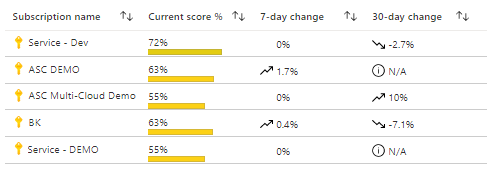
Across subscriptions the score is a weighted sum, not an average. Each subscription or connector gets a linear weight from its healthy plus unhealthy count, and a control with no assessments in a subscription is dropped from both current and max there. So you cannot recompute the tenant score from the per-control numbers in the UI. The REST response exposes weight per subscription.
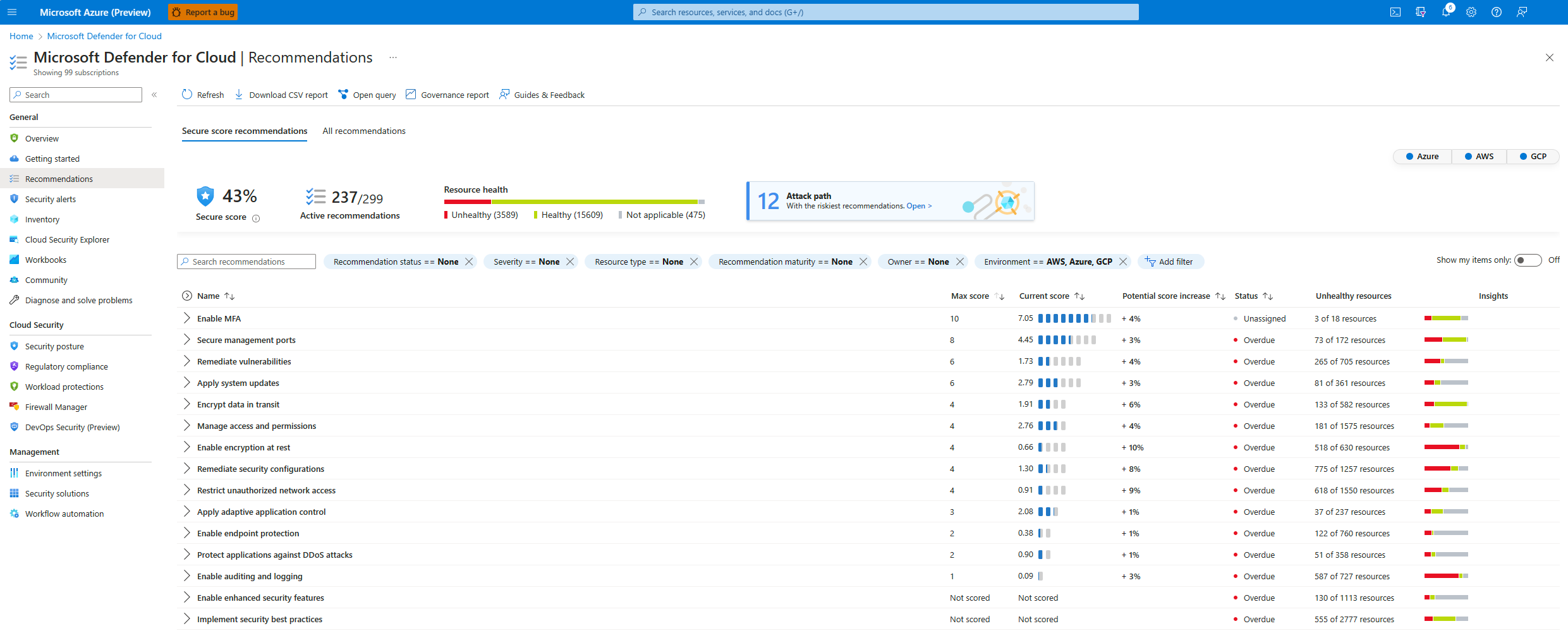

Two 2026 changes matter for trend lines. On 2026-06-30 Microsoft added over 200 AWS and GCP recommendations to the score, so a drop around then is wider scope, not a worse estate. New recommendations carry a New tag for 30 days and View updates on the score card opens the change log. Grouped recommendations are deprecated on 2026-07-31 in favour of individual ones; during the transition both appear and individual preview items do not count until GA.
Cloud Secure Score in the Defender portal
The risk-based score aggregates per-asset scores. Each asset gets a weighted average of its open recommendations' risk levels, adjusted for risk factors (internet exposure, data sensitivity, lateral movement, attack paths) and asset criticality. It lives under Exposure Management > Secure score > View Cloud initiative, with a 14-day trend and scores by environment and workload. Risk level needs Defender CSPM; without it the column reads Not evaluated.
Recommendations
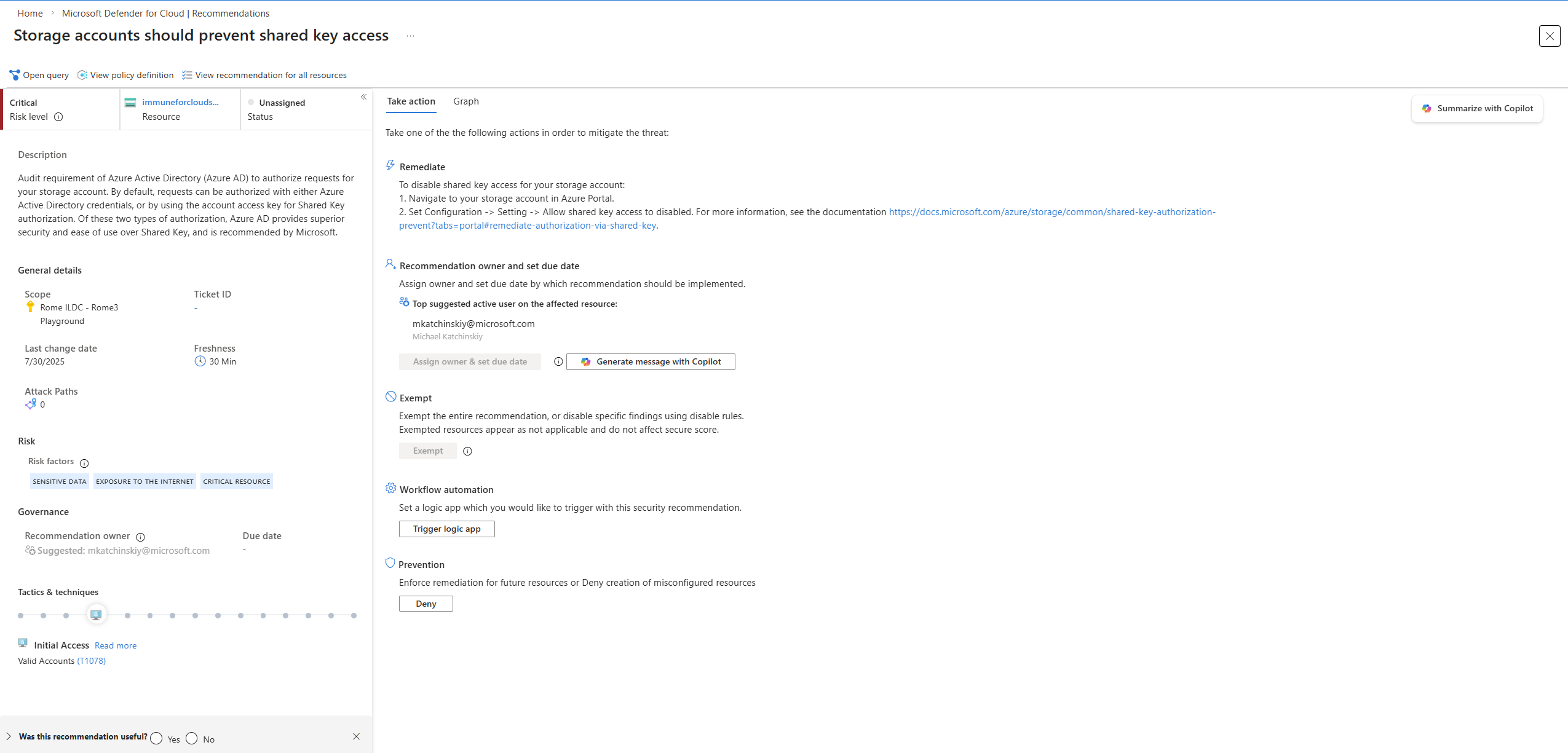
Every recommendation has a Microsoft-set severity (Critical to Low). With Defender CSPM it also has a risk level, which is severity plus the resource's context. The Status column is governance state (Unassigned, On time, Overdue), not health. Views are flat list, group by title, and group by resource. The side panel shows remediation steps, a Map preview of attack paths through the asset, and Related initiatives listing which standards the recommendation feeds. Take action offers Remediate, Fix where a quick fix exists (read View remediation logic first), Change owner and due date, Exempt, and Workflow automation to a Logic App. On AWS and GCP, Fix generates a CLI script for you to run. After a fix the status takes several minutes to update.
Exemptions
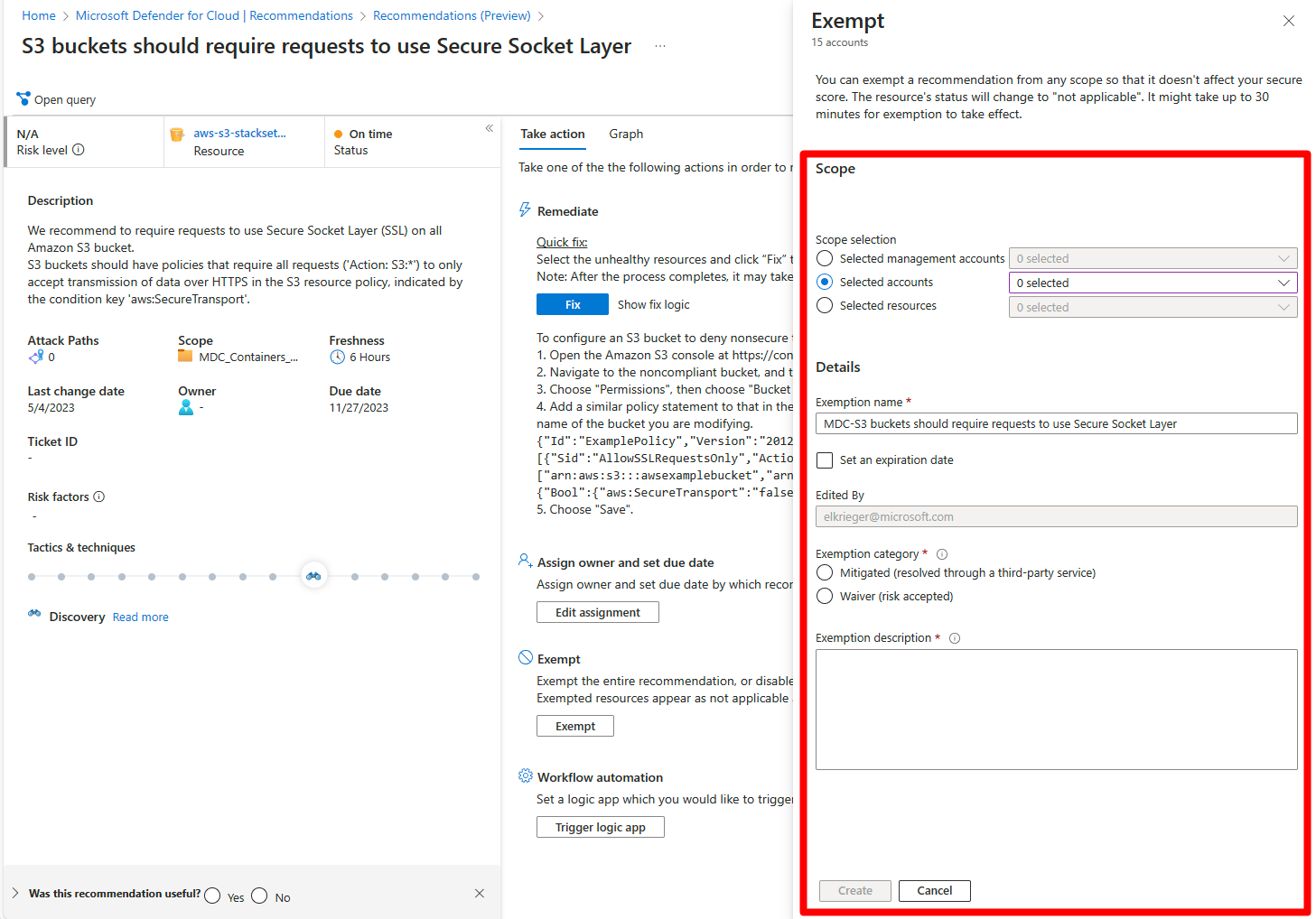
An exemption is an Azure Policy exemption created through Defender for Cloud. Scope is selected resources (up to 5,000 per subscription), a subscription, or a management group. Category is Mitigated (a third party fixes it, resource counts as healthy, score goes up) or Waiver (risk accepted, resource is removed from the calculation, neutral). Expiry is optional. It takes up to 24 hours to apply because evaluation runs every 12 to 24 hours. Exempted resources land in the Not applicable tab with reason Exempted and disappear from the default Recommendations filter.
Limits: custom recommendations cannot be exempted, preview ones may not support it, KQL-based recommendations do not write Policy exemption events to the Activity Log, and a portal exemption covers every initiative containing the recommendation while a Policy API exemption covers one. Exemptions do not carry over to a newly assigned initiative. Disable rules, the old suppression for grouped recommendations, go with them on 2026-07-31 with no automatic migration; Learn maps each disable condition (CVE, CVSS, severity, category) to an exemption condition. The blunt alternative is turning the policy off in the MCSB assignment, which returns NotApplicable with cause OffByPolicy for every resource in scope. Prefer an exemption.
Governance rules
A governance rule needs Defender CSPM. It matches recommendations by severity, risk level, category or a named list, assigns an owner by email or from a resource tag (resource, then resource group, then subscription; otherwise unspecified), and sets a due date 7, 14, 30 or 90 days out. Apply grace period keeps MCSB recommendations out of the score until overdue. Owners get a weekly email; the owner's manager, if Entra knows one, gets overdue mail. Priority runs 1 to 1000, management-scope rules apply before single-scope rules, highest priority wins. Exclusions are API only. Deleting a rule leaves existing assignments in place. The Governance report workbook shows on time, overdue and unassigned by rule and owner.
Regulatory compliance dashboard
Every standard is an Azure Policy initiative. MCSB is on by default; AWS also gets AWS Foundational Security Best Practices and GCP gets GCP Default. The catalogue at source-check time has 47 standards. NIST SP 800-53 R5.1.1, NIST SP 800-171 Rev3, PCI DSS v4.0.1, ISO/IEC 27001:2022, CMMC Level 2 v2.0, SOC 2 2023 and CIS Controls v8.1 are available for Azure, AWS and GCP. CIS Foundations benchmarks are per cloud: Azure v2.1.0 and v3.0, AWS v3.0.0, GCP v3.0. HIPAA and FedRAMP are Azure only. MCSB v2 is in preview.
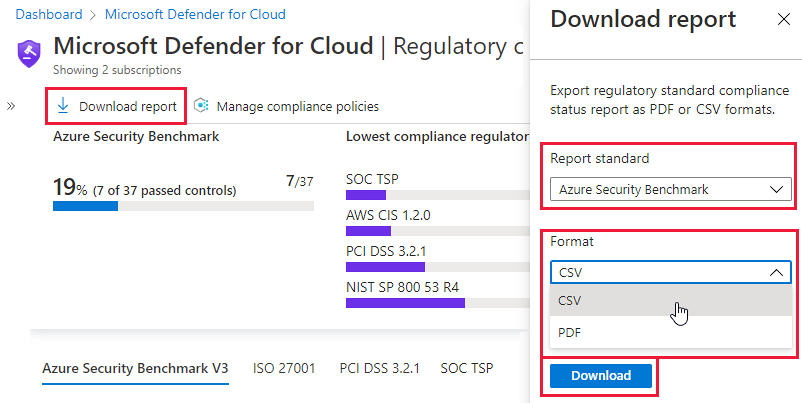
The dashboard lists each standard, its controls, and the automated and manual assessments under them. Manual assessments are attested with evidence per subscription. Assessments run about every 12 hours. Controls that cannot be assessed automatically are greyed out, and a standard with no relevant resources in scope does not appear at all. Download report gives a PDF or CSV per standard; Audit reports downloads Microsoft's own certification packages as a signed ZIP, with a consent notice that Microsoft records who downloaded it so it can notify you of updates. The same data flows into Purview Compliance Manager automatically.
Custom standards: with Defender CSPM you write a KQL recommendation over RawEntityMetadata that must project Id, Name, Environment, Identifiers, AdditionalData, Record, HealthStatus with HealthStatus of HEALTHY or UNHEALTHY, then bundle recommendations into a standard. The legacy route is an Azure Policy initiative with "ASC": "true" in metadata, Azure only.
Configure
- Portal
- Azure CLI
- REST / ARM
Add a standard:
- Defender for Cloud > Regulatory compliance > Manage compliance policies.
- Pick the scope: Azure subscription or management group, AWS account or management account, GCP project or organization. Learn says pick the highest scope that applies so nested resources aggregate.
- Security policies, find the standard, toggle On. If it has parameters, Set parameters appears.
- It shows on the dashboard once relevant resources exist and the first assessment has run.

Create an exemption:
- Defender for Cloud > Recommendations > open the recommendation > Exempt.
- Scope: management group, subscription, or Selected resources.
- Name, optional expiry date, category Mitigated or Waiver, description, Create.
- Review later under Environment settings > Exemptions, or Recommendations with Recommendation status filter set to Exempted, or Inventory with Contains exemptions = Yes.
Create a governance rule:
- Defender for Cloud > Environment settings > Governance rules > Create governance rule.
- Name, scope, priority 1 to 1000, description. Next.
- Conditions: by severity, risk level, recommendation category, or specific recommendations.
- Owner by resource tag key or by email. Remediation time frame 7, 14, 30 or 90 days. Tick Apply grace period if MCSB items should not hit the score until overdue.
- Leave or clear the weekly owner and manager emails. Create.
- Choose whether to assign only unowned existing recommendations or overwrite existing owners. Re-run the rule from the UI or API to catch recommendations generated before it.

Resource Graph is the fastest way to pull posture out. Learn's CLI samples flatten the KQL to one line and scope with --management-groups.
# Tested on: TODO
# Classic secure score per subscription (from Learn)
az graph query -q "SecurityResources | where type == 'microsoft.security/securescores' | extend current = properties.score.current, max = todouble(properties.score.max) | project subscriptionId, current, max, percentage = ((current / max)*100)" -o table

# Control status: unhealthy count, current and max (from Learn)
az graph query -q "SecurityResources | where type == 'microsoft.security/securescores/securescorecontrols' | extend SecureControl = properties.displayName, unhealthy = properties.unhealthyResourceCount, currentscore = properties.score.current, maxscore = properties.score.max | project SecureControl, unhealthy, currentscore, maxscore" -o table

# Recommendations carrying an exemption (trimmed from the Learn review-exemptions query)
az graph query -q "securityresources | where type == 'microsoft.security/assessments' | project SubscriptionID = subscriptionId, DisplayName = properties.displayName, ResourceId = properties.resourceDetails.Id, StatusCode = properties.status.code, StatusDescription = properties.status.description, Severity = properties.metadata.severity | where StatusDescription contains 'Exempt'" -o table

# Whole-tenant scope: pass the tenant ID as a management group
az graph query -q "SecurityResources | where type == 'microsoft.security/securescores' | project subscriptionId, current = properties.score.current, max = properties.score.max" --management-groups $tenantId -o table
Count per recommendation by health state. Built from the documented properties.status.code values (Healthy, Unhealthy, NotApplicable) in the assessments API, not a Learn sample. TODO: verify in dev.
securityresources
| where type == "microsoft.security/assessments"
| extend status = tostring(properties.status.code), name = tostring(properties.displayName)
| summarize Healthy = countif(status == "Healthy"), Unhealthy = countif(status == "Unhealthy"), NotApplicable = countif(status == "NotApplicable") by name
| order by Unhealthy desc
The native commands are thinner. az security assessment list returns every assessment result in the current subscription and az security assessment show -n <assessmentKey> returns one, optionally with --assessed-resource-id. Both are GA. There is no az security command for exemptions, governance rules or standards in the pages checked; use Resource Graph or REST.
az security assessment list -o table
az security assessment show -n '4fb6c0a0-1137-42c7-a1c7-4bd37c91de8d'
Classic score for a subscription. percentage is current over max to four decimals, weight is the subscription's share in the tenant aggregate.
GET https://management.azure.com/subscriptions/{subscriptionId}/providers/Microsoft.Security/secureScores?api-version=2020-01-01
{
  "value": [
    {
      "name": "ascScore",
      "type": "Microsoft.Security/secureScores",
      "properties": {
        "displayName": "ASC score",
        "score": { "current": 23.53, "max": 39, "percentage": 0.6033 },
        "weight": 67
      }
    }
  ]
}
Assessments at subscription or management group scope. status.code is Healthy, Unhealthy or NotApplicable, with cause and description explaining a NotApplicable, for example OffByPolicy when the policy is disabled in the assignment.
GET https://management.azure.com/{scope}/providers/Microsoft.Security/assessments?api-version=2021-06-01
Regulatory standards and their control counts. State is Passed, Failed, Skipped or Unsupported.
GET https://management.azure.com/subscriptions/{subscriptionId}/providers/Microsoft.Security/regulatoryComplianceStandards?api-version=2019-01-01-preview
{
  "value": [
    {
      "name": "PCI-DSS-3.2",
      "type": "Microsoft.Security/regulatoryComplianceStandard",
      "properties": {
        "failedControls": 4,
        "passedControls": 7,
        "skippedControls": 0,
        "state": "Failed",
        "unsupportedControls": 0
      }
    }
  ]
}
Governance rule exclusions and bulk custom recommendation deployment go through the Defender for Cloud composite API; Learn names the API but the pages used here give no route. TODO: add the governanceRules route after testing. Legacy custom standards are an Azure Policy set definition with "ASC": "true" in metadata via PUT .../Microsoft.Authorization/policySetDefinitions/{policySetDefinitionName}?api-version=2021-06-01.
Verify
- Score: Overview tile, then the Secure score page by subscription and management group (Restricted means no rights on that group). Compare to the REST
currentandmax. - Standard: Regulatory compliance shows it with the applied subscription. Missing means no matching resources in scope or the first 12-hour run has not happened.
- Exemption: the resource moves to the Not applicable tab with reason Exempted within 24 hours, and it is listed under Environment settings > Exemptions.
- Governance: Governance rules > Governance report shows status by rule and owner. Owners should get the weekly mail.
- Trend: Workbooks > Secure Score Over Time needs continuous export to Log Analytics with Streaming updates and Snapshots; snapshots are weekly, so expect a one-week lag. Compliance Over Time works the same way and has Export to Excel per panel.
To check one recommendation against the portal, open it, select Open query, and run Query returning affected resource; the KQL is the same filter the portal uses.
Running a posture engagement for a client
The pieces are sourced above; the ordering is mine.
- Baseline first. Pull
secureScoresandsecurescorecontrolsper subscription through Resource Graph to CSV and Download report for each standard. The weighted-sum maths means a screenshot of the tile cannot be reproduced later. - Turn on continuous export to Log Analytics with Streaming updates and Snapshots so Secure Score Over Time and Compliance Over Time have data by the end. Use the DeployIfNotExist policies at scale.
- Assign the audited standards at management group scope, plus a custom standard for internal rules if Defender CSPM is on.
- Work controls by max points. MFA at 10 and management ports at 8 are a third of the classic points, and each needs every recommendation in the control cleared.
- Add governance rules with tag-based owners and a grace period, so the report shows who is overdue.
- Record risk decisions as waivers with an expiry date; use mitigated only where a third-party control exists.
- Hand over the Power BI Secure Score Over Time dashboard (Power BI Pro, Azure-Security-Center GitHub repo), whose change table lists deleted resources, new deployments and status flips behind a sudden drop, plus the compliance PDFs and workbook Excel exports.
Troubleshoot
| Symptom | Likely cause | Fix |
|---|---|---|
| Score has not moved after a fix | Control recalculates every 8 hours; recommendation refresh is faster | Check the recommendation first, then wait for the control cycle |
| Score dropped with no change in the estate | Scope widened, for example the 2026-06-30 AWS and GCP additions, or a new GA recommendation | View updates on the score card, filter on the New tag |
| Score differs between Azure portal and Defender portal | Classic and Cloud Secure Score use different maths | Compare like with like; use Switch to classic view in the Defender portal recommendations |
| Tenant score does not equal the average of subscriptions | Weighted sum by resource count | Expected; read weight from the REST response |
| Recommendation shows deleted resources | Azure portal shows last known state | Known issue per Learn; the Defender portal view omits them |
| Fix button missing | No quick fix for that recommendation | Follow Remediate steps; on AWS and GCP look for the generated script |
| Standard cannot be toggled on | Only Defender for Servers P1 or Defender for API P1 enabled, or role below Owner or Policy Contributor | Enable another paid plan, assign the role at the target scope |
| Standard assigned but not on the dashboard | No relevant resources in scope, or first assessment not run | Wait 12 hours, confirm resource types exist |
| Dashboard empty for Security Reader | Security Reader lacks policy compliance data access | Grant Reader on the subscription |
| Exempt button missing | Missing one of the four policyExemptions or exempt/action RBAC actions, or MCSB not assigned | Assign Security Admin at the right scope, restore the MCSB assignment |
| Exemption created but resource still unhealthy | Under 24 hours, wrong scope, waiver still listed, several initiatives contain the recommendation, or created through the Policy API | Wait, check scope, recreate from Defender for Cloud, exempt per initiative |
| Management group exemption fails with linked scope error | Subscription role does not inherit upward | Assign the role at the management group, grant Reader to the Security Resource Provider there |
| Exemption will not delete or reappears | Orphaned without a policy assignment, or portal sync lag | Add an assignment then delete, or Remove-AzPolicyExemption; allow 30 minutes |
| Governance rule did not assign existing items | Rule only applies forward unless re-run | Re-run from the UI or API, pick overwrite if owners should change |
| Owner shows unspecified | Tag not on resource, resource group or subscription | Add the tag or switch the rule to an email owner |
| Secure Score Over Time workbook blank | Continuous export missing or only Streaming selected | Add Snapshots to the export and wait a week |
Gotchas and limits
- Preview recommendations never count, exempted or not. Remediate them anyway; they count at GA with no warning beyond the change log.
- A waiver is neutral, a mitigated exemption is positive. Auditors read the difference.
- A subscription-scope exemption covers future resources too. Put an expiry on it.
- KQL-based recommendations do not log Policy exemption events, so Activity Log alerts miss them. The Notify-ResourceExemption Logic App in the Defender for Cloud GitHub repo is the documented alternative.
- Grace period only applies to MCSB recommendations. A 90-day window with grace period on raises the number without fixing anything; agree the SLA with the client first.
- Deleting a governance rule does not remove existing owners or due dates.
- Standards are assigned in the Azure portal only; the Defender portal is read-only for compliance.
- Compliance data lands in Purview Compliance Manager automatically, AWS and GCP included. A client compliance team may see it before you tell them.
- The Price Estimation workbook uses retail prices and is not a bill.
- Free subscriptions and some Azure Policy-only resources do not appear in the Defender portal recommendations view yet.
- The Resource Graph samples-by-category page no longer carried a Defender for Cloud section when fetched; the queries above come from the Defender pages and the assessments API schema.
Further reading
- Microsoft Defender for Cloud expands multicloud coverage across AWS and Google Cloud, Microsoft Defender for Cloud blog, June 2026. Explains the 200-plus new AWS and GCP recommendations behind the mid-2026 score shift and how they map to exposure context.
- Bridging the Gap: Compliance Scores vs. Secure Scores, Mirko Peters, M365.fm, August 2026. Practitioner view on presenting a compliance percentage and a secure score to different audiences without the two contradicting each other.
- How to Enable and Configure Microsoft Defender for Cloud Secure Score Recommendations, Nawaz Dhandala, OneUptime, February 2026. End-to-end walkthrough with Azure CLI, PowerShell and a REST call for continuous export, plus KQL over the exported data.
- Breaking down security silos: Microsoft Defender for Cloud Expands into the Defender Portal, Microsoft Defender for Cloud blog, December 2025. The announcement that introduced the risk-based Cloud Secure Score and moved posture into Exposure Management.
My notes
TODO: Sohail's notes after verification.
Changelog
| Date | Change | Source |
|---|---|---|
| 2026-10-22 | Drafted from Learn, with Learn images and diagrams | [1] |