Workload plans: Storage, Containers, Key Vault, App Service, APIs, Resource Manager
What it is
Defender for Cloud sells workload protection as separate plans, one per resource type, each switched on per subscription or per connector. Servers and SQL have their own articles. This one covers the rest: Storage, Containers, Key Vault, App Service, APIs, Resource Manager, the non-SQL database plans and AI Services. They share the same enable surface (Environment settings > Defender plans, the Microsoft.Security/pricings resource) and the same alert pipeline into Defender XDR and Sentinel. They differ in what they watch and how they bill.
Two plans deploy something: Containers (a DaemonSet and an admission webhook) and Storage (an Event Grid system topic and a scanner identity). Everything else is pure platform telemetry. Key Vault, App Service, Resource Manager, APIs, the database plans and AI Services read logs Azure already has as the provider, so there is nothing to install, nothing to break, and nothing you can see from inside the resource.
None of these plans are posture tools. Recommendations come from foundational CSPM for free; Defender CSPM adds attack paths. The paid workload plans add threat detection, and in the Storage and Containers cases, scanning. Read the overview first if the plan and CSPM split is new, and onboarding for how AWS and GCP connectors get a Defender plans page of their own.
Licensing and prerequisites
Every plan here is bought through Azure consumption on the subscription, not a Microsoft 365 SKU. Prices are on the Defender for Cloud pricing page and the cost calculator; Learn does not print numbers, so neither does this article. Billing units as Learn describes them:
| Plan | Pricing name | Billing unit per Learn | Sub-plan or extensions |
|---|---|---|---|
| Storage | StorageAccounts | Per protected storage account per month, plus per GB scanned for malware, plus a transaction charge on high-volume accounts | DefenderForStorageV2; extensions OnUploadMalwareScanning, SensitiveDataDiscovery |
| Containers | Containers | Pricing page only. TODO: confirm unit after the Defender Workload Unit change | Extensions ContainerSensor, AgentlessDiscoveryForKubernetes, ContainerRegistriesVulnerabilityAssessments, AgentlessVmScanning |
| Key Vault | KeyVaults | Pricing page; the Pricings sample shows PerKeyVault | PerKeyVault |
| App Service | AppServices | Total compute instances across all App Service plan tiers | none |
| APIs | Api | Five plans by monthly API traffic entitlement, billed per subscription, overage above the entitlement, counter resets monthly. New subscriptions default to Plan 1 with a one million call entitlement | P1 default |
| Resource Manager | Arm | Pricing page; the Pricings sample shows PerSubscription | PerSubscription |
| Open-source relational DBs | OpenSourceRelationalDatabases | Pricing page | none |
| Cosmos DB | TODO: pricing name not shown in the Learn Pricings sample | Pricing page | none |
| AI Services | AI | Pricing page; 30-day trial capped at 75 billion tokens scanned | Extension AIPromptEvidence |
Prerequisites that matter:
- Roles. Subscription Owner or Contributor to flip a plan. Storage per-account overrides also take Owner or Contributor on the storage account. AI Services threat detection at subscription level wants Owner or specific data actions. Sample alerts need Subscription Contributor.
- Storage malware scanning needs
Microsoft.EventGridregistered in the subscription. Legacy v1 storage accounts are not supported. On-upload scanning does not cover Azure Files, append blobs, page blobs, NFS 3.0 uploads or client-side encrypted blobs. Malware scanning is charged from day one, it is not in the 30-day trial. - Containers needs a supported cluster. EKS and GKE need the AWS or GCP connector first, then Azure Arc on the cluster for the sensor and Azure Policy extensions. Private EKS and GKE API servers must allow
172.212.245.192/28and48.209.1.192/28. Sensor egress is HTTPS 443 to*.cloud.defender.microsoft.com. - APIs needs the APIs published in Azure API Management. The plan is subscription level; individual APIs are then onboarded through a recommendation.
- App Service works on any tier. Alert investigation wants diagnostic settings on the app, which cost storage.
- Open-source relational databases: Azure Database for PostgreSQL and MySQL Flexible Server, all tiers, and Amazon RDS in preview. Not Arc-enabled machines. Cosmos DB: NoSQL API only.
- AI Services: commercial cloud only, text tokens only, Azure OpenAI and Azure AI Model Inference models.
How it works
Storage
Activity monitoring reads data plane and control plane telemetry for Blob, Files and ADLS. No diagnostic logs needed. It flags Tor exit nodes, malicious IPs, leaked or over-permissive SAS tokens, and anomalies against a learned baseline. Hash reputation checks on new blobs and files come with every plan, including classic, but skip SMB shares and blobs written with Put Block and Put Block List.
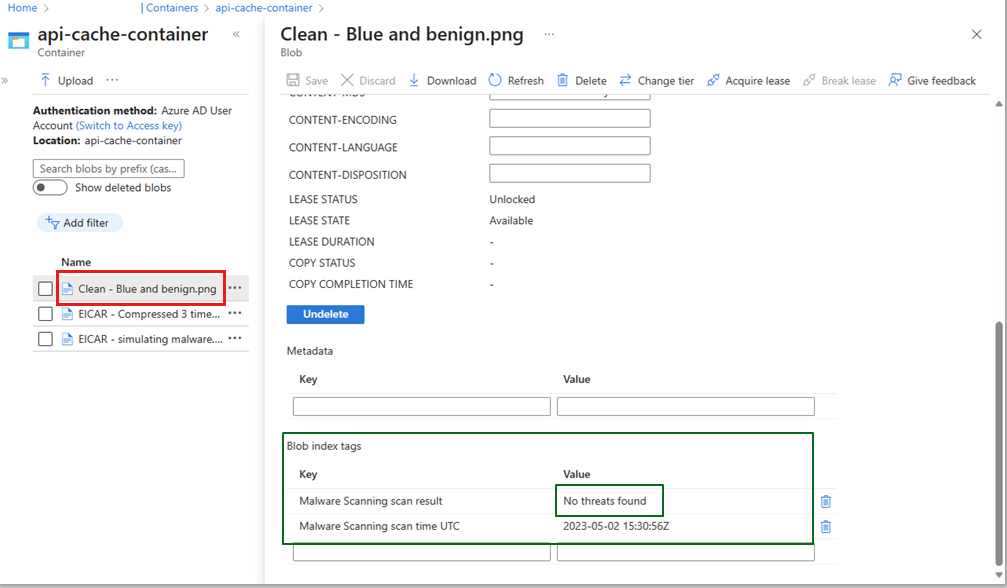
Malware scanning is the paid extra on the new plan. On-upload scanning hooks BlobCreated and BlobRenamed through an Event Grid system topic that the service creates in the storage account's resource group. A StorageDataScanner resource with a system-assigned identity gets Storage Blob Data Owner and is added to the account's resource instance rules so it can read through a firewall. The blob is read in region, scanned in memory by Defender Antivirus, the result is written and the content discarded. Throughput is capped at 50 GB per minute per account; blobs up to 50 GB, archives included. Results land in two blob index tags (Scan result with No threats found, Malicious, Error or Not scanned, and Scan time (UTC)), a Defender for Cloud alert when malicious, and optionally an Event Grid custom topic and the StorageMalwareScanningResults Log Analytics table. Soft delete of malicious blobs is a built-in response. Subscription-level enablement also creates DefenderForStorageSecurityOperator, which keeps settings applied to new accounts.
Sensitive data threat detection samples blobs with the Purview SIT engine and uses the result to weight alerts. It costs nothing extra and can be turned off.
New plan versus classic: classic is per transaction with no malware scanning or sensitive data detection. The portal shows a New pricing plan available link on classic subscriptions. The migration guide is linked from the intro page; Learn gives no feature matrix.
Containers
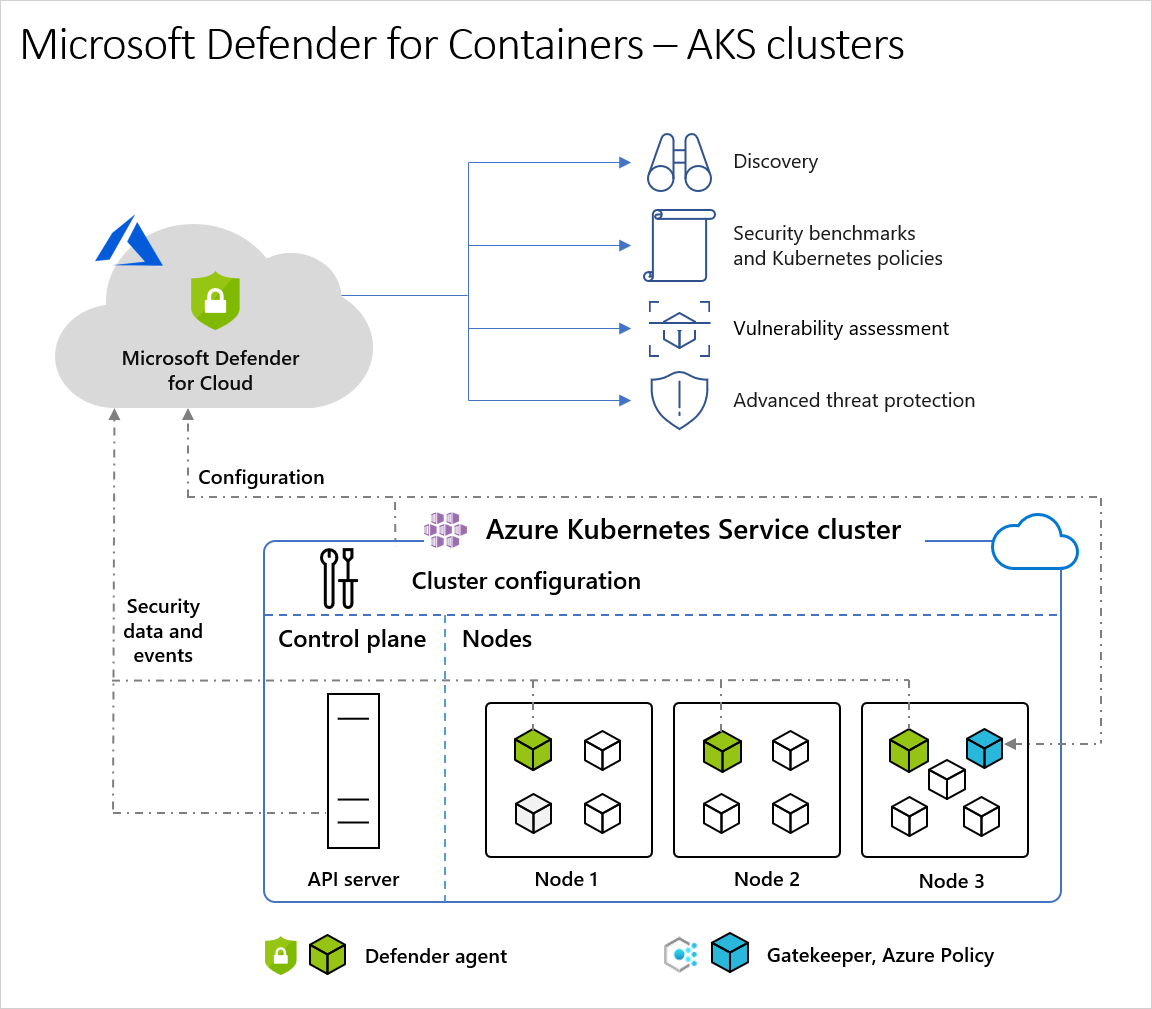
Four capabilities, two delivery models. Image vulnerability assessment, Kubernetes posture and control plane threat detection are agentless. Runtime threat detection needs the sensor.
- Defender sensor. A DaemonSet in
kube-systembuilt on eBPF. Three pods:microsoft-defender-collector-ds-*(DaemonSet, needsSYS_ADMIN,SYS_RESOURCE,SYS_PTRACE, 296Mi and 360m),microsoft-defender-collector-misc-*(Deployment, cluster-level inventory) andmicrosoft-defender-publisher-ds-*(DaemonSet, the only one with egress, HTTPS 443). On AKS it is a security profile managed by the AKS resource provider; on EKS, GKE and Arc it is an Arc extension. Limits are fixed. It registers with a Log Analytics workspace as a pipeline but audit data is not stored there. It gives you process, network and DNS detections, binary drift, runtime anti-malware and the admission controller for security gating. - Azure Policy for Kubernetes. Gatekeeper v3 as an admission webhook, one pod, AKS add-on or Arc extension. This is what produces the data plane hardening recommendations and lets you deny privileged containers.
- Audit logs. AKS: native, nothing to do, works on private clusters. EKS: CloudWatch into an SQS queue, Kinesis Firehose and S3 bucket that Defender for Cloud creates in your account. GKE: Cloud Logging into Pub/Sub at project level.
- Agentless discovery. On AKS, Defender for Cloud creates the identity
CloudPosture/securityOperator/DefenderForContainersSecurityOperator, gives it Kubernetes Agentless Operator at subscription scope, then uses AKS Trusted Access to create aClusterRoleBindingtoaks:trustedaccessrole:defender-containers:microsoft-defender-operator. On EKS it is theMDCContainersAgentlessDiscoveryK8sRolerole; on GKE themdc-containers-k8s-operatorservice account. Snapshots stay in the cluster's region. - Registry scanning. ACR via the Defender Container Registries role over Azure infrastructure, no network change even for private registries. ECR, GAR and GCR via the connector roles. New or imported images are scanned within hours; a daily rescan covers images pushed or pulled in the last 30 days or currently running in a monitored cluster. Older images drop out of rescans until pulled again. Findings come from Defender Vulnerability Management. Runtime scanning of running containers needs Registry access plus K8s API access or the sensor, or Agentless scanning for machines for registry-agnostic coverage.
Key Vault, App Service, Resource Manager, APIs, databases, AI
Key Vault watches vault access patterns and raises alerts with the object ID, UPN or caller IP. Fields vary with the caller: an app shows no UPN, an outside-Azure caller shows no object ID. Azure VMs carry Microsoft IPs, so an alert with a Microsoft IP is not automatically internal. Response is the same every time: identify the caller, lock the firewall or trim the access policy, list the secrets touched, rotate them.
App Service inspects requests at the Azure front gateways before they reach the sandbox, plus the sandbox VM, its management interface and App Service internal logs. Because it sees many tenants it can spot a slow crawl across hosts that a single app cannot. Alerts cover MITRE pre-attack through command and control: scanners, known-bad IPs on FTP, high-privilege commands, Linux commands on a Windows app, fileless and mining behaviour. Dangling DNS detection fires when an app is decommissioned and its custom domain still resolves to it; it does not scan the registrar for existing stale records.
Resource Manager watches control plane operations whatever the client: portal, REST, CLI, PowerShell. Detections include operations from malicious IPs, disabling antimalware, suspicious scripts in VM extensions, Microburst and PowerZure toolkits, and lateral movement from management plane to data plane.
APIs ingests API Management traffic and runs anomaly and rule detections for the OWASP API Top 10, exfiltration, volumetric attacks and odd parameters. It also inventories endpoints with last-called date, 30-day inactivity, unauthenticated (no subscription key, JWT, client cert or Entra token policy executed) and data classification of bodies. Only APIs you onboard are protected. After onboarding, allow about 50 minutes for recommendations and 40 minutes for the API security dashboard.
Databases beyond SQL are two plans under Defender for Databases. Open-Source Relational Databases covers PostgreSQL and MySQL Flexible Server and Amazon RDS (Aurora, PostgreSQL, MySQL, MariaDB, preview); it alerts on brute force with success and failure split, and on access from breached hosts talking to mining C2. Cosmos DB covers the NoSQL API only, detects SQL-injection variants that work against Cosmos, Tor and known-bad IPs, and key-listing patterns that look like lateral movement. Neither touches your data or performance.
AI Services wraps Azure OpenAI and Model Inference calls with Prompt Shields and threat intelligence to alert on jailbreak, data leakage, poisoning and credential theft. Text tokens only. Alerts flow to Defender XDR. Suspicious prompt evidence is an opt-in toggle that puts redacted prompt and response fragments in the alert; without it, analysis still runs but the content is masked. Data security for AI interactions hands prompts to Purview and needs a Purview licence.
Configure
- Portal
- Azure CLI
- REST / ARM
All plans, the common path:
- Microsoft Defender for Cloud > Environment settings > pick the subscription (or the AWS or GCP connector).
- On Defender plans, toggle the row On. Enable all does every plan at once, which also enables Storage malware scanning at the default cap, so do not use it blind.
- Save. Some plans have a Settings link for components, below.
Storage:
- Toggle Storage On. On a classic subscription click New pricing plan available and confirm.
- Settings lets you turn off On-upload malware scanning or Sensitive data threat detection. Edit configuration sets the per-account monthly GB cap (default 10,000 GB, untick for unlimited), whether results are written as blob index tags, and soft delete of malicious blobs.

- Per account: storage account > Security + networking > Microsoft Defender for Cloud. On an unprotected account the pane shows the two feature checkboxes and Enable on storage account. On an account already covered by the subscription, Settings > Override Defender for Storage subscription-level settings On, then set malware scanning, the cap, exclusion filters (prefix, suffix, size, up to 24 values ORed), index tags, soft delete, an Event Grid custom topic and a Log Analytics workspace. Set the plan Off here with override On to exclude the account.

Containers:
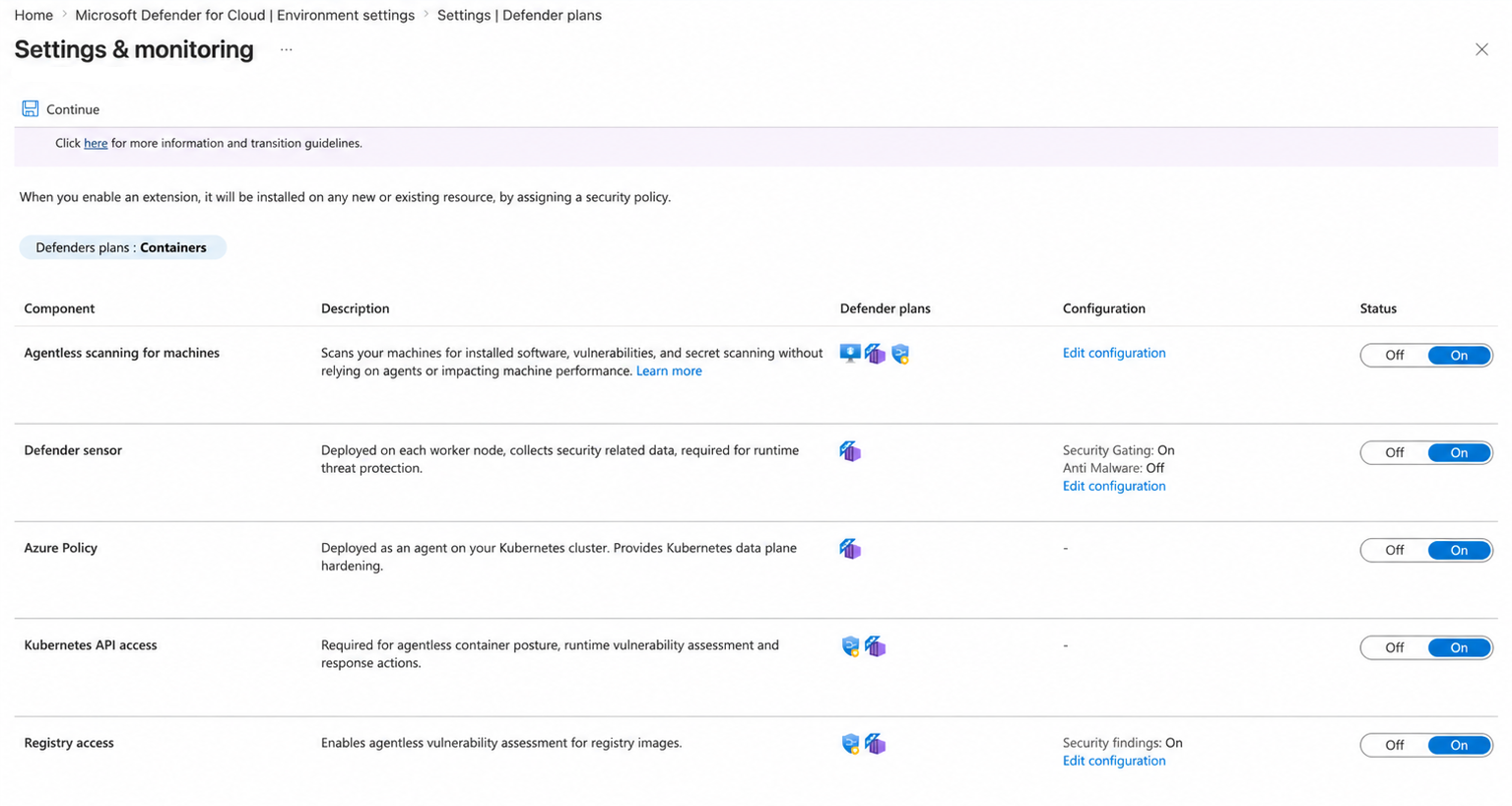
- Toggle Containers On, then Settings.
- Azure subscription components: Agentless scanning for machines (node OS and secrets, with exclusion tags), Defender sensor (with Enable Defender Security Gating and Enable Defender Runtime Anti Malware under it), Azure Policy, Kubernetes API access, Registry access with Security findings. Security findings cannot be set through Azure Policy; it must be toggled here.
- AWS or GCP connector components: Agentless threat protection (audit logs, with a retention period on AWS), Auto provision Defender's sensor for Azure Arc, Auto provision Azure Policy extension for Azure Arc, Kubernetes API access, Registry access. Save, then Configure access and redeploy the CloudFormation stack or rerun the GCP script, then Update. Sensor install after discovery can take several hours.
Key Vault, App Service, Resource Manager, databases: toggle the row On, Save. No settings. Open-source relational databases and Cosmos DB can also be enabled per resource from the resource's Microsoft Defender for Cloud blade.
APIs:
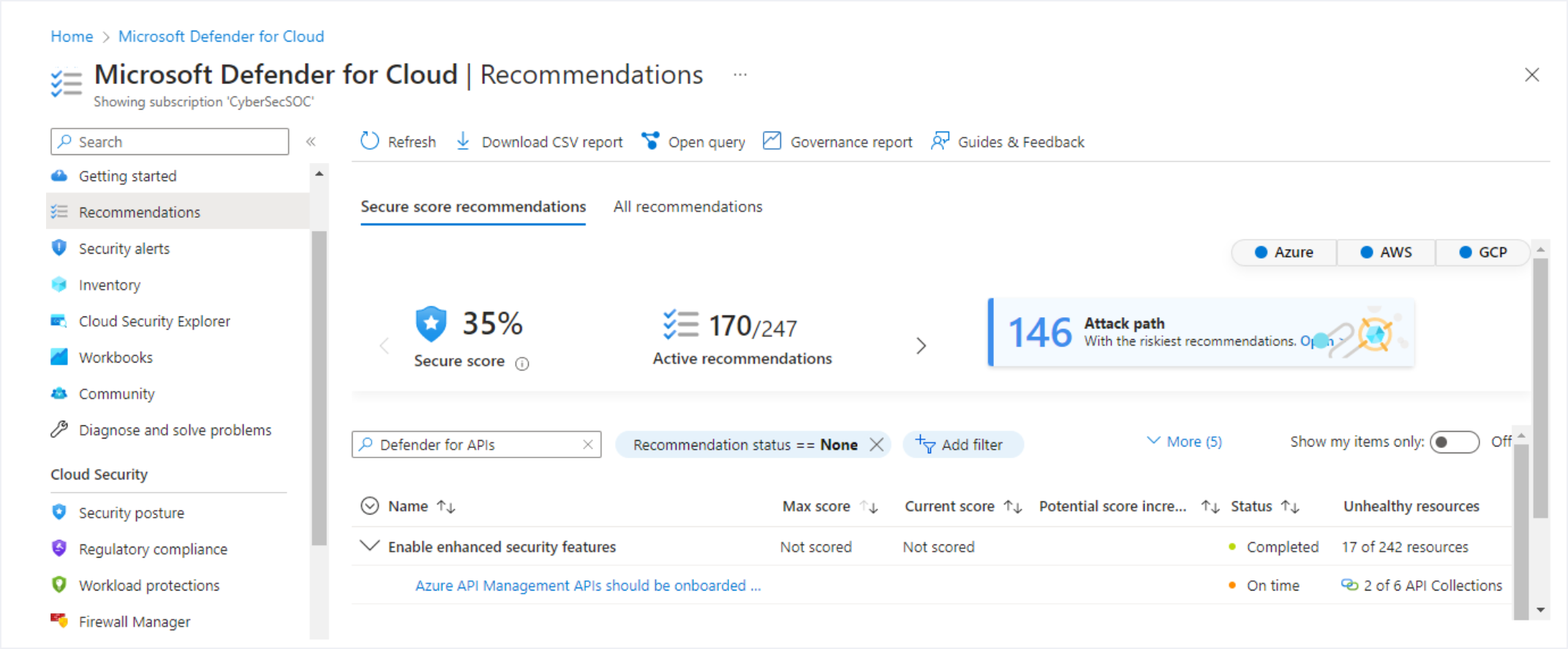
- Toggle APIs On. Under Pricing click Details and pick the plan that matches 30-day API Management request volume (APIM > Metrics > Requests, Sum, last 30 days, summed across instances). Save.
- Recommendations > search Defender for APIs > Azure API Management APIs should be onboarded to Defender for APIs > select Unhealthy resources > Fix > Fix resources.
- Track in Workload protections > API security.
AI Services: toggle AI services On. Settings > Enable user prompt evidence On for prompt snippets in alerts; Enable data security for AI interactions only if Purview is licensed; AI model security for model scanning in Azure ML registries.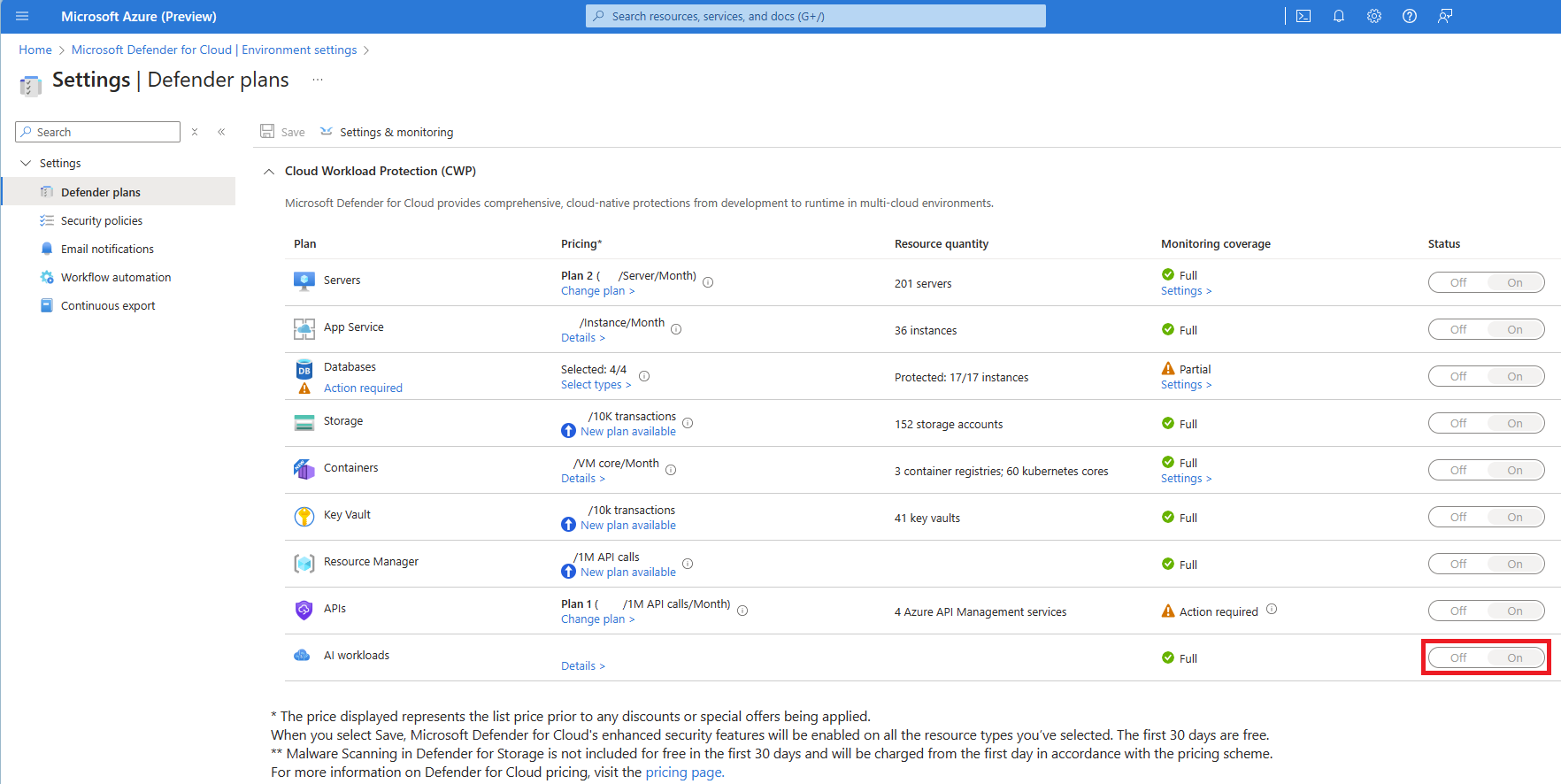
# Tested on: TODO
# Learn documents `az security pricing create --name --tier [--subplan] [--extensions]`.
# Plan names and extension names below come from the Pricings REST samples and the
# Storage PowerShell page. Learn shows no CLI example per plan; verify each in the dev tenant.

az security pricing list -o table

# Storage, new plan, malware scanning capped at 5000 GB per account per month, SIT sampling on
az security pricing create -n StorageAccounts --tier standard --subplan DefenderForStorageV2 \
  --extensions name=OnUploadMalwareScanning isEnabled=True additionalExtensionProperties='{"CapGBPerMonthPerStorageAccount":"5000"}' \
  --extensions name=SensitiveDataDiscovery isEnabled=True

# Containers with every component
az security pricing create -n Containers --tier standard \
  --extensions name=ContainerSensor isEnabled=True \
  --extensions name=AgentlessDiscoveryForKubernetes isEnabled=True \
  --extensions name=ContainerRegistriesVulnerabilityAssessments isEnabled=True \
  --extensions name=AgentlessVmScanning isEnabled=True additionalExtensionProperties='{"ExclusionTags":"[]"}'

az security pricing create -n KeyVaults --tier standard --subplan PerKeyVault
az security pricing create -n AppServices --tier standard
az security pricing create -n Api --tier standard --subplan P1          # P1 default; pick P2 to P5 by traffic
az security pricing create -n Arm --tier standard --subplan PerSubscription
az security pricing create -n OpenSourceRelationalDatabases --tier standard
# Cosmos DB: TODO pricing name not confirmed on Learn; check `az security pricing list`
az security pricing create -n AI --tier standard \
  --extensions name=AIPromptEvidence isEnabled=True

# Turn a plan off
az security pricing create -n Arm --tier free
Storage per account has no CLI on Learn; it is PowerShell or REST:
# From Learn. Override is required or the subscription settings win.
Update-AzSecurityDefenderForStorage `
  -ResourceId "/subscriptions/<SubscriptionId>/resourcegroups/<ResourceGroupName>/providers/Microsoft.Storage/storageAccounts/<StorageAccountName>" `
  -IsEnabled -OverrideSubscriptionLevelSetting -OnUploadIsEnabled -OnUploadCapGbPerMonth 7000 -SensitiveDataDiscoveryIsEnabled

Get-AzSecurityDefenderForStorage -ResourceId "<same resource id>"
Get-AzSecurityPricing | Select-Object Name, PricingTier, SubPlan
Subscription-level plan. Same route for every plan name; body differs.
PUT https://management.azure.com/subscriptions/{subscriptionId}/providers/Microsoft.Security/pricings/StorageAccounts?api-version=2024-01-01
{
  "properties": {
    "pricingTier": "Standard",
    "subPlan": "DefenderForStorageV2",
    "extensions": [
      {
        "name": "OnUploadMalwareScanning",
        "isEnabled": "True",
        "additionalExtensionProperties": {
          "CapGBPerMonthPerStorageAccount": "10000",
          "BlobScanResultsOptions": "BlobIndexTags",
          "AutomatedResponse": "BlobSoftDelete"
        }
      },
      { "name": "SensitiveDataDiscovery", "isEnabled": "True" }
    ]
  }
}
CapGBPerMonthPerStorageAccount of -1 means unlimited. BlobScanResultsOptions of None stops index tag writes. To disable, send pricingTier Free with no subPlan or extensions. Containers takes pricingTier Standard and the four extension names from the CLI tab; KeyVaults, Arm and Api take subPlan PerKeyVault, PerSubscription and P1. Add "enforce": "True" at subscription scope to block descendant overrides.
Storage account override:
PUT https://management.azure.com/subscriptions/{subscriptionId}/resourceGroups/{resourceGroupName}/providers/Microsoft.Storage/storageAccounts/{accountName}/providers/Microsoft.Security/DefenderForStorageSettings/current?api-version=2022-12-01-preview
{
  "properties": {
    "isEnabled": true,
    "malwareScanning": {
      "onUpload": { "isEnabled": true, "capGBPerMonth": 10000 },
      "scanResultsEventGridTopicResourceId": "/subscriptions/{subscriptionId}/resourceGroups/{resourceGroup}/providers/Microsoft.EventGrid/topics/{EventGridTopicName}"
    },
    "sensitiveDataDiscovery": { "isEnabled": true },
    "overrideSubscriptionLevelSettings": true
  }
}
Exclude one account: "isEnabled": false with "overrideSubscriptionLevelSettings": true. Log Analytics destination goes on a child diagnostic setting:
PUT https://management.azure.com/subscriptions/{subscriptionId}/resourceGroups/{resourceGroup}/providers/Microsoft.Storage/storageAccounts/{accountName}/providers/Microsoft.Security/DefenderForStorageSettings/current/providers/Microsoft.Insights/diagnosticSettings/service?api-version=2021-05-01-preview
{
  "properties": {
    "workspaceId": "/subscriptions/{subscriptionId}/resourcegroups/{resourceGroup}/providers/microsoft.operationalinsights/workspaces/{workspaceName}",
    "logs": [ { "category": "ScanResults", "enabled": true, "retentionPolicy": { "enabled": true, "days": 180 } } ]
  }
}
REST can point the Event Grid topic or workspace at another subscription in the same tenant; the portal lists only the account's own subscription. Containers can also be set per resource: PUT .../providers/Microsoft.ContainerService/managedClusters/{cluster}/providers/Microsoft.Security/pricings/Containers?api-version=2024-01-01 or on a Microsoft.ContainerRegistry/registries/{registry} scope with the extension list.
Verify
- Plan state:
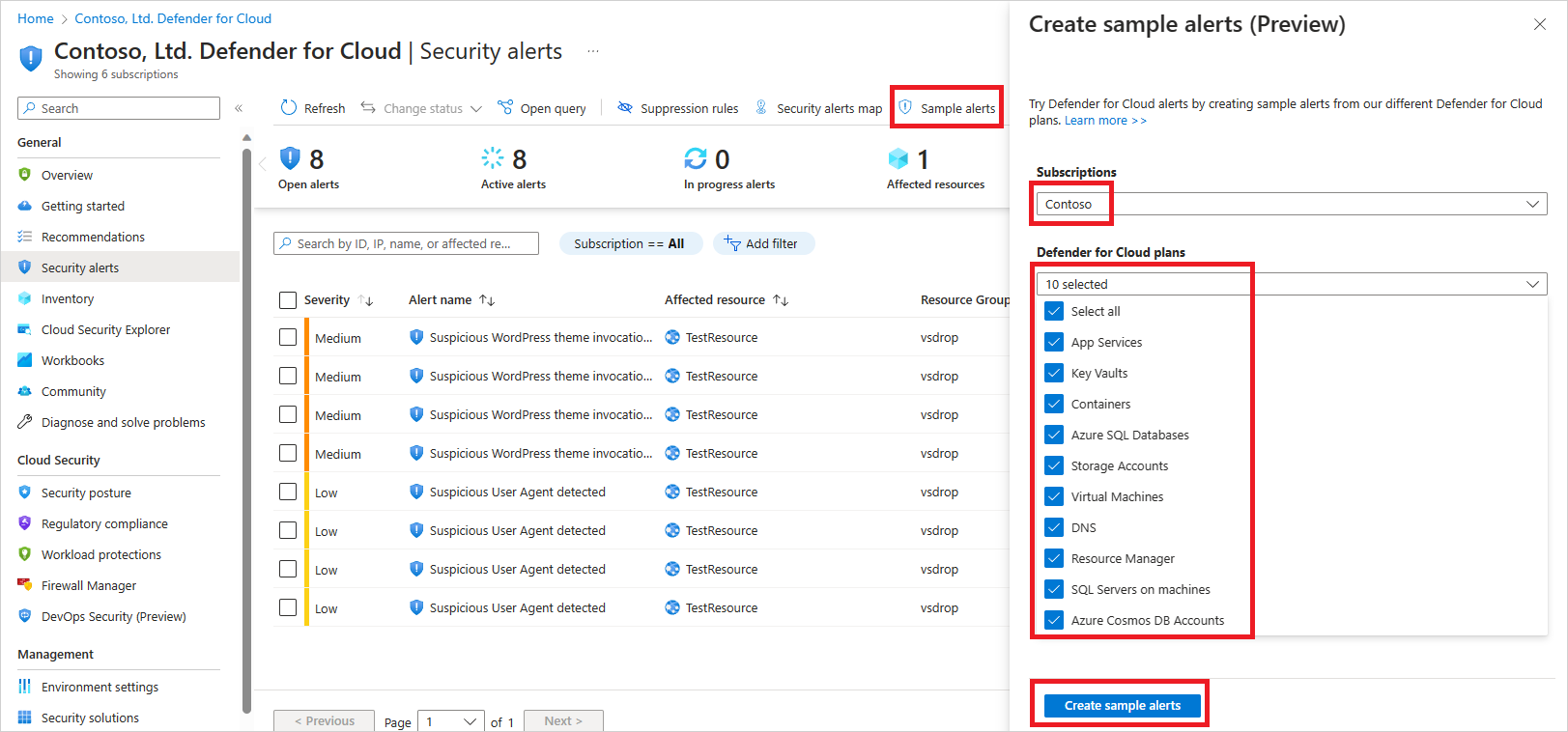
az security pricing list -o table, or the Coverage workbook under Workbooks. For Storage the Storage Center view shows protected, partially protected and unprotected accounts. - Sample alerts: Security alerts > Sample alerts > subscription > pick plans > Create sample alerts. They land in a few minutes and also flow to Sentinel, email and automations, which makes this the fastest end-to-end test of the alert pipeline. The resources in them are fake.
- Storage, activity monitoring: upload any non-sensitive file to a container, Generate SAS, open the SAS URL in Tor Browser. Learn documents this as the Storage ATP validation. The resources Defender for Storage creates are visible too: an Event Grid system topic in the account's resource group and a
StorageDataScannerresource instance in the account's networking rules. - Storage, malware scanning: Learn's alert validation page does not document an EICAR upload for Storage; it points to the Ninja training lab on GitHub for a hands-on scan test. TODO: run an EICAR upload in the dev tenant and record the index tag and alert name. After any upload, check the blob's index tags for
Scan resultandScan time (UTC), and in the workspace:
StorageMalwareScanningResults
| where TimeGenerated > ago(1d)
| summarize count() by ScanResultType
TODO: confirm the column name for the result in the dev tenant; Learn names the table, not its schema.
- Containers:
kubectl get pods -n kube-system | grep microsoft-defendershould list collector-ds on every node, one collector-misc and publisher-ds on every node. The Microsoft Defender for Cloud Attack Simulation tool on GitHub is the documented alert test; run it on a test cluster, alerts arrive between near real time and an hour. Image findings appear as container recommendations within hours of a push. - Key Vault: open the vault in Tor Browser through the portal, browse Secrets, sign out. An alert follows after some time.
- App Service: browse
https://<app>.azurewebsites.net/This_Will_Generate_ASC_Alerton an existing app. Learn quotes both about 1.5 hours and 2 to 4 hours for the alert. - APIs: Workload protections > API security shows onboarded collections; endpoints with no traffic since onboarding show Awaiting data.
- Resource Manager, databases, AI: sample alerts only on Learn.
Troubleshoot
| Symptom | Likely cause | Fix |
|---|---|---|
| New storage account not protected | Subscription-level protection starts up to 24 hours after account creation | Wait, or enable on the account directly |
Malware scan tag says Not scanned or scanning stopped | Monthly cap hit (alert at 75 percent and at 100 percent), or throughput above 50 GB per minute | Raise the cap, use -1 for unlimited, add prefix or suffix filters for log and temp paths; cap changes take up to an hour |
| Malware scanning silently stopped | Someone deleted the Event Grid system topic or StorageDataScanner, or Microsoft.EventGrid not registered | Disable and re-enable malware scanning to recreate the resources; register the provider |
Scan result Error or Scan timed out | Blob over 50 GB, nested archive beyond the 30 minute to 3 hour window, metadata updated right after upload, append or page blob, NFS 3.0, client-side encryption | Fix the upload pattern; set metadata in the write options or delay it |
| Per-account setting ignored | overrideSubscriptionLevelSettings not set | Resend with override true, or tick the override toggle in the portal |
| Event Grid topic not accepted | Topic uses private endpoint or wrong region | Topic must allow public network access and sit in the account's region |
| No Defender sensor pods on EKS or GKE | Cluster not Arc-connected, auto provisioning off, or still inside the several-hour install window | Check Arc, the connector Settings, and wait |
| Containers inventory empty on private EKS or GKE | API server blocks the Defender IP ranges, or role lacks eks:UpdateClusterConfig / container.clusters.update | Allow 172.212.245.192/28 and 48.209.1.192/28 or grant the permission so Defender adds them |
| Image missing from vulnerability results | Not pushed or pulled in 30 days and not running in a monitored cluster | Pull it once to re-enter the daily rescan |
| Runtime VA empty on some nodes | Windows nodes, ephemeral OS disks, autoscaled nodes down at scan time | Known gaps; use registry findings |
| Dangling DNS alert never fires | Custom domain not pointed straight at App Service, or no traffic seen since enablement | Expected per Learn |
| APIs plan on, no findings | APIs not onboarded through the recommendation | Fix Azure API Management APIs should be onboarded; wait 40 to 50 minutes |
| API bill higher than expected | Left on Plan 1 with more than one million calls a month | Re-pick the plan from Pricing > Details |
| Entra users missing in Purview Activity Explorer for AI | Purview service principal 9ec59623-ce40-4dc8-a635-ed0275b5d58a absent in tenant | New-AzADServicePrincipal -ApplicationId that app ID |
| Key Vault alert shows a Microsoft IP | Caller was an Azure VM | Still investigate; Microsoft IP does not mean Microsoft |
Gotchas and limits
- Storage malware scanning bills from day one and is included when you click Enable all or toggle Storage On. Set the cap before you enable on a high-ingest subscription, not after. Lifecycle management transactions also count toward the per-transaction overage on busy accounts.
- Each commit is a scan.
PutBlockandAppendFiledo not trigger,PutBlockListandFlushWithClosedo, so chunked uploaders can be scanned once per flush. Chunked fragments can also defeat detection: headers look corrupt and tails look clean. - Defender for Storage has less context than an endpoint: no Mark of the Web, no file path, no behaviour. Expect more false negatives than MDE on the same sample. Submit misses to the sample submission portal with Microsoft Defender for Storage as the source.
- Index tags on ADLS Gen2 accounts need the Blob Tags for Hierarchical Namespace opt-in, still preview. Anyone with tag write rights can flip a tag, so ABAC rules that rely on
Scan resultare a convenience, not a control. - Containers alerts cover only activity after the plan was enabled. Helm-deployed components can lag up to 30 days behind the AKS add-on. Sensor resource limits cannot be changed, so budget 296Mi plus 200Mi per node.
- Enabling agentless discovery on AKS creates a managed identity, a role assignment and a Trusted Access binding in your subscription. Policy that denies role assignments or trusted access bindings will break discovery quietly.
- APIs is subscription billing on total traffic, not per APIM instance, and the counter resets monthly. Overage is computed against the plan entitlement.
- App Service billing is per compute instance across all plans in the subscription, so a Premium plan scaled to ten instances costs ten times a single instance.
- Open-source relational database protection is PaaS only; PostgreSQL on an Arc server falls under Defender for Servers, not this plan. Cosmos DB covers NoSQL only; Mongo, Cassandra, Gremlin and Table APIs get nothing.
- AI Services scans text tokens only, commercial cloud only, no AWS. The Purview toggle needs a Purview licence and does not include Foundry agents.
- Microsoft announced a Defender Workload Unit billing model in October 2026. The Learn pages here still describe per-plan billing. TODO: re-check the Containers and Storage units once the pricing pages change.
Further reading
- AKS Runtime Security: Binary Drift, Anti-Malware & Gated Deployment with Defender for Cloud, Jerrad Dahlager, March 2026. Layers the three sensor-based controls on a real AKS cluster and adds Sentinel analytics and a workbook for them, which Learn does not.
- Deploy Microsoft Defender for Storage with Malware Scanning and Sensitive Data Threat Detection, AzureTracks, July 2026. Pilot-first rollout with change windows, exception handling and a
SecurityAlertKQL check for storage alerts. - Defending Container Runtime from Malware with Microsoft Defender for Containers, Microsoft Defender for Cloud blog, March 2026. Explains why runtime anti-malware in the sensor differs from a node AV agent.
- Closing the loop on container security: From code to runtime in the AI era, Microsoft Defender for Cloud blog, June 2026. Ties registry scanning, gating and runtime detection into one workflow with the XDR incident view.
Dates for the two Tech Community posts are the page timestamps; the posts do not print a publish date.
My notes
TODO: Sohail's notes after verification.
Changelog
| Date | Change | Source |
|---|---|---|
| 2026-10-22 | Drafted from Learn, with Learn images and diagrams | [1] |