Antivirus and tamper protection
What it is
Defender Antivirus is the engine on the box. Real-time protection, behavior monitoring, cloud lookups, network protection, PUA, scans, and exclusions all live there. MDE adds the sensor, portal, and reporting. ASR rules, controlled folder access, and indicators also run in the engine, so its running mode decides whether most of this folder works at all.
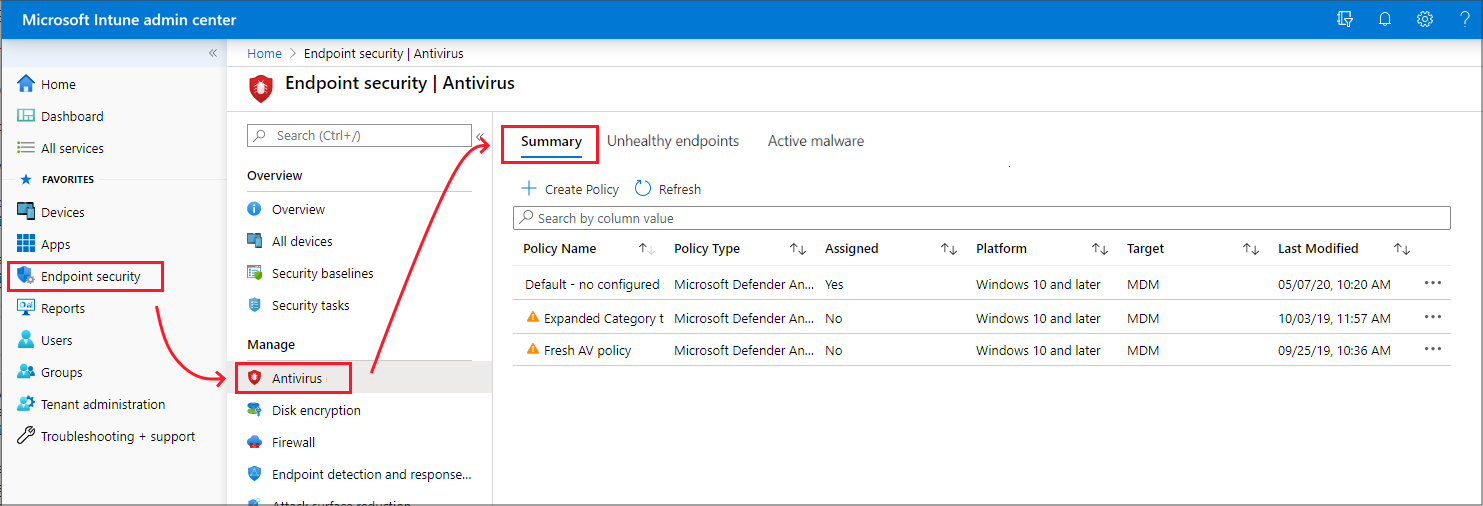
Intune manages it under Endpoint security > Antivirus. Four Windows profiles: Microsoft Defender Antivirus (core settings), Microsoft Defender Antivirus exclusions (paths, extensions, processes only), Windows Security experience (the user-facing app plus tamper protection), and Defender Update controls (platform, engine, signature channels). The Defender portal shows the same templates under Endpoint security policies when security settings management is on.
Tamper protection is the lock. With it on, a local admin, a script, or malware cannot turn off real-time or cloud protection, stop signature updates, or add exclusions. Changes look like they worked and are ignored. Microsoft is renaming the management setting to controlled configuration, a superset where Intune becomes the only authority and unconfigured settings drop to secure defaults.
Licensing and prerequisites
- Defender AV ships with Windows. The Intune profiles need Intune Plan 1. Cloud protection, block at first sight, and sample submission: MDE P1 or P2.
- Tamper protection: the cloud protection page lists it under P2, the Intune and overview pages say P1, P2, and Defender for Business. Treat P1 as the floor and confirm. EDR in block mode is P2 only.
- Tamper protection via Intune: Windows 10 1709 or later, platform 4.18.1906.3, engine 1.1.15500.x, security intelligence 1.287.60.0 or later. Device must be onboarded to MDE first or it reports Not applicable. Intune and MDE in the same Entra tenant. Co-managed devices not supported.
- Tamper protection via the portal toggle: platform 4.18.2010.7, engine 1.1.17600.5 or later, cloud protection on. From platform 4.18.2111.5, turning on tamper protection also turns on cloud protection.
- Tamper-protected exclusions: platform 4.18.2211.5 or later, DisableLocalAdminMerge true, Intune-only or ConfigMgr-only management, exclusions pushed from that tool.
- Roles: Intune Endpoint Security Manager. Defender portal needs Core security settings (manage).
- macOS: macOS 11 or later, MDE 101.70.19 or later. Tamper exclusions need 101.98.71.
How it works
Running modes
The state depends on the OS, MDE onboarding, and whether a non-Microsoft AV is registered with Windows Security Center.
| Primary AV | Onboarded to MDE | Defender state |
|---|---|---|
| Defender AV | Yes or No | Active |
| Non-Microsoft | Yes | Passive |
| Non-Microsoft | No | Disabled (client auto, server manual) |
Active: scans, remediates, reports. Passive: scans and reports but does not remediate. Real-time blocking, cloud protection, network protection, ASR, controlled folder access, PUA, and scan schedules are off. Signatures still arrive on the Windows Update cadence. EDR response actions always work. EDR in block mode on top of passive lets the engine remediate what the EDR sensor finds post-breach. It honours AV exclusions, not indicators.
AMRunningMode in Get-MpComputerStatus reports Normal, Passive, or EDR Block Mode. Passive on clients needs wscsvc running. On servers it is the ForceDefenderPassiveMode DWORD under HKLM\SOFTWARE\Policies\Microsoft\Windows Advanced Threat Protection, set before onboarding. With tamper protection on (platform 4.18.2208.0 and later) a server can go passive to active but not back.
Cloud protection
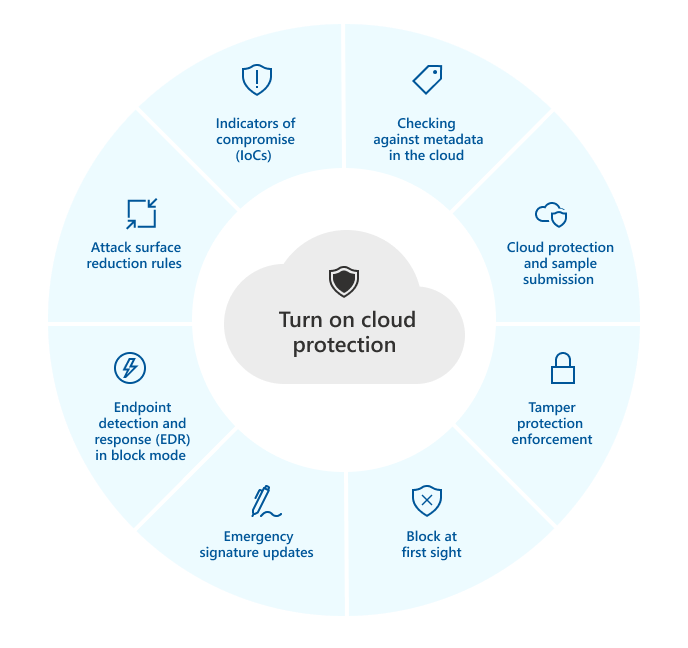
MAPS sends file metadata to Microsoft and gets a verdict during the block window. On by default. Block at first sight, tamper protection, EDR in block mode, emergency signature pushes, and three ASR rules depend on it. Cloud block level sets how aggressive the verdict is.
| Intune and portal | PowerShell CloudBlockLevel | Meaning |
|---|---|---|
| Not configured | Default | Normal blocking |
| High | High | More unknowns blocked, some perf cost |
| High plus | HighPlus | Extra checks, more perf cost |
| Zero tolerance | ZeroTolerance | Blocks all unknown executables |
GPO also has Moderate. Cloud extended timeout adds up to 50 seconds to the default 10 second hold.
Exclusions
Paths, extensions, processes. A process exclusion skips files opened by that process, not the binary itself, and applies to real-time protection only. Contextual exclusions limit a path to one trigger, for example C:\Example\*.test\:{ScanTrigger:OnDemand}. Intune merges exclusions from every assigned Antivirus and exclusions policy into one superset. On startup, Intune and ConfigMgr exclusions overwrite conflicting GPO and PowerShell entries.
Local admin exclusions merge with policy unless DisableLocalAdminMerge is true. HideExclusionsFromLocalAdmins hides the list from Get-MpPreference and the registry and implies HideExclusionsFromLocalUsers.
Tamper protection
Protected on Windows: virus and threat protection, real-time protection, behavior monitoring, IOAV, cloud protection, security intelligence updates, automatic remediation, Windows Security notifications, archive scanning, exclusions. Registry edits to Defender settings are blocked. Since signature 1.383.1159.0, Allow Scanning Network Files is no longer locked. Viewing settings still works. Third-party AV can still register with Windows Security. The service stays protected in passive mode.
Precedence:
- An Intune or ConfigMgr policy that manages tamper protection beats the tenant-wide portal toggle.
- Policy or portal beats the Windows Security app toggle.
- If Intune manages it, flipping the portal toggle does not change the device. The portal setting only restricts protected settings to secure defaults.
- Controlled configuration beats tamper protection if a device gets both.
GPO changes to protected settings are ignored. Event ID 5013 logs a blocked change. Attempts show as TamperingAttempt in DeviceEvents and can raise the alerts "Tamper Protection bypass" and "Tampering with the Microsoft Defender for Endpoint sensor".
Exclusions become tamper-protected only when all four prerequisites above are met. The device reports it in HKLM\SOFTWARE\Microsoft\Windows Defender\Features\TPExclusions (1 protected, 0 not). ManagedDefenderProductType 6 is Intune only. 7 with SenseCM\EnrollmentStatus 4 is ConfigMgr, 7 with 3 is co-managed and not eligible. Read only. Editing them does nothing. You do not turn tamper protection off to push new exclusions from Intune.
macOS
Levels: disabled, audit (default after install, reports only), block. Block stops uninstalling the app, killing wdavdaemon, and touching /Applications/Microsoft Defender.app/, /usr/local/bin/mdatp, /Library/LaunchDaemons/com.microsoft.fresno.plist, and /Library/Managed Preferences/. Precedence: MDM profile (tamperProtection/enforcementLevel) beats mdatp config, which beats the portal toggle (on = block, off = audit if licensed). A local admin can lower a local level, not an MDM one. Jamf and Intune helpers are excluded by default. Other trusted processes go in the MDM profile by path, teamId, signingId, and args. Enable SIP and grant Full Disk Access via MDM so a local admin cannot revoke it.

Configure
- Portal
- PowerShell
- Graph API
- Intune admin center > Endpoint security > Antivirus > Create policy. Platform Windows, profile Microsoft Defender Antivirus. Co-managed devices need the Endpoint Protection workload on Intune.

- Core settings. Names are the CSP names Learn documents; settings catalog labels are close but not identical. Everything else stays Not configured.
| Setting | Recommended | Why |
|---|---|---|
| Allow cloud protection | Allowed | Tamper protection, BAFS, EDR block mode, and several ASR rules need it. |
| Submit samples consent | Send safe samples automatically | Never send disables block at first sight. |
| Cloud block level | High | Default is fine for most. Zero tolerance blocks every unknown executable. |
| Cloud extended timeout | Up to 50 | Longer hold for a verdict. |
| Allow real-time monitoring | Allowed | Tamper-protected anyway. |
| Allow behavior monitoring | Allowed | Network protection needs it on clients. |
| Allow IOAV protection | Allowed | Downloads and attachments. |
| Enable network protection | Audit, then Enabled (block) | Block is required for URL and IP indicators and web content filtering. |
| PUA protection | Audit, then Block | Audit shows only in the Event Log. |
| Allow archive scanning | Allowed | Tamper-protected. |
| Signature update interval | Non-zero | 0 disables checks. |
| Disable local admin merge | True | Required for tamper-protected exclusions. Drops local exclusions. |
| Scan parameter and schedule | Quick scan, daily | Ignored in passive mode. |
-
Exclusions in the same profile or a separate Microsoft Defender Antivirus exclusions profile. They merge. CSV import headers:
ExcludedExtensions,ExcludedPaths,ExcludedProcesses. -
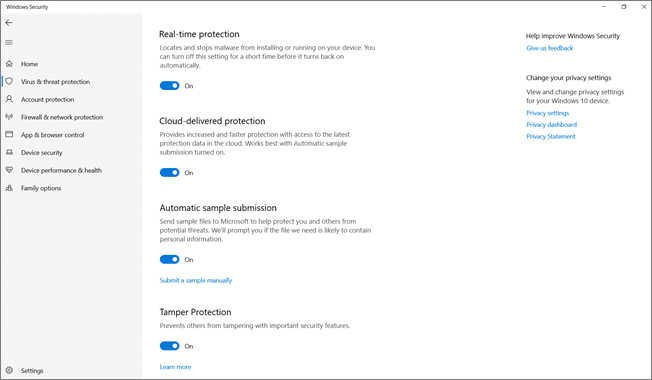
Tamper protection: new policy, platform Windows, profile Windows Security experience. Defender section > Tamper protection (device) > On. Learn's example assigns to All users and All devices, Include. The newer template carries Controlled Configuration (Device): Not configured, Off, Tamper Protection (On), Controlled Configuration (On).
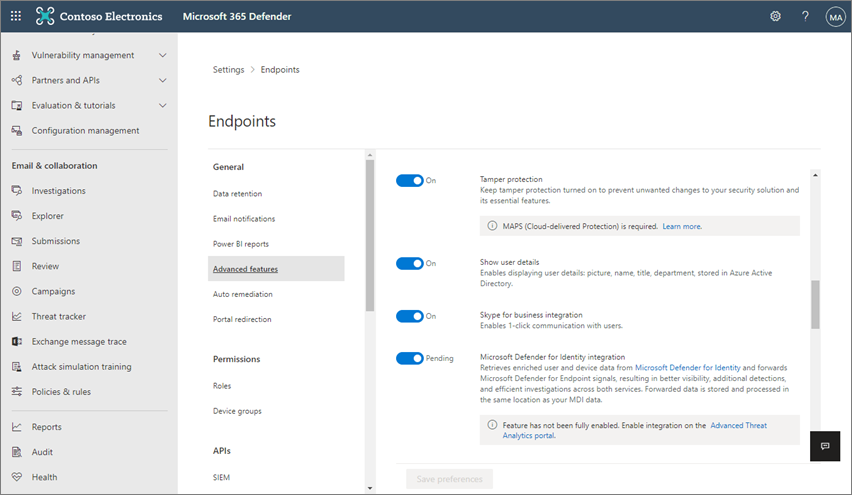
- Tenant fallback: Defender portal > Settings > Endpoints > General > Advanced features > Tamper protection (
security.microsoft.com/preferences2/endpoints). Policy beats this on any device that has one. Enable EDR in block mode is on the same page.
-
macOS: platform macOS, profile Antivirus for AV settings. Tamper protection: Settings catalog > Microsoft Defender > Tamper protection > Enforcement level, or a custom profile with payload identifier
com.microsoft.wdav. -
Assign to device groups. Windows Server uses the Windows platform. ConfigMgr tenant attach uses Windows (ConfigMgr) with the preview profiles.
# Tested on: TODO
# Local Set-MpPreference is overwritten by Intune or GPO on next startup. Tamper-protected
# settings are ignored outright. Lab, standalone, or troubleshooting mode only.

Get-MpComputerStatus | Select-Object AMRunningMode, AMServiceEnabled, AMProductVersion, AMEngineVersion,
  AntivirusSignatureVersion, RealTimeProtectionEnabled, BehaviorMonitorEnabled, IsTamperProtected

Get-MpPreference | Select-Object MAPSReporting, SubmitSamplesConsent, CloudBlockLevel, CloudExtendedTimeout,
  EnableNetworkProtection, PUAProtection, DisableLocalAdminMerge, SignatureUpdateInterval

# Cloud. MAPSReporting 2 = Advanced. SubmitSamplesConsent 1 = safe samples, 3 = all.
Set-MpPreference -MAPSReporting Advanced
Set-MpPreference -SubmitSamplesConsent SendSafeSamples
Set-MpPreference -CloudBlockLevel High        # Default | High | HighPlus | ZeroTolerance

# Network protection. Disabled | Enabled | AuditMode. Servers need the opt-in switch.
Set-MpPreference -EnableNetworkProtection AuditMode
Set-MpPreference -AllowNetworkProtectionOnWinServer $true -AllowDatagramProcessingOnWinServer $false -EnableNetworkProtection Enabled

# PUA. Disabled | Enabled | AuditMode
Set-MpPreference -PUAProtection Enabled

# Exclusions. Add appends, Set replaces the whole list, Remove deletes one.
Add-MpPreference -ExclusionPath "C:\Data\LOBApp"
Add-MpPreference -ExclusionExtension ".test"
Add-MpPreference -ExclusionProcess "C:\internal\test.exe"
Remove-MpPreference -ExclusionPath "C:\Data\LOBApp"

# Is a path excluded? Exit 0 yes, 1 no. Platform 4.18.2111-5.0 or later.
& "$env:ProgramFiles\Windows Defender\MpCmdRun.exe" -CheckExclusion -Path C:\Data\Test

Update-MpSignature

# Only works while the device is in troubleshooting mode
Set-MpPreference -DisableTamperProtection $true

# Exclusion protection state. Read only.
Get-ItemProperty 'HKLM:\SOFTWARE\Microsoft\Windows Defender\Features' -Name TPExclusions
Get-ItemProperty 'HKLM:\SOFTWARE\Microsoft\Windows Defender' -Name ManagedDefenderProductType
macOS:
mdatp health --field tamper_protection          # disabled, audit, block
mdatp health --details tamper_protection        # level plus source
sudo mdatp config tamper-protection enforcement-level --value block   # local, lab only
sudo grep -F '[{tamperProtection}]' /Library/Logs/Microsoft/mdatp/microsoft_defender_core.log
Antivirus profiles are settings catalog policies under one template family.
GET https://graph.microsoft.com/beta/deviceManagement/configurationPolicies?$filter=templateReference/templateFamily eq 'endpointSecurityAntivirus'&$expand=settings
Tell the four Windows profiles apart by templateReference/templateDisplayName. Setting definition IDs are lower-cased CSP paths with underscores. Learn does not list them for this template. TODO: capture exact IDs and option values from the dev tenant before writing a POST.
device_vendor_msft_policy_config_defender_<settingname>        Policy CSP settings
device_vendor_msft_defender_configuration_<settingname>        Defender CSP settings
OMA-URI equivalents from Learn:
./Device/Vendor/MSFT/Policy/Config/Defender/EnableNetworkProtection   int 0|1|2
./Device/Vendor/MSFT/Policy/Config/Defender/ExcludedPaths             C:\A|C:\B\x.exe
./Device/Vendor/MSFT/Policy/Config/Defender/ExcludedExtensions        lib|obj
./Device/Vendor/MSFT/Policy/Config/Defender/ExcludedProcesses         C:\a.exe|C:\b.exe
./Device/Vendor/MSFT/Defender/Configuration/TamperProtection
./Device/Vendor/MSFT/Defender/Configuration/PassiveRemediation        EDR in block mode per group
{}
Verify
Get-MpComputerStatus:AMRunningModeNormal,RealTimeProtectionEnabledTrue,IsTamperProtectedTrue,AntivirusSignatureVersioncurrent. On Server 2012 R2 to 2019 and Windows 10 1709 to 1809 the Windows Security app does not show tamper protection. PowerShell is the local check.- Defender portal > device page > Security policies tab shows applied policies for devices under security settings management.
- Intune > Endpoint security > Antivirus > Unhealthy endpoints, and Reports > Antivirus agent status. The Tamper protection column becomes Controlled configuration when that is in use.
- Vulnerability Management recommendation "Turn on Tamper Protection".

- Event log Windows Defender/Operational: 5013 blocked change, 1160 PUA detection, 5007 settings change.
- macOS:
mdatp healthshowstamper_protection : "block".
DeviceEvents
| where Timestamp > ago(7d)
| where ActionType == "AntivirusDetection"
| extend x = parse_json(AdditionalFields)
| project Timestamp, DeviceName, FileName, FolderPath, SHA256,
    ThreatName = tostring(x.ThreatName),
    WasExecutingWhileDetected = tostring(x.WasExecutingWhileDetected),
    WasRemediated = tostring(x.WasRemediated)
| order by Timestamp desc
DeviceEvents
| where Timestamp > ago(10d)
| where ActionType in ("TamperingAttempt", "AntivirusTroubleshootModeEvent")
| project Timestamp, DeviceName, ActionType, InitiatingProcessFileName, AdditionalFields
Troubleshoot
| Symptom | Likely cause | Fix |
|---|---|---|
| Intune shows Conflict on an AV setting | Two profiles set the same non-mergeable setting | Most secure wins, then last modified, then nothing. Remove the duplicate. Only exclusions merge. |
| Set-MpPreference returns no error, nothing changes | Tamper protection ignores the change | Expected. Use Intune, or troubleshooting mode. Check Event 5013. |
| GPO AV settings not applied | Tamper protection ignores GPO for protected settings | Move the setting to Intune or exclude the device from the tamper policy. |
| Exclusions in Intune, Get-MpPreference shows none | HideExclusionsFromLocalAdmins on, or policy not arrived | Verify with MpCmdRun -CheckExclusion. Check policy report. |
| Exclusion works for scans, not for the app | Process exclusion covers files the process opens, not the binary, and real-time only | Path exclusion for the binary. |
| TPExclusions is 0 under Intune | Platform below 4.18.2211.5, DisableLocalAdminMerge not true, or ManagedDefenderProductType 7 | Fix the condition. If all met, support case. |
| Tamper protection Not applicable in Intune | Device not onboarded to MDE | Onboard. Turns on at first check-in. |
| AMRunningMode Passive, should be active | Third-party AV in WSC, ForceDefenderPassiveMode 1, or Turn off Windows Defender GPO on an onboarded server | Remove the AV, flip the value, remove the GPO. |
| AMRunningMode Passive, no third-party AV | wscsvc disabled, or Smart App Control On without MDE | Enable wscsvc. Onboard. |
| Signatures stale | SignatureUpdateInterval 0, no path to update source, or passive mode on Windows Update cadence | Set interval, check fallback order, Update-MpSignature. |
| Network protection Enabled, does nothing on a server | Opt-in not set | AllowNetworkProtectionOnWinServer true, plus AllowNetworkProtectionDownLevel on 2012 R2 and 2016. |
| RSOP shows cloud block level disabled | RSOP reads 0 as disabled | Confirm HKLM\SOFTWARE\Policies\Microsoft\Windows Defender\MpEngine exists. |
| Portal toggle off, devices still protected | Intune policy manages it and wins | Change the policy. |
| Policy change not applied during troubleshooting mode | Changes queue until the mode expires | Wait for the 4 hour window. |
Gotchas and limits
- Policy beats portal. The tenant toggle only covers devices without a tamper policy.
- Controlled configuration beats both and only covers the Antivirus and ASR templates. EDR, firewall, settings catalog, and account protection are out of scope. Overlapping settings catalog policies report Not applicable.
- Troubleshooting mode: 4 hours per run, 8 hours per device per day, up to 15 minutes to start, AV 4.18.2203 or later. Platform updates defer during the window. Offline devices do not get the command. Local admins still cannot uninstall AV.
- DisableLocalAdminMerge true drops every locally added exclusion. Plan for it.
- Co-managed devices never get tamper-protected exclusions.
- Exclusions are visible to any local admin via Get-MpPreference and the registry unless hidden. Hiding does not change what is excluded.
- GPO, Intune, and security settings management can all write the same CSP. Intune and ConfigMgr exclusions overwrite GPO on startup. Tamper protection ignores GPO for protected settings. For the rest, GPO wins over MDM unless MDMWinsOverGP is set. One channel per setting.
- Server passive to active is one way under tamper protection.
- PUA audit events go only to the Event Log.
- Defender for Business is in the applies-to list for tamper protection and the Intune AV profiles, and built-in protection turns tamper protection on by default. Learn gives no other Business-specific behaviour on these pages. EDR in block mode is P2 only.
- macOS: a level set with
mdatp configcan be lowered by any local admin. Only the MDM profile sticks. Excluding an interpreter such as Ruby without args excludes every script it runs.
Further reading
- Controlled Configuration for Microsoft Defender Antivirus settings, Rudy Ooms, Patch My PC, May 2026. Reverse-engineers the ControlConfigAdapter on the client and explains why controlled configuration is a management model, not just tamper protection v2.
- Defender for Endpoint Controlled configuration, tamper protection on steroids: a deep dive, Vertho, August 2026. Walks through what happens to unconfigured settings and overlapping policies once a device is under controlled configuration.
- MC1227621: Change to exclusion storage when using MDE security settings management, Microsoft Message Center via merill.net, February 2026. Devices under security settings management stop writing readable exclusions to the registry, so Get-MpPreference becomes the only local view.
Only three posts from the last 12 months passed the quality bar; Peter van der Woude and Jeffrey Appel have good tamper protection and AV baseline write-ups but they predate October 2025.
My notes
TODO: Sohail's notes after verification.
Changelog
| Date | Change | Source |
|---|---|---|
| 2026-10-22 | Drafted from Learn | [1] |
| 2026-10-22 | Added Learn images, diagrams, further reading |