Attack surface reduction rules
What it is
ASR rules are a Defender Antivirus feature that blocks a fixed set of behaviours malware uses: Office spawning child processes, scripts launching downloaded executables, LSASS memory reads, PsExec and WMI process creation, obfuscated scripts, and so on. There are 19 rules. Each has a GUID and runs in one of four modes: Off, Audit, Block, or Warn.
They sit in the AV engine, not the EDR sensor. That is why Defender AV must be the active AV for them to work at all. Defender for Endpoint adds the reporting, alerts, and hunting on top. The rules themselves run on any Windows edition that ships Defender AV, including Home.
They are not a replacement for App Control, Credential Guard, or exploit protection. They cover specific behaviours and nothing else. Linux and macOS have no ASR rules even when onboarded to MDE.
Licensing and prerequisites
- Rules run without MDE. Reporting, Advanced Hunting, and the device timeline need MDE Plan 2 or Defender for Business. The ASR report page itself says Plan 1 and Plan 2, but Go hunt and the DeviceEvents view are Plan 2 only. Without MDE, you build reporting on Windows Event Forwarding.
- Intune endpoint security policies need Intune Plan 1.
- Defender AV must be the primary AV in Active mode. Not passive, not passive with EDR in block mode, not limited periodic scanning, not off.
- Real-time protection on.
- Cloud-delivered protection on and reachable. Three rules list it as a hard dependency (prevalence/age/trusted list, obfuscated scripts, ransomware). Three more need a cloud protection level of High or higher for user notifications, and High plus or Zero tolerance for EDR alerts (Adobe Reader, email executable content, JS/VBS downloads).
- Platform, engine, and security intelligence no more than two versions behind current.
- Warn mode: Windows 10 1809 or later, platform 4.18.2008.9 or later, engine 1.1.17400.5 or later. On older builds Warn behaves as Block.
- Centralized management and reporting: Windows 10/11 Pro or Enterprise, Windows Server 2012 R2 or later, Azure Local 23H2 or later. Server 2012 R2 and 2016 need the modern unified solution.
How it works
Every rule is a GUID plus an action. The AV engine evaluates the behaviour inline (process creation, file write, memory access) and either lets it through and logs it (Audit), blocks it (Block), or blocks it with a toast the user can click through for 24 hours (Warn). Block and Warn raise a notification on the device. Some rules also raise an EDR alert, listed in the table.
Policy sources merge. Non-conflicting rules from multiple sources combine. On a conflict, Group Policy beats MDM by default. Local Set-MpPreference values are overwritten by any policy on the next startup. Intune and Defender security settings management write through the Defender CSP.
Events go to the Windows Defender/Operational log on the device and to the DeviceEvents table in MDE as ActionType values starting with Asr. Advanced Hunting throttles ASR events to unique processes per hour.
Rule table
Modes: all rules support Audit and Block. Warn is supported except where marked. OS columns are from the Learn reference. Server 2016 and 2012 R2 need the modern unified solution.
| Rule | GUID | Warn | Win 10 min | Server 2019+ | Server 2016 | Server 2012 R2 | Dependencies | EDR alert |
|---|---|---|---|---|---|---|---|---|
| Block abuse of exploited vulnerable signed drivers | 56a863a9-875e-4185-98a7-b882c64b5ce5 | Y | 1709 | Y | 1803 SAC+ | Y | None listed | N |
| Block credential stealing from LSASS | 9e6c4e1f-7d60-472f-ba1a-a39ef669e4b2 | N | 1803 | Y | Y | Y | Defender AV | N |
| Block persistence through WMI event subscription | e6db77e5-3df2-4cf1-b95a-636979351e5b | Y | 1903 | 1903 SAC+ | N | N | Defender AV, RPC | Y |
| Block Adobe Reader from creating child processes | 7674ba52-37eb-4a4f-a9a1-f0f9a1619a2c | Y | 1809 | Y | Y | Y | Defender AV, cloud level | Y |
| Block all Office applications from creating child processes | d4f940ab-401b-4efc-aadc-ad5f3c50688a | Y | 1709 | Y | Y | Y | Defender AV | N |
| Block executable content from email client and webmail | be9ba2d9-53ea-4cdc-84e5-9b1eeee46550 | Y | 1709 | Y | Y | Y | Defender AV, cloud level | Y |
| Block executable files unless they meet prevalence, age, or trusted list criterion | 01443614-cd74-433a-b99e-2ecdc07bfc25 | Y | 1803 | Y | Y | Y | Defender AV, cloud protection | N |
| Block execution of potentially obfuscated scripts | 5beb7efe-fd9a-4556-801d-275e5ffc04cc | Y | 1709 | Y | Y | Y | Defender AV, AMSI, cloud protection | Y |
| Block JavaScript or VBScript from launching downloaded executable content | d3e037e1-3eb8-44c8-a917-57927947596d | Y | 1709 | Y | N | N | Defender AV, AMSI, cloud level | Y |
| Block Office applications from creating executable content | 3b576869-a4ec-4529-8536-b80a7769e899 | Y | 1709 | Y | Y | Y | Defender AV, RPC | N |
| Block Office applications from injecting code into other processes | 75668c1f-73b5-4cf0-bb93-3ecf5cb7cc84 | N | 1709 | Y | Y | Y | Defender AV | N |
| Block Office communication application from creating child processes | 26190899-1602-49e8-8b27-eb1d0a1ce869 | Y | 1709 | Y | Y | Y | Defender AV | N |
| Block process creations originating from PSExec and WMI commands | d1e49aac-8f56-4280-b9ba-993a6d77406c | Y | 1803 | Y | Y | Y | Defender AV | N |
| Block rebooting machine in Safe Mode | 33ddedf1-c6e0-47cb-833e-de6133960387 | Y | 1709 | Y | Y | Y | Defender AV | N |
| Block untrusted and unsigned processes that run from USB | b2b3f03d-6a65-4f7b-a9c7-1c7ef74a9ba4 | Y | 1709 | Y | Y | Y | Defender AV | Y |
| Block use of copied or impersonated system tools | c0033c00-d16d-4114-a5a0-dc9b3a7d2ceb | Y | 1709 | Y | Y | Y | Defender AV | N |
| Block Webshell creation for Servers | a8f5898e-1dc8-49a9-9878-85004b8a61e6 | Y | n/a | Exchange only | Exchange only | N | Defender AV | N |
| Block Win32 API calls from Office macros | 92e97fa1-2edf-4476-bdd6-9dd0b4dddc7b | Y | 1709 | n/a | n/a | n/a | Defender AV, AMSI | Y |
| Use advanced protection against ransomware | c1db55ab-c21a-4637-bb3f-a12568109d35 | Y | 1803 | Y | Y | Y | Defender AV, cloud protection | Y |
Windows 11 supports every rule except Webshell (server only). "Cloud level" means the rule needs a cloud protection level of High or above for notifications and High plus or above for alerts.
The three standard protection rules are the first three rows: vulnerable drivers, LSASS, WMI persistence. Microsoft says these can go to Block or Warn without an audit period. Everything else gets audited first.
Rule-specific points worth knowing from the reference:
- Vulnerable drivers blocks saving the driver to disk. It does not stop a driver already present from loading.
- LSASS is redundant if LSA protection and Credential Guard are on, and shows as not applicable in the portal. It blocks memory access, not process execution, and it is noisy in Audit. Microsoft says skip audit and go to Block on a small ring. Known issue: Quest Dirsync Password Sync.
- WMI persistence: if ConfigMgr is in play, audit at length because the client depends on WMI. Not supported via Intune on Server 2012 R2 or 2016.
- Office child process, Office injection, and Outlook child process only enforce when Office is installed under ProgramFiles or ProgramFiles(x86). Office executable content enforces regardless. Restart Office after changing the injection rule. Known incompatible: BeyondTrust Privilege Guard, Heimdal Security.
- PsExec/WMI: if ConfigMgr manages the device, do not set this rule by any other channel.
- System tools rule matches on location and name, including signed copies. A block means the heuristic matched, not that the file is malicious.
- Ransomware rule blocks files with no positive reputation, not just bad reputation. Benign unknown files usually clear as reputation builds. Use a per-rule exclusion or an Allow indicator if they do not.
- Webshell: if MDE manages ASR, leave this rule Not Configured in GPO. Any explicit value conflicts.
Exclusions
Four kinds, from the overview:
- Defender AV file and folder exclusions. Not every rule honours them. Process exclusions are honoured by all rules.
- Global ASR exclusions (AttackSurfaceReductionOnlyExclusions). Apply to every rule. Every deployment method supports them.
- Per-rule ASR exclusions. Scoped to one GUID. Supported in Intune endpoint security policies, the Defender portal, and Group Policy. The configure page documents no PowerShell parameter for them.
- Indicators. Most rules honour file and certificate Allow indicators. LSASS and Office injection honour neither.
Excluded files run with no event and no report. Exclusions take effect when the process starts, so a running service keeps triggering until restarted. Wildcards and environment variables are allowed, but not user variables and not for the drive letter. Nested folders need explicit segments like c:\Folder**\Test.
If Disable local admin merge is true (Intune, security settings management, CSP DisableLocalAdminMerge, or the GPO), per-rule and local ASR exclusions are ignored.
Rollout
Microsoft's four phases: plan, test, enable, operationalize.
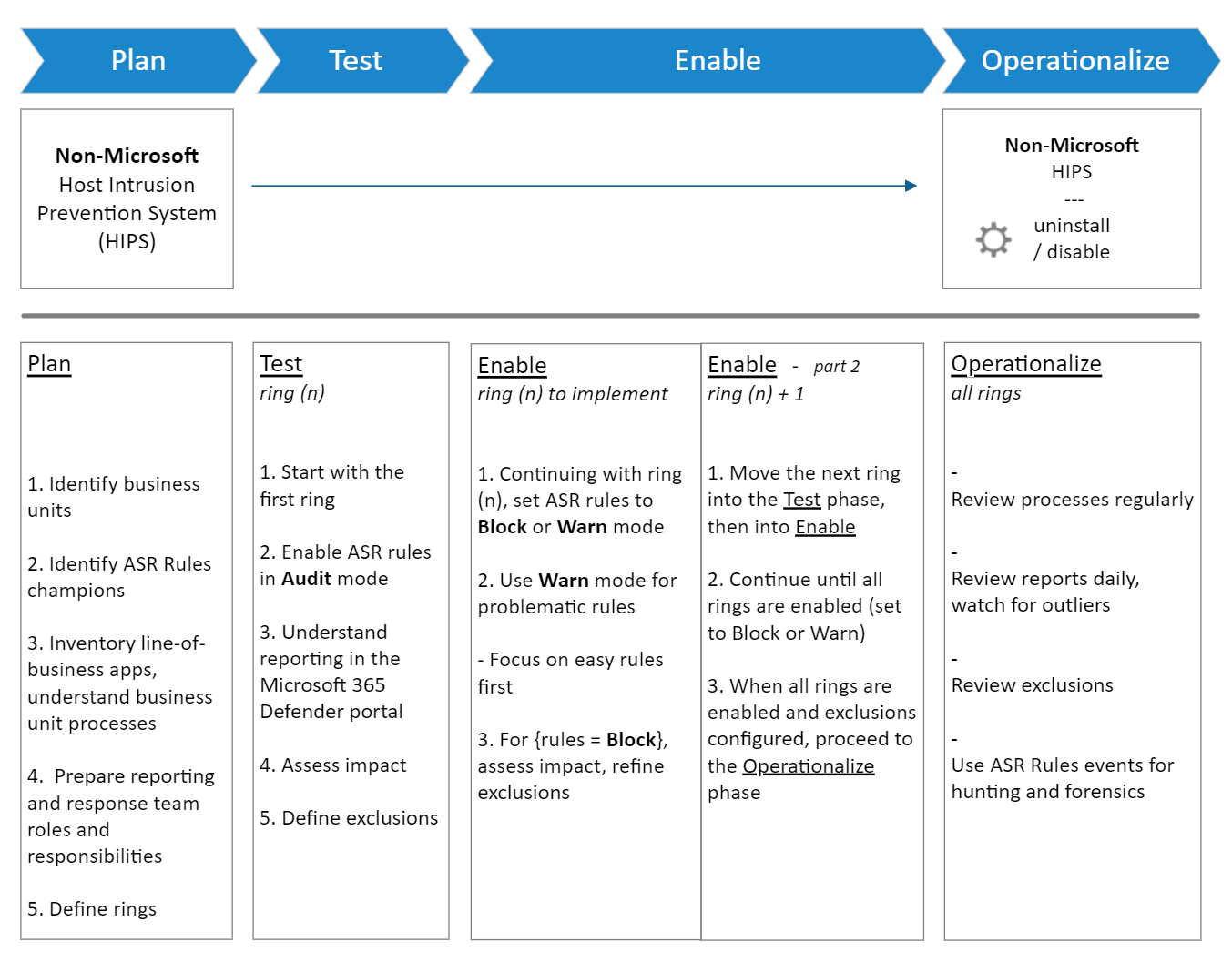
- Plan: pick a small business unit, name champions, inventory apps (unsigned internal tools and macros are where rules bite), define rings. If replacing a third-party HIPS, run both until rules reach Block.
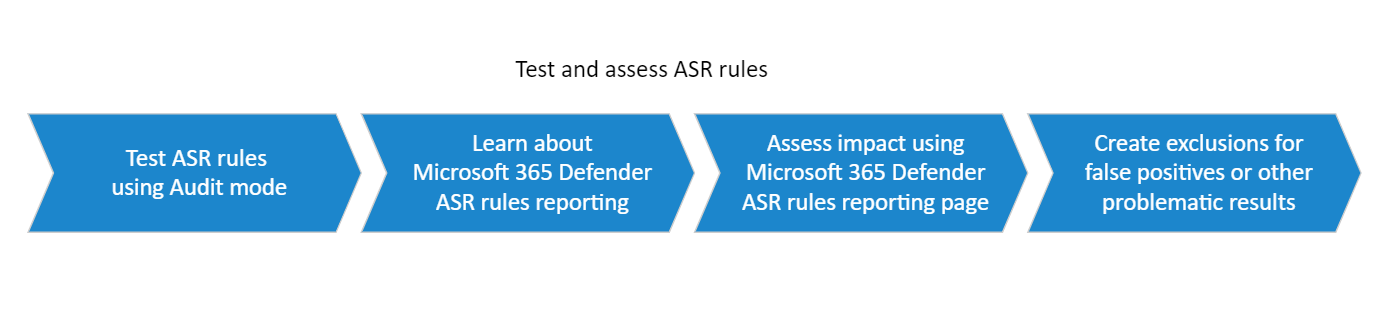
- Test (ring 1): disable any rules already in Block or Warn, then enable all rules in Audit at once. Read the ASR report, Advanced Hunting, device timeline, or Event ID 1122. Add exclusions through the same channel as the rules. Learn gives no fixed audit duration. Cover your business cycles, including month-end.
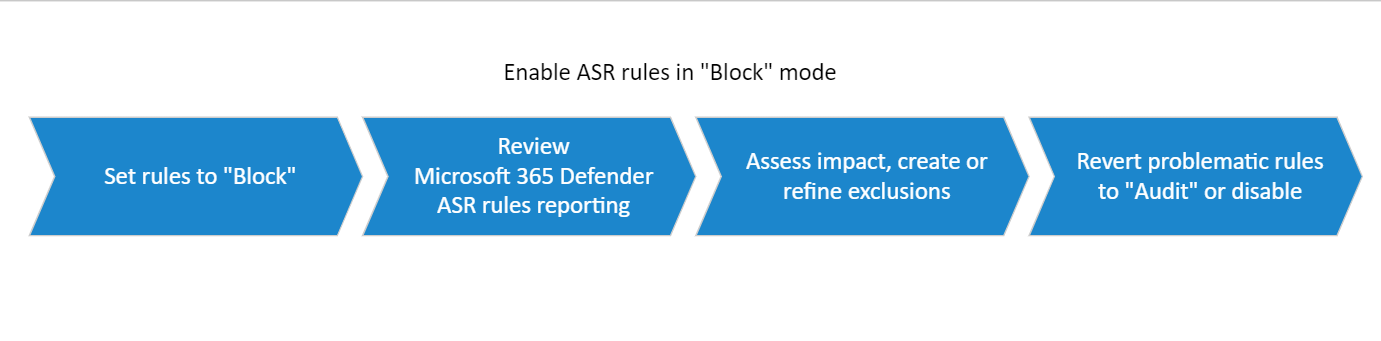
- Enable (ring 1): confirm exclusions, then move rules to Block or Warn one at a time starting with the rule that had the fewest audit events. Review activity and champion feedback. Exclusions beat turning rules off or back to Audit. Use Warn where it is supported to limit disruption.
- Expand (ring n+1): Audit, review, exclude, Block, review, exclude. Only move to the next ring after the current one is stable.
- Operationalize: review reports on a cadence that matches event volume, handle false positives, hunt.
Configure
- Portal
- PowerShell
- Graph API
-
Intune admin center > Endpoint security > Attack surface reduction > Create policy. Platform: Windows. Profile: Attack Surface Reduction Rules. The Defender portal Endpoint security policies > Windows policies blade creates the same policy.
-
Each rule has a dropdown: Not configured, Off, Block, Audit, Warn. LSASS and Office injection do not offer Warn.
-
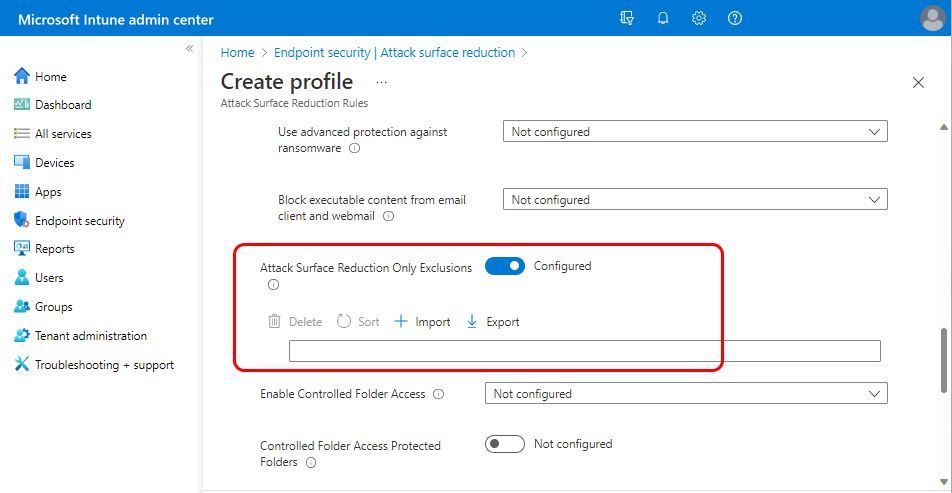
Once a rule is set to Audit, Block, or Warn, an "ASR Only Per Rule Exclusions" field appears under it. Add paths manually or import a CSV with header AttackSurfaceReductionOnlyExclusions. No single quotes.
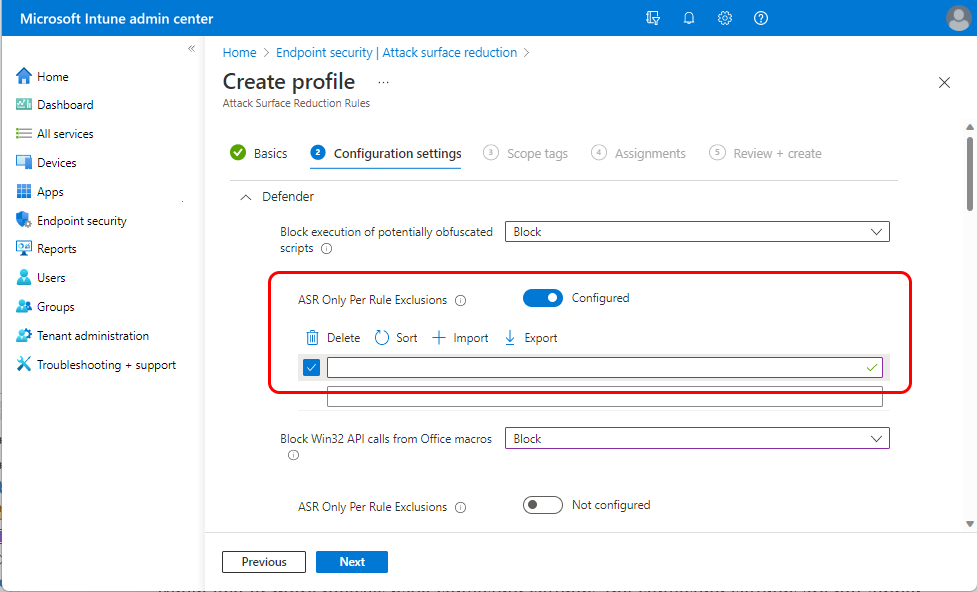
- Global exclusions go in "Attack Surface Reduction Only Exclusions" in the same profile. Controlled folder access settings share this profile.
- Assign to Entra device groups. User groups are not supported for MDE management.
If you use Group Policy instead, the rules are set as GUID and value pairs under Configure Attack Surface Reduction rules.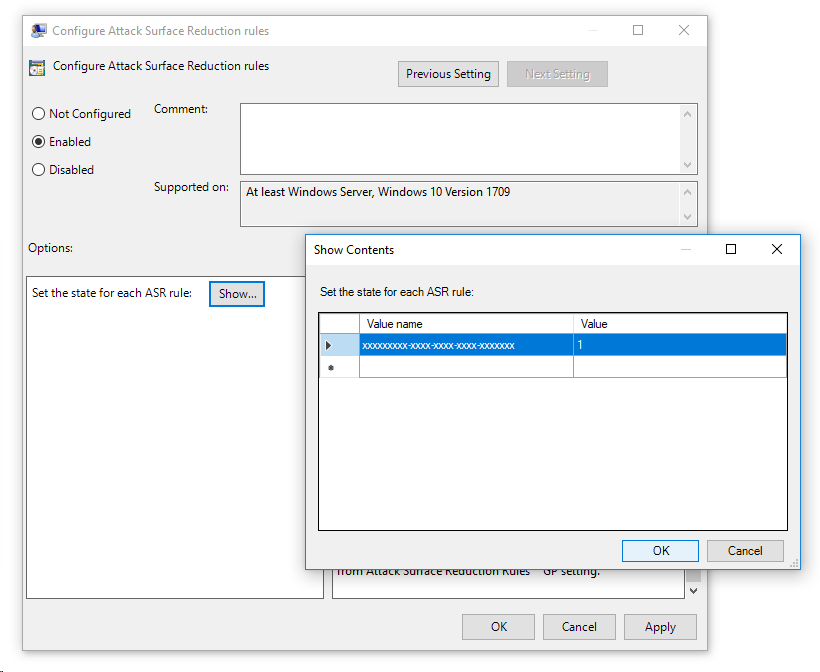
Recommended values: standard protection rules to Block. Everything else Audit in ring 1, then Warn or Block after review.
# Tested on: TODO
# Action values: 0 Disabled, 1 Enabled (Block), 2 AuditMode, 5 NotConfigured, 6 Warn
# Local settings are overwritten by GPO or MDM on next startup. Use for lab or standalone only.

# Read current state as GUID/action pairs
$p = Get-MpPreference
0..([math]::Min($p.AttackSurfaceReductionRules_Ids.Count,$p.AttackSurfaceReductionRules_Actions.Count)-1) |
  ForEach-Object { [pscustomobject]@{ Id=$p.AttackSurfaceReductionRules_Ids[$_]; Action=$p.AttackSurfaceReductionRules_Actions[$_] } } |
  Format-Table -AutoSize

# Add rules without touching existing ones (Set-MpPreference replaces the whole list)
Add-MpPreference -AttackSurfaceReductionRules_Ids 56a863a9-875e-4185-98a7-b882c64b5ce5,9e6c4e1f-7d60-472f-ba1a-a39ef669e4b2,e6db77e5-3df2-4cf1-b95a-636979351e5b `
                 -AttackSurfaceReductionRules_Actions Enabled,Enabled,Enabled

# Put the Office child process rule in Audit
Add-MpPreference -AttackSurfaceReductionRules_Ids d4f940ab-401b-4efc-aadc-ad5f3c50688a -AttackSurfaceReductionRules_Actions AuditMode

# Warn mode
Add-MpPreference -AttackSurfaceReductionRules_Ids 33ddedf1-c6e0-47cb-833e-de6133960387 -AttackSurfaceReductionRules_Actions Warn

# Remove a rule
Remove-MpPreference -AttackSurfaceReductionRules_Ids d4f940ab-401b-4efc-aadc-ad5f3c50688a

# Global ASR exclusions (Set replaces, Add appends)
Add-MpPreference -AttackSurfaceReductionOnlyExclusions "C:\Data\LOBApp\app1.exe","C:\Data\Test"
(Get-MpPreference).AttackSurfaceReductionOnlyExclusions

# Per-rule exclusions: Learn documents no PowerShell parameter. Use Intune, the Defender portal, or GPO.
ASR rules profiles are settings catalog policies. List them by template family.
GET https://graph.microsoft.com/beta/deviceManagement/configurationPolicies?$filter=templateReference/templateFamily eq 'endpointSecurityAttackSurfaceReductionRules'&$expand=settings
Each rule is a choice setting. Setting definition IDs follow the pattern below. Confirm the exact IDs and option values from the settings catalog before writing a policy. TODO: capture IDs from the dev tenant.
device_vendor_msft_policy_config_defender_attacksurfacereductionrules_<rulename>
Custom OMA-URI equivalent if you need it outside the template:
./Vendor/MSFT/Policy/Config/Defender/AttackSurfaceReductionRules
   value: <GUID>=<mode>|<GUID>=<mode>
./Device/Vendor/MSFT/Policy/Config/Defender/AttackSurfaceReductionOnlyExclusions
   value: <path>|<path>
{}
Verify
- Get-MpPreference output above. Action 1 Block, 2 Audit, 6 Warn.
- Device page > Effective settings tab shows the applied value per rule and which source set it.
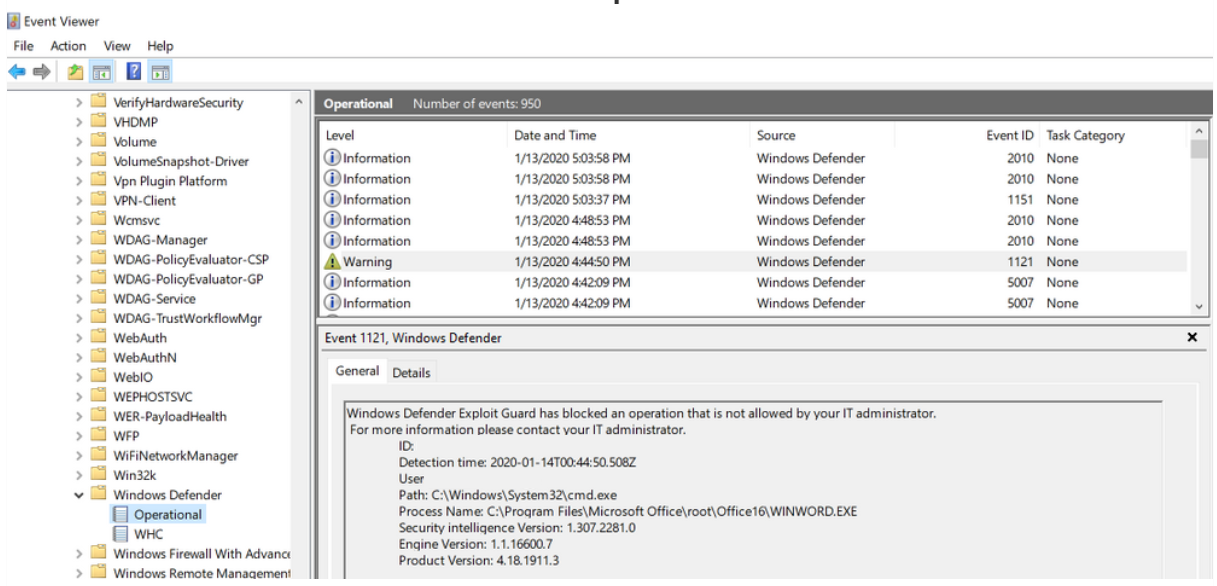
- Event log: Applications and Services Logs > Microsoft > Windows > Windows Defender > Operational.
| Event ID | Meaning |
|---|---|
| 1121 | Rule fired in Block mode |
| 1122 | Rule fired in Audit mode |
| 1129 | User clicked through in Warn mode |
| 5007 | Settings changed |
1125 and 1126 are network protection events, not ASR. The overview page also lists 1125, 1132, and 1134 under audit events, but the events page does not define 1132 or 1134, so treat those as unconfirmed.
DeviceEvents
| where Timestamp > ago(30d)
| where ActionType startswith "Asr"
| extend Parsed = parse_json(AdditionalFields)
| extend IsAudit = tostring(Parsed.IsAudit), RuleId = tostring(Parsed.RuleId)
| summarize Events = count() by ActionType, IsAudit, RuleId
| order by Events desc
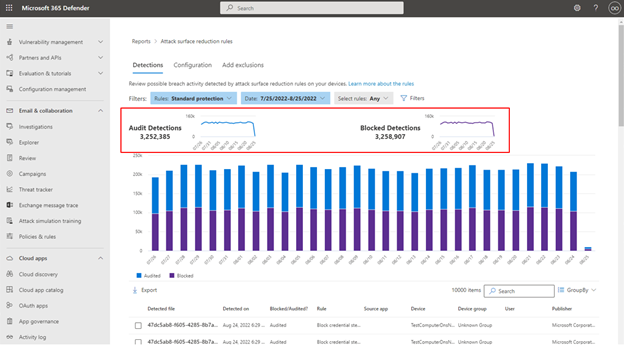
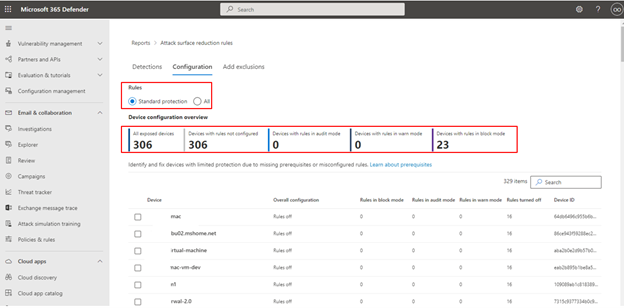
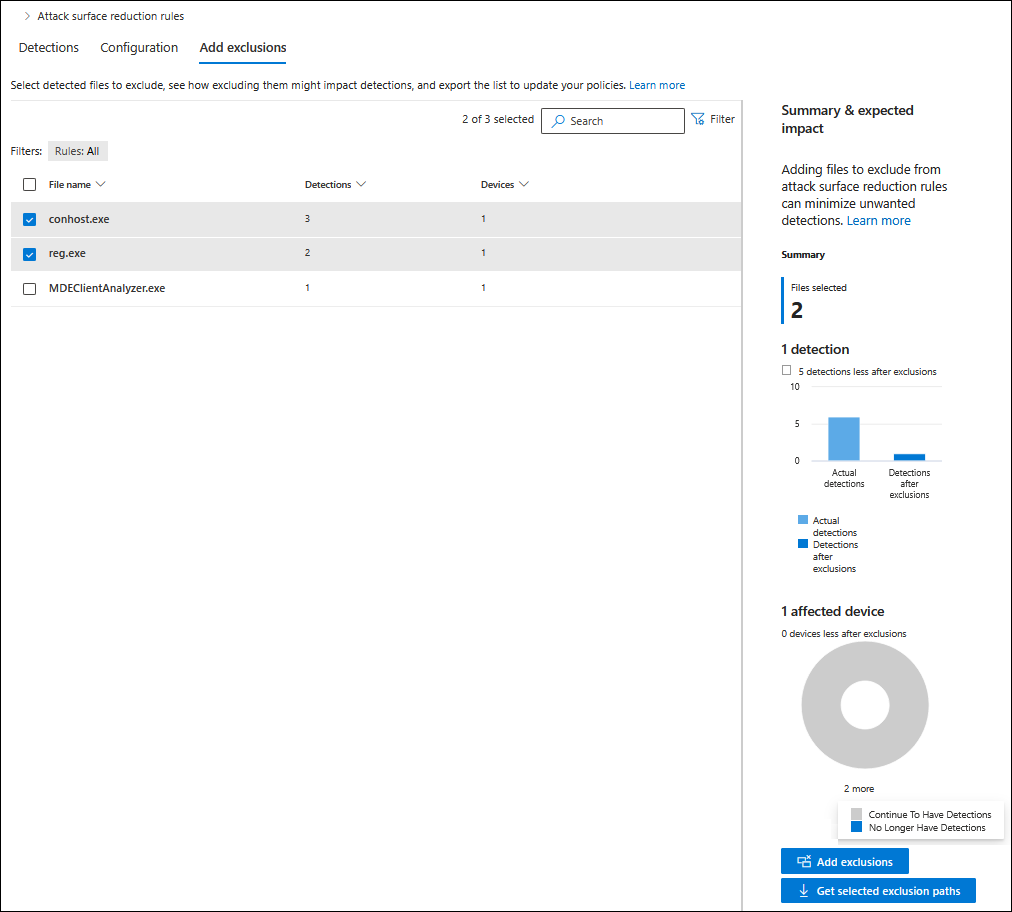
- ASR report: security.microsoft.com/asr. Detections tab (default filter is standard protection rules and last 30 days, table caps at 200 rows, use Export), Configuration tab (per device: block, audit, warn, off, not applicable), Add exclusions tab (pick files, see projected detection reduction, Get selected exclusion paths gives AsrExclusionPaths.csv, Add exclusions jumps to Intune).
- Device timeline > Filter > Event group > ASR events.
Troubleshoot
| Symptom | Likely cause | Fix |
|---|---|---|
| Rules show in policy but nothing fires, no 1121/1122 | Defender AV passive or off | Make Defender AV primary and active. Check Get-MpComputerStatus AMRunningMode. |
| Rule configured but device reports Not configured | GPO value has quotes or spaces, or GPO and MDM conflict | Clean the GUID values. Set one channel. Use MDMWinsOverGP if MDM must win. |
| Office macros or add-ins break | Office child process, executable content, or Win32 API rule in Block | Check 1121 for the source app. Per-rule exclusion for the process. Restart Office. |
| Flood of LSASS audit events | Expected. Many apps enumerate processes with broad rights | Ignore unless the app breaks. Go to Block on a small ring. |
| Warn selected but user gets a hard block | Rule does not support Warn (LSASS, Office injection), or OS below 1809, or old platform | Use Block or Audit. Update platform. |
| Per-rule or local exclusion ignored | Disable local admin merge is true | Set it to false. |
| Exclusion added, detections continue | Process still running from before the exclusion | Restart the process or service. |
| Rule shows compliant in ConfigMgr on a server but does nothing | Known ConfigMgr issue on Server OS | Deploy via Intune, security settings management, or GPO. |
| ConfigMgr client misbehaves | PsExec/WMI or WMI persistence rule in Block | Audit the WMI rule first. Only set PsExec/WMI through ConfigMgr. |
| Legitimate tool blocked by system tools rule | Heuristic match on name or location | Per-rule or global exclusion for the file. |
| Unknown internal executable blocked by ransomware or prevalence rule | No cloud reputation yet | Wait, or per-rule exclusion, or Allow indicator. |
Diagnostics: MDEClientAnalyzer.cmd -v during a repro, or MpCmdRun.exe -GetFiles and read MPOperationalEvents.txt, MPRegistry.txt, MPLog.txt from MpSupportFiles.cab. Report false positives through the Security Intelligence exploit guard form.
Gotchas and limits
- Merge behaviour: non-conflicting rules from GPO, Intune, and local merge. Conflicts go to GPO unless MDMWinsOverGP is 1 (Policy CSP only, no GPO or cmdlet). Controlled configuration ignores GPO, ConfigMgr, and local entirely.
- Set-MpPreference replaces the entire rule list. Add-MpPreference appends. One wrong Set wipes everything.
- Cloud protection is a dependency for prevalence/age, obfuscated scripts, and ransomware. Without MAPS they do not fire. Three more rules will block but stay silent (no toast, no alert) unless the cloud level is High or above.
- Warn is not available in ConfigMgr. From platform 4.18.26060, Unblock needs admin approval. Unblock lasts 24 hours and is not a substitute for an exclusion.
- Server: WMI persistence, JS/VBS, Webshell, and ransomware rules are not supported via Intune on Server 2012 R2 and 2016. Win32 API macro rule is n/a on all Server. Webshell is Exchange servers only.
- The vulnerable drivers rule is the only one with no listed dependency in the reference. Every other rule lists Defender AV. The overview still states AV must be active as a general requirement, so do not count on it running in passive mode until tested.
- Advanced Hunting dedupes ASR events to one per unique process per hour. Low counts do not mean low volume.
- The report's GroupBy is wrong unless you scroll to the last row first so all pages load.
- Intune and Defender portal assignment is device groups only.
- The Office rules check install path. Office installed anywhere other than ProgramFiles or ProgramFiles(x86) is not covered by three of the four Office rules.
Further reading
- ASR Rules: Audit-to-Block Rollout with Intune (2026), Tiago S. Carvalho, August 2026. Cross-checks the Learn pages against each other and lists the contradictions (Not configured semantics, GUID typos, event ID lists) plus why process exclusions have a wide blast radius.
- Attack Surface Reduction: Audit to Block with Intune, Tom Rolvers, April 2026 (updated July 2026). Working KQL for reading audit data and a staged block rollout with narrow exclusions.
- Deploying Attack Surface Reduction Rules with Intune, SecurityScriptographer, June 2026. Puts a number on the audit window (30 to 45 days) and shows per-rule exclusions before ring enforcement.
- Making Attack Surface Reduction Rules Actually Work in Microsoft 365, CIAOPS, May 2026. SMB and Business Premium angle, and how ASR state feeds device compliance and Conditional Access.
- Mastering Attack Surface Reduction in Defender for Endpoint, Kerem Ozturk, New Paradigm Security, February 2026. Groups the rules by operational risk and calls out exclusion limits before you plan rings.
My notes
TODO: Sohail's notes after verification.
Changelog
| Date | Change | Source |
|---|---|---|
| 2026-10-22 | Drafted from Learn | [1] |
| 2026-10-22 | Added Learn images, diagrams, further reading |