Device control: USB and removable media
What it is
Device control in Defender for Endpoint decides whether a user can read, write or execute on removable storage, CD/DVD, Windows Portable Devices (phones, cameras) and printers. On macOS it also covers Apple devices and Bluetooth file transfer. It is enforced by the Defender engine on the endpoint and reports every decision to the portal. It is off by default. When off, everything is allowed.
It is not Windows device installation restrictions (the ADMX "Prevent installation of devices" policies). Those block the driver install at the PnP layer. Device control controls access to a device that is already installed. It is also not Endpoint DLP. DLP looks at content and can capture copies of files that leave the machine. Device control looks at the device.
A Windows device is only in scope if it mounts a drive letter. Keyboards, mice, docks, webcams and audio devices never get one, so they are not touched. No exclusion needed.
Licensing and prerequisites
- MDE Plan 1 is enough for enforcement on Windows and macOS. Defender for Business works too. The report and advanced hunting need the E5 reporting entitlement.
- Windows 10 or 11, antimalware platform 4.18.2103.3 or later. VID_PID matching needs 4.18.2104, WPD 4.18.2107, printers 4.18.2205, file-level masks 4.18.2207. Windows Server is not supported even though the Intune profile lists it.
- macOS: Defender 101.96.85 or later, onboarded. Full Disk Access for
com.microsoft.dlp.daemon(the standard mdatp-xplat FDA profile covers it) andDC_in_dlpenabled in Defender preferences. - Intune, or Group Policy on Windows, or Jamf on macOS. One per machine. If GPO and Intune both land on a Windows device, GPO wins.
How it works
The model is the same on both platforms: groups, rules, entries, default enforcement.
- A group is a filter on device properties. On Windows the properties are
PrimaryId(device family),InstancePathId,DeviceId,HardwareId,FriendlyNameId,BusId,SerialNumberId,VID,PID,VID_PIDandDeviceEncryptionStateId(preview, BitLocker state). Printers addPrinterConnectionId. Match types areMatchAny,MatchAll,MatchExcludeAny,MatchExcludeAll. On macOS a group is aquerybuilt fromall,anyandnotwith clausesprimaryId,vendorId,productId,serialNumber,encryption(apfs),groupIdand the SD cardmedia*clauses. - A rule has an included group list and an excluded group list. The device must be in all included groups and none of the excluded groups. Then the rule's entries are evaluated.
- An entry is one action for one access mask. Windows types are
Allow,Deny,AuditAllowed,AuditDenied. macOS types areallow,deny,auditAllow,auditDeny. Enforcement entries are checked in order until the requested access is matched. Audit entries run after the decision and all matching ones fire. An entry can be scoped withSid(user) andComputerSid(machine). - The Windows access mask is a bitwise OR: 1 disk read, 2 disk write, 4 disk execute, 8 file read, 16 file write, 32 file execute, 64 print. Read-only at disk level is 1. Disk-level read plus file-level read is 9. macOS uses named access values:
read,write,executeforremovableMedia, orgeneric_read,generic_write,generic_executefor any type. - If no rule matches, default enforcement applies. Allow unless you set Deny. It is global: Deny also blocks printers, CD/DVD and WPD unless you scope device types with
SecuredDevicesConfiguration(Windows) orsettings.features(macOS).
Intune does not honour rule order. Make rules non-intersecting with explicit excludes.
Windows AuditDenied options: 0 nothing, 1 toast, 2 event, 3 both. AuditAllowed option 2 sends the event. Toast at most once per hour. Advanced hunting keeps at most 300 RemovableStoragePolicyTriggered events per device per day.
Windows policy reaches the device as XML, one file per rule and one per group under the Defender CSP. The Intune Device Control profile and reusable settings groups generate that XML for you. macOS policy is one JSON document with groups, rules and settings, embedded as a string under the deviceControl > policy key of a com.microsoft.wdav mobileconfig payload. Advanced conditions (network, VPN, file, print job groups referenced from Parameters) are Windows XML only.
Windows Bluetooth is not handled here; use the Bluetooth policy CSP. File evidence (a copy of what was written to USB) is Endpoint DLP, not device control.
Configure
Worked example used in every tab: block all removable storage, allow one USB stick read-only by serial number, keyboards and mice untouched.
- Portal
- PowerShell / Terminal
- Graph API
Windows
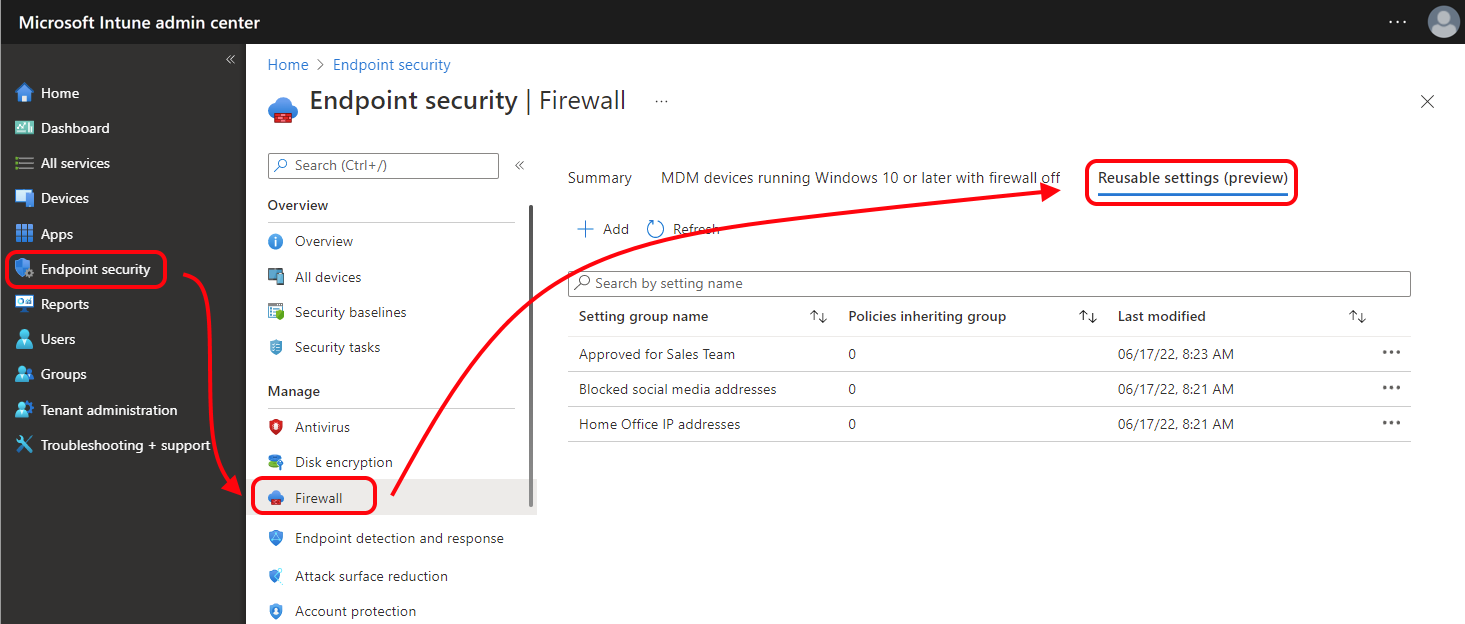
- Intune admin center > Endpoint security > Attack surface reduction > Reusable settings tab > Add. Name it
Approved USB. Configuration settings > Add > Removable storage > Edit instance. PropertySerialNumberId, value the stick's serial. Review + Add. Max 100 instances per group. - Add a second reusable group
All removable storage. PropertyPrimaryId, valueRemovableMediaDevices.
- Endpoint security > Attack surface reduction > Create policy. Platform Windows, profile Device Control. Name it.
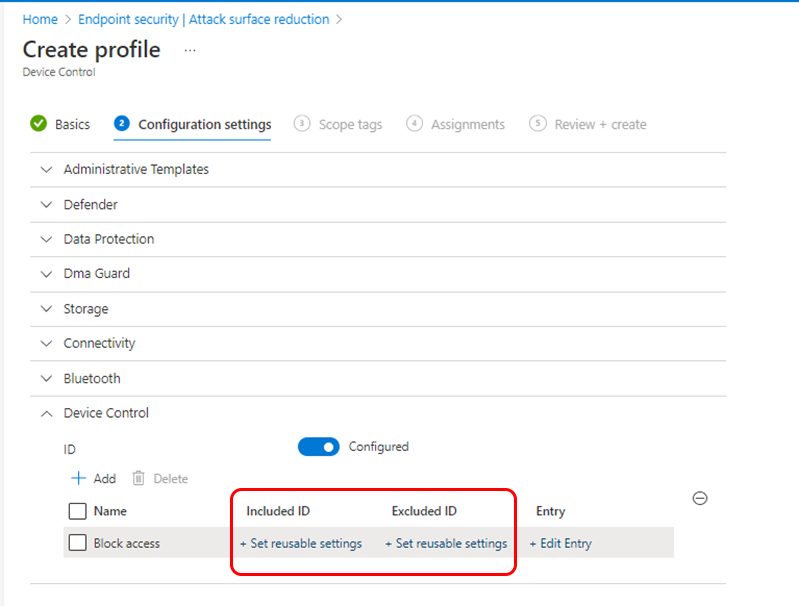
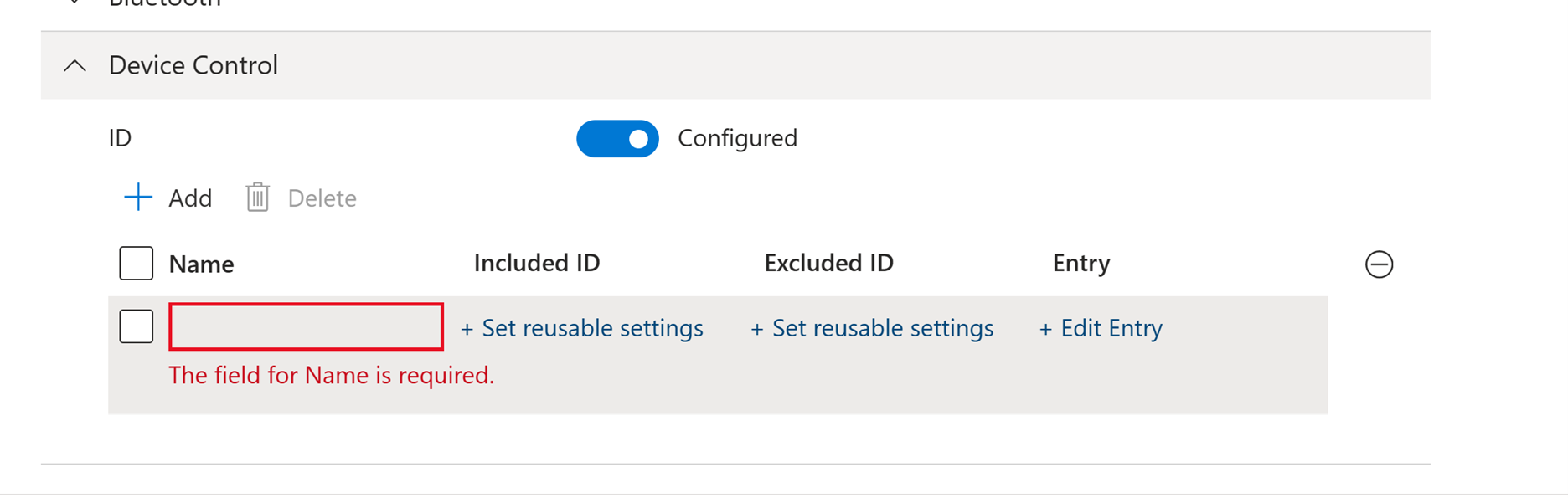
- Configuration settings > Device Control > Add. This is your rule.
- Rule 1
Deny all removable storage: Included ID =All removable storage, Excluded ID =Approved USB. Entry TypeDeny, Access mask Read, Write, Execute. Add a second entry TypeAuditDenied, Options show notification and send event, same mask. - Rule 2
Approved USB read only: Included ID =Approved USB. Entry TypeAllow, Access mask Read. Second entry TypeDeny, Access mask Write, Execute. Third entryAuditDenied, Options 3, Write, Execute.
- Rule 1
- Leave the other sections (Device Installation Restrictions, Removable Storage Access, Storage, Connectivity, Bluetooth) unconfigured. They are separate Windows CSPs that share the profile.
- Assign to a device group. Do not combine Intune user-group targeting with
Sidconditions in entries.
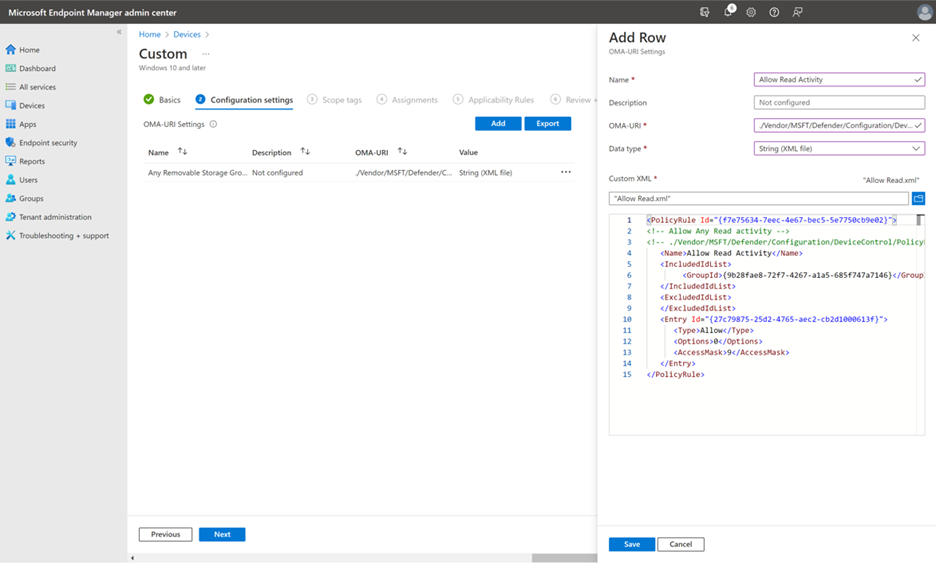
The profile UI cannot change default enforcement or device types. Leave default at Allow and let the explicit Deny rule do the work, or push these via a custom OMA-URI profile (Devices > Configuration > Create > Windows 10 and later > Templates > Custom). Microsoft recommends the profile plus reusable settings over raw OMA-URI XML. Use OMA-URI only for what the UI lacks, such as advanced conditions.
| Setting | OMA-URI | Value |
|---|---|---|
| Enable device control | ./Vendor/MSFT/Defender/Configuration/DeviceControlEnabled | Integer, 1 |
| Default enforcement | ./Vendor/MSFT/Defender/Configuration/DefaultEnforcement | Integer, 1 allow, 2 deny |
| Device types | ./Vendor/MSFT/Defender/Configuration/SecuredDevicesConfiguration | String, pipe-separated, no spaces, for example RemovableMediaDevices |
macOS
- Build the JSON (PowerShell / Terminal tab), validate it on a test Mac.
- Download
demo.mobileconfigfrom the mdatp-devicecontrol repo. Replace the string value underdeviceControl>policywith your JSON. Keep thedlpblock that enablesDC_in_dlp. Save asdevice-control.mobileconfig. - Intune admin center > Devices > macOS > Configuration > Create > New policy. Platform macOS, profile type Templates, template Custom. Deployment channel Device channel. Upload the file. Assign.

- Make sure the Full Disk Access profile is already assigned and reporting compliant.
PowerShell (Windows)
Learn documents Get-MpComputerStatus as the way to confirm the current device control policy is applied, but does not name the fields in text. No registry path for the policy is documented, so none is given here.
# Tested on: TODO
# Generate GUIDs for groups, rules and entries
New-Guid

# Confirm the device control policy state (field names not documented, inspect output)
Get-MpComputerStatus

# Validate XML before you push it (elevated cmd)
& "$env:ProgramFiles\Windows Defender\MpCmdRun.exe" -DeviceControl -TestPolicyXml "C:\Policies\Groups.xml" -Groups
& "$env:ProgramFiles\Windows Defender\MpCmdRun.exe" -DeviceControl -TestPolicyXml "C:\Policies\PolicyRules.xml" -Rules

# Signed-in user's SID for a Sid condition
whoami /user
Group XML. For Intune OMA-URI each group is its own file at ./Vendor/MSFT/Defender/Configuration/DeviceControl/PolicyGroups/%7b[GroupId]%7d/GroupData. For Group Policy wrap all groups in one PolicyGroups root.
<PolicyGroups>
  <Group Id="{3f5253e4-0e73-4587-bb9e-bb29a2171694}" Type="Device">
    <Name>All removable storage</Name>
    <MatchType>MatchAny</MatchType>
    <DescriptorIdList>
      <PrimaryId>RemovableMediaDevices</PrimaryId>
    </DescriptorIdList>
  </Group>
  <Group Id="{3f5253e4-0e73-4587-bb9e-bb29a2171695}" Type="Device">
    <Name>Approved USB</Name>
    <MatchType>MatchAny</MatchType>
    <DescriptorIdList>
      <SerialNumberId>03003324080520232521</SerialNumberId>
    </DescriptorIdList>
  </Group>
</PolicyGroups>
Rule XML. For Intune OMA-URI each rule is its own file at ./Vendor/MSFT/Defender/Configuration/DeviceControl/PolicyRules/%7b[PolicyRule Id]%7d/RuleData. For Group Policy wrap all rules in one PolicyRules root.
<PolicyRules>
  <PolicyRule Id="{75a4e33a-5268-4552-bef2-e34dd0c39cb1}">
    <Name>Deny all removable storage</Name>
    <IncludedIdList>
      <GroupId>{3f5253e4-0e73-4587-bb9e-bb29a2171694}</GroupId>
    </IncludedIdList>
    <ExcludedIdList>
      <GroupId>{3f5253e4-0e73-4587-bb9e-bb29a2171695}</GroupId>
    </ExcludedIdList>
    <Entry Id="{e3837e60-5e56-43ce-8095-043ccd793eac}">
      <Type>Deny</Type>
      <Options>0</Options>
      <AccessMask>7</AccessMask>
    </Entry>
    <Entry Id="{34413b98-8198-4e16-accf-c95c3c775ba3}">
      <Type>AuditDenied</Type>
      <Options>3</Options>
      <AccessMask>7</AccessMask>
    </Entry>
  </PolicyRule>
  <PolicyRule Id="{75a4e33a-5268-4552-bef2-e34dd0c39cb2}">
    <Name>Approved USB read only</Name>
    <IncludedIdList>
      <GroupId>{3f5253e4-0e73-4587-bb9e-bb29a2171695}</GroupId>
    </IncludedIdList>
    <ExcludedIdList>
    </ExcludedIdList>
    <Entry Id="{e3837e60-5e56-43ce-8095-043ccd793ead}">
      <Type>Allow</Type>
      <Options>0</Options>
      <AccessMask>1</AccessMask>
    </Entry>
    <Entry Id="{e3837e60-5e56-43ce-8095-043ccd793eae}">
      <Type>Deny</Type>
      <Options>0</Options>
      <AccessMask>6</AccessMask>
    </Entry>
    <Entry Id="{e3837e60-5e56-43ce-8095-043ccd793eaf}">
      <Type>AuditDenied</Type>
      <Options>3</Options>
      <AccessMask>6</AccessMask>
    </Entry>
  </PolicyRule>
</PolicyRules>
Save without a BOM and escape any & in the XML. Comments must sit inside the first tag, not on line one.
Terminal (macOS)
# Version check (needs 101.96.85 or later)
mdatp version

# Validate the policy
mdatp device-control policy validate --path ~/Downloads/device-control-policy.json

# Apply locally for testing only (no MDM policy present), then remove
mdatp config device-control policy set --path ~/Downloads/device-control-policy.json
mdatp config device-control policy reset

# Generate IDs
uuidgen
The policy, built from the Microsoft deny_removable_media_except_kingston.json sample and changed to match one serial number read-only:
{
  "groups": [
    {
      "$type": "device",
      "id": "3f082cd3-f701-4c21-9a6a-ed115c28e211",
      "name": "All Removable Media Devices",
      "query": {
        "$type": "all",
        "clauses": [
          { "$type": "primaryId", "value": "removable_media_devices" }
        ]
      }
    },
    {
      "$type": "device",
      "id": "3f082cd3-f701-4c21-9a6a-ed115c28e212",
      "name": "Approved USB",
      "query": {
        "$type": "all",
        "clauses": [
          { "$type": "serialNumber", "value": "03003324080520232521" }
        ]
      }
    }
  ],
  "rules": [
    {
      "id": "772cef80-229f-48b4-bd17-a69130092981",
      "name": "Deny RWX to all Removable Media Devices except Approved USB",
      "includeGroups": [ "3f082cd3-f701-4c21-9a6a-ed115c28e211" ],
      "excludeGroups": [ "3f082cd3-f701-4c21-9a6a-ed115c28e212" ],
      "entries": [
        {
          "$type": "removableMedia",
          "id": "A7CEE2F8-CE34-4B34-9CFE-4133F0361035",
          "enforcement": { "$type": "deny" },
          "access": [ "read", "write", "execute" ]
        },
        {
          "$type": "removableMedia",
          "id": "18BA3DD5-4C9A-458B-A756-F1499FE94FB4",
          "enforcement": {
            "$type": "auditDeny",
            "options": [ "send_event", "show_notification" ]
          },
          "access": [ "read", "write", "execute" ]
        }
      ]
    },
    {
      "id": "772cef80-229f-48b4-bd17-a69130092982",
      "name": "Approved USB read only",
      "includeGroups": [ "3f082cd3-f701-4c21-9a6a-ed115c28e212" ],
      "entries": [
        {
          "$type": "removableMedia",
          "enforcement": { "$type": "allow" },
          "access": [ "read" ]
        },
        {
          "$type": "removableMedia",
          "enforcement": { "$type": "deny" },
          "access": [ "write", "execute" ]
        },
        {
          "$type": "removableMedia",
          "enforcement": {
            "$type": "auditDeny",
            "options": [ "send_event", "show_notification" ]
          },
          "access": [ "write", "execute" ]
        }
      ]
    }
  ],
  "settings": {
    "features": {
      "removableMedia": { "disable": false }
    },
    "global": {
      "defaultEnforcement": "allow"
    },
    "ux": {
      "navigationTarget": "https://intranet.example.com/usb-policy"
    }
  }
}
Only removableMedia is enabled in features, so Apple devices, portable devices and Bluetooth are left alone. Keyboards and mice are not a device family here at all.
The Device Control profile is a Settings Catalog policy. Reusable settings groups have their own resource.
GET https://graph.microsoft.com/beta/deviceManagement/configurationPolicies?$filter=templateReference/templateFamily eq 'endpointSecurityAttackSurfaceReduction'
GET https://graph.microsoft.com/beta/deviceManagement/configurationPolicies/{policyId}/settings
GET https://graph.microsoft.com/beta/deviceManagement/reusablePolicySettings
An OMA-URI custom profile (the raw XML path) is a classic device configuration, not a configuration policy:
GET https://graph.microsoft.com/beta/deviceManagement/deviceConfigurations?$filter=isof('microsoft.graph.windows10CustomConfiguration')
The omaSettings array on that object holds the DefaultEnforcement, SecuredDevicesConfiguration, PolicyGroups and PolicyRules rows with the OMA-URI strings from the Portal tab. The FAQ notes the policy is read with GET and updated with PATCH through this call, which is where the 350,000 character limit comes from. The macOS mobileconfig is a macOSCustomConfiguration in the same collection.
Verify
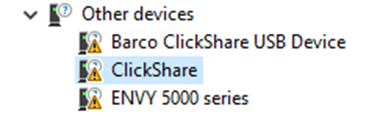
Windows, on the endpoint. Plug in an unapproved stick. A toast appears with the rule name and device name, at most once an hour. Device Manager shows the device as blocked with details on click. Get-MpComputerStatus reflects the applied policy. Learn does not document an event log channel or event IDs for device control, so advanced hunting is the record.
macOS, on the endpoint.
mdatp health --details device_control
Healthy output has active : ["v2"], v2_configured : true, v2_state : "enabled", v2_sensor_connection : "created_ok", v2_full_disk_access : "approved". Then confirm what landed:
mdatp device-control policy preferences list
mdatp device-control policy rules list
mdatp device-control policy groups list
preferences list shows Default Enforcement. Mount the unapproved stick, expect the notification with the link from navigationTarget.
Portal. Defender portal > Reports > Endpoints > Device control card > open the report. It shows audit events (USB mount/unmount, PnP connect) and policy events with rule, access, verdict, media name, class, device ID, vendor ID, serial number and bus type. Filter on time range, media class name and device ID. Up to six hours lag. Export caps at 500 events; stream to Sentinel for more.
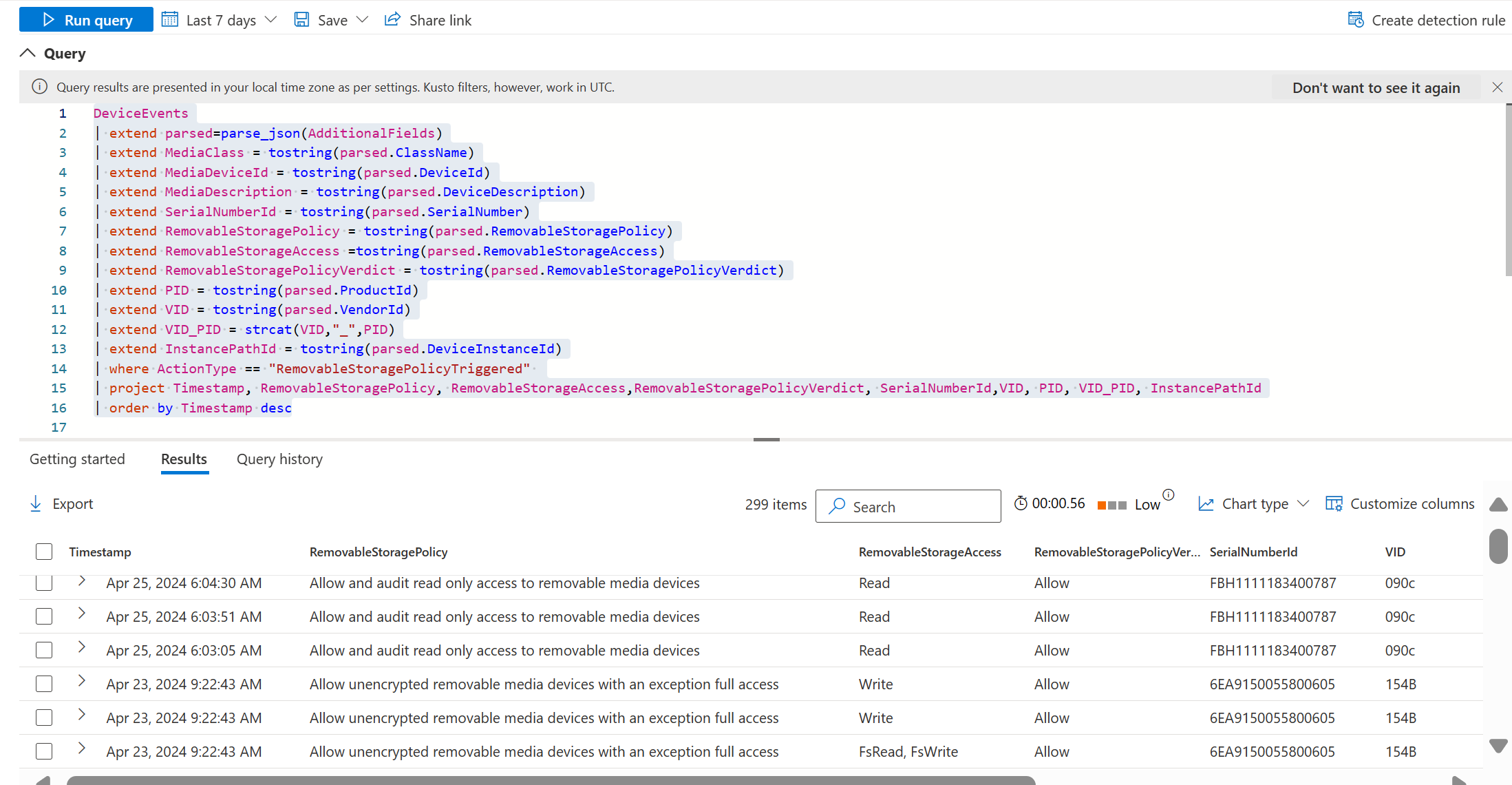
Advanced hunting. Learn's query, trimmed to what an auditor needs:
DeviceEvents
| where ActionType == "RemovableStoragePolicyTriggered"
| extend parsed = parse_json(AdditionalFields)
| extend RemovableStorageAccess = tostring(parsed.RemovableStorageAccess)
| extend RemovableStoragePolicyVerdict = tostring(parsed.RemovableStoragePolicyVerdict)
| extend RemovableStoragePolicy = tostring(parsed.RemovableStoragePolicy)
| extend MediaClassName = tostring(parsed.ClassName)
| extend MediaInstanceId = tostring(parsed.DeviceInstanceId)
| extend MediaSerialNumber = tostring(parsed.SerialNumber)
| extend VID_PID = strcat(tostring(parsed.VendorId), "_", tostring(parsed.ProductId))
| project Timestamp, DeviceName, InitiatingProcessAccountName, RemovableStoragePolicy, RemovableStorageAccess, RemovableStoragePolicyVerdict, MediaClassName, MediaInstanceId, MediaSerialNumber, VID_PID, FolderPath, FileSize
| order by Timestamp desc
RemovableStorageAccess is the mask the device asked for. Use it when an approved device still fails. PnPDeviceBlocked and PnPDeviceAllowed in the same table come from Windows device installation restrictions, not this policy.
Troubleshoot
| Symptom | Likely cause | Fix |
|---|---|---|
| Policy never applies on Windows | Platform version below 4.18.2103.3, or a BOM or unescaped & in the XML | Check version with the MsMpEng.exe hunting query from the FAQ. Re-save the XML from the raw GitHub sample, validate with MpCmdRun.exe -DeviceControl -TestPolicyXml |
| Policy applies but devices stay accessible | Device control not enabled, or default Allow with no Deny rule, or only audit rules | Set DeviceControlEnabled to 1. Audit-only inherits default enforcement. Pair every audit entry with Allow or Deny |
| Approved USB still blocked | It needs more than Read. Some Kingston encrypted sticks need Execute on their CD-ROM partition, some WD drives need disk-level Write | Read RemovableStorageAccess in hunting, grant that mask. To deny writes on those, use the file-level mask (16) instead of disk-level (2) |
| Approved USB matched on Windows but not macOS | Serial number is not cross-platform in the same form, or the device has none | serialNumber on macOS does not match devices without a serial. Use vendorId plus productId instead |
| Keyboard or mouse blocked | Not device control. HID devices have no drive letter and are out of scope | Look at the Device Installation Restrictions or Removable Storage Access sections of the same profile, or an ADMX policy. Those are separate CSPs |
| Printers stopped working | Default enforcement Deny covers printers | Scope SecuredDevicesConfiguration to RemovableMediaDevices, or add an Allow rule for PrinterDevices |
macOS shows v2_configured : false | Profile not delivered, or JSON invalid, or DC_in_dlp not enabled | Validate with mdatp device-control policy validate. Check the dlp block is still in the mobileconfig |
macOS v2_full_disk_access not approved | Full Disk Access profile missing for com.microsoft.dlp.daemon | Deploy the mdatp-xplat Full Disk Access profile. Without it some operations are not blocked |
macOS active shows ["v1","v2"] | Old v1 device control config still present | Remove the v1 configuration |
| Empty folder created on a denied USB | Documented behaviour. Empty folders are not blocked by file-level Write Deny | Nothing to fix. Any non-empty file is still blocked |
| Rule works on a test machine, not in production | Intune user-group targeting combined with Sid entries, or GPO and Intune both applied | Use one targeting method. If GPO exists on the device, GPO wins |
Gotchas and limits
- Default enforcement is global. Deny hits printers, CD/DVD and WPD too. Scope device types or add allow rules first, then flip the default.
- The Intune profile cannot set default enforcement or device types. That needs OMA-URI or GPO. OMA-URI for globals plus the profile for rules on the same device is fine.
- Rule order is not honoured in Intune. "First match wins on conflict" is only predictable in XML and GPO.
InstancePathIdends in a slot number that changes between ports. Use a trailing wildcard, or matchSerialNumberId,VID_PIDorDeviceId.HardwareIdis shared across devices of the same model.- Hunting labels differ from policy names: "DeviceId" is
InstancePathId, "Vendor Id" isHardwareId, "Media name" isFriendlyNameId. - One physical device can create several Device Manager entries (removable media plus WPD). Allow all of them or it half works.
- Keyboards, mice and docks need no exclusion. A dock with a card reader or SSD bay does present a drive letter, and that storage is controlled like any USB stick.
- BitLocker To Go is not a substitute, but
DeviceEncryptionStateId(preview) matchesBitlockerEncryptedorPlain, so you can allow encrypted sticks only. - Entra
Sidconditions need noninteractive Graph access from the device. Conditional Access forcing interactive auth breaks the match. Lock or sign-out can drop user conditions. Prefer Intune group targeting. - macOS has no
FriendlyNameId,InstancePathId,HardwareId, printer control or advanced conditions, but has Apple device, portable device, Bluetooth and APFS clauses. Android on macOS is only restricted in PTP mode. - Limits: 350,000 characters of OMA-URI XML, 100 instances per reusable group, 100 groups per profile, 300 hunting events per device per day, 500 rows per export.
Further reading
- Block USB drives with Intune without breaking approved devices, Emanuel De Almeida, ctrlaltnod, September 2026. Compares the Device Control profile against the three other Intune USB controls and adds a pilot, verification and rollback sequence.
- Block access to removable storage while allowing exceptions? Device Control to the rescue!, Joey Verlinden, July 2026. End-to-end Intune walkthrough of the deny-all plus approved-device pattern with reusable settings, endpoint checks and hunting.
- Defender for Endpoint device control (USB / removable media), CIAOPS, June 2026. Defender for Business angle: audit first with a hunting query to inventory devices, then phase in default deny by rings.
- Controlling USB Access on Windows Devices with Microsoft Intune, Sastu Insights, May 2026. Uses the device control report and hunting to find blocked hardware and carve out serial number and printer exceptions.
No macOS device control post from the last 12 months met the bar; the Microsoft Tech Community macOS guide is from mid 2025 and was left out.
My notes
TODO: Sohail's notes after verification.
Changelog
| Date | Change | Source |
|---|---|---|
| 2026-10-22 | Drafted from Learn | [1] |
| 2026-10-22 | Added Learn images, diagrams, further reading |