EDR, alerts and Advanced Hunting
What it is
EDR is the post-breach half of Defender for Endpoint. Next-gen protection (the AV engine) tries to stop known bad things before they run. EDR assumes something got through, records what processes, files, registry keys, logons and network connections did, and raises alerts when the cloud sees a pattern that looks like an attack. Alerts roll up into incidents in Defender XDR. You then respond: isolate the box, pull a package, open a shell, let automated investigation clean up.
Advanced Hunting is the query side of the same data. The sensor telemetry lands in schema tables you query with KQL. Custom detection rules are saved hunting queries that run on a schedule and create alerts with optional response actions.
What it is not: an audit log. The sensor throttles identical repeat events so it does not drown the service. If you need every event, that is Sysmon or Windows auditing into Sentinel, not EDR.
Licensing and prerequisites
- MDE Plan 2 for everything in this article. Plan 1 and Defender for Business get only four manual actions: run AV scan, isolate device, stop and quarantine a file, add a file indicator. Defender for Business has no Advanced Hunting API and no "stop and quarantine".
- Device onboarded and reporting (sensor health Active).
- Response actions need the Defender RBAC role permission Active remediation actions plus access to the device's device group.
- Live response must be enabled under Advanced features. Servers need the separate "for servers" toggle.
- EDR in block mode needs Defender AV present (active or passive), cloud-delivered protection on, platform 4.18.2001.10 or later, engine 1.1.16700.2 or later.
- Advanced Hunting read: Entra Security Reader or higher, or Unified RBAC Security operations > Security data > Security data basics (read). Endpoint rows are further filtered by MDE device groups.
- Custom detections: Security settings (manage) in Unified RBAC, or Entra Security Administrator. Security Operator only works when MDE RBAC is off.
How it works
Sensor. The Sense agent (MsSense.exe on Windows, mdatp daemon on macOS and Linux) collects behavioural telemetry under an assume-breach model: process creation, network connections, kernel and memory optics, user logon activity, registry and file system changes. It sends events to the cloud as they happen. Telemetry is kept for six months in the backend; Advanced Hunting exposes the last 30 days.
Cloud analytics. Detections fire in the cloud, not on the box. The EDR detection source shows as WindowsDefenderAtp in the alert API. Other sources that land in the same alerts queue: WindowsDefenderAv, CustomDetection, CustomerTI (your indicators), AutomatedInvestigation, WindowsDefenderSmartScreen, ThirdPartySensors, MTP (Defender XDR correlation), OfficeATP, ThreatExperts.
Alert severity.
| Severity | Meaning per Learn |
|---|---|
| High | Human adversary indicators: credential theft tools, sensor tampering, ransomware activity |
| Medium | Post-breach behaviours that may be part of an attack: attack-stage behaviours, odd registry changes, suspicious file execution. Investigate. |
| Low | Prevalent malware or hack tools, recon commands, log clearing. Often not an advanced threat. |
| Informational | Not harmful on its own. Context for other alerts. |
Alert categories map to MITRE ATT&CK enterprise tactics (Initial access, Execution, Persistence, and so on).
Incident correlation. Defender XDR groups alerts that share attack techniques or an attributed attacker into one incident. The advanced feature Restrict correlation to within scoped device groups breaks that correlation at device group boundaries. Leave it off unless you run separate SOCs per group.
Attack disruption. MDE signals feed automatic attack disruption. It can isolate devices, contain users (blocks network logons, RPC, SMB, RDP for five days without disabling the Entra account) and contain IPs of non-onboarded devices. You exclude a device from auto-isolation by tag.
EDR in block mode. Lets Defender AV remediate what EDR detects even when a third-party AV is primary and Defender AV is in passive mode. Blocked items show as Blocked or Prevented in the Action center. It honours Defender AV exclusions but not MDE indicators. It does not restore real-time protection, network protection, ASR or network indicators. Those still need Defender AV in active mode.
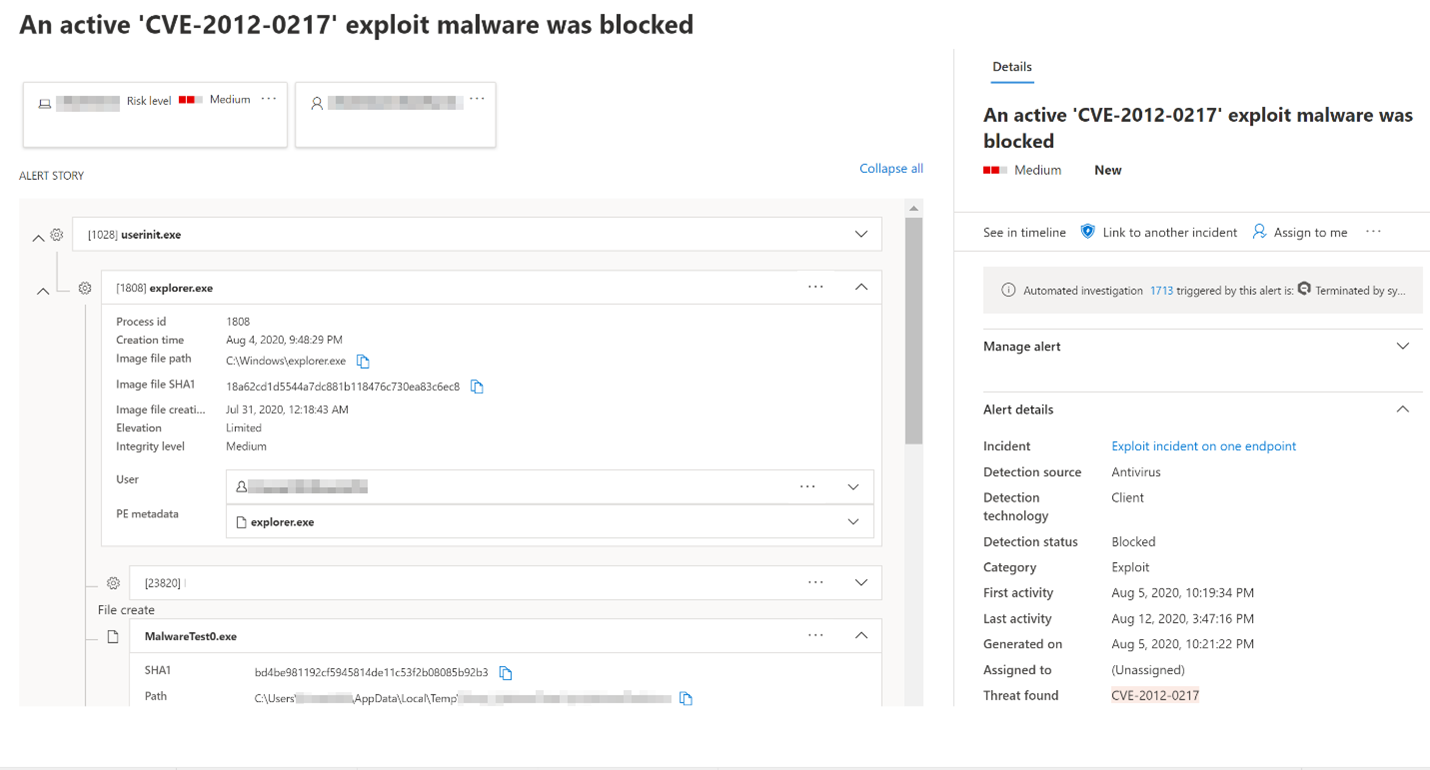
Automated investigation (AIR). An alert creates an incident, AIR starts a playbook on the device, and any new alerts from that device join the same investigation. If the same entity shows up on other devices they are added. Expansion to 10 or more devices waits for approval. Each evidence item gets a verdict: Malicious, Suspicious, or No threats found. Remediation actions (quarantine file, stop service, remove scheduled task) run or wait depending on the device group's automation level. Note the Learn banner: from 1 September 2026 AIR stops being a separate experience and is folded into the AV stack. Manual "Initiate automated investigation" goes away. Run a full AV scan instead.
Automation levels (set per device group):
| Level | What runs automatically |
|---|---|
| Full - remediate threats automatically | Everything. Undo from Action center History. |
| Semi - require approval for core folders remediation | Non-core folders auto. \windows\* waits. |
| Semi - require approval for non-temp folders remediation | Temp folders auto (%temp%, Downloads, \windows\temp, Program Files). Rest waits. |
| Semi - require approval for all folders | Everything waits in Pending. |
| No automated response | AIR does not run. Not recommended. |
Pending actions time out after 7 days and count as rejected. Tenants created after 16 August 2020 default to Full.
Configure
- Portal
- PowerShell (MDE API)
- Graph Security API
Advanced features. Settings > Endpoints > General > Advanced features. Set each, then Save preferences.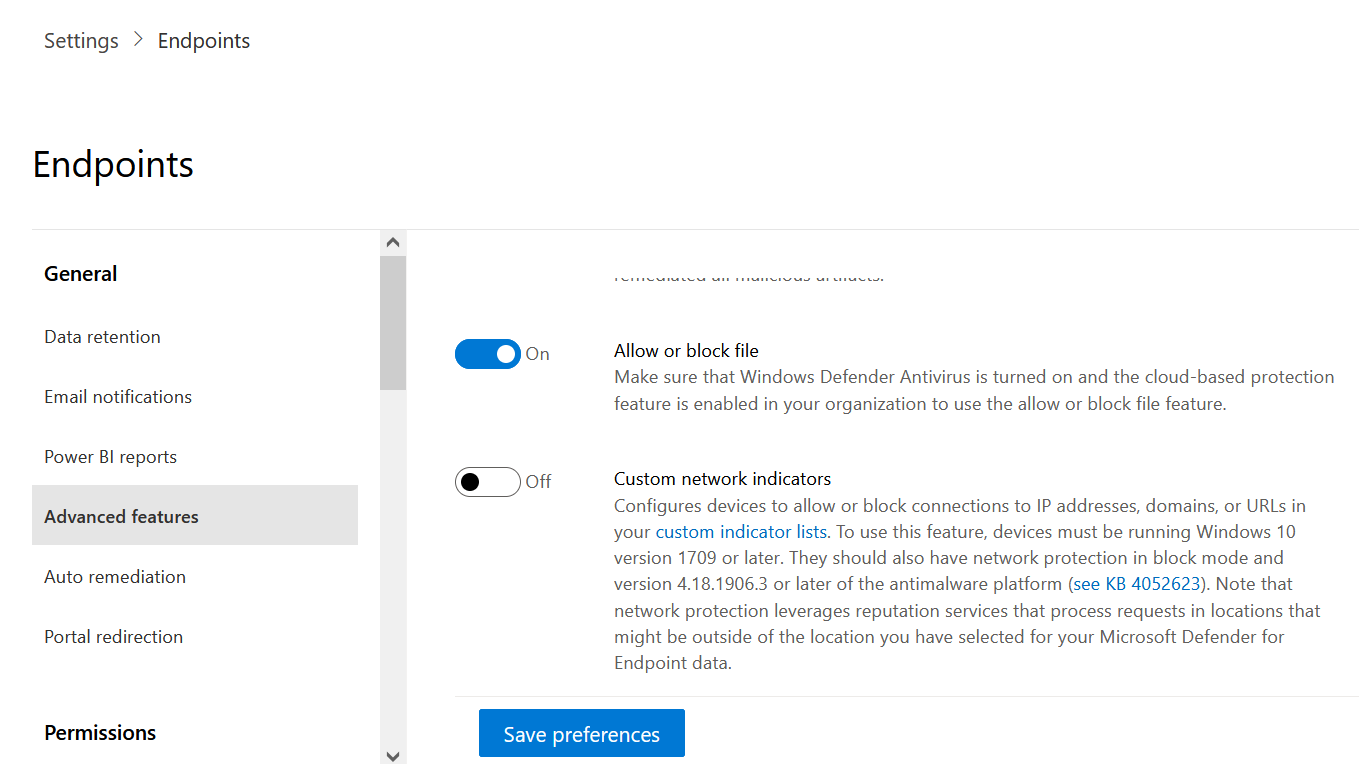
| Toggle | Recommended | Why |
|---|---|---|
| Enable EDR in block mode | On | Only acts when Defender AV is passive. Harmless when AV is active. |
| Enable live response | On | Needed for any shell session. |
| Enable live response for servers | On | Separate gate for server OS. |
| Allow unsigned script execution in live response | Off | Sign your scripts. Turn on only for a specific job, then off. |
| Enable tamper protection | On | Stops local tampering with AV settings. See the tamper protection article. |
| Allow or block file | On | Needed for file indicators. Needs Defender AV active plus cloud protection. |
| Configure custom network indicators | On | IP, URL, domain indicators. Windows 10 1709+. |
| Automatically resolve alerts | On | Closes alerts where AIR found nothing. Affects device risk score. |
| Restrict correlation to within scoped device groups | Off | Breaks cross-group incidents. |
Note: there is no "Automated investigation" toggle any more. AIR is on by default. The automation level lives on the device group.
Device groups and automation level. Settings > Permissions > Device groups > Add device group. Name it, pick the Automation level, add membership conditions (name, domain, tag, OS), assign Entra groups for RBAC, Done. Groups are ranked. A device matches the first group in rank order. Devices matching nothing land in Ungrouped devices, which has its own automation level.
Response actions on a device page. Assets > Devices > pick device. Action bar: Manage tags, Initiate automated investigation, Initiate live response session, Collect investigation package, Run antivirus scan, Restrict app execution, Isolate device, Contain device, Consult a threat expert, Action center.
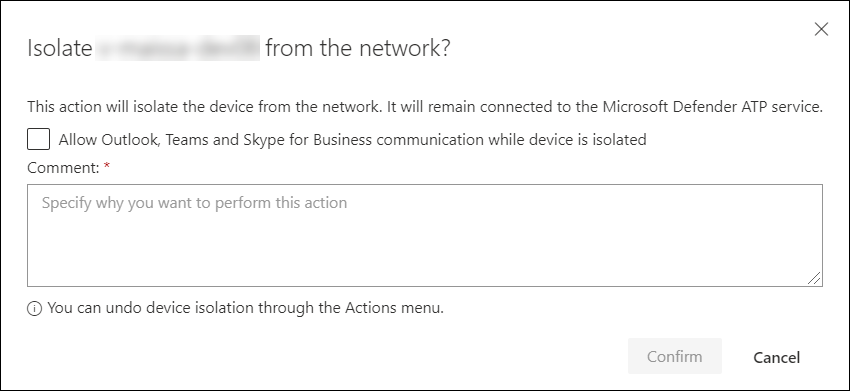
- Isolate device: Full or Selective. Selective keeps Outlook and Teams connectivity and uses Isolation exclusions. Isolation lifts automatically after 7 days. Offline devices get the action retried for 3 days.
- Restrict app execution: applies a WDAC policy that allows only Microsoft-signed binaries. Needs Defender AV. Windows 10 1709+, Server 2019+.
- Run antivirus scan: quick or full. Capped at 50 percent CPU unless
ScanAvgCPULoadFactoris set. - Collect investigation package: zip with autoruns, processes, services, scheduled tasks, network connections, prefetch, security event log, SMB sessions, users and groups.
- Stop and quarantine file and Add indicator: from the file page, not the device page.
Live response. Device page > Initiate live response session. Basic commands: cd, dir, fileinfo, findfile, getfile, processes, connections, drivers, persistence, registry, scheduledtasks, services, startupfolders, jobs, fg, status, help. Advanced (needs the advanced role permission): run, putfile, library, remediate, undo, analyze (Windows), scan, collect, isolate, release (macOS and Linux). Limits: 50 concurrent sessions per tenant, 5 per user, 1 per device, 30 minute idle timeout, 10 minute command timeout (30 for getfile, findfile, run), getfile 3 GB max, putfile 300 MB on Windows.
Custom detection rule. Hunting > Advanced hunting > write and run the query > Create detection rule.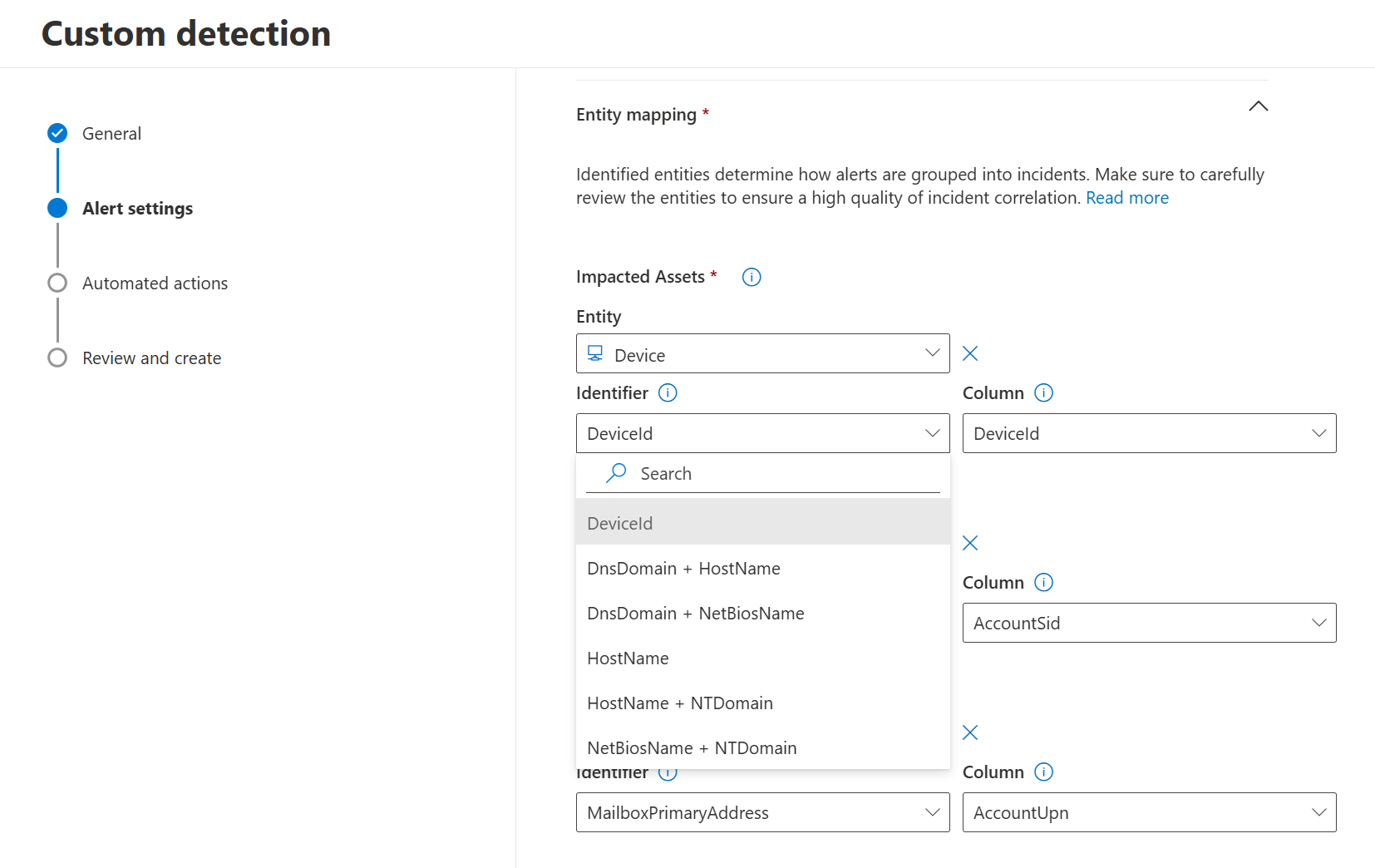
- Query must project
Timestamp,DeviceIdandReportIdfor MDE tables. Do not filter onTimestampyourself. The service applies the lookback. - Alert details: unique name, frequency, title, severity, category, MITRE technique, description, recommended actions.
- Frequency: Every 24 hours (30 day lookback), 12 hours (48 h), 3 hours (12 h), Every hour (4 h), Continuous (NRT). NRT allows one table, no joins or unions, no comment lines.
- Impacted entities: pick the device, user or mailbox column. This drives incident grouping.
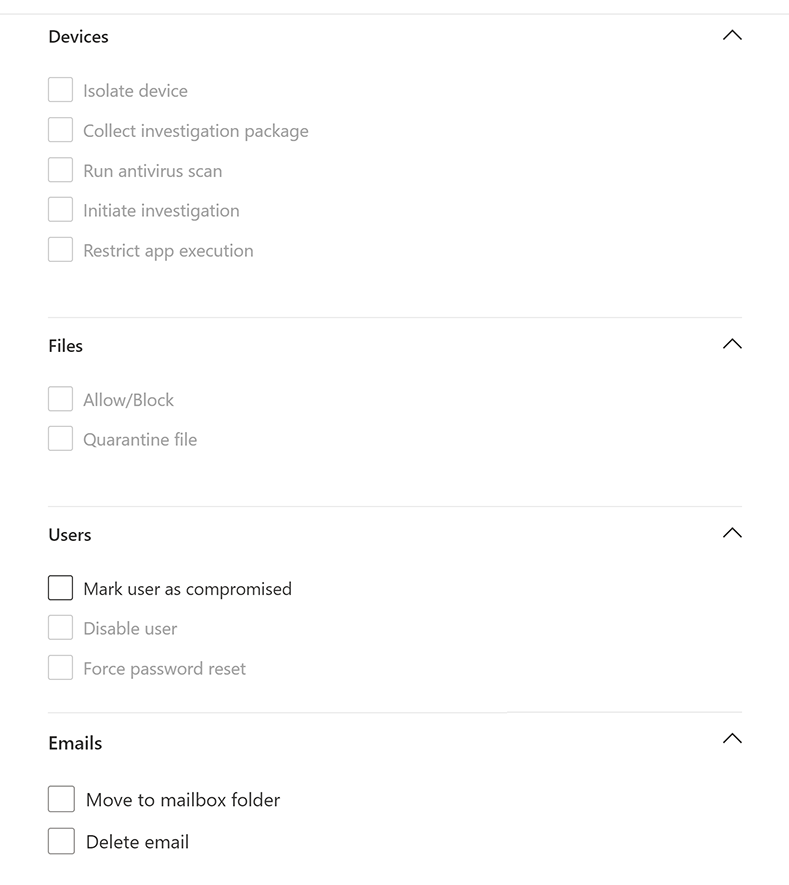
- Actions. Devices: Isolate device, Collect investigation package, Run antivirus scan, Initiate investigation, Restrict app execution. Files: Allow/Block, Quarantine file. Users: Mark user as compromised, Disable user, Reset user authentication. Emails: Move to mailbox folder, Delete email.
- Scope: All devices or specific device groups.
- Create. It runs once over 30 days, then on schedule. Max 150 alerts per run.
App registration: Entra > App registrations > New > API permissions > APIs my organization uses > WindowsDefenderATP > Application permissions. Pick Machine.Read.All, Machine.Isolate, Alert.Read.All, AdvancedQuery.Read.All. Grant admin consent. Add a client secret. The token scope stays on the legacy resource even though the API host is api.security.microsoft.com.
# Tested on: TODO
$tenantId  = ''
$appId     = ''
$appSecret = ''

$authBody = [Ordered] @{
    scope         = 'https://api.securitycenter.microsoft.com/.default'
    client_id     = $appId
    client_secret = $appSecret
    grant_type    = 'client_credentials'
}
$auth  = Invoke-RestMethod -Method Post -Uri "https://login.microsoftonline.com/$tenantId/oauth2/v2.0/token" -Body $authBody
$hdr   = @{ Authorization = "Bearer $($auth.access_token)" }
$base  = 'https://api.security.microsoft.com/api'

# Devices (Machine.Read.All). $top max 10000. 100 calls/min, 1500/hour.
$machines = (Invoke-RestMethod -Headers $hdr -Uri "$base/machines?`$filter=healthStatus eq 'Active'&`$top=1000").value
$machines | Select-Object id, computerDnsName, osPlatform, lastSeen, riskScore, exposureLevel

# Alerts (Alert.Read.All). $expand=evidence for entities.
$alerts = (Invoke-RestMethod -Headers $hdr -Uri "$base/alerts?`$filter=severity eq 'High' and status eq 'New'&`$top=100&`$expand=evidence").value

# Isolate (Machine.Isolate). IsolationType: Full | Selective | UnManagedDevice. Returns 201 + MachineAction.
$id   = $machines[0].id
$body = @{ Comment = 'Isolated via API, incident 1234'; IsolationType = 'Selective' } | ConvertTo-Json
Invoke-RestMethod -Method Post -Headers $hdr -ContentType 'application/json' -Uri "$base/machines/$id/isolate" -Body $body

# Release
Invoke-RestMethod -Method Post -Headers $hdr -ContentType 'application/json' -Uri "$base/machines/$id/unisolate" -Body (@{ Comment = 'Cleared' } | ConvertTo-Json)

# Advanced hunting (AdvancedQuery.Read.All). 45 calls/min, 1500/hour, 200 s timeout, 100k rows, 50 MB.
# Being retired from Jan 2026 in favour of Graph runHuntingQuery. Use the Graph tab for new work.
$q = @{ Query = 'DeviceInfo | where Timestamp > ago(7d) | summarize arg_max(Timestamp, *) by DeviceId | project DeviceName, OSPlatform, SensorHealthState' } | ConvertTo-Json
$r = Invoke-RestMethod -Method Post -Headers $hdr -ContentType 'application/json' -Uri "$base/advancedqueries/run" -Body $q
$r.Results
Regional hosts (us., eu., uk., au.) in front of api.security.microsoft.com are faster. HTTP 429 means you hit a call or CPU quota. The body says which.
Permissions on the Microsoft Graph API: SecurityAlert.Read.All, SecurityIncident.Read.All, ThreatHunting.Read.All (application or delegated). Delegated callers also need Security Reader or higher.
GET https://graph.microsoft.com/v1.0/security/alerts_v2?$filter=serviceSource eq 'microsoftDefenderForEndpoint' and severity eq 'high' and status eq 'new'&$top=100
Filterable: assignedTo, classification, determination, createdDateTime, lastUpdateDateTime, severity, serviceSource, status. Page with @odata.nextLink.
GET https://graph.microsoft.com/v1.0/security/incidents?$filter=severity eq 'high'&$expand=alerts&$top=50
$expand=alerts embeds the alert list with evidence (deviceEvidence, userEvidence, processEvidence, ipEvidence).
POST https://graph.microsoft.com/v1.0/security/runHuntingQuery
Content-Type: application/json
{
  "Query": "DeviceProcessEvents | where InitiatingProcessFileName =~ 'powershell.exe' | project Timestamp, DeviceName, FileName, ProcessCommandLine | order by Timestamp desc | limit 50",
  "Timespan": "P7D"
}
Timespan is ISO 8601, default 30 days. If both the query and Timespan filter time, the shorter wins. Response has schema and results. The same call in PowerShell:
Connect-MgGraph -Scopes 'ThreatHunting.Read.All'
$body = @{ Query = 'DeviceInfo | summarize arg_max(Timestamp, *) by DeviceId | project DeviceName, SensorHealthState'; Timespan = 'P1D' } | ConvertTo-Json
(Invoke-MgGraphRequest -Method POST -Uri 'https://graph.microsoft.com/v1.0/security/runHuntingQuery' -Body $body).results
Verify
1. Detection test. On an onboarded Windows device run the Learn detection test from an elevated Command Prompt, then watch the alerts queue.
powershell.exe -NoExit -ExecutionPolicy Bypass -WindowStyle Hidden $ErrorActionPreference = 'silentlycontinue';(New-Object System.Net.WebClient).DownloadFile('http://127.0.0.1/1.exe', 'C:\\test-MDATP-test\\invoice.exe');Start-Process 'C:\\test-MDATP-test\\invoice.exe'
Learn says expect a new alert in the portal in about 10 minutes. Confirm in hunting:
AlertInfo
| where Timestamp > ago(1h)
| where DetectionSource == "EDR"
| join AlertEvidence on AlertId
| project Timestamp, Title, Severity, DeviceName, FileName
2. Block mode state. On the device:
Get-MpComputerStatus | Select-Object AMRunningMode, AMProductVersion, AMEngineVersion
AMRunningMode of Passive with block mode enabled is the target when a third-party AV is primary. Learn also says: if Threat and vulnerability management recommends turning on EDR in block mode, it is off.
3. Automation level. Settings > Permissions > Device groups. The Automation level column is visible in the list. Cross-check which group a device landed in from the device page Overview (Device group field).
Ready-to-paste hunting queries.
Devices not seen in 7 days:
DeviceInfo
| summarize LastSeen = max(Timestamp) by DeviceId, DeviceName, OSPlatform
| where LastSeen < ago(7d)
| order by LastSeen asc
Sensor health:
DeviceInfo
| where Timestamp > ago(1d)
| summarize arg_max(Timestamp, *) by DeviceId
| summarize count() by SensorHealthState, OnboardingStatus, OSPlatform
ASR rule events (audit and block):
DeviceEvents
| where Timestamp > ago(7d)
| where ActionType startswith "Asr"
| extend RuleId = tostring(parse_json(AdditionalFields).RuleId)
| summarize Hits = count(), Devices = dcount(DeviceId) by ActionType, RuleId, FileName
| order by Hits desc
Removable storage:
DeviceEvents
| where Timestamp > ago(7d)
| where ActionType startswith "RemovableStorage" or ActionType == "UsbDriveMounted"
| project Timestamp, DeviceName, AccountName, ActionType, AdditionalFields
Suspicious PowerShell:
DeviceProcessEvents
| where Timestamp > ago(7d)
| where FileName in~ ("powershell.exe", "pwsh.exe")
| where ProcessCommandLine has_any ("-enc", "-EncodedCommand", "FromBase64String", "DownloadString", "IEX", "Invoke-Expression", "-nop", "bypass", "hidden")
| project Timestamp, DeviceName, AccountName, InitiatingProcessFileName, ProcessCommandLine
| order by Timestamp desc
Logons by local admins (new elevated interactive or remote sessions):
DeviceLogonEvents
| where Timestamp > ago(7d)
| where ActionType == "LogonSuccess"
| where IsLocalAdmin == true
| where LogonType in ("Interactive", "RemoteInteractive", "Network")
| summarize FirstSeen = min(Timestamp), Count = count() by DeviceName, AccountName, AccountDomain, LogonType
| where FirstSeen > ago(2d)
| order by FirstSeen desc
Process tree for a file hash:
let hash = "<sha256>";
DeviceProcessEvents
| where Timestamp > ago(30d)
| where SHA256 == hash or InitiatingProcessSHA256 == hash
| project Timestamp, DeviceName, InitiatingProcessParentFileName, InitiatingProcessFileName, InitiatingProcessCommandLine, FileName, ProcessCommandLine, AccountName
| order by Timestamp asc
Failed logons:
DeviceLogonEvents
| where Timestamp > ago(1d)
| where ActionType == "LogonFailed"
| summarize Failures = count(), Accounts = make_set(AccountName, 20) by DeviceName, RemoteIP, LogonType
| where Failures > 20
| order by Failures desc
Troubleshoot
| Symptom | Likely cause | Fix |
|---|---|---|
| Alerts never appear after detection test | Device not fully onboarded, sensor Inactive, or cloud connectivity blocked | Check DeviceInfo.SensorHealthState, run the MDE Client Analyzer, open the required URLs (streamlined connectivity or the full list) |
| Alert exists but no incident, or wrong incident | Correlation restricted to device group, or entity mapping missing in a custom rule | Check the Restrict correlation toggle. For custom rules, set impacted entities |
| Isolate fails or sits Pending | Device offline (retries 3 days), OS below Windows 10 1703, Linux kernel missing netfilter owner match, or macOS client older than 101.98.84 | Wait, reissue after it comes online, or update the agent |
| Device cannot be released from isolation | Full-tunnel VPN or web proxy (PAC/WPAD) blocked MDE traffic after isolation | Download the forcible release script from the device page (expires 3 days, needs the listed KBs). Use split tunnel and selective isolation next time |
| Live response button missing | Toggle off, or server without the servers toggle, or your role lacks live response permission, or device is a high-value asset with restricted actions | Advanced features, then Settings > Permissions > Roles |
| Live response unsigned script fails | Signature check applies to PowerShell scripts | Sign it, or enable unsigned execution temporarily |
| Hunting query times out or returns partial | 10 minute cap, 100,000 rows, 64 MB result, CPU quota at 100 percent | Narrow the time window first, filter before join, project only needed columns, wait 15 minutes for CPU reset |
| API hunting returns 429 or 400 | 45 calls/min, 1500/hour, 200 s, 50 MB | Back off, trim query, or move to Graph runHuntingQuery |
| Custom detection never fires | Query lacks DeviceId and ReportId, rule scope excludes the device group, or your own Timestamp filter is shorter than the lookback | Project the three columns, widen scope, drop the time filter |
| Custom detection creates too many alerts | 150 alert cap per run hit | Tune the query to exclude normal activity, summarize by device |
| Restrict app execution fails | Defender AV not active, or Server 2016 / 2012 R2 | Use isolation instead on those platforms |
Gotchas and limits
- Isolation always keeps the MDE channel open. The device still reports and still takes response actions. Full-tunnel VPN defeats that: the device loses the cloud after isolation and you cannot release it. Use selective isolation on VPN and proxy fleets.
- Selective isolation on the API is
IsolationType: Selective.UnManagedDeviceis not isolation at all. It triggers Contain device, which asks every onboarded device to drop traffic to that IP. Max 100 contained devices, up to 5 minutes to propagate. - Isolating a Hyper-V host cuts off every child VM. Isolation auto-lifts after 7 days. On Linux, any admin edit to
iptablesreleases it. - EDR in block mode only does something when Defender AV is passive. With Defender AV active, EDR detections are already remediated by the engine. It ignores MDE indicators but respects AV exclusions.
- Automation level is per device group, including Ungrouped devices. A device in the wrong group gets the wrong level. Check rank order. Pending actions expire in 7 days and that counts as a reject.
- AIR as a standalone experience ends 1 September 2026. Plan runbooks around AV full scans, not Initiate automated investigation.
- Advanced Hunting is 30 days, full stop. The backend keeps six months but you cannot query it. For longer: onboard a Sentinel workspace (analytics-tier retention applies), or stream via the Streaming API. Streaming starts the day you enable it. No backfill.
- Entity tables (
DeviceInfo,DeviceNetworkInfo) refresh hourly with one row per device per snapshot. Alwaysarg_max(Timestamp, *) by DeviceIdbefore counting. - Queries run in UTC. The portal converts display only.
- Plan 1 and Defender for Business cannot hunt via the MDE API. The MDE
advancedqueries/runendpoint is being retired from January 2026. New automation goes to Graphsecurity/runHuntingQuerywithThreatHunting.Read.All. - MDE API tokens need the legacy scope
https://api.securitycenter.microsoft.com/.defaulteven when callingapi.security.microsoft.com. Wrong audience returns 403. - MDE API permission names:
Machine.Read.All,Machine.Isolate,Alert.Read.All(list alerts page showsAlert.ReadWrite.All; confirm which your tenant consented),AdvancedQuery.Read.All. Delegated calls additionally need the user's MDE role and device group access. - Live response actions started from the device page do not show in the MachineActions API.
- NRT custom detections: one table, no joins, no comments in the query. Dynamic alert titles take at most three columns. Custom details max 20 pairs and 4 KB per alert, or the whole set is dropped.
Further reading
- Microsoft Defender: New Advanced hunting enhancements, Noa Nutkevitch, Microsoft Tech Community, April 2026. Covers the raised result limits, partial results on size caps and the query diagnostics panel, which changes how you tune a query that times out.
- New Privileged Token Context Telemetry Boosts Advanced Hunting in Microsoft Defender, Tal Tzhori, Microsoft Tech Community, July 2026. New privilege fields in DeviceLogonEvents that make the local admin logon query above more precise than IsLocalAdmin alone.
- Elevate your telemetry using custom data collection in Microsoft Defender, Microsoft Tech Community, June 2026. How to collect extra event sources into Advanced Hunting when the default sensor throttling leaves gaps.
- MC1411577: AIR integrated into antivirus with manual triggering removed, Message Center archive by Merill Fernando, July 2026. The source for the 1 September 2026 AIR change and what to swap into playbooks and API calls before then.
My notes
TODO: Sohail's notes after verification.
Changelog
| Date | Change | Source |
|---|---|---|
| 2026-10-22 | Drafted from Learn | [1] |
| 2026-10-22 | Added Learn images, diagrams, further reading |