Licensing: Plan 1, Plan 2, Business
What it is
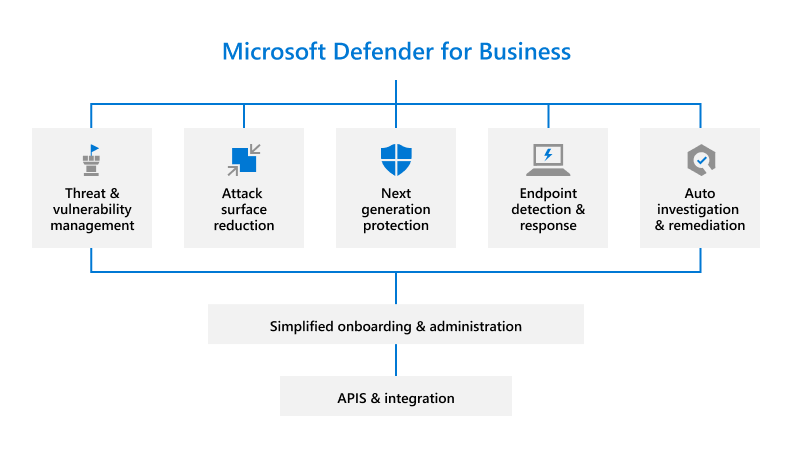
Three client licences: Plan 1, Plan 2, Defender for Business. Plan 1 is prevention only: next-gen AV, ASR, device control, web protection, firewall management, three manual response actions. Plan 2 adds EDR, automated investigation, hunting, core vulnerability management, Threat Experts, six months retention. Defender for Business is the 300-user SMB SKU: Plan 1 plus most Plan 2 detection and response, minus hunting and retention, with simplified setup.
None of these cover servers. A server needs Defender for Servers (via Defender for Cloud), the standalone Defender for Endpoint Server licence, or the Defender for Business servers add-on.
A licence is not onboarding. The licence sets which features the tenant shows. Onboarding makes a device report in. Both failure modes look alike in the portal.

Licensing and prerequisites
Which bundle carries which plan, per the Microsoft Defender service description:
- Plan 1: standalone user subscription, or Microsoft 365 E3/A3/G3.
- Plan 2: standalone, Windows 10/11 Enterprise E5/A5, Microsoft 365 E5/A5/G5 (via Windows Enterprise E5), Microsoft Defender Suite/EDU/GOV/FLW, Microsoft Defender + Purview Suite FLW. Microsoft 365 E5 Security also includes Plan 2.
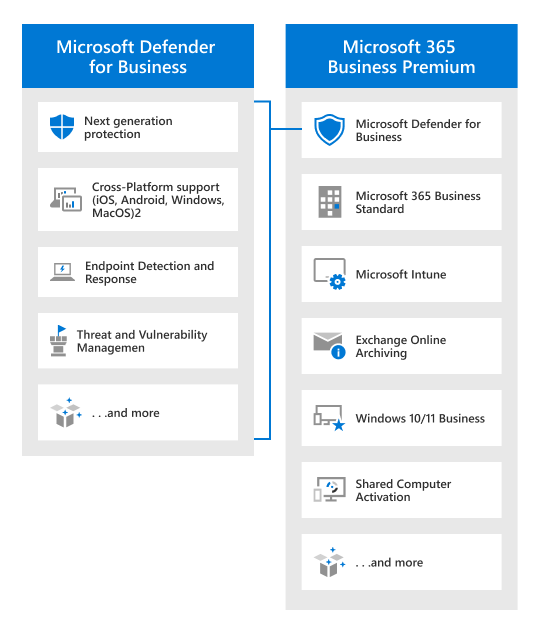
- Defender for Business: included in Microsoft 365 Business Premium, or standalone for orgs with up to 300 users (for example on Business Basic, Business Standard, Office 365 E1).
- Servers: a separate licence per OSE. See the Servers section below.
Roles to read licence state in the Defender portal: Security Administrator, or License Administrator plus Defender for Endpoint Administrator.
How it works
Which licence a device ends up under, client or server:
Feature matrix
From the Defender for Business overview table, plus the Plan 1 feature list.
| Feature | Defender for Business | Plan 1 | Plan 2 |
|---|---|---|---|
| Next-generation protection | Yes | Yes | Yes |
| Attack surface reduction | Yes | Yes | Yes |
| Centralized management, APIs | Yes | Yes | Yes |
| Cross-platform (Mac, iOS/iPadOS, Android) | Yes | Yes | Yes |
| Manual response: AV scan, isolate, file indicator | Yes | Yes | Yes |
| EDR | Yes (optimized) | Yes | |
| Automated investigation and remediation | Yes | Yes | |
| Automatic attack disruption | Yes | Yes | |
| Threat analytics | Yes (optimized) | Yes | |
| Vulnerability management (core) | Yes | Yes | |
| Monthly security summary report | Yes | Yes | |
| Advanced hunting 30 days, six months retention | Yes | ||
| Microsoft Threat Experts | Yes | ||
| Simplified firewall and AV configuration | Yes | ||
| Server support | Extra licence | Extra licence | Extra licence |
Plan 1 devices do not show vulnerabilities or security recommendations at all. Defender Vulnerability Management is not available to Defender for Business customers. The premium DVM add-on needs Plan 2 on clients, or Defender for Servers Plan 2 on servers.
How a user licence maps to devices
Plan 2 and Defender for Business licences are per user. Each licensed user covers up to five concurrent onboarded client devices. There is no device-to-user assignment. The usage report at Settings > Endpoints > Licenses estimates utilisation from sign-in activity across the org and lags up to a day.
Mixed tenants
With both Plan 1 and Plan 2 in the tenant (E3 and E5 users, say), MDE runs one plan for every device. Assigning licences in the admin center does not change that. To split capabilities, set mixed mode at Settings > Endpoints > Licenses > Manage subscription settings, then tag Plan 1 devices with License MDE P1. Untagged devices keep Plan 2. Tags apply within three hours. Client endpoints only; tagging a server changes nothing.
Defender for Business cannot be mixed. Business Premium plus E5 Security for some users gives everyone the Defender for Business experience. To get Plan 2, license all users for Plan 2 and open a support case.
What a mixed-mode device goes through once the tenant has both plans:
Servers
- Defender for Servers Plan 1 or 2 through Defender for Cloud. Both include MDE EDR and auto-onboarding; Defender for Endpoint for Servers licences are included. Plan 2 adds agentless scanning, DVM premium, FIM, JIT, OS update and baseline assessment, 500 MB free ingestion. Billed per machine by power state; stopped but not deallocated VMs still bill. Direct-onboarded (sensor only) servers bill per hour. Enabling starts a 30-day trial that cannot be paused. Plan 1 can be enabled per resource; Plan 2 is subscription-wide, disable per resource only. Arc-enable non-Azure machines for full function.
- Defender for Endpoint Server (standalone). If you later enable Defender for Servers, raise a support request to avoid double billing. Discount starts on approval, not retroactive.
- Defender for Business servers add-on. SMB only; needs at least one paid Defender for Business or Business Premium licence. One licence per Windows or Linux server instance, not assigned to anything. Cap 60 per subscription. Over 60, use one of the other two.
Trials
- MDE Plan 2: 90 days. The trial guide assumes the subscription is already provisioned. Offboard devices before expiry if you do not buy.
- Defender for Business: try or buy from the product page or a partner. Trial length not stated on the pages fetched.
- Defender for Servers: 30 days from plan enable.
- Mixed trial (Plan 2 trial for some users, Plan 1 for the rest) is a supported mixed-mode scenario.
Configure
- Portal
- PowerShell
- Graph API
- Microsoft 365 admin center > Billing > Your products. Confirm the SKU is active and the unit count is right.
-
Azure portal > Microsoft Entra ID > Manage > Licenses. Same data; the deployment guide points here to confirm provisioning.
-
Defender portal > Settings > Endpoints > Licenses. Subscription state and usage report. Manage subscription settings appears only when both Plan 1 and Plan 2 exist.
-
Mixed mode only: Manage subscription settings > use Plan 1 and Plan 2. Then tag devices
License MDE P1, manually or by dynamic rule (device name, domain, OS platform, tags; Equals, Not equals, Starts with, Contains, Does not contain). Nothing changes until devices are tagged. -
Defender for Business servers: admin center > Billing > Purchase services > Microsoft Defender for Business servers.
# Tested on: TODO
# Organization.Read.All covers subscribedSkus. Graph docs list LicenseAssignment.Read.All as least privileged
# for both subscribedSkus and licenseDetails, and licenseDetails is delegated only.
Connect-MgGraph -Scopes "Organization.Read.All","LicenseAssignment.Read.All"

# Tenant SKUs with unit counts
Get-MgSubscribedSku | Select-Object SkuPartNumber, SkuId, CapabilityStatus, ConsumedUnits,
  @{n='Enabled';e={$_.PrepaidUnits.Enabled}}, @{n='Suspended';e={$_.PrepaidUnits.Suspended}} |
  Format-Table -AutoSize

# Which SKUs carry a Defender for Endpoint or Defender for Business service plan.
# Pattern is broad on purpose. Confirm exact names against the service plan reference
# or against your own tenant output and tighten it. TODO: record the names seen in dev.
$pattern = 'WINDEFATP|DEFENDER_ENDPOINT|MDE_'
Get-MgSubscribedSku | ForEach-Object {
  $sku = $_
  $sku.ServicePlans | Where-Object { $_.ServicePlanName -match $pattern } | ForEach-Object {
    [pscustomobject]@{ Sku = $sku.SkuPartNumber; ServicePlan = $_.ServicePlanName; PlanId = $_.ServicePlanId; Status = $_.ProvisioningStatus }
  }
} | Sort-Object Sku, ServicePlan | Format-Table -AutoSize

# Per-user detail: SKU plus the Defender service plans and their provisioning state
$upn = 'user@contoso.com'
Get-MgUserLicenseDetail -UserId $upn | ForEach-Object {
  $d = $_
  $d.ServicePlans | Where-Object { $_.ServicePlanName -match $pattern } | ForEach-Object {
    [pscustomobject]@{ Sku = $d.SkuPartNumber; ServicePlan = $_.ServicePlanName; Status = $_.ProvisioningStatus }
  }
} | Format-Table -AutoSize

# Everyone with a matching plan, for a coverage count
Get-MgUser -All -Property Id,UserPrincipalName,AssignedPlans |
  Where-Object { $_.AssignedPlans | Where-Object { $_.Service -match 'Defender|WindowsDefenderATP' -and $_.CapabilityStatus -eq 'Enabled' } } |
  Select-Object UserPrincipalName | Measure-Object
Tenant SKUs. Only $select is supported, no $filter.
GET https://graph.microsoft.com/v1.0/subscribedSkus?$select=skuPartNumber,skuId,capabilityStatus,consumedUnits,prepaidUnits,servicePlans
Per-user licence detail. Delegated only; application permission is not supported. Least privileged: LicenseAssignment.Read.All plus a directory role such as Directory Readers or License Administrator.
GET https://graph.microsoft.com/v1.0/users/{id}/licenseDetails
Response shape (trimmed from the Learn example):
{
  "value": [
    {
      "skuId": "c7df2760-2c81-4ef7-b578-5b5392b571df",
      "skuPartNumber": "ENTERPRISEPREMIUM",
      "servicePlans": [
        { "servicePlanName": "THREAT_INTELLIGENCE", "provisioningStatus": "Success", "appliesTo": "User" }
      ]
    }
  ]
}
Verify
- User covered:
Get-MgUserLicenseDetailshows a Defender service plan inSuccessstate.PendingProvisioningorDisabledmeans not yet. - Tenant plan in effect: Settings > Endpoints > Licenses. In mixed mode, open a device tagged
License MDE P1and the device page shows Plan 1 assigned; it has no vulnerabilities or recommendations. - Device onboarded (separate from licensed): in Assets > Devices with sensor health Active. Run the detection test.
- Server covered: Defender for Cloud > Environment settings shows the plan On for the subscription. The Business servers add-on only shows as a unit count under Billing > Your products; it is assigned nowhere.
- Usage against entitlement: the usage report under Settings > Endpoints > Licenses, one day of lag.
// Onboarded client devices per OS, to compare against licensed users x5
DeviceInfo
| where Timestamp > ago(7d)
| where OnboardingStatus == "Onboarded"
| summarize arg_max(Timestamp, *) by DeviceId
| summarize Devices = count() by OSPlatform, DeviceType
Troubleshoot
| Symptom | Likely cause | Fix |
|---|---|---|
| Vulnerability management, hunting or timeline greyed out, "requires Plan 2" | Tenant on Plan 1 or Defender for Business, or device tagged License MDE P1 | Check Settings > Endpoints > Licenses. Remove tag or buy Plan 2. Defender for Business: license all for Plan 2, support case. |
| E5 users still get Plan 1 or Business features | Licence assignment does not change the tenant plan | Mixed mode plus tags. Support case for Business to Plan 2. |
| Manage subscription settings missing | One plan only, or mixed-licence not rolled out yet | Confirm both SKUs active. Wait. |
| Tagged device still Plan 2 | Registry key tag, or under three hours | Portal tag or dynamic rule. Wait. |
| Server shows unlicensed | Client licences do not cover servers | Defender for Servers, Defender for Endpoint Server, or Business servers add-on. |
| Over 60 servers on Defender for Business | Add-on cap | Defender for Endpoint Server or Defender for Servers. |
| Defender for Servers plus existing MDE Server licence, billed twice | Discount is not automatic | Azure support request with tenant ID, licence count, expiry. Not retroactive. |
| Trial expired, devices still reporting | Not offboarded | Buy, or offboard. |
| Onboarded but no data | Licence missing or suspended | Check capabilityStatus and prepaidUnits.suspended in subscribedSkus. |
| Licence present, device not in inventory | Not onboarded or sensor dead | Not a licensing problem. Go to onboarding. |
| Usage report over entitlement | More than five devices per licensed user, or shared devices | Count in DeviceInfo. Buy more or offboard. One day lag. |
Gotchas and limits
- Assigning licences in the admin center never moves a tenant between Plan 1 and Plan 2. One plan for all until you turn on mixed mode and tag.
- Business Premium in the tenant wins for everyone, even E5 Security users, until support switches it.
License MDE P1through the registry key does not downgrade the device. Portal, API, Intune custom profile tag, or dynamic rule only.- Five devices per user is an org-wide concurrent count, not a binding. The usage report is an estimate from sign-ins.
- Defender for Business has no DVM at all, core or add-on, despite the "vulnerability management (core)" row in the comparison table. Treat the DVM capabilities page as the authority until verified.
- Defender for Servers bills stopped Azure VMs. Deallocate to stop paying. Sensor-only direct onboarding bills per hour.
GET /subscribedSkushas no$filter.licenseDetailshas no application permission; unattended scripts readassignedPlanson the user instead.- The Plan 1 and 2 compare page and the Defender for Business compare page could not be fetched for this draft. The matrix is from the Defender for Business overview and FAQ, which carry the same table. Re-check both at the next source review.
Further reading
- Microsoft rebrand security and compliance suites for Enterprise plans, Licensing School, Louise Ulrick, October 2025. Explains the E5 Security to Defender Suite rename, which is why the bundle list above no longer matches older quotes and SKU names.
- Modern Work Plan Comparison documents, Licensing School, November 2025. Flags the 300 User SL footnote on SMB Business plans, the hard ceiling behind the Defender for Business standalone rule.
- Is Microsoft Defender Being Removed from M365 Business Premium?, Trusted Tech Team, Thomas Rosquin, January 2026. Clears up the late-2025 confusion: Defender for Business stays in Business Premium and the new Defender and Purview add-ons sit on top.
- Microsoft Security licensing FAQs, August 2026, Microsoft licensing FAQ hosted by Licensing School, August 2026. Microsoft's own Q and A on Defender for Servers P1 and P2 billing by VM power state and the discount process for existing Defender for Endpoint Server licences.
Note: no Tech Community or Microsoft engineering blog post from the last 12 months covers Plan 1 versus Plan 2 licensing directly; the practitioner posts on mixed licensing are from 2023 and were skipped.
My notes
TODO: Sohail's notes after verification.
Changelog
| Date | Change | Source |
|---|---|---|
| 2026-10-22 | Drafted from Learn | [1] |
| 2026-10-22 | Added Learn images, diagrams, further reading |