Onboarding macOS via Intune
Source numbers such as [1] or [11] refer to the order of learn_sources in the frontmatter.
What it is
Getting the Microsoft Defender app onto a Mac, getting macOS to trust its two system extensions and grant its permissions without asking the user, and tying the device to your tenant with an onboarding profile. Intune does it with one app object and a stack of configuration profiles.
The part that goes wrong is ordering. Profiles must land before the app. If the app arrives first, macOS prompts the user for every approval.
Not covered: AV preferences in depth, network protection, device control, Purview DLP. Diagnostics beyond the basics live in troubleshooting.
Licensing and prerequisites
- MDE P1, P2, Defender for Business or Defender for Individuals. One user license covers up to five client devices for that user [8].
- Intune is a separate license. It is not in every MDE SKU [1].
- Supported macOS: the three most recent major releases, currently 27 (Golden Gate), 26 (Tahoe) and 15 (Sequoia). Betas are not supported. New major releases are supported from Apple's GA day [8]. The Intune app page still says "macOS 13 or later" [7]; treat the MDE prerequisites page as the authority.
- Hardware: Intel x64 or Apple silicon ARM64, 1 GB disk, SIP enabled [8].
- Streamlined connectivity needs agent 101.23102.* (November 2023) or later. Allow
*.endpoint.security.microsoft.comand the supporting dependencies. PAC, WPAD and static proxies work. Authenticated proxies and TLS inspection do not [8]. - Intune enrollment via Automated Device Enrollment or Device enrollment, and the Policy and Profile Manager role to create the system extension policy [14].
- Pre-deployment connectivity check [8]:
curl -w ' %{url_effective}\n' 'https://x.cp.wd.microsoft.com/api/report' 'https://cdn.x.cp.wd.microsoft.com/ping'
How it works
Every macOS deployment has the same five stages: prepare the network, approve the extensions and permissions, install the package, apply the onboarding profile, verify [2].
Two system extensions do the work. com.microsoft.wdav.epsext is the Endpoint Security extension that watches files, processes and system events. com.microsoft.wdav.netext is the network extension for network protection, web content filtering and custom indicators. Both are signed with Team ID UBF8T346G9. On macOS 11 and later an MDM profile or a local admin must approve them before they run [8].
Each Intune profile unlocks one thing. What breaks when it is missing [1][8][11]:
| Profile (sample file) | What it grants | Missing it |
|---|---|---|
| System extensions (settings catalog) | Approval for epsext and netext | systemextensionsctl list shows [activated waiting for user], healthy: false, "no active event provider" |
netfilter.mobileconfig | Content filter for com.microsoft.wdav.netext | User gets the "filter network content" prompt; network protection and web filtering do not run |
fulldisk.mobileconfig | Full Disk Access for com.microsoft.wdav, com.microsoft.wdav.epsext, com.microsoft.dlp.daemon | "full disk access has not been granted", real_time_protection_available: false |
background_services.mobileconfig | Background execution (macOS 13 and later) | User gets the "added background items" prompt and can disable them |
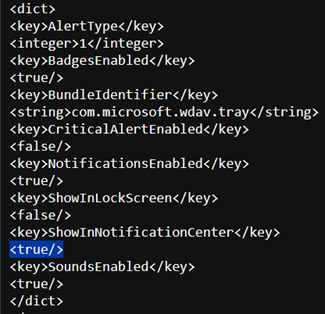
notif.mobileconfig | Notifications for com.microsoft.wdav.tray and com.microsoft.autoupdate2 | User is asked to allow notifications; set ShowInNotificationCenter to false to hide them |
accessibility.mobileconfig | Accessibility for com.microsoft.dlp.daemon | Only matters for Purview DLP |
bluetooth.mobileconfig | Bluetooth for com.microsoft.dlp.agent | Only matters for Bluetooth device control, macOS 14 and later |
com.microsoft.autoupdate2.mobileconfig | MAU channel and behaviour | MAU runs with defaults, Current channel |
com.microsoft.wdav.xml as com.microsoft.wdav | Defender preferences (or use Defender portal policies) | Defaults apply; passive mode not set |
WindowsDefenderATPOnboarding.xml | Tenant binding, domain com.microsoft.wdav.atp | licensed: false, org_id: unavailable, shield shows x badge, "no license found" |
Permissions granted by MDM do not show in System Settings > Privacy & Security. Full Disk Access and Bluetooth granted by profile are invisible there [1]. Do not use /Library/Managed Preferences as your only test either; check System Settings > General > Device Management [11].
Updates come from Microsoft AutoUpdate, which ships inside the Intune app type. Each Defender build expires six months after release; expired builds still get security intelligence updates [5][7].
Configure
Deploy in this order. Profiles first, app and onboarding last [1].
- Portal
- Terminal
- Graph API
Sample profiles come from github.com/microsoft/mdatp-xplat/macos/mobileconfig/profiles. Download them rather than hand-building payloads [11]. Every custom profile below uses Devices > Configuration > Create > New policy, Platform macOS, Profile type Templates, Template Custom, Deployment channel Device channel [1].
- System extensions. Settings catalog, not Custom. The old macOS Extensions template was deprecated in Intune 2408 and cannot be used for new policies [14]. Search
allowed system, category System Configuration > System Extensions. Allowed System Extensions:com.microsoft.wdav.epsext,com.microsoft.wdav.netext, Team IdentifierUBF8T346G9. Allowed System Extension Types:Network,EndpointSecurity, same Team Identifier [1][14].


-
Network filter. Custom profile, file
netfilter.mobileconfig. macOS supports one network filter profile per device. Two filters break connectivity, and that is an Apple limit, not an MDE one [1]. -
Full Disk Access. Custom profile, file
fulldisk.mobileconfig. MDM-granted FDA cannot be revoked by the user [1]. -
Background services. Custom profile, file
background_services.mobileconfig[1]. -
Notifications. Custom profile, file
notif.mobileconfig[1].
-
Accessibility. Custom profile, file
accessibility.mobileconfig. Grants Accessibility tocom.microsoft.dlp.daemon[1]. -
Bluetooth (optional). Custom profile, file
bluetooth.mobileconfig. Only if you will use Bluetooth device control [1]. -
Microsoft AutoUpdate. Custom profile, file
com.microsoft.autoupdate2.mobileconfigfrommdatp-xplat/macos/settings/microsoft_auto_update. Sample is set to Current [1][5]. -
Defender configuration. One of two routes, not both [1].
- Defender portal: Endpoint security policies, macOS policies tab, an Antivirus policy (template Microsoft Defender Antivirus) and an EDR policy (template Endpoint detection and response). Needs the Intune to MDE connector first.
- Intune custom profile: file
com.microsoft.wdav.xml, Configuration profile name exactlycom.microsoft.wdav. Any other name and Defender ignores it. Set passive mode here if another AV stays on the box.
-
The app. Apps > All apps > Create > app type Microsoft Defender for Endpoint > macOS. No wrapping tool. Keep App information defaults, assign to the same groups as the profiles [1][7].
-
Onboarding package. Defender portal > Settings > Endpoints > Onboarding. OS macOS, Connectivity type Streamlined, Deployment method Mobile Device Management / Microsoft Intune. Download
GatewayWindowsDefenderATPOnboardingPackage.zip. The zip containsintune/kext.xml,intune/WindowsDefenderATPOnboarding.xmlandjamf/WindowsDefenderATPOnboarding.plist. Use the Intune XML [1].

-
Onboarding profile. Custom profile, Device channel, file
WindowsDefenderATPOnboarding.xml. Contains the license and tenant binding [1]. -
Check in. Devices > Configuration > policy > Device and user check-in status > View report. On the Mac, System Settings > General > Device Management should list every profile plus the Intune Management Profile, and the Defender shield should be in the menu bar [1].

Jamf Pro instead of Intune. Same payloads, different wrapper. Jamf uses jamf/WindowsDefenderATPOnboarding.plist from the same zip with Preference Domain com.microsoft.wdav.atp. Learn's Jamf sequence: onboarding plist; Defender settings as domain com.microsoft.wdav (Custom Schema with schema.json, or legacy plist upload); Notifications payload for com.microsoft.wdav.tray and com.microsoft.autoupdate.fba; MAU plist as domain com.microsoft.autoupdate2; PPPC payload granting SystemPolicyAllFiles to com.microsoft.wdav and com.microsoft.wdav.epsext; System Extensions payload with Team ID UBF8T346G9; Content Filter payload Microsoft Defender Content Filter, identifier com.microsoft.wdav, socket filter com.microsoft.wdav.netext; then background services and a signed Bluetooth profile. Upload wdav.pkg as-is, never repackaged, and scope the install policy to a smart group whose criterion is that the profiles are installed, so the package cannot arrive first [6][9].
There is no scripted onboarding on macOS. The onboarding "package" is a configuration profile. Manual install is sudo installer -pkg wdav.pkg -target / and double-clicking WindowsDefenderATPOnboarding.mobileconfig from the local script download, then approving every prompt by hand [12]. That is for test boxes only.
What you run after Intune has done its job:
# Tested on: TODO
# Agent health, single source of truth
mdatp health
mdatp health --field healthy
mdatp health --field licensed
mdatp health --field org_id
mdatp health --field real_time_protection_enabled
mdatp health --field definitions_status
mdatp health --field product_expiration

# Component detail
mdatp health --details system_extensions
mdatp health --details permissions
mdatp health --details edr

# Cloud reachability
mdatp connectivity test

# Extension approval state from macOS itself
systemextensionsctl list

# Force real-time protection on (preferences profile normally owns this)
mdatp config real-time-protection --value enabled

# Passive mode when another AV stays active
mdatp config passive-mode --value enabled

# Pull definitions now
mdatp definitions update

# Compare installed payloads against Microsoft's template
curl -sS https://raw.githubusercontent.com/microsoft/mdatp-xplat/master/macos/mdm/analyze_profiles.py | sudo python3 -

# Update on demand through MAU (app ID WDAV00)
cd /Library/Application\ Support/Microsoft/MAU2.0/Microsoft\ AutoUpdate.app/Contents/MacOS
./msupdate --install --apps wdav00

# Diagnostics for a support case
mdatp log level set --level debug
sudo mdatp diagnostic create
mdatp log level set --level info
Commands from [3][5][11][13]. --output json works on any mdatp command [3]. Install log is /Library/Logs/Microsoft/mdatp/install.log [3].
Reading what is deployed is easy. The custom profiles are deviceConfigurations, the system extension policy is a settings catalog configurationPolicies item.
GET https://graph.microsoft.com/beta/deviceManagement/deviceConfigurations?$filter=isof('microsoft.graph.macOSCustomConfiguration')&$select=id,displayName,payloadFileName,payloadName,deploymentChannel
GET https://graph.microsoft.com/beta/deviceManagement/configurationPolicies?$filter=platforms eq 'macOS'&$select=id,name,platforms,technologies
Creating them is not. A POST to deviceConfigurations for a custom macOS profile needs the exported mobileconfig or XML base64-encoded in payload, plus payloadName, payloadFileName and deploymentChannel. Graph does not generate the payload for you. The system extension policy posts to configurationPolicies with settings catalog definition IDs; read them back from a portal-made policy before scripting.
POST https://graph.microsoft.com/beta/deviceManagement/deviceConfigurations
{
  "@odata.type": "#microsoft.graph.macOSCustomConfiguration",
  "displayName": "macOS full disk access",
  "payloadName": "fulldisk",
  "payloadFileName": "fulldisk.mobileconfig",
  "deploymentChannel": "deviceChannel",
  "payload": "<base64 of fulldisk.mobileconfig>"
}
None of the Learn sources document these calls. Body is from the Graph beta schema; verify before use.
Verify
On the Mac, mdatp health fields that matter [13]:
| Field | Good value | Meaning |
|---|---|---|
healthy | true | Product is healthy. health_issues is empty |
licensed | true | Onboarded to a tenant |
org_id | tenant org ID | unavailable means the onboarding profile never applied |
edr_machine_id | populated | Device ID in the portal |
real_time_protection_enabled | true | RTP is switched on |
real_time_protection_available | true | RTP component is healthy. false usually means FDA or extensions |
definitions_status | up_to_date | Else updating or unavailable |
engine_load_status | Engine load succeeded | AV process is up |
product_expiration | months away | Build expires six months after release |
mdatp health --details system_extensions should show network_extension_enabled: true and endpoint_security_extension_ready: true. systemextensionsctl list should show both as [activated enabled] [11]. mdatp connectivity test should pass every URL [2].
In the portal: Assets > Devices, device shows Active with OS platform macOS. Then run the AV detection test and the EDR detection test from Learn [1].
DeviceInfo
| where OSPlatform == "macOS"
| summarize arg_max(Timestamp, *) by DeviceId
| project Timestamp, DeviceName, OSVersion, OnboardingStatus, SensorHealthState, ClientVersion
| order by Timestamp desc
Troubleshoot
Start from mdatp health and work down. The three fields that split most cases:

| Symptom | Likely cause | Fix |
|---|---|---|
| Shield shows x badge, "no license found" | Onboarding profile not applied | Confirm WindowsDefenderATPOnboarding.xml is in Device Management; check Intune check-in report [1] |
systemextensionsctl list shows [activated waiting for user] | System extension policy missing or arrived after the app | Deploy the settings catalog policy; run analyze_profiles.py [11][14] |
health_issues has "full disk access has not been granted" | fulldisk.mobileconfig missing | Add it to the deployment. It will not appear in Privacy & Security even when it works [1] |
| User sees "filter network content" prompt | netfilter.mobileconfig missing, or a second filter profile exists | Deploy it; remove any other content filter profile [1] |
| Background items prompt, services disabled by user | background_services.mobileconfig missing on macOS 13 and later | Deploy it [1] |
| Extensions cannot be created in the old Extensions template | Template deprecated in Intune 2408 | Recreate in settings catalog [14] |
| Preferences profile ignored | Configuration profile name is not com.microsoft.wdav | Rename the profile exactly [1] |
mdatp connectivity test fails | TLS inspection or authenticated proxy | Exempt MDE URLs, use PAC, WPAD or static proxy [8] |
Install log and connectivity failures, Client Analyzer and offboarding leftovers: see troubleshooting.
Gotchas and limits
- Order is everything. Learn says it directly: deploy all profiles before the app and onboarding package [1]. Intune has no dependency between a configuration profile and an app assignment. Stage with groups, or accept prompts on the first ring.
- Enrollment type. The system extension article requires Automated Device Enrollment or Device enrollment [14]. None of the sources fetched discuss User Approved MDM for manually enrolled Macs. TODO verify in lab whether a user-enrolled Mac accepts the device channel profiles.
- Apple silicon. ARM64 is supported natively [8]. No Rosetta statement in the sources.
- macOS version support. The prerequisites page lists 27, 26 and 15 [8]. The what's new page carries only build numbers for 2026 (latest 101.26082.0012 in October 2026) and says nothing about OS support or deprecations [4]. Check the release notes page, not what's new, for OS-specific known issues.
- Intune cannot uninstall. Apple gives Intune no way to remove the app [7]. Uninstall is
sudo '/Library/Application Support/Microsoft/Defender/uninstall/uninstall'or drag to Trash. Offboard first, remove tamper protection policy, then uninstall, then remove the device from the system extension policy group [3][10]. The offboarding marker it leaves behind blocks re-onboarding; see troubleshooting. - MAU channel is global.
ChannelNameincom.microsoft.autoupdate2moves every Microsoft app on the Mac to that channel. To move only Defender, use theApplicationsdictionary with App Domaincom.microsoft.wdavand Application IDWDAV00. Legacy namesInsiderFast,External,Productionmap toBeta,Preview,Current[5]. - Builds expire. Six months after release.
mdatp health --field product_expirationtells you when. A Mac with MAU blocked will quietly age out [5]. - One content filter only. Any other product's network filter profile competes with
netfilter.mobileconfig[1]. - Security settings management does not install anything. It manages settings on onboarded devices; you still need the app and onboarding profile [8].
- Repackaging wdav.pkg is unsupported. Triggers tamper alerts and breaks updates [6].
Further reading
- Zero to Hero: How to Onboard Microsoft Defender for Endpoint for macOS with Intune, Lukas Köglsperger, secopsbase.cloud, February 2026. Full portal walkthrough with current screenshots, including the SIP check and the gotcha that MDM-granted Bluetooth never shows in System Settings.
- Simplify MDE for macOS deployment, Nathan McNulty, updated October 2026. Uses Microsoft's combined mdatp.mobileconfig to collapse the permission profiles into one, and lists what that bundle still leaves out.
- Microsoft Defender for Endpoint Onboarding with Intune 2026: Practical Field Guide, Tiago S. Carvalho, May 2026. Cross-platform onboarding checklist that treats a Mac as onboarded only after extensions, FDA and network filter are confirmed pre-approved.
- Microsoft Defender for Endpoint Deployment Hardening 2026, Eric Bang, Decryption Digest, June 2026. Post-onboarding hardening across Windows and macOS with KQL checks; carries sponsor placements, so read the macOS section for the checklist, not the stats.
My notes
TODO: Sohail's notes after verification.
Changelog
| Date | Change | Source |
|---|---|---|
| 2026-10-22 | Drafted from Learn | [1] |
| 2026-10-22 | Added Learn images, diagrams, further reading |