Onboarding Windows via Intune
Source numbers such as [1] or [8] refer to the order of learn_sources in the frontmatter.
What it is
Onboarding ties a Windows device to your Defender for Endpoint tenant. The sensor (SENSE) ships inside Windows 10 and 11 and does nothing until it gets an onboarding blob naming the tenant and region. Then it reports and the device appears in the portal.
Intune is the primary method. The Intune to Defender connector pulls the package from your tenant and an Endpoint detection and response (EDR) policy pushes it. No blob to copy, no package to rotate [8]. Local script covers up to 10 devices for evaluation [4]. Group Policy covers domain-joined devices outside Intune [5].
Onboarding is not AV configuration. ASR, firewall and antivirus are separate policies [8]. Onboarding also enrols the device in Endpoint DLP [1].
Licensing and prerequisites
- MDE licence. Plan 1 or Plan 2 for clients, Defender for Business for SMB [9]. Supported: Windows 10 and 11 Enterprise, IoT Enterprise, Education, Pro and Pro Education including Arm, Enterprise LTSC 2016 and later, Enterprise multi-session [9]. Windows 10 is past end of support (14 October 2025); Intune allows it but does not guarantee function [3][8].
- Intune licence. Intune Plan 1. Not part of every MDE SKU [1][8].
- Roles. Intune: Endpoint Security Manager, or a custom role with Create, Read, Update, Delete on Endpoint security. Defender: Entra Security Administrator, or Manage security settings in Windows Security Center [3][8]. Making the connector needs rights to create applications and service principals in Entra [8].
- Connector. Must show Connected before Auto from connector appears in the EDR policy [8].
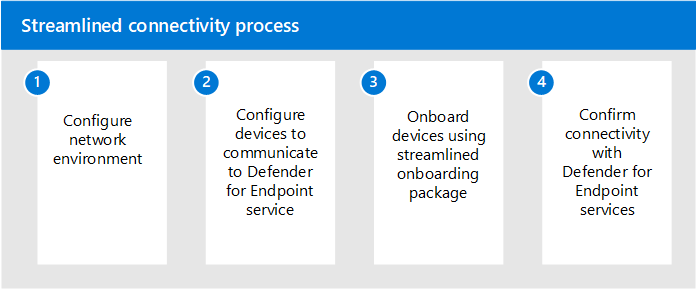
- Connectivity. Internet, direct or via proxy. IPv4 enabled. No TLS inspection. Proxy user authentication breaks the device-initiated connection [9][10].
- Streamlined connectivity. One wildcard,
*.endpoint.security.microsoft.com, replaces the core service URLs. Needs SENSE 10.8040 or later, AV platform 4.18.2211.5 or later, Windows 11 or Windows 10 1809 or later with the March 2022 cumulative update. Alternative: theMicrosoftDefenderForEndpointandOneDsCollectorservice tags, both required. CRL, Windows Update and SmartScreen endpoints stay open either way [10]. - Defender AV. The sensor depends on it for file scanning even in passive mode. Do not disable it by Group Policy on onboarded devices. With third-party AV, keep the ELAM driver enabled [9].
- Windows 11 24H2 upgraded from Home. May need the SENSE capability added first:
DISM /online /Add-Capability /CapabilityName:Microsoft.Windows.Sense.Client~~~~[9].
How it works
The blob is tenant-specific and region-specific. It tells SENSE which service URLs to use and which organisation it belongs to. It is stable; refresh it only in rare cases such as a datacenter move [8].
With Intune, the connector is a service-to-service link to your Defender tenant. Auto from connector makes Intune fetch the current package and deliver it through the WindowsAdvancedThreatProtection CSP. The policy lands under HKLM\SOFTWARE\Policies\Microsoft\Windows Advanced Threat Protection, SENSE starts, and OnboardingState under HKLM\SOFTWARE\Microsoft\Windows Advanced Threat Protection\Status flips to 1. The device shows in the portal within 15 to 30 minutes [3].
Script and GPO deliver the same blob. The script writes it directly. GPO runs the same .cmd as an immediate scheduled task as SYSTEM [5]. End state on the device is identical.
Offboarding is the reverse blob. It stops reporting. It does not remove the client [7][8].
Configure
Which method to use:
- Portal
- PowerShell
- Graph API
1. Connector, Defender side
- Defender portal: System > Settings > Endpoints > General > Advanced features.
- Toggle Microsoft Intune connection to On. Save preferences [3].

2. Connector, Intune side
- Intune admin center: Tenant administration > Connectors and tokens > Microsoft Defender for Endpoint [8]. The same status is on Endpoint security > Defender for Endpoint [3].
- Connect Microsoft Defender for Endpoint to Intune, then set the data-sharing toggles. Turn on Connect Windows devices to Microsoft Defender for Endpoint if you want compliance policy to read the machine risk score [3].
- Confirm Connection status is Enabled or Connected. Allow up to 15 minutes [3][8].
3. EDR policy
Quick path: Endpoint security > Endpoint detection and response > EDR Onboarding Status > Deploy preconfigured policy. Platform Windows, profile Endpoint detection and response, name, Save. Assigns to All Devices on save [3][8]. No pilot ring.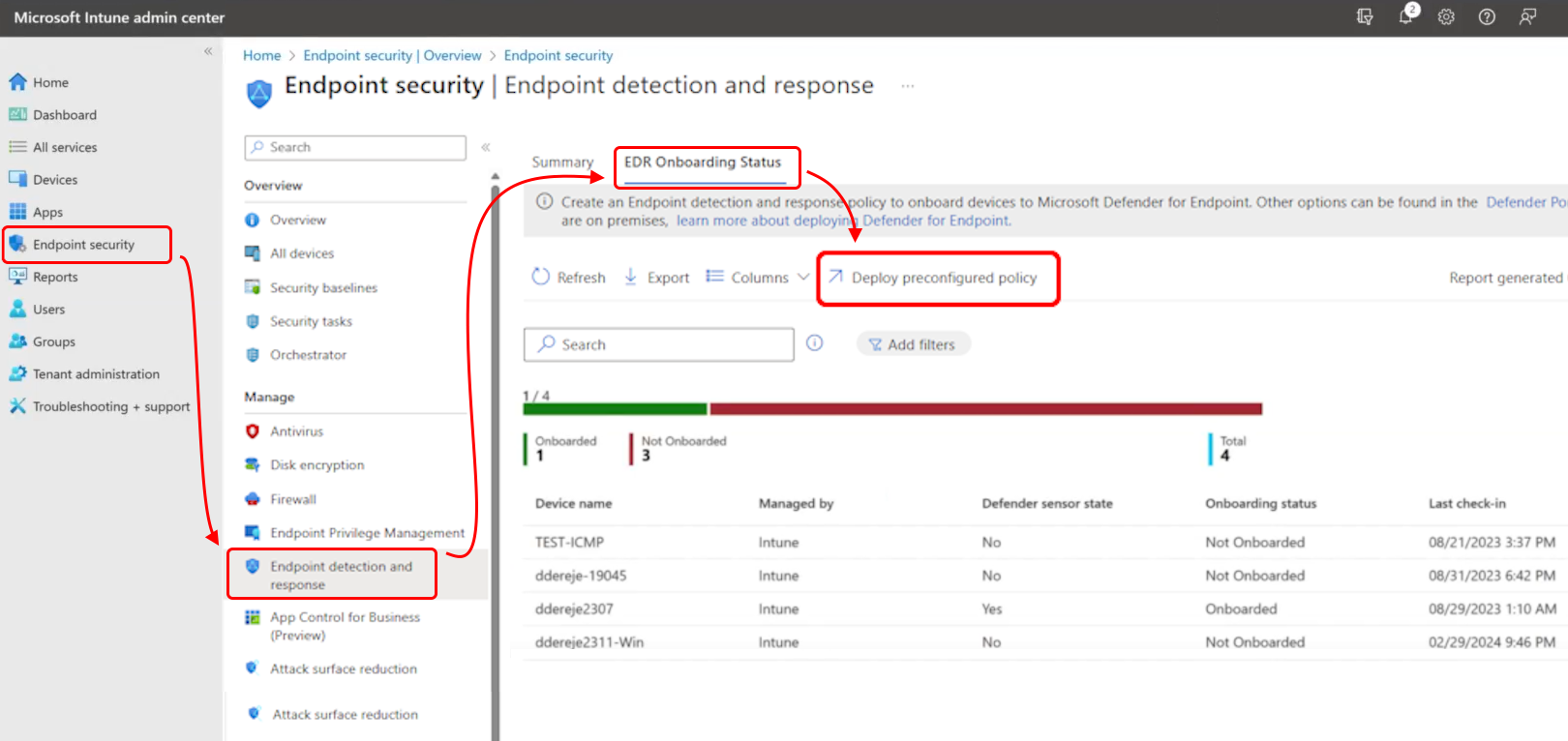
Controlled path:
- Endpoint security > Endpoint detection and response > Create Policy. Platform Windows, profile Endpoint detection and response [3][8].
- Basics: name and description.
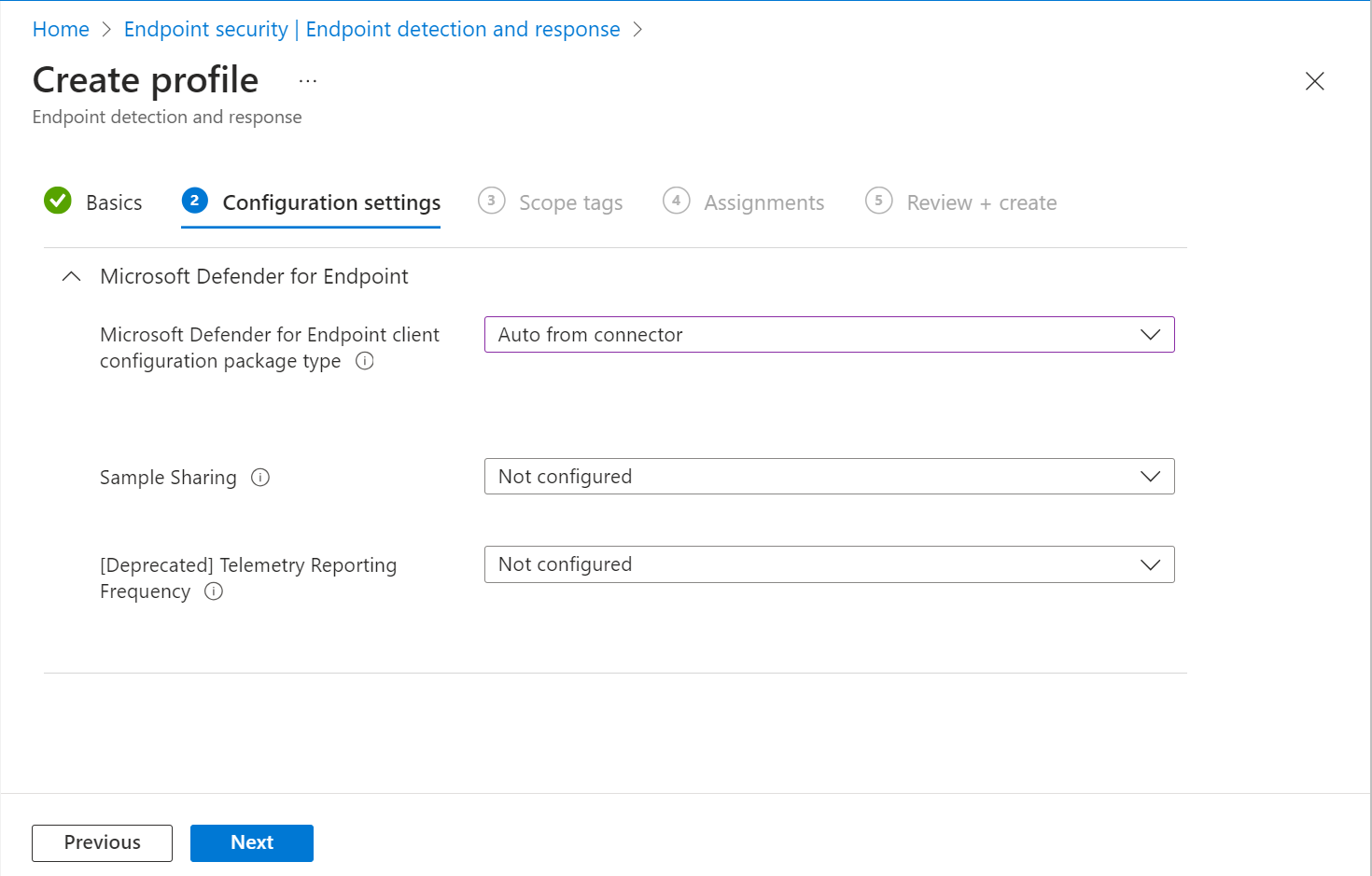
- Configuration settings:
- Microsoft Defender for Endpoint client configuration package type: Auto from connector. Other values: Onboard (paste a
WindowsDefenderATP.onboardingblob; disconnected environments, multi-tenant, strict change control) and Offboard [3][8]. If only Onboard and Offboard show, the connector is not working [3]. - Sample Sharing: All or None. None reduces detection capability [3].
- Telemetry Reporting Frequency: deprecated, no effect on new devices [1][3].
- Microsoft Defender for Endpoint client configuration package type: Auto from connector. Other values: Onboard (paste a
- Scope tags as needed.
- Assignments: device groups. User groups only apply after a user signs in [3].
- Review + create.
Do not also onboard the same devices with a device configuration profile. Two policies managing the onboarding setting conflict [8].
4. Fallback: local script
- Defender portal: Settings > Endpoints > Device management > Onboarding (
https://security.microsoft.com/securitysettings/endpoints/onboarding). - Pick the OS version group. Do not pick plain Windows, that is the Defender deployment tool workflow [4].
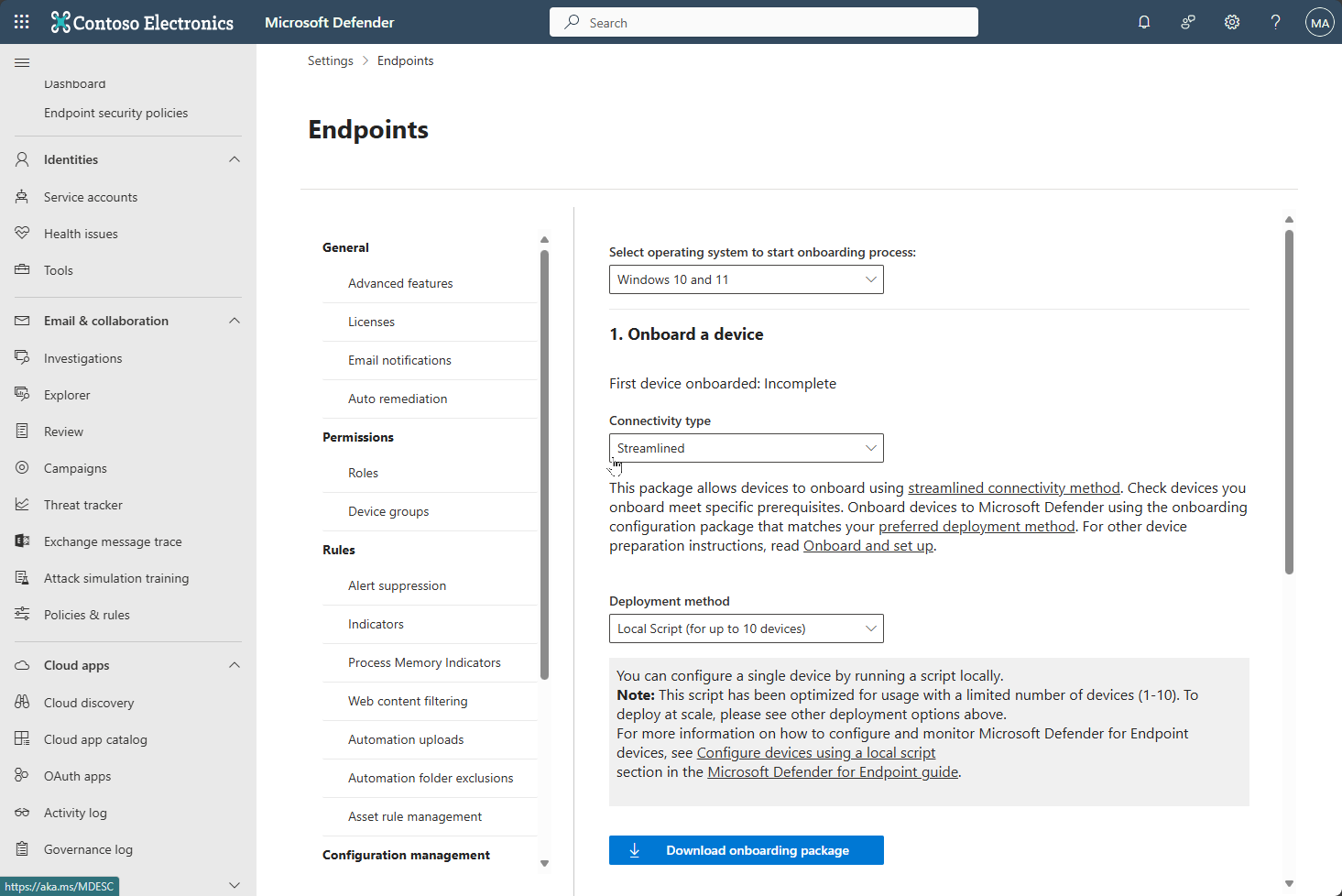
- Connectivity type: Streamlined or Standard. Deployment method: Local script (for up to 10 devices). Download onboarding package gives
GatewayWindowsDefenderATPOnboardingPackage.zip[4]. - Extract, open an elevated Command Prompt, run
WindowsDefenderATPLocalOnboardingScript.cmd, press a key at the prompt [4].
5. Fallback: Group Policy
- Same onboarding page, Deployment method: Group Policy. Extract
WindowsDefenderATPOnboardingScript.cmdto a read-only share [5]. - New GPO. Computer Configuration > Preferences > Control Panel Settings > Scheduled Tasks > New > Immediate Task (At least Windows 7) [5].
- General: run as
NT AUTHORITY\SYSTEM, Run whether user is logged on or not, Run with highest privileges. Actions: Start a program, UNC path to the script using the file server FQDN [5]. - Link to a test OU first. Sample collection policy needs
AtpConfiguration.admxand.admlfrom the package in the Central Store: Administrative Templates > Windows Components > Windows Defender ATP > Enable or disable Sample collection [5].
6. Windows Server
Server 2019 and later have the sensor built in and use the same script, GPO or ConfigMgr packages. Server 2012 R2 and 2016 need the unified solution installer first. All servers need server licensing (Defender for Servers Plan 1 or 2, standalone MDE for servers, or Defender for Business servers); client Plan 1 and 2 do not cover them. In Intune the server profile is Endpoint detection and response (ConfigMgr) on Windows (ConfigMgr), assigned to ConfigMgr collections through tenant attach [8][9][12].
7. Offboarding
- Settings > Endpoints > Device management > Offboarding (
https://security.microsoft.com/securitysettings/endpoints/offboarding). Pick the OS version group, then the deployment method [1][4][5]. - Intune: EDR policy with package type Offboard and the
.offboardingfile contents pasted in, or a Custom profile with OMA-URI./Device/Vendor/MSFT/WindowsAdvancedThreatProtection/Offboarding, data type String [1]. - Script:
WindowsDefenderATPOffboardingScript_valid_until_YYYY-MM-DD.cmdfrom an elevated prompt [4]. GPO: same immediate task pattern pointing at that file [5]. - Remove the onboarding assignment first. Otherwise the deployment tool re-onboards the device on the next refresh [1][5][7].
The package expires seven days after download. The date is in the file name. Devices reject expired packages [1][4][5][8].
Local state checks, elevated.
# Tested on: TODO

# 1 = onboarded. Key is written when SENSE first starts.
Get-ItemProperty 'HKLM:\SOFTWARE\Microsoft\Windows Advanced Threat Protection\Status' |
  Select-Object OnboardingState, OrgId

# Policy the blob was written to (MDM, GPO or script all land here)
Get-ItemProperty 'HKLM:\SOFTWARE\Policies\Microsoft\Windows Advanced Threat Protection' -ErrorAction SilentlyContinue |
  Select-Object AllowSampleCollection

# Sensor service
Get-Service Sense | Select-Object Status, StartType

# AV side: platform version and running mode (Normal or Passive)
Get-MpComputerStatus | Select-Object AMProductVersion, AMEngineVersion, AMRunningMode, AMServiceEnabled
Run the onboarding script (local script fallback). Package from Settings > Endpoints > Onboarding, deployment method Local script [4].
# Extract to Desktop, then from an elevated prompt
Set-Location "$env:USERPROFILE\Desktop\GatewayWindowsDefenderATPOnboardingPackage"
.\WindowsDefenderATPLocalOnboardingScript.cmd
# Press any key when prompted
Detection test. Run this exactly as documented from an elevated Command Prompt. The window closes on success. Expect an alert on the device in the portal in about 10 minutes [6].
powershell.exe -NoExit -ExecutionPolicy Bypass -WindowStyle Hidden $ErrorActionPreference = 'silentlycontinue';(New-Object System.Net.WebClient).DownloadFile('http://127.0.0.1/1.exe', 'C:\\test-MDATP-test\\invoice.exe');Start-Process 'C:\\test-MDATP-test\\invoice.exe'
Offboard with the local script. Replace the date with the one in the file name [4].
.\WindowsDefenderATPOffboardingScript_valid_until_YYYY-MM-DD.cmd
EDR policies are settings catalog policies. List them and keep the ones built from the EDR template [13][14].
GET https://graph.microsoft.com/beta/deviceManagement/configurationPolicies?$filter=templateReference/templateFamily eq 'endpointSecurityEndpointDetectionAndResponse'
Authorization: Bearer {token}
Permission: DeviceManagementConfiguration.Read.All or DeviceManagementEndpointSecurity.Read.All [13]. The list page does not document which properties $filter accepts. If the filter is rejected, list everything and match templateReference.templateFamily client-side.
Creating one is a POST to the same endpoint. The body needs the template ID and the settings catalog definition IDs for the package type and sample sharing settings, which are not on the Learn page. Export them from a policy you built in the portal first (GET .../configurationPolicies/{id}/settings) and reuse the shape.
POST https://graph.microsoft.com/beta/deviceManagement/configurationPolicies
{
  "name": "MDE EDR onboarding - pilot",
  "platforms": "windows10",
  "technologies": "mdm,microsoftSense",
  "templateReference": { "templateId": "<EDR template id from an exported policy>" },
  "settings": []
}
Onboarded devices, from the MDE API rather than Graph [15]:
GET https://api.security.microsoft.com/api/machines?$filter=onboardingStatus eq 'Onboarded' and osPlatform eq 'Windows11'&$top=1000
Authorization: Bearer {token}
$filter supports computerDnsName, aadDeviceId, onboardingStatus, healthStatus, osPlatform, lastSeen, rbacGroupId and more. Permission Machine.Read.All (app) or Machine.Read (delegated). Page cap 10,000. 100 calls a minute, 1,500 an hour [15].
Verify
- Defender portal. Assets > Devices, search the hostname. Sensor health Active, last seen moving. Intune-onboarded devices appear in 15 to 30 minutes [3].
- Intune. Endpoint security > Endpoint detection and response > EDR Onboarding Status: Managed by, Defender sensor state, Onboarding status (Onboarded, Not onboarded, Pending), Last check-in. The policy's Device status page shows per-device delivery [3][8].
- Device.
OnboardingStateis 1, Sense service Running, SENSE event 11. Event list is in troubleshooting. - Detection test. The alert for
invoice.exelands within about 10 minutes [6]. - GPO.
gpresult /rshows the GPO applied [5].
DeviceInfo
| where Timestamp > ago(1d)
| where OSPlatform startswith "Windows"
| summarize arg_max(Timestamp, OnboardingStatus, SensorHealthState, OSVersion, JoinType, MachineGroup) by DeviceName
| where OnboardingStatus != "Onboarded" or SensorHealthState != "Active"
Troubleshoot
Short list. Full runbook, event IDs and the Client Analyzer are in troubleshooting.
| Symptom | Likely cause | Fix |
|---|---|---|
| Package type only offers Onboard and Offboard | Connector not connected | Enable Intune connection in Advanced features, check Connected in Intune, wait 15 minutes, confirm Security Administrator rights [3][8] |
| Device Pending in EDR Onboarding Status, no device in Defender | Policy delivered but sensor cannot reach the service | Open the MDE URLs or *.endpoint.security.microsoft.com, no TLS inspection, no authenticated proxy [8][10] |
| Intune error 0x87D1FDE8 on the onboarding setting | Unsupported SKU or policy key missing | Confirm Enterprise, Education or Pro; see troubleshooting |
OnboardingState stays 0 after script | Not run elevated, or no write access to the policy key | Rerun as administrator [4] |
| Sense service will not start, event 15 | Defender AV disabled by policy, ELAM off, or SENSE capability missing | Remove the disable policy, enable ELAM, add the SENSE capability with DISM [9] |
| Two policies target the device | EDR policy plus device configuration profile both onboarding | Keep one. Intune reports a conflict [8] |
| Offboarding rejected | Package older than seven days | Download a fresh package [1][4] |
| Device re-onboards after offboarding | Onboarding assignment still in place | Remove the onboarding policy, GPO link or collection first [1][5][7] |
Gotchas and limits
- Entra-joined, hybrid, registered. The EDR policy needs Intune enrolment. Join type does not change the sensor, only how you target. Hybrid devices that also get an onboarding GPO have two sources for the same blob. Pick one. Devices outside Intune can still get EDR policy through MDE security settings management [8].
- Duplicate records after reimage. Reinstall or rename creates a new device entity. The old one goes Inactive and stays in inventory for up to 180 days [7]. Filter by sensor health state when counting.
- VDI and non-persistent. Do not onboard the golden image. Cloning an onboarded image copies
senseGuidand clones may not appear as new devices. Use the VDI package as a startup script:Onboard-NonPersistentMachine.ps1for one entry per device name, the.cmdfor one entry per instance. First reports can lag 3 to 4 hours. If the image was onboarded, offboard it and clear the registration values before sealing [11]. - Offboarding is not uninstall. Reporting stops, the device goes Inactive after seven days, the client stays on the box and the record stays in the portal until retention expires. A retained record does not prove protection [7][8].
- Package is tenant-bound. The blob names one tenant and one region. A device onboarded with another tenant's blob reports there. Multi-tenant MSP work needs the manual Onboard package type per tenant, not Auto from connector [8].
- Co-managed devices. If ConfigMgr owns the Endpoint Protection workload, use Windows (ConfigMgr) through tenant attach and assign to collections, not Entra groups. Needs ConfigMgr 2002 or later with the All Desktop and Server Client collection synced. Device configuration profiles do not support tenant-attached devices [8].
- Streamlined vs standard. Keep a device on one. Exclude streamlined devices from policies carrying the standard package [10]. Pre-1809 builds still need the longer URL list [10].
- Onboarding and offboarding together. Never target both to one device [1][4][5].
Further reading
- Simplified onboarding of Microsoft Defender for Endpoint using the Defender deployment package, Jeffrey Appel, May 2026. Hands-on walkthrough of the new deployment tool, its command-line switches and log locations, which Learn only lists.
- MDE introduces a more predictable, transparent, secure and enterprise-ready onboarding experience for Windows devices, Anoop C Nair, March 2026. Covers named and expiring packages and silent deployment options in the updated deployment tool, with portal screenshots.
- Intune connection issues in Defender for Endpoint, Microsoft Tech Community thread, November 2025. Real-world case of the Intune licence warning on the connector and the manual Onboard package workaround; check the accepted answer against current Learn before relying on it.
Only three in the last 12 months met the bar; the other candidates were older than October 2025 or news rewrites of Learn.
My notes
TODO: Sohail's notes after verification.
Changelog
| Date | Change | Source |
|---|---|---|
| 2026-10-22 | Drafted from Learn | [1] |
| 2026-10-22 | Added Learn images, diagrams, further reading |