Overview and architecture
What it is
Defender for Endpoint (MDE) is Microsoft's endpoint security platform for preventing, detecting, investigating, and responding to threats on laptops, phones, tablets, PCs, and network gear. It is a cloud service. The device runs a sensor and the antivirus engine. The cloud does correlation, alerting, investigation, and storage.
It is the endpoint pillar of Defender XDR. Endpoint signals land in the unified Defender portal and get correlated with identity, email, and cloud workload alerts into incidents. Learn lists Intune, Defender for Cloud, Defender for Cloud Apps, Defender for Identity, Defender for Office 365, Defender Vulnerability Management, Sentinel, and Microsoft threat intelligence as integrated products.
What it is not. It is not Defender Antivirus on its own. Defender AV ships with Windows and runs with or without MDE. MDE adds the EDR sensor, the cloud back end, and the portal. It is not an MDM. It does not enroll or manage devices, though it can push Defender settings through Intune's policy engine (Security Settings Management, below). It is not Defender for Cloud, although Defender for Servers licences MDE on servers and can onboard them.
Licensing and prerequisites
- Plans: Defender for Endpoint Plan 1, Plan 2, and Defender for Business. Microsoft 365 E5 and E5 Security include Plan 2. Plan 1 is standalone or part of Microsoft 365 E3. Detail in licensing.
- Servers are not covered by Plan 1 or Plan 2 user licences. You need Defender for Servers Plan 1 or 2 (Defender for Cloud), Defender for Endpoint Server, or Defender for Business servers.
- Role: a Security Administrator to deploy. Learn says use least privilege and keep Global Administrator for emergencies.
- Defender AV must be present. The MDE agent depends on it for file scanning. With a third-party AV active, Defender AV runs in passive mode. Keep security intelligence updates flowing either way. If GPO disables Defender AV, exclude onboarded devices from that GPO. With a third-party AV plus MDM or ConfigMgr, the Defender AV ELAM driver must be enabled.
- IPv4 stack enabled. IPv6-only networks need DNS64/NAT64.
- Internet access, direct or via proxy. DNS resolution is always required.
- Hardware (Windows): 2 cores minimum, 4 preferred; 1 GB RAM minimum, 4 GB preferred. These are the OS minimums, not on top of them.
- Portal: Edge or any HTML5 browser.
How it works
Components
The Learn overview lists these capabilities: EDR, autonomous protection (automatic attack disruption and predictive shielding), next-generation protection including ransomware prevention, attack surface reduction, vulnerability management, Endpoint Attack Notifications, and APIs. Mapped to what you touch day to day:
| Component | Where it runs | What it does |
|---|---|---|
| Sensor (SENSE service, MsSense.exe) | Device | Collects behavioural telemetry and sends it to the cloud. Receives commands (isolate, collect package, Live Response). This is the EDR half. |
| Defender Antivirus | Device | Next-generation protection: behaviour, heuristic, real-time scanning, cloud-delivered protection. Separate proxy settings from the sensor. |
| Attack surface reduction | Device, inside the AV engine | ASR rules, controlled folder access, network protection, web protection, firewall, application control. See ASR rules. |
| Device Control | Device | Block or allow removable devices and files on them. See device control. |
| Vulnerability Management | Cloud, fed by sensor inventory | Software, certificate, firmware, and browser extension inventory with exposure scoring. Inventory data has its own expiry periods (7 to 31 days by source). |
| Automated investigation and response | Cloud | Investigates alerts and proposes or takes remediation. Not described in the fetched overview page; detail is in the Plan 2 docs. |
| Threat analytics | Cloud | Microsoft-authored reports on active threats mapped to your exposure. |
| Live Response | Cloud to device over the sensor command channel | Remote shell to a device for triage and remediation. |
| APIs | Cloud | https://api.security.microsoft.com. Machines, alerts, hunting, response actions. |
What Plan 1 includes, from the Plan 1 page: next-generation protection, manual response actions (run AV scan, isolate device, file block/allow indicators), the attack surface reduction set above, and central management with the portal, RBAC, reporting, and APIs. The Plan 1 page does not list EDR, AIR, Live Response, threat analytics, or Advanced Hunting. The side-by-side comparison page could not be fetched on 2026-10-22, so confirm the Plan 2 column in licensing before quoting it to a client.
New customers from 16 February 2025 get Unified RBAC only. Existing tenants keep legacy MDE roles.
Sensor to cloud
The EDR sensor runs as LocalSystem and uses WinHTTP. Browser (WinINet) proxy settings do not apply. Proxy discovery options, in Microsoft's order:
- Automatic: transparent proxy or WPAD. Nothing to configure.
- Sensor-specific static proxy:
TelemetryProxyServerunderHKLM\Software\Policies\Microsoft\Windows\DataCollection, set by Group Policy. Host and port only, no scheme, no spaces. Do not push it via MDM; the sensor reads the GPO registry location only. - System-wide WinHTTP proxy:
netsh winhttp set proxy. Affects everything that uses the default WinHTTP config.
Defender AV cloud protection uses its own proxy settings (Set-MpPreference -ProxyServer, ProxyPacUrl, ProxyBypass) and does not use the static proxy for Windows Update.
Connections are device-initiated, use certificate pinning and TLS, and the proxy must not require user authentication. TLS inspection is not supported on Defender cloud connections. Learn says it breaks the secure connection and causes onboarding and connectivity failures.
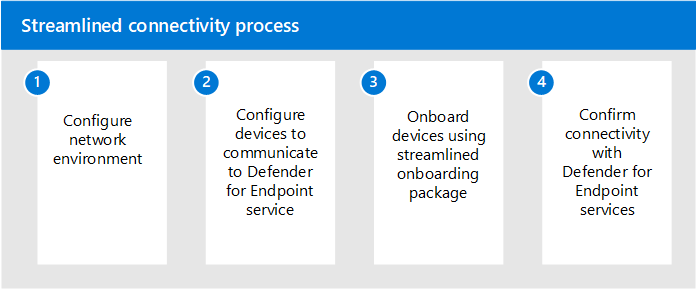
Two connectivity types exist. Standard uses the long URL list; open everything with geography WW plus the rows for your data location. Streamlined consolidates the core services (cloud-delivered protection, sample submission, AIR sample storage, command and control, cyber and diagnostic data) onto *.endpoint.security.microsoft.com (commercial) or *.endpoint.security.microsoft.us (US Gov, preview). IP-only firewalls use the MicrosoftDefenderForEndpoint service tag plus OneDsCollector for diagnostic data. Supporting services (CRLs, Windows Update, SmartScreen, Linux repos) stay outside both. Streamlined needs SENSE 10.8040 or later, AV platform 4.18.2211.5, engine 1.1.19900.2, macOS/Linux 101.24022 or later, Windows 10 1809 or later, Server 2019 or later, or Server 2012 R2/2016 on the modern unified solution. MMA-based devices stay on standard. Standard URLs are not being deprecated.
Defender XDR, Intune, and Security Settings Management
MDE has no separate portal. Everything is in security.microsoft.com. MDE stores data in the same location as Defender XDR; onboarding to MDE turns on Defender XDR if it was off.
Intune is the primary policy channel. Intune endpoint security policies (AV, ASR, EDR, firewall, device control) write to the Defender CSP on enrolled devices. The same policies appear under Endpoint security policies in the Defender portal.
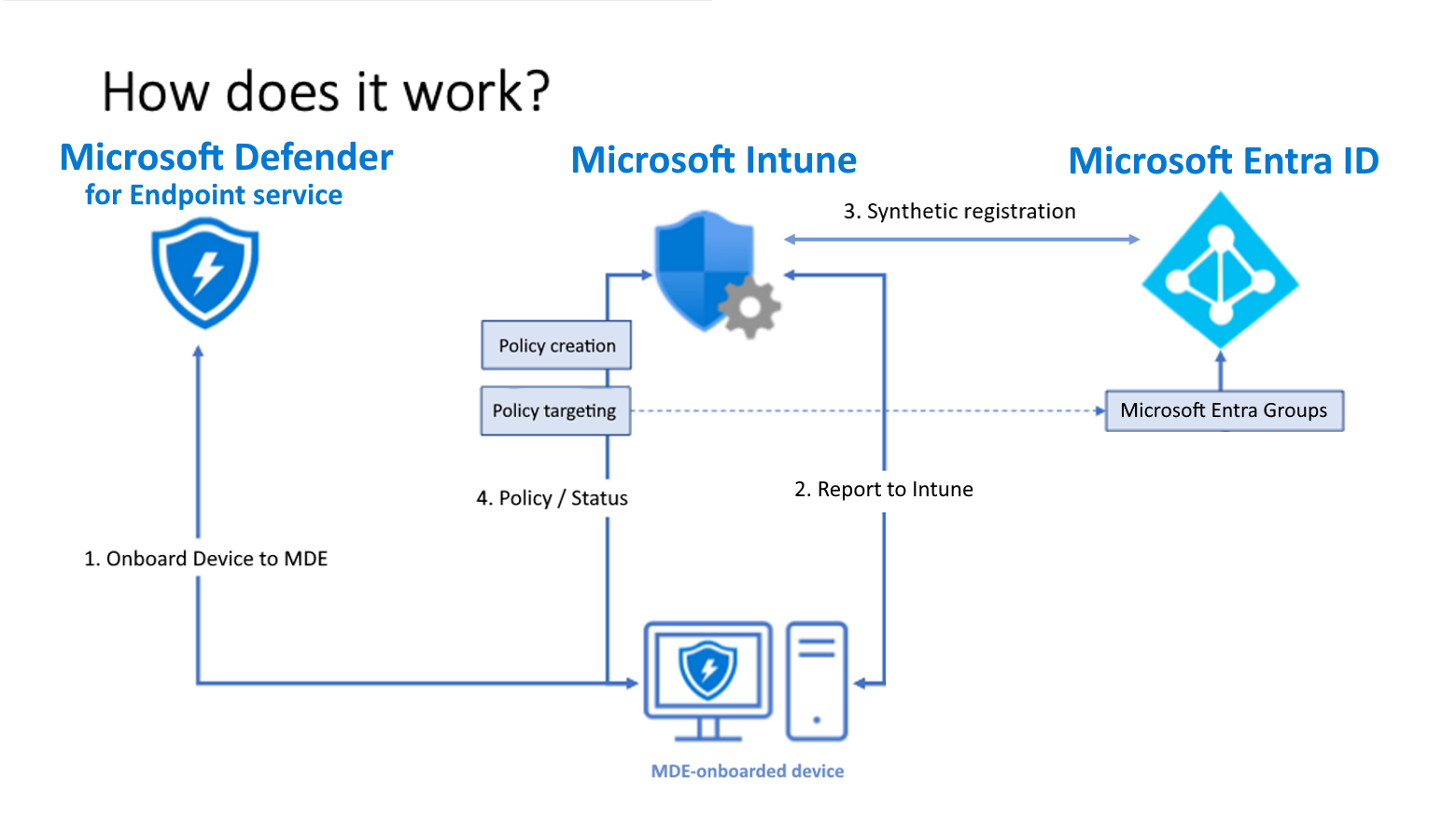
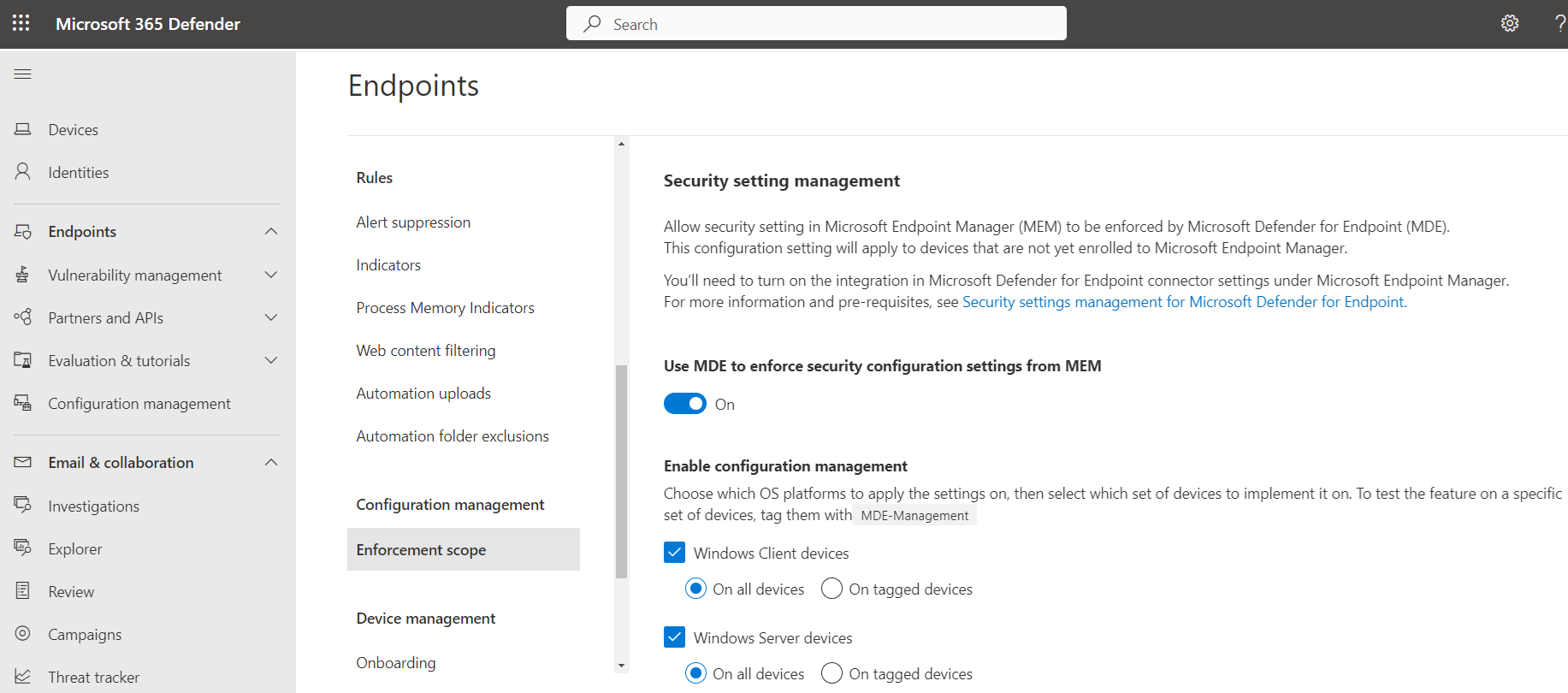
Security Settings Management covers devices onboarded to MDE but not enrolled in Intune. The device gets a synthetic Entra registration (no hybrid join needed), checks in with Intune every 90 minutes, and the MDE components enforce the policy. Supported profiles: AV, AV exclusions, EDR, ASR rules, firewall and firewall rules on Windows; AV, AV exclusions, and EDR on macOS and Linux. Device Control and Windows Security Experience show in the portal but only apply to Intune-managed devices. Needs *.dm.microsoft.com reachable, PowerShell not in ConstrainedLanguage mode, and at least one MDE user licence. Enable it at Settings > Endpoints > Configuration Management > Enforcement Scope, then in Intune at Endpoint security > Microsoft Defender for Endpoint. Full article: security settings management.
Supported platforms
From the minimum requirements page, as of 2026-10-22:
| Platform | Versions |
|---|---|
| Windows client | Windows 10 and 11 Enterprise, IoT Enterprise, Education, Pro, Pro Education, including Arm. Enterprise LTSC 2016 and later. Enterprise multi-session. Windows 7 SP1 Pro/Enterprise via the Defender deployment tool. Windows 8.1 Pro/Enterprise via MMA. |
| Windows Server | 2012 R2 and later including Core. Semi-Annual Channel 1803 and later. 2008 R2 SP1 via the Defender deployment tool. |
| Virtual | Windows 365 Cloud PCs, Azure Virtual Desktop on a supported OS, Azure Local nodes on Azure Stack HCI OS 23H2 and later. |
| Other | macOS (client), Linux, Windows Subsystem for Linux plug-in, Android, iOS. |
Not supported: Windows CE, Windows 10 Mobile. Windows 11 24H2 Home devices upgraded to a supported edition might need DISM /online /Add-Capability /CapabilityName:Microsoft.Windows.Sense.Client~~~~ before onboarding.
Deployment order
Microsoft's planning guide has five steps, each its own article:
- Set up the deployment: licence check, tenant provisioning, network configuration.
- Assign roles and permissions.
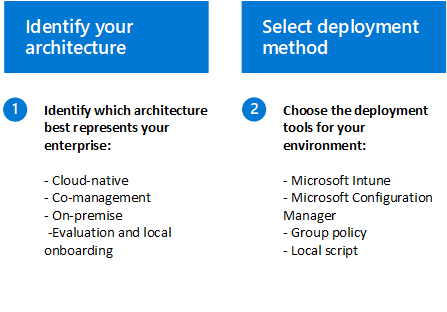
- Identify architecture and deployment method. Four architectures: cloud-native (Intune), co-management (ConfigMgr plus Intune), on-premises (ConfigMgr or AD DS), evaluation and local onboarding (script, small or isolated environments).
- Onboard devices. Windows client: Defender deployment tool, Intune/MDM, ConfigMgr, local script (up to 10 devices), Group Policy, VDI, AVD. Windows Server: local script, Defender for Cloud integration. Linux: deployment tool, installer script, Ansible, Chef, Puppet, Saltstack, manual, Defender for Cloud. Android and iOS: Intune.
- Configure capabilities.
Before step 3, inventory endpoint and server counts by OS, management engine and version, SOC structure, and SIEM.
Data location
The minimum requirements page says the first run of the onboarding wizard asks where data is stored (EU, UK, or US) and the choice cannot be changed afterwards. The production deployment page says the location follows Defender XDR and is picked automatically from where your active Microsoft 365 security services live. Either way, you do not get to change it later. The data storage page lists EU, UK, US, Australia, Switzerland, India, and UAE as operating geographies. Retention is 180 days in the portal and 30 days for Advanced Hunting.
Where to go next
- Licensing
- Onboarding Windows
- Onboarding macOS
- Security settings management
- Antivirus policy
- ASR rules
- Device control
- EDR and hunting
- Troubleshooting
Configure
- Portal
- PowerShell
- Graph API
-
Confirm the licence is provisioned. Microsoft 365 admin center > Billing > Your products, or Entra admin center > Licenses.
-
Provision MDE. Sign in to https://security.microsoft.com and open Assets > Devices, or Endpoints > Dashboard. First use provisions the workspace and shows the data center location.
-
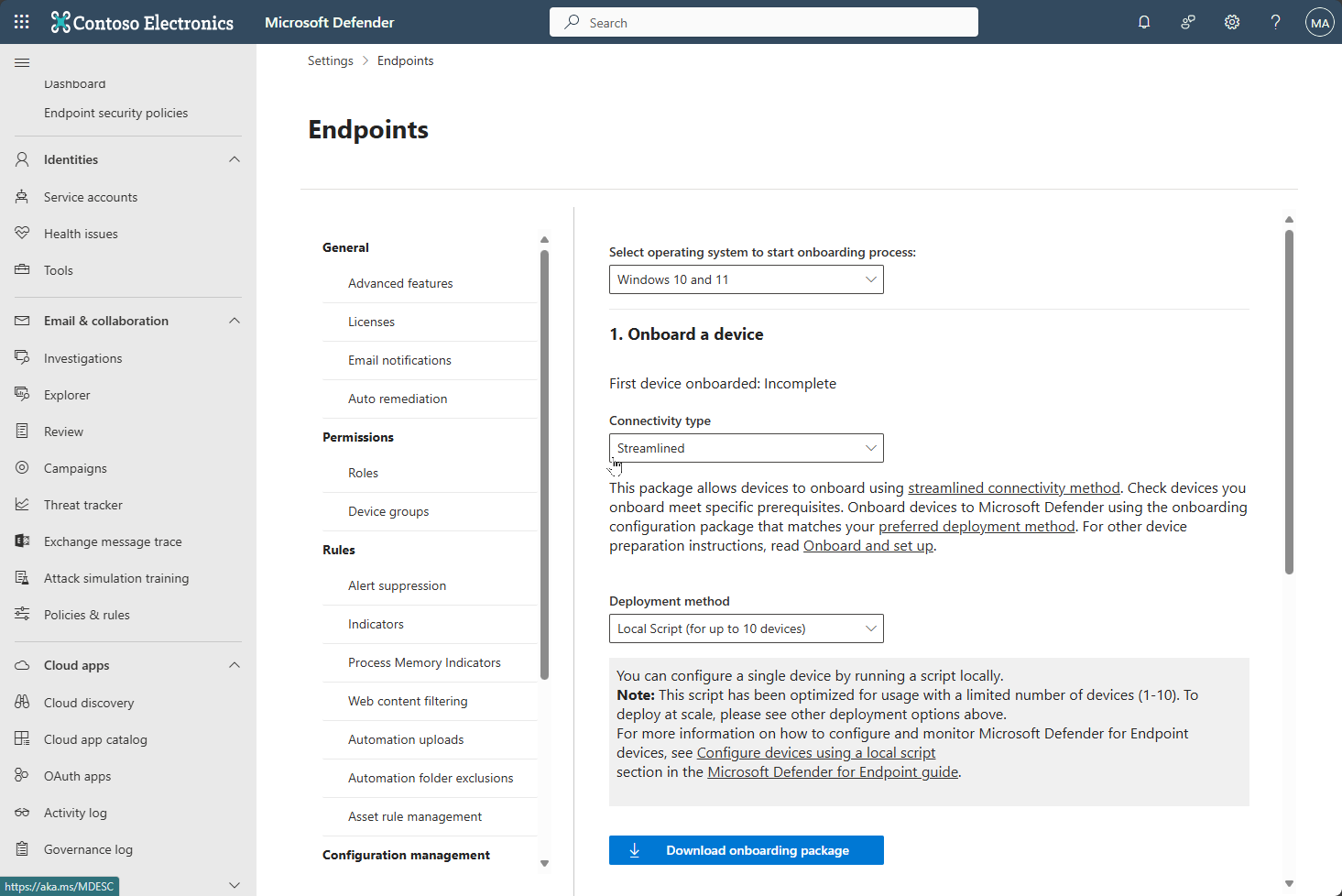
Settings > Endpoints. Pages that matter on day one:
- General > Data retention: confirms the data location and retention period.
- Device management > Onboarding: pick OS, connectivity type (Streamlined or Standard), deployment method, download the package.
- Device management > Offboarding.
- Permissions > Roles and Device groups: RBAC scoping. New tenants use Unified RBAC.
- Configuration management > Enforcement scope: turns on Security Settings Management per platform.
- Advanced features: the tenant-wide toggles (automated investigation, Live Response, tamper protection, and the rest).
# Tested on: TODO

# Sensor service state. Expect Running, StartType Automatic.
Get-Service Sense | Select-Object Status, StartType

# Onboarding state. 1 = onboarded. Written by SENSE on first start.
Get-ItemProperty 'HKLM:\SOFTWARE\Microsoft\Windows Advanced Threat Protection\Status' |
  Select-Object OnboardingState, OrgId, SenseId

# Sensor-specific static proxy, if set by GPO
Get-ItemProperty 'HKLM:\SOFTWARE\Policies\Microsoft\Windows\DataCollection' -ErrorAction SilentlyContinue |
  Select-Object TelemetryProxyServer, DisableEnterpriseAuthProxy

# AV mode. Active, Passive, or EDR Block Mode.
Get-MpComputerStatus | Select-Object AMRunningMode, AMServiceEnabled, AntivirusSignatureVersion

# Recent SENSE operational events (connectivity failures show as ID 5 and 15)
Get-WinEvent -LogName 'Microsoft-Windows-SENSE/Operational' -MaxEvents 20 |
  Where-Object Level -le 3 | Format-Table TimeCreated, Id, Message -Wrap

# Tenant view: list machines via the MDE API. App registration needs
# Machine.Read.All (application) or Machine.Read (delegated) on the WindowsDefenderATP API.
$token = 'TODO: bearer token for https://api.security.microsoft.com'
$r = Invoke-RestMethod -Method Get `
  -Uri 'https://api.security.microsoft.com/api/machines?$filter=healthStatus eq ''Active''&$top=100' `
  -Headers @{ Authorization = "Bearer $token" }
$r.value | Select-Object computerDnsName, osPlatform, healthStatus, onboardingStatus, lastSeen, riskScore
Limits: $top max 10,000, 100 calls per minute, 1,500 per hour. Delegated callers need at least View Data and only see devices in their device groups.
Tenant-level MDE state (provisioning, data location, advanced features, onboarded device list) is not exposed through Microsoft Graph. Use the MDE API at https://api.security.microsoft.com instead. The closest Graph surface is the Intune connector status and the security alert and incident APIs under /security, which carry MDE alerts but not sensor health.
GET https://api.security.microsoft.com/api/machines?$filter=onboardingStatus eq 'Onboarded'
{}
Verify
- Portal: Assets > Devices. The device appears with Health state Active and Onboarding status Onboarded. Managed by shows Intune, MDE, or ConfigMgr. Microsoft's exit criteria for an onboarding ring are: devices in the inventory, alerts on the dashboard, a detection test passed.
- Device:
OnboardingState= 1 and the Sense service running (PowerShell tab). - Hunting: devices that reported in the last day, by OS and onboarding status.
DeviceInfo
| where Timestamp > ago(1d)
| summarize LastSeen = max(Timestamp), SensorVersion = any(ClientVersion) by DeviceName, OSPlatform, OnboardingStatus, MachineGroup
| order by LastSeen desc
Zero rows with a provisioned tenant means no device has ever reported. An empty DeviceInfo table is the quickest proof that onboarding never happened.
Troubleshoot
Top five reasons a device never shows up. Full detail in troubleshooting.
| Symptom | Likely cause | Fix |
|---|---|---|
| Sense service stopped or START_PENDING | Service failed to start. Error 577 or 1058 means ELAM disabled or the Sense capability missing. | sc query sense. Enable the Defender AV ELAM driver. Check DISM /Online /Get-CapabilityInfo /CapabilityName:Microsoft.Windows.Sense.Client~~~~ shows Installed. See troubleshooting. |
| SENSE Operational log Event 5 or 15 | No route to the cloud. Proxy not seen by WinHTTP, URL blocked, or TLS inspection in the path. | Run the Client Analyzer. Set TelemetryProxyServer by GPO or a WinHTTP proxy. Exclude the service URLs from inspection. See troubleshooting. |
| Event 6 or 7, OnboardingState missing | Onboarding script never ran, or ran without admin. | Rerun the package as administrator. Check Application log source WDATPOnboarding. See troubleshooting. |
| Device onboarded but inactive, old AV platform | Defender AV disabled by DisableAntiSpyware or DisableAntiVirus policy (pre 4.18.2007.8). | Clear both values under SOFTWARE\Policies\Microsoft\Windows Defender, rerun onboarding. See troubleshooting. |
| Freshly imaged device not reporting | OOBE or first logon incomplete (Windows 10 before 1809, Server before 2019). | Finish OOBE, log on once. See troubleshooting. |
Gotchas and limits
- Data location is permanent. Whatever the tenant got at first provisioning stays. If a client needs EU residency, check before the first person opens the Endpoints pages.
- Assigning a licence does nothing on the device. Licensing is a tenant entitlement. Onboarding is a per-device package or policy. Both are needed, and neither implies the other.
- Plan 1 has no EDR, no Advanced Hunting, no AIR, no Live Response per the Plan 1 feature list. Clients who buy E3 get Plan 1 and often expect the Plan 2 portal experience.
- TLS inspection breaks the sensor. Certificate pinning means the device rejects the proxy's certificate. Exclude
*.endpoint.security.microsoft.comand the standard URL list from inspection. Do not blanket-exclude*.blob.core.windows.net. - Proxy user authentication breaks it too. Connections come from LocalSystem, not the user.
- The sensor proxy (
TelemetryProxyServer) and the AV cloud protection proxy (Set-MpPreference -ProxyServer) are separate settings.TelemetryProxyServervia MDM is ignored; GPO registry path only. - Server onboarding needs a server licence. User-based Plan 1 or 2 do not cover servers. Security Settings Management needs at least one user MDE licence; Defender for Servers alone does not unlock it.
- Streamlined connectivity does not cover CRLs, Windows Update, SmartScreen, or Linux repos. MMA-based devices (Windows 7, 8.1, Server 2008 R2, un-migrated 2012 R2 and 2016) cannot use it.
- Advanced Hunting holds 30 days. The portal holds 180. Vulnerability Management stops showing a device after 30 days without reports.
Further reading
- Simplified onboarding of Microsoft Defender for Endpoint using the Defender deployment tool, Jeffrey Appel, May 2026. Hands-on walkthrough of the new Windows deployment tool with the practical gaps Learn skips over.
- Monthly news - July 2026, Microsoft Defender XDR blog, Microsoft Tech Community, July 2026. Announces the reworked deployment tool, the bundled onboarding package with key and expiry, and the new Deployment packages portal page.
- Common mistakes during Microsoft Defender for Endpoint deployments, Jeffrey Appel, updated February 2026. A field list of deployment errors (proxy, passive mode, licensing, policy gaps) that maps directly onto the Gotchas above.
- Introducing selective response actions for high-value assets in Microsoft Defender, Microsoft Defender for Endpoint blog, Microsoft Tech Community, May 2026. Planning input for onboarding domain controllers and other Tier 0 assets, where blanket response actions are not acceptable.
- Secure Linux desktops with Microsoft Defender, Microsoft Defender for Endpoint blog, Microsoft Tech Community, October 2026. Extends the supported platforms list to Linux workstations in preview, using the same agent and onboarding methods as Linux servers.
My notes
TODO: Sohail's notes after verification.
Changelog
| Date | Change | Source |
|---|---|---|
| 2026-10-22 | Drafted from Learn | [1] |
| 2026-10-22 | Added Learn images, diagrams, further reading |