Troubleshooting onboarding and sensor health
Source numbers in this article, such as [1] or [16], refer to the order of learn_sources in the frontmatter.
What it is
Runbook for the two most common MDE tickets: "the device never showed up" and "the device is there but the portal says it is unhealthy". Covers the Windows sensor (SENSE), macOS and Linux (mdatp), the logs and commands that tell you what is wrong, and the fixes Microsoft documents.
Not covered: AV detection problems, performance, false positives, and MMA onboarding for Server 2012 R2 and 2016 beyond a pointer.
Licensing and prerequisites
- MDE P1 or P2. The troubleshooting pages apply to both [1].
- Portal access. "You are not authorized to access the portal" means the user has no portal role assigned, not a device problem [2].
- "No subscriptions found" means the tenant you signed in to has no MDE license. Windows E5 and Office E5 are separate, and a license can land in the wrong tenant [2].

- "Your subscription has expired" blocks the portal. Offboarding packages still download but expire 7 days after download [2].
- Windows: supported SKUs for the MDM onboarding CSP are Enterprise, Education and Professional. Holographic is not supported [1].
- Linux: kernel 3.10.0-327 or later for distros not explicitly listed, systemd on servers, one CPU core, 1 GB RAM, 2 GB disk [20].
- Windows Client Analyzer runs connectivity checks through PsExec as Local System. The ASR rule "Block process creations originating from PSExec and WMI commands" blocks it; exclude, audit or disable temporarily [5][8].
How it works
Work the chain in order. Each step has one question and one tool.
| Step | Question | Windows | macOS and Linux |
|---|---|---|---|
| 1 | Is it licensed? | Portal loads, no subscription error [2] | mdatp health --field licensed is true [19] |
| 2 | Is it onboarded? | HKLM\SOFTWARE\Microsoft\Windows Advanced Threat Protection\Status has OnboardingState set to 1 [1] | org_id in mdatp health is not unavailable [19] |
| 3 | Is the sensor running? | sc query sense shows RUNNING [1] | mdatp health --field healthy is true; service mdatp status is active (running) [10][19] |
| 4 | Can it reach the cloud? | MDEClientAnalyzer.cmd connectivity section [8] | mdatp connectivity test all [OK] [16][18] |
| 5 | Is AV healthy? | ELAM driver enabled, Defender AV not disabled by policy [1][4] | real_time_protection_available is true [19] |
| 6 | Does the portal see it? | Device inventory, health state Active [13] | Same |
No device in inventory after one hour means onboarding or connectivity failed; start at step 2 [1]. SENSE event 11 confirms onboarding, but the portal can still lag by hours [3].
Sensor health states
Portal states and what they mean [4][13]:
| State | Meaning | First thing to check |
|---|---|---|
| Active | Device is reporting to the service. | Nothing. |
| Inactive | No reporting for more than 7 days in the past month. | Is the device off, reimaged, renamed or offboarded? |
| Misconfigured | Partial sensor data with configuration errors. Two subtypes below. | Connectivity and dependencies. |
| Impaired communications | Communication with the service is limited. Deep analysis, file blocking and isolation may fail. | WinHTTP proxy, allowed URLs. |
| No sensor data | Device talks to the service but sends only partial sensor data. Limited alerts only. | DiagTrack service, ELAM, Defender AV policy. |
Inactive is not always a fault. Documented causes: not in use for more than 7 days, reinstalled or renamed (new entity created, old one goes Inactive), offboarded (Inactive after 7 days), or not sending signals on any channel [4].
Windows sensor internals
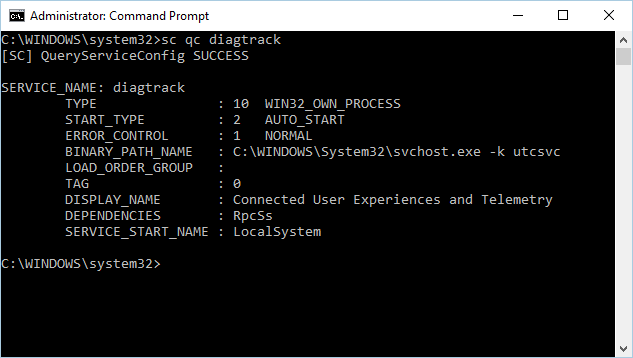
SENSE is the internal name for the behavioral sensor. It uses WinHTTP, so browser proxy settings do not matter [1]. Windows 10 1809 and later no longer depend on DiagTrack for EDR; older builds need it AUTO_START and running [1]. Status is written to HKLM\SOFTWARE\Microsoft\Windows Advanced Threat Protection\Status on first start; policy lives under HKLM\SOFTWARE\Policies\Microsoft\Windows Advanced Threat Protection [1].
If TelemetryProxyServer is set in the registry or Group Policy, the sensor falls back to direct connectivity when the named proxy is unreachable [8].

macOS and Linux sensor internals
mdatp health is the single source of truth. Key fields [19]: healthy, health_issues, licensed (onboarded to a tenant), org_id (unavailable when not onboarded), edr_machine_id (portal device ID), real_time_protection_available, engine_load_status, passive_mode_enabled, conflicting_applications (other fanotify products on Linux [20]) and supplementary_events_subsystem (ebpf by default from 101.2408.0000, or auditd, Linux only).
On macOS the endpoint security extension com.microsoft.wdav.epsext and network extension com.microsoft.wdav.netext (Team ID UBF8T346G9) must be approved, and Full Disk Access must be granted separately [17].


Neither platform supports TLS inspection. Linux supports only static or transparent proxies. macOS supports PAC, WPAD or static. Authenticated proxies are unsupported on both [16][18].
Configure
- Portal
- PowerShell / Terminal
- API
Where to look in the Defender portal.
-
Assets > Devices. Open the device page. The health state and last seen time are on the overview. Filter the inventory by health state Active, Misconfigured or Inactive [13].
-
Device health tile on the Defender for Endpoint dashboard. Shows Misconfigured and Inactive counts. Clicking a group opens Device inventory pre-filtered [13].
-
Export from Device inventory downloads an unfiltered CSV of every device, whatever the view filter [13].
-
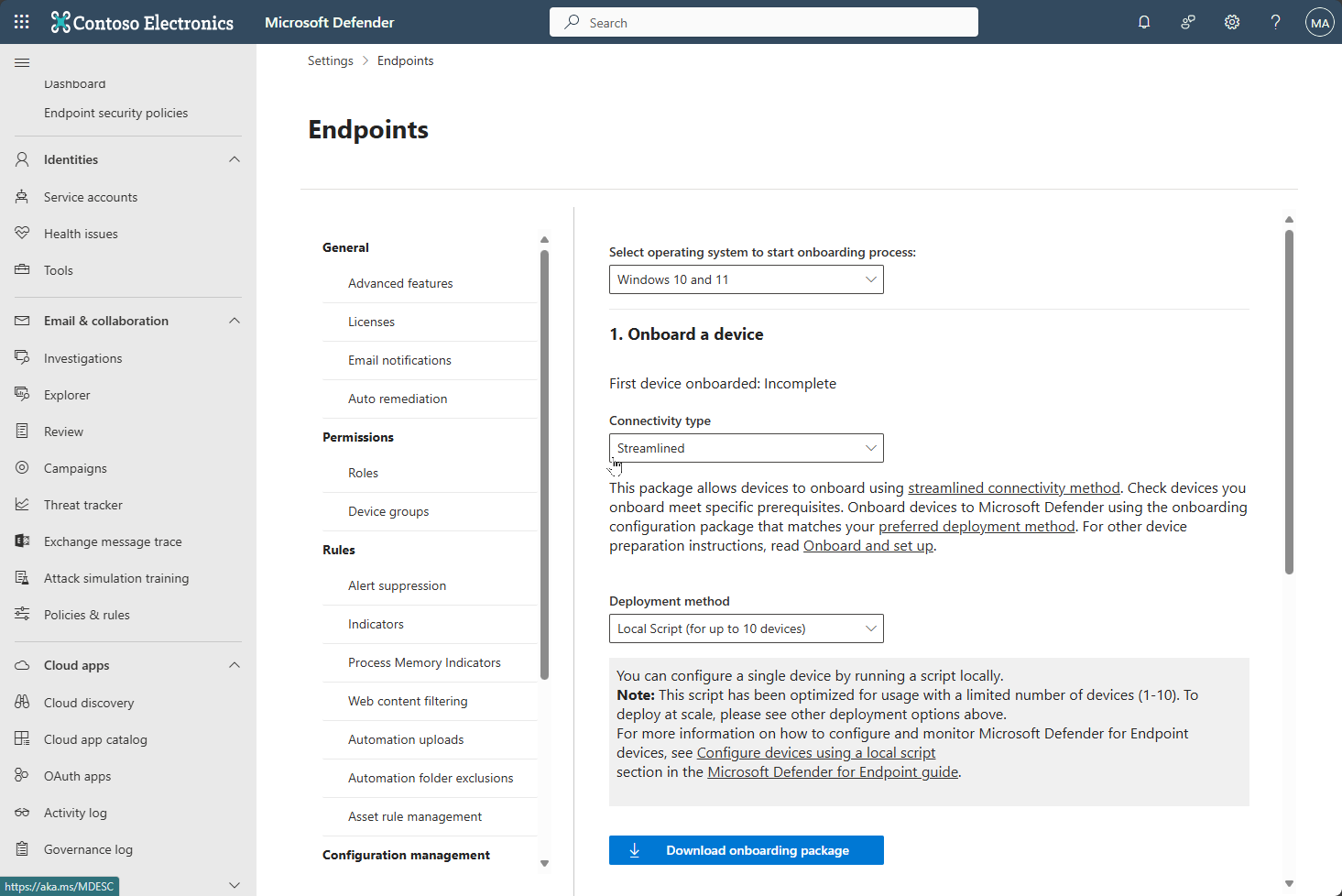
Settings > Endpoints > Device management > Onboarding. Onboarding packages, the detection test, and the Workspace ID for MMA [1][8].
-
Settings > Endpoints > Device management > Offboarding. Offboarding packages. They expire 7 days after download [2].
-
Settings > Endpoints > Licenses opens the M365 admin center for license assignment [21]. Live Response can run the analyzer remotely on Windows and Linux [6][12].
Windows, elevated prompt.
# Tested on: TODO
# Service state and start type
sc query sense
sc qc sense
sc qc diagtrack

# Fix DiagTrack on pre-1809 builds
sc config diagtrack start=auto
sc start diagtrack

# Onboarding state
Get-ItemProperty 'HKLM:\SOFTWARE\Microsoft\Windows Advanced Threat Protection\Status'

# SENSE Feature on Demand present?
DISM.EXE /Online /Get-CapabilityInfo /CapabilityName:Microsoft.Windows.Sense.Client~~~~

# SENSE operational log, errors only
Get-WinEvent -LogName 'Microsoft-Windows-SENSE/Operational' |
  Where-Object { $_.Level -le 3 } | Select-Object TimeCreated, Id, Message

# Onboarding script events (Application log, source WDATPOnboarding)
Get-WinEvent -FilterHashtable @{LogName='Application'; ProviderName='WDATPOnboarding'}
Client Analyzer. Download from https://aka.ms/MDEClientAnalyzer (preview: https://aka.ms/MDEClientAnalyzerPreview), extract, run elevated [5][6]:
C:\Work\tools\MDEClientAnalyzer\MDEClientAnalyzer.cmd

REM Streamlined connectivity, device not yet onboarded
mdeclientanalyzer.cmd -o <path to onboarding cmd file>
Output is MDEClientAnalyzerResult.zip. MDEClientAnalyzer.htm is the report. SystemInfoLogs holds RegOnboardedInfoCurrent.Json, RegOnboardingInfoPolicy.Json, SCHANNEL.txt, CertValidate.log. EventLogs holds sense.evtx, senseIR.evtx, utc.evtx [6]. Connectivity is tested per URL over five methods: default proxy, WPAD, proxy disabled, named proxy, command line proxy. One 200 on any method means reachable [8]. Without -o on a not-yet-onboarded device it tests the standard US, UK and EU URL set; with -o it reads the geo from the streamlined script [8].
macOS:
mdatp health
mdatp health --field licensed
mdatp health --details system_extensions
mdatp connectivity test
systemextensionsctl list
sudo mdatp diagnostic create
# Install log, last session only
sed -n 'H; /^preinstall com.microsoft.wdav begin/h; ${g;p;}' /Library/Logs/Microsoft/mdatp/install.log
Diagnostic zips land in /Library/Application Support/Microsoft/Defender/wdavdiag/ [15]. Analyzer: curl -s -L -o XMDEClientAnalyzerBinary.zip "https://aka.ms/XMDEClientAnalyzerBinary", unzip, unzip -q SupportToolMacOSBinary.zip, then sudo ./MDESupportTool -d --mdatp-log debug [11].
Linux:
mdatp health
mdatp connectivity test
service mdatp status
sudo journalctl --no-pager | grep 'microsoft-mdatp' | grep 'postinstall end'
mdatp config proxy set --value http://address:port
sudo systemctl restart mdatp
sudo mdatp diagnostic create
# Built-in analyzer, agent 101.25082.0000 and later
cd /opt/microsoft/mdatp/tools/client_analyzer/binary
sudo ./MDESupportTool -d
sudo ./MDESupportTool connectivitytest -o ~/MicrosoftDefenderATPOnboardingLinuxServer.py
sudo ./MDESupportTool installation --all
installation --all writes installation_report.json with onboarding_status, support_status, distro, connectivitytest and mde_health [12]. Install log: /var/log/microsoft/mdatp/install.log [14].
Graph is not the tool here. The Defender for Endpoint API lists devices with their health state [23].
GET https://api.security.microsoft.com/api/machines?$filter=healthStatus eq 'Active'&$top=100
Authorization: Bearer {token}
$filter supports healthStatus, onboardingStatus, lastSeen, osPlatform, computerDnsName, rbacGroupId and others. Permission Machine.Read.All (app) or Machine.Read (delegated). Max page 10,000, 100 calls per minute [23]. Learn does not list the allowed healthStatus values on that page; the sample shows Active only.
Verify
What "fixed" looks like.
- Windows onboarding:
OnboardingStateis 1,sc query senseis RUNNING, SENSE log shows event 11 (onboarding completed) and event 4 (contacted processing server), no 5 or 15. Device appears in inventory within hours [1][3]. - Windows connectivity: every URL in
MDEClientAnalyzerResult.txthas one method withSucceeded (200)[8]. - macOS and Linux:
mdatp healthshowshealthy: true,licensed: true,org_idpopulated,health_issuesempty.mdatp connectivity testis all[OK][16][18][19]. - macOS extensions:
systemextensionsctl listshows[activated enabled]for both extensions, andmdatp health --details system_extensionsshowsnetwork_extension_enabled: trueandendpoint_security_extension_ready: true[17]. - Portal: health state Active and last seen moving. After a reimage the new entity is Active and the old one goes Inactive [4].
DeviceInfo
| where DeviceName =~ "hostname"
| project Timestamp, DeviceName, OnboardingStatus, SensorHealthState, OSPlatform
| order by Timestamp desc
| take 5
Troubleshoot
| Symptom | Likely cause | Fix |
|---|---|---|
| Win: WDATPOnboarding event 10, onboarding data not written to registry | Script not run as admin, or no permission on HKLM\SOFTWARE\Policies\Microsoft\Windows Advanced Threat Protection | Fix key permissions, rerun as administrator [1] |
| Win: WDATPOnboarding event 15, SENSE failed to start | Service stuck in Pending_Stopped or Pending_Running | Rerun script as admin. On 1607 with START_PENDING, reboot, then install KB4015217 if still stuck [1] |
| Win: event 15 with system error 577 or 1058 | ELAM driver off because Defender AV disabled by policy (DisableAntiSpyware, DisableAntiVirus) | Clear both policy values under HKLM\SOFTWARE\Policies\Microsoft\Windows Defender, rerun onboarding. Only applies to AV platform older than 4.18.2007.8 [1] |
| Win: event 15, SENSE Feature on Demand missing | DISM /Get-CapabilityInfo for Microsoft.Windows.Sense.Client~~~~ is not Installed | Install the SENSE FoD, rerun script [1] |
| Win: SENSE event 5 or 15, cannot connect or start command channel | No internet, proxy blocks service URLs, WinHTTP cannot find proxy | Run MDEClientAnalyzer.cmd, allow the URLs for your region, fix WinHTTP proxy [1][8] |
| Win: SENSE event 6, not onboarded and no onboarding parameters | Package never applied | Rerun onboarding script [1] |
| Win: SENSE event 29, failed to read offboarding parameters | Expired offboarding package (7 days) or no internet | Download a fresh package, confirm internet, rerun [2][3] |
| Win: SENSE event 63, 68 or 69, wrong start type or service stopped | GPO or hardening script changes the SENSE start type | Remove the change, set start type manually, start the service [1] |
| Win: Intune error 0x87D1FDE8 (-2016281112) on Onboarding OMA-URI | Wrong blob, missing policy key, or unsupported SKU | Check MDM log event 1819, create the policy key if missing, confirm SKU is Enterprise, Education or Pro [1] |
| Win: Intune compliant on SenseIsRunning, non-compliant on OrgId and OnboardingState | OOBE not finished | Wait for OOBE to complete [1] |
| Win: No sensor data state | DiagTrack stopped on pre-1809, or ELAM disabled by third-party AV policy | sc config diagtrack start=auto, enable ELAM, verify URLs [1][4] |
| Win: Impaired communications state | Proxy does not pass MDE URLs, or WinHTTP has no proxy | Verify URLs with analyzer, fix WinHTTP or TelemetryProxyServer [4][8] |
| Win: analyzer connectivity checks fail to run | ASR rule blocking PsExec | Exclude the analyzer, or set the rule to audit temporarily [5][8] |
| Mac: installer says "An error occurred during installation" | Downgrade not permitted, or other preinstall error | Read the [ERROR] line in /Library/Logs/Microsoft/mdatp/install.log [9] |
| Mac: shield has an x badge, "No license found" | Onboarding profile not applied, agent out of date, offboarding marker left behind, or user has no license | Apply onboarding package (check com.microsoft.wdav.atp.plist exists), update agent, delete com.microsoft.wdav.atp.offboarding.plist, assign license [21] |
Mac: health_issues lists "no active event provider" or "full disk access has not been granted" | System extensions not approved, or FDA profile missing | Approve com.microsoft.wdav.epsext and com.microsoft.wdav.netext, deploy fulldisk.mobileconfig, deploy profiles before the app package [17] |
Mac: systemextensionsctl list shows [activated waiting for user] | Extension installed, awaiting approval | Deploy sysext.mobileconfig via MDM or approve manually, run analyze_profiles.py to find missing payloads [17] |
Mac or Linux: mdatp connectivity test fails, curl error 35 or 60 | TLS inspection or certificate pinning rejection | Exempt MDE domains from inspection. Adding the inspection CA to the trust store does not help [16][18] |
Linux: CERTIFICATE_VERIFY_FAILED or HTTP 502 from connectivity test | Proxy replaced the certificate chain or broke the TLS session | Bypass inspection for MDE URLs, sudo systemctl restart mdatp, retest [18] |
| Linux: connectivity fails behind a proxy | Proxy not set for mdatp, or PAC, WPAD or authenticated proxy in use | mdatp config proxy set --value http://address:port, use a static or transparent proxy only [18] |
Linux: postinstall end missing from journal | Install failed silently | Check package matches distro, install glibc >= 2.17 (RPM) or libc6 >= 2.23 (DEB), older than 101.25032.0000 also needs mde-netfilter and pcre [10] |
Linux: service mdatp status not running | mdatp user missing, unit file missing, SELinux enforcing, /opt symlinked, daemon not executable, noexec mount | Create the user with /usr/sbin/nologin, copy /opt/microsoft/mdatp/conf/mdatp.service to the systemd path, test with SELinux permissive and revert, bind mount /opt/microsoft, chmod 0755 wdavdaemon [10] |
Linux: conflicting_applications populated, hangs | Another fanotify-based product in blocking mode | Not supported alongside MDE in active mode. Set AV enforcement to passive or remove the other product [20] |
| Linux: auditd backlog, faulty rules, high event rate | Supplementary events subsystem on auditd | MDESupportTool ratelimit -e true (2500 events per second), skipfaultyrules -e true, exclude -d <dir> for noisy paths [12] |
Gotchas and limits
- Duplicate device entries after reimage or rename. Learn is explicit: reinstall or rename creates a new device entity and the old one stays as Inactive. Search for the new name before you chase a ghost [4].
- Inactive because it is off. More than 7 days without reporting is Inactive. A laptop in a drawer is not a fault. macOS devices asleep for about 48 hours keep sending CnC data but not cyber data, and show as active again on the first business day [4].
- Offboarding is not uninstall. Offboarding stops reporting. The software stays. The device goes Inactive after 7 days and the profile stays in inventory for up to 180 days. Historical data stays until retention expires. A retained record does not prove protection is active [22]. On macOS the offboarding script leaves
com.microsoft.wdav.atp.offboarding.plist, which blocks re-onboarding until you delete it [21]. - Offboarding packages expire 7 days after download. Devices reject expired ones. Event 29 on Windows is the symptom [2][3].
- Impaired communications after a network change. New proxy, firewall rule or inspection policy. The sensor uses WinHTTP, so a working browser proves nothing. Rerun the analyzer [1][4][8].
- TLS inspection breaks the sensor on every platform. curl error 35 or 60 on macOS and Linux is the signature. Adding your CA to the trust store does not fix it. Exempt the MDE domains [16][18].
- Streamlined vs standard URLs. New tenants default to streamlined connectivity. Pre-onboarding tests without
-orun against the standard URL set, so a green analyzer run can test the wrong URLs [8]. - Passive mode and ELAM. With third-party AV, SENSE still needs the Defender AV ELAM driver. Policies that disabled Defender AV broke onboarding with error 577 or 1058 before platform 4.18.2007.8. Never touch
wdboot,wdfilter,wdnisdrv,wdnissvcorwindefend; unsupported, may need a reimage [1]. - Onboarding before OOBE completes. SENSE will not start if the device restarts before OOBE or first logon finishes. Windows 10 1809+, Server 2019+ and Azure Stack HCI 23H2+ do not need a logon [1].
- Time skew. Not covered in the Learn sources above. From field experience a badly wrong clock breaks the TLS handshake to the service, which looks like event 5. Fix time first. TODO verify and source.
- Server 2012 R2 and 2016 on MMA use a different tool chain:
TestCloudConnection.exefromC:\Program Files\Microsoft Monitoring Agent\Agentand the Operations Manager event log [1][8].
Further reading
- How to collect Microsoft Defender Client Analyzer Files via MDE Live Response, Jeffrey Appel, July 2026. Runs the analyzer remotely through Live Response and pulls the zip back without touching the user, which Learn only mentions in passing.
- Detecting and Alerting on MDE Sensor Health Transitions Using KQL and Logic Apps, Microsoft Tech Community, Core Infrastructure and Security blog, November 2025. Turns the health states in this article into an alerting pipeline so you hear about Misconfigured and Inactive before the ticket arrives.
- Defender for Endpoint performance troubleshooting on Linux, Jeffrey Appel, July 2026. Covers the eBPF event provider, how to confirm it with KQL, and why auditd is no longer a supported fallback from 101.2408.0000.
- Fix "No sensor data" and "Impaired communications" in Defender for Endpoint, Inventive HQ knowledge base, August 2026. Walks the two Misconfigured subtypes in a single checklist order, from proxy to re-onboarding.
My notes
TODO: Sohail's notes after verification.
Changelog
| Date | Change | Source |
|---|---|---|
| 2026-10-22 | Drafted from Learn | [1] |
| 2026-10-22 | Added Learn images, diagrams, further reading |