Architecture, sensor types and data flow
What it is
Defender for Identity has three parts: sensors on your identity servers, API connectors for external IAM systems such as Okta, and a cloud analytics service surfaced in the Defender portal. The sensor captures and parses network traffic and Windows events on the server itself and sends only the signals the detections need. No collector, no span port on a domain controller.
Two sensor generations exist. The classic v2.x sensor is a separate package with its own updater, a packet capture driver and a Directory Service Account (DSA) for reading AD. The v3.x sensor is a component of Defender for Endpoint, runs as LocalSystem, updates through Windows Update and resolves names from the Defender device inventory. Learn recommends v3.x on Windows Server 2019 and later and v2.x only on 2016 and older.
The overview explains what MDI is for, deployment has the install steps, troubleshooting goes deeper on logs, and the v3.x sensor rides on the Sense platform described in the MDE overview.
Licensing and prerequisites
- License: EMS E5/A5, Microsoft 365 E5/A5/G5, Microsoft 365 E5/A5/G5/F5 Security, Microsoft 365 F5 Security + Compliance, or standalone Defender for Identity. F5 options also need Microsoft 365 F1/F3 or Office 365 F3 plus EMS E3.
- Roles: Security Administrator, or for v3.x Unified RBAC with System settings (Read and manage) and Security settings (All permissions).
- v2.x server: Windows Server 2016 to 2025, Desktop Experience or Core, not Nano. Server 2019 needs KB4487044 or later or the sensor stops. Budget 2 cores, 6 GB RAM and 6 to 10 GB disk above what the DC uses. High Performance power plan. Clocks within 5 minutes.
- v3.x server: Windows Server 2019 or later with the September 2026 CU (KB5122876, KB5122882, KB5122871 for 2019, 2022, 2025), onboarded to Defender for Endpoint (AV active or passive), no v2.x sensor present. A standalone onboarding package activates Sense in identity-only mode for servers you do not want in MDE, but still needs MDE connectivity.
- Outbound: v2.x needs TCP 443 to
<workspace>sensorapi.atp.azure.comwith no TLS inspection. v3.x uses the Defender for Endpoint URLs. - RODCs supported. Hyper-V dynamic memory off. VMware memory fully reserved and Large Send Offload disabled in the guest.
- Readiness:
Test-MdiReadiness.ps1from the Microsoft-Defender-for-Identity GitHub repo, or Identities > Tools in the portal (preview).
How it works
Components
Classic sensor on a domain controller
The v2.x sensor installs on the DC and captures its own traffic with the Npcap driver. Port mirroring is not involved. Learn's port mirroring article applies to the standalone sensor only: a dedicated server fed a SPAN, RSPAN or decapsulated ERSPAN copy of DC traffic. Standalone sensors cannot collect ETW, which several detections rely on, so Learn treats them as the fallback for virtual DCs the normal sensor cannot cover.
Two services run: the sensor and the sensor updater, both as LocalSystem. The sensor impersonates the DSA when it talks to AD. It reserves at least 15 percent of the DC's memory and CPU and restarts itself at its memory limit, so the DC is protected at the cost of a monitoring gap.
What the sensor collects
Three inputs feed the parsers:
- Network traffic. The FAQ names Kerberos, NTLM, DNS and LDAP. The monitored activities list adds SMB session enumeration and file copy, SAMR, LSARPC, directory replication, and RPC remote execution (service creation, task scheduling, WMI, PowerShell). Encrypted protocols such as AtSvc and WMI are not decrypted but still analysed. Kerberos FAST is supported except for over-pass-the-hash.
- Windows events. DCs: 4662, 4726, 4728, 4729, 4730, 4732, 4733, 4741, 4743, 4753, 4756, 4757, 4758, 4763, 4776, 5136, 7045, 8004. AD FS: 1202, 1203, 4624, 4625. AD CS: 4870, 4882, 4885, 4887, 4888, 4890, 4896. Entra Connect: 4624. Most only exist once advanced audit policy, domain object auditing and NTLM auditing are set, hence the daily auditing health issues.
- ETW. Learn says it powers several detections and standalone sensors cannot collect it. Providers are not listed.
- RADIUS accounting from VPNs on UDP 1813, v2.x only.
What leaves the server
Learn says the sensor parses locally and sends only the required signals, which land in a service-specific database isolated by customer identifier in the Azure region closest to your Entra tenant. The workspace cannot be moved. Retention is 180 days for portal data and 90 days for the audit trail of personal data changes. Deleted AD users follow the 180-day rule unless they are part of an open incident. Learn publishes no field-level list of what is sent versus what stays local. TODO: confirm whether raw packet payloads are ever uploaded; nothing on Learn says they are.
Directory Service Account
The DSA is a read-only identity the v2.x sensor uses against AD, separate from the action account that disables users or resets passwords. The sensor binds with it at startup, then uses it to resolve entities seen in traffic and events, read the Deleted Objects container, map domains and trusts every 10 minutes, and query other domains. Lateral movement paths need SAM-R: the sensor asks member servers and workstations who is in their local Administrators group, as the DSA. Without a DSA the sensor runs as the local service account, SAM-R stops, and LDAP is limited to its own domain. gMSA is recommended. Up to 30 credentials per workspace by default. Selection order is exact domain, parent, sibling, then round robin with gMSA entries first.
v3.x does not use a DSA. It reads AD and performs response actions as LocalSystem. Before migrating, set Manage action accounts to use the sensor's local system account, and remove DSA entries once every sensor is v3.x, or the credential check keeps firing a health issue.
AD FS, AD CS and Entra Connect sensors
The same sensor binary runs on these servers; the portal shows the type. On v2.x they must use a DSA and need a resolver DC under Domain controller (FQDN). AD FS sensors go on federation servers, not WAP. AD CS sensors only on servers holding the Certification Authority role. Entra Connect sensors on both active and staging servers.
- AD FS adds logons to
IdentityLogonEventswith ProtocolAdfs, plus alerts such as Suspected AD FS DKM key read, Suspicious modification of the trust relationship of AD FS server, and Abnormal AD FS authentication using a suspicious certificate. It needs Audit Application Generated, AD FS success and failure auditing,Set-AdfsProperties -AuditLevel Verbose, a SACL on the ADFS container, and db_datareader on the AdfsConfiguration database on every AD FS server, because that permission does not replicate. - AD CS adds
IdentityDirectoryEventswith ProtocolAdcsfor issuance and denial, and alerts such as Suspected Domain Controller certificate request (ESC8), Suspicious certificate usage over Kerberos protocol (PKINIT), Suspicious modifications to the AD CS security permissions, Suspicious deletion of the certificate database entries, and Suspicious disable of audit filters of AD CS. It needs Audit Certification Services andcertutil -setreg CA\AuditFilter 127followed by a certsvc restart. - Entra Connect: the sensor reads the ADSync configuration through the
mms_get_globalsettingsandmms_get_connectorsstored procedures and collects 4624 logons. A health issue fires when it cannot read that configuration, and the SQL permission is known to drop after an Entra Connect upgrade. The sync-account alerts on Learn's current lists come from Entra sign-in data rather than this sensor. TODO: confirm which alerts depend on the Entra Connect sensor itself; the classic alert page does not say.
MDE-integrated sensor (v3.x)
Activation is not an install. The server is already onboarded to MDE; the portal turns the identity capability on in the Sense platform, per server from On-premises > Sensor management > Activate, or automatically when Automatic sensor v3.x activation is on. No restart. The first activation can take an hour to show Running, later ones about five minutes. The sensor caps itself at 30 percent CPU and 1.5 GB RAM, throttles event processing at the CPU cap and may restart at the memory cap. No sizing tool, because it leans on Windows events and ETW rather than packet volume. Name resolution comes from the Defender device inventory, so TCP 135, UDP 137 and TCP 3389 stay closed. From sensor 3.0.8 RPC auditing switches on automatically. Trade-offs: no VPN RADIUS, no syslog notifications, limited ExpressRoute support, no DSA or gMSA.
Multi-forest and trusts
Sensors can sit in every forest, trusted or not, but each reports to one workspace. One credential covers all forests in a two-way trust; every non-Kerberos or untrusted forest needs its own DSA. At startup the sensor pulls user and machine data from remote forests, then every five minutes queries one DC per domain per forest and reads trustedDomain objects. Cross-forest activity triggers ad hoc LDAP to the relevant DCs, so 389, 636, 3268 and 3269 must be open from every sensor; it uses 389 and 3268 unless support switches it to LDAPS.
Sensor updates
Every few minutes a v2.x sensor checks for a new version. Updates roll one sensor at a time: the updater pulls a signed .cab, extracts it to a new version folder, repoints the service, restarts it, waits for cloud clearance, then the next sensor goes. Minor updates install no MSI and touch no registry or system files; a pending reboot does not block them. The delayed ring updates 72 hours later. Mutual TLS uses a self-signed client certificate valid for 2 years, renewed by the updater with a two-phase rollover. v3.x updates through Windows cumulative updates, so Delayed update does not apply and an old CU shows as Sensor outdated (v3).
A detection end to end
Pass-the-ticket has no learning period. The alert carries the name resolution certainty for each IP; check that first, because one machine with two addresses looks identical on the wire.
Configure
- Portal
- PowerShell
- Graph API
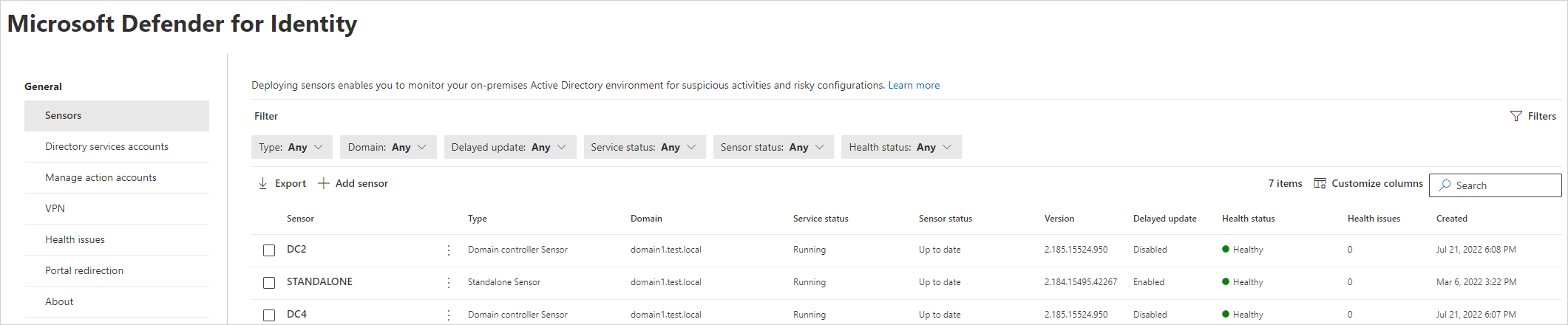
- Defender portal > Settings > Identities > Sensors (also reachable as On-premises > Sensor management). The list shows name, type, domain, migration state, service status, sensor status, version, delayed update, health issue count, health status and created date. Export gives a CSV.
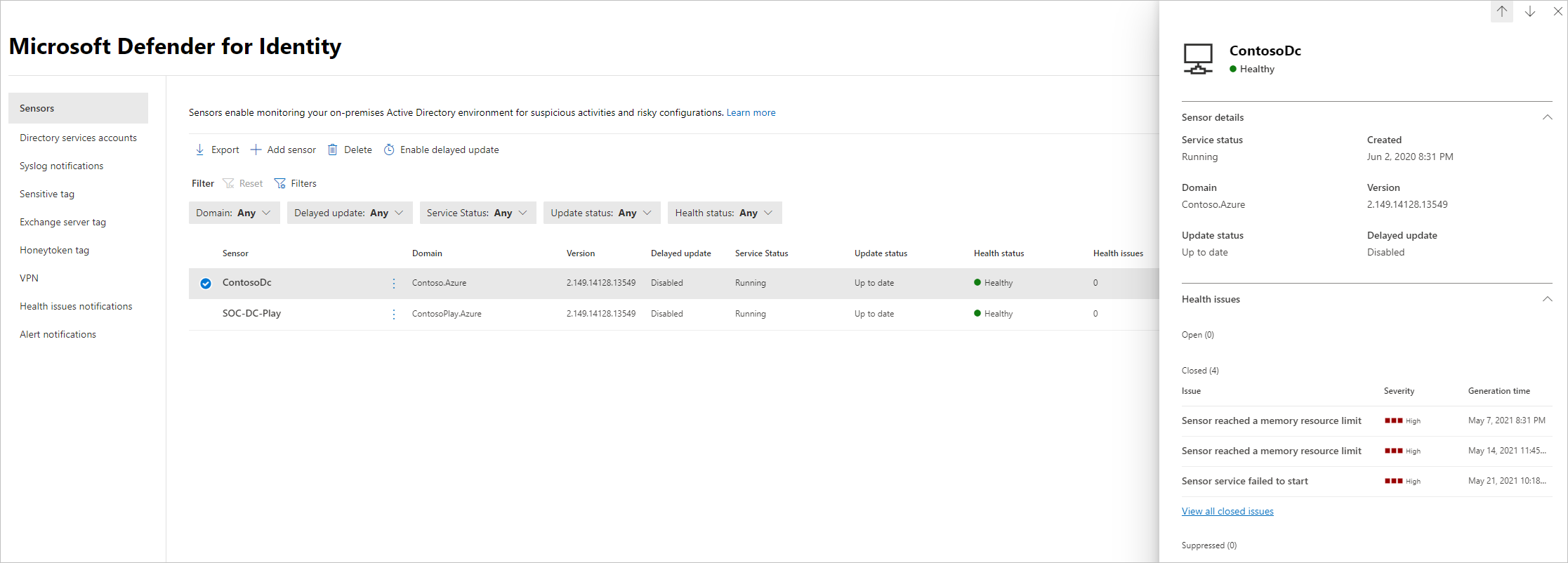
- Select a sensor. The details pane shows its properties and open health issues; you can reopen closed issues from here.
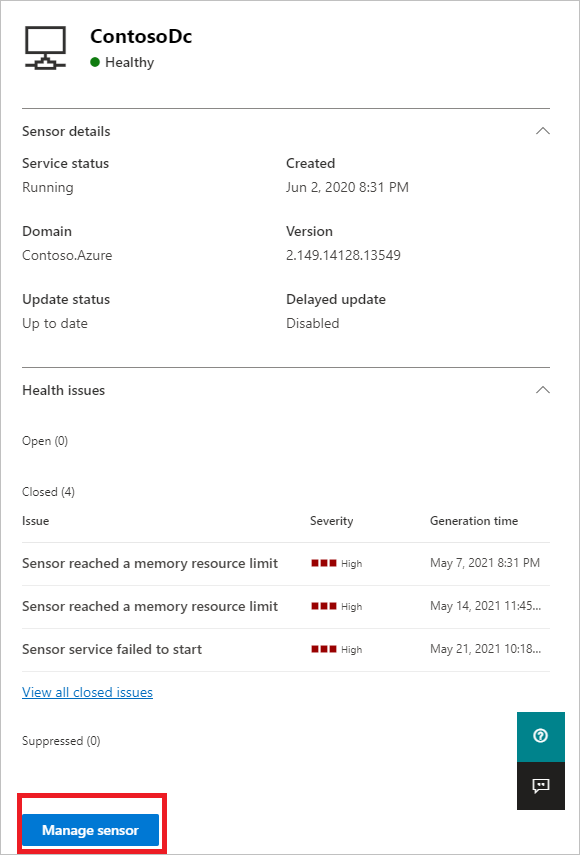
- Manage sensor opens the editable fields.
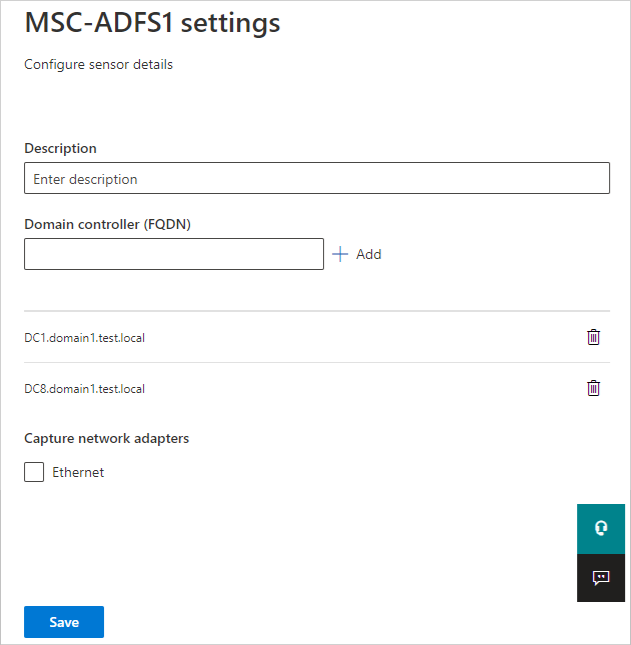
- Description: optional.
- Domain Controllers (FQDN): required for standalone, AD FS and AD CS sensors. A standalone sensor must list every mirrored DC and at least one global catalog. The installer picks the nearest DC for AD FS and AD CS; change it here if wrong.
- Capture Network adapters: required. On a DC, every adapter that talks to other computers. On a standalone sensor, the adapter receiving the mirror.
- Delayed update: select the sensor, Enabled delayed update, Enable. v2.x only. Keep one or two DCs per site in the fast ring so a bad build shows before it reaches the rest.
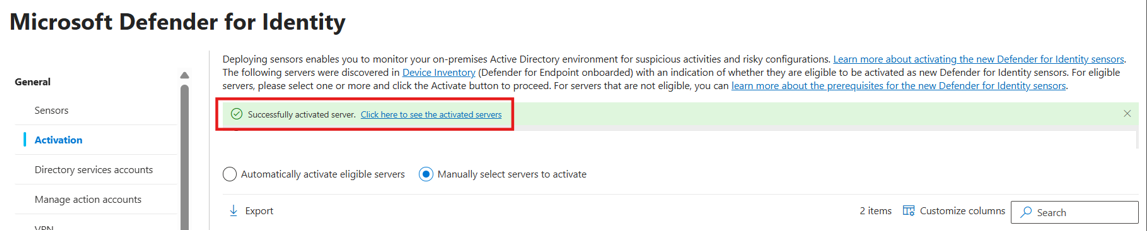
- v3.x activation: On-premises > Sensor management, select an eligible server, Activate. Or Settings > Identities > Advanced features > Automatic sensor v3.x activation. Turn on Automatic Windows auditing configuration on the same page; it reapplies audit settings to local policy every 24 hours.
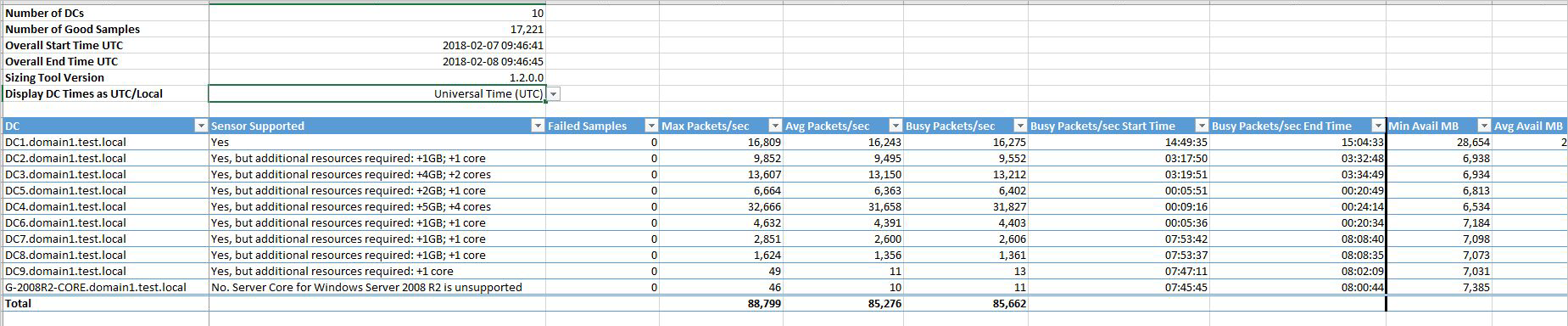
- Capacity: run the sizing tool before any v2.x install and read the Sensor Supported column.
# Tested on: TODO
# Module: Install-Module DefenderForIdentity (PowerShell Gallery)

# Audit configuration. Mode Domain creates and links GPOs; LocalMachine edits local policy.
New-MDIConfigurationReport -Path "C:\Reports" -Mode Domain -Identity "CONTOSO\mdiSvc01$" -OpenHtmlReport
Get-MDIConfiguration -Mode Domain -Configuration All
Set-MDIConfiguration -Mode Domain -Configuration All          # add -CreateGpoDisabled or -SkipGpoLink to stage
auditpol.exe /get /category:*                                  # confirm on a DC after gpupdate

# AD FS and AD CS extras that Set-MDIConfiguration does not cover
Set-AdfsProperties -AuditLevel Verbose
certutil -setreg CA\AuditFilter 127
Restart-Service certsvc

# DSA sanity: fails if the account carries admin-level rights
Test-MDIDSA -Identity "mdiSvc01" -Detailed

# Connectivity (v2.x). Run on the sensor server.
Test-MDISensorApiConnection
Test-MDISensorApiConnection -BypassConfiguration -SensorApiUrl 'https://contososensorapi.atp.azure.com' -ProxyUrl 'http://proxy.contoso.com:8080'
Get-MDISensorProxyConfiguration
Set-MDISensorProxyConfiguration -ProxyUrl 'http://proxy.contoso.com:8080'
Clear-MDISensorProxyConfiguration

# There is no Get-MDISensor cmdlet. Local state checks Learn documents:
Get-Service AATPSensor, AATPSensorUpdater
Get-ChildItem "$env:ProgramFiles\Azure Advanced Threat Protection Sensor" -Directory   # one folder per version
Get-NetAdapterAdvancedProperty | Where-Object DisplayName -Match "^Large*"              # LSO must be off on VMware
Get-ADServiceAccount mdiSvc01 -Properties PrincipalsAllowedToRetrieveManagedPassword, PasswordLastSet

# Sizing tool (v2.x only). Download https://aka.ms/mdi/sizingtool, unzip, run from a management host
# with WMI and performance counter access to every DC. It samples 24 hours and writes an Excel file.
.\TriSizingTool.exe
:: Proxy with authentication at install time or later, v2.x deployer
"C:\Program Files\Azure Advanced Threat Protection Sensor\<version>\Microsoft.Tri.Sensor.Deployment.Deployer.exe" ProxyUrl="http://myproxy.contoso.local" ProxyUserName="CONTOSO\myProxyUser" ProxyUserPassword="..."
Microsoft.Tri.Sensor.Deployment.Deployer.exe ClearProxyConfiguration
No supported method. Learn documents no Graph or REST API for listing sensors, changing sensor settings, or reading health issues. Use Settings > Identities > Sensors and the Health issues page. Alerts raised by the sensors reach the normal Defender XDR incident and alert surfaces.
Verify
- Sensors page: Service status Running, Sensor status Up to date, Health status green. Start failed means no configuration pull for 30 minutes, Disconnected means silence for 10 minutes, Not Configured on an AD FS, AD CS or standalone sensor means the resolver DC is missing.
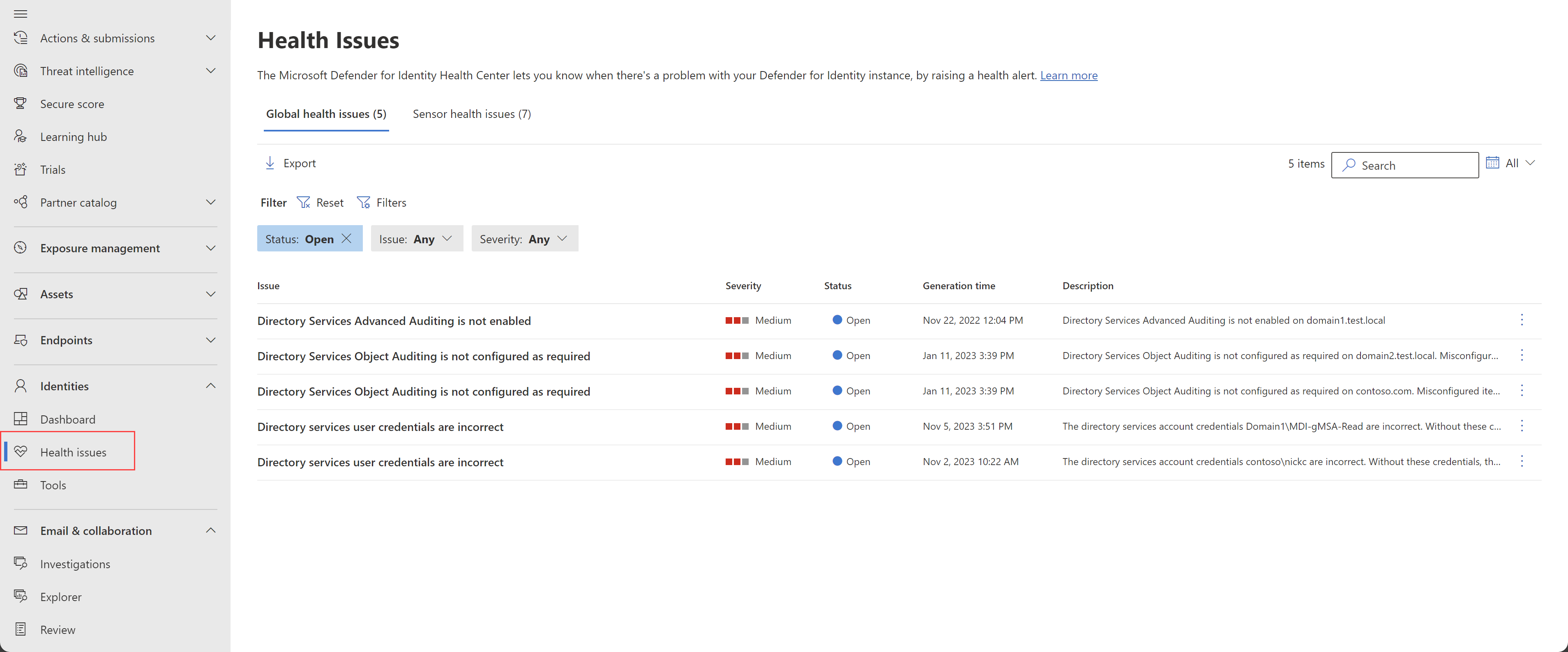
- Health issues page: global issues (DSA credentials, object auditing) sit beside per-sensor ones.
- Local:
Azure Advanced Threat Protection sensorservice running; errors in%programfiles%\Azure Advanced Threat Protection sensor\<version>\Logs\Microsoft.Tri.sensor-Errors.log. - Connectivity: browse to
https://<workspace>sensorapi.atp.azure.com/tri/sensor/api/pingfrom the sensor's proxy context; it returns the latest sensor version. - Traffic test: from a domain-joined client run
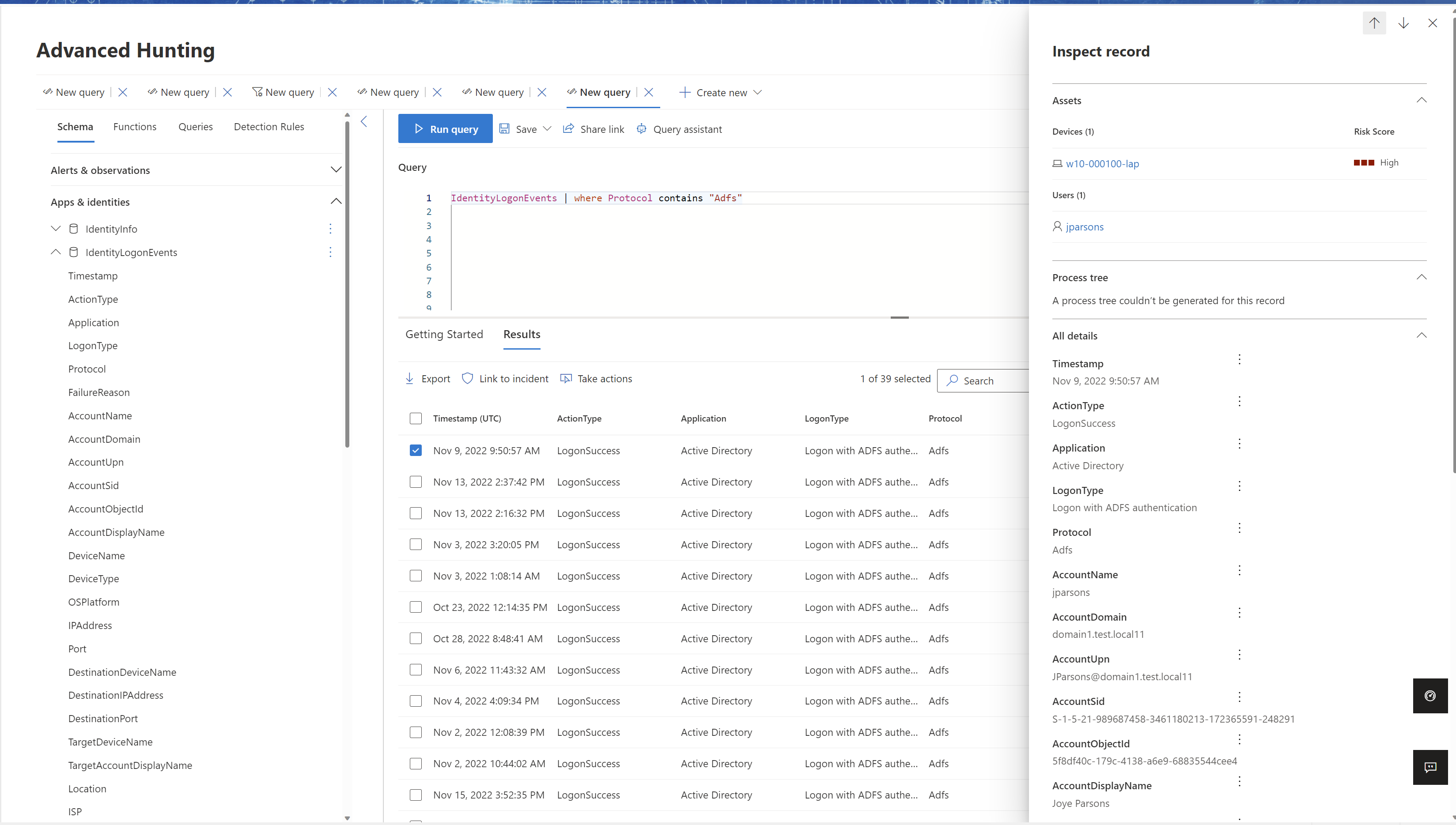
nslookup,server <sensor FQDN>,ls -d <domain>, then look forMdiDnsQueryon the device timeline. Wait 15 minutes after the first sensor. - AD FS and AD CS: authenticate a user through the service, then hunt.
IdentityLogonEvents
| where Protocol contains "Adfs"
| project Timestamp, AccountUpn, LogonType, DeviceName, IPAddress
| take 20
IdentityDirectoryEvents
| where Protocol == "Adcs"
| project Timestamp, ActionType, AccountUpn, AdditionalFields
| take 20
Troubleshoot
| Symptom | Likely cause | Fix |
|---|---|---|
Service stuck in Starting, log says failed to retrieve group managed service account password | Server not in the gMSA's PrincipalsAllowedToRetrieveManagedPassword, or stale Kerberos ticket | Add the computer (via a group) with Set-ADServiceAccount, then klist -li 0x3e7 purge or reboot |
| Service stuck in Starting with Access is denied in System log | NT Service\All Services lacks Log on as a service | Grant it in the DC policy |
| Service fails with registry key Global denied | gMSA cannot read performance counter keys | Add the gMSA to Performance Log Users |
| Some network traffic, Windows events or ETW events not analyzed | Volume above sensor capacity, or VMware LSO on | Add cores and RAM, disable LSO and TSO in the guest, split DCs across standalone sensors |
| Sensor reached a memory resource limit | DC short on RAM, sensor restarted itself | Add RAM or add DCs to the site |
| Sensor registers a licensing error (0x642) | Proxy returns 401 or 403 instead of 407 | Let *.atp.azure.com through the proxy unauthenticated |
| Sensor failed to connect to service | Missing DigiCert Global Root G2 in LocalMachine Root | Import the root certificate |
| ApplyInternal failed two way SSL | TLS inspection, or SystemDefaultTlsVersions and SchUseStrongCrypto not 1 | Bypass inspection, set both .NET registry values to 1 |
| Packet capturing component health issue | WinPcap, Npcap below 1.0, or Npcap misconfigured | Install Npcap per aka.ms/mdi/npcap, reinstall sensor 2.184 or later |
| Install fails on NIC teaming adapter | WinPcap does not support teaming | Use Npcap |
| Low success rate of active name resolution | TCP 135, UDP 137, TCP 3389 blocked, or no reverse zones | Open one of the three from sensors to all computers, fix reverse DNS |
| No network traffic received from domain controller | Standalone sensor without a working mirror | Fix SPAN config, disable RSC on the capture NIC |
| Limited alerts, no health issue, log says EventLogException handle is invalid | Security log DACL blocks the sensor SID | Add ACE (A;;0x1;;;S-1-5-80-818380073-2995186456-1411405591-3990468014-3617507088) |
Entra Connect sensor loses mms_get_globalsettings permission | Entra Connect upgrade reset database permissions | Re-run the SQL grant from the AD FS and Entra Connect page |
| Auditing health issues persist on v3.x despite correct GPO | Known issue with manual auditing on v3.x | Turn on Automatic Windows auditing configuration |
| Sensor outdated (v3) | Server missing the required cumulative update | Install the latest CU |
Gotchas and limits
- Port mirroring is only for standalone sensors. SPAN sessions for sensors on DCs is pre-2018 guidance.
- The capture driver is Npcap. WinPcap fails to install on NIC teaming adapters. Sensor 2.184 and later ship Npcap.
- DCs in a DMZ: Learn does not address this directly. The requirements are unchanged, outbound 443 to the workspace endpoint, LDAP to a DSA-reachable DC, NNR ports inbound to clients. TODO: test a firewalled DC with no NNR reachability and record which detections degrade.
- RODCs are supported for v2.x. Learn says nothing about which DC the DSA binds to from an RODC. TODO: lab it.
- Virtual DCs: Hyper-V dynamic memory and unreserved VMware memory both trip the sensor. VMware LSO and TSO offload cause the Some network traffic could not be analyzed issue and must be off in the guest.
- Busy DCs: the sizing table tops out at 75k to 100k busy packets per second, needing 7.5 physical cores and 13.5 GB for the sensor alone, and Learn says not to count hyper-threaded cores. Above that, split with a standalone sensor. The capacity page quotes both 350 and 1000 as the default sensor limit; confirm with support if you are near either.
- v3.x caps at 30 percent CPU and 1.5 GB. A very busy DC silently throttles event processing. Watch the health issues rather than assuming coverage.
- Standalone sensors miss ETW; v3.x drops VPN RADIUS and syslog. Each generation leaves something out.
- The self-signed client certificate renews every two years; agents such as Entrust EESP can block the renewal, which severs cloud communication until you reinstall.
- TLS inspection is unsupported on the v2.x path because of mutual TLS. Firewalls that cache resolved IPs for
*.atp.azure.combreak when Microsoft rotates addresses; use the AzureAdvancedThreatProtection service tag or the ExpressRoute BGP community 12076:5220. - The workspace is pinned to the region nearest the Entra tenant and cannot move. Retention is 180 days regardless of what Sentinel or Advanced Hunting keep.
- Multi-forest entity resolution generates LDAP from every sensor to every forest. Budget the ports and the DSA count (30 by default).
Further reading
- Announcing General Availability: Unified identity and endpoint sensor, Microsoft Threat Protection blog, October 2025. The GA announcement for the v3.x sensor, with the product team's framing of why it moved onto the MDE platform.
- Microsoft Defender for Identity Sensor v3.x Reduces Complexity, Boosts Threat Detection, Rabia Noureen, Petri, October 2025. Short summary of what v3.x removes from the deployment and the license options.
- Automatic migration from Defender for Identity Sensor v2 to v3.x and gMSA changes, Jeffrey Appel, March 2026. Walks the in-place migration wizard with screenshots and spells out the gMSA to LocalSystem change for action accounts.
- Defender for Identity Sensor v3 Upgrade: Proceed with Caution, Wes Miller, Directions on Microsoft, September 2026. Analyst view of the v3.x limitations and why to stage the migration rather than flip automatic activation on day one.
My notes
TODO: Sohail's notes after verification.
Changelog
| Date | Change | Source |
|---|---|---|
| 2026-10-22 | Drafted from Learn, with Learn images and diagrams | [1] |