Detections, lateral movement paths and response actions
What it is
This article is the operating side of Defender for Identity (MDI). Overview explains why it exists, architecture and sensors covers how the sensor sees traffic, and deployment gets a sensor running. Here the question is what the sensor fires, how you shape that, and what you can do about it from the portal.
Learn is explicit that MDI is not an audit or logging product. It captures only what its detections and recommendations need. Alerts name the suspicious activity and the users and computers involved, land in the Defender portal, correlate with MDE and MDO signals, and can trigger AIR and attack disruption.
Two alert formats exist side by side during a transition. Classic alerts have numeric external IDs (2006 for DCSync) and are tuned through Excluded entities. Defender-format alerts have xdr_ detector IDs and are tuned with XDR alert tuning rules. The Detection source field tells you which engine produced an alert. Microsoft started moving classic detections to the XDR engine in December 2025, brute force, password spray and SAMR reconnaissance first. See incidents and alerts for the shared queue.
One correction to the plan for this article: lateral movement paths (LMPs) as MDI shipped them are no longer updated. Microsoft disabled SAM-R collection of local administrator membership in May 2025. The successor is the Attack paths tab on the identity page, from Exposure Management. Details below.
Licensing and prerequisites
- An MDI licence. Learn names it as the requirement to see identity posture assessments in Secure Score; the alert and response features follow the same licence. It comes with Microsoft 365 E5, E5 Security, EMS E5 or standalone.
- At least one sensor on a domain controller. Several alerts fire only from a specific sensor type: ESC8 certificate requests, AD CS permission changes and PKINIT certificate misuse need an AD CS sensor; AD FS DKM key reads and AD FS trust changes need an AD FS sensor; hybrid posture assessments need a sensor on the Entra Connect server.
- Windows event collection on the DCs. Suspicious additions to sensitive groups is profiled from DC audit events, and the Exchange RCE alert needs event 4662 on an Exchange object. The v3.x sensor can set audit policy itself; see deployment.
- Response actions on AD accounts need a sensor on a DC and the action account setting described below. Portal users need Response (manage) in unified RBAC, plus an Entra role from the per-action table on the remediation actions page.
- Entity tags need admin or user access through the MDI role groups.
How it works
Alert catalogue by phase
Learn groups classic alerts by kill-chain phase. The table below is the working subset: the alerts that matter most in a Windows AD estate, with what triggers them, the benign causes Learn actually documents, and the first move. Learn does not publish a false-positive list per alert; where it says nothing, the cell says so rather than guessing.
| Alert (external ID) | Phase | What triggers it | Known benign causes (Learn) | First response |
|---|---|---|---|---|
| Account enumeration reconnaissance, LDAP (2437) | Recon | Many LDAP ping requests for user names that do not exist, as Ldapnomnom does | None documented | Find the source host, check what process issued the queries |
| Network-mapping reconnaissance, DNS (2007) | Recon | AXFR zone transfer from a non-DNS server, or an excessive number of DNS requests | Security scanners that use DNS; exclude them per rule | Restrict zone transfers to named IPs |
| User and group membership reconnaissance, SAMR (2021) | Recon | SAM-R user or group enumeration from a computer not seen doing it before | Quiet for the first 4 weeks per DC while it learns | Apply the Restrict clients allowed to make remote calls to SAM policy |
| Security principal reconnaissance, LDAP (2038) | Recon, credential access | LDAP enumeration of sensitive groups with methods not seen before; often the first Kerberoasting step | 15-day learning period per computer | Long passwords on service accounts, move to gMSA |
| Honeytoken was queried via LDAP (2429) | Recon | Any LDAP query against a honeytoken user | None documented | Treat as real until proved otherwise |
| Suspicious additions to sensitive groups (2024) | Persistence | Addition to a sensitive group that deviates from the per-user profile built from DC audit events | 4-week learning period per DC | Confirm the change request, then revert |
| Suspected Golden Ticket, encryption downgrade (2009) | Persistence | TGT encryption type in a TGS_REQ downgraded against learned behaviour, no matching AS request | 5-day learning period | Reset krbtgt twice, patch DCs per KB3011780 |
| Suspected skeleton key, encryption downgrade (2010) | Persistence | KRB_ERR encryption type from the DC downgraded against learned behaviour | None documented | Isolate the DC, check lsass for injected modules |
| Suspicious modification of AdminSDHolder (2430) | Persistence | Unauthorised change to the domain AdminSDHolder object | None documented | Revert the ACL, find who had WriteDACL |
| Suspected SID-History injection (1106) | Priv esc | A new SID in the SIDHistory attribute | None documented | Clear the attribute, review migration tooling |
| Suspected Netlogon elevation, CVE-2020-1472 (2411) | Priv esc | A vulnerable Netlogon secure channel to a DC over MS-NRPC | Low severity if every DC is patched | Patch, then enforce secure RPC |
| Suspected DCSync (2006) | Credential access | Replication request from a computer that is not a DC | None documented | Check who holds Replicating Directory Changes All; Entra Connect servers are expected |
| Suspected Kerberos SPN exposure (2410) | Credential access | SPN enumeration, TGS requests and ticket hash extraction for offline cracking | None documented | Rotate the exposed service account passwords |
| Suspected AS-REP roasting (2412) | Credential access | AS-REQ against accounts with pre-authentication disabled | None documented | Enable pre-auth on the listed accounts |
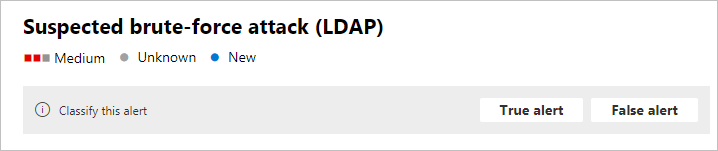
| Suspected brute force, Kerberos or NTLM (2023) | Credential access | Many authentication failures or a password spray | One-week learning period; now on the XDR engine | Lock down the source, check for a successful logon after the failures |
| Honeytoken authentication activity (2014) | Credential access | Any authentication by a honeytoken account | None documented | Nobody should use it; trace the source host |
| Suspected identity theft, pass-the-hash (2017) | Lateral movement | An NTLM hash stolen and reused from another computer | None documented | Reset the account, isolate both hosts in MDE |
| Suspected identity theft, pass-the-ticket (2018) | Lateral movement | The same Kerberos ticket used from two or more computers | None documented | Reset the account, isolate the second host |
| Suspected NTLM relay, Exchange account (2037) | Lateral movement | Exchange account credentials used from a suspicious source | Low severity if signed NTLMv2 is observed | Require sealed NTLMv2 |
| Remote code execution attempt (2019) | Other | PsExec, remote WMI or PowerShell against a DC, AD FS or AD CS server | None documented; admin tooling will trigger it | Restrict remote DC access to Tier 0 hosts, then exclude those |
| Suspicious service creation (2026) | Other | Event 7045 on a DC, AD FS or AD CS server | None documented; deployment agents will trigger it | Confirm the service, exclude known agents |
| Data exfiltration over SMB (2030) | Other | Suspicious transfers from a monitored DC, for example ntds.dit | None documented | Isolate the destination, assume credentials gone |
| Group Policy tampering (2440) | Other | A GPO change that disables Defender Antivirus | None documented | Revert the GPO, check its link scope |
Two notes that apply across the table. First, vulnerability alerts can still fire after the fix is installed because the pattern still matches; when every affected system is patched the alert is Low, and Learn says to tune it only once you have confirmed the activity is expected. Second, alerts with a learning period say nothing in that window, so a fresh sensor is blind to SAMR recon for a month and to brute force for a week.
Lateral movement paths, then and now
The original LMP feature answered one question: which non-sensitive account or machine gives an attacker a route to a sensitive account. The sensor read local Administrators membership on member machines over SAM-R, combined it with logon sessions seen at the DC, and drew a graph. Grey arrows showed where a sensitive user had logged on and left credentials; black arrows showed who was admin on that resource. A path lived on the entity page for 48 hours and an Excel report kept 60 days.
In May 2025 Microsoft disabled the SAM-R collection. The what's new entry says the LMP maps "will no longer be updated" and an alternative is being explored. The classic LMP pages are archived and existing paths are stale.
What you use today is the Attack paths tab on the identity page, added in February 2025. It is Exposure Management, not MDI: paths come from MDE device data, MDVM and Defender for Cloud, are recalculated as logons, group membership and configuration change, and on-premises paths terminate at Domain Admins, Enterprise Admins, Administrators or Domain Controllers. Choke points are nodes where several paths converge, so one fix breaks many. Learn warns the page can be empty because it only shows imminent paths, and that paths need licensed workloads and defined critical assets. Identity Explorer is a second option; it needs a Sentinel data lake licence and ships scenarios such as Kerberoastable users with a path to a critical asset.
Breaking a path has not changed: admins use privileged credentials only on hardened hosts, nobody keeps local admin they do not need, and groups that widen exposure get split.
Sensitive, honeytoken and Exchange server tags
Tags feed the detections. Sensitive marks the accounts, devices and groups the sensitive-group and recon alerts care about. Members of the built-in privileged groups are Sensitive automatically, nested included: Administrators, the Operators groups, Domain, Enterprise and Schema Admins, Group Policy Creator Owners, Domain Controllers and RODCs, Replicators, Network Configuration Operators, Incoming Forest Trust Builders, Microsoft Exchange Servers. CA, DHCP, DNS and Exchange servers and anything holding Replicating Directory Changes are Sensitive too. Remote Desktop Users stopped being automatic in September 2018. Entra admin roles, Okta and CyberArk admin roles and the SailPoint administrator also mark an identity Sensitive.
Honeytoken turns a dormant account or device into a tripwire: any authentication, LDAP query, attribute or group change on it is an alert. Exchange server applies to devices only and marks them Sensitive.
Exclusions versus tuning
MDI has two exclusion types. Exclusions by detection rule remove a device, IP, user or domain from one detection. Global excluded entities remove IPs, subnets, devices or domains from every detection; a global device exclusion only affects detections that identify a device. Common DNS domains are pre-excluded for Suspicious communication over DNS.
Learn now recommends XDR alert tuning rules instead. When a classic detection moves to the XDR engine its exclusions stop applying, suppressed alerts come back, and you recreate the tuning as a rule on the new xdr_ detector. Deleting an exclusion takes effect immediately.
Identity security posture assessments
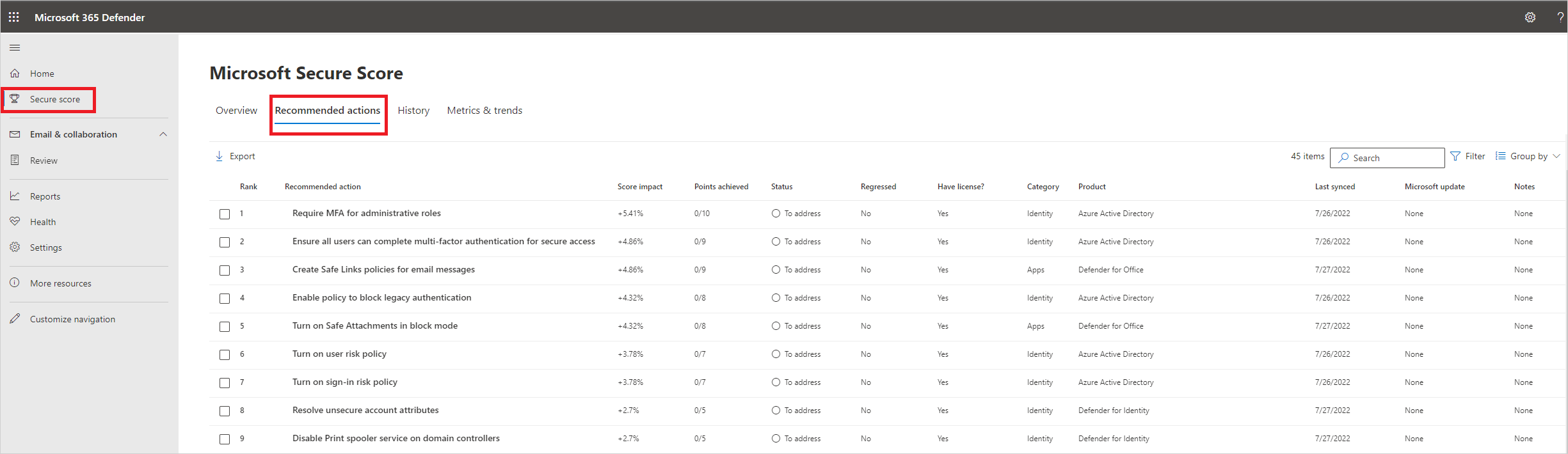
ISPM assessments appear in Secure Score under Recommended actions, filtered to Identity. Scores refresh every 24 hours, the impacted entity list within minutes of a fix. Learn groups them in six categories:
- Accounts: unsecure Kerberos delegation, entities exposing credentials in clear text (LDAP simple bind), dormant entities in sensitive groups, unsecure account attributes (DES, reversible encryption, no pre-auth, password not required), unsecure SID history, krbtgt and built-in Administrator passwords older than 180 days, non-admin accounts with DCSync rights, service accounts in privileged groups, operator group membership, non-default primary group ID, LAPS usage, discoverable passwords in attributes, stale accounts and service accounts, Entra-privileged users also privileged in AD.
- Identity infrastructure: unmonitored DCs, AD CS, AD FS and Entra Connect servers, Print Spooler on DCs, DC machine account password older than 45 days, Guest enabled, local admins on identity assets, unsecure domain configuration (LDAP signing not required, ms-DS-MachineAccountQuota above 0).
- Certificates: ESC1 through ESC8, ESC11 and ESC15. The CA-level ones (ESC6, 7, 8, 11, 15) need a sensor on the CA; template ones do not.
- Group policy: GPOs modifiable by unprivileged accounts.
- Hybrid: MSOL_ connector password age and replication rights, AZUREADSSOACC password age, MSOL_ in Domain Admins, privileged SaaS accounts outside IdP control.
Learn's current category pages have no standalone legacy protocol or weak cipher assessment; those concerns sit inside unsecure account attributes and unsecure domain configuration. TODO: confirm in the dev tenant which older assessment names still show in Secure Score.
Response actions and the action account
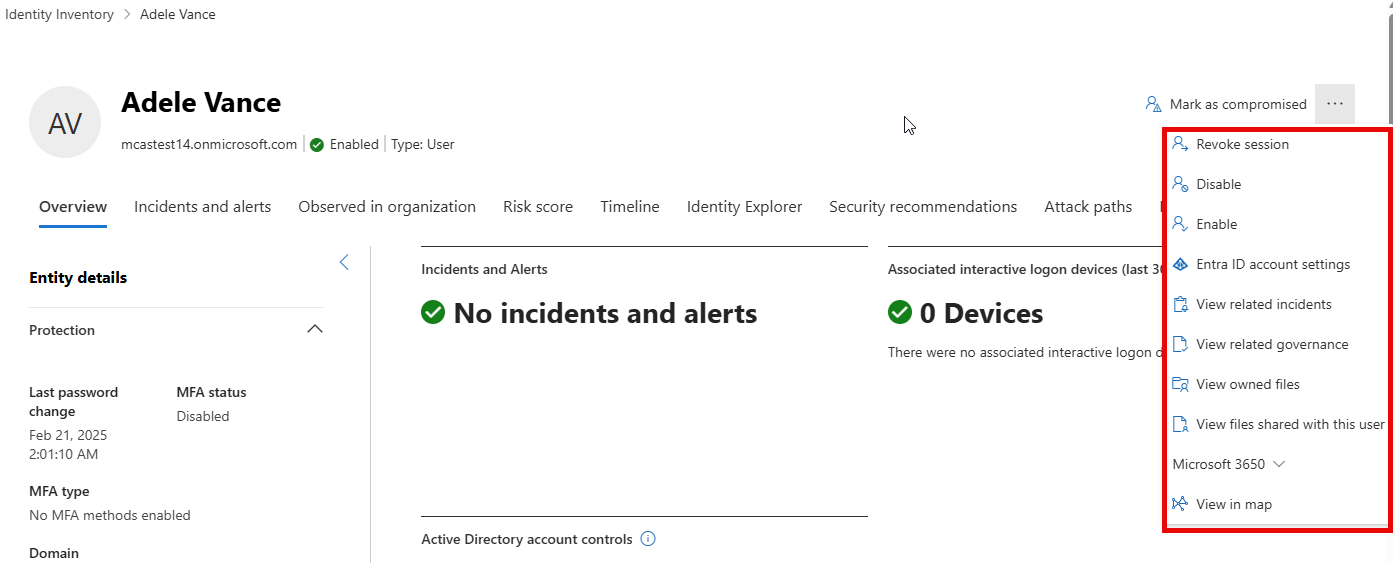
Actions on an identity apply to every linked account. For AD the list is Disable, Enable and Force password change. Entra adds Revoke session and Mark as compromised. Okta, CyberArk, SailPoint and some SaaS apps support disable and enable through their connectors. Unified RBAC checks the caller first; a failed check never leaves the portal.
On AD the work is done by a sensor on a domain controller, never by an AD FS, AD CS or Entra Connect sensor. The v3.x sensor always uses the DC's LocalSystem account. The v2.x sensor can use a gMSA action account scoped to Reset password plus read and write of pwdLastSet and userAccountControl on descendant user objects. Learn recommends LocalSystem and requires it once any sensor is v3.x. Do not reuse the action gMSA on non-DC servers, and do not make it the Directory Service Account, which needs read only. Entra actions run through the Microsoft-managed enterprise application Microsoft Defender for Identity, app ID 60ca1954-583c-4d1f-86de-39d835f3e452, created automatically since January 2026.
Attack disruption uses the same path without an analyst.
Configure
- Portal
- PowerShell
- Graph API
Entity tags:
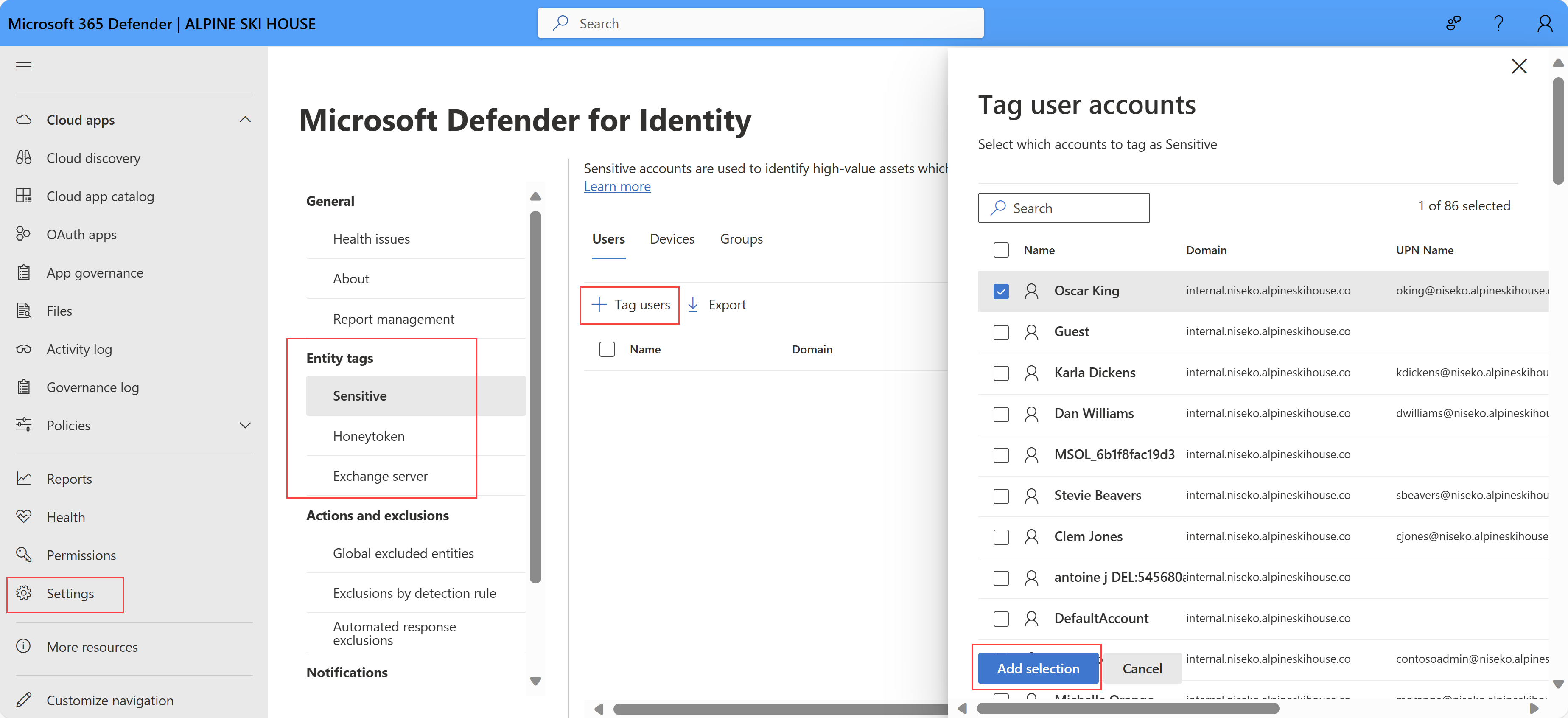
- Defender portal > System > Settings > Identities. Pick the Sensitive, Honeytoken or Exchange server tab.
- Select Tag users, Tag devices or Tag groups, search, select, Add selection.
- For honeytokens pick an account nobody uses and that looks worth stealing. Learn says they are usually dormant.
Exclusions:
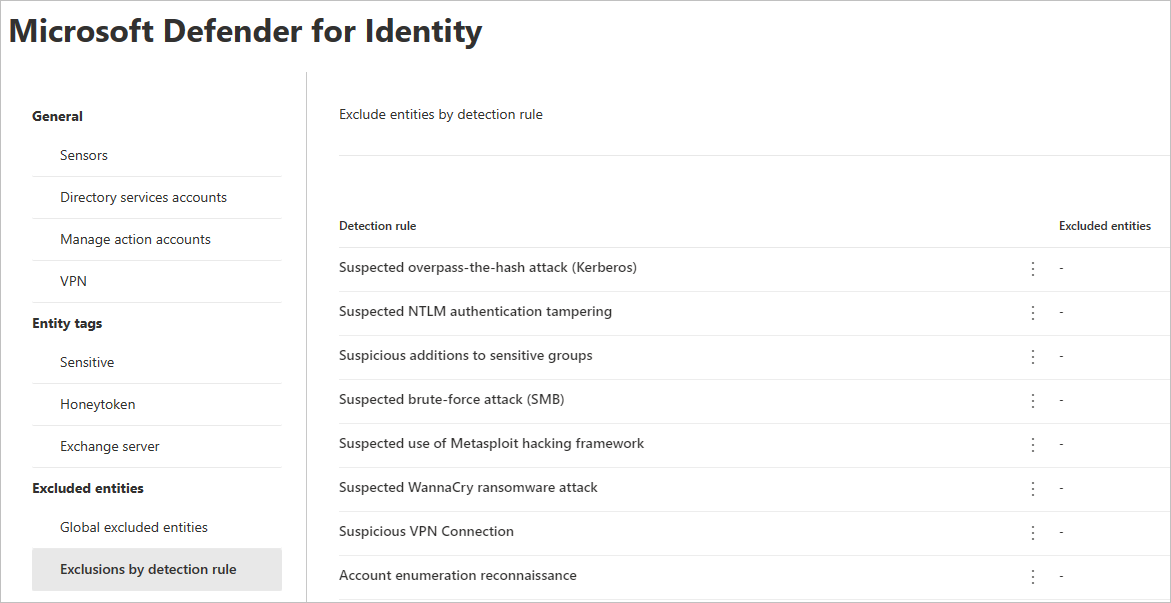
- Settings > Identities > Excluded entities > Exclusions by detection rule. Pick the rule, open its details, select Excluded entities.
- Choose the entity type the rule supports (devices, IPs, users, domains), select +, add, confirm. The down-arrow exports the list; the bin removes an entry.
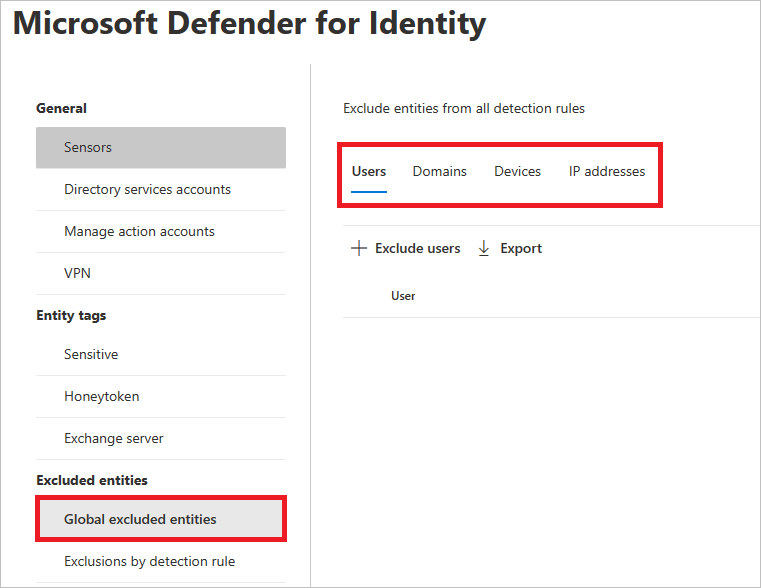
- Global excluded entities works the same for IPs, subnets, devices and domains, and applies to every detection.
- For Defender-format alerts use Incidents & alerts > Alerts, open the alert, Tune alert, and build the rule on evidence conditions. This is the path Learn now recommends.
Action account:
- Settings > Identities > Microsoft Defender for Identity > Manage action accounts.
- Leave Automatically use the sensor's local system account selected unless you have only v2.x sensors and a reason to scope a gMSA.
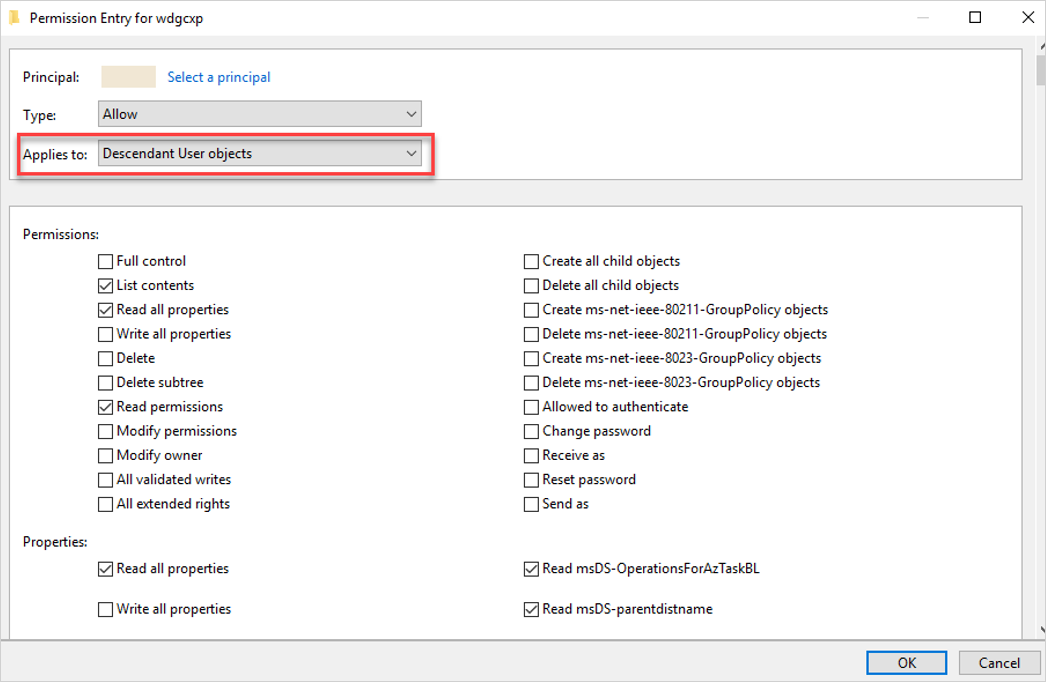
- For a gMSA: create it, grant Log on as a service on each DC with a sensor, then in AD Users and Computers open the domain or OU > Properties > Security > Advanced > Add. Tick Service accounts under Object types, select the gMSA, set Applies to Descendant User objects, grant Reset password, Read and Write
pwdLastSet, Read and WriteuserAccountControl. Optionally Read and Write members on Descendant Group objects. - Back in the portal, +Create new account, enter name and domain, Save.

Posture assessments:
- Secure Score > Recommended actions, filter Category Identity or Product Defender for Identity.
- Open an assessment for the exposed entities and the fix steps.
Response action:
- Assets > Identities > open the identity > Actions, or right-click a result in Advanced hunting, or Action center.
- Pick Disable, Enable, Force password change, Revoke session or Mark as compromised. Confirm. Track in Action center.
The DefenderForIdentity module configures prerequisites, not tags or exclusions. Those two have no documented PowerShell or Graph surface.
# Tested on: TODO
Install-Module -Name DefenderForIdentity
Import-Module -Name GroupPolicy -SkipEditionCheck   # PowerShell 7.4 and later only

# Audit prerequisites that the detections depend on, as a report first
New-MDIConfigurationReport -Mode Domain -Path C:\Temp\mdi-report
Test-MDIConfiguration -Mode Domain -Configuration All

# Apply by GPO. RemoteSAM takes the DSA identity. Learn still documents RemoteSAM;
# the SAM-R based LMP collection itself has been disabled since May 2025.
Set-MDIConfiguration -Mode Domain -Configuration AdvancedAuditPolicyDCs, NTLMAuditing, DomainObjectAuditing -GpoNamePrefix 'MDI'
Set-MDIConfiguration -Mode Domain -Configuration RemoteSAM -Identity 'mdi-dsa$' -GpoNamePrefix 'MDI'

# Action account prerequisites are not in the module. Learn documents the ACL by GUI only.
# Verify the gMSA exists and which DCs can retrieve its password:
Get-ADServiceAccount -Identity 'mdi-action$' -Properties PrincipalsAllowedToRetrieveManagedPassword

# What MDI will tag Sensitive: enumerate the automatic groups, nested
$groups = 'Administrators','Account Operators','Server Operators','Print Operators','Backup Operators',
          'Domain Admins','Enterprise Admins','Schema Admins','Group Policy Creator Owners','Replicator',
          'Network Configuration Operators','Incoming Forest Trust Builders'
foreach ($g in $groups) {
    Get-ADGroupMember -Identity $g -Recursive -ErrorAction SilentlyContinue |
      Select-Object @{n='Group';e={$g}}, name, objectClass, distinguishedName
}

# Who holds DCSync rights on the domain head (expect DCs, Entra Connect MSOL_, nothing else)
$dn = (Get-ADDomain).DistinguishedName
(Get-Acl "AD:\$dn").Access |
  Where-Object { $_.ObjectType -in '1131f6aa-9c07-11d1-f79f-00c04fc2dcd2','1131f6ad-9c07-11d1-f79f-00c04fc2dcd2' } |
  Select-Object IdentityReference, ObjectType, AccessControlType

# Confirm a honeytoken account is really dormant before tagging it
Get-ADUser -Identity 'svc-backup-old' -Properties LastLogonDate, PasswordLastSet, Enabled
The two GUIDs are the Replicating Directory Changes and Replicating Directory Changes All extended rights; the Get-Acl approach is standard AD PowerShell, not from the MDI pages.
MDI alerts in the unified alerts API, both formats. serviceSource is a filterable property and microsoftDefenderForIdentity is the documented enum value. category is not in the filterable list and is being deprecated in favour of categories, so filter on it client side.
GET https://graph.microsoft.com/v1.0/security/alerts_v2?$filter=serviceSource eq 'microsoftDefenderForIdentity' and status eq 'new'&$top=50
Permission: SecurityAlert.Read.All. Delegated callers also need Security Reader or higher. Page with @odata.nextLink.
Run a hunting query against an Identity table. Permission ThreatHunting.Read.All. Timespan defaults to 30 days; the shorter of the body timespan and the query's own time filter wins.
POST https://graph.microsoft.com/v1.0/security/runHuntingQuery
Content-Type: application/json
{
  "Query": "IdentityQueryEvents | where QueryType == 'EnumerateUsers' | summarize Queries = count(), Targets = dcount(QueryTarget) by AccountUpn, DeviceName, Application | where Queries > 50 | order by Queries desc",
  "Timespan": "P7D"
}
Response actions on an identity have no documented Graph route on the MDI pages. The Entra side of Disable and Revoke session maps to PATCH /users/{id} with accountEnabled and POST /users/{id}/revokeSignInSessions, which are Entra APIs, not MDI, and do nothing to the AD account. Tags, exclusions and the action account are portal only.
Verify
Learn's sensor test page is the documented detection test; the older security alert lab playbooks no longer resolve on Learn. TODO: confirm whether the playbook lab pages were retired or moved.
- Honeytoken: tag a dormant account, sign in with it against a monitored DC. Expect Honeytoken authentication activity (2014). An LDAP lookup of it should produce Honeytoken was queried via LDAP (2429).
- Service creation: create a service on a DC. Expect Suspicious service creation (2026).
- Remote execution: from a workstation, run a PsExec or remote PowerShell command against the DC as an admin. Expect Remote code execution attempt (2019).
- Posture: in a test domain only, set
ms-DS-MachineAccountQuotato 10 and watch Resolve unsecure domain configurations appear in Secure Score, then set it back to 0. - Response: open a test user, run Force password change, confirm
pwdLastSetis 0 in AD and the entry in Action center.
// 1. LDAP reconnaissance: who is enumerating users, from where, with what tool
IdentityQueryEvents
| where Timestamp > ago(7d)
| where QueryType in ("EnumerateUsers", "QueryGroup", "QueryUser")
| summarize Queries = count(), Targets = dcount(QueryTarget), Types = make_set(QueryType) by AccountUpn, DeviceName, IPAddress, Application
| where Queries > 100
| order by Queries desc
// 2. NTLM use by Sensitive accounts. Tags needs MDI; Learn also lists it under UEBA columns, so check it is populated.
let sensitive = IdentityInfo
    | summarize arg_max(Timestamp, *) by AccountObjectId
    | where Tags has "Sensitive"
    | project AccountUpn, AccountName;
IdentityLogonEvents
| where Timestamp > ago(7d)
| where Protocol =~ "Ntlm"
| join kind=inner sensitive on AccountName
| summarize Logons = count(), Sources = make_set(DeviceName, 10), Targets = make_set(DestinationDeviceName, 10) by AccountUpn
| order by Logons desc
// 3. DCSync signal: replication from a host that is not a DC. ActionType value to confirm in the portal schema.
IdentityDirectoryEvents
| where Timestamp > ago(30d)
| where ActionType has "replication"
| where DeviceName !has "DC" // TODO replace with a DC allow-list
| project Timestamp, ActionType, AccountName, DeviceName, IPAddress, DestinationDeviceName
// 4. Kerberoasting signals: MDI alerts plus the LDAP recon that precedes them
AlertInfo
| where Timestamp > ago(30d)
| where ServiceSource == "Microsoft Defender for Identity"
| where Title has_any ("Kerberoast", "SPN", "AS-REP")
| join kind=inner (AlertEvidence | where EntityType == "User" | project AlertId, AccountUpn) on AlertId
| summarize Alerts = dcount(AlertId), Users = make_set(AccountUpn, 10) by Title, Severity, DetectionSource
// 5. Dormant admins: Sensitive, enabled, no logon seen by MDI in 90 days
let active = IdentityLogonEvents
    | where Timestamp > ago(90d)
    | summarize LastLogon = max(Timestamp) by AccountName;
IdentityInfo
| summarize arg_max(Timestamp, *) by AccountObjectId
| where Tags has "Sensitive" and IsAccountEnabled == true and SourceProviders has "ActiveDirectory"
| join kind=leftanti active on AccountName
| project AccountUpn, AccountDisplayName, Department, CreatedDateTime, UserAccountControl
// 6. Sensitive group changes, to cross-check alert 2024 against raw directory events
IdentityDirectoryEvents
| where Timestamp > ago(30d)
| where ActionType has "Group Membership"
| extend Group = tostring(AdditionalFields["TO.GROUP"])
| where Group has_any ("Domain Admins", "Enterprise Admins", "Schema Admins", "Administrators")
| project Timestamp, ActionType, AccountName, TargetAccountDisplayName, Group, DeviceName
The Learn table pages do not list ActionType values; queries 3 and 6 use values from the in-portal schema and need checking in the dev tenant. See EDR and hunting for the device-side tables these join to.
Troubleshoot
| Symptom | Likely cause | Fix |
|---|---|---|
| Lateral movement paths tab missing or empty | SAM-R collection disabled May 2025; LMP maps no longer update | Use the Attack paths tab (Exposure Management) or Identity Explorer; do not chase the SAM-R GPO |
| Attack paths tab empty | No critical assets defined, workload not licensed, or no imminent path found | Define critical assets in Exposure Management, confirm MDE and MDVM coverage on the hosts in question |
| Response action fails on an AD account | Sensor on the DC is v3.x but the action account setting is a gMSA, or the only sensor near the account is AD FS, AD CS or Entra Connect | Select Automatically use the sensor's local system account; confirm a DC sensor is Running |
| Action blocked before it runs | Caller lacks Response (manage) or the Entra role for that action | Fix the custom role in unified RBAC; check the per-action role table |
| Entra action fails | MDI enterprise app missing or consent broken | Check for app ID 60ca1954-583c-4d1f-86de-39d835f3e452 in Enterprise applications |
| Alert suppressed last month is back | Its detection moved to the XDR engine and the exclusion no longer applies | Recreate as an alert tuning rule on the xdr_ detector |
| Too many Remote code execution and Suspicious service creation alerts | Admin tooling, ConfigMgr, backup or monitoring agents on DCs | Exclude the known source hosts per rule, or tune by evidence; restrict DC remote access to Tier 0 |
| Too many DNS reconnaissance alerts | Vulnerability scanner doing zone transfers | Per-rule exclusion for the scanner IP |
| No SAMR or brute-force alerts on a new sensor | Learning period: 4 weeks per DC for SAMR, 1 week for brute force | Wait; do not test these in week one |
| Sensitive group change not alerted | Group is custom and not tagged, or DC auditing missing | Tag the group Sensitive; run Test-MDIConfiguration |
| ESC or CA assessments missing | No sensor on the AD CS server | Deploy the sensor on the CA; template assessments do not need it |
| Posture assessment still shows Incomplete after a fix | Status refreshes every 24 hours | Check the exposed entities list, which updates within minutes |
| Honeytoken never fires | Account was not dormant, or the tag was never applied | Confirm LastLogonDate, re-check the Honeytoken tab |
Gotchas and limits
- The LMP feature in older guides and its SAM-R GPO advice are history. Learn still ships
RemoteSAMin the PowerShell module, but the local admin collection that drew the graph is off. Check what's new before promising a client LMP reports. - One detection can show twice under different names during the format transition. Detector IDs are not unique either:
xdr_SuspiciousAuthAttemptcovers two alerts. Key automation on title plus detector. - A rise in alerts of the same type lowers their suspicion level in the portal. Repeated alerts usually mean a configuration gap, not a quieter attacker.
- Tag before go-live. A custom admin group is invisible to the sensitive-group alert until tagged.
- Honeytoken is a user or device tag. There is no honeytoken group.
- Exclusions and tags have no API. Multi-tenant work means clicking.
- Disable on a hybrid identity disables the AD and the Entra account together. Force password change does not revoke tokens; add Revoke session.
IdentityInfowrites a row per identity on change or every 24 hours, soarg_maxby object ID is mandatory, and the table page saysTagsmay be empty without Sentinel UEBA.categoryonalerts_v2is being deprecated forcategoriesand is not filterable server side.
Further reading
- Stop identity attacks before they start with Microsoft ISPM recommendations, Microsoft Defender XDR blog, September 2026. Microsoft's own framing of which posture assessments to fix first and why, beyond the flat category lists on Learn.
- Automatic Windows event auditing configuration for Defender for Identity V3.x sensor, Jeffrey Appel, February 2026. Maps each audit subcategory and event ID to the detections that need it, which Learn scatters across pages.
- Defender for Identity: Is It Actually Worth Your Time?, Bartosz Wysocki, February 2026. Field view of baseline periods and weekly alert review, and one of the few posts that states plainly that LMPs stopped updating after May 2025.
- MC1187386: Defender for Identity alerts transitioning to XDR-based detection platform, Merill Fernando's Message Center archive, November 2025. The dated list of which classic alerts moved first and their new
xdr_detector IDs, which Learn does not keep as a changelog. - Stop Kerberoasting: Our Advanced Threat-Hunting Blueprint, 7ASecurity, May 2026. Low-volume Kerberoasting hunting with event 4769 bitmasks and an
IdentityDirectoryEventsKQL query; complements the MDI alert rather than replacing it.
My notes
TODO: Sohail's notes after verification.
Changelog
| Date | Change | Source |
|---|---|---|
| 2026-10-22 | Drafted from Learn, with Learn images and diagrams | [1] |