Overview: MDI vs Defender for Endpoint on a domain controller
What it is
Defender for Identity (MDI) is the identity threat detection layer of the Defender suite. Learn describes it as a cloud service that takes signals from on-premises Active Directory, Microsoft Entra ID and third-party IAM systems such as Okta, runs behavioural analytics and known attack patterns over them, and raises alerts across the identity attack lifecycle. Sensors run on domain controllers, AD FS, AD CS and Entra Connect servers. They capture and parse network traffic and Windows events locally and send only what the detections need to the cloud. Learn is explicit that MDI is not an auditing or logging product.
What it detects, by kill-chain stage from the product overview: reconnaissance (user, group, IP and resource enumeration), compromised credentials (brute force, repeated failed authentications, suspicious group membership changes), lateral movement (pass the ticket and similar expansion toward sensitive identities), and AD domain dominance (remote code execution on a DC, DCShadow, malicious DC replication, Golden Ticket). The portal groups alerts by MITRE category: Command and Control, Credential Access, Defense Evasion, Discovery, Execution, Impact, Initial Access, Lateral Movement, Persistence and Privilege Escalation. Examples: DCSync, AS-REP roasting, Kerberoasting, suspected pass-the-ticket, suspicious LDAP query, AD enumeration via ADWS, suspicious remote service installation.
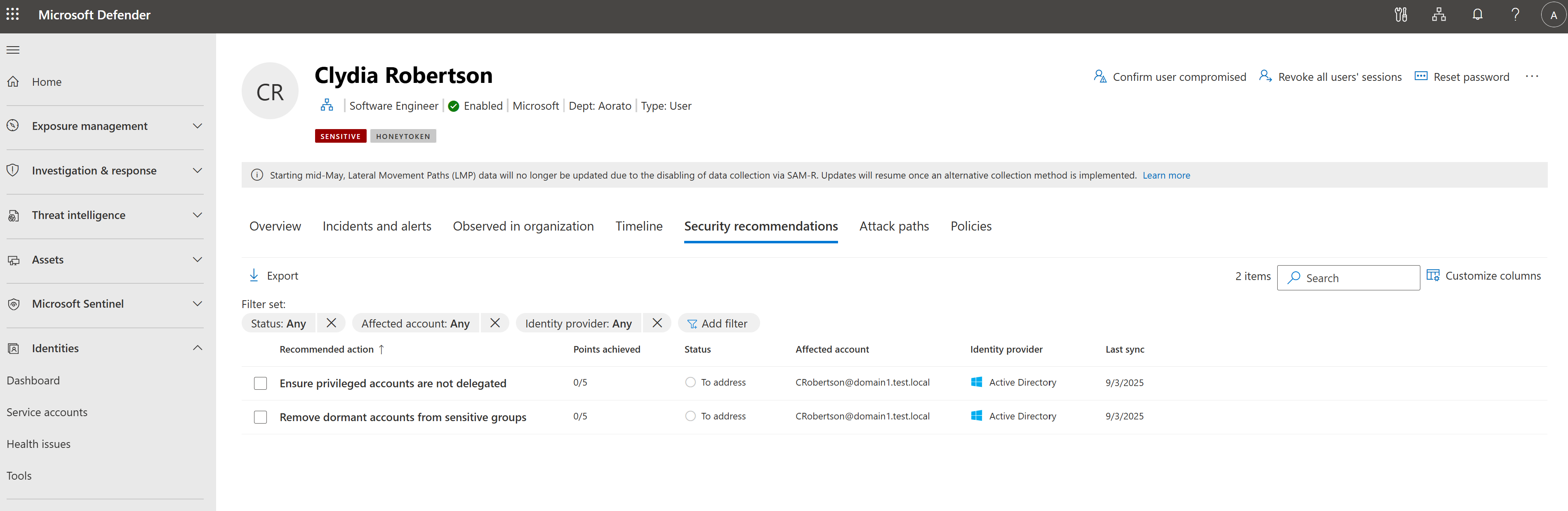
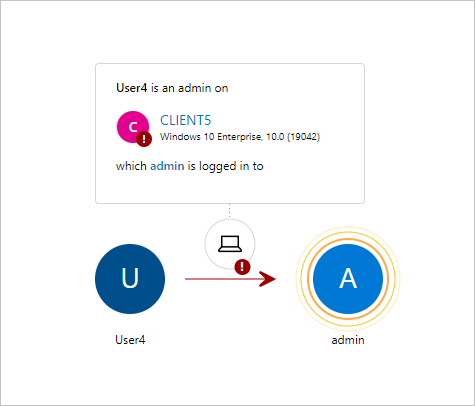
Beyond alerts MDI gives you three things an endpoint product does not. Lateral movement paths show how a non-sensitive account on a shared machine can reach a sensitive one through stored credentials, sessions and group membership; the current portal shows them on the identity page under Attack paths. Honeytoken tags turn a dormant decoy account into a tripwire: any sign-in from it raises an alert. Identity security posture assessments (ISPM) surface AD misconfigurations in Secure Score, in six categories: hybrid security, identity infrastructure, certificates, group policy, accounts and cloud identities.
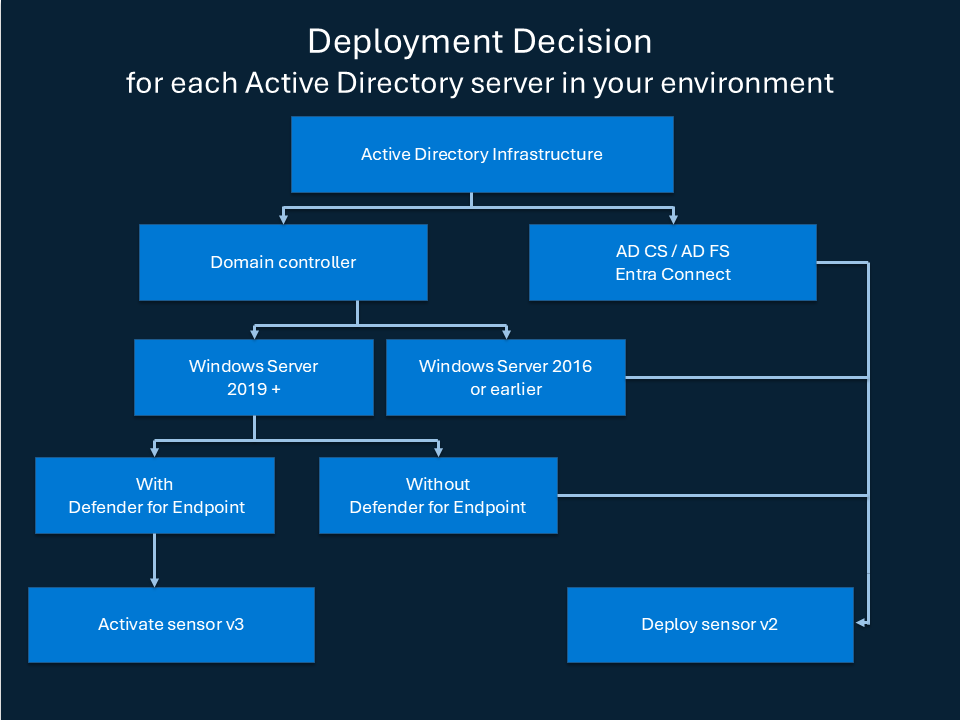
The confusion this article clears up: onboarding a domain controller to Defender for Endpoint (MDE) does not give you any of the above. MDE on a DC is still just MDE. Since the v3.x sensor, however, the MDI sensor is delivered as a component of the MDE agent and activated from the portal, so the two products now share one installer on Windows Server 2019 and later. The rest of this folder covers architecture and sensors, deployment, detections and response and troubleshooting. For how a DC gets its MDE licence see direct onboarding, and for where MDI sits in the suite see the XDR integrations map.
Licensing and prerequisites
MDI needs one of the following, identical on the v2.x and v3.x prerequisite pages:
- Enterprise Mobility + Security E5 (EMS E5/A5)
- Microsoft 365 E5 (E5/A5/G5)
- Microsoft 365 E5/A5/G5/F5 Security
- Microsoft 365 F5 Security + Compliance
- A standalone Defender for Identity licence
Both F5 options also require Microsoft 365 F1/F3 or Office 365 F3 plus EMS E3. Licences come through the Microsoft 365 portal or CSP. Automatic v3.x activation and automatic Windows auditing both require an active licence that includes MDI.
MDE on the same DC is licensed separately. The server onboarding page lists three options: Defender for Servers Plan 1 or Plan 2 through Defender for Cloud, the standalone Defender for Endpoint for servers licence, or Defender for Business servers for SMB. The v3.x standalone package is the exception: it activates the sensor on the Sense platform in restricted identity-only mode and does not license or deploy the full MDE experience.
Prerequisites by sensor:
| Classic sensor v2.x | Sensor v3.x via MDE | |
|---|---|---|
| OS | Windows Server 2016, 2019 (KB4487044 or later), 2022, 2025. Server Core supported, Nano not. 2012 and 2012 R2 still report but are out of support | Windows Server 2019 or later with the September 2026 cumulative update or later (sensor 3.0.10 and later): KB5122876 for 2019, KB5122882 for 2022, KB5122871 for 2025 |
| Agent | Own MSI, .NET Framework 4.7 installed if missing | Server onboarded to MDE (AV active or passive), or the v3.x standalone package |
| Resources | 2 cores and 6 GB RAM on top of the DC load, 6 to 10 GB disk | Capped at 30 percent CPU and 1.5 GB memory. Sizing tool not required |
| Service account | Directory Service account or gMSA with read on all monitored domains | LocalSystem for both AD reads and response actions. No DSA or gMSA |
| Network | Outbound 443 to *.atp.azure.com and the workspace sensor API URL. SSL inspection not supported | MDE streamlined or standard URL set |
| Roles | Security Administrator | Security Administrator, or Unified RBAC System settings (Read and manage) plus Security settings (All permissions) |
| Readiness | Test-MdiReadiness.ps1, also in the portal under Identities > Tools | Same script |
Both want High Performance power plan, clocks within five minutes, and all VM memory allocated (Dynamic Memory off, VMware memory reserved).
How it works
Three components
MDI has sensors, API connectors and a cloud analytics service. The sensor on a DC captures traffic to and from that DC: the technical FAQ names Kerberos, NTLM and DNS, plus Windows security events and ETW. It reads entity data over LDAP (389 and 3268, or 636 and 3269 by support request) and resolves IPs to names with NTLM over RPC, NetBIOS and RDP client hello. Encrypted RPC such as AtSvc and WMI is not decrypted but is still analysed. The cloud side builds behavioural profiles, correlates with MDE, Defender for Office 365 and Defender for Cloud Apps in Defender XDR, and triggers automated investigation and response.
What MDE on a DC gives, and what it does not
Onboard a DC to MDE and you get what the server onboarding page describes: Defender Antivirus (built in on 2016 and later), the EDR sensor as the sense service, attack surface reduction rules where the OS supports them, posture management, and the normal device page with process, file and network telemetry plus response actions. That protects the operating system.
Nothing on the MDE onboarding page mentions domain controllers, Active Directory or identity detections. The parsing of Kerberos, NTLM and DNS, the LDAP entity graph, lateral movement paths, honeytokens, the identity posture assessments and the reconnaissance, credential theft and domain dominance alert families are all documented only as MDI sensor functions. Learn also states that the Secure Score identity assessments need an MDI licence to be viewed. So an MDE-only DC is blind to a DCSync, a Kerberoast or an LDAP enumeration unless some other endpoint signal happens to fire.
The reverse is also true. MDI does not block malware, isolate a machine or give you a process tree. Its alerts correlate with MDE signals and hand off to automated investigation only if MDE is on the DC too. That is why the deployment flow now assumes MDE first and MDI activated on top.
Sensor v3.x, the MDI sensor via MDE
Since GA in October 2025 the MDI sensor ships as a component of the MDE agent. On an MDE-onboarded server the portal activates the identity capability; no package, no restart. Updates arrive through Windows Update. The sensor runs as LocalSystem and ignores gMSA. The 2026 timeline from the what's new page:
- March 2026: in-portal migration from v2.x to v3.x, up to 20 minutes, no downtime.
- April 2026: automatic Windows event auditing GA.
- May to August 2026: all identity roles on DCs, migration GA including Server 2025, RPC auditing automatic from 3.0.8, auto auditing for AD FS, AD CS and Entra Connect.
- September 2026: automatic activation on by default for new MDE customers (first device onboarded on or after 13 September 2026). Preview of activation without MDE and of non-DC role servers.
- October 2026: activation without MDE GA. After a 30-day banner, automatic activation and auditing default to on for existing customers unless you opt out.
What still needs the classic sensor, from the deployment overview and the v3.x limitations: Windows Server 2016 and earlier, VPN integration (RADIUS accounting), syslog notifications, and the standalone port-mirroring sensor. v3.x also has limitations with Azure ExpressRoute for Microsoft 365, and in-place migration is not yet available for AD FS, AD CS or Entra Connect servers that are not DCs. Learn says v2.x and v3.x can coexist in one workspace, and that the alert format (classic versus Defender-format) is independent of sensor version.
A note on the brief: the capabilities comparison page at deploy/capabilities-comparison returned an error at source check time and the what's new page carries no detection-by-detection table. TODO: re-check whether Microsoft publishes a per-detection gap list for v3.x; the only documented gaps are the ones listed above.
Three-way comparison
| MDE on a DC only | Classic MDI sensor v2.x | MDI sensor v3.x via MDE | |
|---|---|---|---|
| Installer | MDE onboarding script, GPO, ConfigMgr, Defender for Cloud extension | Separate MSI from the portal | Activated from the portal on an MDE-onboarded server, or v3.x standalone package |
| OS | Windows Server 2012 R2 and later | 2016 to 2025 | 2019 and later with the September 2026 CU |
| AV, EDR, ASR, isolation, device timeline | Yes | No | Only if MDE is fully onboarded (not with the identity-only package) |
| Kerberos, NTLM, DNS parsing and LDAP entity graph | No | Yes | Yes |
| Recon, credential access, lateral movement, domain dominance alerts | No | Yes | Yes |
| Lateral movement paths, honeytokens | No | Yes | Yes |
| ISPM recommendations in Secure Score | No (needs MDI licence) | Yes | Yes |
| VPN integration, syslog notifications | n/a | Yes | No |
| Port-mirroring standalone sensor | n/a | Yes | No |
| Service account | n/a | DSA or gMSA | LocalSystem |
| Updates | MDE and Windows Update | MDI sensor updater, optional 72 hour delay ring | Windows Update, no delay ring |
| Resource footprint | MDE baseline | 2 cores, 6 GB RAM extra | 30 percent CPU and 1.5 GB cap |
| Licence | Defender for Servers, MDE for servers, or Defender for Business servers | MDI licence | MDI licence plus an MDE server licence, or MDI only with the standalone package |
Configure
- Portal
- PowerShell
- Graph API
Settings for everything in this article live at https://security.microsoft.com/securitysettings/identities.
- Settings > Identities > General > Advanced features. Two toggles matter: Automatic sensor v3.x activation and Automatic Windows auditing configuration. The first activates the identity sensor on every eligible MDE-onboarded DC, AD FS, AD CS or Entra Connect server as it is discovered; it skips servers that already have a sensor. The second checks auditing every 24 hours and writes the missing settings to local policy. Both are off for older tenants until the October 2026 default kicks in, unless you opted out.
- Settings > Identities > On-premises > Sensor management. Every MDE-onboarded identity server shows here even without a sensor. The Onboarding status column tells you what to do: Onboarded, Activate sensor, Manually onboard, or Upgrade to the latest Windows Update.
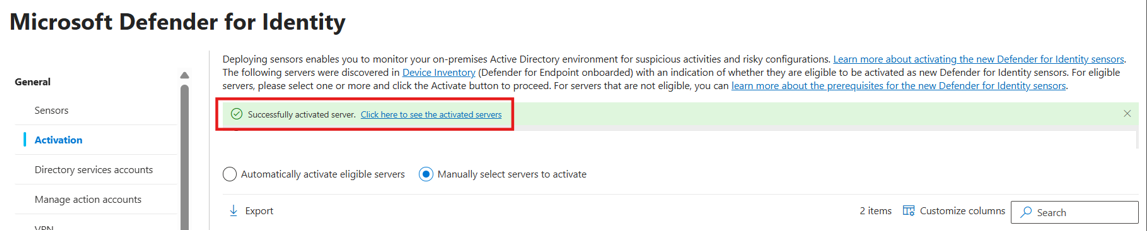
- Manual v3.x activation: select the server, Activate, confirm. A green banner appears; the link in it takes you back to the health view. First activation in a tenant can take up to an hour to show Running, later ones about five minutes.
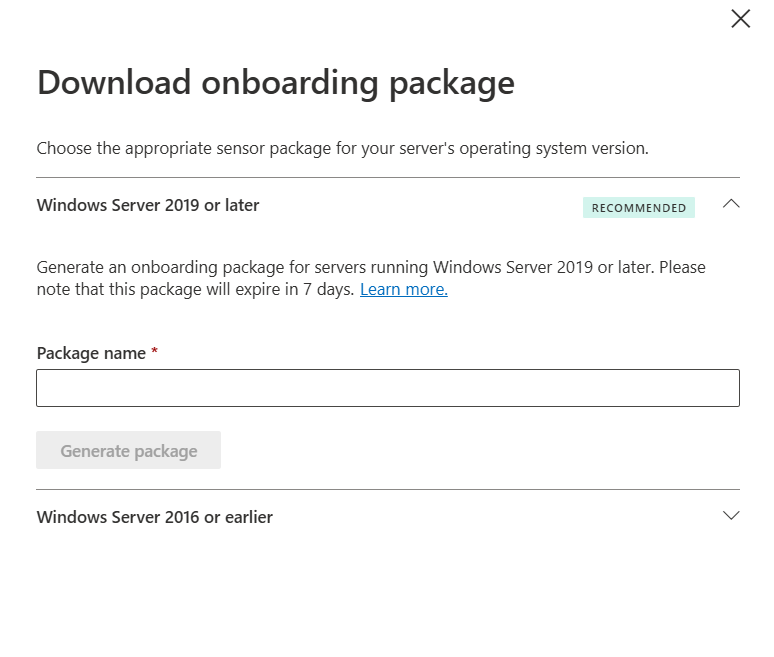
- Server not on MDE: Sensor management > Download onboarding package > expand Windows Server 2019 or later > name it > Generate package. Copy the access key once. Extract on the server keeping the
resourcesfolder, then runDefenderForIdentityV3StandaloneOnboardingScript.cmdfrom an elevated PowerShell and paste the key. Regenerating the key breaks any install still using the old one.
- Existing v2.x on a 2019 or later DC: Sensors tab, filter Migration state = Ready for migration, select, Migrate. Before that, Settings > Identities > Microsoft Defender for Identity > Manage action accounts > Automatically use the sensor's local system account. If gMSA stays selected, response actions and attack disruption do not work on v3.x.
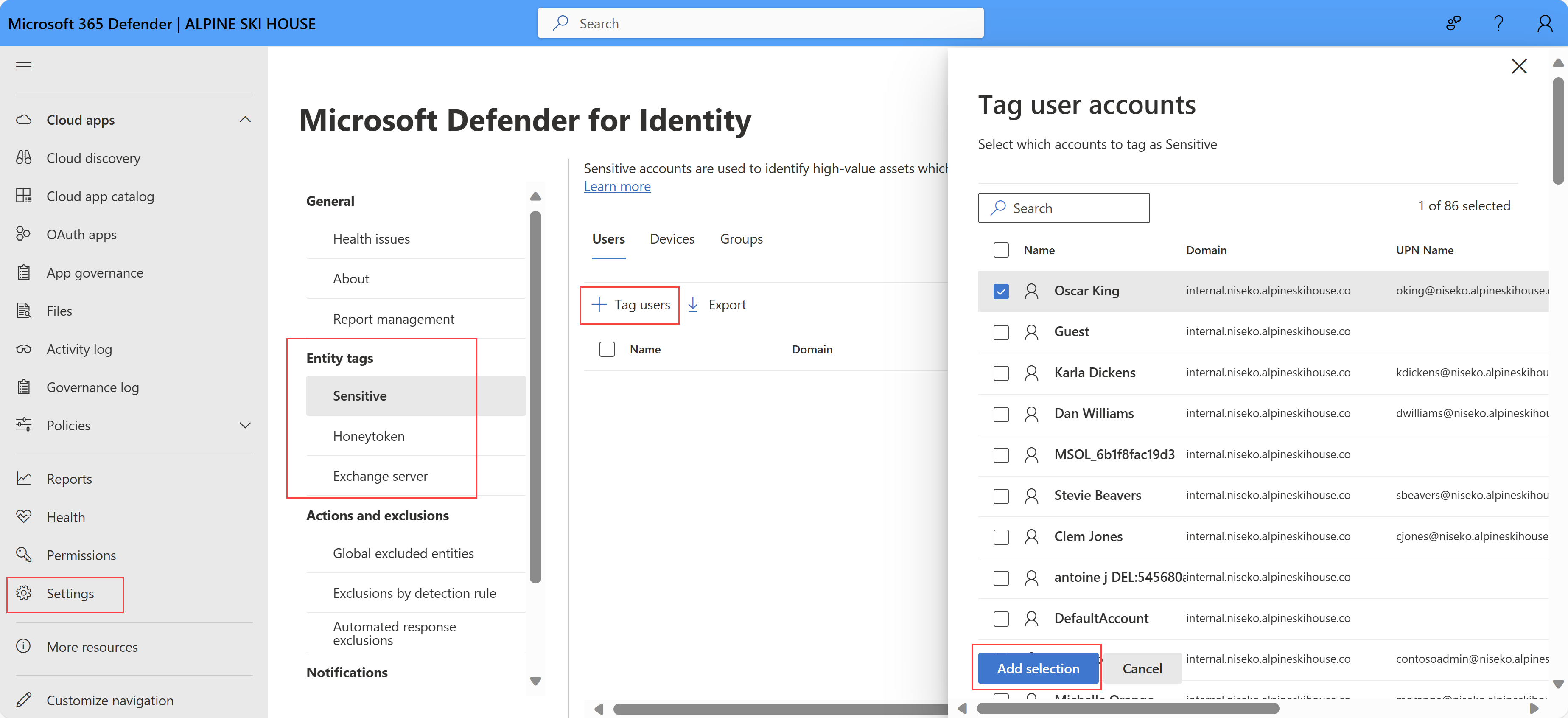
- Honeytokens: Settings > Identities > Honeytoken tab > Tag users or Tag devices, pick the dormant decoy accounts, Add selection. Sensitive and Exchange server tags are on the neighbouring tabs.
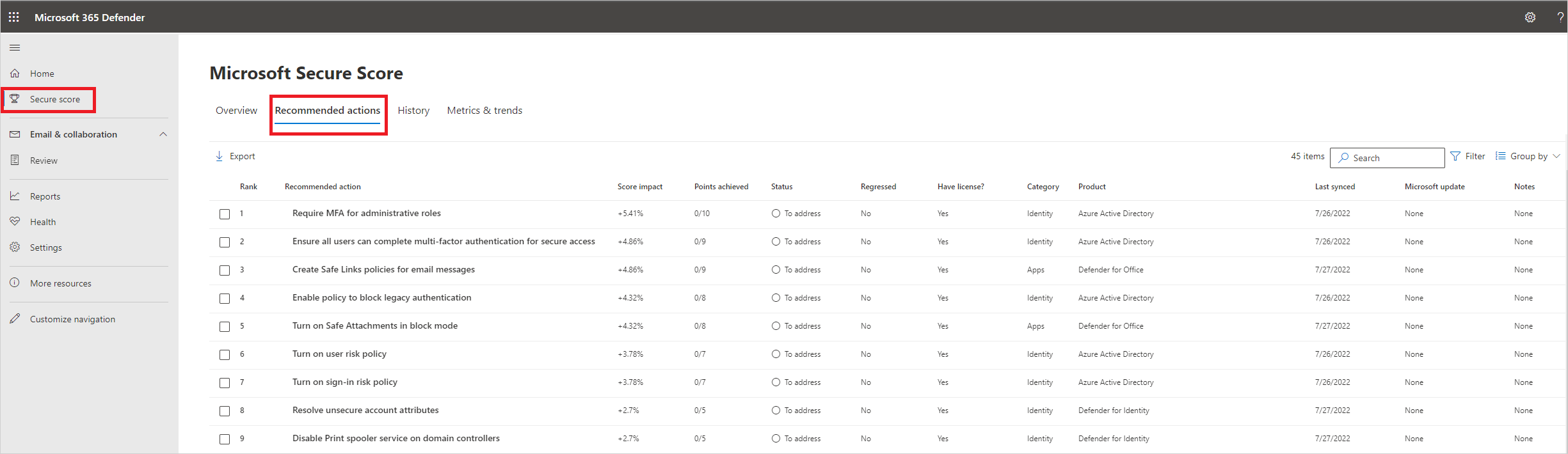
- ISPM: Secure Score > Recommended actions > filter category Identity. Scores refresh every 24 hours; the impacted entity list updates within minutes of a fix.
# Tested on: TODO

# --- MDE side: is this DC onboarded and is the Sense service up? (from the server onboarding page)
sc.exe query sense
sc.exe query Windefend
Get-ItemProperty 'HKLM:\SOFTWARE\Microsoft\Windows Advanced Threat Protection\Status' -ErrorAction SilentlyContinue |
  Select-Object OnboardingState, OrgId, SenseId

# --- MDI side: the DefenderForIdentity module from the PowerShell Gallery
# https://www.powershellgallery.com/packages/DefenderForIdentity/
Install-Module DefenderForIdentity -Scope CurrentUser   # standard Gallery install; Learn links the Gallery but shows no install line
Import-Module DefenderForIdentity

# Quick check of post-deployment auditing on this machine. Returns $true or $false.
Test-MDIConfiguration -Mode LocalMachine -Configuration NTLMAuditing
Test-MDIConfiguration -Mode LocalMachine -Configuration AdvancedAuditPolicyDCs

# Whole domain through GPOs, including SACLs. Run from a DC or an admin box with RSAT.
Test-MDIConfiguration -Mode Domain -Configuration All

# Fuller picture
Get-MDIConfiguration -Mode Domain -Configuration All
New-MDIConfigurationReport -Path 'C:\Reports' -Mode Domain -OpenHtmlReport

# Fix gaps the automatic auditing did not cover, or on v2.x sensors
Set-MDIConfiguration -Mode Domain -Configuration All

# Is the classic v2.x sensor present and running on this box?
Get-Service AATPSensor, AATPSensorUpdater -ErrorAction SilentlyContinue

# Readiness script Microsoft maintains on GitHub (also under Identities > Tools in the portal)
# https://github.com/microsoft/Microsoft-Defender-for-Identity/tree/main/Test-MdiReadiness
Learn documents no PowerShell for activating or migrating the v3.x sensor; that is portal only. The standalone package runs DefenderForIdentityV3StandaloneOnboardingScript.cmd.
MDI has no Graph configuration surface. Alerts come through the unified security alerts API. Needs SecurityAlert.Read.All (delegated plus a role such as Security Reader, or application).
GET https://graph.microsoft.com/v1.0/security/alerts_v2?$filter=serviceSource eq 'microsoftDefenderForIdentity'&$top=50&$orderby=createdDateTime desc
Narrow by time and severity ($filter supports createdDateTime, severity, status, serviceSource, classification, determination, assignedTo, lastUpdateDateTime):
GET https://graph.microsoft.com/v1.0/security/alerts_v2?$filter=serviceSource eq 'microsoftDefenderForIdentity' and severity eq 'high' and createdDateTime ge 2026-10-01T00:00:00Z
Trimmed example of what comes back:
{
  "value": [
    {
      "id": "da...",
      "title": "DCSync attack (replication of directory services)",
      "severity": "high",
      "serviceSource": "microsoftDefenderForIdentity",
      "detectionSource": "microsoftDefenderForIdentity",
      "mitreTechniques": ["T1003.006"],
      "evidence": []
    }
  ]
}
Page with @odata.nextLink. The serviceSource enum also carries microsoftDefenderForEndpoint, which lets you pull both sides of a DC incident in two calls.
Verify
- Sensor management tab: the DC shows Type = Domain controller sensor, Service status = Running, Health status = Healthy. Version column shows the installed build; Migration state = Up to date means v3.x. Delayed update column is populated only for v2.x.
sc.exe query senseRUNNING on the DC proves the MDE side. For v2.x,AATPSensorandAATPSensorUpdaterservices exist and run.Test-MDIConfiguration -Mode Domain -Configuration Allreturns$true.- The DC's identity entities appear in Assets > Identities and the user page has the Attack paths and Security recommendations tabs populated.
- Honeytoken test: sign in once with a tagged decoy account and expect an alert.
- Lateral movement paths need SAM-R calls from the sensor to clients and servers. Learn's current SAM-R page and the LMP overview page both redirected to the MDI landing page at source check time. TODO: confirm the remote SAM policy name and the LocalSystem variant for v3.x on the live page.
// Is MDI actually producing identity telemetry for each DC?
IdentityLogonEvents
| where Timestamp > ago(1d)
| summarize Events = count(), LastSeen = max(Timestamp) by DestinationDeviceName
| order by Events desc
// DCs known to MDE: cross-check against the Sensor management tab
DeviceInfo
| where Timestamp > ago(7d)
| where OSPlatform startswith "WindowsServer"
| summarize arg_max(Timestamp, *) by DeviceId
| extend IsDC = tostring(AdditionalFields.DeviceRole)
| project DeviceName, OSPlatform, OnboardingStatus, IsDC
TODO: confirm in the dev tenant that AdditionalFields.DeviceRole exists on DeviceInfo; Learn does not document that field.
Troubleshoot
| Symptom | Likely cause | Fix |
|---|---|---|
| DC is in MDE device inventory but not on the Sensor management tab | Not recognised as an identity-role server, or discovery not run yet | Confirm it is a DC, AD FS, AD CS or Entra Connect server; allow time; check onboarding with the MDE Client Analyzer |
| DC on Sensor management with status Upgrade to the latest Windows Update | Missing the September 2026 CU for v3.x | Install KB5122876, KB5122882 or KB5122871 for the matching OS, or deploy v2.x on 2016 |
| Status Manually onboard on a 2019 or later server | Server not onboarded to MDE | Onboard to MDE and activate, or use the v3.x standalone package |
| Activated but still not Running after an hour | First activation in the tenant, or MDE connectivity | Wait the documented hour; verify MDE URLs; run the Client Analyzer |
| Not ready for migration | Hover the tooltip: MDE not onboarded, OS, Sense outdated or stopped, not a DC, Device ID empty, v2.x disconnected, AATPSensorUpdater stopped | Fix the named item; migration is DC-only today |
| Migration failed | Sense sensor unhealthy | Client Analyzer; if healthy, open a support case |
| Directory services user credentials are incorrect health alert after migration | Workspace still validates DSA or gMSA while v3.x ignores it | Remove the DSA or gMSA from the workspace once every sensor is v3.x |
| Response actions or attack disruption do nothing | Action account still set to gMSA | Manage action accounts > use the sensor's local system account |
| Sensor v3.x RPC audit misconfigured health alert | Pre 3.0.8 build without the RPC audit tag, or CU missing | Upgrade; from 3.0.8 RPC auditing is automatic |
| v2.x sensor stopped on Server 2019 | ntdsai.dll older than 10.0.17763.316 | Install KB4487044 or later |
| No VPN or syslog data after moving to v3.x | Not supported on v3.x | Keep v2.x on the DCs that need them |
| MDE offboarded, identity alerts stopped | v3.x rides on Sense; offboarding stops it and does not fall back to identity-only | Re-onboard, or offboard cleanly and use the standalone package |
| Identity assessments missing from Secure Score | No MDI licence, or no sensor on the AD CS or Entra Connect server for those categories | License, then put a sensor on the role server |
| Honeytoken alert never fires | Account not tagged, or account is in use | Tag under Settings > Identities > Honeytoken; use a truly dormant account |
Gotchas and limits
- MDE on a DC is not MDI. Device page, timeline and isolation, yes. Kerberoast, DCSync, enumeration, LMPs, posture, no. If a client says "our DCs are in Defender", ask which tab.
- The v3.x standalone package is identity-only. It uses the Sense platform and needs MDE service URLs open but does not license MDE and gives no AV or EDR. Moving to full MDE later means offboard, re-onboard, re-activate.
- Offboarding a DC from MDE kills the v3.x sensor, including migrated ones. Plan DC offboarding as an MDI change.
- Defaults are changing under you. New MDE customers since 13 September 2026 get automatic activation and auditing on by default. Existing tenants got a 30-day banner in October 2026 and then the same. If you run v2.x on purpose, or do not want the sensor writing local audit policy on DCs, opt out in the banner.
- Automatic auditing writes to local policy once every 24 hours. A GPO that sets the same values the other way will fight it. On AD CS it edits an existing CA audit filter but will not create one, and
certsvcmust restart. - v3.x ignores gMSA. One v3.x sensor in the workspace means every sensor must use the local system action account setting, and the DSA or gMSA health alert stays until you remove the account from the workspace. Removing it there does not delete the gMSA from AD.
- v3.x updates with Windows Update. No delayed ring. Your DC patch cadence is now your MDI sensor cadence.
- No in-place migration yet for non-DC AD FS, AD CS and Entra Connect servers, and v3.x on those roles still needs at least one v3.x sensor on a DC.
- Port-mirroring standalone sensors, VPN RADIUS integration and syslog forwarding stay on v2.x.
- Overpass-the-hash detection does not work when Kerberos Armoring (FAST) is on. v2.x needs SSL inspection off for the sensor URL.
- LMPs are kept 48 hours per discovery in the classic documentation. The current LMP and SAM-R Learn pages redirected at source check time, so treat the retention figure as TODO until re-sourced.
Further reading
- Microsoft Defender for Identity Sensor v3.x Reduces Complexity, Boosts Threat Detection, Rabia Noureen, Petri, October 2025. Framing of the GA announcement and what "unified sensor" meant on day one, before the 2026 migration and auto-activation features landed.
- Automatic migration from Defender for Identity Sensor v2 to v3.x and gMSA changes, Jeffrey Appel, March 2026. Field walkthrough of the in-portal migration with the gMSA to LocalSystem trap and post-migration cleanup Learn spreads across four pages.
- Defender for Identity: the sensor you've been avoiding just got easy, CIAOPS, June 2026. SMB-angle activation plus honeytoken setup and the tuning period before you trust the alerts.
- Defender for Identity Sensor v3 Upgrade: Proceed with Caution, Wes Miller, Directions on Microsoft, September 2026. The counter-argument: why the v3.x gaps still justify keeping v2.x in some estates.
My notes
TODO: Sohail's notes after verification.
Changelog
| Date | Change | Source |
|---|---|---|
| 2026-10-22 | Drafted from Learn, with Learn images and diagrams | [1] |