Troubleshooting sensors, health issues and missing detections
What it is
Defender for Identity fails in four places: the sensor will not install, it installs but will not run or talk to the cloud, it runs but the DC is not producing the Windows events the detections need, or everything is green and a known-bad action still raised nothing. This article is the workflow for all four, in that order. Where Learn gives a log line or error code it is quoted so you can grep for it. Where Learn is silent, the article says so.
Most of the install and service material applies to the v2.x sensor, the classic package with its own services, Npcap and a Directory Service Account. The v3.x unified sensor runs inside the Defender for Endpoint agent as LocalSystem with no DSA, no Npcap and no sizing tool, so whole classes of failure disappear with it. The auditing material applies to both. See architecture and sensors for sensor types, deployment for the install, detections and response for the alerts, and the overview for where MDI sits.
Licensing and prerequisites
- An active Defender for Identity licence. Automatic Windows auditing configuration needs the licence, sensor v3.x and Windows Server 2019 or later onboarded to Defender for Endpoint.
- Roles: Security viewer sees Health issues and thresholds. Close or suppress needs the Azure ATP workspace Administrator role. Thresholds and exclusions need Security administrator.
- v2.x sensor: .NET Framework 4.7 or later, Npcap 1.0 or later with the MDI settings, outbound TCP 443 to
<workspace>sensorapi.atp.azure.comwith no TLS inspection, DigiCert roots in the machine store. - The DefenderForIdentity module on Windows PowerShell 5.1 or PowerShell 7.4 or later; on 7.4 import GroupPolicy with
-SkipEditionCheck. Domain mode defaults to the PDC emulator andSet-needs rights to create and link GPOs. - A DSA (v2.x only) with Read on all objects plus List Contents and Read Property on Deleted Objects. The sensor service runs as LocalSystem regardless.
How it works
The workflow runs top down. Each stage has one question, one place to look and one cmdlet or log that answers it. Do not chase "why no alert" while a sensor shows Start failed.
Stage 1, install
Deployment logs land in the installing user's temp folder for an interactive install, typically %USERPROFILE%\AppData\Local\Temp, and in C:\Windows\Temp or C:\Windows\SystemTemp for a service-based install. Three files matter: Deployer_YYYYMMDDHHMMSS.log for the whole process, Sensor_YYYYMMDDHHMMSS.log for steps, _001_MsiPackage.log for the MSI. Learn names four install failures by signature: 0x80070643 is network to *.atp.azure.com; NTE_BAD_ALGID is a certificate management client blocking the self-signed sensor certificate; System.UnauthorizedAccessException on Server 2019 with KB5009557 needs the installer run as SYSTEM; Unexpected token '"/quiet"' is PowerShell parsing. Running the installer from inside the ZIP also fails.
Stage 2, service
Once installed, the sensor writes to C:\Program Files\Azure Advanced Threat Protection Sensor\<version>\Logs. Start with Microsoft.Tri.Sensor-Errors.log, note timestamps, then open Microsoft.Tri.Sensor.log at the same time for the sequence. The updater has its own pair, Microsoft.Tri.Sensor.Updater.log and Microsoft.Tri.Sensor.Updater-Errors.log. Files roll at 50 MB to -Archived-00000 and prune past ten archives, so on a busy DC the window is short.
The startup sequence explains the failure modes: gMSA password (v2.x), LDAP bind, then mutually authenticated TLS to the sensor API. Each hop has its own log line.
Learn's known issues give the line to search for in each case. CreateLdapConnectionAsync failed to retrieve group managed service account password means the DC is not in PrincipalsAllowedToRetrieveManagedPassword, or its Kerberos ticket predates the group membership (klist -li 0x3e7 purge or reboot), or Secure Time Seeding pushed PasswordLastSet into the future (new gMSA). GMSA password could not be retrieved [errorCode=AccessDenied] is the same family plus a "Log on as a service" policy that omits the gMSA. UnauthorizedAccessException on key Global means Performance Log Users. Stuck in Starting with performance data errors for .NETFramework, Lsa and WmiApRpl means NT Service\All Services lacks Log on as a service. ApplyInternal failed two way SSL connection to service is strong crypto not forced for .NET, or TLS inspection. LicenseInvalid is a proxy answering 401 or 403 instead of 407. "Failed to connect to service" is a missing DigiCert root. The table in Troubleshoot has the fix for each.
Stage 3, health issues
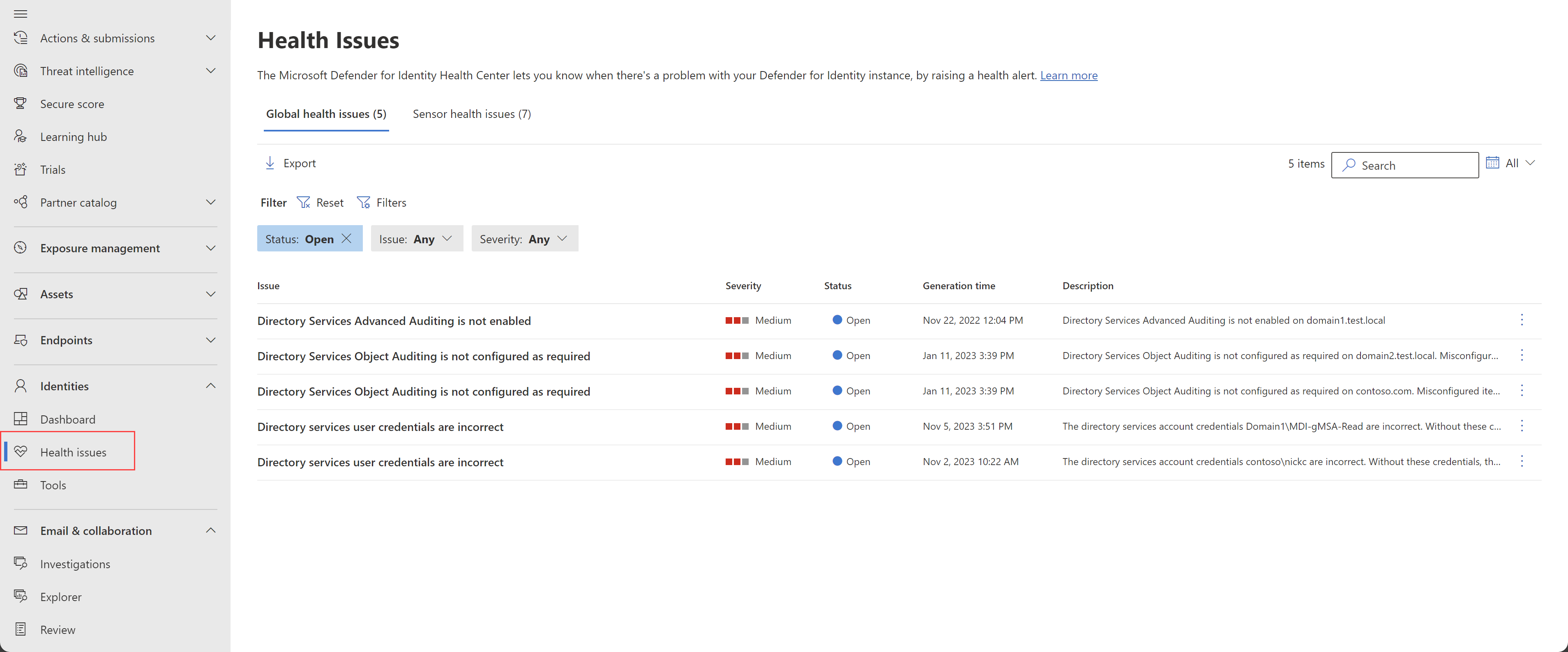
Settings > Identities > Health issues has two tabs. Global issues are domain-wide: DSA credentials, password expiry, object, Configuration container and ADFS container auditing. Sensor issues are per server: Npcap, capture adapters, resource limits, service failed to start, NTLM and advanced auditing, AD CS auditing. The Troubleshoot table collapses the documented fixes.
Auditing issues are checked once a day per sensor or domain, so a fix takes up to 24 hours to clear. The three "not being analyzed" issues and "reached a memory resource limit" mean the sensor dropped input or restarted itself, so detections on that DC have gaps for that window. Those are capacity problems; the fix is the sizing table, not a service restart.
Stage 4, events and detections
If the DC is not auditing, the detection that depends on the event cannot fire and no health issue tells you which detection you lost. Learn documents which audit subcategory produces which event, and warns that auditing only user objects gives incomplete coverage, but it does not publish a per-event-to-per-detection map. The table below is the documented subcategory map.
| Event ID | Windows meaning | Subcategory or setting | Note |
|---|---|---|---|
| 4662 | Operation on a directory object | DS Access > Directory Service Access | Only fires with a SACL on the domain root for user, group, computer, gMSA, MSA and dMSA descendants |
| 4726 | User account deleted | Account Management > User Account Management | Deleted Objects read on the DSA is the other half |
| 4728, 4729, 4730 | Global security group member added, removed, group deleted | Account Management > Security Group Management | Success and Failure |
| 4732, 4733 | Local security group member added, removed | Security Group Management | Success and Failure |
| 4756, 4757, 4758 | Universal security group member added, removed, group deleted | Security Group Management | Success and Failure |
| 4741, 4743 | Computer account added, deleted | Computer Account Management | Failure not supported by the subcategory |
| 4753, 4763 | Distribution group deleted | Distribution Group Management | Failure not supported |
| 4776 | DC validated credentials, NTLM | Account Logon > Credential Validation | Success and Failure |
| 5136 | Directory object modified | DS Access > Directory Service Changes | Failure not supported |
| 4697 | Service installed, security system extension | System > Security System Extension | In the audit table, not in the required events list |
| 7045 | New service installed | None, System log | Listed under other required events |
| 8004 | NTLM authentication with target server | Three Restrict NTLM security options | Checked daily, raises its own health issue |
| 1202, 1203, 4624, 4625 | AD FS credential validation and logon | Audit Application Generated plus AD FS event auditing and verbose level | AD FS servers only |
| 4870 to 4896 | CA revoked, issued, denied, settings changed, rows deleted | Audit Certification Services plus CA\AuditFilter 127 | AD CS servers only |
| 4624 | Logon | Logon/Logoff > Audit Logon | Entra Connect servers only |
Event 1644 is no longer required; remove the NTDS registry values if an older guide set them.
When auditing is right and the sensor is green, three things still stop an alert. First, learning periods. The classic alerts reference lists eight alerts that learn before they fire: DNS network-mapping reconnaissance eight days, SAMR reconnaissance four weeks per DC, Golden Ticket encryption downgrade five days, suspicious additions to sensitive groups four weeks per DC, LDAP security principal reconnaissance 15 days per computer, brute force one week, over-pass-the-hash one month, suspicious VPN connection 30 days. Medium or Low on the Adjust alert thresholds page, or Recommended test mode, makes them fire immediately. Second, exclusions: global, per rule, or a Defender XDR alert tuning rule. Exclusions do not carry over when a detection moves to the XDR engine, so suppressions vanish and tuning rules hide. Third, coverage: a DC with no sensor, a standalone sensor without mirroring or forwarding, or a sensor that dropped traffic during a resource issue. Standalone sensors also collect no ETW, which costs several detections outright.
Configure
- Portal
- PowerShell
- Graph API
Health issues:
- Defender portal > Settings > Identities > Health issues. Work the Global tab first; a bad DSA or missing object auditing affects every sensor.
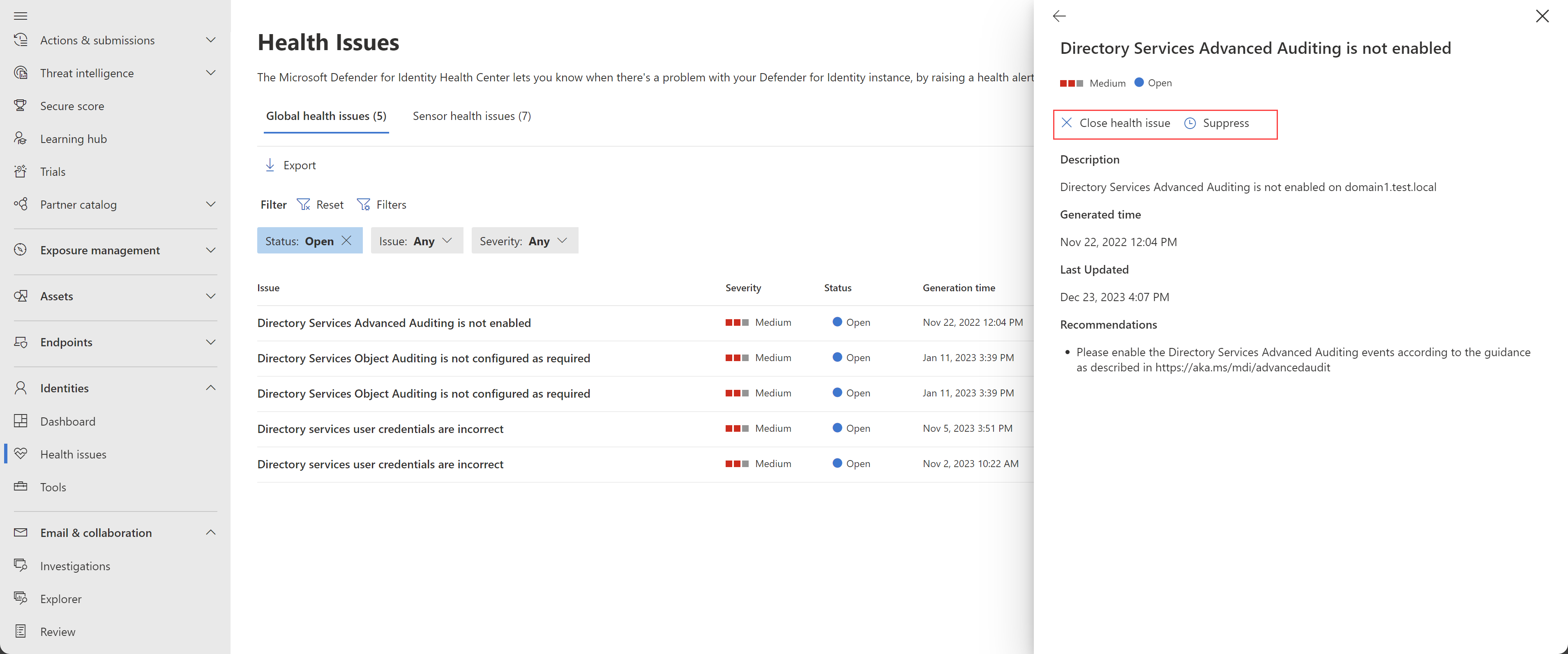
- Select an issue for the details pane. Close it once fixed rather than wait for the daily check; Suppress for seven days when the cause is planned, such as a DC down for maintenance.
- Settings > Identities > Notifications > Health issues notifications for email recipients. Syslog notifications sends the same through one designated v2.x sensor, TCP or UDP, RFC 3164 or 5424, with a test button.
Sensor page:
- Settings > Identities > Sensors. Sensor status values: Start failed is no configuration pulled for 30 minutes, Disconnected is no communication for 10 minutes, Outdated is three or more versions behind, Unreachable is a DC deleted from AD without uninstall and safe to delete. Health colour is the highest open issue.
- Select a row for the details pane. Delayed update, v2.x only, is the 72-hour ring; v3.x updates through Windows Update.
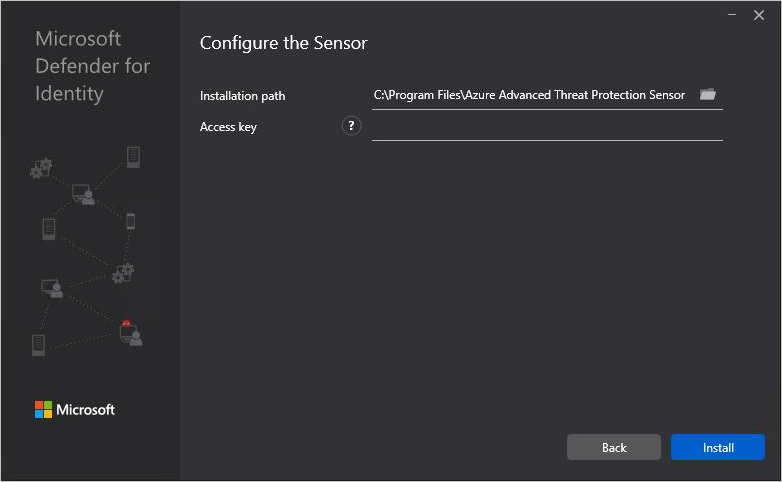
- For a v2.x reinstall, Download onboarding package > Windows Server 2016 or earlier, copy the access key. It is used once at registration; Regenerate key does not affect installed sensors.
Auditing, v3.x: Settings > Identities > General > Advanced features > Automatic Windows auditing configuration. The sensor then sets audit policy, NTLM auditing, domain object and Configuration container SACLs, AD FS and Entra Connect auditing every 24 hours. It modifies an existing CA audit filter but will not create one, and GPO settings can conflict with it. It is also Learn's fix for v3.x auditing issues that persist after a correct manual configuration.
Auditing, manual: a DC-only GPO, Advanced Audit Policy Configuration, Success and Failure on Credential Validation, Computer, Distribution Group, Security Group and User Account Management, Directory Service Changes, Directory Service Access and Security System Extension.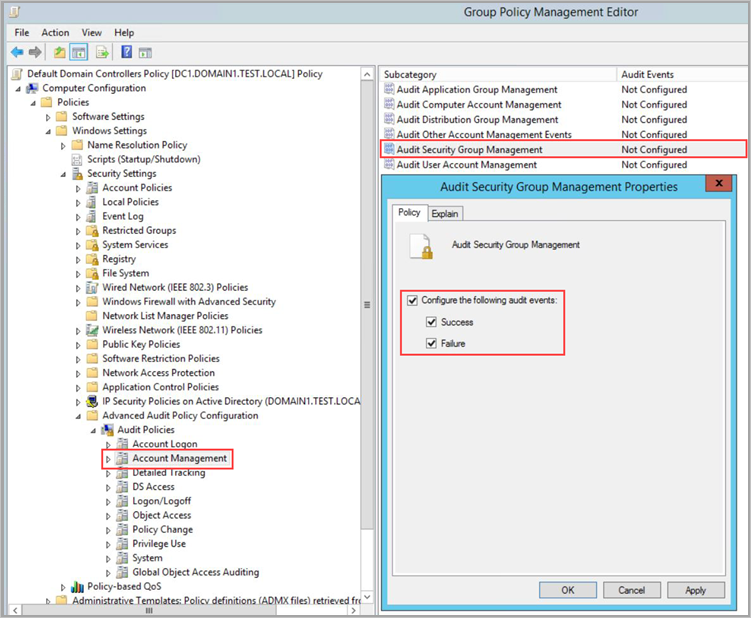
NTLM: same GPO, Local Policies > Security Options, Restrict NTLM: Outgoing NTLM traffic to remote servers set to Audit all, Audit NTLM authentication in this domain set to Enable all, Audit Incoming NTLM Traffic set to Enable auditing for all accounts.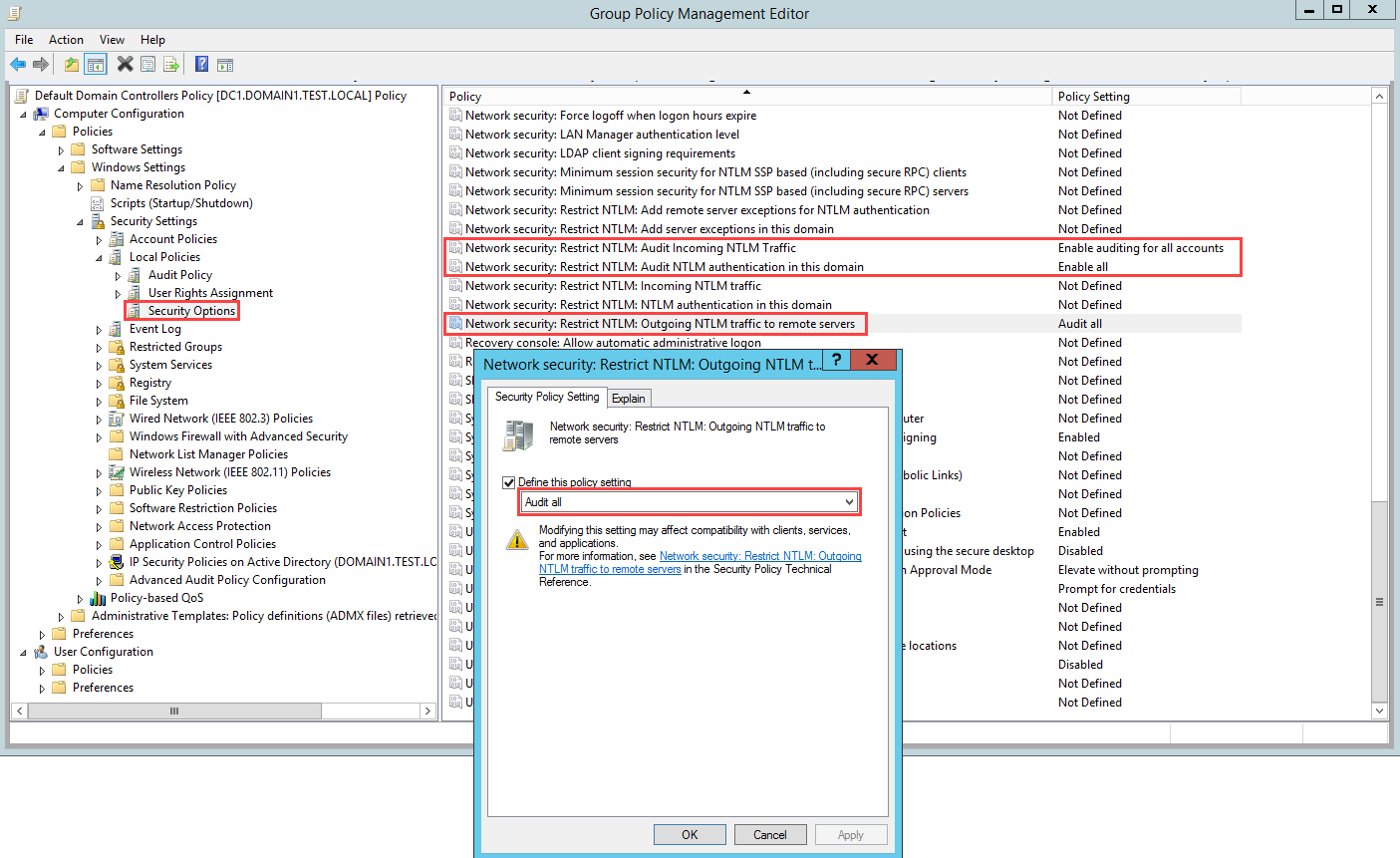
Object auditing: ADUC, domain Properties > Security > Advanced > Auditing, Everyone, Success, one entry each for descendant User, Group, Computer, gMSA, MSA and, with a Server 2025 DC, dMSA objects. Clear all, tick Full Control, clear List contents, Read all properties and Read permissions. Configuration container: ADSI Edit, CN=Configuration, Everyone, All, Write all properties, once per forest, only where Exchange is or was.
Learning period and exclusions: Settings > Identities > Adjust alert thresholds, and Excluded entities; Defender portal alert tuning for anything recent.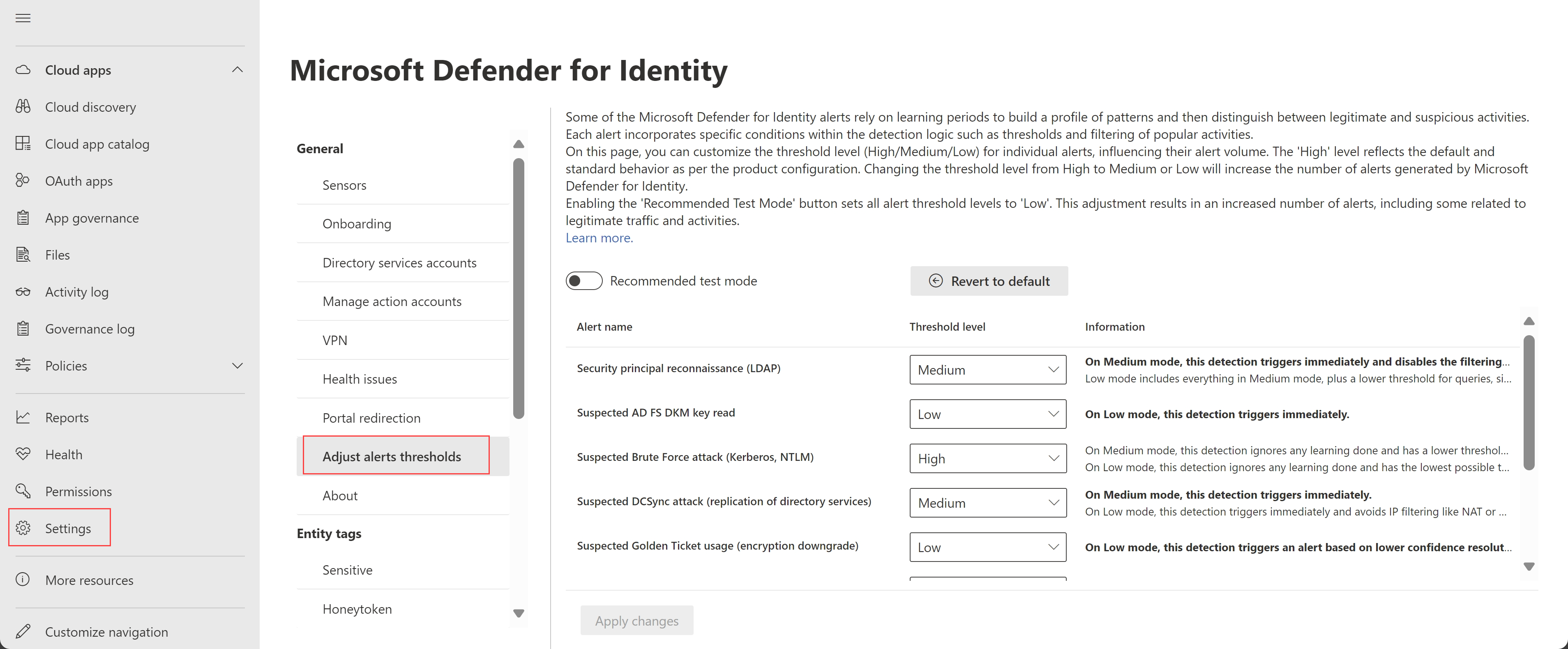
# Tested on: TODO
Install-Module -Name DefenderForIdentity
Import-Module -Name GroupPolicy -SkipEditionCheck   # PowerShell 7.4+ only

# 1. Connectivity from the sensor server, using what is configured now
Test-MDISensorApiConnection

# 1b. Or test a planned config before install, through a proxy
$cred = Get-Credential
Test-MDISensorApiConnection -BypassConfiguration `
  -SensorApiUrl 'https://contososensorapi.atp.azure.com' `
  -SensorType Classic -ProxyUrl 'http://proxy.contoso.com:8080' -ProxyCredential $cred

# 1c. Proxy as the sensor sees it
Get-MDISensorProxyConfiguration
Set-MDISensorProxyConfiguration -ProxyUrl 'http://proxy.contoso.com:8080'
Clear-MDISensorProxyConfiguration

# 2. Auditing, as a boolean per area or in one go. Domain mode reads GPOs, LocalMachine reads this DC.
Test-MDIConfiguration -Mode Domain -Configuration All
Test-MDIConfiguration -Mode LocalMachine -Configuration NTLMAuditing, AdvancedAuditPolicyDCs
# Values: AdfsAuditing AdRecycleBin AdvancedAuditPolicyCAs AdvancedAuditPolicyDCs CAAuditing
#         ConfigurationContainerAuditing EntraConnectAuditing RemoteSAM DomainObjectAuditing
#         NTLMAuditing ProcessorPerformance All

# 2b. Full HTML plus JSON report, then fix what it flags
New-MDIConfigurationReport -Path C:\Reports -Mode Domain -Identity 'CONTOSO\mdiSvc01' -OpenHtmlReport
Get-MDIConfiguration -Mode Domain -Configuration All
Set-MDIConfiguration -Mode Domain -Configuration All      # creates and links GPOs; -CreateGpoDisabled or -SkipGpoLink to stage

# 2c. Raw check without the module
auditpol.exe /get /category:*
auditpol.exe /get /subcategory:"Directory Service Access","Credential Validation","Security Group Management"

# 3. DSA (v2.x). Over-privileged DSA is a finding, missing Deleted Objects read is a gap.
Test-MDIDSA -Identity 'mdiSvc01' -Detailed
Get-ADServiceAccount mdiSvc01 -Properties PrincipalsAllowedToRetrieveManagedPassword, PasswordLastSet, LastLogonDate
Set-ADServiceAccount mdiSvc01 -PrincipalsAllowedToRetrieveManagedPassword (Get-ADGroup 'Domain Controllers')
klist -li 0x3e7 purge     # stale Kerberos ticket on the DC after a group change

# 4. Logs
$root = 'C:\Program Files\Azure Advanced Threat Protection Sensor'
$logs = Get-ChildItem $root -Directory | Sort-Object Name -Descending | Select-Object -First 1 | ForEach-Object { Join-Path $_.FullName 'Logs' }
Get-Content (Join-Path $logs 'Microsoft.Tri.Sensor-Errors.log') -Tail 50
Select-String -Path (Join-Path $logs 'Microsoft.Tri.Sensor.log') -Pattern 'LicenseInvalid','two way SSL','CreateLdapConnectionAsync','EventLogException','HttpRequestException'
Get-ChildItem "$env:LOCALAPPDATA\Temp", 'C:\Windows\Temp', 'C:\Windows\SystemTemp' -Filter 'Azure Advanced Threat Protection*' -ErrorAction SilentlyContinue

# 5. Known-issue checks
Get-Service AATPSensor, AATPSensorUpdater
wevtutil gl security                                     # DACL must include the AATPSensor service SID
Get-NetAdapterAdvancedProperty | Where-Object DisplayName -Match '^Large|Receive Segment'   # VMware, no-traffic
Get-ItemProperty 'HKLM:\SOFTWARE\Microsoft\.NETFramework\v4.0.30319' | Select-Object SchUseStrongCrypto, SystemDefaultTlsVersions
Get-ChildItem Cert:\LocalMachine\Root | Where-Object Subject -Match 'DigiCert Global Root'

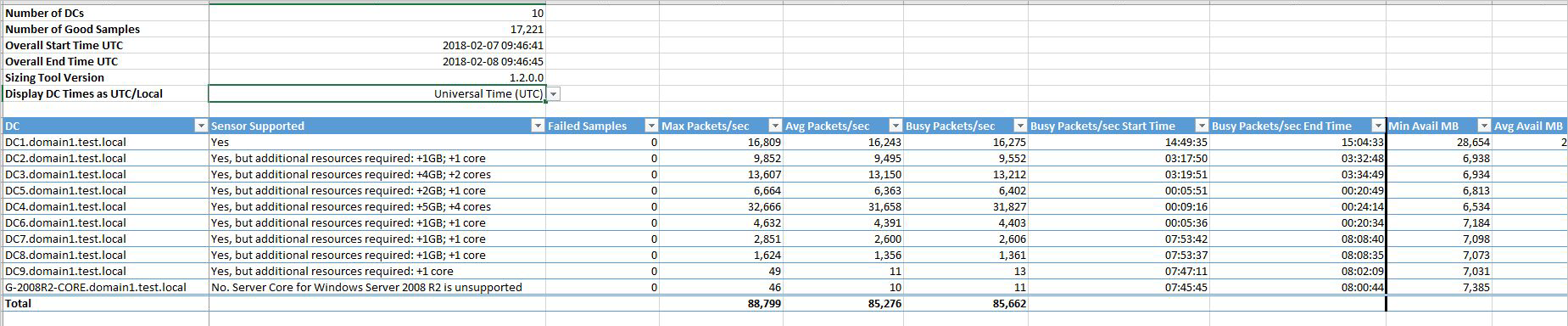
# 6. Sizing (v2.x, run before any sensor is installed): https://aka.ms/mdi/sizingtool
#    TriSizingTool.exe -> Azure ATP Summary sheet -> Sensor Supported column
Sizing table from Learn, sensor consumption only, physical cores without hyper-threading:
| Busy packets per second | CPU cores | RAM GB |
|---|---|---|
| 0 to 1k | 0.25 | 2.5 |
| 1k to 5k | 0.75 | 6 |
| 5k to 10k | 1 | 6.5 |
| 10k to 20k | 2 | 9 |
| 20k to 50k | 3.5 | 9.5 |
| 50k to 75k | 5.5 | 11.5 |
| 75k to 100k | 7.5 | 13.5 |
Health issues are portal, email and syslog only. Learn mentions an API for toggling Open and Suppressed but documents no endpoint, and there is no Graph resource for MDI health issues. TODO: confirm whether the legacy workspace API still exposes health issue status.
Alerts and incidents come through the Graph security API. Filter on serviceSource value microsoftDefenderForIdentity.
GET https://graph.microsoft.com/v1.0/security/alerts_v2?$filter=serviceSource eq 'microsoftDefenderForIdentity'&$top=50
GET https://graph.microsoft.com/v1.0/security/alerts_v2/{alertId}
GET https://graph.microsoft.com/v1.0/security/incidents?$filter=alerts/any(a:a/serviceSource eq 'microsoftDefenderForIdentity')
Permissions: SecurityAlert.Read.All and SecurityIncident.Read.All. Use this to script the known-bad action, no alert check.
Verify
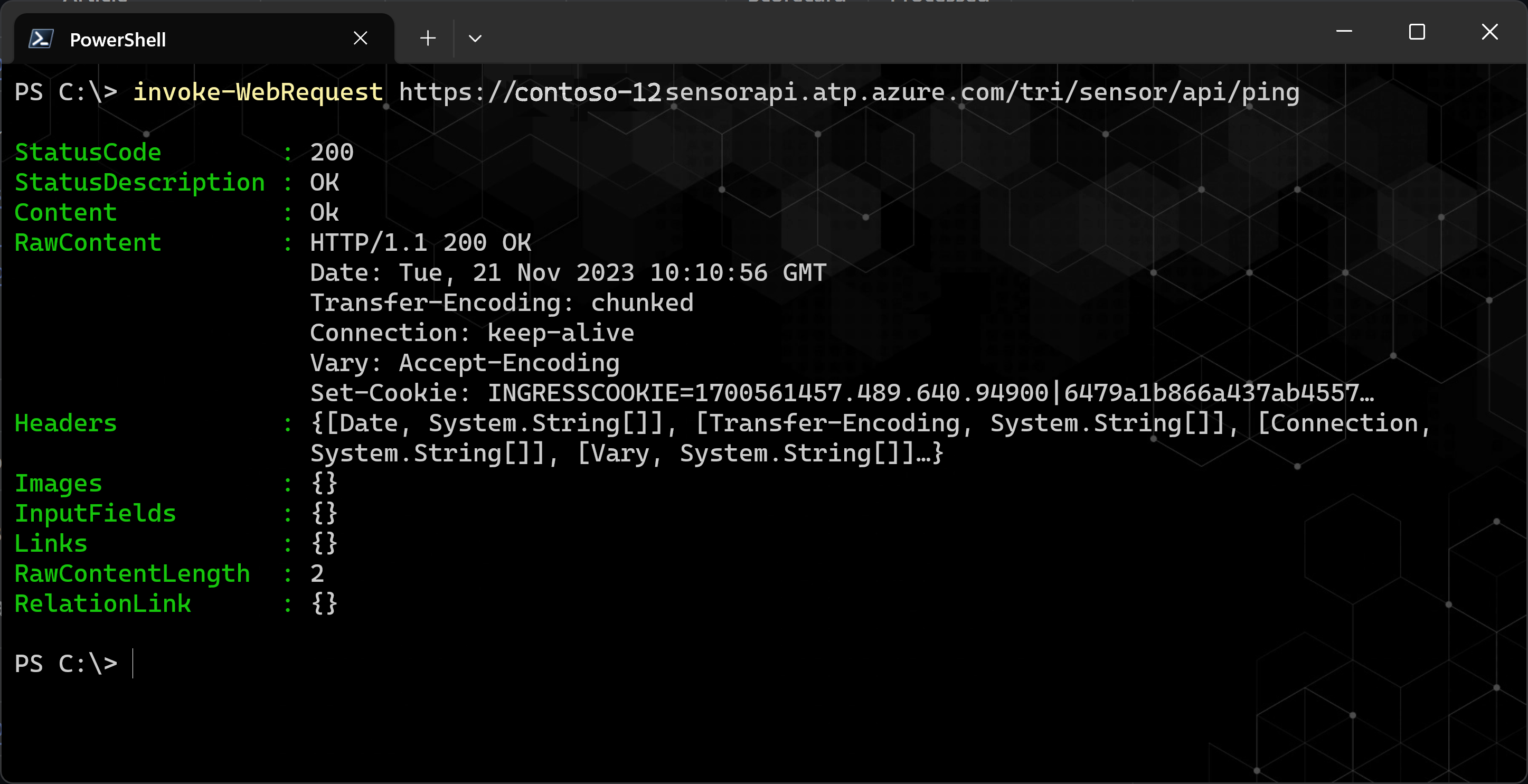
Test-MDISensorApiConnectionreturnsTrueon every sensor server. In a browser under the sensor's proxy context,https://<workspace>sensorapi.atp.azure.com/tri/sensor/api/pingreturns the latest sensor version, or on older workspaces a 503, which Learn counts as success. A certificate error means the DigiCert root is missing.
- Sensors page: every sensor Healthy, Up to date, none Start failed or Disconnected.
- Health issues page: nothing Open on either tab. Auditing issues take up to 24 hours to close; close them manually once confirmed.
Test-MDIConfiguration -Mode Domain -Configuration AllreturnsTrue;auditpol /get /category:*shows Success and Failure on the eight subcategories.Microsoft.Tri.Sensor.logshowsEventLogWatcher enabled [name=Security]after a restart.EventLogException: The handle is invalidinstead is the DACL problem.- Advanced hunting: identity activity from every DC is landing.
IdentityLogonEvents
| where Timestamp > ago(1h)
| summarize Events = count(), LastSeen = max(Timestamp) by DestinationDeviceName, Protocol
| order by LastSeen desc
A DC with a healthy sensor and zero rows in an hour is a coverage gap. TODO: confirm in the dev tenant that DestinationDeviceName is the DC name for both NTLM and Kerberos rows.
Troubleshoot
| Symptom | Likely cause | Fix |
|---|---|---|
| Install fails with 0x80070643, Failed to install MSI package | Sensor cannot reach *.atp.azure.com | Fix firewall or pass ProxyUrl, ProxyUserName, ProxyUserPassword to the installer |
| Deployer log shows NTE_BAD_ALGID 0x80090008 | Certificate management client such as Entrust EESP blocks self-signed cert creation | Uninstall the client, install the sensor, reinstall the client |
| Install fails with System.UnauthorizedAccessException on Server 2019 | KB5009557 or hardened EventLog permissions | Run the installer as SYSTEM with psexec -s -i or a scheduled task |
| PowerShell silent install: Unexpected token /quiet | Installer name not prefixed | .\"Azure ATP sensor Setup.exe" /quiet NetFrameworkCommandLineArguments="/q" AccessKey="..." |
| Install error on a NIC teaming adapter | WinPcap driver | Replace with Npcap 1.0 or later per the technical FAQ |
| Server restarts after silent install | .NET 4.7 install or installer needs it; norestart is not reliable | Maintenance window; deploy .NET as a separate package first |
| Service fails to start, log says failed to retrieve gMSA password | DC not in PrincipalsAllowedToRetrieveManagedPassword, stale ticket, or future PasswordLastSet | Set-ADServiceAccount, then klist -li 0x3e7 purge or reboot; recreate the gMSA if the date is wrong |
| Service fails to start, UnauthorizedAccessException on registry key Global | gMSA lacks performance counter access | Add the gMSA to Performance Log Users |
| Service stuck in Starting, System log shows performance data access denied for .NETFramework, Lsa, WmiApRpl | NT Service\All Services lacks Log on as a service | Grant the right in a DC policy |
| Sensor failed to register due to licensing issues, log shows LicenseInvalid | Proxy returns 401 or 403 instead of 407 | Allow *.atp.azure.com through the proxy without authentication |
| Sensor failed to connect to service | DigiCert root missing in LocalMachine Root | Import DigiCert Global Root G2, or Global Root CA for GCC High |
| ApplyInternal failed two way SSL connection to service | Strong crypto not forced for .NET, or TLS inspection | Set SchUseStrongCrypto and SystemDefaultTlsVersions to 1 in both .NETFramework\v4.0.30319 keys; exempt the sensor API from inspection |
| HttpRequestException or SocketException, connection attempt failed | Localhost or TCP 443 blocked | Open both |
| Health issue Directory services user credentials are incorrect | Wrong DSA details, gMSA retrieval AccessDenied, Log on as a service missing, or a lingering DSA in a mixed v2 and v3 estate | Fix per cause; remove the DSA once no v2.x sensor needs it; ignore if it self-closes after gMSA rotation |
| Read-only user password to expire or expired | Regular-account DSA | Rotate the password in AD and on the Directory services page; move to gMSA |
| Few or no alerts and activities, no health issue, log shows EventLogException The handle is invalid | Security log DACL blocks the sensor | Append (A;;0x1;;;S-1-5-80-818380073-2995186456-1411405591-3990468014-3617507088) to the Security log access GPO, verify with wevtutil gl security |
| No network traffic received from domain controller | Port mirroring down, or RSC on the capture NIC | Fix mirroring; disable Receive Segment Coalescing IPv4 and IPv6 on the adapter |
| Some network traffic could not be analyzed, or network configuration mismatch on VMware | LSO or IPv4 TSO Offload on the VM NIC | Disable-NetAdapterLso, set IPv4 TSO Offload to 0, add CPU and RAM |
| Some Windows events or ETW events are not being analyzed | Sensor over capacity | Add cores and memory per the sizing table; on standalone, forward fewer events or split DCs |
| Sensor reached a memory resource limit | DC low on RAM, sensor self-restarted | Add RAM or add DCs to the site |
| Low success rate of active name resolution | Ports 135 or 137 closed from sensors, or reverse DNS zones missing | Open inbound 135 and 137 from sensors, enable reverse lookup zones |
| Sensor stopped communicating | Firewall change or long restart; keep-alive missed for 5 minutes | Check egress to the sensor API; suppress for planned maintenance |
| Sensor outdated | v2.x auto-update broken, or v3.x missing the Windows cumulative update | Manual update then reinstall if still stuck; install the CU for v3.x |
| Sensor v3.x RPC Audit Misconfigured | Unified sensor RPC audit tag not applied | Apply the tag, or install the September 2026 or later CU for sensor 3.0.10 where it is automatic |
| NTLM Auditing is not enabled, or Advanced Auditing not enabled as required | GPO missing or overridden by a closer GPO | Set-MDIConfiguration or the GPO settings above; v3.x turn on Automatic Windows auditing configuration |
| Auditing health issues persist on v3.x although auditpol looks right | Manual GPO or PowerShell configuration, known issue | Enable Automatic Windows auditing configuration; detections are not affected |
| Auditing for AD CS servers not enabled | No CA audit filter, or certsvc not restarted | certutil -setreg CA\AuditFilter 127 then Restart-Service certsvc |
| Entra Connect sensor: EXECUTE permission denied on mms_get_globalsettings | Entra Connect update reset ADSync DB permissions | Re-grant per the AD FS and Entra Connect sensor guide |
| Syslog or SIEM events ignored by a standalone sensor | Wrong format, missing fields, or timestamps without milliseconds | Match the RSA, CEF, Splunk or QRadar template exactly; QRadar needs agentless MSRPC collection |
| Workspace cannot be created, security group already exists | Groups left by an expired workspace | Rename the three Azure ATP groups with an old suffix, then create the workspace |
| Known-bad test raised no alert | Learning period, exclusion or tuning rule, DC without a sensor, event not audited, or standalone sensor with no ETW | Check the learning period list, Excluded entities and alert tuning, sensor coverage per DC, then Test-MDIConfiguration |
Gotchas and limits
- The self-signed sensor certificate renews every two years. If renewal fails the sensor stops communicating and the only fix is a reinstall.
- Auditing health checks run once a day. You can be correct and still red for 24 hours, or broken for a day before you notice.
- The health alerts reference has no "no Windows events" issue, but MC1455016 (August 2026) announced "No Windows events received from domain controller". It closes the gap where a DACL or audit regression used to be silent.
- DSA selection is exact domain, parent, sibling, then round robin with gMSA first. One DSA needs Read on every domain in the forest; untrusted forests need one each; the default limit is 30 credentials. The local service fallback cannot do SAM-R or cross-domain LDAP, so lateral movement paths vanish quietly.
- v3.x ignores DSA entries but validates them while they exist, so a mixed estate keeps raising the credentials issue until the last v2.x sensor is gone and the entry is removed. gMSA action accounts also fail on v3.x; see detections and response.
- Hyper-threaded cores do not count in the sizing table and can cause health issues. The sizing tool is v2.x only and must run before any sensor exists.
norestarton the silent installer is not reliable. Treat every silent install as a possible reboot.- Registry and WinINet proxy methods affect every LocalService and LocalSystem WinINet consumer on the DC. Prefer the deployer exe or the cmdlets, and change the proxy with whatever method set it.
- Health notifications by email and syslog are v2.x only, one syslog endpoint, relayed through a sensor.
Further reading
- Automatic migration from Defender for Identity Sensor v2 to v3.x and gMSA changes, Jeffrey Appel, March 2026. Covers sensors stuck at Not ready for migration and why gMSA action accounts fail on v3, which Learn's known issues page does not.
- Defender for Identity Sensor v3 Upgrade: Proceed with Caution, Wes Miller, Directions on Microsoft, September 2026. Lists the v3 limitations and the CU and OS gates on in-place upgrade that decide whether your DCs can drop the v2.x failure modes at all.
- Defender for Identity: the sensor you've been avoiding just got easy, CIAOPS, June 2026. MSP view of the v3 sensor plus the advice to audit for a few weeks before acting, which is the learning period problem seen from the client side.
- MC1455016: New Defender for Identity health issue for missing Windows events from a domain controller, Message Center via merill.net, August 2026. Announces the health issue that the Learn reference had not yet listed at source check time.
My notes
TODO: Sohail's notes after verification.
Changelog
| Date | Change | Source |
|---|---|---|
| 2026-10-22 | Drafted from Learn, with Learn images and diagrams | [1] |