SPF, DKIM, DMARC, ARC and spoof intelligence
What it is
SPF lists the servers allowed to send for the envelope domain. DKIM signs the message with a key the domain owner controls. DMARC ties both to the From domain the user sees, publishes what to do on failure, and asks for reports. ARC lets a trusted intermediary vouch for the results it saw before it modified the message.
In Microsoft 365 these checks run in both directions. Outbound, Exchange Online signs with DKIM once you enable it per domain. Inbound, Exchange Online Protection runs SPF, DKIM and DMARC on every message, folds the results into one verdict called composite authentication, and hands that to spoof intelligence and the anti-phishing policy. Policy actions, presets and impersonation settings are in anti-phishing and presets; the service map is in the overview.
Spoofing is a forged From header and usually fails authentication. Impersonation is a lookalike user, domain or brand, and it can pass SPF, DKIM and DMARC because the attacker owns the lookalike domain. Authentication stops the first. Only Defender for Office 365 impersonation protection addresses the second.
Licensing and prerequisites
- Inbound checks, composite authentication, spoof intelligence, the TABL spoofed senders tab and Honor DMARC are Exchange Online Protection features in every cloud mailbox.
- Impersonation protection and Threat Explorer need Defender for Office 365 Plan 1 or Plan 2.
- Outbound DKIM needs the custom domain verified in Microsoft 365 and write access to its DNS zone.
- Roles: Organization Management or Security Administrator in Exchange Online, or Global Administrator in Entra. Unified RBAC: Authorization and settings/Security settings/Core Security settings (manage). Learn notes the Entra Security Administrator role cannot open Email authentication settings in the portal.
- Enhanced Filtering needs Organization Management or Exchange Administrator, and an inbound connector already carrying the gateway traffic.
How it works
SPF
One TXT record per sending domain or subdomain. Microsoft 365 needs include:spf.protection.outlook.com (commercial and GCC), spf.protection.office365.us (GCC High and DoD) or spf.protection.partner.outlook.cn (21Vianet). Use ip4: or ip6: only for on-premises servers such as hybrid Exchange. End with -all (recommended), ~all or ?all (testing only). Receivers check the MAIL FROM (5321.MailFrom, P1) domain, not the From header.
Evaluation stops at the first match and counts DNS lookups. include, a, mx, exists and redirect cost one each, nested includes add theirs, and more than 10 returns permerror with an NDR such as "The message required too many lookups". ip4, ip6 and all are free. Learn's fixes: IP literals for stable vendors, subdomains so each gets its own budget of 10, and never flatten spf.protection.outlook.com. Subdomains do not inherit SPF, one record per name, parked domains get v=spf1 -all, and onmicrosoft.com is read-only. DMARC treats ~all and -all both as failures, but Learn says the DMARC policy is effectively ignored for ~all when the message is also unsigned.
DKIM
Exchange Online does not sign custom-domain mail until you enable it; until then it carries the onmicrosoft.com signature, which never aligns with your From domain. Each domain or subdomain gets two CNAMEs, selector1._domainkey and selector2._domainkey, pointing at Microsoft-hosted keys. One is active, the other takes over at rotation. Domains added since May 2025 use selector1-contoso-com._domainkey.contoso.<partition>-v1.dkim.mail.microsoft with a Microsoft-assigned partition character; older domains keep ...contoso.onmicrosoft.com. Copy the targets from Get-DkimSigningConfig, never type them.
Default key size is 1024-bit; 2048-bit is set at creation or rotation, one selector per rotation. Rotation takes 96 hours. onmicrosoft.com is signed automatically but never rotated automatically. Mail inside the tenant is not signed.
DMARC
A TXT record at _dmarc.<domain>. p= is none, quarantine or reject; pct= samples it, default 100. rua= takes the daily aggregate XML report, ruf= the per-message failure report; Microsoft 365 sends aggregate reports only. aspf and adkim choose relaxed (organisational domain, default) or strict (exact FQDN) alignment. DMARC passes when SPF or DKIM both passes and aligns with the From domain. contoso.onmicrosoft.com never aligns with contoso.com, which is why DKIM is not optional.
A parent record covers every subdomain without its own, including nonexistent ones. The sp= tag is in RFC 7489 but not on the Learn page. Microsoft 365 sends aggregate reports only for domains whose MX points directly at it, and an external report domain must publish contoso.com._report._dmarc with value v=DMARC1;. Outbound cost: with p=quarantine or p=reject on your domain, your own mail that fails DMARC at the destination goes through the high-risk delivery pool with no override.
Composite authentication and spoof intelligence
EOP writes the results into Authentication-Results and adds compauth=<pass | softpass | fail | none> reason=<code>. Composite authentication combines SPF, DKIM and DMARC with implicit signals (sender reputation, recipient history, behaviour) and judges the From domain. A compauth=fail does not block by itself. Spoof intelligence decides whether the failing sender looks legitimate (lists, SaaS, internal apps) or suspicious, and the anti-phishing policy applies the action. An explicit failure is a DMARC fail under p=quarantine or p=reject, reason 000. An implicit failure is no or weak records, reason 001. Reason codes are listed under Verify.
Honor DMARC in anti-phishing policy
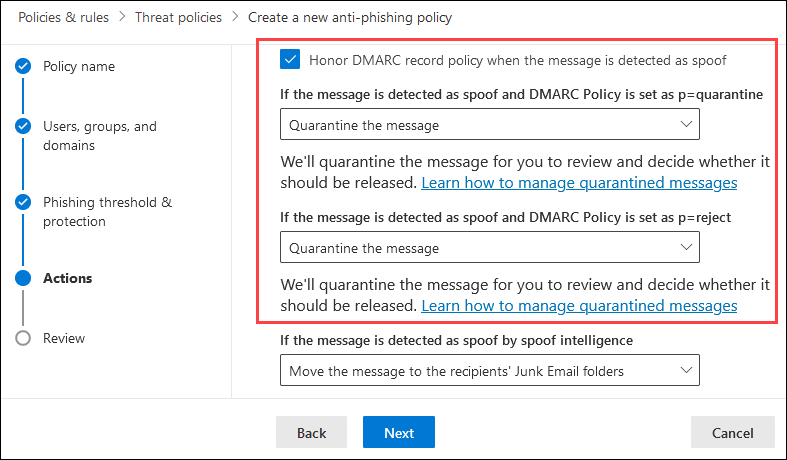
Honor DMARC record policy when the message is detected as spoof controls explicit failures. On: p=quarantine mail goes to Junk or quarantine, p=reject mail is quarantined or rejected at SMTP with 550 5.7.1, p=none gets no DMARC action. Off: explicit failures fall back to the spoof intelligence action. Turning spoof intelligence off removes implicit protection only. Behind a gateway, Honor DMARC only works with Enhanced Filtering on the connector. Enforced DMARC failures never appear in the spoof intelligence insight.
ARC and third-party gateways
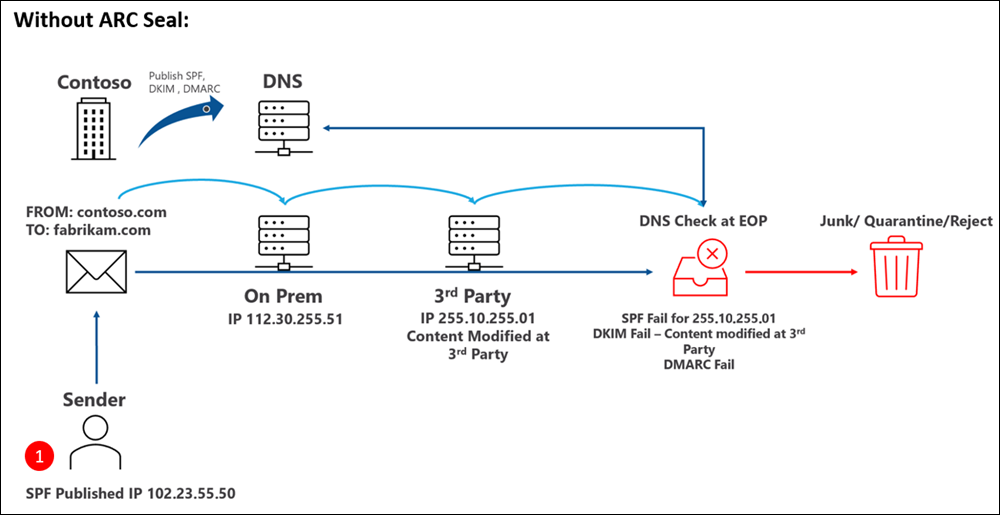
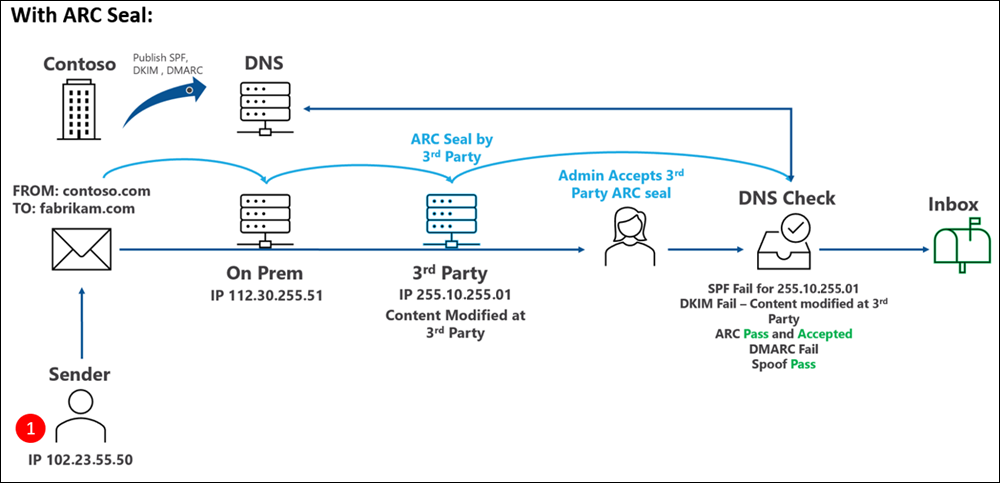
A gateway, forwarder or list in front of Microsoft 365 makes the connecting IP the gateway, so SPF fails; if it rewrites content, DKIM and DMARC fail too. ARC fixes the modification problem: the intermediary records what it saw in ARC-Authentication-Results, signs with ARC-Message-Signature and seals with ARC-Seal. Microsoft 365 honours the chain only if the ARC-Seal d= is a trusted sealer. Trust the vendor's signing domain (Proofpoint is pphosted.com), not your own. ARC does not bypass spam, bulk, mail flow rules or sender lists.
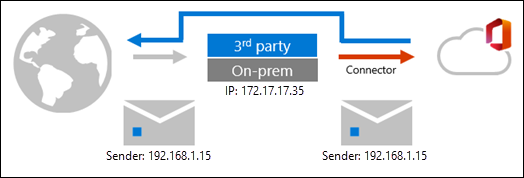
Enhanced Filtering for Connectors fixes the IP problem. EOP skips the gateway hop (last IP automatically, or a list) and evaluates the true source, which flips authentication from implicit to explicit. Learn also says it recovers from DKIM failures caused by non-ARC gateways. Both together are the normal pattern for a Proofpoint or Mimecast front end. Only linear routing is supported.
Configure
- Portal
- PowerShell
- Graph API
Outbound DKIM for a custom domain:
- Defender portal > Email & collaboration > Policies & rules > Threat policies > Email authentication settings (
https://security.microsoft.com/authentication), DKIM tab.

- Slide the toggle. A Client error dialog shows the CNAME values; select OK. Status becomes CnameMissing.
- Click the row, copy both Publish CNAMEs values, create them as CNAMEs with TTL 3600. Enter only the host part; Cloudflare must be DNS only; Route 53 needs a trailing dot.
- In the flyout, turn on Sign messages for this domain with DKIM signatures. Status changes to Signing once the CNAMEs are detected.

- Rotation: flyout > Rotate DKIM keys. Status reads Rotating keys for 96 hours.
Trusted ARC sealers:
- Same page, ARC tab > Add (or Edit).
- Enter the vendor signing domain from
ARC-Seald=in a test message. Save. Allow 30 minutes.
Honor DMARC and spoof actions:
- Threat policies > Anti-phishing > policy > Edit protection settings. Turn on Enable spoof intelligence and Honor DMARC record policy when the message is detected as spoof.
- Set the p=quarantine action (Quarantine or Junk), the p=reject action (Quarantine or Reject), the spoof intelligence action and the quarantine policy. See anti-phishing and presets for recommended values.
Spoof intelligence insight and overrides:
- Threat policies > Tenant Allow/Block Lists > Spoofed senders > View spoofing activity (
https://security.microsoft.com/spoofintelligence). Seven days of spoofed user, sending infrastructure (PTR domain,<ip>/24without PTR, or DKIM domain), count, spoof type and verdict. - Select rows > Bulk actions > Allow to spoof or Block from spoofing. The entry moves to the Spoofed senders tab as a pair scoped to that domain plus that infrastructure.
- To pre-create a pair: Spoofed senders tab > Add, up to 20 pairs, Internal or External, Allow or Block. Wildcard on one side only.

Enhanced Filtering for Connectors:
- Threat policies > Rules > Enhanced filtering (
https://security.microsoft.com/skiplisting) > the inbound connector. - Automatically detect and skip the last IP address, or Skip these IP addresses with the gateway's public IPs or CIDRs. IPv6 is PowerShell only.
- Apply to a small set of users first, then the whole organisation. Disable SCL -1 mail flow rules for the connector.
SPF and DMARC have no portal or cmdlet; create them at the DNS host. Exception: the onmicrosoft.com DMARC record goes in the Microsoft 365 admin center, Settings > Domains > the domain > DNS records > Add record, TXT, name _dmarc, value v=DMARC1; p=reject.
# Tested on: TODO (ExchangeOnlineManagement 3.x, dev tenant)
Connect-ExchangeOnline

# --- DKIM: create, publish CNAMEs, enable, rotate ---
Get-AcceptedDomain | Select-Object DomainName, DomainType
Get-DkimSigningConfig | Format-List Name, Enabled, Status, Selector1CNAME, Selector2CNAME

# Domain not listed yet: create the config disabled, 2048-bit, then read the CNAME targets
New-DkimSigningConfig -DomainName contoso.com -Enabled $false -KeySize 2048
Get-DkimSigningConfig -Identity contoso.com | Format-List Selector1CNAME, Selector2CNAME

# After both CNAMEs resolve (fails with the expected values if they do not)
Set-DkimSigningConfig -Identity contoso.com -Enabled $true

# The initial domain is signed anyway; this only makes it manageable
Set-DkimSigningConfig -Identity contoso.onmicrosoft.com -Enabled $true

# Rotate, optionally moving to 2048-bit one selector at a time. 96 hours per rotation.
Rotate-DkimSigningConfig -Identity contoso.com -KeySize 2048
Get-DkimSigningConfig -Identity contoso.com | Format-List KeyCreationTime, RotateOnDate,
  SelectorBeforeRotateOnDate, SelectorAfterRotateOnDate, Selector1KeySize, Selector2KeySize

# Stop signing
Set-DkimSigningConfig -Identity contoso.com -Enabled $false

# --- ARC trusted sealers (the list is replaced, not appended) ---
Get-ArcConfig
$current = (Get-ArcConfig).ArcTrustedSealers
Set-ArcConfig -Identity Default -ArcTrustedSealers (@($current) + 'pphosted.com' | Select-Object -Unique)
# Delegated orgs: -Identity '<tenantGuid>\Default'

# --- Anti-phish DMARC handling (read; set via Set-AntiPhishPolicy) ---
Get-AntiPhishPolicy | Format-List Name, EnableSpoofIntelligence, AuthenticationFailAction,
  HonorDmarcPolicy, DmarcQuarantineAction, DmarcRejectAction

# --- Spoof intelligence and TABL spoofed senders ---
Get-SpoofIntelligenceInsight            # 30 days, versus 7 in the portal
Get-TenantAllowBlockListSpoofItems -Action Allow -SpoofType External
New-TenantAllowBlockListSpoofItems -Identity Default -Action Allow -SpoofedUser contoso.com `
  -SendingInfrastructure tms.mx.com -SpoofType External
New-TenantAllowBlockListSpoofItems -Identity Default -Action Block -SpoofedUser laura@adatum.com `
  -SendingInfrastructure 172.17.17.17/24 -SpoofType External
Set-TenantAllowBlockListSpoofItems -Identity Default -Ids <guid> -Action Block
Remove-TenantAllowBlockListSpoofItems -Identity Default -Ids <guid>

# --- Enhanced Filtering for Connectors ---
Get-InboundConnector | Format-List Name, EFSkipLastIP, EFSkipIPs, EFUsers
Set-InboundConnector -Identity 'From Proofpoint' -EFSkipLastIP $true -EFUsers 'pilot1@contoso.com','pilot2@contoso.com'
Set-InboundConnector -Identity 'From Proofpoint' -EFSkipLastIP $false -EFSkipIPs '203.0.113.10','198.51.100.0/25'
Set-InboundConnector -Identity 'From Proofpoint' -EFSkipLastIP $true -EFUsers $null   # whole org
Set-InboundConnector -Identity 'From Proofpoint' -EFSkipLastIP $false                 # off, if EFSkipIPs empty

# --- DNS checks ---
Resolve-DnsName contoso.com -Type TXT | Where-Object Strings -like 'v=spf1*'
Resolve-DnsName _dmarc.contoso.com -Type TXT | Select-Object -ExpandProperty Strings
Resolve-DnsName selector1._domainkey.contoso.com -Type CNAME
Resolve-DnsName selector2._domainkey.contoso.com -Type CNAME
No Get-DmarcReport or equivalent cmdlet is documented; aggregate reports are XML at the rua mailbox. -EFSkipMailGateway is not on the Enhanced Filtering page; check the Set-InboundConnector reference first.
No Graph API covers DKIM config, ARC sealers, spoof entries or skip listing; it is all Exchange Online PowerShell or portal. For per-message analysis read headers with the Message Header Analyzer at https://mha.azurewebsites.net or Threat Explorer.
Verify
Inbound: open the last Authentication-Results header on a received message. Expect this shape:
Authentication-Results: spf=pass (sender IP is 203.0.113.10) smtp.mailfrom=contoso.com;
 dkim=pass (signature was verified) header.d=contoso.com;
 dmarc=pass action=none header.from=contoso.com;
 compauth=pass reason=100
spf=pass, fail, softfail, neutral, none, temperror, permerror;smtp.mailfromis the P1 domain.dkim=pass, fail with reason, none;header.dis the signing domain.dmarc=pass, fail, bestguesspass, none;action=none, quarantine, oreject, pct.quarantine, pct.reject, permerror, temperror.compauthreason:000explicit fail,001implicit fail,002admin block,010DMARC fail on an accepted domain,1xxpass,130ARC override,2xxsoftpass,3xxnot checked,4xxbypassed,6xxintra-org fail,7xximplicit pass.X-Forefront-Antispam-Report:CAT:SPOOFwithSFTY:9.11(intra-org) or9.22(cross-domain) is spoof intelligence.CAT:DIMP,UIMP,BIMP,GIMP,SFTY:9.19or9.20are impersonation.SFV:SKA,SKI,SKNmean an allow list or rule bypassed filtering.- ARC:
arc=passandoda=1inARC-Authentication-Resultsmeans chain verified, sealer trusted.cv=perARC-Sealshows where a chain broke. - Enhanced Filtering stamps
X-MS-Exchange-ExternalOriginalInternetSenderon a recipient match andX-MS-Exchange-SkipListedInternetSenderwhenever enabled. X-MS-Exchange-Organization-AuthAs: TODO. Learn's header reference does not document it; confirm against a known message in the dev tenant.
Outbound DKIM: send to an outlook.com or gmail.com mailbox (not AOL). DKIM-Signature must show d=contoso.com and the expected s= selector; the receiver's Authentication-Results should show dkim=pass header.d=contoso.com. Get-DkimSigningConfig should read Enabled True, Status Valid. The admin center DKIM diagnostic (Run Tests: DKIM) needs Global Administrator and is not in GCC, GCC High, DoD or 21Vianet.
DNS: Learn points to free online SPF lookup tools without naming one; Resolve-DnsName or dig give the raw answer. Reports: Spoof detections and Threat protection status show the effect over time; Threat Explorer (Plan 2) or Real-time detections (Plan 1) give per-message detail.
Troubleshoot
| Symptom | Likely cause | Fix |
|---|---|---|
spf=permerror, NDR says too many lookups | More than 10 DNS lookups after expanding includes | Replace stable vendor includes with ip4, move vendors to subdomains, never flatten the Microsoft include |
spf=permerror with a short record | Two TXT records starting v=spf1, an include that does not resolve, trailing period, include= or a space after the colon | Merge to one record, query the include target, fix syntax |
| DKIM toggle will not enable, Status stays CnameMissing | Host entered as the FQDN so the zone was appended twice, TXT instead of CNAME, Cloudflare proxy on, wrong target format, only selector1 created | Copy targets from Get-DkimSigningConfig, enter host as selector1._domainkey only, DNS-only in Cloudflare, create both CNAMEs |
Outbound mail shows dkim=none | Signing not enabled for that exact domain or subdomain, or test sent inside the tenant | Enable DKIM per sending subdomain, test to an external mailbox |
dkim=pass but dmarc=fail | header.d is a vendor domain or onmicrosoft.com, not the From domain | Enable DKIM on the From domain, or have the SaaS sign with d= your domain or subdomain |
| DMARC fail on legitimate SaaS mail | MAIL FROM is the vendor's bounce domain and DKIM is the vendor's domain, so nothing aligns | Custom return path and DKIM at the vendor on a dedicated subdomain with its own SPF and DKIM; short term, a TABL spoof allow for that domain and infrastructure pair |
dmarc=fail action=oreject but the message was delivered | Honor DMARC off, or a TABL, safe sender, allowed domain or mail flow rule override | Check the anti-phish policy and the overrides listed in SFV |
dmarc=fail on forwarded mail | Forwarding changes the connecting IP and often the body | Trusted ARC sealer for the forwarder, or scoped TABL allow |
arc=fail or oda=0 | Sealer domain not on the trusted list, or your own domain was added instead of the vendor's | Read d= from ARC-Seal, set it with Set-ArcConfig, wait 30 minutes |
arc=none, no ARC-Seal header | Gateway is not sealing | Enable ARC at the vendor, or fall back to Enhanced Filtering plus an IP allow or skip-filter rule |
cv=fail in the chain | A later hop modified the message after sealing, or the sealer's key did not resolve | Check cv= per i= instance, nslookup -type=TXT <selector>._domainkey.<sealer> |
| Inbound mail from a gateway all fails SPF or lands in Junk | MX points at the gateway and skip listing is off, so EOP sees the gateway IP | Enable Enhanced Filtering on the connector, disable SCL -1 rules, trust the ARC sealer |
| Enhanced Filtering seems to do nothing for some users | Recipient list incomplete, a proxy address missing, or one recipient on the message not listed | List every address, hybrid MailUsers by TargetAddress, then move to whole org |
| No DMARC aggregate reports from Microsoft | MX does not point directly at Microsoft 365, or external report domain lacks the _report._dmarc record | Accept that gateway tenants get none from Microsoft; publish the authorisation record for cross-domain rua |
| Your own mail routed through the high-risk pool | Your domain has p=quarantine or p=reject and the message failed DMARC at the destination | Fix the source alignment; there is no override |
| Legitimate sender shows the via tag or question mark | From domain differs from DKIM d= or MAIL FROM, or both SPF and DKIM failed | Align DKIM or MAIL FROM with the From domain, or allow the pair in spoof intelligence |
Gotchas and limits
- Subdomains inherit DMARC but not SPF or DKIM.
marketing.contoso.comneeds its own SPF record and CNAME pair. Impersonation trusted domains do not cover subdomains either. - Forwarding always breaks SPF. DKIM survives only if the forwarder leaves body and signed headers alone. Plan ARC or scoped allows for every forwarding path you cannot remove.
p=noneforever gives reports and nothing else. Expect false positives and read the aggregate reports before each step up.- The 10-lookup limit is counted at the receiver, stopping at the first match, so a record can be over budget for one destination and fine for another.
onmicrosoft.com: Microsoft owns SPF and DKIM, the DMARC record is yours. Publishp=rejectif nothing legitimate sends from it.- Ed25519 is unsupported. Moving to 2048-bit takes two 96-hour rotations that cannot overlap.
- The CNAME target format changed in 2025 and the two formats cannot coexist on one selector. Do not rebuild records from a blog post.
Set-ArcConfig -ArcTrustedSealersreplaces the whole list. Read, then append.- TABL spoof entries never expire, cap 1024. A spoof allow from the Submissions page only happens if spoof intelligence actually blocked the message.
- Enhanced Filtering recipient scope applies only when every recipient is listed. Microsoft 365 IPs, RFC 1918 and loopback cannot be skip-listed.
- Microsoft 365 sends no
rufreports, and no aggregate reports for domains whose MX is not Microsoft 365. - Safe Senders and anti-spam allowed lists skip spoof protection. Prefer the scoped TABL spoof pair.
Rollout plan to p=reject
- Inventory every service that puts your domain in a From header. Decide which get a dedicated subdomain.
- SPF: one record per sending domain and subdomain,
-all, under 10 lookups. Parked domains getv=spf1 -all. - DKIM: enable per domain and subdomain, 2048-bit, verify externally. Each SaaS signs with
d=your subdomain. p=nonewithrua, long enough to catch quarterly senders. Fix alignment, not just authentication.p=quarantinewithpct=10, raise as reports stay clean.p=reject, same ramp, subdomains first, parent last. Drop subdomain records once they match the parent.v=DMARC1; p=rejectononmicrosoft.comand every parked domain.- Inbound in parallel: Honor DMARC on with reject, Enhanced Filtering and trusted ARC sealers for any gateway.
Further reading
- SPF, DKIM and DMARC for Microsoft 365: Order and Mistakes, IT Partner (o365hq.com), September 2026. Ordered rollout with the field errors behind permerror and alignment failures, mapped to Plan 1 and Plan 2; vendor-published, skip the pitch.
- ARC Email Authentication: Forwarded Mail in 2026, Meysam Azad, April 2026. Annotated ARC chains from Postmark, Mimecast and OpenARC, plus a
cv=failsymptom table beyond Learn's single example. - Microsoft Fehlkonfiguration bei DKIM-Einstellungen (MS 365) durch CNAME-Einträge, Günter Born, February 2026. Field reports (German) of the admin center showing
dkim.mail.microsofttargets that disagree with existing records; check your tenant before touching live DNS.
Only three qualified in the October 2025 to October 2026 window.
My notes
TODO: Sohail's notes after verification.
Changelog
| Date | Change | Source |
|---|---|---|
| 2026-10-22 | Drafted from Learn, with Learn images and diagrams | [1] |