Defender for SQL on machines and Azure SQL
What it is
Defender for SQL is two separate plans inside the Databases plan of Defender for Cloud. They share a feature set but protect different resources and bill differently.
| Plan | Pricing name | Protects |
|---|---|---|
| Defender for Azure SQL Databases | SqlServers | Azure SQL Database (single and elastic pool), Azure SQL Managed Instance, Azure Synapse Analytics dedicated SQL pools. Read and write replicas. |
| Defender for SQL Servers on Machines | SqlServerVirtualMachines | SQL Server 2012 through 2022 on Azure VMs, SQL Server enabled by Azure Arc on-prem or in AWS and GCP. |
Both plans give two things. Vulnerability assessment (VA) scans the engine and databases against a Microsoft rule set and reports misconfigurations, excessive permissions and unprotected sensitive data, with remediation scripts where they exist. Advanced Threat Protection (ATP) watches activity for SQL injection, brute force, anomalous access and suspicious payloads, and raises Defender for Cloud alerts.
Defender for Servers protects the operating system. Defender for SQL protects the engine on top of it. They are separate pricings on Microsoft.Security/pricings and both can be Standard on the same subscription. Learn does not spell out any overlap or discount between them.
Naming trap: the portal shows one Databases plan with four resource types under Select types. The two SQL types are the two plans above.
Licensing and prerequisites
- Each plan is priced separately. Defender for SQL Servers on Machines is billed per server, not per database. For the Azure SQL plan Learn points to the pricing page and cost calculator without stating the unit. Express VA configuration adds no cost. See licensing.
- Enabling the Azure SQL plan at subscription level turns on ATP and VA with express configuration for every Azure SQL database in that subscription, including ones created later.
- SQL on machines: Subscription Owner to deploy the plan, because it deploys Azure Policy. The SQL Server service account must hold the
sysadminfixed server role on each instance (the default). The plan impersonates that account to reach the instance. - SQL on machines: SQL Server 2012 (11.x) or later, Windows Server 2012 R2 or later. On-prem machines must be onboarded to Azure Arc first and registered as Arc SQL Server instances. See onboarding.
- SQL on machines network: outbound HTTPS on TCP 443 with TLS 1.2 or later to
*.<region>.arcdataservices.com, plus the normal Arc URL list. - SQL on machines extensions that Azure Policy must not block:
| Extension | Publisher | Type | Scope |
|---|---|---|---|
| Defender for SQL | Microsoft.Azure.AzureDefenderForSQL | AdvancedThreatProtection.Windows | Azure VM and Arc |
| SQL IaaS Extension | Microsoft.SqlServer.Management | SqlIaaSAgent | Azure VM |
| Azure extension for SQL Server | Microsoft.AzureData | WindowsAgent.SqlServer | Arc |
- VA permissions (express): Security Admin or Security Reader to see results in recommendations. SQL Security Manager or Security Admin to change VA settings and to open resource-level results. Classic additionally needs Storage Blob Data Reader and Owner on the storage account.
- VA on machines needs EXECUTE on
xp_instance_regreadandsysmail_help_profile_spfor some rules. - Linux: the Arc SQL page says Defender for Cloud works only for SQL Server on Windows machines. The extension type is Windows-only. Treat SQL Server on Linux as unsupported until Learn says otherwise.
- Arc SQL instances with the Arc proxy feature enabled are not supported.
How it works
The two plans have different data paths.
Azure SQL plan: no agent. ATP runs in the platform and raises alerts into Defender for Cloud and by email. VA express stores scan results in Microsoft-managed storage in the region of the logical server. Managed Instance express depends on the instance's system-assigned managed identity. Classic VA stored results in a storage account you own, scheduled scans could be turned off, and baselines needed a rescan.
SQL on machines plan: since the April 2025 enhanced agent, the plan no longer needs the Azure Monitor Agent. On an Azure VM the SQL IaaS Agent extension registers the instance. On an Arc server the Azure extension for SQL Server registers it. Defender for Cloud then creates a system-assigned managed identity on the host if no user-assigned one exists, and installs the Defender for SQL extension. Detection is split: an Extended Events session named SQLAdvancedThreatProtectionTraffic runs on the machine (SQL 2017 and later; older versions read the audit log), and the rest runs in the cloud. Microsoft quotes about 3 percent CPU at peak slices and about 30 minutes for protection status to update once prerequisites are met.
Where the Log Analytics workspace still matters: the VA on machines page says scan results live in the region of the workspace the machine is connected to, data is collected only when SQL VA is enabled on that workspace, and changing the plan's workspace resets scan results and baselines (recoverable within 90 days if you switch back). The autoprovisioning page describes the SQL-targeted AMA process as the MMA replacement and is now marked government-cloud only. Learn does not name the SQL data collection rule. TODO: confirm in the dev tenant whether an AMA DCR is still created with the enhanced agent.
VA scheduling differs by plan. Express on Azure SQL: recurring scans always on, each database gets a random slot on a fixed weekday, on-demand scans allowed. SQL on machines: every 12 hours per Learn's VA page, read-only, seconds per database. The Arc SQL page says first scan within 24 hours then every Sunday. The numbers disagree; expect 12 hours with the current agent and verify.
Baselines: express lets you baseline a batch of rules, the latest scan, or a single rule, and it applies without a rescan. Classic was single rule and needed a rescan. On machines, Add all results as baseline on the recommendation does the same, and a new baseline replaces the old one.
ATP alert families, from the SQL alerts reference. Type IDs follow SQL.<DB|VM|MI|DW>_<Name> and Synapse.SQLPool_<Name>.
| Alert | Tactic | Severity |
|---|---|---|
| A possible vulnerability to SQL Injection | Pre-Attack | Medium |
| Potential SQL injection | Pre-Attack | High |
| Suspected brute force attack, with valid user, or successful | Pre-Attack | High |
| Logon activity from a potentially harmful application | Pre-Attack | High |
| Login from a suspicious IP | Pre-Attack | Medium |
| Log on from an unusual Azure Data Center or unusual location | Probing or Exploitation | Informational |
| Login from a principal user or domain not seen in 60 days | Exploitation | Informational |
| SQL Server potentially spawned a Windows command shell and accessed an abnormal external source | Execution | High or Medium |
| Unusual payload with obfuscated parts initiated by SQL Server | Execution | High or Medium |
| An abnormally large number of rows were extracted (Preview, VM only, extension 2.0.3448.357 or later) | Exfiltration | Medium |
The classic VA and ATP APIs (vulnerabilityAssessments, securityAlertPolicies/Default on the SQL resource provider) retire on 16 August 2027. New work should use the unified Microsoft.Security/sqlVulnerabilityAssessments API at version 2026-04-01-preview and advancedThreatProtectionSettings/Default for ATP.
Configure
- Portal
- Azure CLI / PowerShell
- REST / ARM
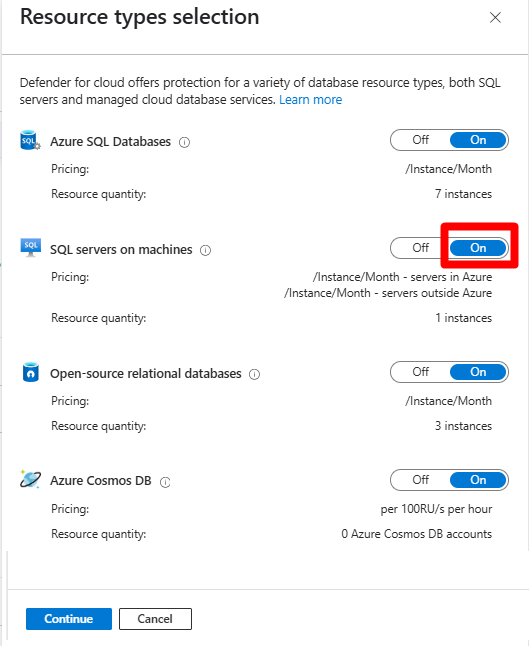
- Defender for Cloud > Environment settings > subscription > Defender plans. On the Databases row choose Select types. Turn on Azure SQL Databases and SQL Servers on Machines as needed. Continue, then Save. For an AWS or GCP connector the toggle is under Settings on the Databases plan.

-
If the subscription had the machines plan before 21 April 2025, the Databases plan shows Action required or an Update button. Open Settings and select Update so the plan moves to the enhanced agent and auto-registers SQL instances. The Overview page also has a multi-subscription update link.
-
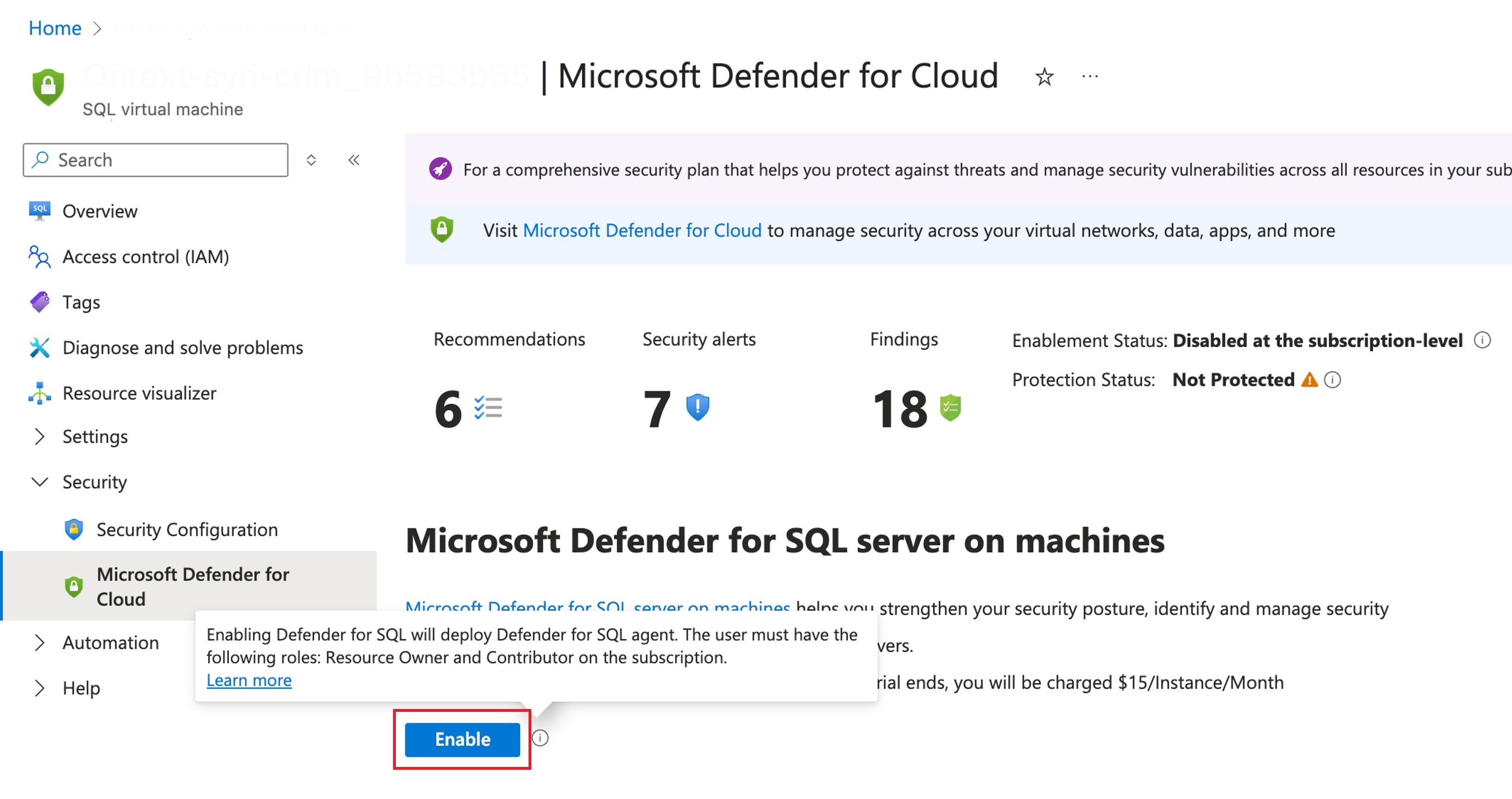
Resource-level enablement for the machines plan is only for when you do not want the whole subscription covered. Disable the plan at subscription level first, then open SQL virtual machines or Azure Arc > Data services > SQL Server instances, pick the instance, Security > Microsoft Defender for Cloud, Enable Microsoft Defender for SQL servers on Machines.
-
Arc-enabled SQL Server: connect the Windows machine to Arc and let the Azure extension for SQL Server register the instance. The Arc SQL Learn page still describes creating a Log Analytics workspace and adding the Log Analytics Agent extension. That is the retired MMA path. With the enhanced agent the registration step is what matters. On the Arc SQL resource, the Microsoft Defender for Cloud tile shows Enablement Status; if it says Disabled at the subscription-level, go back to step 1.
-
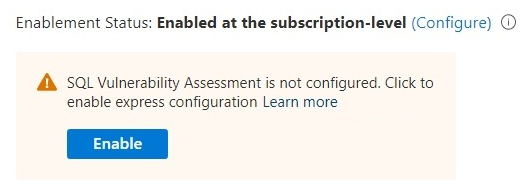
Express VA on an Azure SQL server: open the logical server or database, Security > Defender for Cloud. If VA is not configured, select Enable in the notice, or Configure then Enable, and confirm. If it is on classic, the same place shows a migrate notice. Baselines and scan history do not migrate.
- Baselines on machines: Recommendations > Vulnerability assessment findings on your SQL servers on machines should be remediated > Manage query results and remediation, or Add all results as baseline.

- Optional: disable specific VA findings by scope with Disable rule on the recommendation (preview). Needs Azure Policy edit rights and takes up to 24 hours.
# Tested on: TODO
# Enable both SQL plans at subscription scope
az security pricing create -n SqlServers --tier standard
az security pricing create -n SqlServerVirtualMachines --tier standard

# Check state
az security pricing show -n SqlServers
az security pricing show -n SqlServerVirtualMachines
az security pricing list --query "[?name=='SqlServers' || name=='SqlServerVirtualMachines'].{plan:name,tier:pricingTier,coverage:resourcesCoverageStatus}" -o table
Express VA has no Az cmdlets. Learn says to call the REST API from PowerShell with Invoke-AzRestMethod (Az.Accounts 2.9.1 or later). Routes below are from the Learn migration sample.
# Tested on: TODO
$rid = "/subscriptions/<sub>/resourceGroups/<rg>/providers/Microsoft.Sql/servers/<server>"
$api = "2026-04-01-preview"

# Enable express VA on the server
$path = "$rid/providers/Microsoft.Security/sqlVulnerabilityAssessments/default?api-version=$api"
Invoke-AzRestMethod -Method PUT -Path $path -Payload (@{ properties = @{ state = "Enabled" } } | ConvertTo-Json -Depth 5)

# Read state
(Invoke-AzRestMethod -Method GET -Path $path).Content | ConvertFrom-Json | Select-Object -Expand properties

# On-demand scan of one database (200 = done, 202 = poll scanOperationResults)
$db = [uri]::EscapeDataString("<database>")
Invoke-AzRestMethod -Method POST -Path "$rid/providers/Microsoft.Security/sqlVulnerabilityAssessments/default/scans/initiateScan?api-version=$api&databaseName=$db"

# Baseline a rule from the latest scan
$rule = "VA1143"
Invoke-AzRestMethod -Method PUT -Path "$rid/providers/Microsoft.Security/sqlVulnerabilityAssessments/default/baselineRules/$rule?api-version=$api&databaseName=$db" -Payload (@{ latestScan = $true; results = @() } | ConvertTo-Json)

# ATP on the new API (SQL server 2021-11-01-preview; Managed Instance needs 2023-08-01)
Invoke-AzRestMethod -Method PUT -Path "$rid/advancedThreatProtectionSettings/Default?api-version=2021-11-01-preview" -Payload (@{ properties = @{ state = "Enabled" } } | ConvertTo-Json -Depth 5)
Az.Security cmdlets that Learn lists for SQL on machines VA data: Get-AzSecuritySqlVulnerabilityAssessmentScanRecord, Get-AzSecuritySqlVulnerabilityAssessmentScanResult, Add-, Get-, Set- and Remove-AzSecuritySqlVulnerabilityAssessmentBaseline. Parameters are not documented on that page; use Get-Help -Full.
Manual install of the Defender for SQL extension on a VM when auto-deploy did not happen:
Set-AzVMExtension -Publisher 'Microsoft.Azure.AzureDefenderForSQL' `
  -ExtensionType 'AdvancedThreatProtection.Windows' `
  -ResourceGroupName '<rg>' -VMName '<vm>' `
  -Name 'Microsoft.Azure.AzureDefenderForSQL.AdvancedThreatProtection.Windows' `
  -TypeHandlerVersion '2.0' -Location '<location>' -EnableAutomaticUpgrade $true
Plans. Subscription scope, API version 2024-01-01. enforce is subscription-level only.
PUT https://management.azure.com/subscriptions/{subscriptionId}/providers/Microsoft.Security/pricings/SqlServers?api-version=2024-01-01
PUT https://management.azure.com/subscriptions/{subscriptionId}/providers/Microsoft.Security/pricings/SqlServerVirtualMachines?api-version=2024-01-01
{
  "properties": {
    "pricingTier": "Standard"
  }
}
GET https://management.azure.com/subscriptions/{subscriptionId}/providers/Microsoft.Security/pricings?api-version=2024-01-01&$filter=name in (SqlServers,SqlServerVirtualMachines)
Express VA, unified API 2026-04-01-preview. {resourceId} is the logical server, managed instance, Synapse workspace, SQL VM or Arc SQL instance.
PUT https://management.azure.com/{resourceId}/providers/Microsoft.Security/sqlVulnerabilityAssessments/default?api-version=2026-04-01-preview
{
  "properties": {
    "state": "Enabled"
  }
}
GET  https://management.azure.com/{resourceId}/providers/Microsoft.Security/sqlVulnerabilityAssessments/default?api-version=2026-04-01-preview
POST https://management.azure.com/{resourceId}/providers/Microsoft.Security/sqlVulnerabilityAssessments/default/scans/initiateScan?api-version=2026-04-01-preview&databaseName={db}
GET  https://management.azure.com/{resourceId}/providers/Microsoft.Security/sqlVulnerabilityAssessments/default/scans/scanOperationResults/{operationId}?api-version=2026-04-01-preview&databaseName={db}
PUT  https://management.azure.com/{resourceId}/providers/Microsoft.Security/sqlVulnerabilityAssessments/default/baselineRules/{ruleId}?api-version=2026-04-01-preview&databaseName={db}
Baseline body: latestScan true takes the last scan as the baseline; otherwise pass results as an array of expected rows.
{
  "latestScan": true,
  "results": []
}
Bicep and ARM: Microsoft.Security/sqlVulnerabilityAssessments. The classic Microsoft.Sql/.../vulnerabilityAssessments and securityAlertPolicies resources retire on 2027-08-16.
Verify
- Machines plan, whole subscription: Recommendations > The status of Microsoft SQL Servers on Machines should be protected > View recommendation for all resources. Each SQL VM and Arc SQL instance shows a protection status and an unhealthy reason. Refreshes every 12 hours.
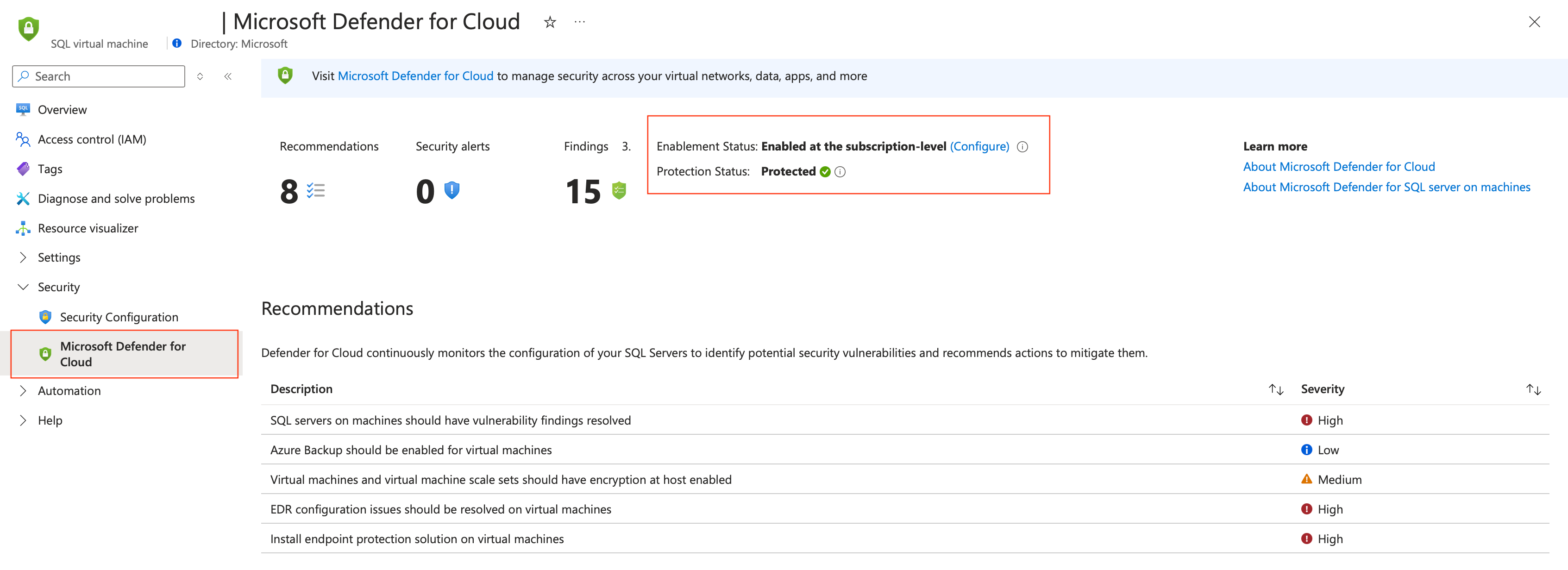
- Machines plan, one resource: SQL virtual machines or SQL Server - Azure Arc > resource > Security > Defender for Cloud. Protection status should read Protected. This view is live.
- Extension state: VM or Arc server > Settings > Extensions + applications > Defender for SQL extension. With several instances on one host this is the only place that shows per-instance status.
- VA results: Defender for Cloud VA dashboard, the resource's Defender for Cloud page, the Vulnerability Assessment Findings workbook, or continuous export to Log Analytics or Event Hubs. On Azure SQL, Scan History on the resource shows the last scan whose results changed; express does not store identical results.
- Check which VA model a server is on: resource > Defender for Cloud > Configure under Enablement Status. If it offers a storage account you are on classic.
- Test alerts on machines: Azure SQL > SQL Server on Azure VMs or SQL Server instances (Azure Arc) > resource > Security > Microsoft Defender for Cloud > Security Alerts tab > Simulate Alerts. Choose brute force, suspicious application, SQL injection, principal anomaly, shell external source or shell obfuscation. Credential scenarios need SQL authentication and a test login. The alert appears in a few minutes; use Check for alerts on this resource in Microsoft Defender for Cloud. Needs Security Admin or Contributor, plus rights to write VM extensions and deployments.
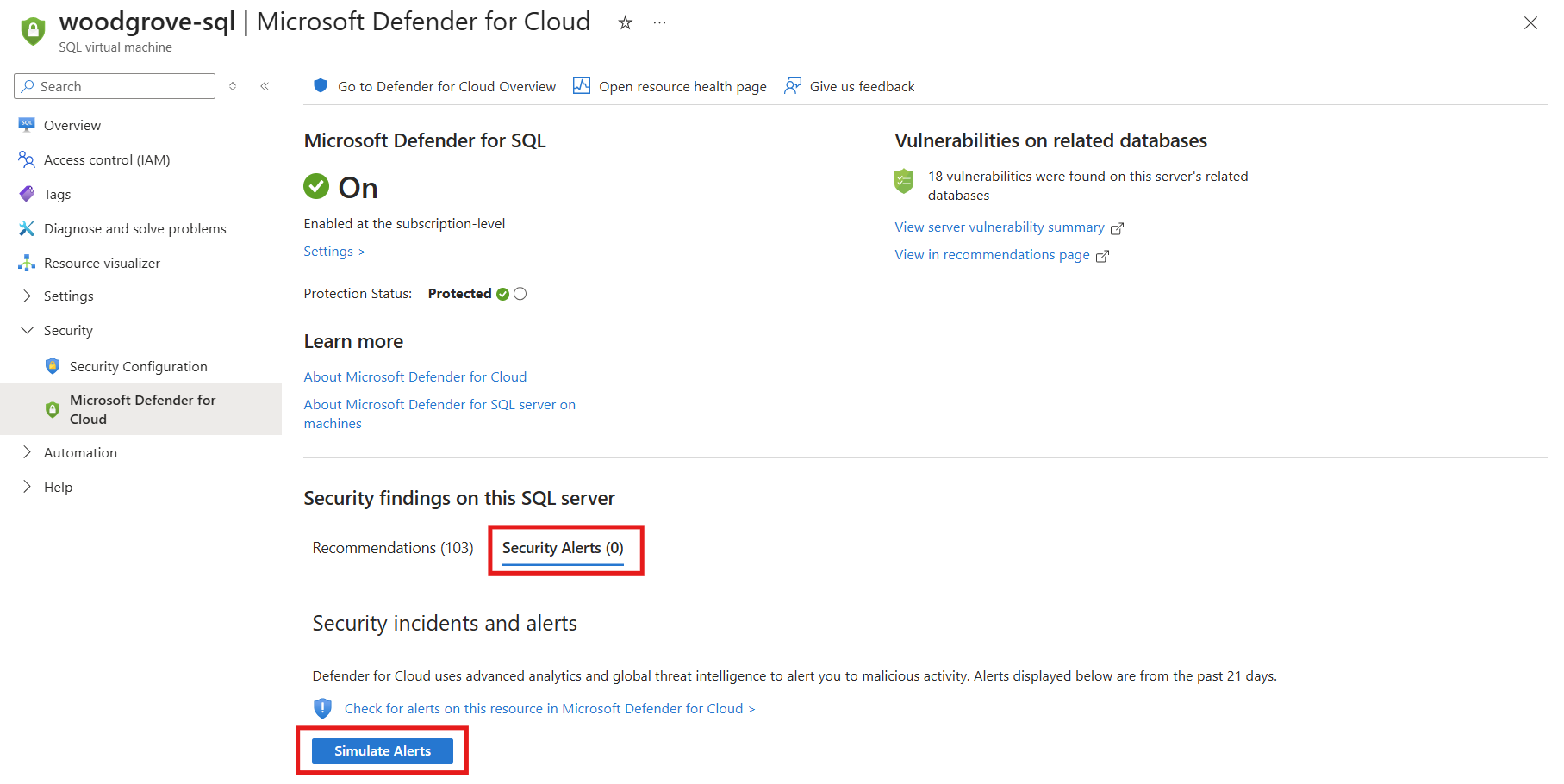
- Azure SQL ATP: the Sample alerts button in Security alerts is the generic Defender for Cloud path. Learn's SQL pages do not document a sample alert specific to Azure SQL Database. TODO: confirm in the dev tenant that Sample alerts offers the SQL plan.
Resource Graph sketch for inventory (not from Learn, confirm field names):
resources
| where type in~ ('microsoft.sqlvirtualmachine/sqlvirtualmachines','microsoft.azurearcdata/sqlserverinstances')
| project name, type, resourceGroup, subscriptionId, location
Troubleshoot

| Symptom | Likely cause | Fix |
|---|---|---|
| SQL VM or Arc SQL missing from the protection recommendation | Instance not registered in Azure. SQL IaaS Agent extension or Azure extension for SQL Server not deployed, or auto-registration off | Register the instance. Arc: connect the server and let the SQL extension auto-deploy. Azure VM: register with the SQL IaaS Agent extension. |
| Unhealthy reason Missing identity | Host has no managed identity | Add a system-assigned or user-assigned identity. No RBAC role needed. |
| Unhealthy reason Defender for SQL extension does not exist | Azure Policy deny on publisher Microsoft.Azure.AzureDefenderForSQL type AdvancedThreatProtection.Windows, or deployment never ran | Remove the deny, or install with Set-AzVMExtension version 2.x. |
| Unhealthy reason Lack of permissions | SQL service account is not sysadmin | Grant it, or follow the least privilege article for Arc. |
| Unhealthy reason Lack of communication | Outbound 443 to *.<region>.arcdataservices.com blocked | Open it with TLS 1.2 or later. |
| Unhealthy reason SQL Server restart is needed | Extension install needs the engine to restart | Restart the instance in a window. |
| Several instances on one VM, recommendation unclear | Recommendation is per host | Open the Defender for SQL extension pane for per-instance reasons. |
| Plan shows Action required or Update | Subscription enabled before 2025-04-21, still on the old AMA configuration | Settings > Update, then re-verify protection. |
| Old MMA path, Log Analytics agent toggle still on | Legacy autoprovisioning | Turn on Azure Monitoring Agent for SQL server on machines first, then turn off the Log Analytics agent toggle. Check Defender for Servers dependencies before you do. |
| VA results and baselines vanished on machines | Plan's Log Analytics workspace was changed | Revert to the original workspace within 90 days to recover. |
| VA rule shows Not applicable, cannot baseline | Rule output exceeded the 1 MB per-rule cap, or the finding was disabled | Expected. Disabled findings also land under Not applicable. |
| Some VA rules fail on machines | Scanner lacks EXECUTE on xp_instance_regread or sysmail_help_profile_sp | Grant EXECUTE. |
| SQL servers should have vulnerability assessment configured stays unhealthy on classic | Server has no user databases, so classic never scans system databases | Move to express. |
| Exemption saved but no effect | Azure CSPM standard not assigned to the scope | Assign it. |
| Arc SQL instance behind Arc proxy not protected | Arc proxy feature not supported by the plan | Known limitation. |
| Simulate Alerts fails | Machine not Protected, plan off, or no SQL authentication for credential scenarios | Fix protection first, enable SQL auth with a test login. |
Gotchas and limits
- Plan naming. Two plans, one Databases toggle, three names each across the portal, Learn and the pricing API (
SqlServersandSqlServerVirtualMachines). Scripts that enable Databases must set both pricings. - Billing moved. The enhanced agent can discover instances the AMA path missed. Microsoft warns the bill may rise after the upgrade. Billing is per server for the machines plan.
- Defender for Servers is a separate pricing. Turning on
VirtualMachinesP2 does not protect the SQL engine, andSqlServerVirtualMachinesdoes not give you MDE on the host. Run both on SQL hosts. - Managed Instance. Express VA depends on the system-assigned managed identity. ATP on the new API needs
api-version=2023-08-01; the2021-11-01-previewversion returns NoRegisteredProviderFound for MI. Synapse ATP has no new API yet and still writes to the retiringsecurityAlertPoliciesresource. - Express replaces the storage account. You lose direct access to raw results and baselines, Excel export becomes CSV, the built-in weekly email is gone (use Logic Apps), policy scope drops to subscription and server, and single-rule output caps at 1 MB. Express is the default for every new supported Azure SQL database and Microsoft is rolling out automatic express enablement at subscription level where the Azure SQL plan is on.
- Classic API retirement 2027-08-16 covers VA and ATP settings on
Microsoft.Sql. Audit with the scripts on the migration page. - AMA cost. On the legacy path, AMA shipped SQL data to a Log Analytics workspace and you paid ingestion. The enhanced agent removes AMA for this plan, but the VA page still ties result storage and residency to the workspace region. Keep the workspace in the same region as the servers and do not casually change it.
- Linux. Learn says Windows only. The extension type is
AdvancedThreatProtection.Windowsand Arc least privilege is not supported on Linux either. No workaround documented. - Arc proxy feature is unsupported. Government cloud got the enhanced agent GA on 2026-09-29, later than commercial.
- Status lag. The protection recommendation refreshes every 12 hours, the per-resource page is live. Disable rule changes take up to 24 hours. First VA results wait for the scheduled slot unless you trigger a scan.
- Database-level VA recommendations went GA on 2026-07-26 and count toward Cloud Score, not the classic secure score. Dashboards built on the old aggregated recommendation names will drift.
Further reading
- Public preview: Expanded coverage and unified management for SQL VA Express Configuration, Microsoft Tech Community, May 2026. Microsoft's own framing of why express was extended to Managed Instance, Synapse and SQL on machines under one API, with the rollout plan.
- Better together with Azure WAF + Microsoft Defender for Storage + Defender for Azure SQL Databases, Microsoft Tech Community, May 2026. Answers the customer question of why the SQL plan is still needed behind a WAF, which Learn never addresses.
- Les nouveautés de septembre 2026 de Microsoft Defender for Cloud, Jean-Sébastien Duchêne, September 2026. Monthly digest that ties the enhanced agent GA in Azure Government to the billing and re-registration actions existing customers must take.
Only three posts from the last year qualified as practitioner sources; most hits were Learn mirrors.
My notes
TODO: Sohail's notes after verification.
Changelog
| Date | Change | Source |
|---|---|---|
| 2026-10-22 | Drafted from Learn, with Learn images and diagrams | [1] |