Licensing: Plan 1, Plan 2 and standalone server licences
What it is
A server cannot run on a user licence. MDE P1 and P2, standalone or inside Microsoft 365 E3/E5, do not include server rights. Three paths exist.
- Defender for Servers Plan 1 or Plan 2, bought through Microsoft Defender for Cloud and metered on an Azure subscription. This is Microsoft's recommended route and the only one that gives agentless scanning, FIM, JIT and the data ingestion benefit.
- Microsoft Defender for Endpoint for Servers, a standalone per-OSE licence sold through volume licensing. No Azure subscription needed. Foundational server EDR only.
- Microsoft Defender for Business servers, an add-on for Defender for Business or Microsoft 365 Business Premium. Capped at 60 licences per subscription. SMB only.
All three light up the same MDE sensor on the box and the same device page in the Defender portal. What differs is who bills you, how, and which Defender for Cloud features come with it. This article covers the licensing and the plan switch. Sensor deployment is in onboarding through Defender for Cloud and the product itself is in the overview. User licences are in Defender for Endpoint licensing.
| Defender for Servers P1 | Defender for Servers P2 | MDE for Servers (standalone) | Defender for Business servers | |
|---|---|---|---|---|
| Sold through | Azure subscription, Defender for Cloud | Azure subscription, Defender for Cloud | Volume licensing, yearly with EA renewals (Microsoft licensing FAQ) | M365 admin center, Purchase services |
| Billing unit | Per machine, by power state, hourly | Per machine, by power state, hourly | Per Operating System Environment | Per Windows Server or Linux instance |
| Azure subscription needed | Yes | Yes | No | No |
| MDE capability level | MDE P2 incl. EDR | MDE P2 incl. EDR | Foundational server protection, EDR via Defender XDR | Same protection as MDB client devices |
| Agentless VM scanning, malware, secrets | No | Yes | No | No |
| FIM, JIT, OS baseline, OS updates, network map | No | Yes | No | No |
| Premium Defender Vulnerability Management | No | Yes | No | No |
| 500 MB per node per day ingestion benefit | No | Yes | No | No |
| Enable per resource | Yes | No (disable only) | n/a | n/a |
| 30 day trial | Yes | Yes | Not documented | Not documented |
| Cap | None | None | None documented | 60 per subscription |
| Mixed with another path in same estate | Not with standalone MDE for Servers | Not with standalone MDE for Servers | Not with Defender for Servers | Not documented |
Licensing and prerequisites
- Defender for Servers: an Azure subscription with Defender for Cloud. Permission to change pricing on the subscription. Both plans give the capabilities of MDE Plan 2 including EDR, so a server under P1 is not a "P1 MDE" device.
- Where machines must live: Azure VMs and VMSS Flexible are native. On-premises, AWS and GCP machines should be Azure Arc-enabled servers for full plan function. The multicloud connector can push the Arc agent to AWS and GCP. A machine with the MDE sensor installed directly, no Arc, still gets Plan 1 function; on Plan 2 it gets Plan 1 features plus premium Defender Vulnerability Management and nothing else.
- MDE for Servers standalone: the service description says a separate licence is required for each OSE on a server or VM. The Microsoft licensing FAQ says it is purchased yearly on EA renewals and needs no Azure subscription. Learn does not document a minimum seat count or an eligibility rule. TODO: confirm current purchase eligibility with the licensing desk; Learn has no statement on who can still buy it.
- Defender for Business servers: at least one paid Defender for Business or Microsoft 365 Business Premium licence. One licence per Windows Server or Linux instance. Maximum 60 per subscription. Above that, Microsoft points you to Defender for Servers.
- Discount for existing standalone licences: if you hold MDE for Servers licences and turn on Defender for Servers, open an Azure support request with tenant ID, licence count and expiry. The discount starts on approval and is not retroactive.
- Roles: Learn's tutorial defers to the planning guide for roles. The pricing write is an ARM operation on
Microsoft.Security/pricings, so Owner, Contributor or Security Admin on the subscription is the practical floor. TODO: confirm the exact least-privilege role in the dev tenant.
Windows Server versions by path:
| Path | Windows Server versions | Source |
|---|---|---|
| Defender for Servers P1/P2, Azure VM | 2025, 2022, 2019, 2016, 2012 R2, 2008 R2 SP1 | Support matrix, MDE integration row |
| Defender for Servers P1/P2, Arc | Same as MDE minimum requirements | Support matrix shows Arc as supported, no version list |
| MDE for Servers standalone | 2012 R2 and later incl. Core, Semi-Annual Channel 1803 and later, 2008 R2 SP1 with the deployment tool | MDE minimum requirements |
| Defender for Business servers | "Windows Server or Linux", no versions listed | Get Defender for Business |
For 2012 R2 and 2016, Defender for Cloud installs the unified solution. 2012 R2 gets both Defender AV and the EDR sensor installed; 2016 has AV built in and gets the sensor; 2019 and later have both built in. Linux is server-based licensing only: the licensing FAQ says a Linux server cannot be covered by MDE user licences and needs a server product.
How it works
Defender for Servers is a pricing object, not a licence object. You set Microsoft.Security/pricings/VirtualMachines to Standard with a subPlan of P1 or P2 on a subscription. Defender for Cloud then counts every machine in that subscription that is in a billable state and meters it hourly. The MDE tenant is created on first enablement if the tenant has none, and the data location picked then cannot be changed without a support ticket. The MDE.Windows or MDE.Linux extension onboards the machine automatically. Nothing is assigned per device in the M365 admin center.
The billing table from the FAQ is the part people get wrong. An Azure VM shut down from inside the guest is Stopped, still allocated, still billed. Only Deallocated stops the meter. An Arc machine bills only while the Connected Machine agent is heartbeating; 15 to 30 minutes without one and it drops to Disconnected and stops billing. A machine onboarded directly to MDE with no Arc agent is still billed per hour because the sensor connection is the signal.
The 500 MB benefit on Plan 2 is pooled. Daily allowance is machine count times 500 MB, applied at the Log Analytics workspace, and one noisy box can exceed 500 MB as long as the total holds. It covers listed security tables only (SecurityEvent, SecurityAlert, WindowsFirewall, ProtectionStatus, MDCFileIntegrityMonitoringEvents, DeviceCustomFileEvents, DeviceCustomRegistryEvents and a few more) and only when ingestion arrives through AMA, the MDE sensor or agentless FIM. WindowsEvent qualifies only for the Microsoft-SecurityEvent stream. Plan 2 must be enabled on the workspace itself, not just the subscription. Under Sentinel classic meters it offsets Log Analytics ingestion; under simplified meters it offsets Sentinel ingestion.
Standalone MDE for Servers has no assignment step. The licensing FAQ says you cannot assign the SKU to servers; the Defender for Business servers page says the same about users and devices. You buy the count, the tenant holds it, and the portal never checks a server against it. Mixed licensing between standalone MDE for Servers and Defender for Servers is not supported; Microsoft's suggested hybrid shape is Plan 1 on-premises and Plan 2 in cloud, both on Defender for Servers.
Plan 1 can be enabled per resource with a resource-level pricing object on an Azure VM, Arc machine or VMSS. Plan 2 is subscription-wide; you exclude machines by setting Free on them. The subscription object has an enforce flag that blocks overrides below it.
Configure
- Portal
- Azure CLI / PowerShell
- REST / ARM
Defender for Servers on a subscription
- Azure portal > Microsoft Defender for Cloud > Environment settings. Pick the subscription, AWS account or GCP project.
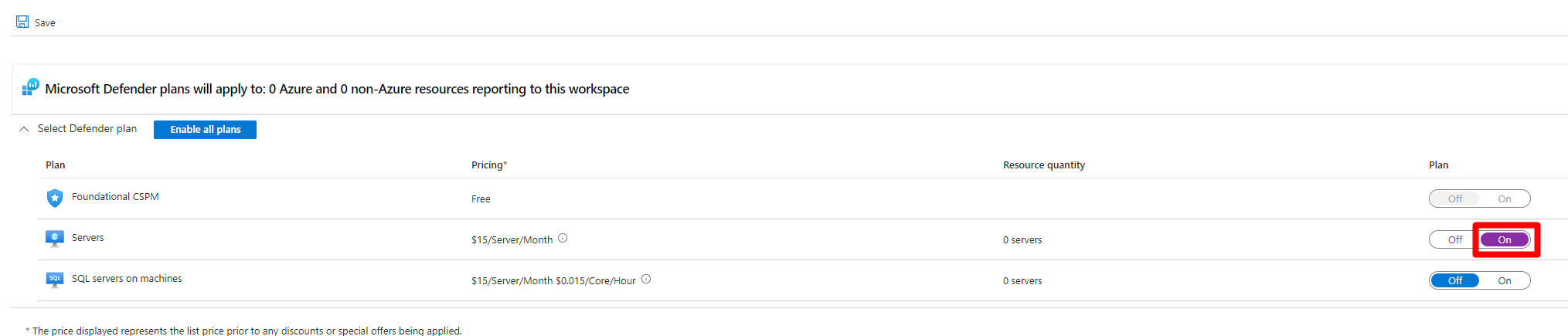
- On Defender plans, set Servers to On. This selects Plan 2 by default.
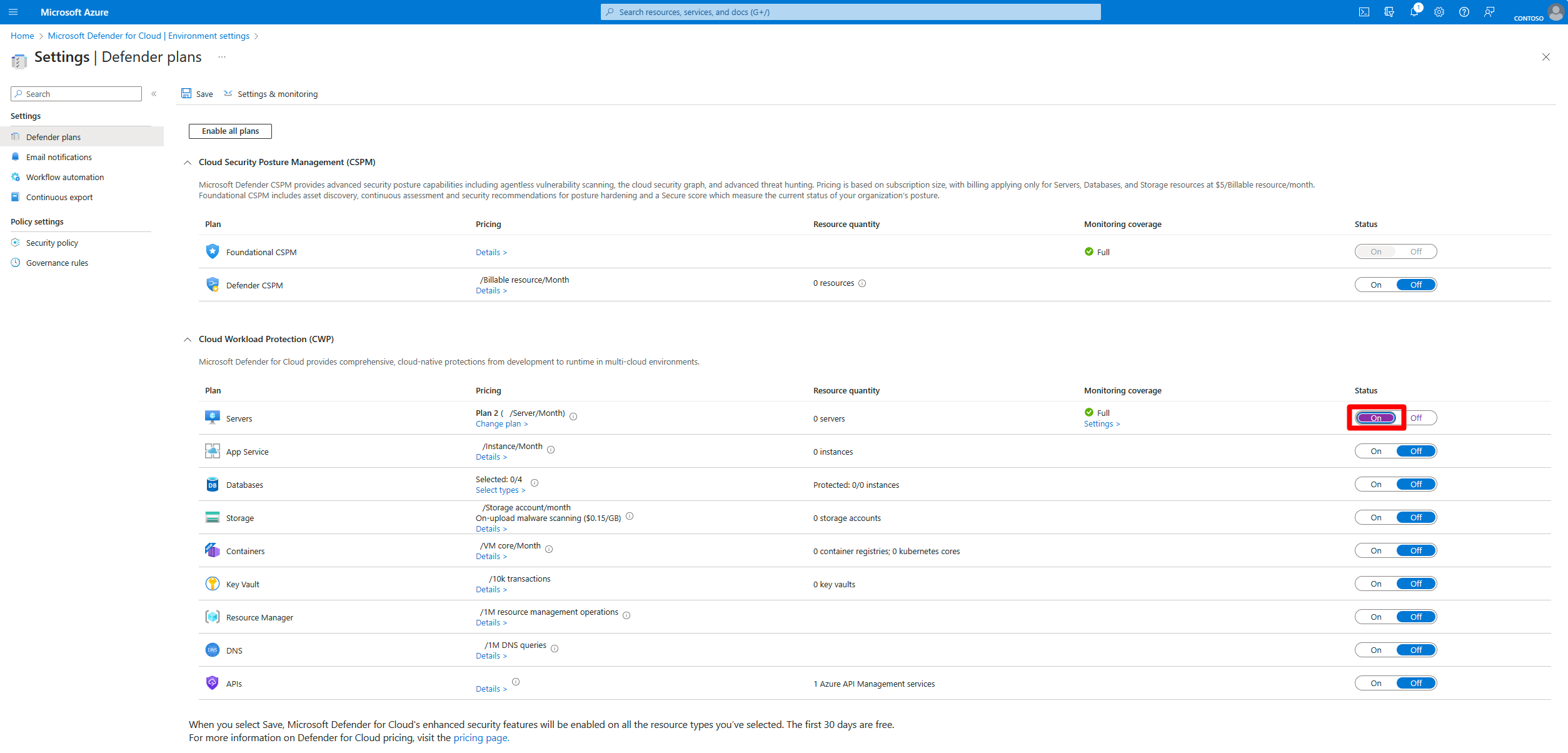
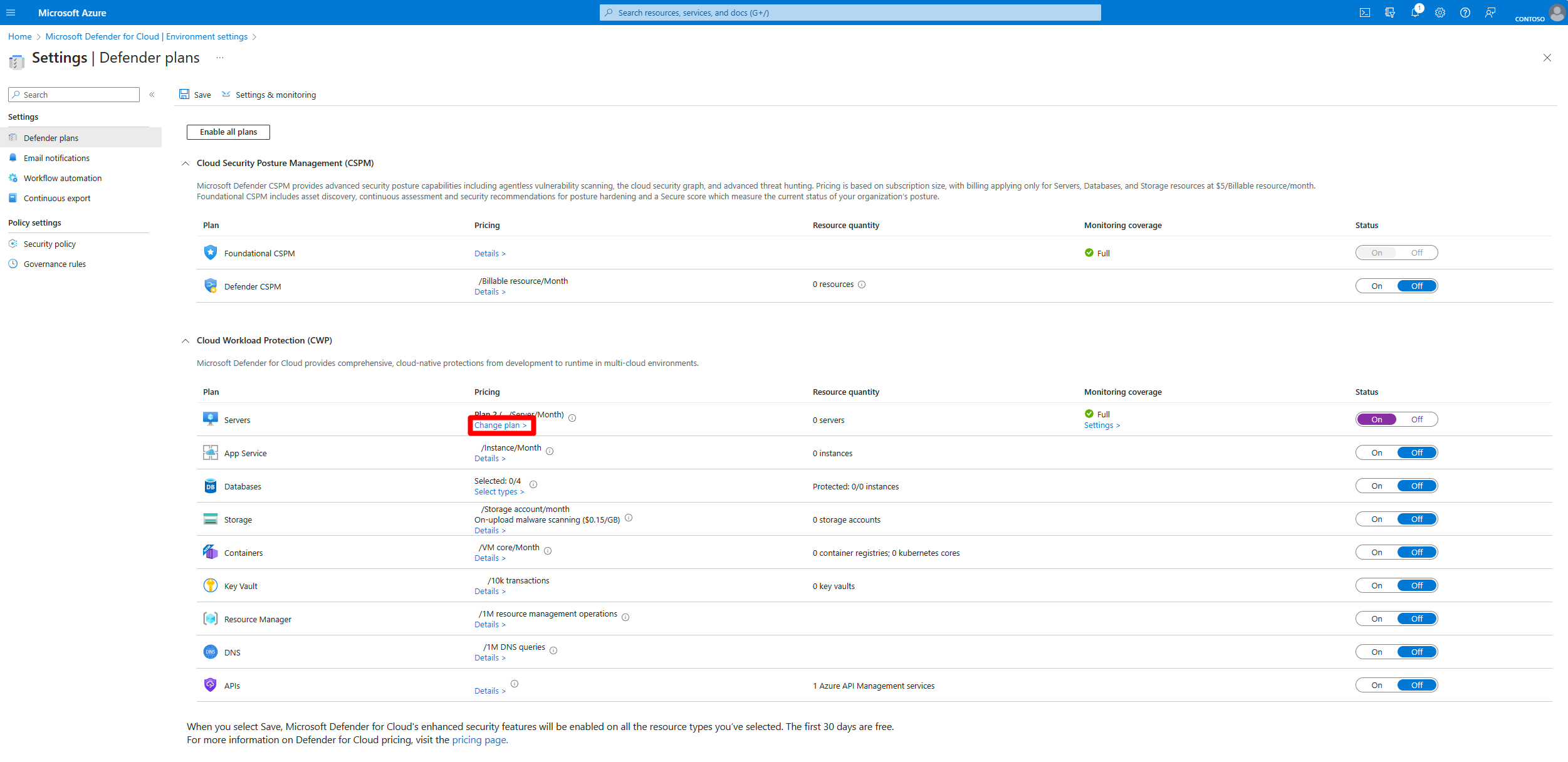
- To pick Plan 1, select Change plans on the Servers row.
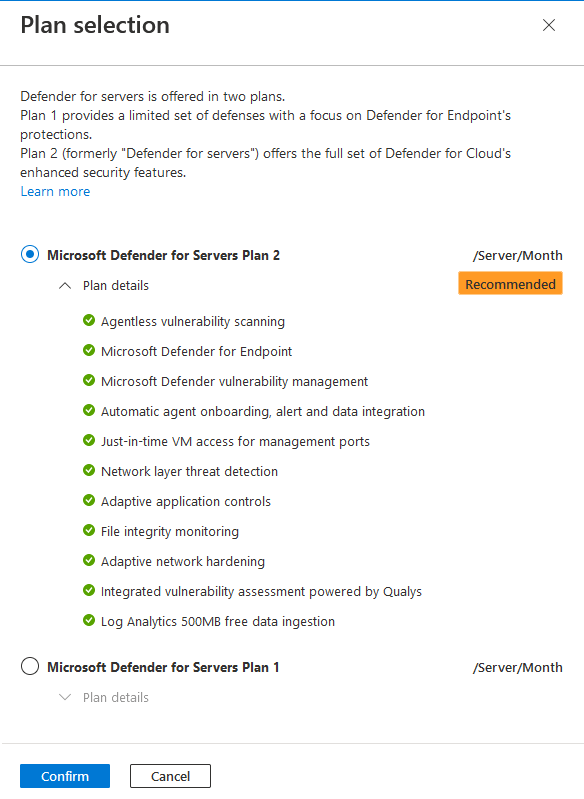
- Choose Plan 1 or Plan 2 in the popup, Confirm, then Save. A 30 day trial starts that cannot be paused or extended.
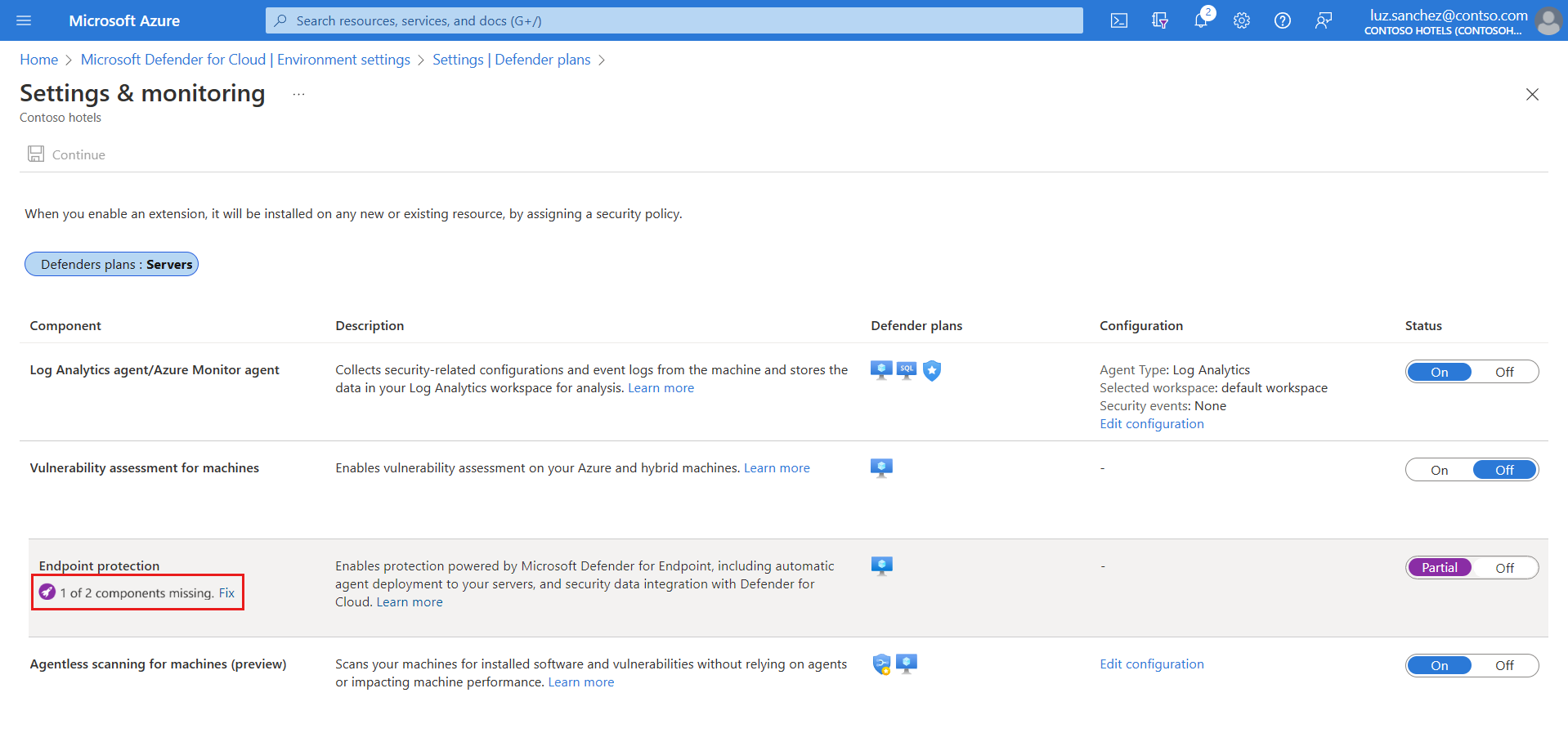
- Same subscription > Settings and monitoring > Endpoint protection. Status should already be On; the plan enables it. First-time tenant setup can take up to 12 hours, later subscriptions up to one hour.
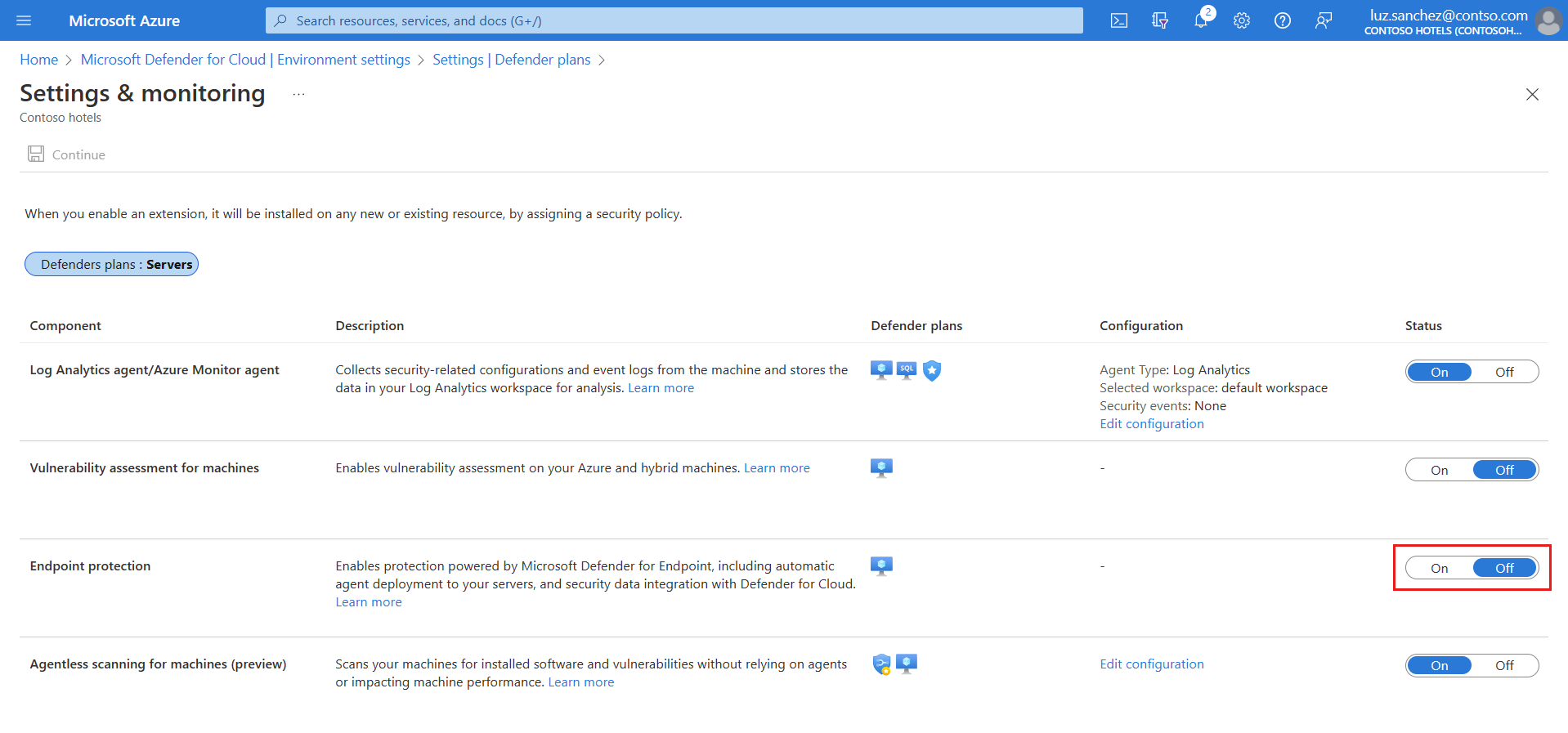
- Subscriptions created before spring 2022 (Windows Server 2012 R2 and 2016) or before summer 2021 (Linux) show Endpoint protection as Partial. Select Fix, enable the missing component, Save.

Plan 2 on the Log Analytics workspace (for the ingestion benefit and FIM)
- Environment settings > select the workspace > turn on Defender for Servers Plan 2 > Save. Repeat per workspace. Turning the subscription plan off does not turn this off.
Plan 1 per resource
Azure Policy, category Security Center - Granular Pricing: assign "Configure Azure Defender for Servers to be enabled (with 'P1' subplan) for all resources with the selected tag". In Parameters clear "Only show parameters that need input or review", set Inclusion Tag Name and Inclusion Tag Values, create a remediation task. The disable twin is "Configure Azure Defender for Servers to be disabled for resources (resource level) with the selected tag". Any tag name works.
Standalone MDE for Servers and Defender for Business servers
There is nothing to assign. Defender for Business servers: M365 admin center > Billing > Purchase services > Microsoft Defender for Business servers, one per server instance, not assigned to users or devices. MDE for Servers: bought through volume licensing; the licensing FAQ states the SKU cannot be assigned to servers. Learn documents no admin center step for it. Onboard the server with any MDE method and it shows in the portal.
Discount request
Azure portal > Support and Troubleshooting > Help + support > Create a support request. In Additional details enter tenant ID, number of MDE for Servers licences, expiry date.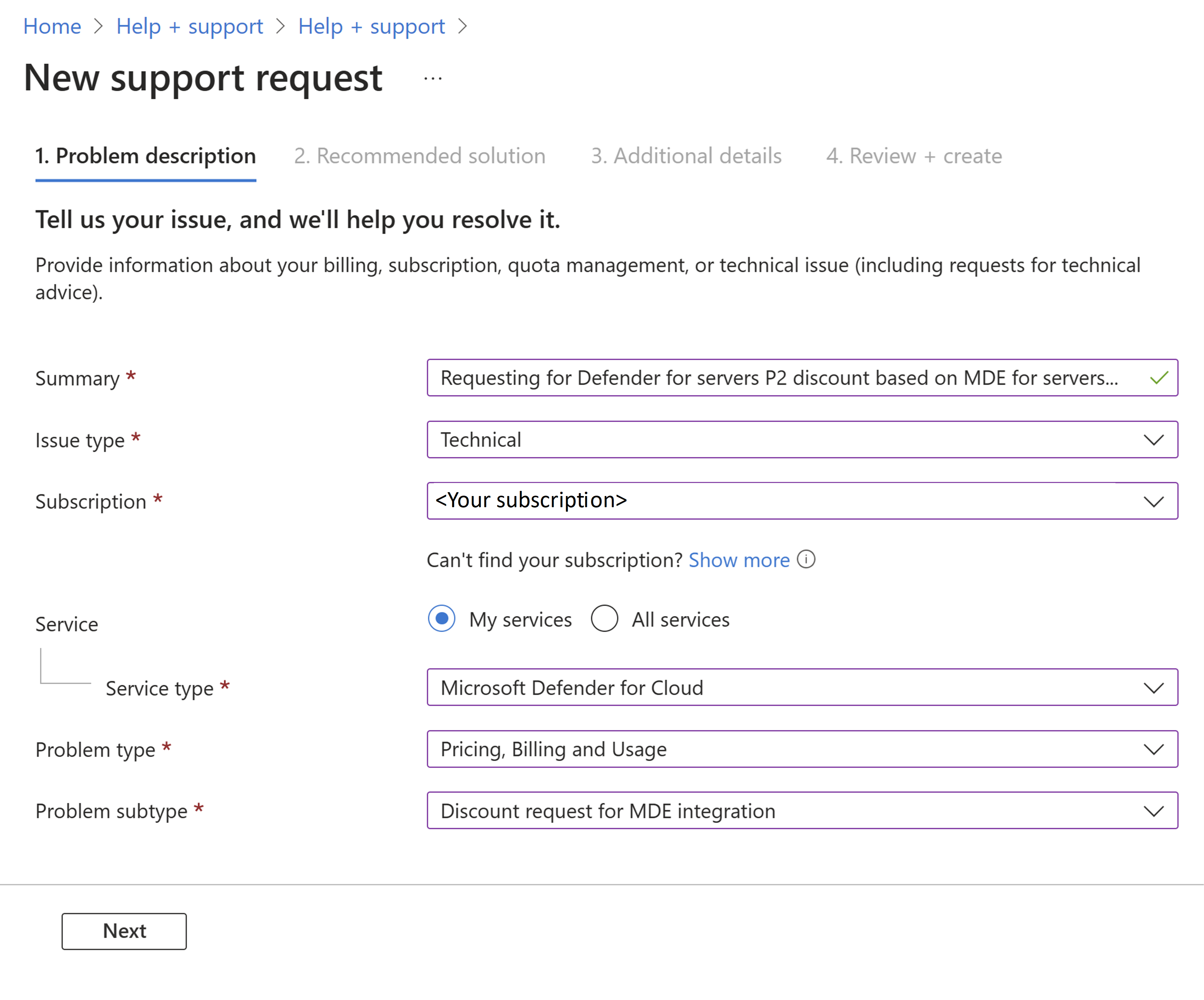
# Azure CLI, subscription scope. Tested on: TODO
# Plan 2 (default when you just pass --tier standard)
az security pricing create -n VirtualMachines --tier standard --subplan P2

# Plan 1
az security pricing create -n VirtualMachines --tier standard --subplan P1

# Learn's own example with extensions
az security pricing create -n VirtualMachines --tier standard --subplan P2 \
  --extensions name=MdeDesignatedSubscription isEnabled=False \
  --extensions name=AgentlessVmScanning isEnabled=True additionalExtensionProperties='{"ExclusionTags":"[{\"key\":\"A\",\"value\":\"B\"}]"}'

# Off
az security pricing create -n VirtualMachines --tier free

# Read back
az security pricing show -n VirtualMachines
az security pricing list -o table
# Az.Security, subscription scope. Tested on: TODO
# Learn example: Plan 2
Set-AzSecurityPricing -Name "VirtualMachines" -PricingTier "Standard" -SubPlan P2

# Plan 1
Set-AzSecurityPricing -Name "VirtualMachines" -PricingTier "Standard" -SubPlan P1

# Read back
Get-AzSecurityPricing -Name "VirtualMachines"
Learn lists -SubPlan and -Extension as parameters but does not enumerate accepted values; P1 and P2 come from the REST reference. Neither CLI nor the cmdlet documents a resource-scope switch. For per-machine Plan 1 use the REST call or the tag-based script in the Microsoft-Defender-for-Cloud GitHub repo under Powershell scripts/Defender for Servers on resource level. The az security pricing help text spells the parameter "Bundle suplan"; that is a typo on their side, the switch is --subplan.
Standalone MDE for Servers and Defender for Business servers: no CLI or PowerShell path. Nothing to set.
Subscription scope, Plan 2, locked so resource-level objects cannot override:
PUT https://management.azure.com/subscriptions/{subscriptionId}/providers/Microsoft.Security/pricings/VirtualMachines?api-version=2024-01-01
{
  "properties": {
    "enforce": "True",
    "pricingTier": "Standard",
    "subPlan": "P2"
  }
}
Resource scope, Plan 1 on one VM (the only sub-plan allowed at resource scope; also valid on an Arc machine or VMSS resource ID):
PUT https://management.azure.com/subscriptions/{subscriptionId}/resourceGroups/{resourceGroupName}/providers/Microsoft.Compute/virtualMachines/{machineName}/providers/Microsoft.Security/pricings/virtualMachines?api-version=2024-01-01
{
  "properties": {
    "pricingTier": "Standard",
    "subPlan": "P1"
  }
}
Exclude one machine from a subscription plan: same URI, body {"properties": {"pricingTier": "Free"}}. Remove the resource-level override so the subscription setting applies again: DELETE on the same URI. Read state with GET on the same URI; the response carries inherited, inheritedFrom, freeTrialRemainingTime, enablementTime, resourcesCoverageStatus and per-extension operationStatus.
Extensions valid on VirtualMachines: MdeDesignatedSubscription (P1 and P2), AgentlessVmScanning (P2), FileIntegrityMonitoring (P2). Booleans are strings, "True" and "False".
The MDE integration switch is a separate setting object:
PUT https://management.azure.com/subscriptions/{subscriptionId}/providers/Microsoft.Security/settings/WDATP?api-version=2022-05-01
{
  "name": "WDATP",
  "type": "Microsoft.Security/settings",
  "kind": "DataExportSettings",
  "properties": {
    "enabled": true
  }
}
Standalone MDE for Servers and Defender for Business servers: no Graph or ARM licence assignment exists.
Verify
- Defender for Cloud > Environment settings > subscription: Servers shows On with the plan name. Workspace page shows Plan 2 On if you need the benefit.
az security pricing show -n VirtualMachinesreturnspricingTier: Standardand the expectedsubPlan.freeTrialRemainingTimetells you whether you are still inside the 30 days.- Per machine: VM or Arc resource > Extensions >
MDE.WindowsorMDE.Linuxshows Provisioning succeeded. The coverage workbook in Azure Workbooks shows plan state per subscription and resource, and the Defender for Endpoint deployment status workbook in the community repo tracks extension state across VMs and Arc machines. - Defender portal > Assets > Devices: the server appears, sensor health Active. On Linux,
mdatp healthshowshealthy : trueandlicensed : true. On Windows,sc.exe query senseshows RUNNING. The portal does not display which of the three licence paths covers a server; that lives only in Defender for Cloud or your licence records. - Billing: Microsoft Cost Management, filter the Defender for Cloud meter for Servers. The ingestion benefit is zero cost so it never shows on the invoice; look at the data allocation benefits view in Azure Monitor cost analysis.
// Servers the MDE tenant knows about, with onboarding and sensor state
DeviceInfo
| where OSPlatform startswith "WindowsServer" or OSPlatform == "Linux"
| summarize arg_max(Timestamp, OnboardingStatus, SensorHealthState, OSPlatform, OSVersion) by DeviceId, DeviceName
| project DeviceName, OSPlatform, OSVersion, OnboardingStatus, SensorHealthState
Join that count against your Defender for Cloud resource count. Anything in MDE but not in Defender for Cloud is either standalone-licensed or unlicensed.
Troubleshoot
| Symptom | Likely cause | Fix |
|---|---|---|
| Server onboarded, Defender portal shows it, but no Defender for Servers coverage | Direct onboarding or no Arc agent; machine is outside any subscription with the plan | Arc-enable it, or accept Plan 1 function only. Direct onboarding is still billed hourly while the sensor connects. |
mdatp health shows licensed : false | Sensor connected before the plan took effect, or wrong tenant | Check plan is On and Endpoint protection is On. If the box was onboarded to another MDE tenant, offboard it first; Defender for Cloud will not reassign it. |
| Extension missing on 2012 R2 or 2016 | Legacy subscription, unified solution not opted in | Settings and monitoring > Endpoint protection > Fix > enable Unified solution. Apply KB5005292. |
| Extension missing on Linux | Legacy subscription, Linux not opted in, Python 3 missing, /opt/microsoft/mdatp on noexec, fanotify tool present | Fix in Endpoint protection, then meet the Linux prerequisites and retry. |
| No agentless findings, no FIM, no JIT | Subscription is on Plan 1 | Change plans to Plan 2. Resource-level objects can only hold P1, so check for a P1 override on the machine with GET on its pricing URI. |
| Plan 2 features missing on an on-premises server | Direct MDE install, no Arc | Only premium Defender Vulnerability Management works without Arc on P2. Arc-enable the server. |
| Ingestion benefit not applied | Plan 2 is on the subscription but not on the workspace, or data arrives outside AMA, MDE sensor or agentless FIM, or the table is not eligible | Enable Plan 2 on the workspace. Check the table list. WindowsEvent only counts for the SecurityEvent stream. |
| Stopped VMs still billed | Guest shutdown leaves the VM allocated | Deallocate from the Azure control plane, not from inside the OS. |
| Arc machines bill unevenly | Billing follows agent heartbeat; Disconnected and Expired machines are not billed | Expected. Check azcmagent show on machines you believe should be covered. |
| Double paying for servers already on MDE for Servers | No billing adjustment requested | Support request with tenant ID, licence count and expiry. Not retroactive, so file early. |
| Plan 2 subscription keeps charging after you turned Servers off | Plan 2 still on the Log Analytics workspace | Turn it off on each workspace separately. |
| Resource-level enable rejected for P2 | P2 is subscription-only | Enable P2 on the subscription and exclude machines with Free. |
| Cannot override a machine to P1 or Free | Subscription object has enforce set to True | Set enforce to False on the subscription pricing, or accept the inherited plan. |
| Device inventory shows the server but Defender for Cloud does not | GCC tenant, or AWS/GCP machine not connected through the multicloud connector | Server monitoring via this integration is not available for Office 365 GCC. Connect the cloud account. |
Gotchas and limits
- Turning Servers On selects Plan 2. Plan 1 needs the Change plans step.
- The 30 day trial cannot be stopped, paused or extended. Enabling P2 on a test subscription to look around starts the clock.
- Billing is by power state and agent state, not by licence count. There is no cap. A hundred stopped-but-allocated test VMs pay as a hundred servers.
- Arc machines stop billing 15 to 30 minutes after the last heartbeat. A flaky agent means a lower bill and a blind spot at the same time.
- Direct onboarding (MDE sensor, no Arc) is tenant-wide. No pilot subset, and it bills hourly like everything else.
- Plan 1 and Plan 2 both give MDE Plan 2 capability on the endpoint. The difference is Defender for Cloud features, never the EDR tier.
- Resource-level pricing objects accept only
P1orFree. Enable P2 on the subscription and carve out exclusions. - The ingestion benefit lives on the workspace. Learn describes the pool as both per subscription and per workspace without reconciling them, so verify against cost exports.
- Mixed licensing between standalone MDE for Servers and Defender for Servers is not supported. The discount path assumes you are migrating, not splitting.
- Standalone MDE for Servers has no assignment, no count enforcement in the portal and no Learn-documented purchase eligibility rule. TODO: confirm current channel availability with the licensing desk.
- Defender for Business servers is capped at 60 per subscription and needs a paid MDB or Business Premium base. No version list is published for it.
- Enabling Defender for Servers creates the MDE tenant and fixes the data region. Changing it later is a support ticket.
- Changing P2 to P1 does not offboard machines. Turning the plan Off on a public preview subscription does trigger automatic offboarding of eligible servers.
- Deleting the
MDE.WindowsorMDE.Linuxextension does not remove MDE from the box. Offboard properly. - Windows Server 2008 R2 SP1 is listed for MDE integration on Azure VMs and under the standalone licence with the deployment tool, but the unified solution only covers 2012 R2 and later.
Further reading
- How to Effectively Set Up Microsoft Defender for Servers in 2026, Mirko Peters, M365.fm, March 2026. Practitioner walkthrough of the Plan 1 against Plan 2 choice and the default-to-Plan-2 behaviour of the Servers toggle.
- Sentinel - Defender for Cloud P2 Benefit, Microsoft Tech Community, July 2026. Real case of the 500 MB benefit not applying until Plan 2 was turned on at the workspace with AMA in place; a DCR alone was not enough.
- Security FAQs 24 August 2026, Licensing School UK, August 2026. Licensing-desk view of the power-state billing, the MDE for Servers discount and the no-mixed-licensing rule.
- How to Integrate Azure Arc-Enabled Servers with Microsoft Defender for Cloud, Nawaz Dhandala, OneUptime, February 2026. Arc onboarding sequence for non-Azure servers before the plan can meter them, with the free CSPM tier set against Plan 1 and Plan 2.
My notes
TODO: Sohail's notes after verification.
Changelog
| Date | Change | Source |
|---|---|---|
| 2026-10-22 | Drafted from Learn, with Learn images and diagrams | [1] |