Onboarding through Defender for Cloud and Azure Arc
What it is
This is the server onboarding path with no onboarding script. Turn on the Defender for Servers plan on an Azure subscription, leave Endpoint protection on, and Defender for Cloud installs the Defender for Endpoint sensor on every supported machine in scope through a VM extension: MDE.Windows or MDE.Linux. The machine then shows in the Defender portal device inventory like any other server, and its alerts and vulnerability data flow back into Defender for Cloud.
The machine must be an Azure resource for the extension to land. Azure VMs already are. On-prem servers, AWS EC2, GCP VMs and other hosts become Azure resources through Azure Arc-enabled servers: install the Connected Machine agent, run azcmagent connect, and the machine gets an Azure resource ID. From then on it is treated like an Azure VM for extension deployment. The AWS and GCP connectors do the Arc step for you.
A third option exists for servers that already run the MDE sensor and will not get Arc: direct onboarding, a tenant-wide switch that links MDE-onboarded non-Azure servers to one Azure subscription for billing and visibility. No extension, no Arc, Plan 1 functionality only. It has its own article, Direct onboarding; it appears here only where it overlaps with Arc, mainly duplicates.
This article is not the per-machine script, GPO, ConfigMgr or Intune onboarding on the MDE side. See Overview for the comparison and Licensing for the per-hour billing model.
Licensing and prerequisites
- Defender for Servers Plan 1 or Plan 2 on the subscription. Plan 2 is the default. Billing is per hour of machine uptime, not per user. If you already hold MDE for Servers licences, open a support request for the discount; it is not retroactive.
- Enabling the plan is the consent for Defender for Cloud to read MDE vulnerability, software inventory and alert data. The MDE and Defender Vulnerability Management integration is on by default on new subscriptions.
- RBAC: Security Admin or Owner on the subscription to enable or disable the integration. Direct onboarding needs subscription Owner plus Entra Security Administrator.
- Azure Arc: local admin on Windows or root on Linux. Use an Azure account holding Azure Connected Machine Onboarding or Azure Connected Machine Resource Administrator rather than Owner. Arc does not support Azure VMs.
- Windows: the monitoring components page lists Azure VMs running Windows Server 2012 R2 through 2022, 2008 R2 SP1, Azure Virtual Desktop and Windows 10 Enterprise multi-session. Plain Windows 10 Azure VMs are not supported. Windows Server 2025 is not named there as of this check.
- Linux: Python 3 on RHEL 8.x and Ubuntu 20.04 or later.
/opt/microsoft/mdatpmust not sit on anoexecmount. Linux is commercial cloud only; Windows also covers Azure Government and 21Vianet. - Network: the sensor runs in system context, so the proxy cannot require interactive authentication.
- A device already onboarded to a different MDE tenant is not reassigned. Offboard it first.
- Windows Server 2012 R2 and 2016 use the unified solution: SSU from 2021-09-14 or later, LCU from 2018-09-20 or later, Defender Antivirus installed and updated (a feature on 2016), KB5005292 for ongoing updates.
- MDE health status needs Plan 2, or Defender CSPM plus Plan 1.
How it works
Three layers: the Azure control plane (Defender for Cloud and the plan setting), the extension handler on the machine (VM guest agent or Arc Connected Machine agent), and the MDE service.
- You enable Defender for Servers on the subscription. Endpoint protection (the WDATP setting under
Microsoft.Security/settings) is on by default. - Defender for Cloud discovers machines in Azure, Arc and connected AWS and GCP accounts before any sensor exists. They can already appear in the MDE device inventory with Defender for Cloud as discovery source and status Can be onboarded.
- For each supported machine it deploys
MDE.WindowsorMDE.Linuxfrom publisherMicrosoft.Azure.AzureDefenderForServers. The extension installs or activates the sensor and onboards it to the MDE tenant tied to the Azure tenant. 2019 and later have the sensor built in; 2012 R2 and 2016 get the unified solution package; Linux getsmdatpwith auto-update on. - Onboarding is complete only when the sensor reports. First subscription in a tenant: up to 12 hours. Later machines and subscriptions: up to one hour.
- MDE alerts and Defender Vulnerability Management data flow to Defender for Cloud. The Defender portal device page and the Defender for Cloud resource describe the same machine. Linux servers start with Defender Antivirus in passive mode.
MDE creates the tenant automatically when Defender for Cloud starts monitoring. Data lives in the geo picked at provisioning, US or EU, and cannot move later without a support ticket to reset the tenant. If MDE existed first, its location wins.
Which path a machine takes:
Azure VMs versus Arc machines: once connected they behave the same for the extension, billing and recommendations. The differences are on the Arc side. Arc machines heartbeat every 5 minutes, drop to Disconnected after 15 to 30 minutes without one, and can show Expired after 45 days, after which an admin must disconnect and reconnect. Arc also brings machine configuration, Update Manager and other extensions, which is why Learn calls Arc the route to full Plan 2 functionality on non-Azure servers.
Multicloud: connect the AWS account or GCP project in Environment settings, enable the Servers plan on the connector, and the connector onboards the instances as Arc-enabled servers by default. The extension then deploys as on any Arc machine. For EC2 connected through Arc, CVE data appears on the Arc resource, not the EC2 resource. Recommendations such as EC2 instances should be connected to Azure Arc track the gaps.
Tags and device groups: Learn does not document any Azure resource tag flowing into MDE tags. MDE tags still come from the portal, the API, dynamic rules, or the DeviceTagging\Group registry value on Windows. The extension writes AzureResourceId, SecurityWorkspaceId and SecurityAgentId under HKLM\SOFTWARE\Microsoft\Windows Advanced Threat Protection\DeviceTags, which links the device back to the Azure resource. Build device groups on tags or OS as normal. TODO: confirm in the dev tenant which Azure properties, if any, appear as tags on an Arc-onboarded device.
Configure
- Portal
- Azure CLI / PowerShell
- REST / ARM
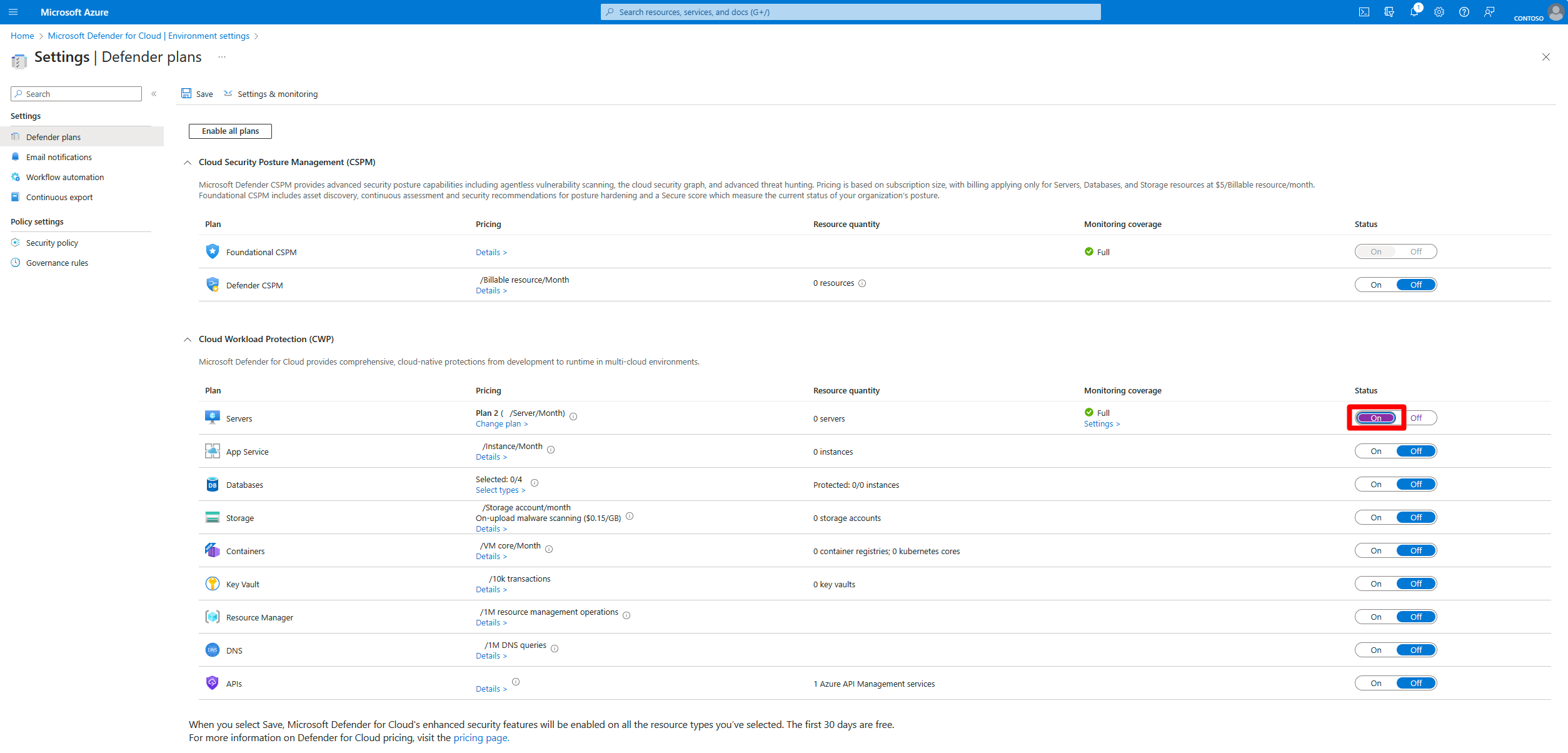
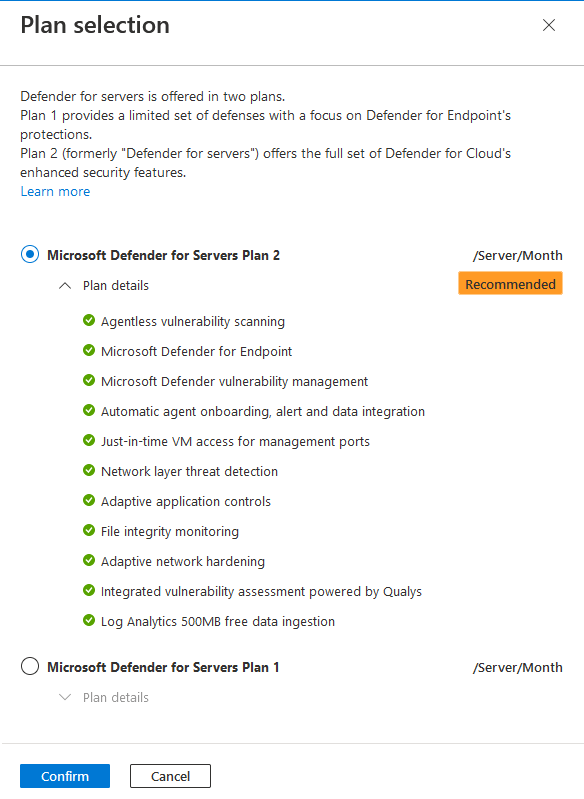
- Azure portal > Microsoft Defender for Cloud > Environment settings > the subscription. On Defender plans, set Servers to On. That picks Plan 2. Use Change plans to pick Plan 1 if that is the decision from Licensing. Save. A 30 day trial starts and cannot be paused.
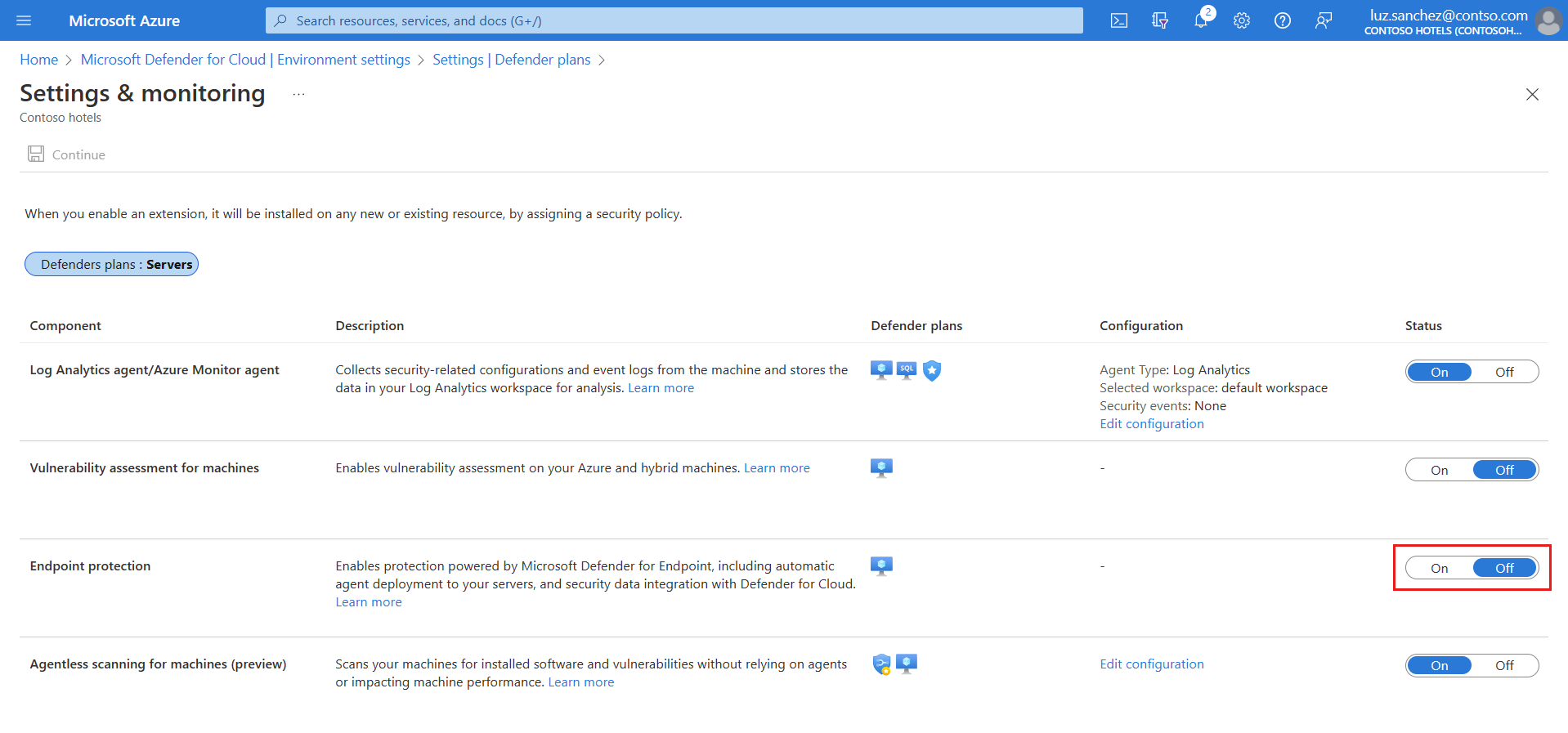
- Still in the subscription, open Settings and monitoring. Confirm Endpoint protection is On; if not, set On, Continue, Save. Off means no extension and no MDE data in Defender for Cloud. Recommended: On, unless the subscription is deliberately covered another way.
- Older subscriptions only. If Endpoint protection shows Partial, select Fix, then under Missing components enable Unified solution (subscriptions from before spring 2022, for 2012 R2 and 2016) and Linux machines (before summer 2021). Save, Continue. One-time actions. Enabling Linux reconfigures existing MDE for Linux installs.


-
Non-Azure machines: generate the Arc script. Azure portal > Azure Arc > Infrastructure > Machines > Onboard/Create > Onboard existing machines. Basics: subscription, resource group, region (metadata location, pick the closest), operating system, connectivity method (public or private endpoint, optional proxy as
http://proxy:port, optional Arc gateway), Authenticate machines manually. Tags: physical location or custom. AddArcSQLServerExtensionDeployment = Disabledif you do not want SQL instances auto-connected. DownloadOnboardingScript.ps1orOnboardingScript.shand run it elevated. For scale, Learn points at the service principal method. -
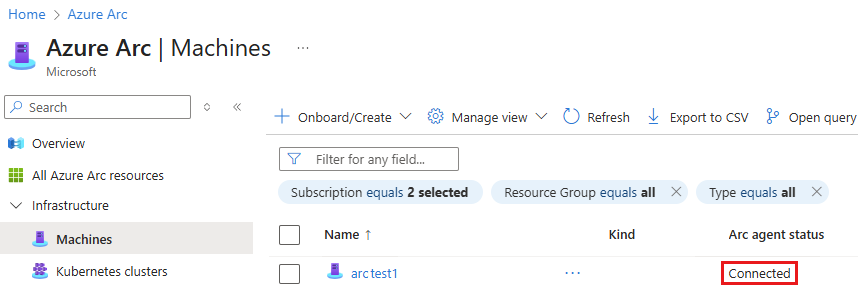
Confirm the machine shows Connected under Azure Arc > Machines. Defender for Cloud now treats it as an Azure resource and deploys the extension within about an hour.
- Optional, tenant-wide: Environment settings > Direct onboarding > On, pick the billing subscription, Save. Up to 24 hours to appear. Read Direct onboarding first; there is no pilot scope.

- Linux update control: tag the VM or Arc machine
ExcludeMdeAutoUpdate = trueto stop the extension auto-updatingmdatp.
# Tested on: TODO
# Enable Defender for Servers on the current subscription. Standard = On.
Set-AzSecurityPricing -Name "VirtualMachines" -PricingTier "Standard" -SubPlan P2
# Plan 1 instead
Set-AzSecurityPricing -Name "VirtualMachines" -PricingTier "Standard" -SubPlan P1
# Azure CLI equivalent
az security pricing create -n VirtualMachines --tier standard --subplan P2
az security pricing show -n VirtualMachines

# Arc: install and connect a Linux server (run as root)
wget https://aka.ms/azcmagent -O ~/Install_linux_azcmagent.sh
bash ~/Install_linux_azcmagent.sh            # add --proxy "proxy.contoso.com:8080" if needed
azcmagent connect \
  --resource-group "rg-arc-servers" \
  --tenant-id "<tenant-id>" \
  --location "eastus" \
  --subscription-id "<subscription-id>" \
  --cloud "AzureCloud"
# Arc: install and connect a Windows server (elevated)
msiexec.exe /i AzureConnectedMachineAgent.msi /qn /l*v "C:\Support\Logs\Azcmagentsetup.log"
& "$env:ProgramFiles\AzureConnectedMachineAgent\azcmagent.exe" connect `
  --resource-group "rg-arc-servers" `
  --tenant-id "<tenant-id>" `
  --location "eastus" `
  --subscription-id "<subscription-id>"
Extension handling. Learn's position is that Defender for Cloud deploys MDE.Windows and MDE.Linux itself. Publisher and type come from the Arc extensions table. The create commands below combine Learn's generic CLI syntax with that publisher and type; Learn gives no MDE-specific example or settings payload, so treat manual create as a last resort. TODO: capture the settings block from an auto-deployed extension in the dev tenant.
# Inspect what Defender for Cloud deployed
az vm extension list -g rg-prod --vm-name vm01 -o table
az vm extension show -g rg-prod --vm-name vm01 -n MDE.Windows --query "provisioningState"
az connectedmachine extension list --machine-name srv01 --resource-group rg-arc-servers -o table

# Remove the extension to force a redeploy (same tenant move) or as step 2 of offboarding
az vm extension delete -g rg-prod --vm-name vm01 -n MDE.Windows
az connectedmachine extension delete --extension-name MDE.Windows --machine-name srv01 --resource-group rg-arc-servers

# Manual create, Arc machine. Syntax from Learn, publisher and type from the Arc extension table. Untested.
az connectedmachine extension create \
  --machine-name srv01 --resource-group rg-arc-servers --location eastus \
  --name MDE.Windows --publisher Microsoft.Azure.AzureDefenderForServers --type MDE.Windows

# Manual create, Azure VM. Same caveat.
az vm extension set -g rg-prod --vm-name vm01 \
  --name MDE.Windows --publisher Microsoft.Azure.AzureDefenderForServers
For the legacy Unified solution and Linux toggles at scale, Learn points at Powershell scripts/MDE Integration/ in the Azure/Microsoft-Defender-for-Cloud GitHub repo.
Enable the plan on a subscription or a single machine, then the MDE integration setting.
PUT https://management.azure.com/subscriptions/{subscriptionId}/providers/Microsoft.Security/pricings/VirtualMachines?api-version=2024-01-01
{
  "properties": {
    "pricingTier": "Standard",
    "subPlan": "P2"
  }
}
Resource-level Plan 1 on one machine (Learn documents the VM form; Arc would use Microsoft.HybridCompute/machines):
PUT https://management.azure.com/subscriptions/{subscriptionId}/resourceGroups/{resourceGroupName}/providers/Microsoft.Compute/virtualMachines/{machineName}/providers/Microsoft.Security/pricings/virtualMachines?api-version=2024-01-01
{
  "properties": {
    "pricingTier": "Standard",
    "subPlan": "P1"
  }
}
The Endpoint protection toggle is the WDATP setting:
PUT https://management.azure.com/subscriptions/{subscriptionId}/providers/Microsoft.Security/settings/WDATP?api-version=2022-05-01
{
  "name": "WDATP",
  "type": "Microsoft.Security/settings",
  "kind": "DataExportSettings",
  "properties": {
    "enabled": true
  }
}
On new subscriptions WDATP covers the unified solution and Linux. WDATP_UNIFIED_SOLUTION and WDATP_EXCLUDE_LINUX_PUBLIC_PREVIEW exist only for legacy subscriptions.
Extension resource, read with ARM:
GET https://management.azure.com/subscriptions/{subscriptionId}/resourceGroups/{rg}/providers/Microsoft.Compute/virtualMachines/{vm}/extensions/MDE.Windows?api-version=2024-07-01
GET https://management.azure.com/subscriptions/{subscriptionId}/resourceGroups/{rg}/providers/Microsoft.HybridCompute/machines/{machine}/extensions/MDE.Windows?api-version=2024-07-10
Expect properties.publisher Microsoft.Azure.AzureDefenderForServers, properties.type MDE.Windows or MDE.Linux, properties.provisioningState Succeeded. TODO: confirm the api-version strings; the Learn pages used here do not state them.
Verify
- Azure portal > VM or Arc machine > Extensions:
MDE.WindowsorMDE.Linuxwith Provisioning succeeded. - Defender portal > Assets > Devices: onboarding status Onboarded. Can be onboarded with Defender for Cloud as discovery source means the sensor has not reported yet.
- Defender for Cloud > Inventory: filter by resource type. The icon separates Azure VM, Arc-enabled server and on-prem machine.
- Defender for Cloud > Recommendations: EDR solution should be installed on Virtual Machines (plus EC2 and GCP variants) goes healthy. These agentless checks need Plan 2 or Defender CSPM, cover Azure and multicloud only, and replace the MMA-era Endpoint protection should be installed on your machines and Endpoint protection health issues should be resolved on your machines. On-prem servers are not assessed.
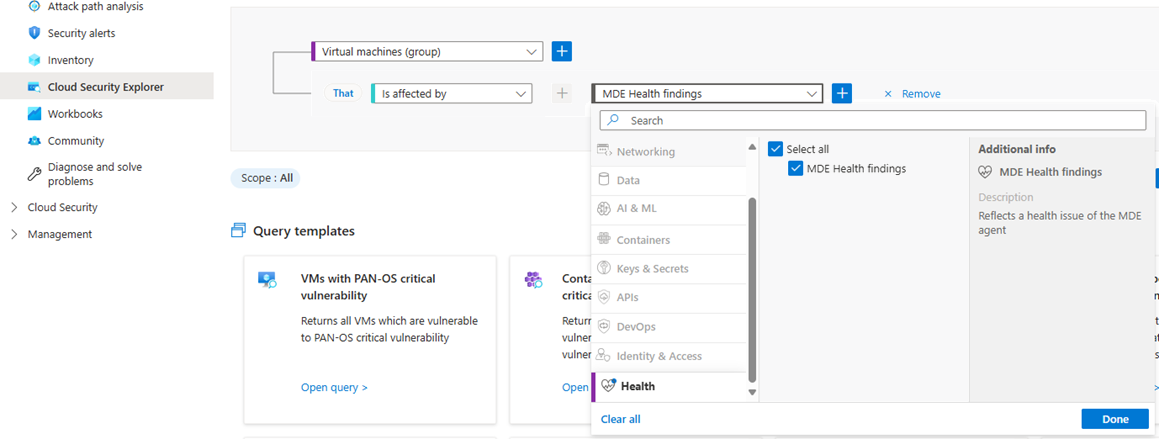
- Plan 2 or CSPM plus Plan 1: MDE health status, refreshed every four hours, split into installation, heartbeat and not applicable. Security explorer has saved queries for each.
On the box:
sc.exe query sense
sc.exe query Windefend
Get-ItemProperty 'HKLM:\SOFTWARE\Microsoft\Windows Advanced Threat Protection\Status'
Get-ItemProperty 'HKLM:\SOFTWARE\Microsoft\Windows Advanced Threat Protection\DeviceTags'
mdatp health --field healthy
mdatp health --field licensed
azcmagent show
Advanced Hunting, to list the servers that arrived through this path versus script onboarding:
DeviceInfo
| where OSPlatform startswith "WindowsServer" or OSPlatform == "Linux"
| summarize arg_max(Timestamp, *) by DeviceId
| project DeviceName, OSPlatform, OnboardingStatus, MachineGroup, DeviceManualTags, DeviceDynamicTags
TODO: confirm which DeviceInfo column, if any, distinguishes Defender for Cloud onboarded servers. Learn does not name one. Learn also offers the Defender for Servers Deployment Status workbook and the standard EDR detection test.
Troubleshoot
| Symptom | Likely cause | Fix |
|---|---|---|
| Extension missing after hours | Plan off, Endpoint protection Off, unsupported OS, or first subscription in the tenant | Check both toggles. First subscription allows 12 hours, later ones 1 hour. Confirm the OS is in the supported list. |
MDE.Windows provisioning failed | Prerequisites missing, proxy needs auth, MDE URLs blocked | Read C:\WindowsAzure\Logs\Plugins\Microsoft.Azure.AzureDefenderForServers.MDE.Windows. Run the MDE Client Analyzer. On 2012 R2 and 2016 check the SSU, LCU and Defender AV feature. |
MDE.Linux provisioning failed | Python 3 absent, /opt/microsoft/mdatp on noexec, SELinux or mount policy | Logs in /var/log/azure/Microsoft.Azure.AzureDefenderForServers.MDE.Linux/ and /var/log/microsoft/mdatp/install.log. `sudo journalctl --no-pager |
| Arc machine shows Disconnected | No heartbeat for 15 to 30 minutes | azcmagent show on the box. Fix network or service. It returns to Connected on its own. |
| Arc machine shows Expired | Disconnected more than 45 days, managed identity credential lapsed | Disconnect and reconnect with azcmagent. |
| Extension Succeeded, device not in Defender portal | Sensor already onboarded to another MDE tenant | Offboard from the old tenant, delete the extension, let Defender for Cloud redeploy. |
| Device listed twice, or billed twice | Same server reached MDE through direct onboarding and through Arc, with an old sensor that cannot be correlated | Update the sensor to at least 10.8555 (2019+), 10.8560 (2012 R2/2016 unified), 30.101.23052.009 (Linux AMD64), 30.101.25022.004 (Linux ARM64). Correlation is automatic once versions meet the minimum. |
| Server moved to another subscription, same tenant, still tied to old one | Extension state | Delete MDE.Linux or MDE.Windows; Defender for Cloud redeploys it. |
| Server moved to another tenant | Manual preparation needed | Contact Microsoft support before Defender for Cloud deploys MDE. |
| Device in Defender portal, nothing in Defender for Cloud | Non-Azure server onboarded by script, no Arc and direct onboarding Off | Install Arc, or turn on direct onboarding and wait up to 24 hours. |
| MDE health status blank | Plan 1 without Defender CSPM | Health status needs Plan 2, or CSPM with Plan 1. |
| EDR recommendation stays unhealthy on an on-prem Arc server | Agentless assessment does not cover on-prem | Use the Defender portal device page instead. |
| Plan turned off, sensor still installed | Automatic offboarding only disconnects | Expected. It stops EDR reporting and removes the extension but leaves the software and history. Uninstall by hand if required. |
| Client OS VM shows not applicable | MDE for servers does not licence client OS | Needs a user licence such as Microsoft 365 E5. |
Gotchas and limits
- One MDE tenant per Entra tenant. Defender for Cloud onboards to the MDE tenant of the Azure tenant that owns the subscription. A server already reporting to a different MDE tenant is not reassigned. Cross-tenant moves are a support case.
- Data location is fixed at first provisioning. Reset means a support ticket, and only if you own the MDE licence.
- Auto-provisioning scope is the whole subscription. No per-resource-group opt out in the integration setting. Resource-level plan control exists for Plan 1 through REST, the PowerShell script in the Microsoft repo, or the Granular Pricing Azure Policy definitions keyed on a tag.
- Direct onboarding is tenant-wide, up to 24 hours to settle, Plan 1 functionality only. Plan 2 on a directly onboarded server adds premium Defender Vulnerability Management and nothing else; Learn does not list the excluded features. Agentless scanning, file integrity monitoring, JIT and the 500 MB ingestion benefit are Plan 2 benefits on the Arc and Azure VM path; see Plan 2 features.
- Arc cost: the Arc overview gives no free-versus-paid breakdown. Attached services (Defender for Servers, Sentinel, Update Manager, machine configuration) carry their own pricing. TODO: pin the Arc pricing statement before quoting it to a client.
- Arc does not support Azure VMs. A connected server running SQL Server gets the SQL Arc extension automatically unless tagged out at connect time.
- Linux starts with Defender Antivirus in passive mode. Switch to active through policy; see Security settings management.
- Deleting the extension does not offboard MDE. Turning the plan off triggers automatic offboarding of eligible servers: sensor disconnected, extension removed, binaries and device history left behind. Plan 2 to Plan 1 or a subscription move does not offboard. Turning the plan back on before it finishes runs both actions asynchronously and reonboards after a few hours.
- Full offboarding by hand: Endpoint protection Off and Save, delete the extension, run the MDE offboarding package, optionally clear
AzureResourceId,SecurityWorkspaceIdandSecurityAgentIdunderDeviceTags. - Windows 10 Azure VMs are not supported through the extension. Multi-session Windows 10 Enterprise and AVD are. Office 365 GCC has no server monitoring through this integration. Linux is commercial cloud only.
- The MMA-based Endpoint protection recommendations are being retired. Do not build compliance reporting on them.
Further reading
- Simplified onboarding of Microsoft Defender for Endpoint using the Defender deployment tool, Jeffrey Appel, May 2026. Positions the new deployment tool against the Defender for Cloud and Arc path and states when each should be used for Azure, Arc and on-prem servers.
- How to Integrate Azure Arc-Enabled Servers with Microsoft Defender for Cloud, Nawaz Dhandala, OneUptime, February 2026. Shows the full CLI run from Connected Machine agent through plan enablement, explicit
az connectedmachine extension createforMDE.WindowsandMDE.Linux, and Azure Policy for fleet rollout, which Learn does not give as one sequence. - Microsoft Defender XDR Security Settings Management: The Complete Implementation Guide, Kaido Järvemets, March 2026. Covers what to do after this path lands the sensor on Arc servers: policy enforcement and enrolment monitoring without Intune.
Only three posts in the window qualified; the Tech Community posts on MDE extension status checks and Arc connectivity scripts date from early and mid 2025.
My notes
TODO: Sohail's notes after verification.
Changelog
| Date | Change | Source |
|---|---|---|
| 2026-10-22 | Drafted from Learn, with Learn images and diagrams | [1] |