Onboarding Linux servers
What it is
Defender for Endpoint on Linux is one package, mdatp, that carries the AV engine, the EDR sensor, vulnerability management and the mdatp CLI. You install it from Microsoft's package repo (packages.microsoft.com), then onboard it to your tenant with a Python script or a JSON file from the Defender portal. Once onboarded, the server shows up in the Defender device inventory like any other endpoint and is covered by whatever Defender for Servers plan the subscription has. See the overview for how the plans split.
There are five ways to get it on a box. The installer script mde_installer.sh and the newer Defender deployment tool wrap the repo setup, install and onboarding into one run. Manual repo setup is the same steps by hand. Defender for Cloud pushes the MDE.Linux VM extension to Azure VMs and Arc servers, which is covered in onboarding through Defender for Cloud. Ansible, Puppet and Chef just orchestrate one of the first two.
It is not a kernel module. Since agent 101.23082.0006 the supplementary event data comes from an eBPF sensor, and auditd is gone as a provider from 101.2408.0000. It is also not a full MDM. Policy comes from a JSON file you own, or from security settings management if you want the Intune policy model.
Licensing and prerequisites
- Servers: Defender for Servers Plan 1 or Plan 2, Defender for Endpoint for servers, or Defender for Business servers. Linux desktops (public preview) need MDE P2, which is in M365 E5 and E7.
- Hardware minimums: 1 core, 1 GB RAM, 2 GB disk. Learn says more for high-throughput workloads.
systemdon the host. Device isolation needsiptablesandip6tables, or the-nftpair.- Root on the box, and an MDE RBAC role that can download onboarding packages.
- Package dependencies:
glibc >= 2.17on RPM,libc6 >= 2.23on DEB. Mariner needsattr,diffutils,libacl,libattr,libselinux-utils,selinux-policy,policycoreutils.uuid-runtimestopped being a dependency at 101.25042.0003. - Python 3 for the onboarding script. Defender for Cloud calls it out for RHEL 8.x and Ubuntu 20.04 or later.
- Network: the streamlined connectivity URL set. Static and transparent proxies work. PAC, WPAD, authenticated proxies and TLS inspection do not. The deployment tool also needs
msdefender.download.prss.microsoft.comon 443.
Supported distros from the prerequisites page, as of 2026-10-22:
| Distro | x64 | ARM64 |
|---|---|---|
| RHEL | 7.2+, 8.x, 9.x, 10.x | 8.x, 9.x, 10.x |
| CentOS | 7.2+, 8.x | none |
| CentOS Stream | 8.x, 9.x, 10.x | 8.x, 9.x, 10.x |
| Ubuntu LTS | 16.04 to 26.04 | 20.04 to 26.04 |
| Ubuntu Pro | 22.04, 24.04 | 22.04, 24.04 |
| Debian | 9 to 13 | 11, 12, 13 |
| SLES | 12.x, 15.x, 16.x | 15 SP5, SP6, 16.x |
| openSUSE Leap | 15.6, 16.x | 15.6, 16.x |
| Oracle Linux | 7.2+, 8.x, 9.x, 10.x | 8.x, 9.x, 10.x |
| Amazon Linux | 2, 2023 | 2 (ends 2026-10-31, last build 101.25122.0004), 2023 |
| Fedora | 33 to 44 | 40 to 44 |
| Rocky | 8.7+, 9.2+, 10.x | same |
| Alma | 8.4+, 9.2+, 10.x | same |
| Mariner | 2 | 2 |
Kernel: Learn calls the agent kernel-version agnostic on listed distros. Anything unlisted needs 3.10.0-327 or later and is unsupported anyway. Custom builds derived from a supported vendor distro are treated as custom configurations; support needs a repro on a clean image. The eBPF sensor has its own per-distro minimum kernels, listed under How it works.
Filesystems: real-time protection covers btrfs, ecryptfs, ext2/3/4, fuseblk, jfs, overlay, ramfs, reiserfs, tmpfs, udf, vfat, xfs. Custom scans add network and FUSE types including nfs, cifs, smb, glusterfs, lustre, s3fs, blobfuse. NFS v3 exports need no_root_squash or scans fail on permissions. Another fanotify-blocking product on the same host is unsupported and can hang the box; the exception is fapolicyd on RHEL and Fedora.
How it works
Install drops the binaries under /opt/microsoft/mdatp, creates the mdatp system user and the mdatp systemd unit. Create the user yourself before install if you need a fixed UID and GID. The onboarding script or mdatp_onboard.json writes the tenant binding under /etc/opt/microsoft/mdatp/. On first start the daemon pulls definitions, then reports licensed true and an org_id. healthy stays false until definitions finish. The device appears in the portal in 5 to 20 minutes.
Two sensors matter. Real-time protection hooks file access through fanotify; that is why two fanotify-blocking products on one host is a hard no. Supplementary events (process, file, socket) come from the eBPF provider since 101.23082.0006, on by default. mdatp health shows supplementary_events_subsystem: ebpf. If eBPF is disabled or the kernel cannot run it, the agent drops to Netlink: process events keep flowing, file rename or unlink and socket events are lost. Auditd stopped being an option at 101.2408.0000, and 101.24072.0000 was the last build that carried it.
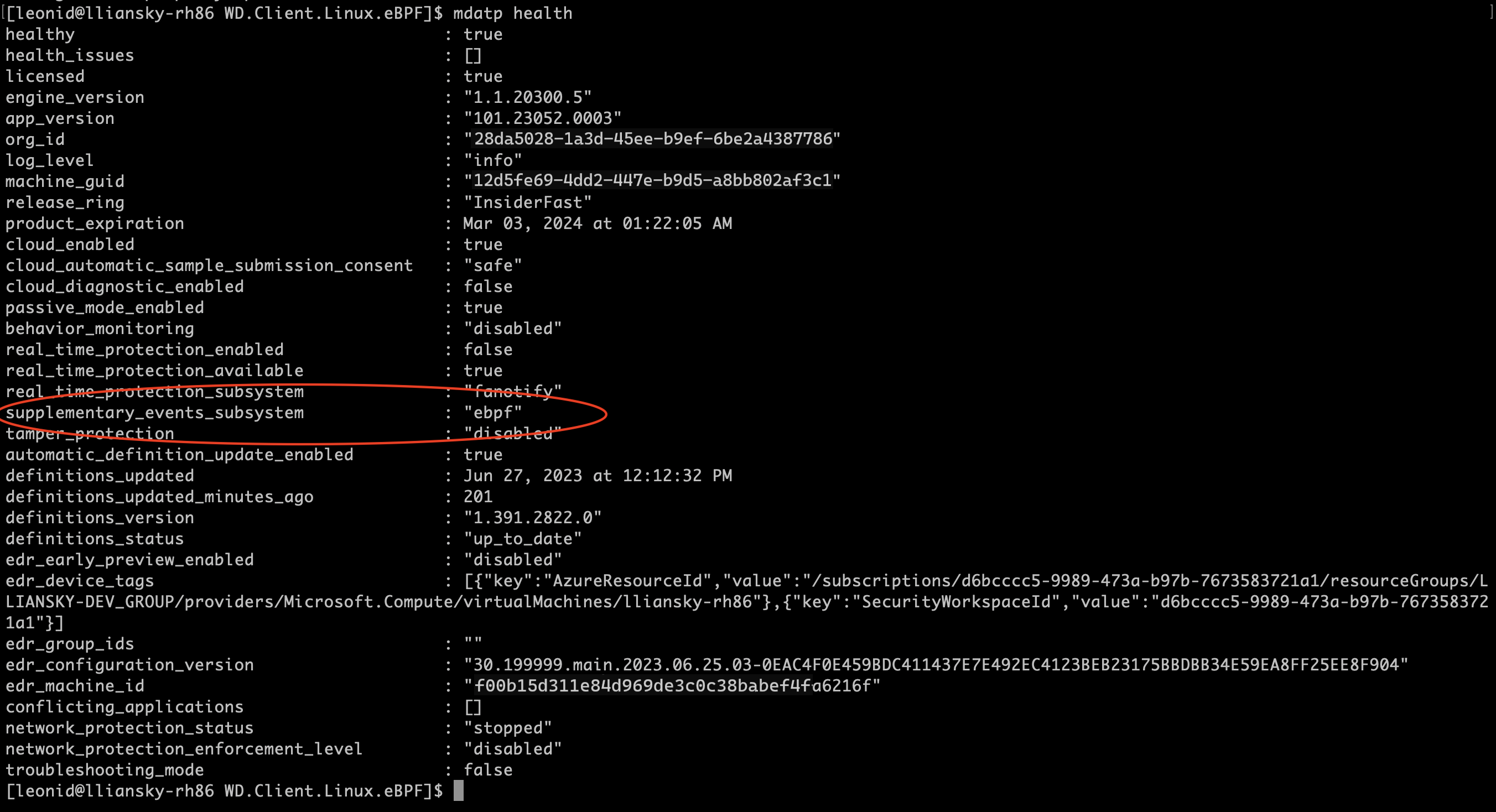
eBPF minimum kernels from Learn: Ubuntu 16.04 4.15.0, Fedora 33 5.8.15, CentOS and RHEL 7.6 3.10.0-957.10, SLES 15 5.3.18-18.47, Debian 9 4.19.0, Oracle RHCK 7.9 3.10.0-1160, Oracle UEK 7.9 5.4, Amazon Linux 2 5.4.261-174.360, Rocky and Alma 8 4.18.0-425 and 4.18.0-305, Rocky and Alma 9 5.14.0-284. Check with uname -a.
Policy precedence is simple. Anything in mdatp_managed.json is [managed] and wins over local mdatp config values. Exclusions set in the managed file can only be removed there. The exclusionSettings.mergePolicy key set to admin_only throws away local exclusions in every scope; merge keeps both. The default enforcement level in the managed file schema is passive, so a file that sets nothing else silently leaves you in passive mode. Set enforcementLevel to real_time on purpose.
Updates are plain package updates from the same repo. Each build expires nine months after release; an expired build still gets definitions but reports missing license and healthy false. Channels are prod, insiders-slow and insiders-fast; changing channel means uninstall and reinstall. The MDE.Linux extension auto-updates unless the VM carries tag ExcludeMdeAutoUpdate = true.
Configure
- Portal
- Terminal
- Graph API
Onboarding package and deployment tool:
- Defender portal > System > Settings > Endpoints > Device management > Onboarding. Operating system: Linux Server. Deployment method: Local Script for the Python onboarding script, or "Your preferred Linux configuration management tool" for
mdatp_onboard.json. DownloadWindowsDefenderATPOnboardingPackage.zip. Do not repackage it; Learn says that trips tamper alerts and breaks updates.
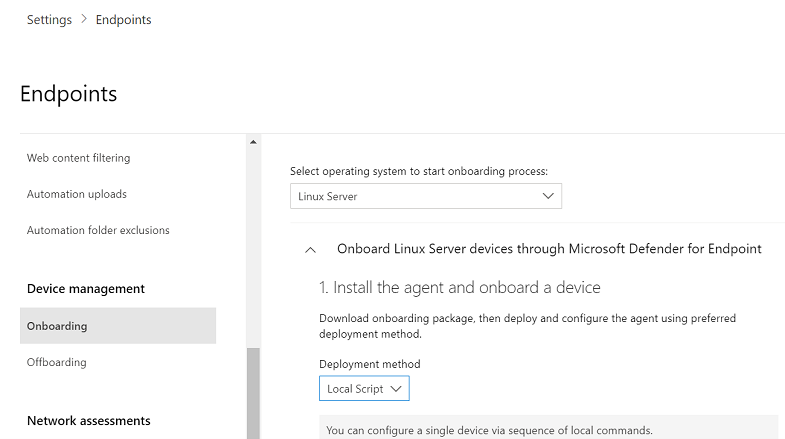
- Same page, Linux: Defender deployment tool > Download package gives
GatewayLinuxDefenderDeploymentTool.zip. The script inside installs and onboards in one run and is tenant-specific. GA since July 2026.

- After a deployment tool run, Device inventory > device > Timeline, search
DefenderDeployment. Steps are Start, Download, Prerequisite check, Installation, Sensor initialization, Sequence completion.

Defender for Cloud path (details in onboarding through Defender for Cloud):
- Azure portal > Microsoft Defender for Cloud > Environment settings > subscription > Settings and monitoring > Endpoint protection > On > Continue > Save. First subscription in a tenant can take up to 12 hours, later ones about an hour. If the agent is already installed, Defender for Cloud detects it and reconfigures it. A device bound to another tenant is not reassigned; offboard it first.
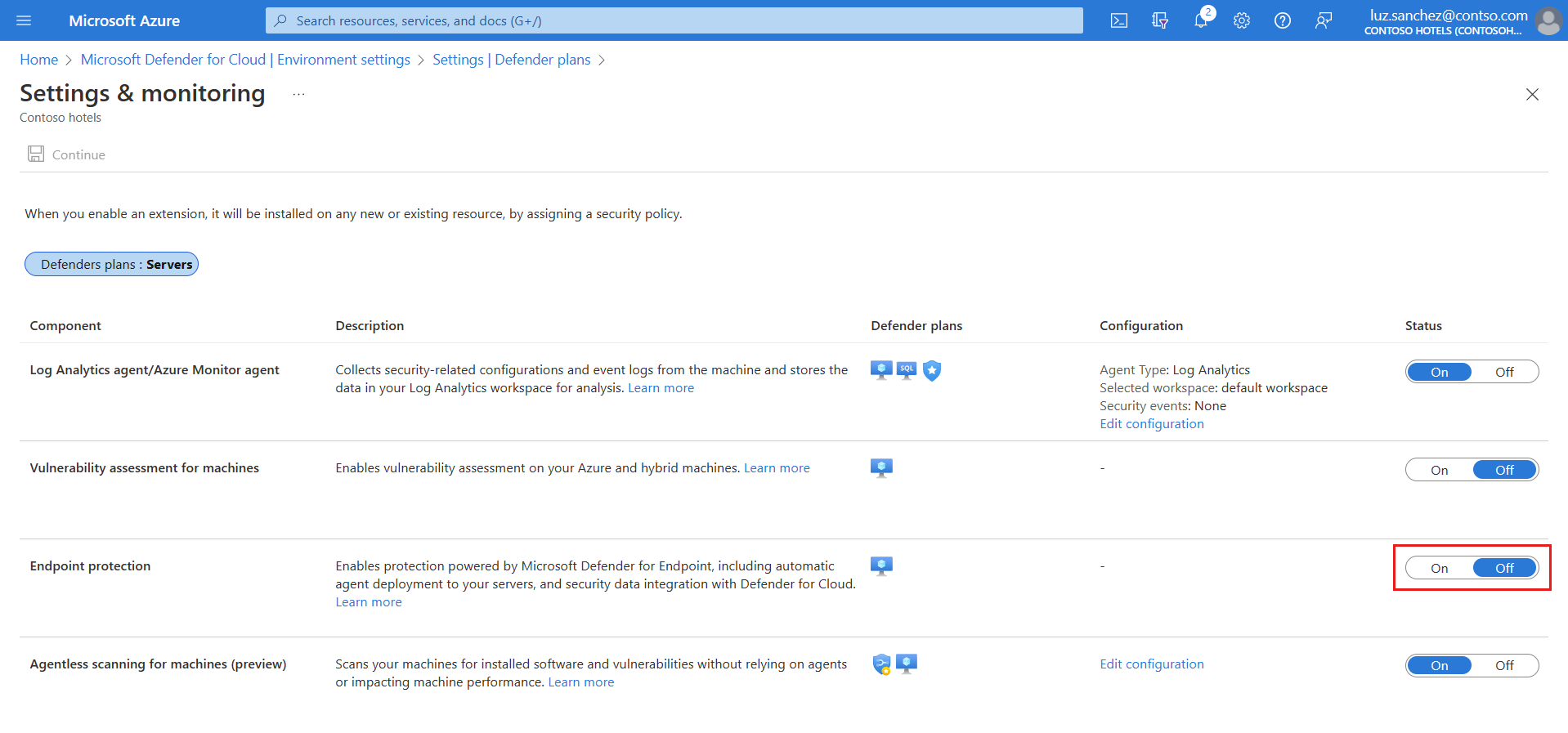
- Subscriptions created before summer 2021 show Partial. Select Fix > Missing components > Linux machines > Enable > Save.

AV policy through security settings management (full setup in security settings management):
- Defender portal > Endpoints > Configuration management > Enforcement scope > enable Linux, All devices or On tagged devices with tag
MDE-Management. Enrolment can take up to 24 hours. Agent 101.23052.0009 or later. - Entra dynamic device group on Linux OS type.
- Intune > Endpoint security > Antivirus > Create policy > Platform Linux. Profiles: Microsoft Defender Antivirus, Microsoft Defender Antivirus exclusions. Global exclusions (AV plus EDR) live under Endpoint detection and response > Microsoft Defender Global Exclusions (AV+EDR) and only work on devices managed through this channel. Exclusions from all three profiles merge into one superset.

Settings worth getting right: enforcement level real_time not passive, behaviorMonitoring enabled (only works under real_time), cloudService.enabled true, automaticDefinitionUpdateEnabled true, unmonitoredFilesystems left at the default of cifs, fuse, nfs, nfs4, smb unless you want RTP walking network mounts.
# Tested on: TODO
# All commands from Learn. Run as root or with sudo.

# ---- Option A: installer script (Learn's recommended path) ----
# Download mde_installer.sh from github.com/microsoft/mdatp-xplat, linux/installation/
chmod +x mde_installer.sh
unzip WindowsDefenderATPOnboardingPackage.zip   # gives MicrosoftDefenderATPOnboardingLinuxServer.py
sudo ./mde_installer.sh --pre-req               # OS, CPU, RAM, disk check only
sudo ./mde_installer.sh --install --onboard ./MicrosoftDefenderATPOnboardingLinuxServer.py --channel prod --pre-req
# Useful flags: --passive-mode | --rtp-mode, --tag GROUP Servers, --mdatp 101.26042.0011,
#   --http-proxy URL --https-proxy URL, --install-path /custom, --use-local-repo,
#   --upgrade, --downgrade --mdatp VER, --remove, --clean, --log-path FILE, --skip_conflict

# ---- Option B: Defender deployment tool ----
unzip GatewayLinuxDefenderDeploymentTool.zip
chmod +x defender_deployment_tool.sh
sudo ./defender_deployment_tool.sh --pre-req
sudo ./defender_deployment_tool.sh --connectivity-test
sudo bash defender_deployment_tool.sh                       # install + onboard, prod
sudo ./defender_deployment_tool.sh --channel insiders-slow  # other channel
sudo ./defender_deployment_tool.sh --only-onboard           # mdatp already installed
# Logs: /tmp/defender_deployment_tool.log

# ---- Option C: manual repo, RHEL family (RHEL, CentOS, Oracle, Alma, Rocky, Fedora, AL2) ----
sudo dnf install dnf-plugins-core
sudo dnf config-manager --add-repo https://packages.microsoft.com/config/rhel/9/prod.repo   # swap 9 for your major
sudo rpm --import https://packages.microsoft.com/keys/microsoft.asc
sudo dnf install mdatp
# Several MS repos present: sudo dnf --enablerepo=packages-microsoft-com-prod install mdatp

# ---- Option C: manual repo, SLES ----
sudo zypper addrepo -c -f -n microsoft-prod https://packages.microsoft.com/config/sles/15/prod.repo
sudo rpm --import https://packages.microsoft.com/keys/microsoft.asc
sudo zypper install mdatp

# ---- Option C: manual repo, Ubuntu and Debian ----
sudo apt install curl libplist-utils gpg apt-transport-https
curl -o microsoft.list https://packages.microsoft.com/config/ubuntu/24.04/prod.list   # distro/version/channel
sudo mv ./microsoft.list /etc/apt/sources.list.d/microsoft-prod.list
# Key location depends on release:
#   Debian 11 / Ubuntu 22.04 and earlier:
curl -sSL https://packages.microsoft.com/keys/microsoft.asc | gpg --dearmor | sudo tee /etc/apt/trusted.gpg.d/microsoft.gpg > /dev/null
#   Debian 12 / Ubuntu 24.04 and later:
curl -sSL https://packages.microsoft.com/keys/microsoft.asc | gpg --dearmor | sudo tee /usr/share/keyrings/microsoft-prod.gpg > /dev/null
#   Debian 13 and later use the 2025 key:
curl -sSL https://packages.microsoft.com/keys/microsoft-2025.asc | gpg --dearmor | sudo tee /usr/share/keyrings/microsoft-prod.gpg > /dev/null
sudo chmod o+r /usr/share/keyrings/microsoft-prod.gpg
sudo apt update
sudo apt install mdatp

# ---- Onboard (manual paths) ----
mdatp health --field org_id                       # blank before onboarding
sudo python3 MicrosoftDefenderATPOnboardingLinuxServer.py
# or drop mdatp_onboard.json into /etc/opt/microsoft/mdatp/
mdatp health --field org_id
mdatp health --field licensed
mdatp health --field healthy                      # false until definitions_status is up_to_date
mdatp health --field definitions_status

# ---- Proxy ----
# Install time: the package manager needs it. Per command, no sudo between var and apt:
HTTPS_PROXY="http://proxy.server:port/" apt install mdatp
# Post install:
mdatp config proxy set --value http://proxy.server:port
mdatp connectivity test                           # every line should read [OK]
curl -v https://winatp-gw-weu.microsoft.com 2>&1 | grep issuer   # issuer must be Microsoft, not your proxy CA

# ---- Health and sensor ----
mdatp health
mdatp health --field supplementary_events_subsystem   # ebpf expected
mdatp health --field antivirus_enforcement_level      # real_time | audit | on_demand | passive
mdatp health --field conflicting_applications
mdatp health --field product_expiration
mdatp health --details edr
mdatp version

# ---- Local AV config (managed JSON overrides these) ----
mdatp config real-time-protection --value enabled
mdatp config behavior-monitoring --value enabled
mdatp config passive-mode --value disabled
mdatp config cloud --value enabled
mdatp config cloud-automatic-sample-submission --value enabled
mdatp config scan-archives --value enabled
mdatp config maximum-on-demand-scan-threads --value 2
sudo mdatp config ebpf-supplementary-event-provider --value enabled
mdatp edr tag set --name GROUP --value Servers

# ---- Exclusions (default scope epp; global needs 101.24092.0001+, no wildcards, path must exist) ----
mdatp exclusion folder add --path /var/lib/postgresql/
mdatp exclusion folder add --path "/var/*/tmp"
mdatp exclusion process add --path /usr/lib/postgresql/16/bin/postgres --scope global
mdatp exclusion extension add --name .log
mdatp exclusion list

# ---- Managed JSON ----
sudo mkdir -p /etc/opt/microsoft/mdatp/managed
python3 -m json.tool /etc/opt/microsoft/mdatp/managed/mdatp_managed.json   # exit 0 = valid
mdatp health | grep managed

# ---- Performance ----
mdatp config real-time-protection-statistics --value enabled   # needs 100.90.70+, RTP on
mdatp diagnostic real-time-protection-statistics --sort --top 4
sudo mdatp log level set --level debug
sudo mdatp diagnostic hot-event-sources files
sudo mdatp diagnostic hot-event-sources executables
sudo mdatp log level set --level info
sudo mdatp diagnostic ebpf-statistics              # 20 second sample, top initiators and syscalls

# ---- Detection tests ----
mdatp health --field real_time_protection_enabled
curl -o /tmp/eicar.com.txt https://secure.eicar.org/eicar.com.txt
mdatp threat list                                  # file should be quarantined
# EDR: download https://aka.ms/MDE-Linux-EDR-DIY, then
chmod +x mde_linux_edr_diy.sh && ./mde_linux_edr_diy.sh   # alert in the portal within minutes

# ---- Updates ----
sudo dnf update mdatp                              # RHEL family (yum on 7)
sudo zypper update mdatp                           # SLES
sudo apt-get install --only-upgrade mdatp          # Ubuntu, Debian
# Learn's cron example, first half of the month, Sundays 06:00:
# 0 6 * * sun [ $(date +\%d) -le 15 ] && sudo apt-get install --only-upgrade mdatp >> ~/mdatp_cron_job.log

# ---- Diagnostics and logs ----
sudo mdatp diagnostic create                       # prints zip path
sudo journalctl --no-pager | grep 'microsoft-mdatp'
# /var/log/microsoft/mdatp/install.log
# /var/log/microsoft/mdatp/microsoft_defender_core.log   (eBPF activity)
# /var/log/azure/Microsoft.Azure.AzureDefenderForServers.MDE.Linux/   (extension)

# ---- Offboard and uninstall ----
sudo python3 MicrosoftDefenderATPOffboardingLinuxServer_valid_until_YYYY-MM-DD.py
# or copy mdatp_offboard.json to /etc/opt/microsoft/mdatp/
mdatp health --field health_issues                 # expect "missing license"
sudo ./defender_deployment_tool.sh --remove --clean
sudo apt purge mdatp    # or: sudo dnf remove mdatp / sudo zypper remove mdatp
Minimal managed file for a server fleet, keys from the preferences page:
{
  "antivirusEngine": {
    "enforcementLevel": "real_time",
    "behaviorMonitoring": "enabled",
    "scanAfterDefinitionUpdate": true,
    "scanArchives": true,
    "maximumOnDemandScanThreads": 2,
    "nonExecMountPolicy": "unmute",
    "unmonitoredFilesystems": ["cifs", "fuse", "nfs", "nfs4", "smb"],
    "threatTypeSettings": [
      { "key": "potentially_unwanted_application", "value": "block" },
      { "key": "archive_bomb", "value": "audit" }
    ]
  },
  "cloudService": {
    "enabled": true,
    "diagnosticLevel": "required",
    "automaticSampleSubmissionConsent": "safe",
    "automaticDefinitionUpdateEnabled": true,
    "cloudBlockLevel": "normal"
  },
  "features": {
    "ebpfSupplementaryEventProvider": "enabled"
  },
  "edr": {
    "tags": [ { "key": "GROUP", "value": "LinuxServers" } ]
  },
  "exclusionSettings": {
    "mergePolicy": "admin_only",
    "exclusions": [
      { "$type": "excludedPath", "isDirectory": true, "path": "/var/lib/postgresql", "scopes": ["epp"] },
      { "$type": "excludedFileName", "name": "/usr/lib/postgresql/16/bin/postgres", "scopes": ["global"] }
    ]
  }
}
GROUP is the only tag key the agent accepts. Scheduled scans, network protection and offline definition mirrors use the scheduledScan, networkProtection and offlineDefinitionUpdate* keys on the same page.
Config management in one paragraph each. Ansible: Learn's recommended playbook copies the onboarding JSON to /tmp/mde_install/mdatp_onboard.json and runs mde_installer.sh --install --channel prod --onboard through ansible.builtin.script; the sample is ansible.install_mdatp_simplified.yaml in microsoft/mdatp-xplat, and the older manual playbook uses apt_repository or yum_repository plus the apt or dnf module with enablerepo. Puppet: a module install_mdatp with files/mdatp_onboard.json and files/mde_installer.sh, an exec that runs the installer, or the manual variant with apt::source and yumrepo and the JSON placed at /etc/opt/microsoft/mdatp/mdatp_onboard.json mode 0600 before the package resource; note the Learn sample stages the JSON in /tmp with mode 0777. Chef: cookbook mdatp with install_mdatp.rb running the installer in a bash resource or branching on platform_family to apt_repository or yum_repository, then file ... action :create_if_missing for the onboarding JSON, tested with chef-client --local-mode --runlist 'recipe[mdatp]'. None of the three deploy mdatp_managed.json in Learn's samples; add a file resource for it yourself. Microsoft does not support the third-party tooling itself.
Inventory from the MDE API. osPlatform is a documented filter property but the page does not list its values, and it has no Linux example. TODO: confirm the exact osPlatform string for Linux from a real response in the dev tenant before relying on the filter.
GET https://api.security.microsoft.com/api/machines?$filter=osPlatform eq 'Linux' and healthStatus eq 'Active'&$top=1000
Authorization: Bearer {token}
Permissions Machine.Read.All or Machine.ReadWrite.All (app) or Machine.Read (delegated). $top max 10,000. Rate limit 100 calls a minute, 1,500 an hour. No machines returns 404, not an empty array.
Defender for Cloud integration switch per subscription, ARM API version 2022-05-01:
PUT https://management.azure.com/subscriptions/{subscriptionId}/providers/Microsoft.Security/settings/WDATP?api-version=2022-05-01
{
  "name": "WDATP",
  "type": "Microsoft.Security/settings",
  "kind": "DataExportSettings",
  "properties": { "enabled": true }
}
Intune Linux AV policy through Graph: the Linux profiles are settings catalog objects, same as the Windows ones in security settings management. List them with the antivirus template family and filter on platform.
GET https://graph.microsoft.com/beta/deviceManagement/configurationPolicies?$filter=templateReference/templateFamily eq 'endpointSecurityAntivirus'&$expand=assignments
TODO: capture the platforms and templateReference/templateId values for the Linux Microsoft Defender Antivirus and Antivirus exclusions profiles from the dev tenant. Learn does not publish them for Linux. Assignment is the usual configurationPolicies/{id}/assign with an Entra device group; filters are ignored on the MDE-attach channel.
Verify
mdatp health:healthy true,licensed true,org_idmatches the tenant,definitions_status up_to_date,real_time_protection_enabled true,supplementary_events_subsystem ebpf,conflicting_applicationsempty.mdatp connectivity test: every CDN, gateway and events URL reads[OK].- EICAR download lands in
mdatp threat listand is quarantined. To check an exclusion, drop EICAR inside the excluded folder; no detection means the exclusion works. - EDR DIY script raises an alert in the portal within minutes.
- Defender portal > Device inventory: device present, OS Linux, sensor health Active. 5 to 20 minutes after onboarding.
- Azure path: VM > Extensions >
MDE.Linuxshows Provisioning succeeded. - Security settings management: device page > MDE Enrollment status Success, Configuration management > Security policies tab lists the Linux AV policy.
eBPF state across the fleet, from the eBPF support page:
DeviceTvmInfoGathering
| where OSPlatform == "Linux"
| extend EbpfStatus = AdditionalFields["EBPF STATUS"]
| project DeviceName, OSPlatform, EbpfStatus, Timestamp
Agent version and expiry across the fleet, so you catch nine-month expiries before licensed flips to false:
DeviceTvmSoftwareInventory
| where SoftwareName == "defender_for_linux"
| project DeviceName, OSDistribution, SoftwareVersion
| order by SoftwareVersion asc
Deployment tool progress fleet-wide:
DeviceEvents
| where ActionType == "DefenderDeploymentToolEvent"
| summarize arg_max(Timestamp, *) by DeviceName
| project DeviceName, Timestamp, AdditionalFields
Troubleshoot
| Symptom | Likely cause | Fix |
|---|---|---|
licensed false, org_id blank | Onboarding step skipped, or installer run without --onboard | Run sudo python3 MicrosoftDefenderATPOnboardingLinuxServer.py or place mdatp_onboard.json in /etc/opt/microsoft/mdatp/. Re-check org_id. |
licensed false, health_issues has missing license, was fine before | Build expired after nine months, or the device was offboarded | mdatp health --field product_expiration. Update the package. If offboarded on purpose, uninstall. |
healthy false right after install | Definitions still downloading | mdatp health --field definitions_status. Wait for up_to_date. If stuck, run mdatp connectivity test. |
healthy false, conflicting_applications lists another product | Second fanotify-blocking agent on the host | Remove it, or set enforcementLevel to passive. fapolicyd on RHEL and Fedora is the only supported exception. |
supplementary_events_subsystem not ebpf, file and socket events missing in timeline | Kernel below the eBPF minimum, unlisted distro, or provider disabled | uname -a against the eBPF kernel table. sudo mdatp config ebpf-supplementary-event-provider --value enabled. Netlink fallback keeps process events only. |
| Kernel panic or hang after enabling eBPF | RHEL 8.1 with SAP, Oracle 8.8 UEK 5.15.0-0.30.20, Oracle 7.9 with ksplice | Move to a kernel outside the known-bad list. Learn allows disabling the eBPF provider as a stopgap. For ksplice, stop mdatp around the patch window with cron. |
| Defender audit rules still present after moving to eBPF | auditd in immutable mode froze the rules file | Confirm eBPF mode, delete /etc/audit/rules.d/mdatp.rules, reboot, sudo auditctl -l should show only your rules. |
wdavdaemon high CPU | One process or path generating most scan events | mdatp diagnostic real-time-protection-statistics --sort --top 4, then hot-event-sources and ebpf-statistics. Add a global process exclusion for the top initiator, AV exclusion for the hot path. Check nothing else is running RTP. |
apt or dnf cannot find mdatp, or GPG error | Wrong [distro]/[version]/[channel] in the repo URL, key in the wrong keyring for the release | Rebuild the repo file for the exact major. Debian 12 and Ubuntu 24.04 want /usr/share/keyrings/microsoft-prod.gpg; Debian 13 wants microsoft-2025.asc. |
| Dependency failure on install | glibc or libc6 too old, Mariner selinux packages missing | Install the listed dependencies by hand, then retry. Older than 101.25032.0000 also wanted mde-netfilter. |
mdatp.service not found or daemon will not start | Unit file missing, /opt is a symlink, noexec mount, SELinux denial, mdatp user missing | Copy /opt/microsoft/mdatp/conf/mdatp.service to the systemd path. Bind-mount /opt/microsoft. findmnt -T /opt. Create the user with useradd --system --no-create-home --user-group --shell /usr/sbin/nologin mdatp. |
mdatp: command not found | Symlink missing | sudo ln -sf /opt/microsoft/mdatp/sbin/wdavdaemonclient /usr/bin/mdatp |
| EICAR not detected, service running | File on a filesystem RTP does not cover, or path is excluded | findmnt -T <file> against the supported list. mdatp exclusion list. |
connectivity test fails, curl error 35 or 60, 502 | TLS inspection on the proxy, or PAC or authenticated proxy | Exempt the MDE URLs from inspection. `curl -v ... |
| Installed and licensed, but no telemetry and slow commands | Proxy set for the package manager but not for the daemon | mdatp config proxy set --value http://proxy:port, or cloudService.proxy in the managed file. |
MDE.Linux extension failed | Python 3 missing, /opt/microsoft/mdatp on noexec, fanotify conflict, Arc agent unhealthy, device bound to another tenant | Extension log under /var/log/azure/Microsoft.Azure.AzureDefenderForServers.MDE.Linux/, /var/log/microsoft/mdatp/install.log, azcmagent show. Offboard from the old tenant first. |
| Managed settings not applied | Invalid JSON, wrong path, setting needs restart | python3 -m json.tool on the file. Path is /etc/opt/microsoft/mdatp/managed/mdatp_managed.json. cloud-diagnostic and log rotation need a daemon restart. |
| Linux AV policy from Intune never lands | Device not enrolled on the MDE-attach channel, agent older than 101.23052.0009, profile assigned to a user group | See security settings management and MDE troubleshooting. |
Gotchas and limits
- eBPF is the only supplementary provider on current builds. Auditd exclusions do not migrate. If a kernel cannot do eBPF you get Netlink, which drops file and socket events without any error. Check
supplementary_events_subsystemon every onboarded box, not just the pilot. - The managed file default for
enforcementLevelispassive. A file that only sets exclusions leaves AV passive. Setreal_timeexplicitly.behaviorMonitoringandscanAfterDefinitionUpdatedo nothing unless the level isreal_time. - Global exclusions mute events at the sensor, so they remove EDR visibility too. No wildcards, no extensions, path must exist at the time you add it, and process exclusions need the full path. Use them for performance only, and keep AV-only
eppexclusions for the rest. Exclusion paths must be hard paths, not symlinks. - Managed exclusions can only be removed from the managed file.
mergePolicy admin_onlywipes local ones silently. - Channel switch means uninstall and reinstall. Install path cannot change after install. Major OS version upgrades need uninstall, upgrade, reinstall.
- Nine-month build expiry. Expired builds keep getting definitions but report
missing license. Pin an update cadence, or let theMDE.Linuxextension auto-update and tagExcludeMdeAutoUpdate = truewhere you must freeze. - SELinux: Learn's install troubleshooting says set permissive to get the service started, then revert immediately. Defender for Cloud guidance says do not disable SELinux or mount protections as a first step. Treat permissive as a diagnostic, never a fix. Mariner pulls in the selinux packages as dependencies.
noexecon the filesystem holding/opt/microsoft/mdatpblockswdavdaemon. Check withfindmntbefore deploying to hardened images.nonExecMountPolicy muteskips scanningnoexecmounts; it does not fix this.- Container hosts:
overlayis a supported RTP filesystem, so every layer write is a scan event. Learn says nothing specific about container hosts beyond that. TODO: lab-test exclusion strategy for a Docker or containerd host and record CPU before and after. - Two fanotify-blocking agents on one host can hang it. The installer's
--skip_conflictflag exists; using it on a box with another AV is on you. - Onboarding and offboarding packages are tenant-specific; the offboarding package expires on the date in its filename. Repackaging either is unsupported and trips tamper alerts.
- Offboarding leaves the package installed and licensed false. The portal marks the device inactive after 7 days and keeps the profile up to 180 days. Inactive is not proof of offboarding; check
health_issueson the box. - Defender for Cloud does not auto-provision VMs built from generalized images. Use CLI, REST or Azure Policy for those. Enabling the Linux integration is one-way; disabling the plan does not undo it.
- Linux desktop support is in public preview and licensed under MDE P2, not Defender for Servers. The agent decides server versus workstation from signals, and defaults to server when unsure. That changes which licence a device consumes.
- Amazon Linux 2 ARM64 support ends 2026-10-31. Block upgrades past 101.25122.0004 or move the workload.
Further reading
- Secure Linux desktops with Microsoft Defender, Microsoft Tech Community, October 2026. Announcement of the desktop preview and how the agent classifies server versus workstation, which decides the licence.
- Defender for Endpoint performance troubleshooting on Linux, Jeffrey Appel, July 2026. A local analyzer that visualises the RTP, hot event source and eBPF diagnostic dumps, with a worked case where one log shipper took most of the scan time.
- MC1392568: Amazon Linux 2 ARM64 support retiring October 31, 2026, Merill Fernando's message center archive, June 2026. The retirement notice and the last supported build, which Learn's prerequisites table only mentions in a footnote.
- Microsoft Defender for Servers: How to Onboard Linux Servers to Defender for Endpoint and Enable Cloud Security, Decryption Digest, June 2026. Hands-on RHEL and Ubuntu walkthrough that strings install, exclusions and EICAR into one runbook; less known author, read with that in mind.
My notes
TODO: Sohail's notes after verification.
Changelog
| Date | Change | Source |
|---|---|---|
| 2026-10-22 | Drafted from Learn, with Learn images and diagrams | [1] |