Overview: direct onboarding vs Defender for Cloud
What it is
Defender for Endpoint is the sensor on every server, whichever way you buy it. MDE Plan 1 and Plan 2 user licences do not cover servers. Learn lists three server licences: Defender for Servers Plan 1 or Plan 2 through Defender for Cloud, the standalone Defender for Endpoint Server licence, and Defender for Business servers for SMB. That leaves two operating models.
Model A is standalone MDE. You buy a per-device server licence, onboard the server with a script, GPO, ConfigMgr or a Linux config tool, and manage it in the Defender portal like any other device. No Azure subscription is involved. You get MDE Plan 2 features on the server and nothing from Defender for Cloud.
Model B is Defender for Servers. You enable the plan on an Azure subscription in Defender for Cloud. Defender for Cloud pushes the MDE.Windows or MDE.Linux extension to Azure VMs and to non-Azure machines you have connected through Azure Arc. The MDE licence is included and billed per server-hour on the subscription. Plan 2 adds agentless scanning, FIM, JIT, OS baseline assessment, compliance posture and the 500 MB data ingestion benefit. This is the model Microsoft recommends for most organisations.
Direct onboarding sits between the two. It is a Defender for Cloud setting that takes servers onboarded to MDE by any method, no Arc, and bills them to a chosen subscription under Defender for Servers. They appear in Defender for Cloud with Plan 1 features, plus premium MDVM if Plan 2 is on. It is a licensing and visibility bridge, not an agent.
The rest of this folder goes deeper on each piece: licensing, direct onboarding, onboarding through Defender for Cloud, Linux onboarding, Plan 2 features, response actions and live response, Defender for SQL and Defender for Identity. For the client side see the MDE overview.
Licensing and prerequisites
Licences, from the minimum requirements page and the server onboarding page:
| Licence | Model | Unit | Notes |
|---|---|---|---|
| Defender for Endpoint Server | A | Per device | Standalone. Learn names it as an alternative when you do not use Defender for Cloud. |
| Defender for Business servers | A | Per device | SMB only. |
| Defender for Servers Plan 1 | B | Per server-hour | EDR focus. Can be enabled per resource. |
| Defender for Servers Plan 2 | B | Per server-hour | Everything in P1 plus agentless, FIM, JIT, posture, 500 MB ingestion. Subscription level only, but can be disabled per resource. |
Prerequisites by model:
- Model A: a Defender portal with the data location already chosen (EU, UK or US, cannot be changed later), Security Administrator to deploy, supported OS, outbound access to the MDE service URLs. Windows Server 2012 R2 and 2016 need the modern unified solution package, SSU from 2021-09-14 or later, LCU from 2018-09-20 or later, and KB5005292 approved for sensor updates. Windows Server 2019 and later have the sensor built in.
- Model B: an Azure subscription with Defender for Cloud. Non-Azure machines connected as Azure Arc-enabled servers, running the Connected Machine agent. Linux machines need Python 3 on RHEL 8.x and Ubuntu 20.04 or later, and
/opt/microsoft/mdatpmust not be on anoexecmount. The Endpoint protection setting on the subscription must be On (it is by default when you enable the plan). Plan 2 OS assessment also needs the Azure Policy machine configuration extension. FIM and the ingestion benefit need a Log Analytics workspace. - Direct onboarding: Subscription Owner on the chosen subscription and Entra Security Administrator or higher on the tenant. Agent minimums to avoid duplicate billing: Windows Server 2019 and later 10.8555, Windows Server 2016 and 2012 R2 unified solution 10.8560, Linux AMD64 30.101.23052.009, Linux ARM64 30.101.25022.004.
Platform coverage is the same in both models. Direct onboarding supports every Windows Server and Linux server version MDE supports.
How it works
Model A, standalone MDE
The sensor is installed and onboarded with an onboarding package from the Defender portal. On Windows Server 2019 and later the Sense service is already present and the script activates it. On 2016 and 2012 R2 the unified solution installer adds the EDR sensor, and on 2012 R2 also adds Defender Antivirus. Linux uses the installer script or Ansible, Chef, Puppet, Saltstack or a manual package install. Policy comes from GPO, ConfigMgr, PowerShell or MDE security settings management. The server is a device in the Defender portal. There is no Azure resource, no Defender for Cloud recommendation, no Azure Policy.
Model B, Defender for Servers
Enabling the plan on a subscription turns on the Defender for Endpoint integration by default. Defender for Cloud then provisions the MDE.Windows or MDE.Linux extension on supported machines. The extension runs the same onboarding the script does. If a sensor already exists and belongs to the same MDE tenant, Defender for Cloud uses it. If it belongs to another tenant, nothing happens until you offboard it. First subscription in a tenant takes up to 12 hours; later machines and subscriptions up to one hour.
Defender for Cloud discovers Azure, Arc and connected AWS and GCP machines before the sensor lands, so they can appear in the MDE device inventory as Can be onboarded with Defender for Cloud as the discovery source. On Windows, the integration writes AzureResourceId, SecurityWorkspaceId and SecurityAgentId under HKLM\SOFTWARE\Microsoft\Windows Advanced Threat Protection\DeviceTags, which is how the device is tied back to its Azure resource. Linux servers onboarded this way start with Defender Antivirus in passive mode. Linux auto-update is on by default through the extension; tag the machine ExcludeMdeAutoUpdate=true to manage it yourself.
Plan 2 features that do not come from the sensor come from Defender for Cloud itself. Agentless scanning snapshots the disk from the platform side. JIT works through NSG and firewall rules on Azure and AWS. OS updates and MCSB baseline assessment need Arc for non-Azure machines. FIM needs Arc for AWS and GCP machines. That is why Arc matters: these features need an Azure resource to attach to.
Direct onboarding
Environment settings > Direct onboarding, toggle On, pick a subscription. From then on every server in the same Entra tenant that reports to MDE, existing and new, is attached to that subscription for licensing, billing, alerts and insights. The subscription gets no Azure management capabilities for those machines: no Azure Policy, no guest configuration. Security settings stay with MDE security settings management, GPO, ConfigMgr, PowerShell or WMI. Servers can take up to 24 hours to appear. It is tenant-wide and cannot be piloted on a subset. Servers reached both through Arc and through direct onboarding are correlated automatically if the agent meets the minimum versions above; older agents can be billed twice. With Plan 1 on the subscription a directly onboarded server gets every Plan 1 feature. With Plan 2 it gets Plan 1 plus premium MDVM and nothing else from Plan 2.
What direct onboarding and Model A give up
From the overview feature table and the direct onboarding limits page, a server without an Azure or Arc resource cannot get:
- Agentless vulnerability, malware and secrets scanning
- Just-in-time VM access
- File integrity monitoring
- OS updates assessment and MCSB OS baseline assessment
- Azure network layer threat detection and network map
- Defender for Cloud regulatory compliance posture on the machine
- Azure Policy and guest configuration
Model A also loses per-hour billing, Defender for Cloud alerts and inventory, and the free data ingestion benefit. What it gains is simple: no Arc agent, no Azure subscription, no Connected Machine agent heartbeat to keep healthy, and a licence you can count per device.
Configure
This article covers the model decision. Step-by-step onboarding is in onboarding-direct and onboarding-defender-for-cloud. The steps below are the subscription-level switches.
- Portal
- PowerShell / Terminal
- REST / ARM
Model B, enable the plan:
- Azure portal > Microsoft Defender for Cloud > Environment settings > pick the subscription.
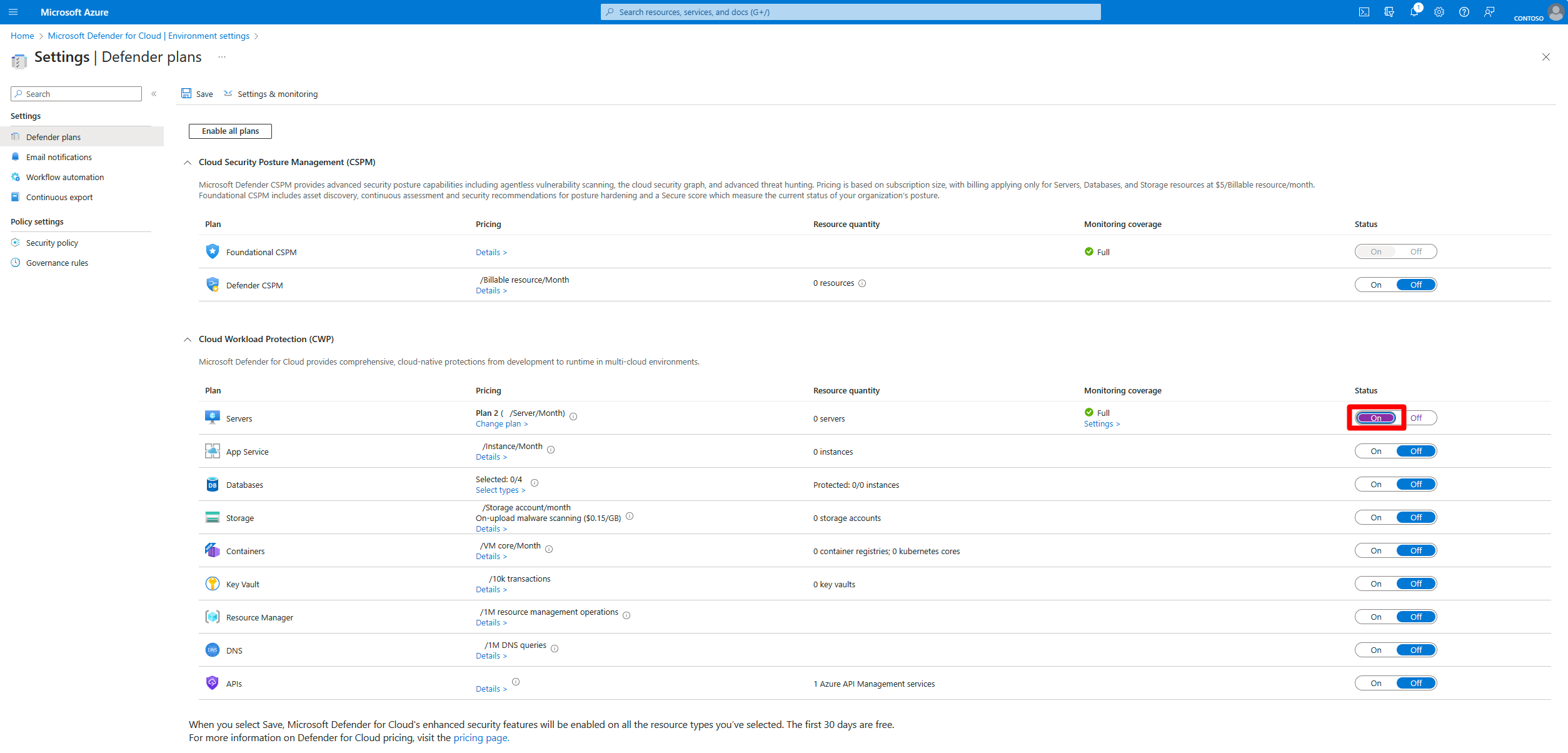
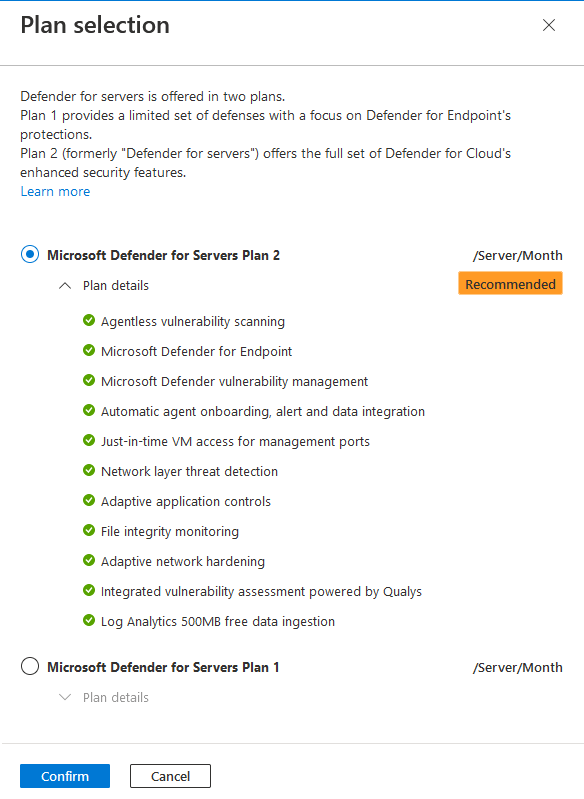
- Toggle Servers to On. This selects Plan 2 by default and starts a 30-day trial that cannot be stopped or extended.
- Change plans to pick Plan 1 if that is the intent. Confirm, then Save.
- Settings and monitoring > Endpoint protection. Confirm Status is On. This is the switch that lets Defender for Cloud provision the MDE extension.
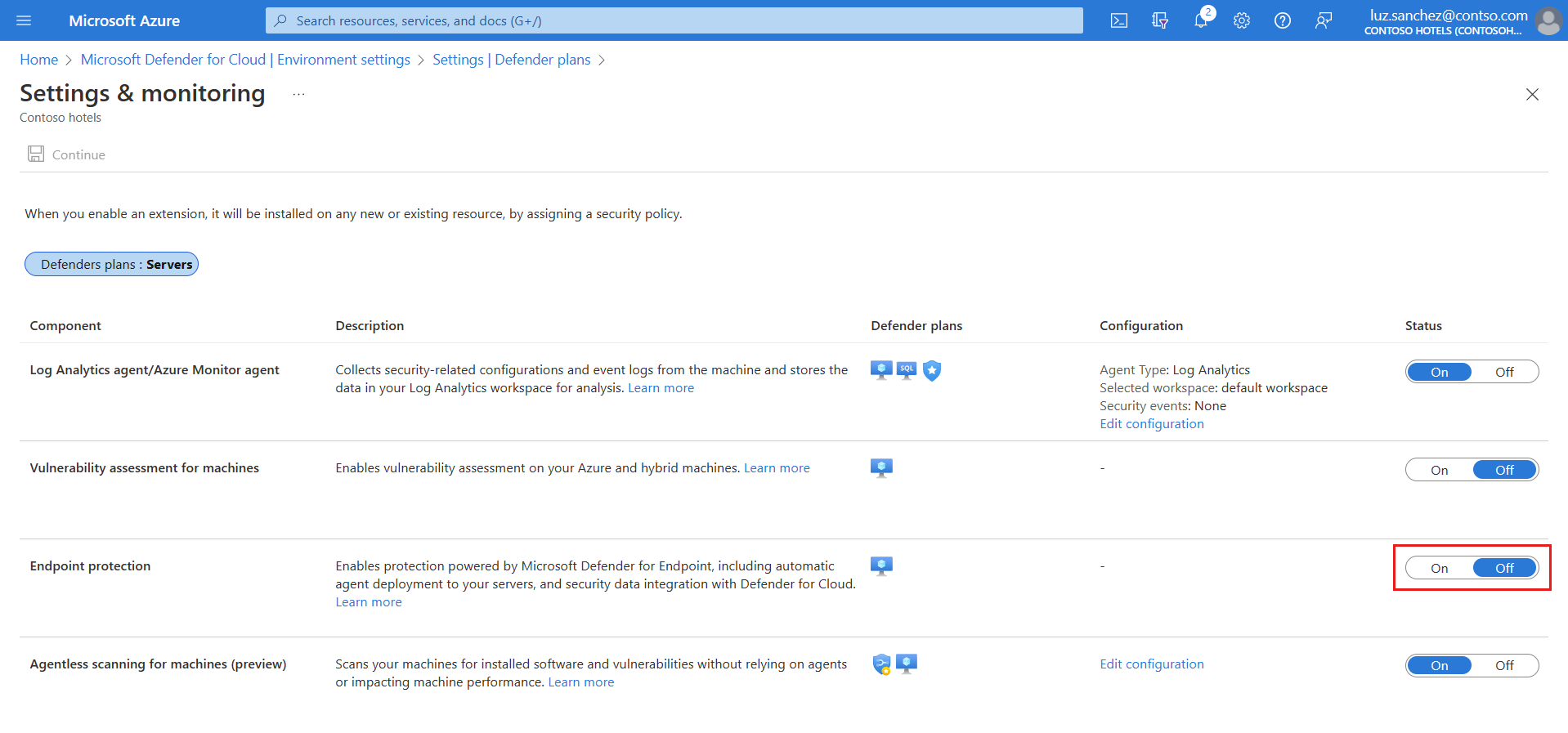
- On subscriptions created before spring 2022 the component may show Partial. Fix > Missing components > Unified solution > Enable covers Windows Server 2012 R2 and 2016. Subscriptions from before summer 2021 have a similar Linux machines opt-in.

- Non-Azure machines: connect them as Azure Arc-enabled servers first (single machine quickstart or service principal at scale). They become Azure resources and pick up the extension.
Direct onboarding:
- Defender for Cloud > Environment settings > Direct onboarding.
- Toggle On, select the subscription that will carry licensing and billing, Save.
- Deploy MDE on the servers the normal way, with or without this setting.

Model A: there is no Azure step. Defender portal > Settings > Endpoints > Onboarding, pick the OS and method, deploy the package. Buy the per-device server licence through your licensing channel.
# Tested on: TODO
# Learn documents the resource-level plan work through scripts in the
# Azure/Microsoft-Defender-for-Cloud repo, folder
# "Powershell scripts/Defender for Servers on resource level".
# Download the .ps1, run it, select machines by tag, follow prompts.
# Direct onboarding has no documented PowerShell or CLI; portal only.

# Readiness check before expecting the MDE.Windows extension (from Learn, read-only)
$os = Get-CimInstance Win32_OperatingSystem
$himds = Get-Service -Name himds -ErrorAction SilentlyContinue
$sense = Get-Service -Name Sense -ErrorAction SilentlyContinue
$av = Get-Service -Name WinDefend -ErrorAction SilentlyContinue
[pscustomobject]@{
    OS         = $os.Caption
    ArcAgent   = if ($himds) { $himds.Status } else { 'Not installed' }
    Sense      = if ($sense) { $sense.Status } else { 'Not present' }
    DefenderAV = if ($av) { $av.Status } else { 'Not present' }
}

# Which model is this server in? The DeviceTags key is written by the Defender for Cloud integration.
Get-ItemProperty 'HKLM:\SOFTWARE\Microsoft\Windows Advanced Threat Protection\DeviceTags' -ErrorAction SilentlyContinue |
  Select-Object AzureResourceId, SecurityWorkspaceId, SecurityAgentId
# Linux readiness and state (from Learn)
cat /etc/os-release
python3 --version
findmnt -T /opt -o TARGET,OPTIONS
azcmagent show        # Arc agent present and connected?
mdatp health          # healthy : true, licensed : true once onboarded
Turn the MDE integration on for a subscription. On new subscriptions this also covers the unified solution and Linux.
PUT https://management.azure.com/subscriptions/{subscriptionId}/providers/Microsoft.Security/settings/WDATP?api-version=2022-05-01
{
  "name": "WDATP",
  "type": "Microsoft.Security/settings",
  "kind": "DataExportSettings",
  "properties": { "enabled": true }
}
Enable Plan 1 on one machine when the subscription is off or on Plan 2:
PUT https://management.azure.com/subscriptions/{subscriptionId}/resourceGroups/{resourceGroupName}/providers/Microsoft.Compute/virtualMachines/{machineName}/providers/Microsoft.Security/pricings/virtualMachines?api-version=2024-01-01
{
  "properties": {
    "pricingTier": "Standard",
    "subPlan": "P1"
  }
}
Set pricingTier to Free to exclude a machine. DELETE on the same route removes the resource-level override so the subscription setting applies. Plan 2 cannot be set per resource. Direct onboarding has no documented REST route.
Verify
- Model B: Azure portal > VM > Extensions >
MDE.WindowsorMDE.Linuxshows Provisioning succeeded. Defender portal > Assets > Devices lists the server. On Linuxmdatp healthreturnshealthy : trueandlicensed : true. - Direct onboarding: Defender for Cloud > Inventory, filter by resource type, the server shows as a non-Azure machine under the chosen subscription within 24 hours.
- Model A: Defender portal device inventory, sensor health, then run the EDR detection test.
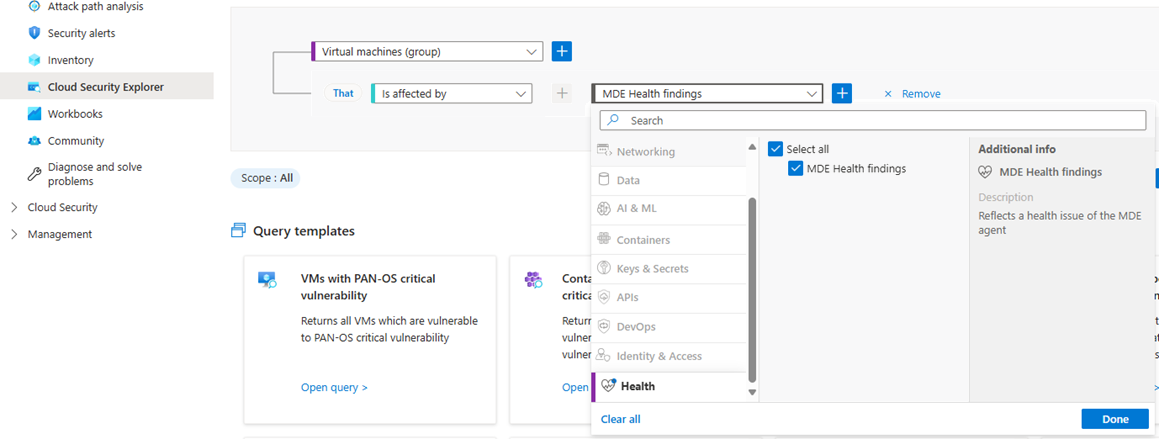
sc.exe query sensereports RUNNING.sc.exe query Windefendtells you whether Defender AV is installed where you expect active mode. - Defender for Cloud health status (needs Plan 2, or Defender CSPM plus Plan 1): Security Explorer queries for unhealthy, healthy and not-applicable VMs. Status refreshes every four hours.
- Coverage workbook in Azure Workbooks shows which plan is on per subscription and resource.
// Which onboarded servers carry an Azure resource ID, meaning they came in through Defender for Cloud
DeviceInfo
| where OSPlatform startswith "WindowsServer" or OSPlatform == "Linux"
| summarize arg_max(Timestamp, *) by DeviceId
| extend AzureResource = tostring(AdditionalFields.AzureResourceId)
| project DeviceName, OSPlatform, OnboardingStatus, AzureResource
TODO: confirm in the dev tenant that AdditionalFields.AzureResourceId is populated for extension-onboarded servers; Learn documents the registry value, not the Advanced Hunting field.
Troubleshoot
| Symptom | Likely cause | Fix |
|---|---|---|
| Extension never appears on an Arc machine | Plan or Endpoint protection off, machine off, OS unsupported, Arc agent unhealthy | Check Environment settings, azcmagent show, then wait the 12 hour or 1 hour window |
| Extension Provisioning failed | Connectivity, proxy needing user auth, Python missing, noexec on /opt, AV or ELAM disabled by GPO | View detailed status, logs under C:\WindowsAzure\Logs\Plugins\...MDE.Windows or /var/log/azure/...MDE.Linux/, run the Client Analyzer |
| Extension succeeded, device missing in Defender portal | Sensor onboarded to a different MDE tenant | Offboard from the old tenant first. Defender for Cloud never reassigns |
| Directly onboarded servers not in Defender for Cloud | Setting just enabled, or server in another Entra tenant | Allow 24 hours. The setting only covers the tenant it was enabled in |
| Server billed twice | Reached through Arc and direct onboarding with an old agent | Update to 10.8555, 10.8560 or 30.101.23052.009 and later so correlation works |
| Paying Defender for Servers and holding standalone MDE Server licences | Discount not requested | Support request from Azure portal with tenant ID, licence count and expiry. Not retroactive |
| Plan 2 enabled but no agentless, JIT or FIM on a server | Server is directly onboarded, no Azure or Arc resource | Connect through Arc or accept P1 plus premium MDVM |
| Devices show Can be onboarded in MDE inventory | Discovered by Defender for Cloud, sensor not yet deployed | Normal. Wait for the extension or deploy manually |
| MDE tenant data location is wrong for the business | Tenant was auto-created by Defender for Cloud in the subscription geo, or created earlier by MDE | Cannot be changed. Support request to reset the tenant |
| Windows 10 or 11 devices billed under Plan 1 | Pre November 2026 behaviour | From 2026-11-01 clients stop being billed as servers under P1 |
Gotchas and limits
- Billing is by power state. Azure VMs that are Stopped but not Deallocated are still billed. Arc machines are billed while Connected and stop when the heartbeat drops for 15 to 30 minutes. Directly onboarded servers are billed per hour while the sensor is connected.
- Direct onboarding is all or nothing for the tenant. Every MDE-onboarded server, existing and new, lands on the chosen subscription and gets billed there. Turn it on only when you want every server on Defender for Servers pricing. Learn says it is not required just to keep an existing MDE deployment working.
- Moving the MDE tenant data location is impossible. Defender for Cloud creates the MDE tenant in the subscription geo if none exists; if MDE came first, its choice sticks.
- Plan 2 at resource level cannot be enabled, only disabled. Granular Plan 1 works by script, Azure Policy with a tag, or the Pricings API.
- Toggling the plan on starts a 30-day trial you cannot pause. Turning the plan off on a subscription now auto-offboards eligible servers from MDE (public preview, October 2026). Moving Plan 2 to Plan 1 does not.
- The server onboarding page says Linux servers onboarded through Defender for Cloud start with Defender AV in passive mode. Plan for a follow-up policy to switch to active if that is the intent.
- Server endpoint monitoring through the Defender for Cloud integration is not available for Office 365 GCC.
- Security settings management for servers still needs at least one MDE user licence in the tenant, even if every server is covered by Defender for Servers. See the MDE-attach article.
- From 2026-11-01 the billable server check runs multiple times per hour instead of once, and golden-image clones sharing an Arc ID are counted separately. Expect the billed count to move.
- Microsoft announced a Defender Workload Unit billing model in October 2026. Learn pages used here still describe per server-hour billing. TODO: re-check once the DWU pages land.
- The MDE planning guide has nothing server-specific; it points at the production deployment and deployment strategy articles. Treat it as the client playbook.
Decision tree
Further reading
- Mastering Microsoft Defender for Servers: Understanding P1 vs P2 and Choosing the Right Plan, Dominik Höfling, October 2025. Adds a recommendation matrix for P1 versus P2 and when to take the Arc route versus direct MDE onboarding, written from field work rather than the feature table.
- How to Effectively Set Up Microsoft Defender for Servers in 2026, M365.fm, March 2026. End-to-end setup walkthrough with
azcmagenttroubleshooting; its per-server prices are the author's figures, verify against the pricing page. - Cloud Security Billing, Simplified: Introducing the Defender Workload Unit, Microsoft Defender for Cloud blog, October 2026. Announces a new billing model for Defender for Cloud; read it alongside the per server-hour model described here, as the Learn pages had not been updated at source check time.
Only three qualified in the October 2025 to October 2026 window. The best direct onboarding write-ups (Jeffrey Appel, Jakub Fras) predate it.
My notes
TODO: Sohail's notes after verification.
Changelog
| Date | Change | Source |
|---|---|---|
| 2026-10-22 | Drafted from Learn, with Learn images and diagrams | [1] |