Plan 2 extras: agentless scanning, JIT, FIM, vulnerability management
What it is
Plan 1 is MDE for servers, billed by the hour, with alerts in Defender for Cloud. Plan 2 adds features that do not exist in the MDE sensor. They run from the Azure control plane: disk snapshots scanned out of band, NSG and firewall rules rewritten on request, change events shipped to Log Analytics, OS baseline checks through the machine configuration extension. None of it works if you onboard servers straight to MDE and skip Defender for Cloud. See overview and licensing.
It does not replace the sensor. Agentless scanning sees the disk once a day; the sensor sees processes live. Plan 2 runs both.
From the Defender for Servers overview page:
| Feature | Plan 1 | Plan 2 | Scope notes |
|---|---|---|---|
| MDE EDR, alerts, software inventory | Yes | Yes | Azure, AWS, GCP, Arc |
| Vulnerability scanning, agent-based | Yes | Yes | DVM core |
| Vulnerability scanning, agentless | No | Yes | Azure, AWS, GCP |
| Malware scanning, agentless | No | Yes | Azure, AWS, GCP |
| Machine secrets scanning, agentless | No | Yes | Azure, AWS, GCP |
| DVM premium features | No | Yes | Defender portal only |
| File integrity monitoring | No | Yes | AWS and GCP only via Arc |
| Just-in-time VM access | No | Yes | Azure and AWS, AWS in preview |
| OS baseline misconfigurations, MCSB | No | Yes | Needs machine configuration extension; non-Azure via Arc |
| OS system updates assessment | No | Yes | Arc-onboarded only for non-Azure |
| Threat detection, Azure network layer | No | Yes | Azure only |
| Defender for DNS alerts | No | Yes | Azure, AWS, GCP |
| Network map | No | Yes | Azure only |
| Free data ingestion, 500 MB per node per day | No | Yes | Workspace level |
Licensing and prerequisites
- Defender for Servers Plan 2 on the subscription. Plan 2 is subscription scope only. Plan 1 can be set per resource through the Pricings REST API with
subPlanP1. - Agentless scanning also comes with Defender CSPM, minus malware. Malware needs Plan 2.
- MDE-direct machines (sensor installed, no Defender for Cloud onboarding) keep Plan 1 features and, from Plan 2, only the DVM premium features.
- Non-Azure machines must be Arc-enabled for FIM, OS baselines and OS updates. JIT is not documented for Arc; the supported list is Azure Resource Manager VMs, VMs behind Azure Firewall on the same VNet, and AWS EC2 in preview.
- FIM and the ingestion benefit need a Log Analytics workspace. For the benefit, Plan 2 must be enabled on the workspace itself under Environment settings.
- FIM agent versions: Windows MDE client 10.8799 or later (Learn update 2026-03-22, after the MDE pipeline change), Linux 30.124082 or later.
- Roles. Agentless scanning grants itself the VM scanner operator role (disk, VM and VMSS read, plus
Microsoft.Compute/disks/beginGetAccess/action). JIT configure:Microsoft.Security/locations/jitNetworkAccessPolicies/writeandMicrosoft.Compute/virtualMachines/write. JIT request:.../jitNetworkAccessPolicies/initiate/action,.../jitNetworkAccessPolicies/*/read, VM read, NIC read, public IP read. FIM enable: Workspace owner plus Security admin; view: Security reader. DVM scanner deployment: Owner at resource group. - Agentless disk support: platform-managed keys work as is. Customer-managed keys need the Microsoft Defender for Cloud Servers Scanner Resource Provider (app ID
0c7668b5-3260-4ad0-9f53-34ed54fa19b2) granted Get, Wrap Key and Unwrap Key, or Key Vault Crypto Service Encryption User on RBAC vaults. Azure Disk Encryption is not mentioned on either agentless page.
How it works
Defender for Cloud acts on the machine from outside. Nothing here changes the sensor's behaviour.
Agentless machine scanning. Defender for Cloud snapshots the OS and data disks, analyses the copy in an isolated regional environment, extracts metadata and deletes the snapshot within minutes. Vulnerability and software data goes to DVM. Secrets go to the Microsoft secrets engine, which also tests whether SSH private keys can reach another machine; unverifiable keys are labelled unverified. Malware scanning runs Defender Antivirus with cloud protection against the snapshot, so it catches files the on-box AV excluded and machines with no AV. The scan runs every 24 hours, not configurable, and the VM must be running. Results land as recommendations (vulnerabilities, secrets) and security alerts (malware, also in Defender XDR).
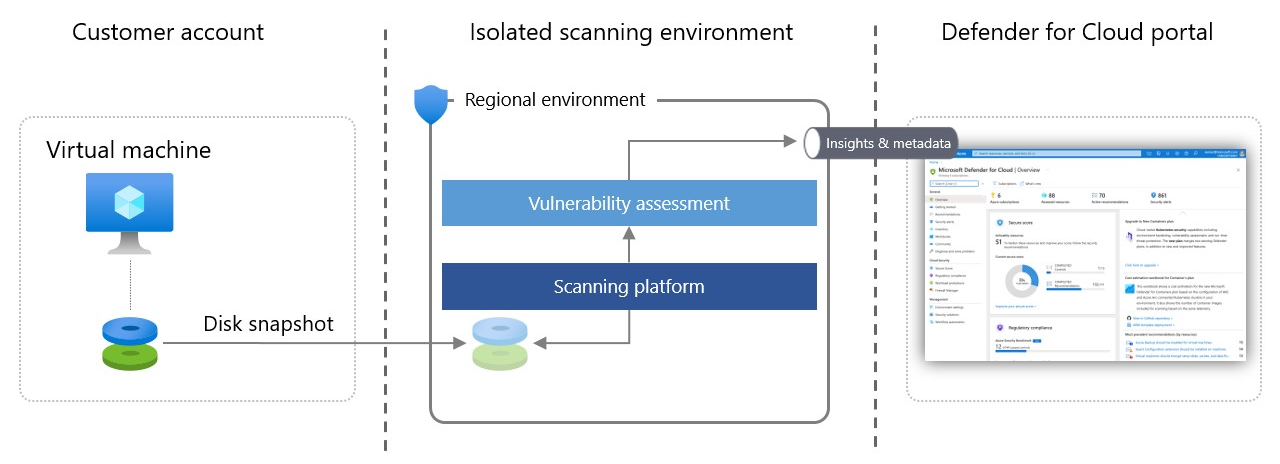
Limits: disks up to 4 TB total, else only the OS disk is scanned and only if under 4 TB. Over 14 disks is unsupported. UltraSSD_LRS, PremiumV2_LRS and AKS ephemeral OS disks make the VM unscannable. UFS, ReFS, ZFS, OracleASM, DRBD, Linux RAID members, DM_Verity and swap are skipped. Malware scanning is partial on archives over 1 GB, 10,000 files or 5 nesting levels.
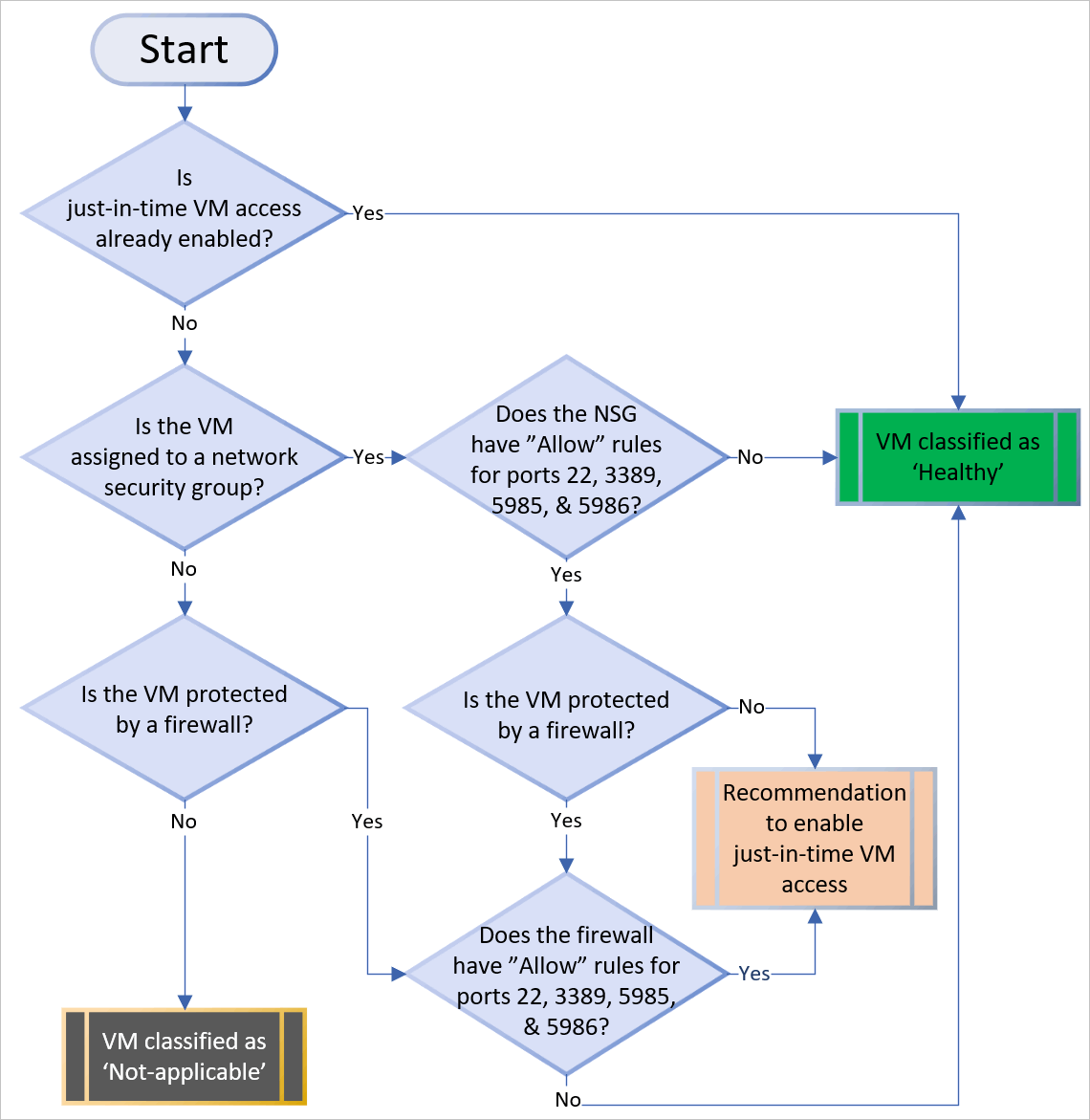
Just-in-time VM access. Enabling JIT writes deny-all inbound rules for the chosen ports into the NSG and, if present, the Azure Firewall. Existing rules for those ports keep priority; otherwise the deny rules go to the top. A request names ports, source IP or range and a duration up to the policy maximum. Defender for Cloud checks the requester's Azure RBAC on the VM, writes a temporary allow rule, and restores the previous state at expiry. Live connections are not cut. Azure Firewall must use Rules (Classic); firewall policies and Firewall Manager are unsupported. On AWS, JIT revokes the EC2 security group inbound rules and creates a new group on approval.
File integrity monitoring. FIM runs on the MDE sensor. It collects create, delete and modify events for configured files and registry keys (size, ACL, content hash for files; size, ACL, type, content for registry) and sends them near real time to the Log Analytics workspace you pick. Agentless scanning adds a 24 hour feed and unlocks custom paths. Events carry account, initiating process and change source. Table: MDCFileIntegrityMonitoringEvents. The MMA path stopped in November 2024; AMA is on the migration list. Defaults cover autorun keys, AppInit DLLs, cryptography OID keys, LSA secrets, shell folders, and core Windows and Linux binaries and config paths.
Defender Vulnerability Management. Both plans get DVM core through the sensor: vulnerability and configuration assessment, risk-based prioritisation, remediation tracking, continuous monitoring, software inventory and usage insights. Plan 2 adds the premium set: security baselines assessment, block vulnerable applications, browser extensions, digital certificates, network shares, hardware and firmware. Premium features show only in the Defender portal. Windows authenticated scan is gone from the capability table. Vulnerability assessment is on by default; the toggle is for switching solutions or turning it off.
OS baselines against MCSB. The Azure Policy machine configuration extension (formerly guest configuration) evaluates the compute baselines and feeds two recommendations: Windows assessment key 8c3d9ad0-3639-4686-9cd2-2b2ab2609bda, Linux 1f655fb7-63ca-4980-91a3-56dbc2b715c6. Leftover MMA produces duplicates.
Data ingestion benefit. 500 MB per node per day, pooled across the subscription's machines, applied at workspace level, not enforced per machine. Covers SecurityAlert, SecurityBaseline, SecurityBaselineSummary, SecurityDetection, SecurityEvent, WindowsFirewall, ProtectionStatus, Update and UpdateSummary under conditions, MDCFileIntegrityMonitoringEvents, DeviceCustomFileEvents, DeviceCustomRegistryEvents, and WindowsEvent for the security stream only. Classic Sentinel meters: offsets Log Analytics ingestion. Simplified meters: offsets Sentinel ingestion. Never on the invoice; look in Cost Management exports.
MDE itself. Either plan entitles the server to MDE Plan 2 capabilities: EDR, advanced hunting, automated investigation and remediation, ASR rules, next-generation protection, threat analytics. Not a Plan 2 extra.
Configure
- Portal
- Azure CLI / PowerShell
- REST / ARM
All plan toggles live in one place: Defender for Cloud > Environment settings > subscription > Defender for Servers row > Settings. The page is Settings and monitoring.
Agentless scanning for machines
- Settings and monitoring > Agentless scanning for machines > On. Save.
- For CMK disks, grant the scanner resource provider on each vault. Microsoft publishes a PowerShell script in the Azure/Microsoft-Defender-for-Cloud repo for bulk vaults.
- Wait up to 24 hours for the first scan.
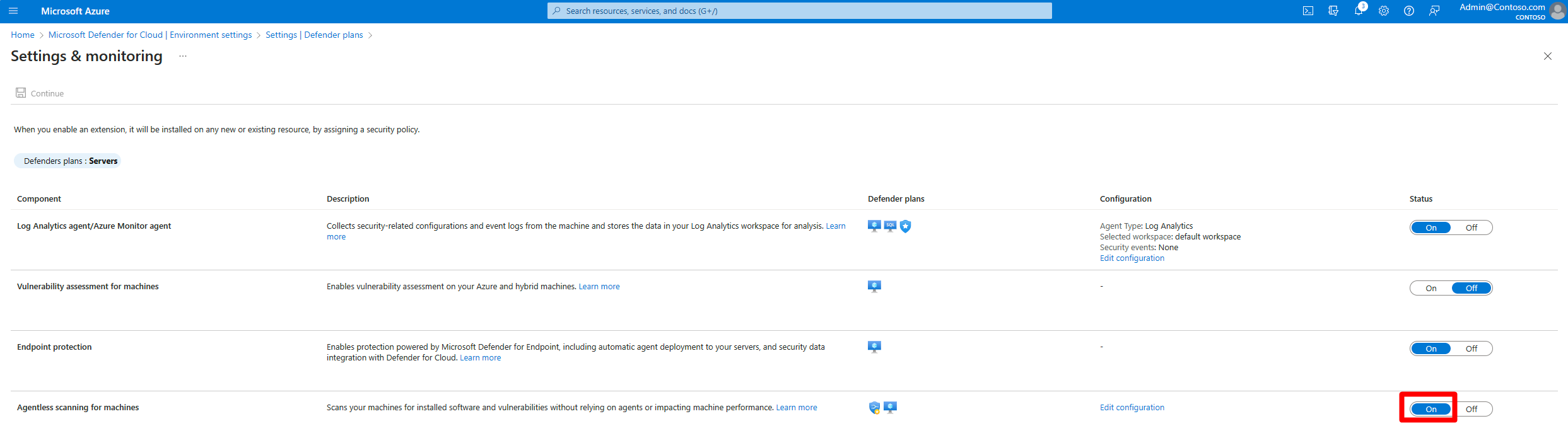
Malware and secrets scanning have no separate toggle.
Vulnerability assessment for machines. Same page. Toggle On, Edit configuration to pick the solution. Apply, Save.
File Integrity Monitoring
- Same page. File Integrity Monitoring > On.
- Edit configuration. Pick a Log Analytics workspace or Create new.
- Recommended to monitor > Edit. All recommended entities are on by default. Set Status and Change types per rule, or delete rules. Apply.
- Optional: + Add rule. Rule name (letters, digits, underscore, 128 max), Status Enabled, change types, entity type and path. Path rules: up to three asterisks at segment boundaries, registry paths start with
HKLM, Linux paths absolute, 260 characters max. Up to 500 custom rules per subscription. Apply. - Apply, Continue, Save.

Just-in-time VM access
From Defender for Cloud:
- Workload protections > Just-in-time VM access > Not configured tab. Select VMs. Enable JIT on VMs.
- Default ports: 22, 3389, 5985, 5986. Add for more; per port set protocol, allowed source IPs, maximum request time. Save.
From the VM blade: Virtual machines > VM > Configuration > Enable just-in-time. Defaults: Windows 3389, Linux 22, 3 hours, any source. Change them in Defender for Cloud > Configured tab > right-click VM > Edit.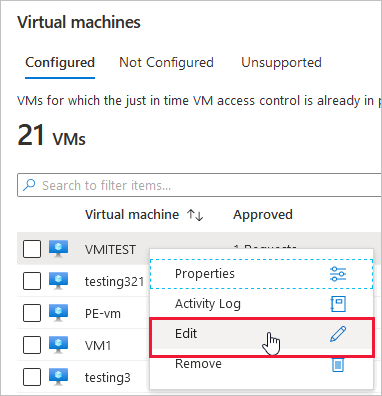
Requesting access: Configured tab > select VM > Request access > ports, source IP, time window > Open ports. Or VM > Connect > Request access. Behind a proxy, enter the proxy's egress range. Policy name plus VM name must stay under 56 characters.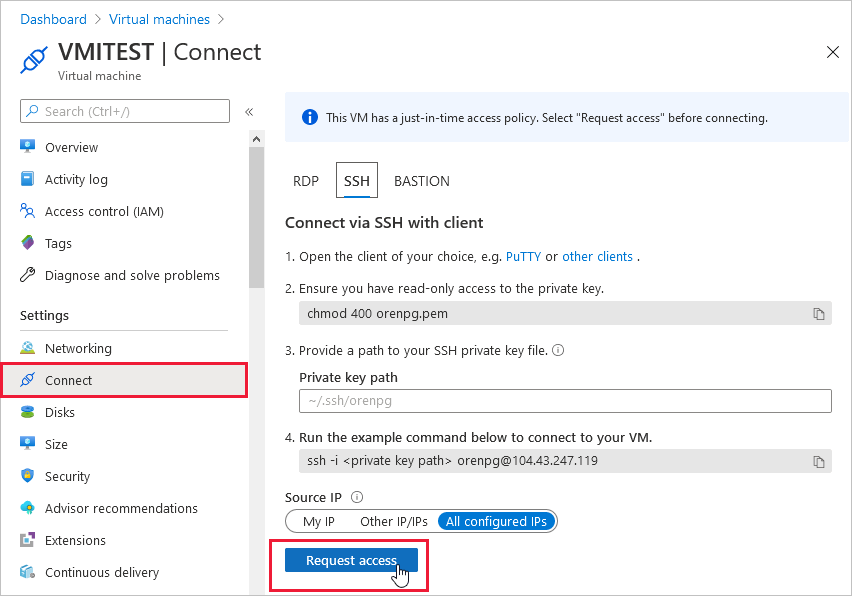
Data ingestion benefit. Environment settings > the Log Analytics workspace (not the subscription) > Defender for Servers Plan 2 On > Save.
OS baselines. No toggle. Plan 2 plus the Azure Policy machine configuration extension. Results under Recommendations.
az security pricing create is the only documented CLI write path for plan extensions. Learn has no CLI or PowerShell sample for the FileIntegrityMonitoring extension.
# Tested on: TODO
# Plan 2 with agentless scanning on and MDE direct onboarding off, plus exclusion tags
az security pricing create -n VirtualMachines --tier standard --subplan P2 \
  --extensions name=MdeDesignatedSubscription isEnabled=False \
  --extensions name=AgentlessVmScanning isEnabled=True \
    additionalExtensionProperties='{"ExclusionTags":"[{\"key\":\"A\",\"value\":\"B\"}]"}'

# Read back
az security pricing show -n VirtualMachines
az security pricing list

# JIT policies: CLI is read only (list, show). Writes go through PowerShell or REST.
az security jit-policy list
az security jit-policy show -l northeurope -n default -g myService1
JIT policy through Az.Security. Learn's example: ports 22 and 3389, any source, 3 hour maximum.
# Tested on: TODO
$JitPolicy = (@{
    id="/subscriptions/SUBSCRIPTIONID/resourceGroups/RESOURCEGROUP/providers/Microsoft.Compute/virtualMachines/VMNAME";
    ports=(@{
        number=22;
        protocol="*";
        allowedSourceAddressPrefix=@("*");
        maxRequestAccessDuration="PT3H"},
        @{
        number=3389;
        protocol="*";
        allowedSourceAddressPrefix=@("*");
        maxRequestAccessDuration="PT3H"})})

$JitPolicyArr=@($JitPolicy)

Set-AzJitNetworkAccessPolicy -Kind "Basic" -Location "LOCATION" -Name "default" `
  -ResourceGroupName "RESOURCEGROUP" -VirtualMachine $JitPolicyArr
Request access through PowerShell:
$JitPolicyVm1 = (@{
    id="/subscriptions/SUBSCRIPTIONID/resourceGroups/RESOURCEGROUP/providers/Microsoft.Compute/virtualMachines/VMNAME";
    ports=(@{
        number=22;
        endTimeUtc="2026-10-22T17:00:00Z";
        allowedSourceAddressPrefix=@("IPV4ADDRESS")})})

$JitPolicyArr=@($JitPolicyVm1)

Start-AzJitNetworkAccessPolicy `
  -ResourceId "/subscriptions/SUBSCRIPTIONID/resourceGroups/RESOURCEGROUP/providers/Microsoft.Security/locations/LOCATION/jitNetworkAccessPolicies/default" `
  -VirtualMachine $JitPolicyArr
Least-privilege requester role: Set-JitLeastPrivilegedRole script in the Azure/Microsoft-Defender-for-Cloud repo. FIM, baselines, ingestion benefit: no CLI or PowerShell method documented.
Plan and extensions. One PUT sets the plan and its sub-settings. enforce True stops child scopes overriding it.
PUT https://management.azure.com/subscriptions/{subscriptionId}/providers/Microsoft.Security/pricings/VirtualMachines?api-version=2024-01-01
{
  "properties": {
    "enforce": "True",
    "pricingTier": "Standard",
    "subPlan": "P2",
    "extensions": [
      { "name": "MdeDesignatedSubscription", "isEnabled": "False" },
      {
        "name": "AgentlessVmScanning",
        "isEnabled": "True",
        "additionalExtensionProperties": {
          "ExclusionTags": "[{\"Key\":\"TestKey1\",\"Value\":\"TestValue1\"}]"
        }
      },
      { "name": "FileIntegrityMonitoring", "isEnabled": "True" }
    ]
  }
}
The reference names FileIntegrityMonitoring as a P2 extension but shows no sample. TODO: confirm in the dev tenant whether it takes workspace and rule properties under additionalExtensionProperties. Check operationStatus per extension. Per-machine Plan 1 uses the same resource at VM scope with subPlan P1; pricingTier Free at VM scope opts the machine out.
Vulnerability assessment on one VM. PUT enables, DELETE disables. No body documented.
PUT https://management.azure.com/subscriptions/{subscriptionId}/resourceGroups/{resourceGroup}/providers/Microsoft.Compute/virtualMachines/{vmName}/providers/Microsoft.Security/serverVulnerabilityAssessments/mdetvm?api-version=2015-06-01-preview
JIT policy. ascLocation is where Defender for Cloud stores the subscription's data, from the Locations API.
PUT https://management.azure.com/subscriptions/{subscriptionId}/resourceGroups/{resourceGroupName}/providers/Microsoft.Security/locations/{ascLocation}/jitNetworkAccessPolicies/default?api-version=2015-06-01-preview
{
  "kind": "Basic",
  "properties": {
    "virtualMachines": [
      {
        "id": "/subscriptions/{subscriptionId}/resourceGroups/{resourceGroupName}/providers/Microsoft.Compute/virtualMachines/vm1",
        "ports": [
          { "number": 22, "protocol": "*", "allowedSourceAddressPrefix": "*", "maxRequestAccessDuration": "PT3H" },
          { "number": 3389, "protocol": "*", "allowedSourceAddressPrefix": "*", "maxRequestAccessDuration": "PT3H" }
        ]
      }
    ]
  }
}
maxRequestAccessDuration is ISO 8601, PT5M to P1D. protocol is TCP, UDP or *. allowedSourceAddressPrefix and allowedSourceAddressPrefixes are mutually exclusive.
JIT request. POST to initiate. Returns 202 with status Initiating. Omit allowedSourceAddressPrefix and the caller's IP is used.
POST https://management.azure.com/subscriptions/{subscriptionId}/resourceGroups/{resourceGroupName}/providers/Microsoft.Security/locations/{ascLocation}/jitNetworkAccessPolicies/default/initiate?api-version=2015-06-01-preview
{
  "virtualMachines": [
    {
      "id": "/subscriptions/{subscriptionId}/resourceGroups/{resourceGroupName}/providers/Microsoft.Compute/virtualMachines/vm1",
      "ports": [
        { "number": 3389, "endTimeUtc": "2026-10-22T17:00:00Z", "allowedSourceAddressPrefix": "192.0.2.10" }
      ]
    }
  ],
  "justification": "Patch window"
}
Learn's sample shows duration on the port; the schema lists endTimeUtc. Use endTimeUtc.
Verify
Agentless scanning. Nothing on the box shows it. Check the recommendations Machines should have vulnerability findings resolved and Machines should have secrets findings resolved, and confirm machines without the sensor still get vulnerability data. For malware, run Learn's Test agentless malware scanning procedure; an empty alert list proves nothing. Azure Resource Graph:
securityresources
| where type == "microsoft.security/assessments/subassessments"
| extend assessmentKey = extract(@"(?i)providers/Microsoft.Security/assessments/([^/]*)", 1, id)
| where assessmentKey in ("1f655fb7-63ca-4980-91a3-56dbc2b715c6", "8c3d9ad0-3639-4686-9cd2-2b2ab2609bda")
| extend status = tostring(properties.status.code)
| summarize count() by assessmentKey, status
Those are the MCSB baseline keys. Swap in the vulnerability or secrets assessment keys from the recommendation details page.
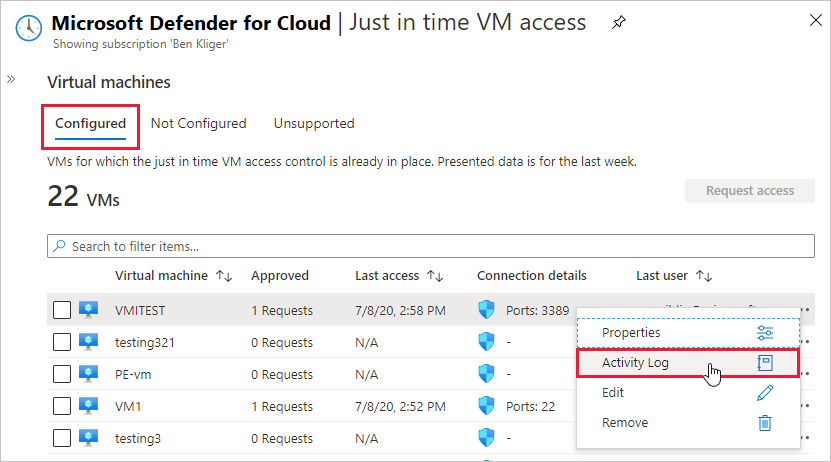
JIT. Configured tab lists the VM. Confirm deny inbound rules for the policy ports in the NSG. Request access, then look for the temporary allow rule scoped to your IP. Audit: Configured tab > ellipsis > Activity Log, Download as CSV. Behind Azure Firewall the approved request returns the DNAT mapped port.
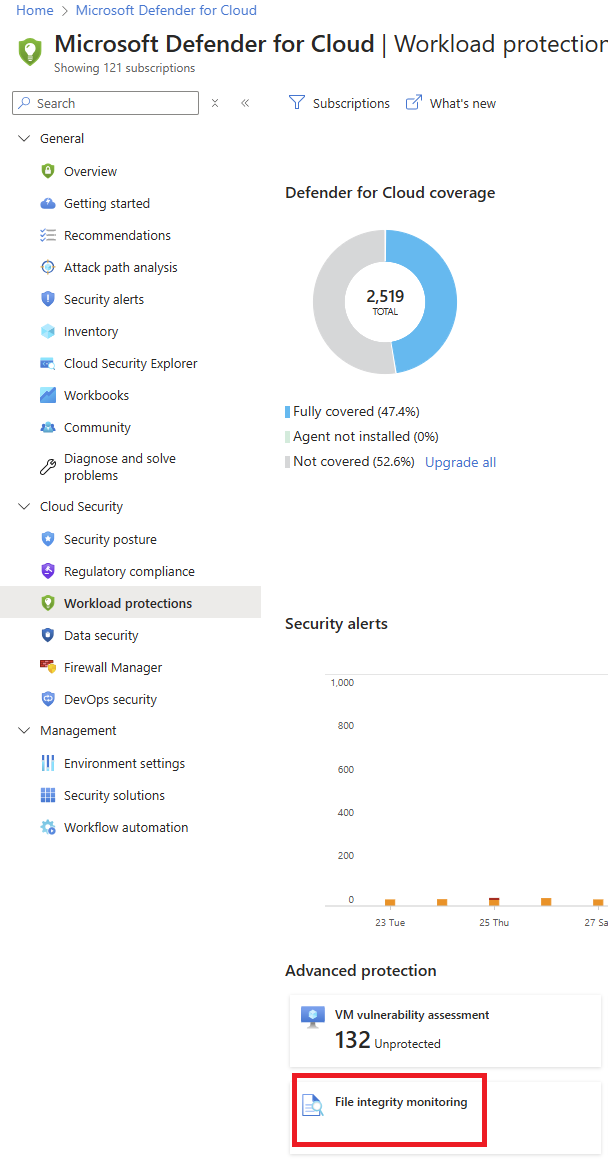
FIM. Workload protections > File Integrity Monitoring lists resources with tracked changes; click one to open the query. Settings there shows missing prerequisites per subscription. In the workspace:
MDCFileIntegrityMonitoringEvents
| where TimeGenerated > ago(14d)
| where MonitoredEntityType in ('Registry', 'Files')
| summarize count() by Computer, MonitoredEntityType
MDCFileIntegrityMonitoringEvents
| where TimeGenerated > ago(14d)
| where MonitoredEntityType == 'Registry'
| order by Computer, RegistryKey
DVM premium. Defender portal > Vulnerability management. Baselines assessment, Browser extensions, Certificates, Network shares and Hardware and firmware should be populated for Plan 2 servers.
Ingestion benefit. Not on the invoice. Azure Monitor's View data allocation benefits guidance, or a Cost Management export.
Troubleshoot
| Symptom | Likely cause | Fix |
|---|---|---|
| Agentless scan never produces findings for a VM | VM was off at scan time, disk set over 4 TB or over 14 disks, unsupported disk SKU or filesystem | Keep the VM running across a 24 hour window. Check for UltraSSD, PremiumV2, ReFS, ZFS, RAID member volumes. |
| CMK VMs missing from agentless results | Scanner RP has no key access | Grant Get, Wrap Key, Unwrap Key or Key Vault Crypto Service Encryption User to app 0c7668b5-3260-4ad0-9f53-34ed54fa19b2. |
| AWS scans stopped for an account | 250 or more leftover Defender-tagged snapshots | Fix ec2:DeleteSnapshot on the VmScanner role for CreatedBy=Microsoft Defender for Cloud, check IAM boundaries and SCPs. Cleanup clears the block. |
| GCP agentless returns nothing | Org policy blocks disk, image or snapshot access | Follow the Learn page Resolve an agentless scan error for GCP. |
| Malware alert on a known-good file | False positive | Submit the sample via the submission portal. Suppress by malware name or file hash meanwhile. |
| JIT missing from a VM's Configuration blade | Classic VM, firewall managed by Firewall Manager, firewall policy in use, or Arc machine | Only ARM VMs and EC2 are supported. Firewall must use Rules (Classic). |
| JIT request fails with authorization error | Missing initiate action, NIC read or public IP read | Assign the actions in the Licensing section or use the Set-JitLeastPrivilegedRole script. |
| JIT save fails on name length | Policy name plus VM name over 56 characters | Shorten the policy name. |
| FIM toggle on but no events | Agent below 10.8799 on Windows or 30.124082 on Linux; MDE not deployed; workspace mismatch | Server 2016 and 2012 R2 need KB 5005292 manually. Check FIM > Settings corrective actions. |
| FIM shows Create as Modify on Linux | Known sensor limitation | Expected. Filter on Modify for new files. |
| FIM is not enabled message on the review page | FIM over MDE never turned on for that subscription | Onboard subscriptions from that page, then enable FIM. |
| Duplicate baseline recommendations | MMA still installed next to the machine configuration extension | Remove MMA. |
| 500 MB benefit not applied | Plan 2 enabled on the subscription but not on the workspace, or data going to another workspace | Environment settings > workspace > enable Plan 2. |
| Custom FIM rule rejected | Path rule violation | Max three asterisks at segment boundaries, HKLM prefix, absolute Linux paths, 260 characters. |
Gotchas and limits
- MDE-direct is a trap for Plan 2. Onboarded by script or Intune, not through Defender for Cloud, you pay for Plan 2 and get DVM premium and nothing else. See onboarding.
- Plan 2 is subscription scope only. You can set individual machines to Free, but you cannot light up Plan 2 on three machines in a Plan 1 subscription.
- Agentless scanning is a daily snapshot. Nothing in memory, nothing on machines that are off at scan time. Posture, not detection, even for malware.
- CSPM agentless is not Plan 2 agentless. CSPM gives vulnerabilities, software, secrets and EDR config. Malware needs Plan 2.
- Azure Disk Encryption is not covered in either agentless page. Assume ADE volumes are unscanned until proven otherwise. TODO: test in the dev tenant.
- JIT only touches NSG and Azure Firewall classic rules. Firewall policy, Firewall Manager, classic VMs and Arc servers are out. An on-premises box behind Arc has no NSG to rewrite.
- JIT rule priority: an existing allow on 3389 outranks the JIT deny. JIT adds to a bad NSG, it does not fix it.
- FIM data beyond the benefit is billed. Noisy custom rules on busy paths eat the 500 MB pool, which is subscription-wide, not per machine. Disabling FIM stops collection but leaves data under workspace retention.
- FIM on AWS and GCP needs Arc. Native EC2 or GCE onboarding does not give FIM.
- DVM premium only shows in security.microsoft.com. The Azure portal will not tell you certificate assessment is running.
- The ingestion benefit needs Plan 2 on the workspace, not just the subscription. Check which Sentinel meter the workspace uses before promising savings.
- Release notes list a billing change effective 2026-11-01 for how billable servers are counted. Watch November invoices.
Further reading
- Mastering Microsoft Defender for Servers: Understanding P1 vs P2 and Choosing the Right Plan, Dominik Höfling, October 2025. Plan choice with per-resource Plan 1 scoping and onboarding trade-offs in one place.
- Comparing Defender for Endpoint P1 & P2 with Defender Servers P1 & P2, Microsoft Q&A, February 2026. Moderator answer on why M365 E5 does not license servers and when Plan 2 is needed.
- Sentinel - Defender for Cloud P2 Benefit, Microsoft Tech Community, July 2026. Confirms a DCR alone does not unlock the 500 MB benefit; Plan 2 must be on the workspace.
- How to Effectively Set Up Microsoft Defender for Servers in 2026, M365.fm, March 2026. Setup and maintenance checklist; light on Plan 2 detail.
Only four posts in the window qualified.
My notes
TODO: Sohail's notes after verification.
Changelog
| Date | Change | Source |
|---|---|---|
| 2026-10-22 | Drafted from Learn, with Learn images and diagrams | [1] |