Response actions and Live Response, every option explained
What it is
Response actions are the buttons across the top of a device page in the Defender portal. They let an analyst change the state of a device or a file from the cloud: cut it off the network, stop a process, pull evidence, run a scan, open a shell. Every action is recorded in the Action center with who ran it, when, and whether it worked.
Live Response is the shell. It is a cloud-relayed remote console on an onboarded device with a fixed command set for forensics and clean-up, plus the ability to push and run your own PowerShell or Bash scripts from a tenant library. It is not RDP or SSH. There is no interactive desktop, no arbitrary binary execution outside the library, and every command is logged.
This article covers servers first (Windows Server, Linux) because that is where the gaps are, but the actions are the same for Windows and macOS clients. For how the sensor gets onto servers, see Direct onboarding and Linux onboarding. For the data these actions act on, see EDR and hunting. For how Defender for Servers maps to MDE plans, see the overview.

Licensing and prerequisites
- MDE Plan 1 includes only four actions: Run antivirus scan, Isolate device, Stop and quarantine file, and Add an indicator to block or allow a file. Everything else, including Live Response, needs Plan 2. Defender for Business does not include Stop and quarantine file.
- Servers get MDE through Defender for Servers Plan 1 or Plan 2 in Defender for Cloud, or through MDE server licences. Both server plans include the full MDE response set.
- Portal RBAC. Legacy MDE roles need Active remediation actions for isolate, restrict, scan, stop and quarantine, indicators and the Action center. Alerts investigation covers scans, investigation packages, tags and PE file download. Live response capabilities has two levels: Basic (start a session, read-only commands, download a file) and Advanced (upload a file to the device, view and run library scripts, download non-PE files). Manage security settings in Security Center is needed to upload to the library from inside a session console. Tenants created after 2025-02-16 only have Unified RBAC; the Learn roles page does not map the legacy permissions to URBAC names, but the Action center page gives
Security operations \ Security data \ Response (manage)for device remediation. - Device group scope. Every action also requires access to the device through device group settings. A role with the right permission but no device group sees nothing.
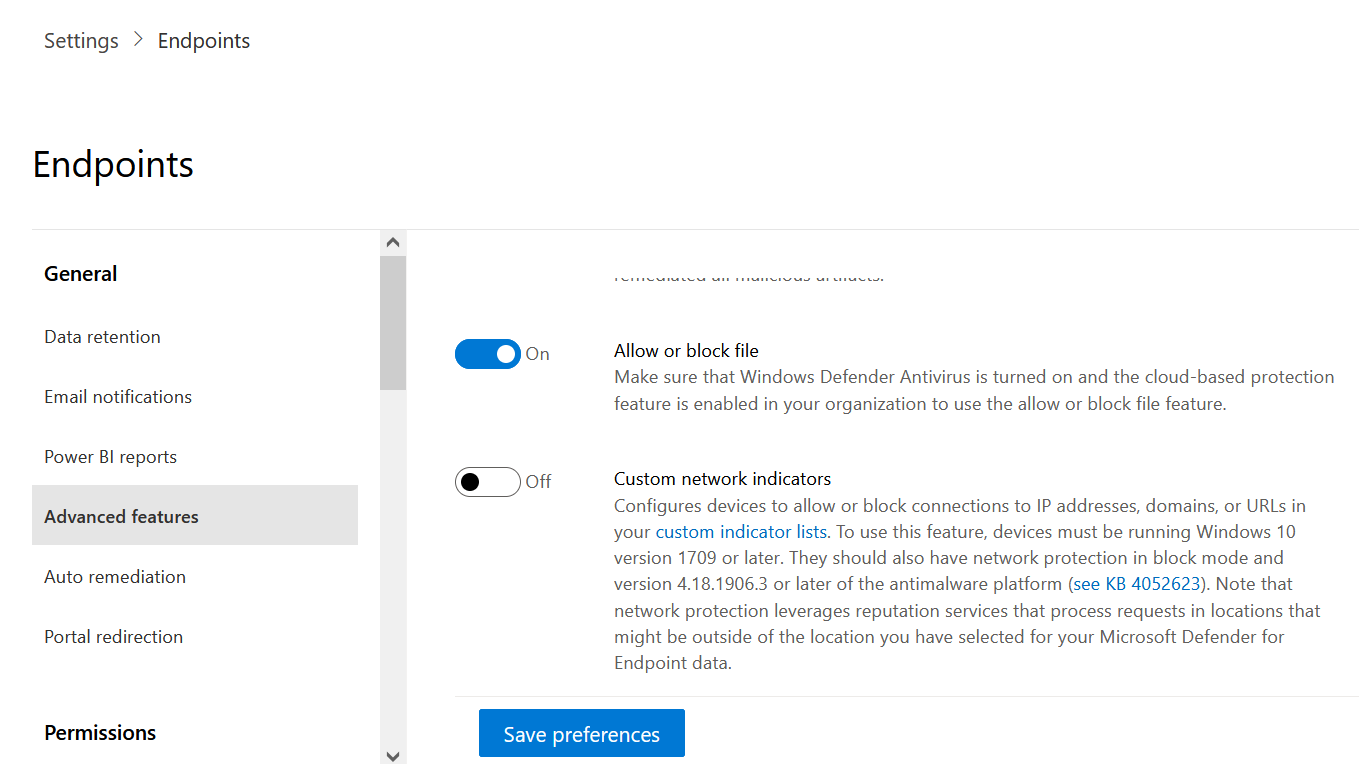
- Advanced features toggles. Live response, Enable live response for servers and Allow unsigned script execution in live response are all under Settings > Endpoints > Advanced features and need the Manage portal system settings permission to change.
- OS and agent minimums are per action and listed in the tables below. Windows Server 2012 R2 and 2016 need the modern unified agent for almost everything.
How it works
The analyst never talks to the device. The portal or the API creates a machine action in the MDE service. The Sense agent on the device long-polls the service, picks up the action, runs it locally through the right component (the sensor, Defender Antivirus, the firewall, the WDAC engine, or the Live Response broker), then reports back. The Action center is the view over that queue. If the device is offline the action waits in Pending until the device checks in or the per-action timeout expires.
Live Response is the same pattern with a long-lived session on top. The portal opens a console, the agent on the device keeps a channel open, each command is shipped down, run, and the output shipped back. Scripts you run come only from the tenant library. Everything is written to the session Command log and to the Action center History.
Every device action
| Action | What it does | OS support | Prerequisites | Reversible |
|---|---|---|---|---|
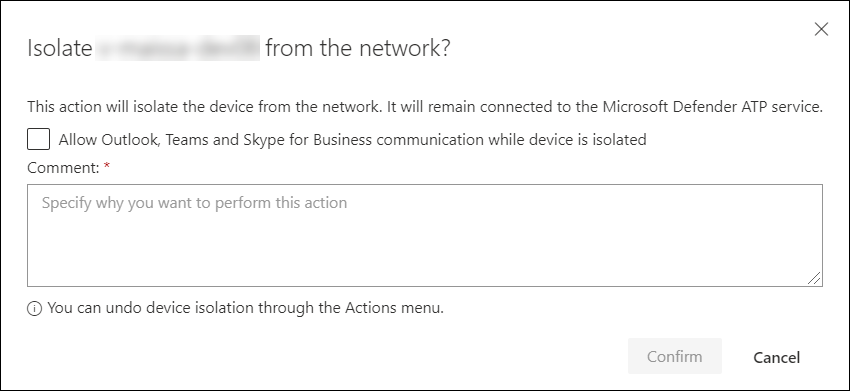
| Isolate device, Full | Blocks all traffic except the Defender service channel. | Windows 11, Windows 10 1703+, Windows Server 2012 R2+, Azure Stack HCI 23H2+, Linux, macOS 101.98.84+ | Active remediation actions. Linux needs iptables, ip6tables and netfilter owner-match kernel options. | Yes, Release from isolation. Auto-lifted after 7 days. |
| Isolate device, Selective | Same, but keeps defined processes and destinations reachable. On Windows 10 1709+ can also allow Outlook and Teams. | Windows 11, Windows 10 1703+, Windows Server 2012 R2+, Azure Stack HCI 23H2+, macOS | As above. Exclusions are not supported on macOS or Linux. | Yes, Release from isolation. |
| Release from isolation | Removes the isolation rules. | Same as isolate | Active remediation actions | n/a |
| Restrict app execution | Applies a WDAC code integrity policy that only allows files signed by a Microsoft certificate. | Windows 10 1709+, Windows 11, Windows Server 2019+ | Defender Antivirus running, policy and signing meet WDAC requirements. | Yes, Remove app restrictions. |
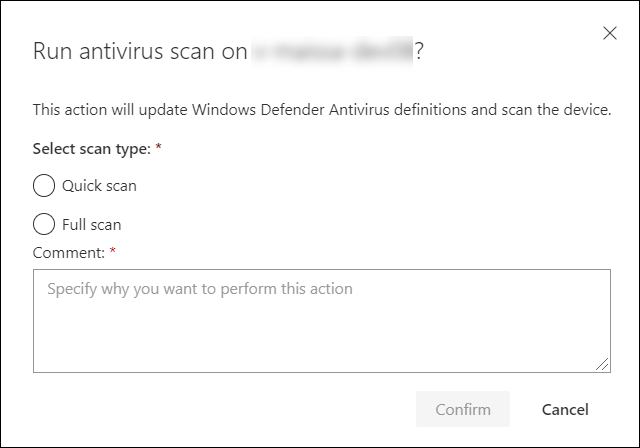
| Run antivirus scan | Quick or full Defender Antivirus scan. Works in Passive mode alongside other AV. | Windows, macOS and Linux 101.98.84+ | Active remediation actions (API). Default 50 percent CPU cap unless ScanAvgCPULoadFactor set. | n/a |
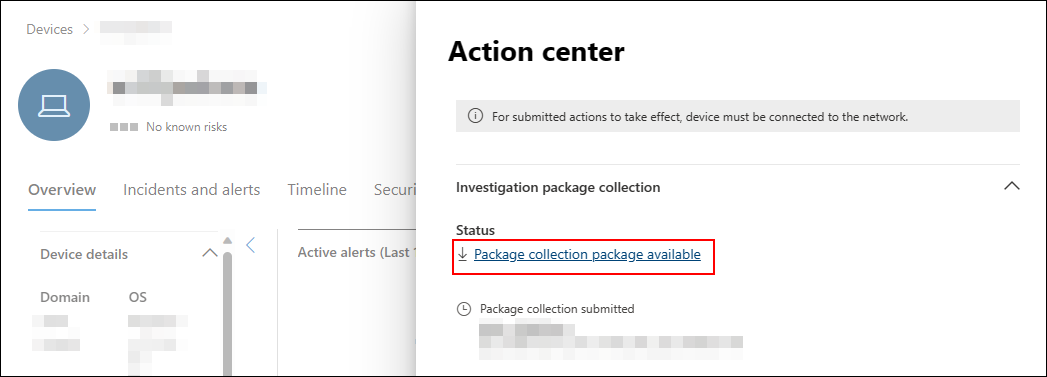
| Collect investigation package | Zips device state for offline forensics. Contents below. | Windows, macOS, Linux | Alerts investigation. Fails on low battery or metered connection. | n/a |
| Initiate automated investigation | Starts AIR on the device. | Windows | Plan 2 | n/a, but see Gotchas: manual AIR triggering retired 2026-09-01. |
| Consult a threat expert | Opens a request to Microsoft Threat Experts. | Any | Endpoint Attack Notifications or Experts on Demand subscription. | n/a |
| Initiate Live Response session | Opens the remote shell. | See Live Response section | Live response toggles, Live response capabilities role | n/a |
| Contain device | For non-onboarded devices. Every onboarded Windows device blocks traffic to and from the contained IP. | Enforced by onboarded Windows 10 and Windows Server 2019+ | Active remediation actions. Recommended maximum 100 contained devices. | Yes, Release from containment. |
| Contain user | Blocks the identity from network logon, RPC, SMB and RDP on onboarded devices. Does not disable the account. | Enforced on Windows 10 and 11 (Sense 8740+), Windows Server 2019+, Server 2012 R2 and 2016 with modern agent | Attack disruption. On DCs it edits the Default Domain Controller GPO. | Yes, Undo in Action center. Auto-removed after 5 days. Undo needs Global Administrator per Learn. |
| Offboard | Stops the sensor sending data. | Windows 10 1703+, Windows 11, Server 2019+, Server 2012 R2 and 2016 with unified agent, macOS 14+, Linux | Manage security settings in Security Center, or Machine.Offboard API | No. Re-onboard with a fresh package. |
| Manage tags | Adds or removes device tags for grouping and dynamic lists. | Any | Alerts investigation | Yes, edit tags. |
| Action center | Device-scoped history of actions. | Any | View data | n/a |
Learn does not document an Offboard button on the device page. Offboarding for individual servers runs from Settings > Cloud Security > Server security > Manage offboarding, or the API. Azure-managed servers offboard by turning off the Defender for Servers plan.
File actions from the file page
| Action | What it does | Prerequisites | Reversible |
|---|---|---|---|
| Stop and quarantine file | Kills the process, quarantines the file wherever it was seen in the last 30 days, removes persistence such as registry keys. | Windows 10 1703+, Windows 11, Windows Server 2012 R2+. Defender AV at least Passive. File not Microsoft-signed or from a trusted publisher. Max 1,000 devices per action, 3 day timeout. | Yes, MpCmdRun.exe -Restore -Name EUS:Win32/CustomEnterpriseBlock -All on each device. |
| Add indicator | Block or allow a file hash across the tenant. Blocked files cannot be read, written or executed. | Allow or block file toggle on, Defender AV active with cloud protection, client 4.18.1901.x+, Windows 10 1703+ or 11. PE files only. | Yes, edit or delete the indicator. |
| Download file | Password-protected zip of the file from the cloud sample store. | Unified RBAC file collection permission, or legacy Security Administrator, Advanced live response, or Alerts for PE files only. Quarantined files need AV active, engine 1.1.17300.4+, cloud protection and sample submission on. | n/a |
| Collect file | Shown instead of Download when the sample is not already stored. Pulls it from a device that saw it in the last 30 days. | Same as Download | n/a |
| Deep analysis | Detonates a PE file in a cloud sandbox. | PE file, sample collected from Windows 10, 11 or Server 2012 R2+. 3 hour collection timeout. | n/a |
What is inside the investigation package
Windows: Autoruns (one file per ASEP registry location), Installed programs CSV, Network connections (ActiveNetConnections.txt, Arp.txt, DnsCache.txt, IpConfig.txt, firewall logs), Prefetch folder copy and list, Processes CSV, Scheduled tasks CSV, Security event log, Services CSV, SMB inbound and outbound sessions, SystemInformation.txt, per-user Temp directory listings, Users and Groups, WdSupportLogs (MpCmdRunLog.txt and MPSupportFiles.cab), and CollectionSummaryReport.xls which tells you what succeeded and what failed.
Linux: disk volumes, open files and their processes, network connections (active and listening, ARP, firewall rules, IP list, proxy), processes, CPU and hardware and OS info, sign-in history and sudoers. macOS adds installed applications, shell history, kernel modules, certificates and configuration profiles, EFI integrity, firewall, MRT and SIP status.
Live Response in depth
OS and agent support. Windows 11. Windows 10 1909+, or 1709 to 1903 with the listed KBs. Windows Server 2022 and later. Windows Server 2019 with 1809 KB4537818 or 1903 KB4515384. Windows Server 2016 and 2012 R2 only with the unified agent, and KB5005292 recommended. macOS 101.43.84+ on Intel and ARM. Linux 101.45.13+. Azure Stack HCI 23H2+. Down-level servers onboarded with the streamlined method behind a static proxy may not get a working session; use a system proxy.
Session mechanics. Start from the device page with Initiate live response session, wait for the console to connect, run commands, Disconnect session. The dashboard shows creator, start time and duration, with Upload file to library, Command console and Command log tabs. Limits: 50 concurrent sessions per tenant, 5 per user, 1 per device, 30 minute inactivity timeout, 10 minutes per command and 30 minutes for getfile, findfile and run. Ctrl + C cancels in the portal only; the command keeps running on the agent.
Command set. Basic commands need Live response Basic. Advanced commands need Advanced. Y and N columns are Windows, macOS, Linux.
| Command | Level | Description | Win | mac | Linux |
|---|---|---|---|---|---|
cd | Basic | Change directory | Y | Y | Y |
cls | Basic | Clear the console | Y | Y | Y |
connect | Basic | Start a session to the device | Y | Y | Y |
connections | Basic | Show active network connections | Y | N | N |
dir | Basic | List files and subdirectories | Y | Y | Y |
drivers | Basic | List installed drivers | Y | N | N |
fg | Basic | Bring a background job to the foreground by command ID | Y | Y | Y |
fileinfo | Basic | File metadata, up to 30 GB | Y | Y | Y |
findfile | Basic | Locate files by name | Y | Y | Y |
getfile | Basic | Download a file, up to 3 GB | Y | Y | Y |
help | Basic | Command help | Y | Y | Y |
jobs | Basic | List running jobs and IDs | Y | Y | Y |
persistence | Basic | Show known persistence methods | Y | N | N |
processes | Basic | List running processes | Y | Y | Y |
registry | Basic | Show registry values | Y | N | N |
scheduledtasks | Basic | List scheduled tasks | Y | N | N |
services | Basic | List services | Y | N | N |
startupfolders | Basic | List startup folder items | Y | N | N |
status | Basic | Status and output of a command | Y | Y | Y |
trace | Basic | Set console logging to debug | Y | Y | Y |
analyze | Advanced | Run incrimination engines on a file or process | Y | N | N |
collect | Advanced | Collect a forensics package | N | Y | Y |
isolate | Advanced | Network isolate from inside the session | N | Y | N |
release | Advanced | Release isolation from inside the session | N | Y | N |
run | Advanced | Run a library script | Y | Y | Y |
library | Advanced | List or delete library files | Y | Y | Y |
putfile | Advanced | Copy a library file to the device, 300 MB Windows, 10 MB other | Y | Y | Y |
remediate | Advanced | Delete file, stop process or service, delete registry entry, remove task or startup item | Y | Y | Y |
scan | Advanced | Quick AV scan | N | Y | Y |
undo | Advanced | Restore a remediated entity | Y | N | N |
Library. Tenant-wide store for PowerShell and Bash scripts, 250 MB total (5 MB in US Government cloud). Upload from the session dashboard or from the Library management page; the console upload needs Manage security settings, the management page does not. File names: alphanumeric plus -, _ and . only. putfile drops into a working folder that is cleared on restart unless you pass -keep.
Unsigned scripts. The agent verifies PowerShell signatures by default. Allow unsigned script execution in live response turns that check off for the whole tenant. Learn warns it increases exposure. Bash scripts on Linux and macOS are not covered by this toggle because it only applies to PowerShell signature verification.
Audit. The session Command log tab shows every command with ID, command line, duration, status and input and output. The Action center History tab records Live Response commands and remediations under Action source = Manual live response action, and API-driven ones as Live response action. The Learn Live Response page itself has no separate audit log section beyond these two.
Remediation examples from the examples page:
# Collect a file
getfile "C:\Users\user\Desktop\work.txt" -auto
getfile "C:\windows\some_file.exe" &        # background, then fg <id>

# Kill a process
processes -name notepad.exe
remediate process 7960
undo file c:\Users\user\Desktop\malware.exe

# Run a PowerShell script from the library with arguments
run get-process-by-name.ps1 -parameters "-processName Registry"

# Pull event logs: no native command. Put a script that exports them, run it, getfile the result.
putfile export-evtx.ps1
run export-evtx.ps1
getfile "C:\ProgramData\Microsoft\Windows Defender Advanced Threat Protection\Temp\Security.evtx" &
Forbidden characters in script parameters: ;, &, |, !, $. getfile cannot pull reparse points, sparse files, empty files or files not fully present locally; use a script for those. remediate does not support the HKEY_USERS hive.
Server and Linux specifics
- Windows Server 2012 R2 and 2016 need the unified agent for isolation, Live Response, offboard API and Stop and quarantine. The MMA sensor supports none of this.
- Restrict app execution needs Windows Server 2019 or later. The user notification does not appear on Server 2016 or 2012 R2.
- Linux isolation depends on
iptables. If an admin adds or changes aniptablesrule while isolated, isolation is removed. Selective isolation exclusions do not exist on Linux or macOS. - Linux and macOS have no
registry,services,scheduledtasks,persistence,connections,drivers,startupfolders,analyzeorundoin Live Response. They do havecollectandscan, which Windows lacks. - Isolating a Hyper-V host blocks all child VMs. Containing a router or default gateway breaks the subnet; the portal warns but lets you continue.
- Contain device is enforced by onboarded Windows 10 and Server 2019+ hosts. Linux and macOS hosts do not enforce containment rules, so a contained attacker box can still reach them.
- Full VPN tunnels break the Defender channel after isolation. Split-tunnel the Defender and AV cloud endpoints.
Configure
- Portal
- MDE API
- Graph API
- Settings > Endpoints > Advanced features. Set Live response to On. Set Enable live response for servers to On if you want sessions on Windows Server and Linux. Leave Allow unsigned script execution in live response Off unless you have a signing gap you accept. Save preferences. Needs Manage portal system settings.
- Same page. Allow or block file to On so Add indicator works from the file page. Download quarantined files is on by default.
- Settings > Endpoints > Roles. Create a role with View data, Active remediation actions, Alerts investigation and Live response capabilities set to Basic or Advanced as the tier needs. Assign an Entra group. Then Settings > Endpoints > Device groups and give that role the device groups it may act on. URBAC tenants build the equivalent under Permissions and roles with Security data Response (manage).
- Run an action: Assets > Devices > device > action bar. Every action asks for a comment and a Confirm. Isolation also asks Full or Selective; the scan asks Quick or Full.
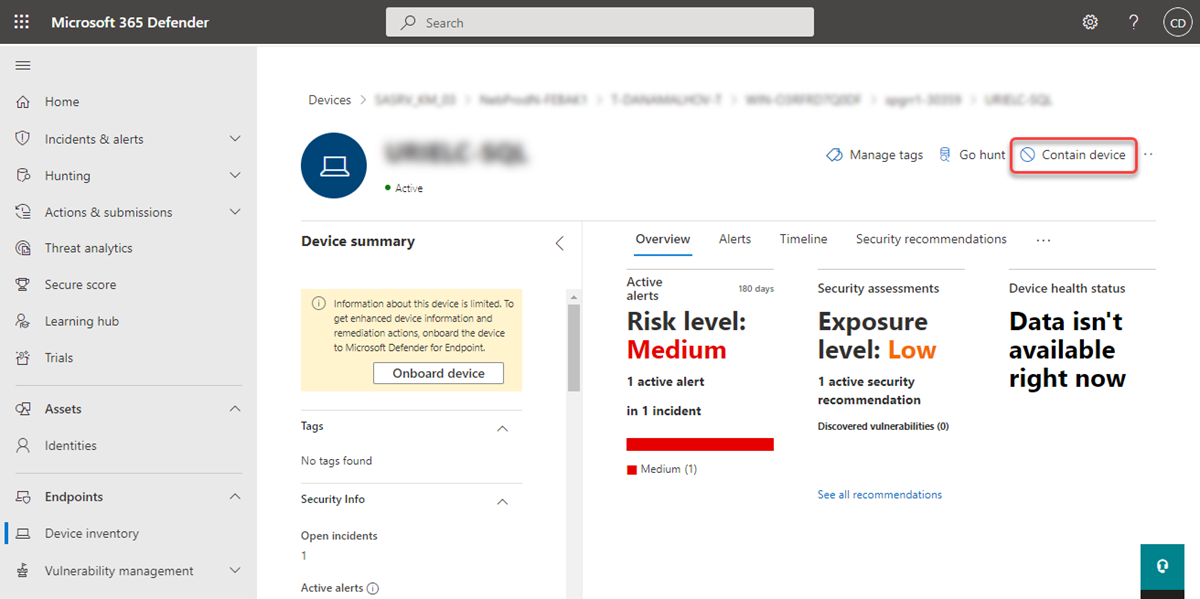
- Contain an unmanaged device: Assets > Devices > filter to non-onboarded > select > Contain device > comment > Confirm. Rules reach onboarded hosts within about 5 minutes. Release from the same menu.
- Live Response: device page > Initiate live response session. Upload scripts first from the Library management page so the session does not need Manage security settings. Disconnect session when done.
# Tested on: TODO
# App registration needs WindowsDefenderATP application permissions:
# Machine.Isolate, Machine.Scan, Machine.CollectForensics, Machine.LiveResponse, Machine.ReadWrite.All
$tenantId = '<tenant>'; $clientId = '<app>'; $secret = '<secret>'
$body = @{ grant_type='client_credentials'; client_id=$clientId; client_secret=$secret
           scope='https://api.securitycenter.microsoft.com/.default' }
$token = (Invoke-RestMethod -Method Post -Uri "https://login.microsoftonline.com/$tenantId/oauth2/v2.0/token" -Body $body).access_token
$h = @{ Authorization = "Bearer $token"; 'Content-Type' = 'application/json' }
$api = 'https://api.security.microsoft.com/api'
$machineId = '<40 char machine id>'

# Isolate. IsolationType: Full, Selective, UnManagedDevice (the last one = contain device). 100/min, 1500/hour.
Invoke-RestMethod -Method Post -Headers $h -Uri "$api/machines/$machineId/isolate" `
  -Body (@{ Comment='Isolate due to alert 1234'; IsolationType='Full' } | ConvertTo-Json)

# Release
Invoke-RestMethod -Method Post -Headers $h -Uri "$api/machines/$machineId/unisolate" `
  -Body (@{ Comment='Clean and validated' } | ConvertTo-Json)

# AV scan. ScanType: Quick or Full. Second call while pending returns 400 Action is already in progress.
Invoke-RestMethod -Method Post -Headers $h -Uri "$api/machines/$machineId/runAntiVirusScan" `
  -Body (@{ Comment='Scan due to alert 3212'; ScanType='Full' } | ConvertTo-Json)

# Investigation package, then poll and fetch the SAS link (2 calls/min, link is short-lived)
$a = Invoke-RestMethod -Method Post -Headers $h -Uri "$api/machines/$machineId/collectInvestigationPackage" `
  -Body (@{ Comment='Forensics for alert 1234' } | ConvertTo-Json)
do { Start-Sleep 30; $s = Invoke-RestMethod -Headers $h -Uri "$api/machineactions/$($a.id)" } until ($s.status -in 'Succeeded','Failed')
$uri = (Invoke-RestMethod -Headers $h -Uri "$api/machineactions/$($a.id)/getPackageUri").value.Trim('"')
Invoke-WebRequest -Uri $uri -OutFile .\WDATP_Investigation_Package.zip

# Live Response: PutFile, RunScript, GetFile in that order. 10 calls/min, 50 sessions, queued 2 hours if offline.
$lr = @{
  Comment  = 'Collect dump'
  Commands = @(
    @{ type='RunScript'; params=@(@{key='ScriptName';value='minidump.ps1'}, @{key='Args';value='OfficeClickToRun'}) },
    @{ type='GetFile';   params=@(@{key='Path';value='C:\\windows\\TEMP\\OfficeClickToRun.dmp.zip'}) }
  )
} | ConvertTo-Json -Depth 6
$act = Invoke-RestMethod -Method Post -Headers $h -Uri "$api/machines/$machineId/runliveresponse" -Body $lr
do { Start-Sleep 30; $s = Invoke-RestMethod -Headers $h -Uri "$api/machineactions/$($act.id)" } until ($s.status -in 'Succeeded','Failed')
# Result link per command index, valid 30 minutes, re-callable without rerunning
(Invoke-RestMethod -Headers $h -Uri "$api/machineactions/$($act.id)/GetLiveResponseResultDownloadLink(index=1)").value

# Offboard. Stops the sensor only, leaves registry onboarding info in place.
Invoke-RestMethod -Method Post -Headers $h -Uri "$api/machines/$machineId/offboard" `
  -Body (@{ Comment='Decommissioned' } | ConvertTo-Json)
The token scope above is the one Learn uses for the WindowsDefenderATP app. TODO: confirm in the dev tenant that the api.security.microsoft.com host accepts it, or switch to the api.securitycenter.microsoft.com host for the calls.
Microsoft Graph Security API has no device response actions. There is no isolate, scan, collect or Live Response resource under security/ in Graph. Use the MDE API tab. Graph is only useful here for reading alerts and incidents (security/alerts_v2, security/incidents) to find the deviceId you then pass to the MDE API.
Verify
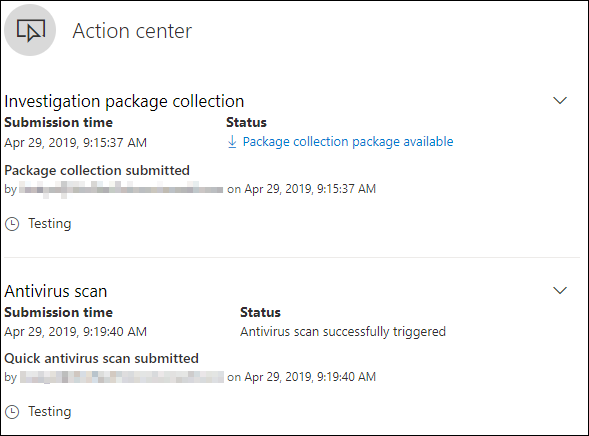
- Device page > Action center (the button in the action bar) shows that device's actions with time, submitter and status.
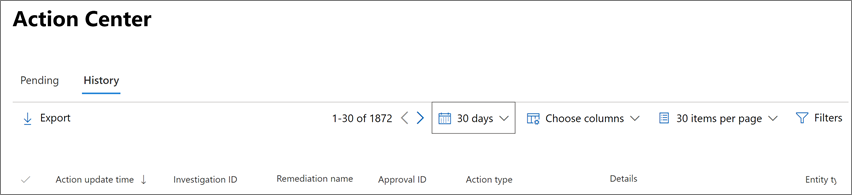
- Actions and submissions > Action center > History. Filter Action source to Manual device action, Manual live response action or Live response action. Export to CSV for evidence.
- Device timeline gets an event for each action submitted.
- Isolated device: the user sees a no network connection notification on Windows. The device page shows Release from isolation.
- Contain device: the device page shows Release from containment. Onboarded hosts drop traffic within about 5 minutes. If not, check the Base Filtering Engine service is running on the enforcing hosts.
- Live Response: the session Command log tab lists every command and its output.
// Response-related device events on servers
DeviceEvents
| where ActionType in ("AntivirusScanCompleted", "AntivirusScanCancelled", "UserAccountContained", "ContainedUserLogonBlocked")
| where DeviceType == "Server" or OSPlatform startswith "Linux"
| project Timestamp, DeviceName, ActionType, AdditionalFields
| order by Timestamp desc
TODO: confirm the exact ActionType strings for isolation and Live Response in the dev tenant; Learn's contain user section shows an advanced hunting screenshot but the article text does not list names.
Troubleshoot
| Symptom | Likely cause | Fix |
|---|---|---|
| Action stays Pending for days | Device offline. Isolation retries for 3 days, Stop and quarantine 3 days, Live Response API queue 2 hours. | Wait for check-in or reissue once the device is active. For a file, add a block indicator so the block survives the timeout. |
| Device offline but attacker still has it | Full VPN tunnel or proxy blocks the Defender channel after isolation. | Split-tunnel Defender endpoints. Use Selective isolation where a PAC or WPAD proxy is in play. Use the forced release script if the box is unrecoverable (Windows, needs the listed KBs, script expires in 3 days). |
| Initiate live response session missing or greyed | Live response toggle off, servers toggle off for a server, role lacks Live response capabilities, or device not in your device group. | Check Advanced features, then Roles and Device groups. Selective response actions on high-value assets can also block it. |
| Live Response on Server 2012 R2 or 2016 fails | MMA-based sensor, or streamlined onboarding behind a static proxy. | Move to the unified agent and KB5005292. Use a system proxy. |
run returns an error that unsigned scripts are not allowed | Allow unsigned script execution in live response is Off. | Sign the script, or turn the toggle on with Manage portal system settings and accept the exposure. |
| API returns 400 ActiveRequestAlreadyExists | A session is already open on that device. One per device. | Wait or disconnect the portal session. Portal sessions are not visible in the machineactions API, so you cannot see them from the script. |
| API returns 429 | Over 10 Live Response calls per minute, over 50 sessions, or over 100 per minute on other actions. | Back off and retry. |
| Live Response API fails on a device group with no remediation level | Group has no automated remediation level set. | Set at least the minimum remediation level on the device group. |
| Upload file to library greyed in the session | User has delegated permissions only, needs Manage security settings. | Upload from the Library management page instead. |
getfile fails on a file | Reparse point, sparse, empty or not fully present locally. | Copy it with a PowerShell script, then getfile the copy. |
| Restrict app execution not offered | Server 2016 or older, or Defender AV not running. | Needs Server 2019+ and Defender AV. |
| Contain device has no effect | Rules take up to 5 minutes, IP changed, or BFE stopped on enforcing hosts. | Wait, check the new IP is blocked, start Base Filtering Engine. |
| Contain user undo not allowed | Learn says undo needs Global Administrator. | Use a break-glass admin, or wait 5 days for auto-release. |
| Investigation package download gives 404 from the API | Collection not finished. | Poll the machine action until Succeeded, then call getPackageUri. |
Gotchas and limits
- Plan 1 gets four actions only. Everything on a Defender for Servers Plan 1 or Plan 2 subscription has the full set, because both server plans carry MDE P2 features.
- Manual Initiate automated investigation is retired. The Action center Learn page says that from 2026-09-01 AIR no longer runs as a separate experience or can be triggered manually for Defender for Endpoint, and any playbook that triggered it stops working. Run a full AV scan instead. Expect the button to disappear from device pages. Defender for Office 365 AIR is unaffected.
- Isolation auto-lifts after 7 days. Contained users auto-release after 5 days. Neither is a permanent control. Pair with an indicator, a Conditional Access block or an account disable.
- Isolation on a Linux box is just iptables rules. Any config management tool that reconciles iptables will silently release it.
- Contain device blocks by IP, enforced by Windows hosts only. DHCP lease changes are followed but there is a 5 minute window. If the IP is shared (NAT, load balancer) the portal warns with a hunting query link; read it before you confirm.
- Contain user on a DC rewrites the Default Domain Controller GPO and triggers AD replication. Know that before you run it in a tenant with strict GPO change control.
- Live Response is one session per device and 50 per tenant. A stuck portal session blocks your automation and the API cannot see it.
- Ctrl + C only cancels the console. A
remediatekeeps going on the device. putfileartefacts vanish on reboot unless-keep. Library total is 250 MB.putfileis 10 MB on Linux and macOS, which rules out dropping most tools; pull them from a trusted URL inside a script instead.- Unsigned script toggle is tenant-wide and PowerShell-only. There is no per-script or per-role grant.
- The offboard API only stops the Sense service on Windows. Registry onboarding data stays. The device shows inactive after 7 days and the profile stays in inventory for 180 days.
- Restore from quarantine only works per device with
MpCmdRun, and files quarantined as potential network threats may not be recoverable. - The contain-devices Learn page could not be fetched while drafting; the contain device content here comes from the respond-machine-alerts page. TODO: diff against contain-devices once reachable.
Further reading
- Introducing library management in Microsoft Defender, Microsoft Tech Community, February 2026. Covers the standalone Library management page that lets you stage Live Response scripts outside a session and without the Manage security settings permission.
- Microsoft Defender: Automated investigation and response integrated into antivirus with manual triggering removed, Message Center MC1411577 via merill.net, July 2026. The notice that removed the Initiate automated investigation action and the deadline for fixing playbooks that called it.
- 129 seconds to disruption: Microsoft Defender stops ransomware with QNET, Microsoft Security Research, August 2026. Explains automatic device isolation as an attack disruption action and why isolating the device and containing the user should be used together.
Only three posts from the last twelve months qualified; the remaining practitioner material on Live Response is from 2023 or earlier.
My notes
TODO: Sohail's notes after verification.
Changelog
| Date | Change | Source |
|---|---|---|
| 2026-10-22 | Drafted from Learn, with Learn images and diagrams | [1] |