Incidents, alerts, investigation and triage
What it is
An alert is one detection from one engine: MDE saw a hidden file execute, MDO saw a phish click, Entra ID Protection saw impossible travel. An incident is the container the portal builds around related alerts so you work the attack, not the noise. Correlation groups alerts by shared entities, artifacts, time frame and event sequence, and merges incidents that turn out to be the same attack. Every alert belongs to an incident.
The queue at Incidents and alerts > Incidents is the SOC work list: priority score, severity, status, assignment, tags, classification, and an incident page with the attack story graph. Alert tuning, automated investigation, the Action center and email notifications decide what lands in the queue and what gets fixed without a human.
This covers the legacy incident experience Learn still documents in full; incident cases, in preview, are now recommended. See settings-console for portal switches, the overview for product framing, EDR and hunting for hunting from an incident, and Sentinel analytics and incidents for the Sentinel side.
Licensing and prerequisites
- Any Defender XDR workload licence gives you the queue: MDE P2, MDO P2, MDI, MDA, or E5 and E5 Security. Threat analytics is not in MDE P1; Sentinel-only customers see some tabs.
- Microsoft Threat Intelligence alerts reach the queue only for Sentinel customers using the Defender portal or the Defender XDR connector. Otherwise they appear only in the Microsoft 365 admin center.
- Roles: Security Reader, Global Reader, Security Operator or Security Administrator to read; Security Operator or Security Administrator to update. Notification rules need Manage security settings. Approving device actions needs Security Administrator, URBAC Security operations \ Security data \ Response (manage), or the MDE RBAC role Active remediation actions. MDO remediation also needs Search and Purge.
- Graph:
SecurityIncident.Read.Allto list,SecurityIncident.ReadWrite.Allto update,SecurityAlert.Read.Allfor alerts_v2. Delegated and application both work. - Analyst notes need Security Copilot plus the opt-in under Settings > Microsoft Defender XDR > Advanced features. Blast radius needs the Sentinel data lake and Exposure management (read).
How it works
From alert to incident
If an alert is sufficiently unique within a time frame, the correlation engine creates a new incident. If it is sufficiently related to existing alerts, from any source, it joins that incident. The criteria and the time frame are proprietary. Incident names are generated from alert attributes and can change as the incident grows, so never key automation on the name.
Correlation continues after creation. When two incidents look alike on entities, artifacts, time frames or event sequences, the source merges into the target: it closes, gets a Redirected tag, and redirects. Alerts, tags, entities and detection rules move across; Defender picks the direction. No merge happens when either is resolved, owners differ, classification or determination differ, the target would pass the entity cap, or, with the optional check on, devices sit in different device groups. Manual merge is five at a time once the blocker is cleared.
Incident severity defaults to the highest alert severity inside it and can move as alerts come and go; no history is kept. Status is Active, In progress, Resolved. Resolving the incident resolves every active alert in it. Assignment is one user or group and flows to all its alerts.
Priority score and the queue
Defender Queue Assistant scores each incident 0 to 100 from attack disruption signals, threat analytics, severity, MITRE techniques, asset criticality, alert rarity and high profile threats. Red is above 85, orange 15 to 85, gray below 15. Selecting the row, not the name, opens a summary pane with the score factors. The default filter is New or In progress, High to Low, last week; Informational is hidden. CSV export caps at 10,000 records.
Classification and determination
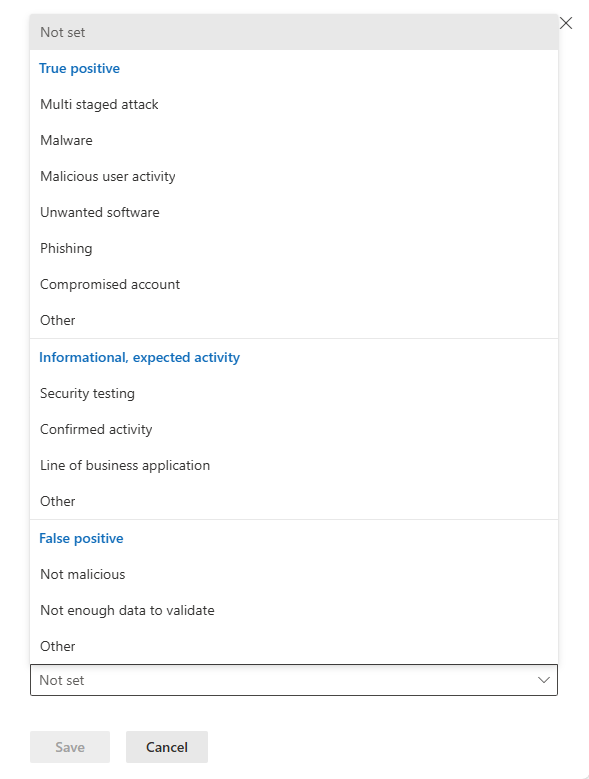
Classification is the analyst verdict: Not set, True positive, Informational expected activity, False positive. In Graph the enum is unknown, truePositive, informationalExpectedActivity, falsePositive. Determinations:
| Classification | Determination values |
|---|---|
| True positive | multiStagedAttack, maliciousUserActivity, compromisedAccount, malware, phishing, unwantedSoftware, other |
| Informational, expected activity | securityTesting, lineOfBusinessApplication, confirmedActivity, other |
| False positive | notMalicious, notEnoughDataToValidate, other |
The legacy Defender XDR API uses PascalCase (TruePositive, Clean, InsufficientData); Graph uses camelCase and different words for the false positive pair.
Investigation surfaces on the incident page
The attack story tab is the incident graph: alerts, devices, users, mailboxes and artifacts as nodes you can play in order, filter by severity, status and service source, and thin by hiding entity types. Each node opens an entity pane with response actions; Go hunt pivots into Advanced hunting with the entity pre-filled. Blast radius draws possible propagation paths to critical targets, capped at seven hops.
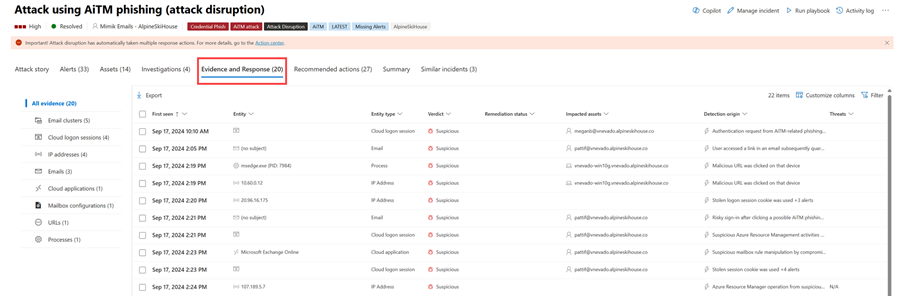
Other tabs: Alerts, Activities (audit log), Assets, Investigations (AIR runs; MDO alerts show zero here by design), Evidence and Response (every analysed entity with verdict and remediation status, approve or reject for pending items), Summary (MITRE kill chain, scope by risk) and Similar incidents.
Copilot: Learn documents analyst notes generated from the three dot menu in up to 20 minutes, and a Copilot incident summary in the PDF export when licensed.
Automated investigation and the Action center
When an alert that supports AIR creates an incident, an investigation starts, gives each piece of evidence a verdict of Malicious, Suspicious or No threats found, proposes remediation for the first two, and expands scope when an entity shows up elsewhere. Devices come from MDE, email from MDO, on-premises AD users from MDI. Automatic mode runs the action; approval-based mode parks it in the Action center Pending tab. From 1 September 2026 AIR no longer runs as a separate or on-demand experience for MDE alerts; AIR for MDO remains.
The Action center has Pending for approvals, singly or in bulk per action type, and History as the audit log of automated, manual, Live Response, Explorer and hunting actions. Isolate device and Restrict code execution are undoable from History.
Status lifecycle
Handoff to Sentinel and ITSM
With the Defender XDR connector, or Sentinel onboarded to the Defender portal, each incident appears in Sentinel within about five minutes and syncs both ways: title, description, severity, custom tags, new comments, owner, status, classification. Active maps to Sentinel New. True positive maps to True Positive, Suspicious activity; False positive to Inaccurate data; Informational expected activity to Benign Positive, Suspicious but expected; Not set to Undetermined. Sentinel incidents cap at 150 alerts. Microsoft incident creation rules are off for Defender-integrated products; use alert tuning or automation rules.
For other SIEMs Learn documents the REST incidents API pull (Splunk, ArcSight, Elastic) and the streaming API (Splunk, QRadar, Elastic), and recommends Graph for new work. TODO: no Learn page used here documents ServiceNow; source it from ServiceNow docs first.
Reports and threat analytics
Threat analytics is the report feed from Microsoft researchers: actors, campaigns, techniques, vulnerabilities, malware and curated OSINT. Each report has Overview, Analyst report, Related incidents, Impacted assets, Endpoints exposure, Recommended actions and a preview Indicators tab. Related incidents lists your incidents tied to the threat and lets you assign them there; a matching incident shows the report on its own page, and custom detection rules can be linked to a report. Volume reporting is the 24 hour chart on the queue, Defender Boxed each January and July, and the single incident PDF export. TODO: the Reports > Incidents and alerts page was not among the sources fetched.
Configure
- Portal
- PowerShell
- Graph API
Work an incident from the queue:
- Incidents and alerts > Incidents. Set time range and filters. Save a filter set or bookmark the URL.
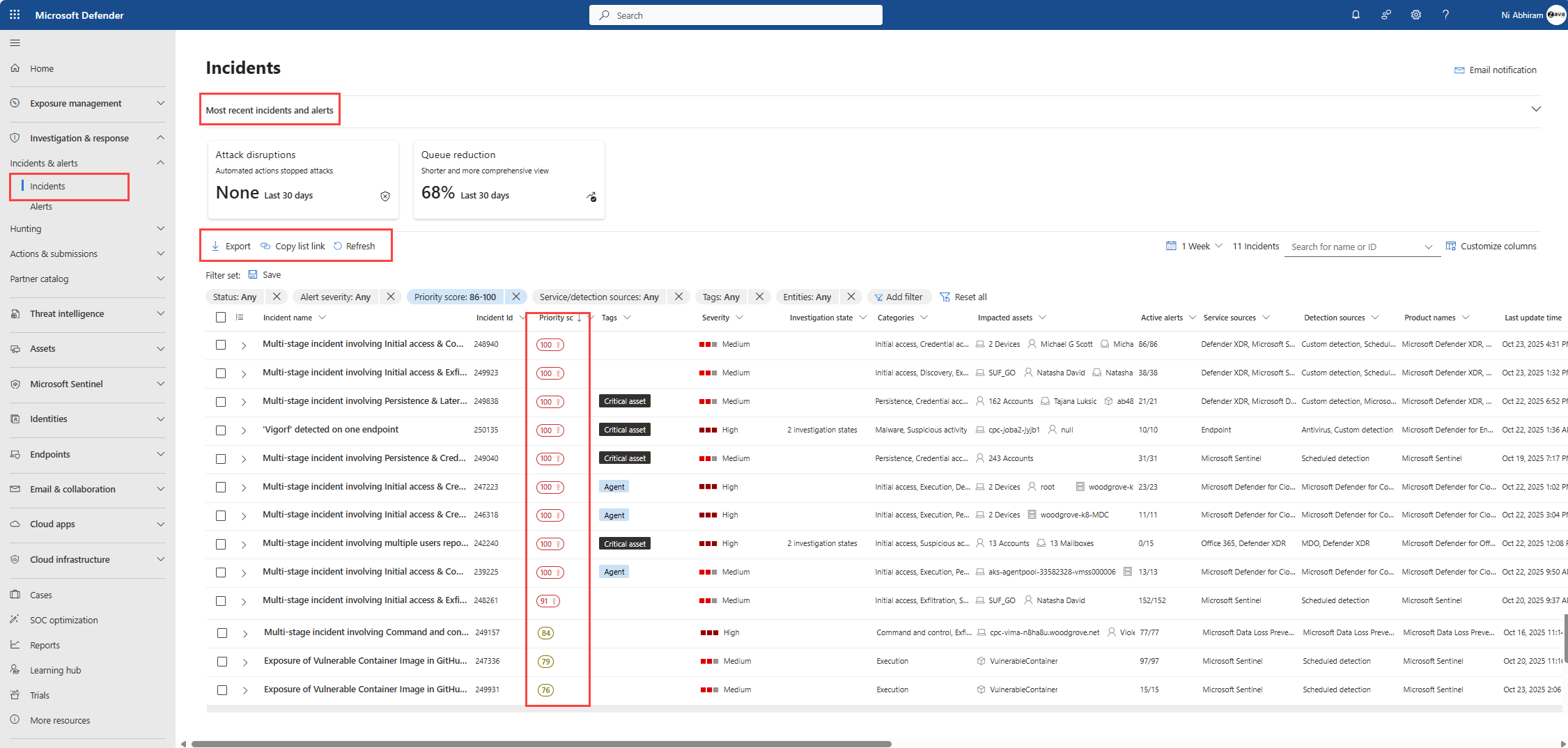
- Select the row, then Manage incident. Or tick several rows and use Manage incidents on the toolbar.
- Set Assign to, Severity, Status, Classification with determination, and tags. White tags are custom; red or black are system tags such as attack disruption, Defender Experts or critical asset.
- To close, set Status to Resolved, type the resolution note, Save. All active alerts resolve with it.
- On the incident page, Evidence and Response approves or rejects pending remediation in place.
Alert tuning rule:
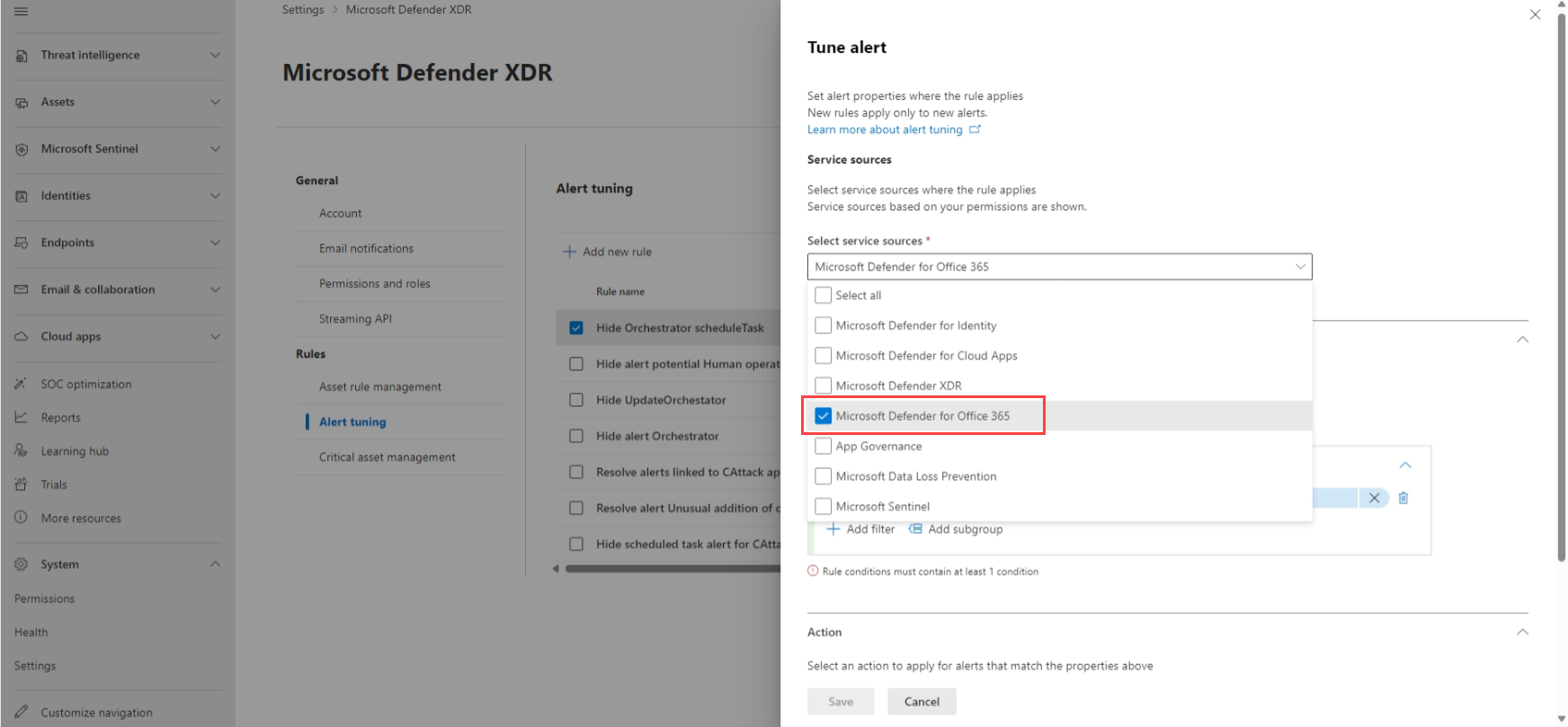
- Settings > Microsoft Defender XDR > Alert tuning > Add new rule, or Tune alert from an alert page, which pre-fills scope.
- Select service sources, and optionally detection sources inside each (preview, effective 8 November 2026). Only services you have permission for are listed.
- Add conditions on file, process, scheduled task, AMSI script, WMI event and other IOC types, combined with AND, OR and grouping. Values are not case sensitive, some take wildcards, up to 200 per rule.
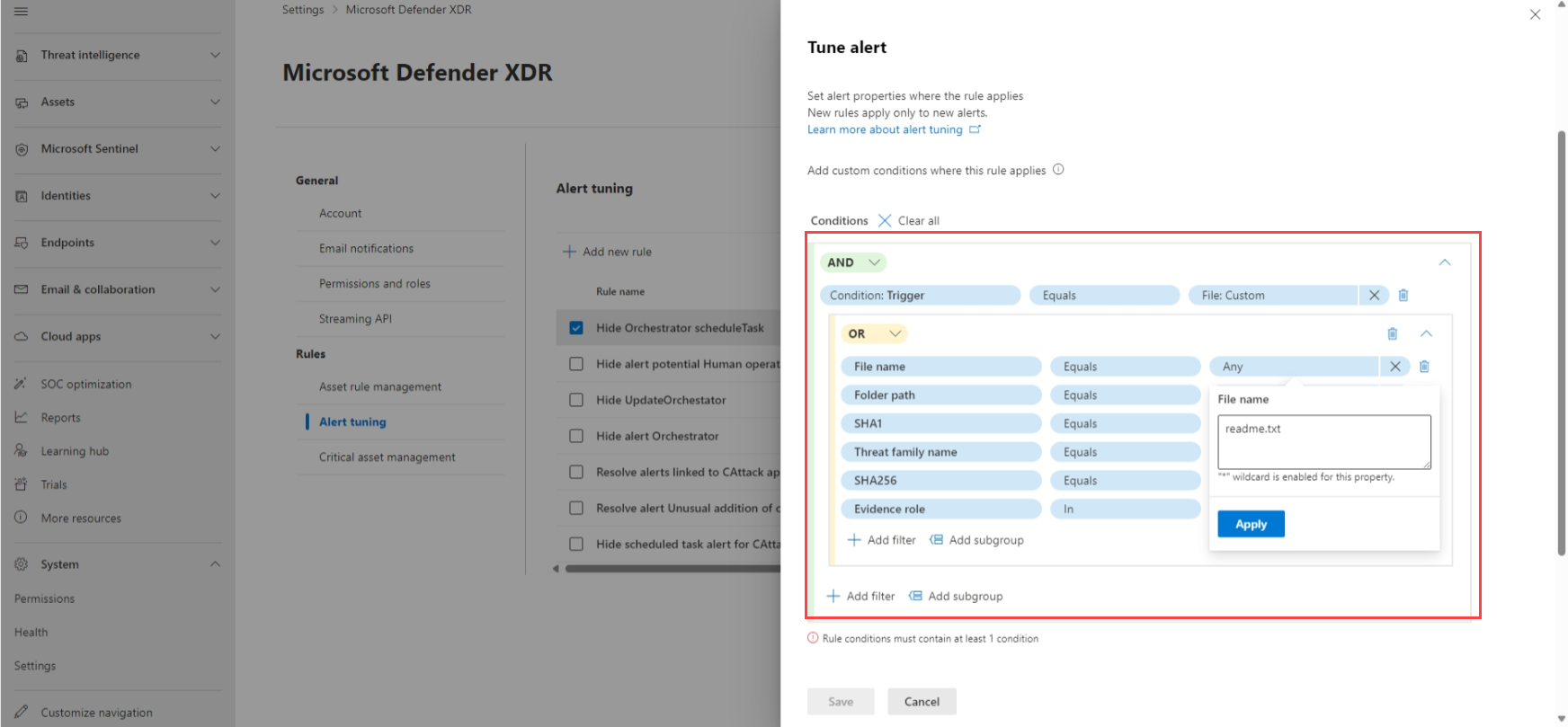
- Pick the action. Hide alert suppresses it and prevents incident creation, MDE alerts only; the alert still lands in
AlertInfoandAlertEvidence. Resolve alert creates the alert and its incident already resolved. Set as behavior turns the signal into a behavior inBehaviorInfoandBehaviorEntities, not supported for Defender for Cloud or MDO alerts. Learn documents no change severity action; severity is edited manually on the incident, or per policy for MDO alert policies. - Name, comment, Save. Review the built-in rules on the same page and disable any you do not want.
Incident email notification rule:
- Settings > Microsoft Defender XDR > Email notifications > Incidents > Add incident notification rule.
- Basics: name and description.
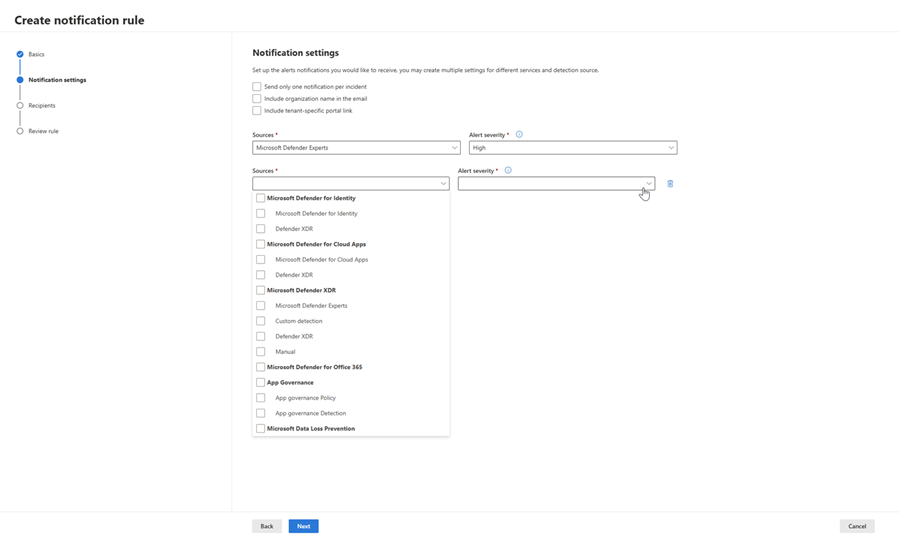
- Notification settings: alert severities, device group scope, Send only one notification per incident, include organisation name, include tenant specific portal link. Learn also describes choosing service and detection sources with severities per source.
- Recipients: add each address, Send test email, Create rule. New recipients only get incidents created after they were added.
Incident settings: Automatically resolve alerts and Restrict correlation to within scoped device groups sit under Settings > Endpoints > Advanced features; the analyst notes opt-in under Settings > Microsoft Defender XDR > Advanced features. See settings-console.
Action center: Actions and submissions > Action center > Pending. Tick items of one type, Approve or Reject.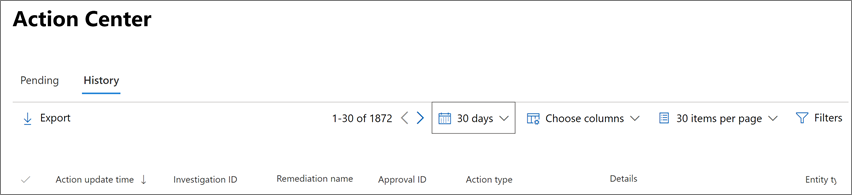
# Tested on: TODO
# Microsoft.Graph module, delegated sign-in. Application auth works the same with the same scopes.
Connect-MgGraph -Scopes 'SecurityIncident.ReadWrite.All','SecurityAlert.Read.All'

# High and medium incidents still active, with their alerts
$uri = "https://graph.microsoft.com/v1.0/security/incidents?`$filter=status eq 'active' and (severity eq 'high' or severity eq 'medium')&`$expand=alerts&`$top=50"
$incidents = @()
do {
    $page = Invoke-MgGraphRequest -Method GET -Uri $uri
    $incidents += $page.value
    $uri = $page.'@odata.nextLink'
} while ($uri)

$incidents | ForEach-Object {
    [pscustomobject]@{
        Id        = $_.id
        Severity  = $_.severity
        Priority  = $_.priorityScore
        Assigned  = $_.assignedTo
        Alerts    = $_.alerts.Count
        Sources   = ($_.alerts.serviceSource | Sort-Object -Unique) -join ','
        Name      = $_.displayName
        Url       = $_.incidentWebUrl
    }
} | Sort-Object Priority -Descending | Format-Table -AutoSize

# Unassigned incidents updated in the last 24 hours
$since = (Get-Date).ToUniversalTime().AddDays(-1).ToString('o')
$uri = "https://graph.microsoft.com/v1.0/security/incidents?`$filter=assignedTo eq null and lastUpdateDateTime ge $since"
(Invoke-MgGraphRequest -Method GET -Uri $uri).value | Select-Object id, severity, displayName

# Take ownership and tag
$body = @{ assignedTo = 'sohail@contoso.com'; status = 'active'; customTags = @('triage-wave-1') }
Invoke-MgGraphRequest -Method PATCH -Uri 'https://graph.microsoft.com/v1.0/security/incidents/29' -Body $body -ContentType 'application/json'

# Close as a security test
$body = @{
    status           = 'resolved'
    classification   = 'informationalExpectedActivity'
    determination    = 'securityTesting'
    resolvingComment = 'Red team exercise RT-2026-10, confirmed with purple team lead'
}
Invoke-MgGraphRequest -Method PATCH -Uri 'https://graph.microsoft.com/v1.0/security/incidents/29' -Body $body -ContentType 'application/json'

# Alerts for one incident with evidence verdicts
$alerts = (Invoke-MgGraphRequest -Method GET -Uri "https://graph.microsoft.com/v1.0/security/alerts_v2?`$filter=incidentId eq '29'").value
# incidentId is not in Learn's filterable list; if the call 400s, filter client side from $expand=alerts instead.
$alerts | ForEach-Object {
    $a = $_
    $a.evidence | ForEach-Object {
        [pscustomobject]@{ Alert = $a.title; Type = $_.'@odata.type'; Verdict = $_.verdict; Remediation = $_.remediationStatus }
    }
}
Filterable incident properties per Learn: assignedTo, classification, createdDateTime, determination, lastUpdateDateTime, severity, status. For alerts_v2 add serviceSource. Anything else, filter client side.
Active high severity incidents with alerts. Page with @odata.nextLink.
GET https://graph.microsoft.com/v1.0/security/incidents?$filter=status eq 'active' and severity eq 'high'&$expand=alerts&$top=25
Incidents touched since a timestamp, for a poller:
GET https://graph.microsoft.com/v1.0/security/incidents?$filter=lastUpdateDateTime ge 2026-10-21T00:00:00Z&$count=true
Set status, classification, determination and owner. Only send the fields you change.
PATCH https://graph.microsoft.com/v1.0/security/incidents/{incidentId}
Content-Type: application/json
{
  "status": "resolved",
  "classification": "truePositive",
  "determination": "phishing",
  "assignedTo": "soc-tier2@contoso.com",
  "customTags": ["bec", "q4-2026"],
  "resolvingComment": "Credential phish, user reset and sessions revoked"
}
Returns 200 OK with the full incident. Send camelCase values; Learn's example sends PascalCase but the response is camelCase.
Alerts from one service with evidence, newest first:
GET https://graph.microsoft.com/v1.0/security/alerts_v2?$filter=serviceSource eq 'microsoftDefenderForEndpoint' and status eq 'new'&$top=100
Each alert carries inline evidence[] typed as #microsoft.graph.security.deviceEvidence, fileEvidence, processEvidence, userEvidence, ipEvidence, registryKeyEvidence and so on, each with verdict and remediationStatus.
Legacy API, live but not recommended: GET https://api.security.microsoft.com/api/incidents, 50 calls per minute or 1,500 per hour, HTTP 429 with reset time in the body.
Verify
- Queue: filter Incident assignment to yourself; the incident you patched through Graph shows the new owner and tags.
- Activity log: three dot menu > Activities. Graph edits show as
API-App:<upn>inlastModifiedBy. - Tuning rule: trigger the benign condition again. Hide alert means nothing in the queue but a row in
AlertInfo. Resolve alert means a new incident already Resolved. Set as behavior means a row inBehaviorInfo. - Notification rule: Send test email, then wait for the next qualifying incident. The email names incident, severity and categories and links to it.
- Sentinel: the same incident appears within about five minutes with status and classification translated per the mapping table.
- Action center: approved items move from Pending to History with action source Automated device action or Automated email action.
// Alerts hidden or resolved by tuning still land here; compare against what the queue shows
AlertInfo
| where Timestamp > ago(7d)
| summarize Alerts = count() by ServiceSource, Severity, Title
| order by Alerts desc
// Behaviors created by Set as behavior rules
BehaviorInfo
| where Timestamp > ago(7d)
| summarize count() by ServiceSource, Title
TODO: confirm whether AlertInfo carries a flag for tuned alerts; Learn names none.
Troubleshoot
| Symptom | Likely cause | Fix |
|---|---|---|
| PATCH returns 200 but the queue still shows the old status | Pane cached, or the incident was merged and you patched the source | Refresh. Check redirectIncidentId on the GET; patch the target ID |
| Incident reopened or reclassified by itself | Sentinel bidirectional sync pushed a change from an automation rule or playbook | Check lastModifiedBy and the Sentinel automation rule history |
| Two obvious duplicates never merge | Different owners, different classification or determination, one resolved, or device groups differ with the check on | Align the blocking field, then merge manually, five at a time |
| Tuning rule saved but alerts keep coming | Rule scoped to the wrong service or detection source, condition on a value that changes per run, or alert from a custom detection outside the selected detection sources | Open the alert, Tune alert from there so scope is pre-filled, use wildcards on volatile paths |
| Tuning rule with Hide alert refused for an MDO alert | Hide alert is MDE only | Use Resolve alert |
| Set as behavior greyed out | Alert is from Defender for Cloud or MDO | Use Resolve alert |
| Phishing Triage Agent skips user reported mails | A built-in or custom rule auto-resolves the Email reported by user as malware or phish alert | Disable that built-in rule and any custom rule on the same alert |
| Notification never arrives | Severity or device group outside the rule, recipient added after the incident, or sender blocked by mail hygiene | Send test email, widen scope, allow the sender |
| Notification rule cannot be created | Account lacks Manage security settings, or the device group is outside your RBAC scope | Use Security Administrator or widen the device group assignment |
| Graph filter returns 400 | Property not in the filterable list | Filter on the seven documented properties, then narrow client side |
| Graph PATCH returns 403 | Delegated user lacks Security Operator or Security Administrator, or app lacks SecurityIncident.ReadWrite.All | Fix the role or consent |
| Investigations tab shows zero for an MDO incident | By design | Open the alert pane for MDO investigations, or the Evidence and Response tab |
| Sentinel incident shows 150+ alerts | Cap in the connector | Follow the link to the Defender incident |
| Alert status changed to Resolved with no analyst action | MDE Automatically resolve alerts after AIR found nothing or remediated | Expected. It never overrides In progress or Resolved set by a person |
Gotchas and limits
- Classification values changed over time. Legacy API:
TruePositive,Clean,InsufficientData. Graph:truePositive,notMalicious,notEnoughDataToValidate. The portal shows a third set of labels.aptandsecurityPersonnelwere removed in August 2022 and sit in the Graph enum as history. Map SIEM and ITSM fields to the Graph names. - Alert auto-resolve: the only documented mechanism is the MDE advanced feature that resolves alerts when AIR finds nothing or remediated everything, and it moves device risk level. TODO: no Learn page fetched here says alerts resolve after a fixed number of days; verify before telling a client that.
- Tuning rules versus MDE suppression: alert tuning is the current surface and Hide alert is the only action limited to MDE. TODO: Learn says nothing here about migrating older MDE suppression rules; check how they show on the Alert tuning page.
- Hidden alerts are not deleted. They stay in
AlertInfoandAlertEvidence, so hunting and reporting still count them. - Built-in tuning rules ship on by default: 12 low priority MDO rules from 5 February 2026, DLP alerts as behaviors from 12 October 2026, MDE rules in preview. Review Settings > Microsoft Defender XDR > Rules > Alert tuning after each message center notice.
- Detection source scoping takes effect 8 November 2026. Untouched rules keep applying to every detection source under their service source, custom detections included.
- A renamed incident loses its custom name when another incident merges into it. Incident description is not stored in the activity log or Advanced hunting.
- The legacy experience sits under a preview banner for incident cases. Expect the queue and Manage incident pane to move; the Graph contract is the stable part.
Further reading
- Reimagining Case Management in Microsoft Defender, Microsoft Defender XDR blog, September 2026. Where incident cases are going, the replacement for the legacy queue documented here.
- MC1481318: Detection source support in alert tuning rules, Merill Fernando's message center archive, September 2026. Preview and GA dates for detection source scoping and the custom detection warning.
- MC1465771: DLP alerts will be set as behaviors by default, Merill Fernando's message center archive, September 2026. The built-in rule that moves Purview DLP out of the queue from 12 October 2026 and how to opt out.
- MC1222979: New Built-in Alert Tuning Rules optimize your incident and alert queues, Merill Fernando's message center archive, January 2026. The 12 built-in MDO rules and how AIR reopens suppressed alerts that turn out malicious.
My notes
TODO: Sohail's notes after verification.
Changelog
| Date | Change | Source |
|---|---|---|
| 2026-10-22 | Drafted from Learn, with Learn images and diagrams | [1] |