How the products integrate with each other
What it is
Defender XDR is the correlation layer. Each product under it keeps its own sensor, its own alerts and its own settings page, and XDR stitches them into incidents, a shared hunting schema and one Action center. That part needs no switch: Learn says XDR turns itself on the first time an eligible admin visits the portal, and it only correlates signals from the products you have licensed and provisioned.
The product-to-product links are different. Most are a toggle on one side, a toggle on the other, and a licence check in the middle that fails silently. This article is the map of those links: where the switch is, what it needs, what it unlocks, and how to prove it is on.
It does not repeat how each product works on its own. See the XDR overview, the settings console, and the per-product overviews for MDE, MDI, MDO, MDA, Defender for Cloud and Sentinel.
Licensing and prerequisites
XDR itself comes with any component licence on the prerequisites page: Microsoft 365 E5 or A5, E3 plus the Defender Suite or EMS E5 add-on, Windows E5, EMS E5, Office 365 E5, MDE, MDI, MDA, MDO Plan 2, Business Premium, Defender for Business. Turning it on needs Security Administrator. Attack disruption and threat analytics need MDE Plan 2.
Each integration adds its own requirement:
- MDE to MDA: MDA plus MDE Plan 2 or Defender for Business. Windows 10 1709 and later or Windows 11, macOS with MDE 20.123072.25.0 or later. Blocking also needs Defender AV with real-time, cloud-delivered and network protection in block mode.
- MDE to Intune: Intune Plan 1, an MDE subscription, Entra joined or hybrid joined Windows, Entra Conditional Access for the enforcement step. Intune role Endpoint Security Manager; Defender side Security Administrator.
- Security settings management: at least one active MDE user licence in the tenant, even when every server is covered by Defender for Servers.
- MDE to MDI: a Defender for Identity licence (EMS E5, M365 E5, E5 Security, F5 Security variants). v3 sensor needs Windows Server 2019 or later with the September 2026 cumulative update and the server onboarded to MDE, or the standalone v3 package.
- MDA to Conditional Access App Control: MDA plus Entra ID P1. Conditional Access Administrator.
- MDA to Purview: MDA plus a Purview licence, the Microsoft 365 app connector, labels published with Files and Emails in scope.
- Defender-sourced Entra risk detections: Entra ID P2 plus the matching Defender licence, or M365 E5 with EMS E5.
- Defender for Cloud to XDR: a subscription with the relevant plans enabled, and the XDR Unified RBAC role for Defender for Cloud, or Security Administrator.
- XDR to Sentinel: a Defender XDR licence, Security Administrator on the tenant, write on the workspace, same Entra tenant. Onboarding to the Defender portal needs an unconditional Owner on the subscription.
- Exposure Management: MDVM standalone or via MDE P2, Defender for Cloud with CSPM for the full dashboard, Public Cloud only.
How it works
Every arrow below is a documented link. Thick lines are data or policy flows that need a switch; dotted lines are things XDR does by itself once the products exist.
The matrix
| From | To | Enable where | Prerequisite | What it unlocks |
|---|---|---|---|---|
| MDE | MDA | Defender portal, Settings > Endpoints > General > Advanced features > Microsoft Defender for Cloud Apps | MDA licence, MDE P2 or MDB, onboarded Windows or macOS devices, network protection on macOS | Cloud Discovery from the endpoint network logs with user and device context, no log collector or proxy. Data in up to two hours |
| MDA | MDE | Settings > Cloud Apps > Cloud Discovery > Microsoft Defender for Endpoint > Enforce app access, plus Advanced features > Custom network indicators | The MDE to MDA link above, Defender AV with network protection in block mode | Unsanctioned apps become block URL indicators, Monitored apps become warn prompts with a bypass timer, scoped to MDE device groups. Up to three hours end to end |
| MDE | Intune | Defender portal Advanced features > Microsoft Intune connection, then Intune Endpoint security > Defender for Endpoint platform toggles | Intune Plan 1, MDE, Entra joined Windows | Auto onboarding package for EDR policy, machine risk score as a compliance signal, Conditional Access on compliance. Connector status Enabled in up to 15 minutes |
| Intune | MDE | Defender portal Settings > Endpoints > Configuration Management > Enforcement Scope, and Intune Endpoint security > Defender for Endpoint > Allow Microsoft Defender for Endpoint to enforce Endpoint Security Configurations | At least one MDE user licence, agent minimums, *.dm.microsoft.com reachable | Endpoint security policies on devices not enrolled in Intune, through a synthetic Entra device object. Check-in about every 90 minutes |
| MDE | MDI | Settings > Identities > Advanced features > Automatic sensor v3.x activation, or Sensor management > Activate | MDI licence, Windows Server 2019 or later with the September 2026 CU, server onboarded to MDE | The identity sensor runs on the Sense platform, LocalSystem, no gMSA, no separate installer. One MDI tenant can mix v2 and v3 |
| MDI | XDR identity page | Nothing to enable | MDI sensor deployed | AD control flags, org tree, MDI risk score alongside Entra risk level, attack paths tab, lateral movement paths, user actions through MDI action accounts |
| MDE, MDA, MDO | Entra ID Protection | Nothing to enable, detections appear when the product is licensed | Entra ID P2 plus the Defender licence, or M365 E5 with EMS E5 | PRT access attempt from MDE sets High user risk; suspicious sending from MDO sets Medium; MDA contributes anonymous IP, impossible travel, mass file access, new country, inbox forwarding, inbox rules, attacker in the middle |
| MDO | MDE | Nothing documented as a switch on the pages fetched, see Gotchas | MDO P2 and MDE in the same tenant | Analysts go upstream from an endpoint alert to the email entry point; threat intelligence shared so attacks are contained and blocked; AIR verdicts on email and devices in one Action center; MDO data shown for 30 days |
| MDA | Entra Conditional Access | Entra admin center, Conditional Access policy > Session > Use Conditional Access App Control | MDA, Entra ID P1, Conditional Access Administrator, the Session Controls service principal allowed | Session policies: block or protect download, block upload of unlabeled files, malware scan, step-up auth, monitor. Access policies for native clients |
| MDA | Purview | Settings > Cloud Apps > Information Protection > Microsoft Information Protection > automatic scan | MDA, Purview licence, Microsoft 365 app connector, labels published with Files and Emails scope | Labels synced hourly, files scanned, Apply sensitivity label as a governance action in Box, Google Workspace, SharePoint, OneDrive. File policies retire 2027-01-06 |
| Defender for Cloud | XDR | Nothing to enable in XDR; enable plans on the subscription | Subscription with Defender for Cloud plans, XDR Unified RBAC role for Defender for Cloud or Security Administrator | Cloud alerts and incidents in the queues, VM entity pages, CloudAuditEvents, CloudProcessEvents, CloudStorageAggregatedEvents in hunting, alerts in the XDR API. Informational alerts excluded |
| Defender for Cloud | MDE | Defender for Cloud > Environment settings > Settings and monitoring > Endpoint protection | Servers plan on the subscription | Defender for Servers deploys the MDE.Windows or MDE.Linux extension; the server is an MDE device. Covered in the Defender for Servers folder |
| XDR | Sentinel | Azure portal: Content hub > Microsoft Defender XDR solution > connector. Defender portal: System > Settings > Microsoft Sentinel > Connect a workspace | XDR licence, Security Administrator, workspace write, same tenant; portal onboarding needs unconditional Owner | Incidents in Sentinel in about 5 minutes, bi-directional sync of status, owner, classification, tags and comments, raw hunting tables at a cost, longer retention. Component connectors are disconnected |
| XDR | Exposure Management | Nothing to enable | MDVM, Defender for Cloud CSPM for the full view, device groups access for full scope | Unified inventory, exposure graph, attack paths, critical assets. First-party data within 72 hours, 14 days retained, Public Cloud only |
| All | Secure Score | Nothing to enable | Licensed products feed recommendations | One score from MDE, MDI, MDO, MDA, Entra, Purview IP, Exchange, SharePoint, Teams, app governance and third parties. Entra states refresh weekly, Teams monthly |
| XDR | Security Copilot | Copilot button in the portal | Provisioned Security Copilot access, plugins turned on | Guided incident summaries, hunting and threat intelligence from the Defender, Threat Intelligence and NL-to-KQL plugins. One line is all Learn gives on data scope |
The identity chain
Three risk numbers exist and only two reach Conditional Access. MDI produces an identity risk score on the XDR identity page. Entra ID Protection produces user and sign-in risk, fed by its own detections plus the MDE, MDA and MDO sourced ones. MDE produces a machine risk score that Intune turns into a compliance verdict. Conditional Access reads Entra risk directly and the MDE score only through Intune compliance.
Learn's Entra risk detection list does not name MDI as a source. The XDR identity page shows the MDI risk score and the Entra risk level side by side and lets Confirm safe reset both, but that is correlation in the portal, not a feed. TODO: confirm in the dev tenant whether an MDI alert alone ever raises Entra user risk; the fetched pages say it does not.
MDA blocking through MDE, step by step
Configure
The product-side deep dives have their own articles. The steps here are the switches only.
- Portal
- PowerShell
- Graph API
MDE to MDA:
- Defender portal > Settings > Endpoints > General > Advanced features > Microsoft Defender for Cloud Apps > On > Save preferences.
- Optional: Settings > Cloud Apps > Cloud Discovery > Microsoft Defender for Endpoint > Alerts, set the severity for alerts MDA sends back.
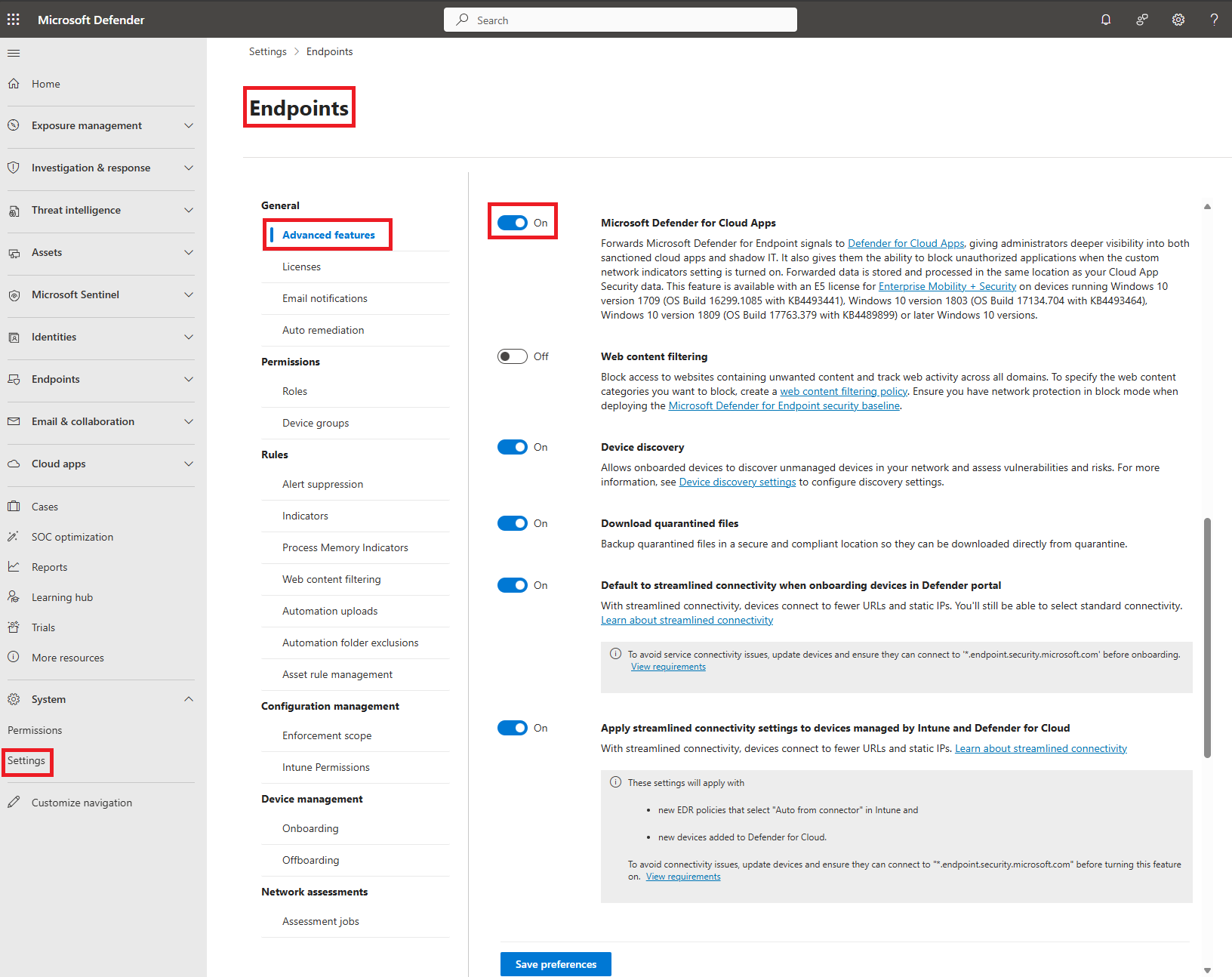
MDA to MDE enforcement:
- Settings > Cloud Apps > Cloud Discovery > Microsoft Defender for Endpoint > Enforce app access. Allow 30 minutes.
- Settings > Endpoints > Advanced features > Custom network indicators > On.
- Optional: Notification URL for blocked apps, Notification URL and Bypass duration for monitored apps, Generate alert for blocked app access.
- Scoping: Settings > Cloud Apps > Cloud discovery > App tags > Scoped profiles, Include or Exclude MDE device groups. Pick the profile when you tag the app.

MDE to Intune:
- Defender portal > Settings > Endpoints > General > Advanced features > Microsoft Intune connection > On > Save preferences.
- Intune > Endpoint security > Defender for Endpoint. Wait up to 15 minutes for Enabled, then turn on Connect Windows, Android and iOS devices under Compliance policy evaluation, and the App protection toggles for mobile. Save.
- Endpoint security > Endpoint detection and response > Deploy preconfigured policy, or a policy with package type Auto from connector.
- Devices > Compliance > Create policy > Microsoft Defender for Endpoint > Require the device to be at or under the machine risk score. Learn recommends Low.
- Entra Conditional Access > Grant > Require device to be marked as compliant. Report-only first, exclude break-glass and Directory Synchronization Accounts, then On.

Security settings management (Intune policy for devices MDE manages):
- Defender portal > Settings > Endpoints > Configuration Management > Enforcement Scope > enable Windows, Windows Server, Linux, macOS. Pilot with On tagged devices and the
MDE-Managementtag. - Intune > Endpoint security > Microsoft Defender for Endpoint > Allow Microsoft Defender for Endpoint to enforce Endpoint Security Configurations > On.
- If Configuration Manager is in play, turn off Manage Security settings using Configuration Manager on the same Enforcement Scope page.
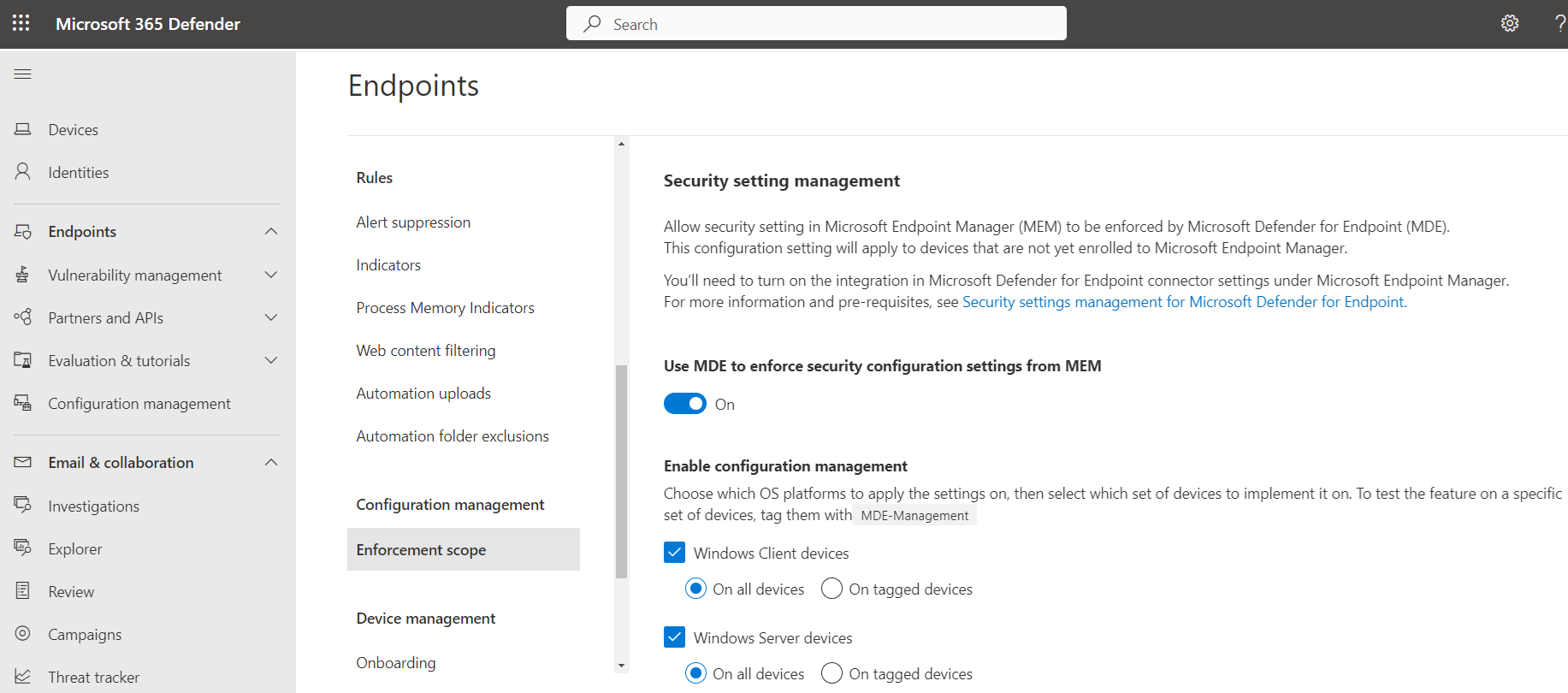
MDE to MDI:
- Settings > Identities > Advanced features > Automatic sensor v3.x activation > On. Eligible MDE-onboarded DCs activate as they are discovered.
- Or Settings > Identities > Sensor management, select the server, Activate. AD FS, AD CS and Entra Connect servers are preview and need at least one v3 DC sensor too.
- If any sensor is v3, set Manage action accounts to Automatically use the sensor's local system account.
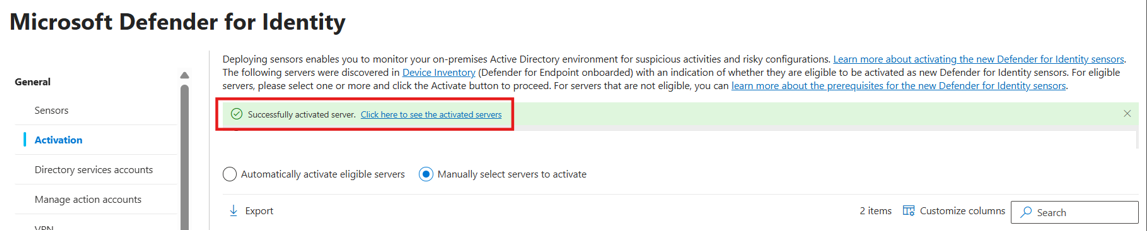
MDA to Conditional Access:
- Entra admin center > Conditional Access > New policy. Users: All users minus break-glass. Target resources: the apps. Session > Use Conditional Access App Control > Monitor only, Block downloads or Use custom policy. Report-only, then On.
- Defender portal > Cloud Apps > Policies > Policy management > Conditional Access > Create policy > Session policy. Pick the control type, filters, action Audit, Block or Protect.
- Make sure the Microsoft Defender for Cloud Apps - Session Controls enterprise app exists and is not blocked by another policy.
MDA to Purview:
- Settings > Cloud Apps > Information Protection > Microsoft Information Protection > Automatically scan new files for sensitivity labels.
- Optional: Only scan files for labels from this tenant.
- Existing files only get scanned by a file policy with Built-in DLP content inspection.
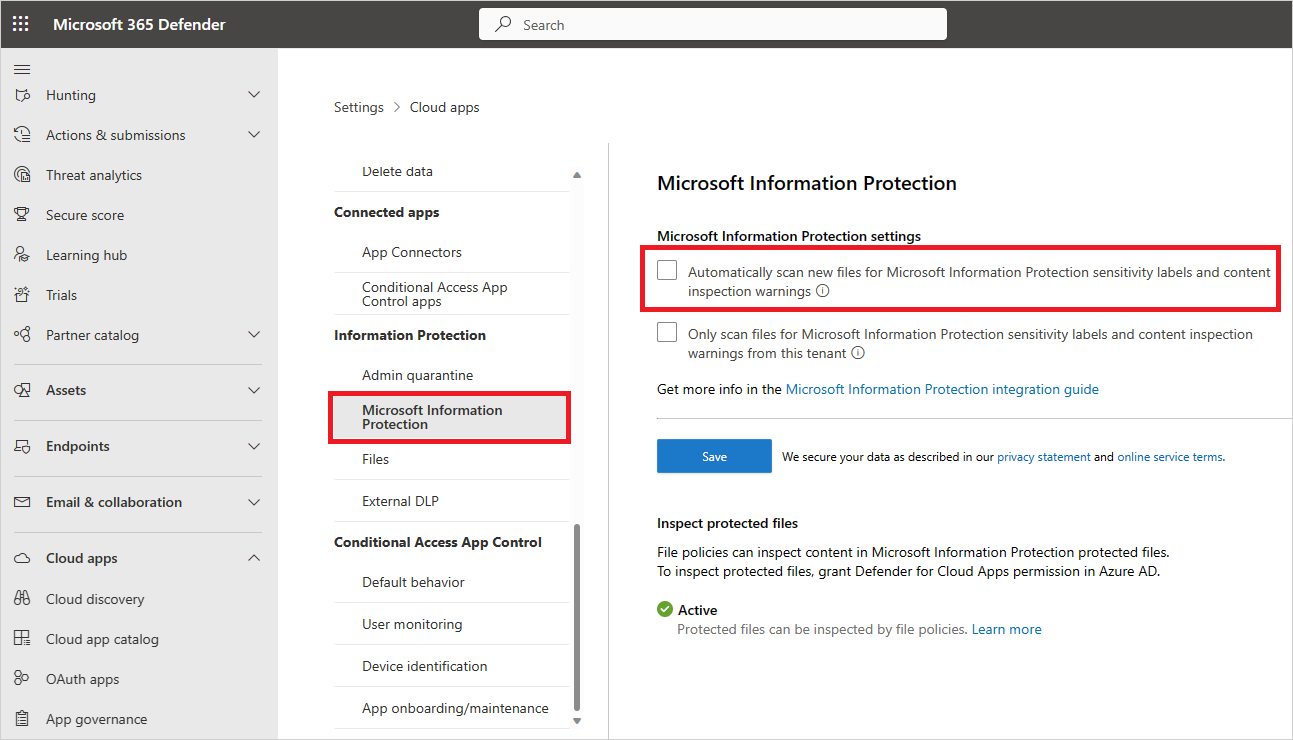
XDR to Sentinel, Defender portal path:
- Defender portal > System > Settings > Microsoft Sentinel > Connect a workspace. Pick workspaces, pick the primary, review the connector changes, Connect.
- The XDR connector is created for you and the per-product connectors are disconnected.
XDR to Sentinel, Azure portal path (retires after 2027-03-31):
- Content hub > Microsoft Defender XDR solution > connector > Connect incidents and alerts, tick Turn off all Microsoft incident creation rules for these products.
- Connect entities needs UEBA with Active Directory selected, and MDI. Connect events picks the billed hunting tables.
- Enable the Tenant-based Microsoft Defender for Cloud connector and disconnect the legacy one, or Defender for Cloud incidents arrive empty.
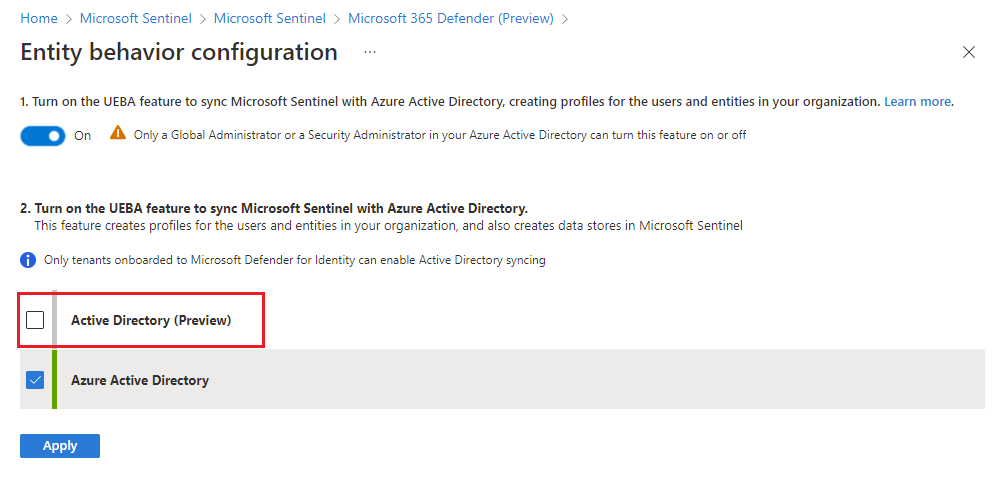
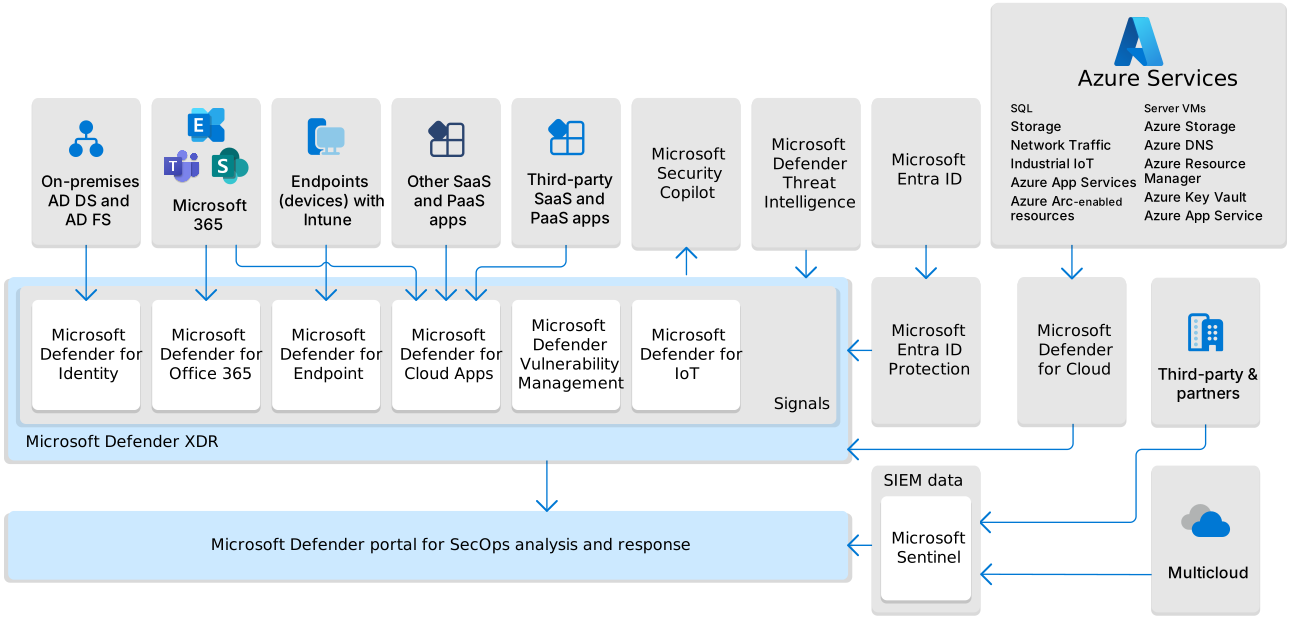
Defender for Cloud to XDR: nothing in XDR. Enable the plans and assign the Unified RBAC role. Per-subscription permissions do not exist; filter the queue by alert subscription ID.
# Tested on: TODO
# Intune side of the MDE connector. The Defender portal toggle (Microsoft Intune
# connection) has no documented cmdlet; flip it in the portal first.
Connect-MgGraph -Scopes "DeviceManagementServiceConfig.ReadWrite.All"

# Read current connector state. Look for partnerState and the platform flags.
Get-MgDeviceManagementMobileThreatDefenseConnector |
  Select-Object Id, PartnerState, WindowsEnabled, AndroidEnabled, IosEnabled,
                MicrosoftDefenderForEndpointAttachEnabled, LastHeartbeatDateTime

# Enable compliance evaluation on all three platforms plus security settings management
$id = (Get-MgDeviceManagementMobileThreatDefenseConnector).Id
Update-MgDeviceManagementMobileThreatDefenseConnector -MobileThreatDefenseConnectorId $id `
  -WindowsEnabled -AndroidEnabled -IosEnabled -MicrosoftDefenderForEndpointAttachEnabled

# MDA session controls: the enterprise app must exist (from the session policy page)
Connect-MgGraph -Scopes "Application.ReadWrite.All"
New-MgServicePrincipal -AppId 8a0c2593-9cbc-4f86-a247-beb7aab00d83

# Security settings management, on the device: confirm policy landed
Get-MpPreference | Select-Object DisableRealtimeMonitoring, EnableNetworkProtection, PUAProtection

# MDI v3 readiness (script from the Microsoft-Defender-for-Identity GitHub repo,
# also under Identities > Tools in the portal)
.\Test-MdiReadiness.ps1

# MDI v3 standalone package on a server without MDE
Set-Location .\DfiOnboarding
.\DefenderForIdentityV3StandaloneOnboardingScript.cmd
No PowerShell is documented for: the MDE Advanced features toggles, Enforce app access, MDI automatic activation, Conditional Access App Control, Purview label scanning in MDA, or connecting a Sentinel workspace to the Defender portal. Those are portal only on the pages checked.
Intune connector (the Intune half of MDE to Intune):
GET https://graph.microsoft.com/v1.0/deviceManagement/mobileThreatDefenseConnectors
PATCH https://graph.microsoft.com/v1.0/deviceManagement/mobileThreatDefenseConnectors/{mobileThreatDefenseConnectorId}
{
  "@odata.type": "#microsoft.graph.mobileThreatDefenseConnector",
  "windowsEnabled": true,
  "androidEnabled": true,
  "iosEnabled": true,
  "windowsDeviceBlockedOnMissingPartnerData": false,
  "microsoftDefenderForEndpointAttachEnabled": true
}
partnerState is read-only in practice and should report enabled once both sides are on. partnerUnresponsivenessThresholdInDays is the heartbeat window after which Intune ignores MDE data in compliance.
Entra ID Protection, to see the Defender-sourced detections arriving:
GET https://graph.microsoft.com/v1.0/identityProtection/riskDetections?$filter=riskEventType eq 'attemptedPrtAccess'
GET https://graph.microsoft.com/v1.0/identityProtection/riskyUsers
Needs IdentityRiskEvent.Read.All and IdentityRiskyUser.Read.All. Tenants without P2 see generic instead of the real type.
Secure Score:
GET https://graph.microsoft.com/v1.0/security/secureScores?$top=7
currentScore, maxScore and controlScores per day. Learn says Graph access to Secure Score still relies on Entra roles, not Unified RBAC.
Defender for Cloud alerts flow into the XDR incidents and alerts API once the integration is live, so one export covers cloud too. No Graph or REST route is documented for Enforce app access, the MDE Advanced features toggles, MDI activation, Conditional Access App Control onboarding, or Sentinel workspace onboarding.
Verify
Evidence per link, from the Learn pages:
- MDE to MDA: Cloud Discovery shows the Win10 Endpoint Users data source receiving data, with user and device columns. Allow two hours.
- MDA to MDE: the app overview shows the applied control, Settings > Endpoints > Indicators lists the synced domains, and a test device is blocked or warned after three hours.
- MDE to Intune: Connection status Enabled, EDR Onboarding Status Successfully onboarded, a risk level column in compliance reports, and the Conditional Access result in Entra sign-in logs.
- Security settings management: device page shows Managed by MDE and MDE Enrollment status Success. Policy sync forces a check-in.
- MDE to MDI: Sensor management lists the server as Onboarded with service status Running.
- Entra ID Protection: the Risk detections report or the Graph filter above shows
attemptedPrtAccess,mcasImpossibleTravelorsuspiciousSendingPatterns. - MDA session control: the lock icon in Edge or the
.mcas.mssuffix elsewhere, plus a match in the policy report and the Activity log. - MDA to Purview: Files filtered by label returns results and the file drawer shows the label.
- Defender for Cloud to XDR: alerts carry a cloud resource asset labelled Azure, Amazon or Google Cloud.
- XDR to Sentinel: incidents with Alert product name Microsoft Defender XDR within about five minutes. Change status on one side, refresh the other.
// Sentinel: prove the XDR connector is delivering incidents
SecurityIncident
| where ProviderName == "Microsoft XDR"
| summarize count() by bin(TimeGenerated, 1d)
// XDR: MDI sensors on AD FS and AD CS servers are reporting
IdentityLogonEvents | where Protocol contains "Adfs" | take 10
// XDR: Defender for Cloud control-plane events arriving
CloudAuditEvents | take 10
// XDR: devices that are eligible for MDA block scoping and critical asset tagging
DeviceInfo
| summarize arg_max(Timestamp, *) by DeviceId
| project DeviceName, OSPlatform, ClientVersion, OnboardingStatus
Troubleshoot
| Symptom | Likely cause | Fix |
|---|---|---|
| No endpoint data in Cloud Discovery | Toggle not saved, device below OS minimum, or still inside the two-hour window | Re-save Advanced features, check Windows build or macOS agent version, wait |
| Discovery works but blocks never land | Custom network indicators off, or network protection not in block mode | Turn on the MDE toggle, set Defender AV real-time, cloud and network protection to block |
| Block applies to every device despite a profile | App tagged before the profile was chosen, or scope set directly on the indicator | Remove the Unsanctioned tag, retag with the profile. MDA overrides manual indicator scope |
| No device groups offered in scoped profiles | Defender for Business licence | Expected. MDB does not expose device groups |
| Intune Connection status stays Unavailable | Defender side toggle not on, or under 15 minutes | Flip Microsoft Intune connection in the Defender portal and wait |
| EDR policy only offers Onboard and Offboard blobs | Connector not established | Fix the connector before building the policy |
| Device compliant despite High risk | Compliance policy missing the risk setting, or windowsEnabled false on the connector | Add the machine risk score setting, check the connector flags |
| Users blocked unexpectedly after CA policy | Policy went straight to On, or sync accounts not excluded | Report-only first, exclude break-glass and Directory Synchronization Accounts |
| Security settings management devices never enrol | No MDE user licence in the tenant, *.dm.microsoft.com blocked, agent too old, Constrained Language Mode | Buy one MDE user licence, open the URL, update the agent |
| Enrolled device ignores assignment filters | Filters are not supported on this channel | Target device groups only |
| v3 sensor activation does not appear | Server not on 2019 or later with the September 2026 CU, v2 sensor still present, not MDE onboarded | Patch, remove v2, onboard to MDE or use the standalone package |
| Directory services user credentials are incorrect health alert after v3 migration | Workspace still holds the DSA or gMSA and validates it on v3 sensors | Remove the DSA from Settings > Identities after full migration |
| Session policy never matches | Session Controls service principal missing or blocked, user not routed by the CA policy, app not onboarded | Create the service principal, check the CA session control, onboard the app |
| Teams desktop still downloads | Session controls do not cover the Teams desktop app | Access policy that blocks desktop sign-in for the targeted users |
| Labels not visible in MDA | Label scope lacks Files or Emails, label not published, permissions not open to all users | Fix the label policy in Purview, wait for the hourly sync |
| Existing files never get labelled | Automatic scan only covers new or modified files | Create a file policy with Built-in DLP content inspection |
| Defender for Cloud alerts missing in XDR | Plan not enabled, informational severity, or no Unified RBAC role | Enable the plan, accept that informational is excluded, assign the role |
| MDE alert status differs between Defender for Cloud and XDR | By design, MDE alerts on cloud resources do not sync status | Work them in XDR |
| Sentinel Defender for Cloud incidents are empty | Only the XDR connector is on | Add the Tenant-based Defender for Cloud connector, disconnect the legacy one |
| Sentinel automation rules stopped matching on title | XDR correlation engine names incidents | Match on tags or other conditions |
| TVM queries return nothing in Sentinel | DeviceTvm* tables are in the schema but not ingested | Query them in XDR Advanced Hunting |
| Workspace cannot be onboarded to Defender portal | Owner role is conditional, or multiple workspaces without Security Administrator | Grant unconditional Owner at subscription scope |
| Premium Entra detections show as Additional risk detected | Tenant lacks Entra ID P2 | Licence, or accept the hidden detail |
Gotchas and limits
- Licences fail silently. MDE Plan 1 can flip the MDA toggle but Learn requires Plan 2 or MDB. Entra ID P1 shows a generic risk event where P2 would show the Defender-sourced detection. Security settings management needs one MDE user licence even in a server-only estate. None of these raise an error.
- Tenant mismatches break quietly. Sentinel needs the workspace and XDR in one Entra tenant. A server onboarded to another MDE tenant is never reassigned by Defender for Cloud. GDAP with Lighthouse does not work for Sentinel in the Defender portal; use B2B.
- Timing: MDA discovery two hours, MDA block three hours, Intune connector 15 minutes, EDR onboarding 15 to 30 minutes, first v3 sensor an hour, Exposure Management data 72 hours, settings management check-in every 90 minutes.
- Connecting the XDR connector to Sentinel turns off Microsoft incident creation rules for the integrated products and disconnects the per-product connectors. Alert schemas change. Existing analytics and automation rules need a review before, not after.
- Sentinel incidents hold 150 alerts; bigger XDR incidents show as 150 plus with a link. Classification values are transformed during sync, so a report built on Sentinel closing reasons will not match XDR one to one.
- Raw hunting tables streamed into Sentinel are billed. Incidents and alerts are free.
DeviceTvm*is never streamed. - MDE AIR as a separate experience ends 2026-09-01; MDO AIR continues. Cross-product verdicts still land in the Action center, but the device side is now the default AV stack.
- MDA file policies retire 2027-01-06. The Purview label governance action goes with them; plan on Purview DLP or auto-labelling.
- v3 MDI sensors use LocalSystem and cannot use gMSA, VPN integration or syslog. Mixed v2 and v3 workspaces keep validating the DSA on every sensor until you remove it.
- MDA scoping of blocks overrides any scope you set on the indicator by hand. Manage scope in MDA only.
- MDO to MDE: the dedicated Learn page for the Explorer-side MDE setting returned an error on fetch. The integration page fetched describes going upstream from endpoint to email and shared threat intelligence; Explorer's URL prevalence flyout shows a Devices count. TODO: re-fetch the MDO integration page and confirm whether a toggle exists and whether Safe Links detonation verdicts appear on the endpoint alert.
- MDO unified features are not available in Norway, South Africa, UAE, Sweden or Singapore datacenter locations. XDR data location follows MDE. Exposure Management is Public Cloud only. Copilot: Learn lists plugins, not which product data it reads.
Further reading
- Defender for Identity: the sensor you've been avoiding just got easy, CIAOPS, June 2026. MSP view of the v3 sensor on the MDE agent, including the Business Premium licensing gap and a honeytoken as the first win.
- Automatic migration from Defender for Identity Sensor v2 to v3.x and gMSA changes, Jeffrey Appel, March 2026. Walks the migration wizard states and calls out that gMSA action accounts fail on v3, which Learn glosses over.
- Unify Your SOC: Integrating Defender XDR with Sentinel, ATA Learning, June 2026. One operating-model guide for the connector, which hunting tables are worth their ingestion cost, and a validation checklist.
- 6 truths about migrating Microsoft Sentinel to the Defender portal, Microsoft Sentinel Blog, October 2025. Microsoft's own list of what changes when Sentinel moves into the unified portal.
My notes
TODO: Sohail's notes after verification.
Changelog
| Date | Change | Source |
|---|---|---|
| 2026-10-22 | Drafted from Learn, with Learn images and diagrams | [1] |