What Defender XDR is and how the products correlate
What it is
Defender XDR is not a sensor. It is the layer above the sensors. MDE, MDI, MDO, MDA, Defender for Cloud and Entra ID Protection each detect in their own domain and raise alerts. Defender XDR correlates those alerts across products into incidents, acts on the incident as a whole, and gives you one portal, one hunting schema and one API. Learn lists the feeding products as MDE, MDO, MDI, MDA, Defender Vulnerability Management, Defender for Cloud, Entra ID Protection, Purview DLP, App Governance, Purview Insider Risk Management and Security Exposure Management.
The portal is https://security.microsoft.com. The mental shift is from products to incidents. An MDI alert about a Kerberos ticket, an MDO alert about a phishing click and an MDE alert about a dropped binary on the same user's laptop are one incident, not three queues.
Defender XDR does not change the products underneath. It aggregates data from the services you have already deployed, stores it centrally, and does not alter their settings or data. If MDI is not deployed, there is no identity signal to correlate. Coverage is the sum of what you have switched on.
This article is the map. The detail is in settings console, incidents and alerts, RBAC and the integrations map. For the endpoint sensor itself see the MDE overview, and for the SIEM side see Sentinel.
Licensing and prerequisites
There is no Defender XDR SKU. The prerequisites page lists the licences that light up the portal "without any additional cost": Microsoft 365 E5 or A5, E3 plus the Defender Suite add-on, E3 plus EMS E5, A3 plus A5 Security, Windows 10 or 11 Enterprise E5, EMS E5, Office 365 E5, Defender for Endpoint, Defender for IoT Enterprise IoT, Defender for Identity, Defender for Cloud Apps or Cloud App Discovery, Defender for Office 365 Plan 2, Microsoft 365 Business Premium and Defender for Business. Any one of them provisions the XDR layer. What you then see in it depends on which products are licensed and deployed.
Two features carry their own gate on the prerequisites page: automatic attack disruption and Threat analytics both need Defender for Endpoint Plan 2. The configure attack disruption page lists a longer set of qualifying SKUs that includes MDI, MDA, MDO P2 and Defender for Business on their own. The two pages do not agree. TODO: test in a tenant without MDE P2 before promising disruption to a client.
Roles. The service turns on the first time a user with a qualifying role opens the portal and clicks Incidents and alerts, Hunting, Action center or Threat analytics. The enable page lists Global Administrator, Security Administrator, Security Operator, Global Reader, Security Reader, Compliance Administrator, Compliance Data Administrator, Application Administrator and Cloud Application Administrator. The prerequisites page says Security Administrator at minimum. Day-to-day access is in RBAC.
Data location. With MDE in the tenant, XDR data lands where MDE data lands. Without MDE, a datacenter is picked from your active Microsoft 365 security services and shown on screen. Moving it later is a support request through Need help. MDO integration into XDR is not available for Office 365 datacenters in Norway, South Africa, UAE, Sweden and Singapore.
Network and products. Allow the Azure Monitor outbound IP ranges. Sign in to Defender for Cloud Apps once to activate that integration. Defender for Cloud alerts need a plan enabled on the subscription, and viewing them without unified RBAC needs Global or Security Administrator.
How it works
From signal to alert
Each product keeps its own detection engines; Learn notes that Sentinel alone has at least four. The alert queue filters by service source and detection source. The service sources listed are MDE, MDO, MDI, MDA, App Governance, Entra ID Protection, Purview DLP, Defender for Cloud, Sentinel, Purview Insider Risk Management, Security Copilot and Defender XDR itself. That last one matters. XDR runs its own correlation detectors across the other sources and raises its own alerts.
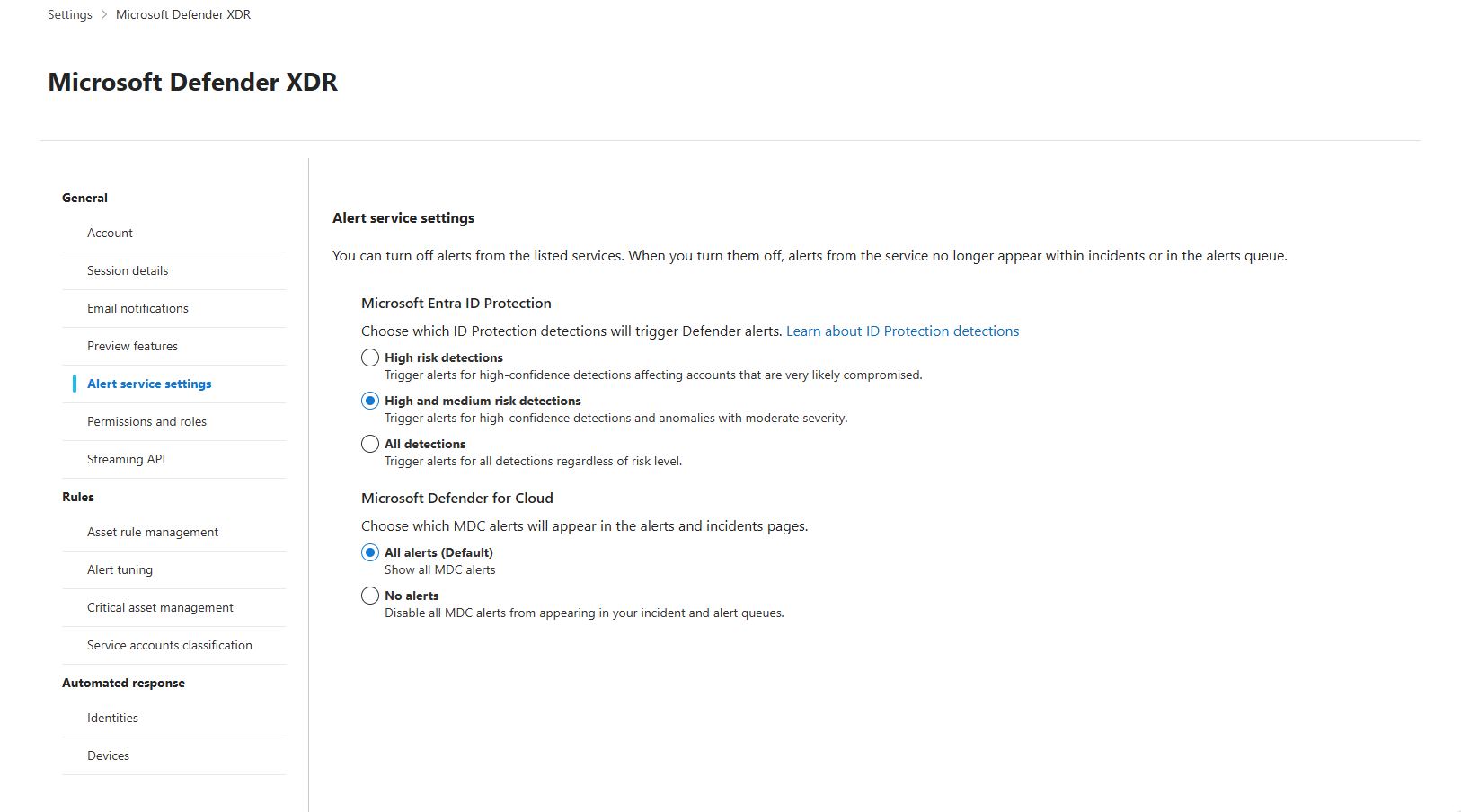
Not every product sends everything. Informational Defender for Cloud alerts are dropped on purpose. Entra ID Protection volume is set under Settings > Microsoft Defender XDR > Alert service settings: High-risk detections only is the new default, High + Medium and All detections are the alternatives (public preview since December 2025).
From alert to incident
The correlation engine runs on every alert that arrives. If the alert is sufficiently unique among all sources within a time frame, a new incident is created and the logic names it. If it is sufficiently related to other alerts, same source or different, it joins an existing incident. Every alert belongs to exactly one incident. The logic is proprietary and Learn gives no time window, no weights and no entity cap.
Correlation does not stop at creation. XDR keeps comparing open incidents and merges them when they look like the same attack. The named criteria are entities (users, devices, mailboxes), artifacts (files, processes, email senders), time frames, and event sequences that signal a multistage attack, such as a malicious click shortly after a phishing detection. On a merge the source folds into the target, is closed with a Redirected tag, its alerts, tags and entities move across, and its ID redirects. You do not choose the direction. Merges are refused when one side is Closed, the two are assigned to different people, classifications or determinations differ, the target would exceed the entity maximum, or device groups differ and that check is on (off by default). Manual merge is five at a time under the same rules.
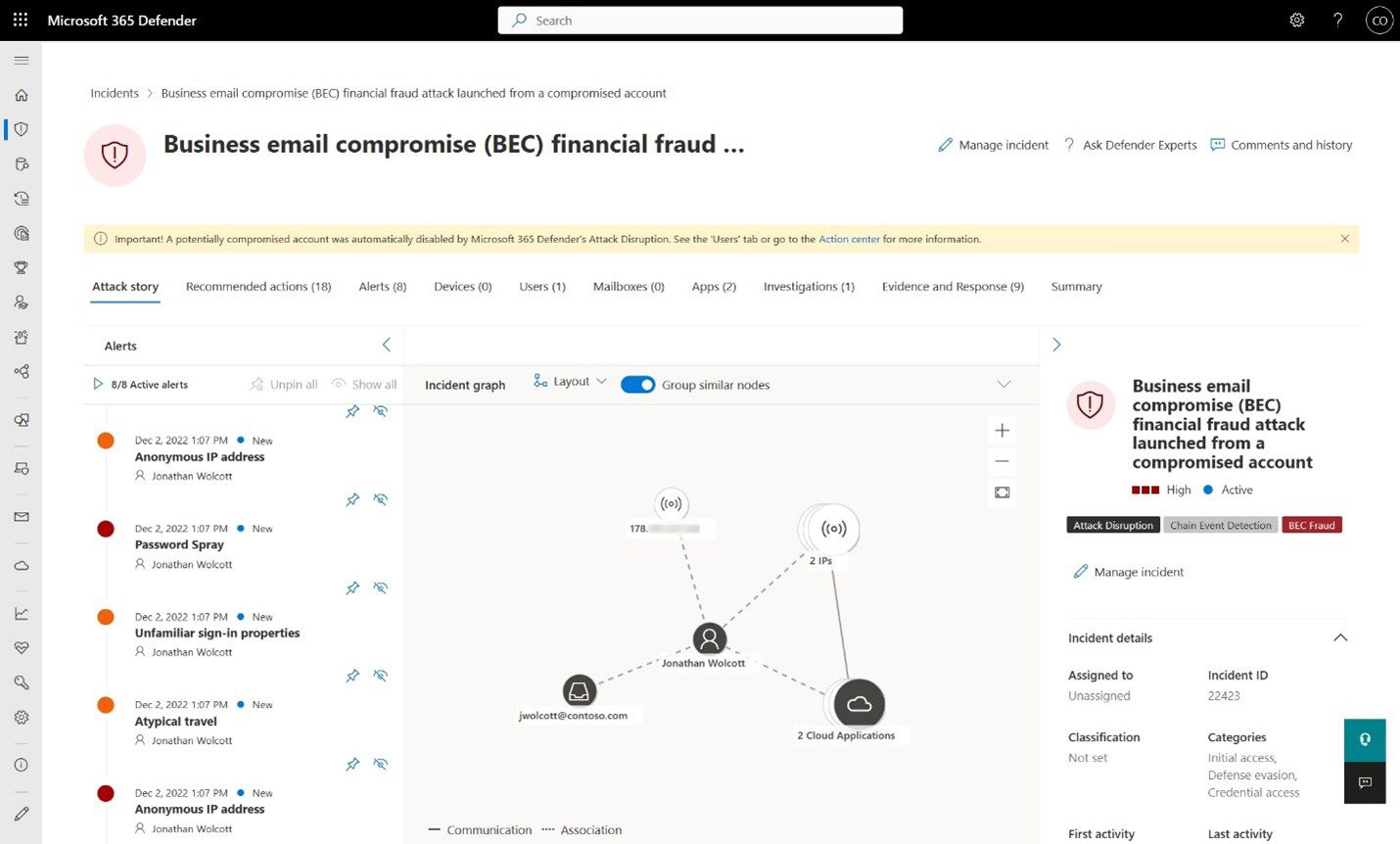
The result is the attack story: alert timeline with the raw events behind it, tactics, involved users, devices and resources, an entity graph, the AIR and disruption action log, evidence, and a text summary. Incident cases, in preview, are the recommended successor to the legacy incident page.
Automatic attack disruption
Attack disruption is XDR acting on the incident, not on a single indicator. Three stages: correlate signals into one high-confidence incident, identify the assets the attacker controls and is spreading through, then take response actions in the relevant products in real time. Microsoft holds containment detectors to 99 percent or better precision on production data and runs new ones in audit mode first. Signals come from endpoints, identities, email and collaboration, and SaaS apps, plus Microsoft threat intelligence and prior incidents. The actions, and the product that executes each:
| Action | Executed by | What it does |
|---|---|---|
| Contain device | Defender for Endpoint | Policy on all onboarded devices to block traffic from the contained device |
| Contain IP | Defender for Endpoint | Blocks traffic from an IP tied to an undiscovered or non-onboarded device |
| Isolate device | Defender for Endpoint | Isolates an onboarded workstation that is an active foothold, keeps Defender connectivity, reverts after a time window |
| Contain user | Defender for Endpoint | Policy on onboarded devices to block communication from the user, limits lateral movement and remote encryption |
| Disable user | Defender for Identity | Disables the account in AD through the sensor on the DC, and in Entra ID for synced or cloud-only accounts |
| Revoke user session, suspend user | Entra ID | Kills sessions, suspends the cloud account |
| OAuth app compromise | Defender for Cloud Apps | Protective measures on a compromised OAuth app |
| Okta suspend, AWS deny policy | Sentinel connectors | Preview, need the workspace connected to the portal |
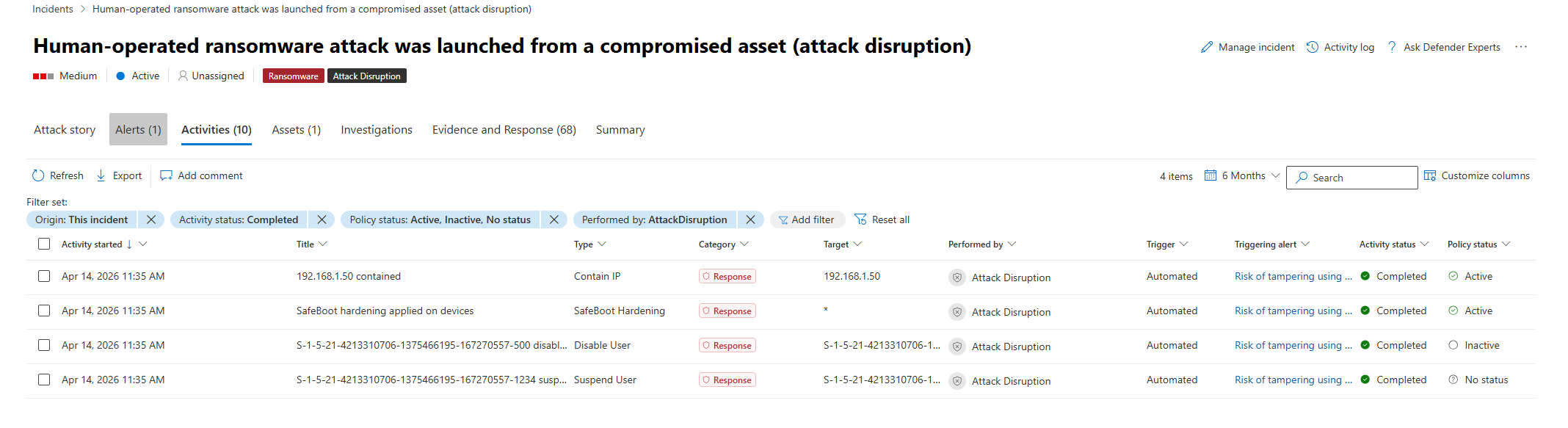
Each product must be deployed to run its own action. Contain device needs Standard device discovery. Contain user needs Sense v10.8470 or later. Device groups on No automated response are excluded. MDI needs DC audit policies and a working action account (LocalSystem by default). Cloud-only account disable goes through the Microsoft Defender for Identity enterprise app and does not need the sensor. A disrupted incident carries an Attack Disruption tag, a banner, status labels on assets, and Action center entries. Undo is release from containment on a device and enable user on an account, from the incident or the Action center.
Advanced hunting, one schema
Every product writes into the same Kusto schema. The schema page does not carry a product column, so the grouping below is by table family plus the product named in the table description.
| Table family | Fed by | Examples |
|---|---|---|
| Alert* | All products | AlertInfo, AlertEvidence |
| Device* | Defender for Endpoint | DeviceProcessEvents, DeviceNetworkEvents, DeviceLogonEvents, DeviceInfo |
| DeviceTvm* | Defender Vulnerability Management | DeviceTvmSoftwareVulnerabilities, DeviceTvmSecureConfigurationAssessment |
| Email*, UrlClickEvents, CampaignInfo, FileMaliciousContentInfo | Defender for Office 365 | EmailEvents, EmailPostDeliveryEvents |
| Message* | Teams protection | MessageEvents, MessageUrlInfo |
| Identity* | Defender for Identity for AD and online services, IdentityInfo from several sources | IdentityLogonEvents, IdentityDirectoryEvents, IdentityQueryEvents |
| EntraIdSignInEvents, EntraIdSpnSignInEvents, GraphAPIAuditEvents | Entra ID | Interactive, non-interactive and service principal sign-ins |
| CloudAppEvents, Behavior*, OAuthAppInfo | Defender for Cloud Apps and app governance | Office 365 and connected app activity |
| Cloud* | Defender for Cloud and Defender for Containers | CloudAuditEvents, CloudProcessEvents, CloudStorageAggregatedEvents |
| DataSecurity* | Purview | Policy violations and risky behaviours |
| ExposureGraphNodes, ExposureGraphEdges | Security Exposure Management | The exposure graph |
| DisruptionAndResponseEvents | Defender XDR | Attack disruption actions |
When a Sentinel workspace is connected, its tables sit next to these and the correlation engine can read them. The streaming API pushes a subset to Event Hubs or a storage account: the GA list is the Alert, Device, Email, Identity and CloudAppEvents tables plus UrlClickEvents; Behavior tables are not available. Learn points new integrations at the Graph security API.
Action center
One queue for pending and completed remediation across devices, email and identities at https://security.microsoft.com/action-center. Pending holds AIR actions waiting for approval; History is the audit log and the undo surface for Isolate device and Restrict code execution. Actions from MDE, MDO and XDR land here, including attack disruption. Since September 2026 AIR no longer runs as a separate investigation for MDE alerts; it is folded into the antivirus stack. MDO AIR stays.

Threat analytics, Secure Score, Exposure Management
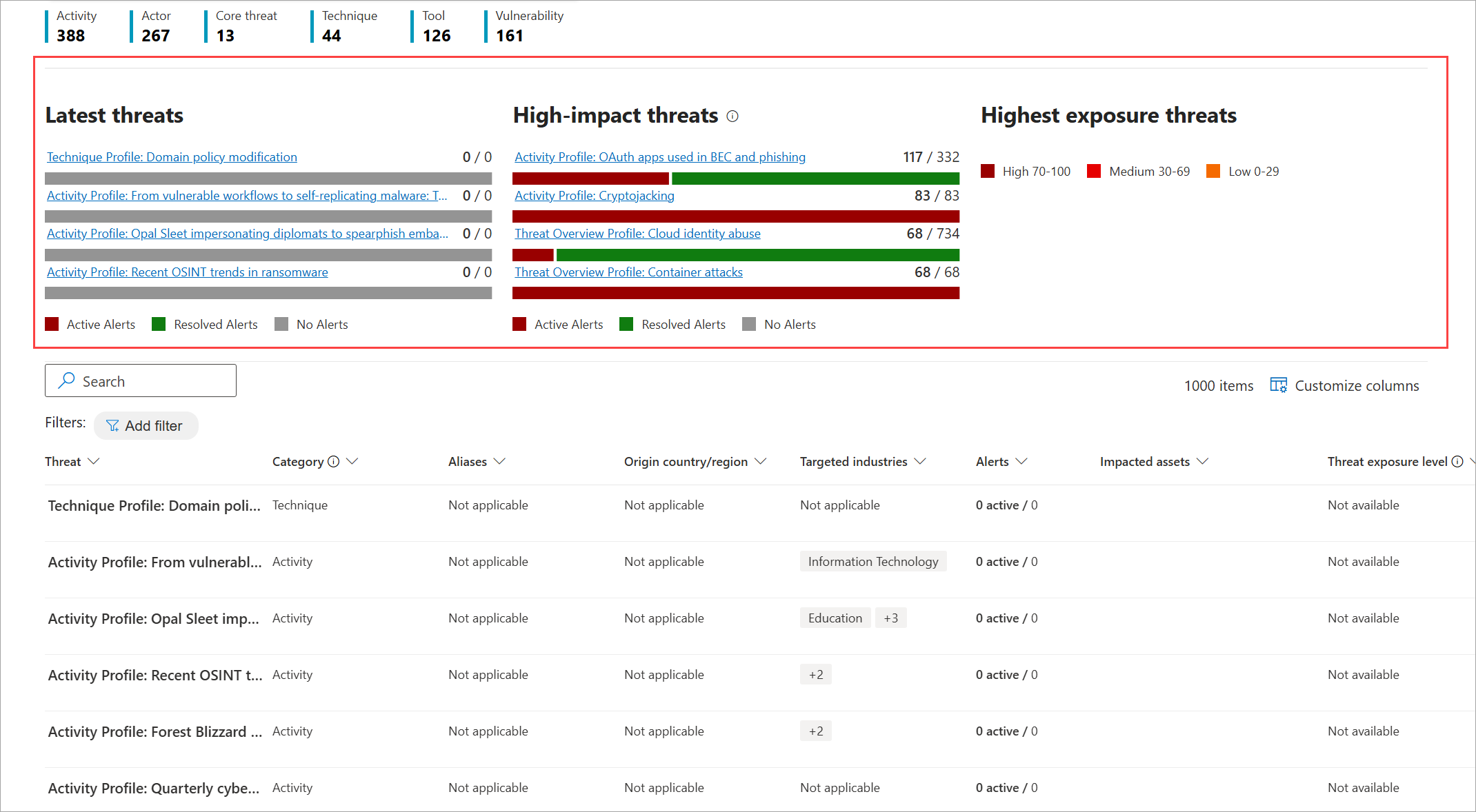
Threat analytics is Microsoft's own threat intelligence matched against your tenant: related incidents from MDE, MDI, MDO, MDA and Defender for Cloud, impacted assets, endpoint exposure from MDVM, and recommended actions that are the same items Secure Score tracks. MDE P1 alone does not grant it. Secure Score at https://security.microsoft.com/securescore scores actions worth up to 10 points each across Entra ID, the four Defender products, Exchange, SharePoint, Teams, Purview and several third-party apps. Exposure Management is the posture layer: unified inventory, exposure graph and attack surface map, critical assets, attack paths with choke points, and initiative scores for Code, Endpoint, Cloud, Identity and SaaS. Public cloud only. Secure Score permissions now sit under the Exposure Management read and manage URBAC permissions.
Sentinel and the unified SecOps platform
Connecting a Sentinel workspace (System > Settings > Microsoft Sentinel > Connect a workspace) puts Sentinel incidents, analytics rules, connectors, automation rules, playbooks, workbooks and content hub inside security.microsoft.com, and Home, Incidents and Advanced hunting combine both data sets. One primary workspace correlates with XDR alerts and shares incidents; secondary workspaces correlate with nothing. Onboarding needs Security Administrator plus unconditional Owner on the subscription, or User Access Administrator plus Sentinel Contributor, and Azure RBAC still governs Sentinel data afterwards. Learn now frames the next step as the Integrated Security Operations Center, in preview for Defender Suite, E5 and E7 tenants with no active Sentinel workspace: case management, automation rules and workbooks work without a workspace; UEBA, content hub, threat intelligence and third-party data need one. Do not disconnect a production workspace to qualify. Detail in Sentinel overview.
Configure
- Portal
- PowerShell
- Graph API
First-time setup:
- Sign in to
https://security.microsoft.comwith one of the qualifying roles and select any item such as Incidents and alerts. Provisioning starts. The data location is shown; use Need help to change it before you build on it. - Sign in to Defender for Cloud Apps once so the MDA integration activates.
- Confirm the navigation pane shows Incidents, Alerts, Action center, Advanced hunting and Threat analytics.

Settings > Microsoft Defender XDR:
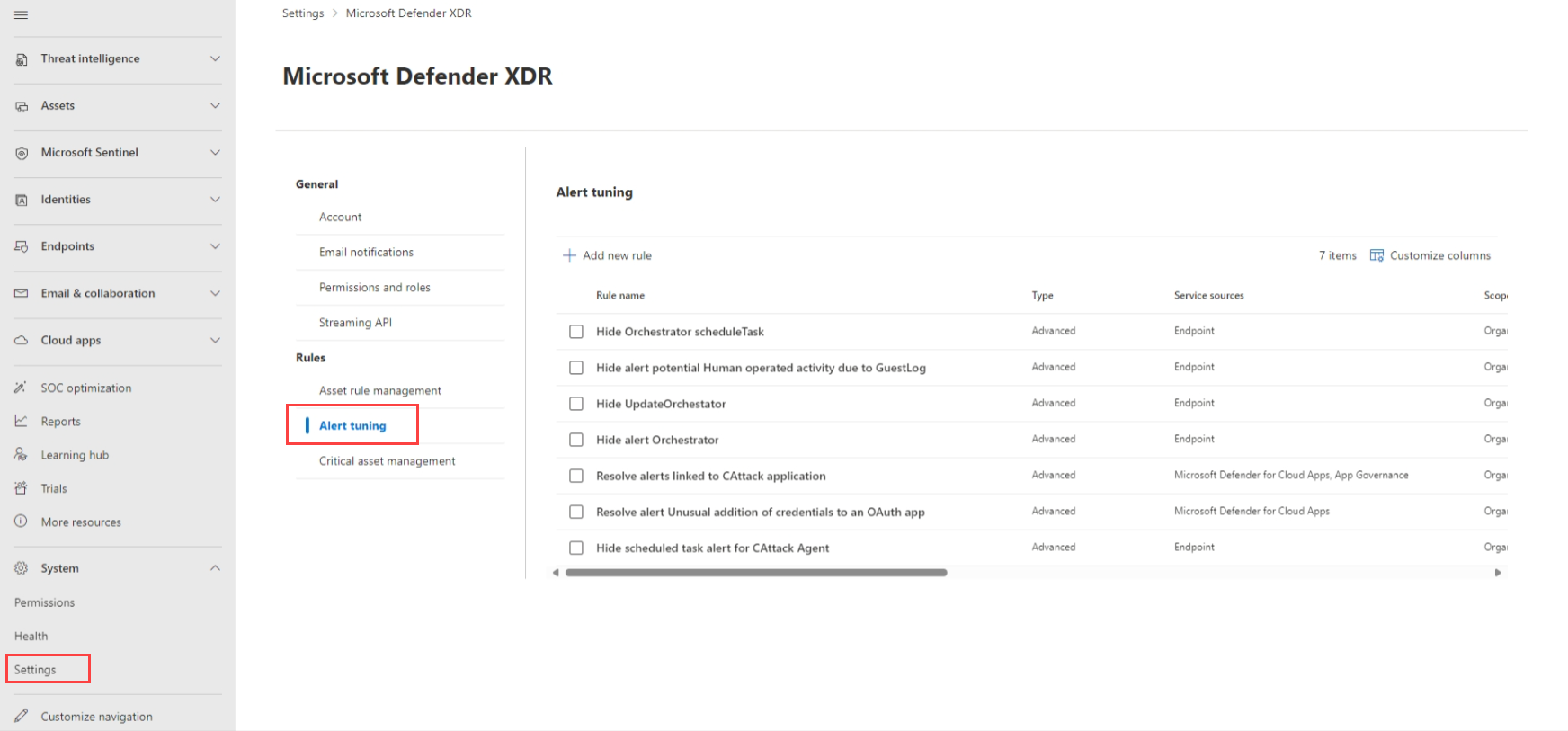
- Alert tuning. Add new rule, pick service and detection sources, add up to 200 conditions on evidence types (file, process, scheduled task, AMSI script, WMI event), then choose Hide alert (MDE only), Resolve alert (incident created resolved) or Set as behavior (not for Defender for Cloud or MDO). Review the built-in rules under Rules > Alert tuning first.
- Alert service settings. Set the Entra ID Protection level: High-risk detections only (default), High + Medium, or All detections.
- Email notifications > Incidents > Add incident notification rule. Severities, device group scope, one notification per incident, organisation name and tenant link, recipients, test send. Needs Manage security settings; under RBAC you only see your device groups.

- General > Preview features. Turn on. Global Administrator, Security Administrator or Security Operator.
- Streaming API. Add, name it, Forward events to Azure Event Hub, single hub or one per table, namespace resource ID, select tables, Save. Security Administrator plus Contributor on the namespace.
Attack disruption readiness (System > Settings > Endpoints):
- Device groups: Remediation level Full. Device discovery: Standard.
- MDI: audit policies on sensor DCs, action account verified. MDA: Office 365 connector with every box ticked. MDO: Exchange Online mailboxes with
MailItemsAccessed,UpdateInboxRules,MoveToDeletedItems,SoftDeleteandHardDeleteaudited.
# Tested on: TODO
# Needs Microsoft.Graph module. Delegated roles that satisfy the calls:
# Security Reader / Operator / Administrator for read, Security Operator or Administrator for PATCH.
Connect-MgGraph -Scopes 'SecurityIncident.ReadWrite.All','SecurityAlert.Read.All'

# High severity active incidents with their alerts, newest first
$uri = "https://graph.microsoft.com/v1.0/security/incidents?`$filter=severity eq 'high' and status eq 'active'&`$expand=alerts&`$top=50"
$incidents = @()
do {
    $page = Invoke-MgGraphRequest -Method GET -Uri $uri
    $incidents += $page.value
    $uri = $page.'@odata.nextLink'
} while ($uri)
$incidents | ForEach-Object {
    [pscustomobject]@{
        Id       = $_.id
        Name     = $_.displayName
        Created  = $_.createdDateTime
        Alerts   = $_.alerts.Count
        Sources  = ($_.alerts.serviceSource | Sort-Object -Unique) -join ','
        Disrupted = $_.displayName -like '*(attack disruption)*'
        Url      = $_.incidentWebUrl
    }
} | Format-Table -AutoSize

# Alerts by product in the last 7 days. serviceSource is a filterable property.
$since = (Get-Date).AddDays(-7).ToUniversalTime().ToString('o')
$auri = "https://graph.microsoft.com/v1.0/security/alerts_v2?`$filter=createdDateTime ge $since&`$top=500"
$alerts = @()
do {
    $p = Invoke-MgGraphRequest -Method GET -Uri $auri
    $alerts += $p.value
    $auri = $p.'@odata.nextLink'
} while ($auri)
$alerts | Group-Object serviceSource | Select-Object Name, Count | Sort-Object Count -Descending

# Classify and close an incident
$body = @{
    status           = 'resolved'
    classification   = 'truePositive'
    determination    = 'multiStagedAttack'
    assignedTo       = 'soc@contoso.com'
    customTags       = @('Reviewed')
    resolvingComment = 'Contained by attack disruption, remediated.'
}
Invoke-MgGraphRequest -Method PATCH -Uri 'https://graph.microsoft.com/v1.0/security/incidents/29' -Body $body -ContentType 'application/json'
There is no PowerShell surface for the Settings > Microsoft Defender XDR pages (alert tuning, notifications, preview, streaming). Portal only.
Permissions: SecurityIncident.Read.All to list, SecurityIncident.ReadWrite.All to update, SecurityAlert.Read.All for alerts. Delegated and application both supported. Not available in 21Vianet.
GET https://graph.microsoft.com/v1.0/security/incidents?$filter=status eq 'active'&$expand=alerts
$filter works on assignedTo, classification, createdDateTime, determination, lastUpdateDateTime, severity and status. Page with @odata.nextLink. Add Prefer: include-unknown-enum-members if you want to see the awaitingAction status that Defender Experts can set.
GET https://graph.microsoft.com/v1.0/security/alerts_v2?$filter=serviceSource eq 'microsoftDefenderForIdentity'
PATCH https://graph.microsoft.com/v1.0/security/incidents/{incidentId}
Content-Type: application/json
{
  "status": "resolved",
  "classification": "truePositive",
  "determination": "multiStagedAttack",
  "assignedTo": "soc@contoso.com",
  "customTags": ["Reviewed"],
  "resolvingComment": "Contained by attack disruption, remediated."
}
Patchable: assignedTo, classification, customTags, description, determination, displayName, severity, resolvingComment, status, summary. Use camelCase enum values. A merged incident shows status = redirected and redirectIncidentId pointing at the target. priorityScore is 0 to 100, null when not enabled or pending.
Verify
- Portal: Incidents and alerts > Alerts, filter Service source. Every deployed product should appear within the last 7 days. A product missing here is not feeding XDR.
- Incidents queue: open any multi-alert incident and check the Alerts tab lists more than one service source. That is correlation working.
- Attack disruption: Incidents queue, filter tag Attack Disruption. On the incident, Activities tab, Performed by AttackDisruption, Policy status Active, Inactive, No status.
// Which products have raised alerts in the last 7 days, and how many incidents they span
AlertInfo
| where Timestamp > ago(7d)
| summarize Alerts = count(), Incidents = dcount(tostring(AlertId)) by ServiceSource, DetectionSource
| order by Alerts desc
// Attack disruption actions, whole tenant, 30 days
DisruptionAndResponseEvents
| where Timestamp > ago(30d)
| project Timestamp, ActionType, AttackDisruptionCategory, DeviceName, AccountUpn, RemoteIP
| order by Timestamp desc
// Blocks caused by a contained device or user
DeviceEvents
| where ActionType contains "ContainedDevice" or ActionType contains "ContainedUser"
| summarize count() by ActionType, DeviceName, bin(Timestamp, 1h)
TODO: AlertInfo has no incident column; confirm in the dev tenant whether the Graph incidentId on alerts is the better way to count incidents per source.
Troubleshoot
| Symptom | Likely cause | Fix |
|---|---|---|
| Portal never provisioned, menu shows only one product | User role not in the enable list, or no qualifying licence | Sign in as Security Administrator, click Incidents and alerts, check Billing > Licenses |
| Defender for Cloud Apps alerts absent | Nobody has signed in to MDA yet | Sign in to Defender for Cloud Apps once |
| Defender for Cloud alerts absent | No Defender for Cloud plan on the subscription, or no URBAC role and user is not Global or Security Administrator | Enable a plan, assign the Defender for Cloud URBAC role. Informational alerts never arrive by design |
| Entra ID Protection alerts sparse | Alert service settings at default High-risk only | Set High + Medium or All detections |
| MDO alerts missing in XDR | Tenant in Norway, South Africa, UAE, Sweden or Singapore datacenter | Not supported. Use the MDO pages directly |
| Alerts from two products never share an incident | Different entities, outside the time frame, or one incident closed, assigned to someone else, or classified differently | Merge manually after clearing the blocker, maximum five at a time |
| Sentinel alerts not correlating | Workspace is secondary, not primary | Set as primary under Settings > Microsoft Sentinel > Workspaces |
| Incident vanished, ID redirects | Merged into another incident | Follow the redirect, check redirectIncidentId in Graph |
| Attack disruption never fires | No MDE P2, device groups on No automated response, device discovery Basic, Sense below v10.8470 | Fix the device group remediation level, set Standard discovery, update the sensor |
| Disable user never happens | MDI sensor not on the DC that holds the account, or action account lacks rights | Deploy sensor there, check action account |
| Disabled account comes back enabled | Identity automation re-enabling active employees | Review provisioning jobs and HR sync flows |
| Device contained but kept talking to a host | Selective isolation exclusion or contained IP not covered | Review network isolation exclusions |
| Alert hidden by tuning but still wanted | Built-in or custom tuning rule | Settings > Microsoft Defender XDR > Rules > Alert tuning, disable the rule |
| Streaming API shows no Behavior tables | Not supported in the streaming API | Use the Graph security API or Sentinel for those |
Gotchas and limits
- The correlation engine is a black box. No published time window, entity cap or weights. Do not promise a client that two alerts will always land together.
- Merges are blocked by mundane things: two analysts assigned, or one side already classified. Assign late, not early, if you want auto-merge to keep working.
- Alert tuning Hide alert is MDE only. MDO and Defender for Cloud get Resolve alert at best; Set as behavior is not available for either.
- Hidden alerts still write to
AlertInfoandAlertEvidence. Built-in rules do not suppress email notifications or AIR, and reactivate the alert if AIR finds something. - Rules not edited before 2026-11-08 keep applying to all detection sources under their service source, including custom detections.
- Disruption actions apply through MDE onboarded devices. Unmanaged devices get Contain IP at most, and only with Standard discovery.
- Contain user in predictive shielding stops new sessions, not existing ones. Isolate device reverts on a timer.
- Cloud-only account disable is done by the
Microsoft Defender for Identityenterprise app (older tenants showRadius Aad Syncer). Do not delete that app. - MDE alerts on cloud resources show in both Defender for Cloud and XDR but their status does not sync. Defender for Cloud alert status syncs both ways.
- Sentinel tenants that also ingest Defender for Cloud alerts get duplicates unless they move to the tenant-based connector and turn off the incident-creating analytics rules.
- GDAP with Lighthouse is not supported for Sentinel data in the portal. B2B only.
- Secure Score URBAC roles only take effect if the user holds no elevated Entra global role.
- The unified SecOps overview page on Learn now redirects to the ISOC page. TODO: re-check when ISOC leaves preview.
Further reading
- Microsoft Defender XDR Attack Disruption: Automatic Device Isolation Explained, Jeffrey Appel, September 2026. Lab walkthrough of the new isolate action, with the difference between contain and isolate shown on a real device.
- 128 Seconds to disruption: Microsoft Defender stops ransomware at QNET, Microsoft Security blog, August 2026. A production case with the timeline from first signal to isolation, which Learn never gives you.
- Reimagining Case Management in Microsoft Defender, Microsoft Defender XDR blog, September 2026. The design intent behind incident cases replacing the legacy incident page.
- Integrated Security Operations Center in Microsoft Defender, Microsoft Defender XDR blog, September 2026. Announcement context for ISOC and what it means for tenants without a Sentinel workspace.
My notes
TODO: Sohail's notes after verification.
Changelog
| Date | Change | Source |
|---|---|---|
| 2026-10-22 | Drafted from Learn, with Learn images and diagrams | [1] |