Unified RBAC and portal permissions
What it is
The Defender portal has three permission layers. Entra global roles come first and always apply. Under them sit the legacy per-product models: MDE roles plus device groups, MDO Email & collaboration and Exchange Online role groups, MDA built-in admin roles, and MDI Azure ATP security groups. Unified RBAC is the third layer and the one Microsoft is moving everyone onto. One Permissions and roles page at security.microsoft.com/mtp_roles controls what a user can see and do across MDE, MDO, MDI, MDA, MDVM, Defender for Cloud, Exposure Management and Sentinel workspaces onboarded to the portal.
The legacy models are going away. New MDE tenants since 16 February 2025 and new MDI tenants since 2 March 2025 only get unified RBAC. New MDO Plan 2 organisations get it from July 2026. Message Center item MC1457836 (August 2026) says Microsoft is auto-importing legacy roles and auto-activating unified RBAC in existing tenants from late September to late December 2026, with a 30-day portal banner before each tenant flips.
What it is not: a replacement for Entra roles, a model for Purview, the Exchange admin center or Exchange Online PowerShell, or a way to manage Intune endpoint security settings. It does not replace MDE device groups either. Device groups decide which devices a user sees; unified RBAC decides what they can do.
See the Defender XDR overview, the settings console article for the rest of System > Settings, and the MDE overview for the endpoint side.
Licensing and prerequisites
- Unified RBAC has no SKU. Each workload needs its own licence to appear as a data source: MDE Plan 2, MDO Plan 2 (trial licences not supported), MDI, MDA, MDVM, Defender for Cloud, Sentinel.
- Entra Security Administrator is the entry point: first access to the Permissions and roles page, creating or importing roles, activating workloads. After that a custom role holding the Authorization permission can run day-to-day RBAC without any global role.
- Activating a Sentinel workspace also needs Subscription Owner, or User Access Administrator plus Sentinel Contributor on the workspace. Global Administrator does not get workspace permissions in unified RBAC; it can only assign them.
- Entra security groups should exist first. MDE device groups can only be granted to Entra groups that already hold a role.
- Legacy MDE RBAC: first roles need Entra Global Administrator or Security Administrator, and opting in is irreversible.
- Legacy MDO: only Global Administrators or the Organization Management role group manage Email & collaboration role groups.
How it works
Layer 1, Entra global roles
The portal grants access to Global Administrator, Security Administrator, Security Operator, Global Reader and Security Reader. These keep working after activation. The compare-roles page lists the unified permissions each Entra role is treated as holding:
| Entra role | Effective unified RBAC permissions |
|---|---|
| Global Administrator, Security Administrator | Everything on every workload: Security data basics, Alerts, Response, both live response levels, Exposure Management read and manage, Authorization read and manage, all Security settings, System settings read and manage |
| Security Operator | Security data basics, Exposure Management read, Response, Secure Score read, all Security settings, plus per workload: live response, exception and remediation handling, email metadata and quarantine content, System settings |
| Security Reader, Global Reader | Security data basics and Exposure Management read, plus per workload: Vulnerability management read for MDE, Response and email metadata and quarantine content for MDO, Core security settings read and System settings read for MDO and MDI |
| SOC Identity Responder | Security data basics, Alerts manage, Response manage |
| Exchange Administrator | Exposure Management read and manage, Security data basics, email metadata, System settings for MDO |
| Compliance Administrator, Compliance Data Administrator | MDO only: Security data basics and Alerts manage |
| Service Support, User, Helpdesk Administrator | Exposure Management read only |
| Billing Administrator | Nothing |
The odd one: Security Reader and Global Reader hold Response for MDO, so a reader can approve email remediation.
Layer 2, legacy per-product RBAC
MDE. Roles say what a user can do, device groups say which devices they see. Roles at Settings > Endpoints > Roles, assigned to Entra groups. Permissions: View data (Security operations, MDVM), Active remediation actions (Security operations plus MDVM exception, remediation and application handling), Security baselines, Alerts investigation, Manage portal system settings (built-in Microsoft Defender for Endpoint Administrator only), Manage security settings in Security Center, Live response basic and advanced. Device groups match on name, domain, tag and OS platform; rank 1 wins; unmatched devices land in Ungrouped devices; a group with no Entra group is visible to everyone. Limits: 2000 groups, 10 values per property, propagation up to hours. Opting in drops Entra Security Readers until placed in a role, and cannot be undone.
MDO. Entra roles, read-only in the portal. Email & collaboration role groups at security.microsoft.com/emailandcollabpermissions, shared with Purview; built-in groups cannot have roles changed, and the Role Management role (Organization Management only by default) controls who edits them. Exchange Online role groups from the EAC, which some MDO features still need and which keep PowerShell, message trace and mail flow.
MDA. Entra Security Administrator and Cloud App Security Administrator get full access; Compliance Administrator, Compliance Data Administrator, Security Operator, Security Reader and Global Reader get read plus limited actions. Built-in MDA roles at Permissions > Cloud Apps > Roles can override a weaker Entra role for MDA only. App/instance admin and User group admin are closed to new configurations; none of the four scoped roles survive unified RBAC activation. MSSP admins are B2B guests.
MDI. Azure ATP workspace Administrators, Users and Viewers groups. Administrators manage sensors, data sources and health; Users change alert status, tags, exclusions and notifications; Viewers read. Entra Security Administrators are MDI administrators automatically. Since March 2025 MDI no longer creates these groups.
Layer 3, unified RBAC
A custom role is a set of permissions plus one or more assignments. Each assignment names Entra groups or users, optional GDAP remote tenant groups, data sources, and optional scopes. Several assignments can hang off one role: all data sources for one team, MDE only for another.
Permission groups and the permissions inside them:
| Group | Permission | Level | What it covers |
|---|---|---|---|
| Security operations, Security data | Security data basics | Read | Incidents, alerts, investigations, advanced hunting, devices, submissions, evaluation lab, reports |
| Security operations, Security data | Alerts | Manage | Manage alerts, start AIR, run scans, collect investigation packages, device tags |
| Security operations, Security data | Response | Manage | Response actions, approve or dismiss pending remediation, automation allow and block lists |
| Security operations, Security data | Basic live response | Manage | Start sessions, read-only commands, download files |
| Security operations, Security data | Advanced live response | Manage | Upload files, run scripts |
| Security operations, Security data | File collection | Manage | Collect or download files including executables |
| Security operations, Security data | Email & collaboration quarantine | Manage | View and release quarantine |
| Security operations, Security data | Email & collaboration advanced actions | Manage | Move or delete mail, soft and hard delete |
| Security operations, Raw data | Email & collaboration metadata | Read | Threat Explorer, campaigns, email entity, the Email & collaboration hunting schema |
| Security operations, Raw data | Email & collaboration content | Read | Download email content and attachments; sub-options for emails tied to alerts and for quarantined mail only |
| Security posture, Posture management | Vulnerability management | Read | MDVM inventory, weaknesses, missing KBs, baselines |
| Security posture, Posture management | Exception, Remediation, Application handling | Manage | MDVM actions |
| Security posture, Posture management | Security baseline assessment | Manage | Baseline profiles |
| Security posture, Posture management | Exposure Management | Read / Manage | Exposure insights and Secure Score |
| Security posture, AI code scan | Run scan, Upload results, Scan results | Manage / Read | AI code scanning |
| Authorization and settings | Authorization | Read / Manage | Roles and device groups |
| Authorization and settings | Core security settings | Read / Manage | Core security settings |
| Authorization and settings | Detection tuning | Manage | Custom detections, alert tuning, IOCs |
| Authorization and settings | System settings | Read / Manage | General portal settings |
| Data operations (Preview) | Data, Analytics Jobs Schedule | Manage / Read | Sentinel data lake retention, tiers, tables, jobs |
All read-only or All read and manage in a group picks up permissions Microsoft adds later. Individual selections do not, and Microsoft added one for quarantine content in April 2026.
Scopes on an assignment: data sources (which products), MDE device groups (configured separately, still the per-device filter), MDI domains or OUs, Defender for Cloud subscriptions, resource groups or resources, and Sentinel workspaces or data lake collections.
Activation and what happens to legacy roles
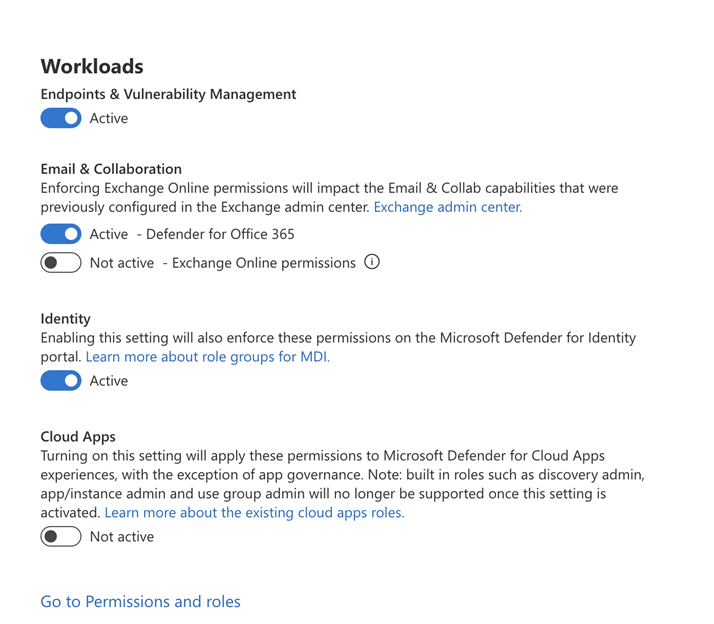
Created or imported roles do nothing until the workload is activated. Activation is a per-workload toggle: MDE, MDI, Defender for Office 365, Exchange Online permissions (needs the MDO toggle first), MDA, and Sentinel per workspace. Defender for Cloud is active by default. Exposure Management needs no activation; a role with an Exposure Management permission works at once.
Once active, imported and custom roles replace the legacy roles for that workload in the portal. The MDO Email & collaboration permissions page disappears. The four MDA scoped roles stop working. Entra global roles are unchanged. Exchange Online role groups keep PowerShell and the EAC, Purview keeps its own RBAC, Azure RBAC keeps direct workspace access outside the portal. Sentinel cuts both ways: unified assignments sync to Azure RBAC, and a user with more ARM permissions than unified permissions sees more than the unified role says.
Deactivation is self-service today: toggle off, the previous model returns, unified roles stop applying. The MDO step-by-step guide says this ability will be removed in a future update.
Least-privilege examples
- SOC analyst. Security data basics, Alerts, Response, Basic live response, Email & collaboration metadata and quarantine, all data sources. Tier 2 adds Advanced live response and File collection. Tier 1 scoped to a regional device group.
- Intune admin who needs device actions. Security data basics plus Response, MDE data source only, device group scoped to their devices. Gives isolate, scan and AIR approvals without alert management. Intune endpoint security settings are not in unified RBAC; they stay in the Intune admin center.
- Help desk read-only. Security data basics only, MDE data source, a device group for their site. Not Entra Security Reader: it is tenant-wide, privileged, and carries Response on MDO.
- MSP access. Multitenant management at
mto.security.microsoft.comhandles up to 100 tenants and needs GDAP or Entra B2B for Defender data; Sentinel cross-tenant data needs Azure Lighthouse and B2B only, no GDAP. In the customer tenant an assignment can target a GDAP remote tenant group, so the MSP's own security group inherits the role, data sources and scopes through the existing GDAP relationship. Sentinel workspaces cannot be assigned to GDAP groups or service principals; keep Azure RBAC there. MC1457836 says delegated access is unchanged by auto-activation, but roles holding B2B or GDAP assignments are included in the import, so review them.
Configure
- Portal
- PowerShell
- Graph API
Create a custom role:
- System > Permissions > Microsoft Defender XDR > Roles > Create custom role.
- Basics: name, description. Next.
- Choose permissions: pick a group, then All read-only, All read and manage, or Select custom permissions in the pane. Apply, Next.
- Assign users and data sources > Add assignment: Assignment name, Employees (Entra groups or users), Remote tenant group for GDAP, Data sources, Include future data sources automatically. Add.
- Review, Submit.
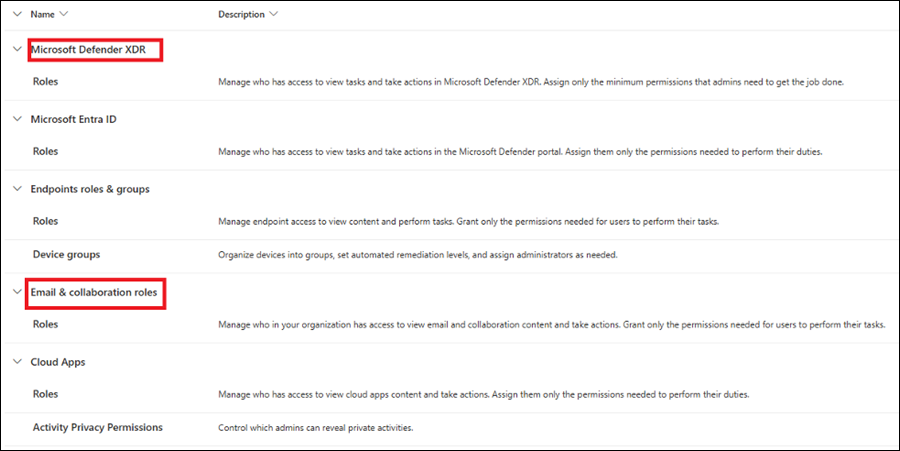

A role that manages roles: same wizard, Authorization and settings > Select custom permissions > Authorization > Select all permissions (or Read-only for auditors), assignment scoped to all data sources, specific ones such as MDE, or the Sentinel data lake collection.
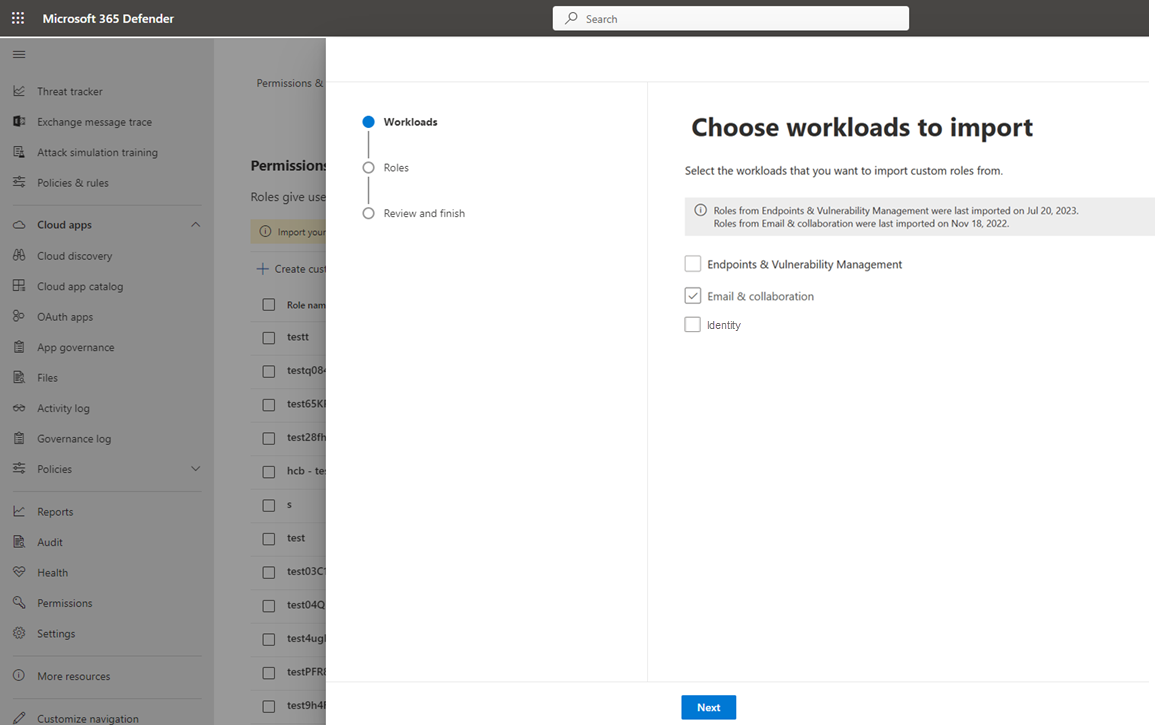
Import from a legacy model:
- Permissions > Roles > Import role. Pick the source products.
- Next, choose all roles or specific ones. Click a role name to see permissions and members first.
- Roles not eligible for import hold a user or group that no longer exists in Entra. Remove it from the source role, retry.
- Submit, Done. Imported roles say Imported in the description until edited.
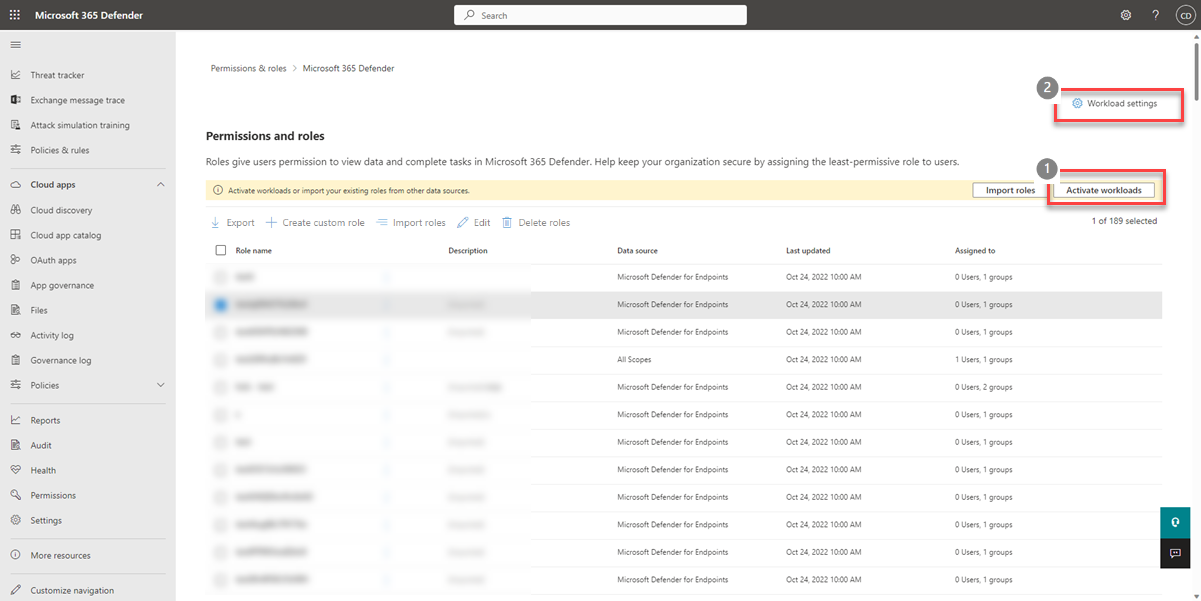
Activate workloads:
- Permissions > Roles > Activate workloads in the banner (shown only while a workload is inactive), or Workload settings. Also under System > Settings > Microsoft Defender XDR > General > Permissions and roles.
- Toggle each workload. MDO first, then Exchange Online permissions. For Sentinel, View Workspaces and pick.
- Activate. Takes effect within a few minutes.
Edit, delete, export:
- Select a role to open the edit flyout, one at a time. Edits to an imported role never flow back.
- Delete roles removes every assignment on an active workload immediately. The legacy source survives and can be re-imported.
- Export gives a CSV, one row per assignment, plus an activation snapshot per workload. Needs one active workload.

Legacy MDE: Settings > Endpoints > Roles > Add role, then Settings > Endpoints > Device groups > Add device group, with remediation level, matching rule, preview, and the Entra groups that already hold a role. Device groups stay here under unified RBAC too.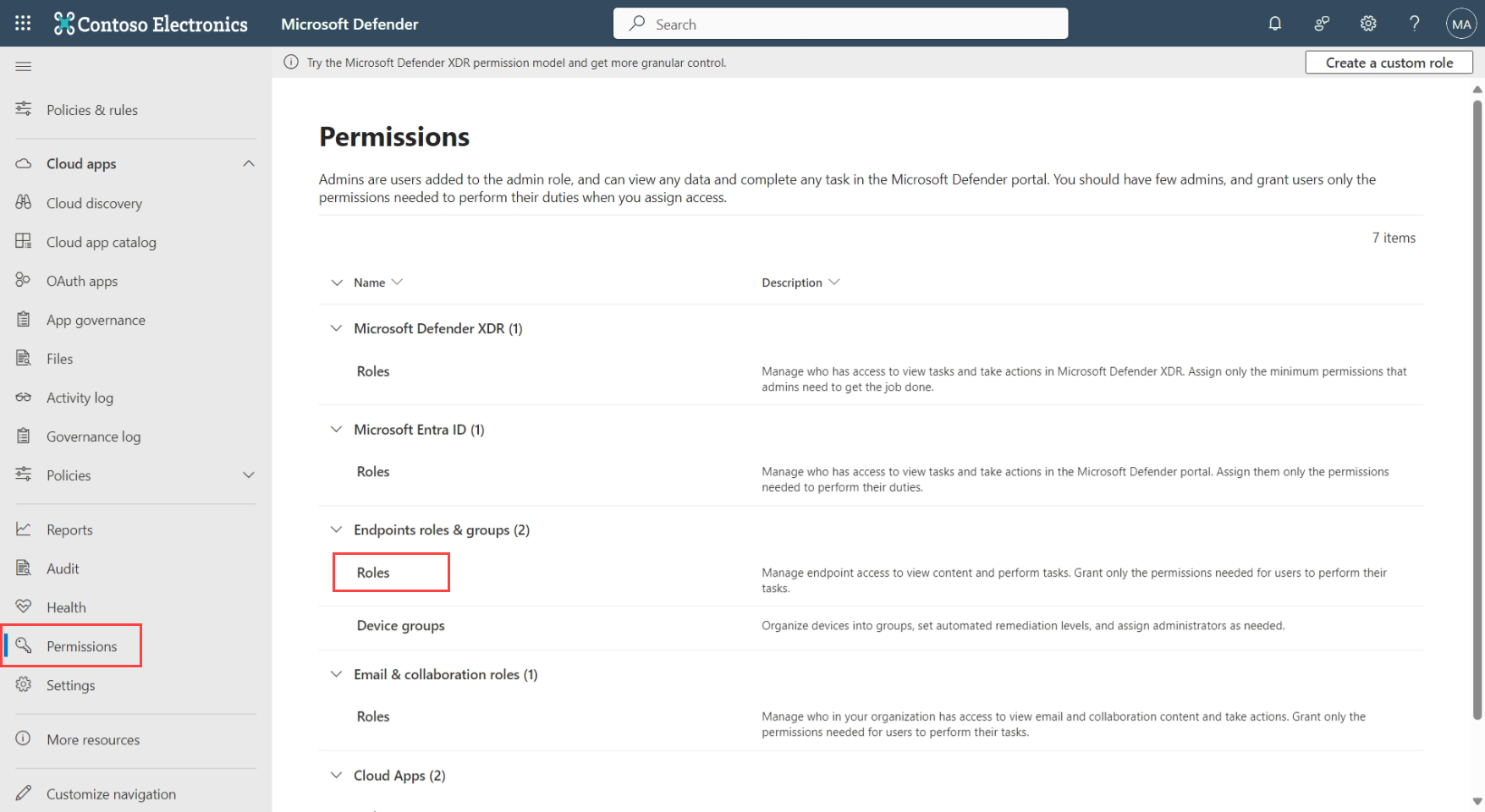
No dedicated PowerShell module exists for unified RBAC. Entra roles are Graph PowerShell. Unified RBAC is reachable only through Invoke-MgGraphRequest against the beta roleManagement/defender provider, the API MC1457836 says to move to.
# Tested on: TODO
# Who holds the Entra roles that bypass unified RBAC
Connect-MgGraph -Scopes 'RoleManagement.Read.Directory'
Import-Module Microsoft.Graph.Identity.Governance

$roles = @{
  # TODO: add the Global Administrator template ID from the Entra built-in roles reference
  '194ae4cb-b126-40b2-bd5b-6091b380977d' = 'Security Administrator'
  '5f2222b1-57c3-48ba-8ad5-d4759f1fde6f' = 'Security Operator'
  '5d6b6bb7-de71-4623-b4af-96380a352509' = 'Security Reader'
  'f2ef992c-3afb-46b9-b7cf-a126ee74c451' = 'Global Reader'
  '58f930cc-fcf4-4152-852c-1d7dbf502139' = 'SOC Identity Responder'
}
foreach ($id in $roles.Keys) {
  Get-MgRoleManagementDirectoryRoleAssignment -Filter "roleDefinitionId eq '$id'" -ExpandProperty principal -All |
    ForEach-Object {
      [pscustomobject]@{
        Role      = $roles[$id]
        Principal = $_.Principal.AdditionalProperties.displayName
        Scope     = $_.DirectoryScopeId
      }
    }
}

# Unified RBAC roles and assignments, beta, read-only
Connect-MgGraph -Scopes 'RoleManagement.Read.Defender'
Invoke-MgGraphRequest -Method GET -Uri 'https://graph.microsoft.com/beta/roleManagement/defender/roleAssignments' |
  Select-Object -ExpandProperty value |
  Select-Object displayName, roleDefinitionId, principalIds, appScopeIds
The five template IDs are from the Entra built-in roles reference. Legacy MDE roles, MDO role groups and MDA roles have no Graph or PowerShell path from the Defender side; Exchange role groups are managed in Exchange Online PowerShell, which unified RBAC does not touch.
Entra roles use the v1.0 directory provider. Unified RBAC uses the beta defender provider, type unifiedRbacApplicationMultiple, with roleDefinitions, roleAssignments, customAppScopes and resourceNamespaces relationships. Beta is not supported for production. Learn documents the list call; create and update for defender role definitions were not on the pages read for this article. TODO: confirm POST against /beta/roleManagement/defender/roleDefinitions in the dev tenant.
Assign an Entra role tenant-wide. roleDefinitionId is the template ID, principalId the user or group object ID. Least privileged caller is Privileged Role Administrator.
POST https://graph.microsoft.com/v1.0/roleManagement/directory/roleAssignments
{
  "@odata.type": "#microsoft.graph.unifiedRoleAssignment",
  "roleDefinitionId": "5d6b6bb7-de71-4623-b4af-96380a352509",
  "principalId": "f8ca5a85-489a-49a0-b555-0a6d81e56f0d",
  "directoryScopeId": "/"
}
directoryScopeId of /administrativeUnits/{administrativeunit-ID} limits an Entra role to an administrative unit. That is an Entra scope and does not scope what the role sees in the Defender portal.
List unified RBAC assignments for one role, permission RoleManagement.Read.Defender:
GET https://graph.microsoft.com/beta/roleManagement/defender/roleAssignments?$filter=roleDefinitionId eq '{roleDefinitionId}'
{
  "value": [
    {
      "id": "dbe9d288-fd87-41f4-b33d-b498ed207096",
      "displayName": "Example role assignment scoped to specific domain identity",
      "roleDefinitionId": "b5c08161-a7af-481c-ace2-a20a69a48fb1",
      "principalIds": ["8e811502-ebda-4782-8f81-071d17f0f892"],
      "appScopeIds": ["Mdi", "/UserGroupId/481c-ace2-a20a69a48f"]
    }
  ]
}
appScopeIds carries the data source and scope. / means all workloads with no scope.
Verify
Build a test account with no Entra role, put it in the scoped group, and sign in as it:
- The portal opens without the no-permission page.
- Assets > Devices shows only the scoped device group. A device outside it, opened by URL, fails.
- On an incident, with Alerts but no Response, Isolate device and Run antivirus scan are greyed.
- Advanced hunting:
DeviceInforeturns only scoped devices;EmailEventsreturns nothing without Email & collaboration metadata. - Without Authorization read, the Roles link is absent from Permissions.
- As an admin, Permissions > Roles > Export and check the CSV row for the assignment and the activation snapshot.
// Which devices a scoped account can see, run as the test account
DeviceInfo
| summarize arg_max(Timestamp, *) by DeviceId
| summarize Devices = count() by MachineGroup
The MDO step-by-step guide suggests the same approach: one user per persona signs in and confirms what they can and cannot do.
Troubleshoot
| Symptom | Likely cause | Fix |
|---|---|---|
| User sees nothing, portal shows no permission | No Entra role, and either the workload is not active or the user's group is not in any assignment | Activate the workload, or add the group to an assignment, or check the group is the one the device group references |
| User sees incidents but no devices | Device group assigned to a different Entra group, or Ungrouped devices has no access granted | Edit the device group's User access tab, remember Ungrouped devices needs explicit groups once any group is restricted |
| Device actions greyed out | Role has Security data basics and Alerts but not Response, or live response permission missing | Add Response manage; add Basic or Advanced live response for the console |
| Readers lost access after legacy MDE RBAC turned on | Documented behaviour: Entra Security Reader loses access until placed in a role | Create a read-only MDE role and assign the group; this cannot be reverted |
| Role conflict after activation | Imported roles replace legacy ones; user held several legacy roles and only some were imported | Import everything, or rebuild; effective permissions are the union of all assignments the user matches |
| MDA scoped admin lost access after activation | App/instance admin, User group admin and Cloud Discovery roles are unsupported under unified RBAC | Recreate as a unified role with MDA as data source |
| MDI alerts missing for users who had Scoped deployment in MDA | Scoped deployment permissions do not carry over | Grant Security data basics explicitly |
| Threat Explorer or Email & collaboration schema empty | Missing Email & collaboration metadata read | Add it; Security data basics alone no longer covers that schema since May 2024 |
| Cannot preview email | Missing Email & collaboration content read | Add the full permission, or the alerts-only or quarantine-only sub-option |
| PowerShell cmdlets fail after MDO activation | Exchange Online PowerShell still uses Exchange role groups | Assign the Exchange role group |
| Role not eligible for import | Assignment references a deleted user or group | Remove the orphan from the source role, re-import |
| Sentinel sync error on the Permissions page | Someone changed the workspace in the Azure portal after activation | Follow the notification steps; manage Sentinel permissions in the Defender portal from now on |
| Sentinel user sees more than the unified role allows | ARM role on the workspace outranks the unified assignment | Trim Azure RBAC or accept it; both apply |
| Permission change not visible | Propagation | Wait about five minutes, device group changes can take hours |
Gotchas and limits
- The auto-enablement wave (MC1457836) imports roles 30 days before activation. The review is yours. Export the CSV during the banner period and diff it against who should have what.
- Imported roles are a one-way copy. Edits never go back, and re-importing creates a duplicate.
- Entra Security Reader and Global Reader hold Response on MDO and read on every workload, tenant-wide. Reading MDE device data with them needs extra setup per the MDE RBAC page.
- Device groups are the only per-device scope. Data sources are per product. A tenant with no device groups gives every unified role every device.
- Device groups can only be assigned to Entra groups that already hold a role. Role first, then group, or the picker is empty.
- All read and manage is the only way to pick up new permissions automatically. Custom selections silently miss additions like the April 2026 quarantine-content permission.
- Portal only. Exchange Online PowerShell, Security & Compliance PowerShell, the EAC, Purview, message trace, mail flow reports and Attack Simulation Training keep their own models.
- MDA app governance is Entra-role only, apart from the
OAuthAppInfohunting table. - Sentinel: Playbook Operator, Automation Contributor and Workbook Contributor stay in Azure. No service principals or GDAP groups on workspaces. Activating a workspace puts User Access Administrator on the MTP Unified RBAC app there.
- Global Administrator sees no Sentinel data through unified RBAC by default. It can assign itself a role.
- Deactivation exists today and Microsoft says it will be removed. Do not build a rollback plan on it.
- The Graph defender provider is beta only: no v1.0, no SDK cmdlets, create and update undocumented at source check.
- Legacy MDE opt-in is irreversible, and new MDE and MDI tenants cannot export from the legacy model at all.
Further reading
- Unified RBAC becomes the default in Microsoft Defender, Tobias Asböck, August 2026. Plain reading of MC1457836 with the 30-day banner timeline and what stays on Exchange and Purview.
- MC1457836: Tenant will be auto-enabled into Microsoft Defender Unified RBAC, Merill Fernando's Message Center archive, August 2026. The full text of the auto-activation notice, including the pointer to the beta Graph API, useful if your tenant did not receive it.
- New Defender XDR permission for viewing and downloading quarantined emails, Tobias Asböck, April 2026. Covers the quarantine-only content permission, the kind of addition custom-selected roles miss.
- Defender Unified RBAC will be enabled for new tenants with Defender for Office 365 Plan 2, Tobias Asböck, March 2026. Tracks the MC1246006 date slips for the MDO Plan 2 default.
Four qualified. The Tech Community posts on portal permissions carry no publication date and were left out.
My notes
TODO: Sohail's notes after verification.
Changelog
| Date | Change | Source |
|---|---|---|
| 2026-10-22 | Drafted from Learn, with Learn images and diagrams | [1] |