Secure Score, Exposure Management and Threat analytics
What it is
Three posture surfaces live under Exposure management in the Defender portal, and they answer three different questions. Microsoft Secure Score answers "which recommended controls have we turned on". Security Exposure Management answers "where could an attacker actually get to, and what matters most if they do". Threat analytics answers "of the threats Microsoft is tracking right now, which ones can hurt this tenant and what closes the gap".
Secure Score is a number built from recommended actions across Microsoft 365 identities, apps and devices, each worth 10 points or less. Learn is blunt about what it is not: not a measure of breach likelihood, not a guarantee. It covers Entra ID, Exchange Online, SharePoint Online, Teams, Defender for Endpoint, Defender for Identity, Defender for Office, Defender for Cloud Apps, App governance, Purview Information Protection, and SaaS apps through Defender for Cloud Apps connectors (Okta, Salesforce, ServiceNow, GitHub, Zoom, Docusign, Citrix ShareFile).
Security Exposure Management (MSEM) is the layer above. It pulls assets from every Defender workload, Defender for Cloud and third party connectors into one exposure graph, marks critical assets, simulates attack paths to them, and groups posture into initiatives with their own scores. Since November 2025 the Defender for Cloud CSPM pieces and Defender Vulnerability Management sit inside it, so Microsoft Secure Score and the Cloud secure score show side by side. Public cloud only; no US Gov, no China.
Threat analytics is the in-product threat intelligence feed. Each report is written by Microsoft researchers, tagged (ransomware, phishing, activity group, vulnerability), and overlaid with your telemetry: related incidents, impacted assets, vulnerable and misconfigured devices, and which Secure Score actions reduce exposure to that threat.
For portal placement see the Defender XDR overview and settings and console. The classic Defender for Cloud secure score in the Azure portal is a different calculation, covered in Defender for Cloud secure score and compliance.
Licensing and prerequisites
- Secure Score: no separate licence. The full recommendation set shows for every supported product whatever plan you hold; the score does not change with licensing, only what you can act on.
- Exposure Management: Microsoft 365 E5, E3 with certain add-ons, or Defender suite licences. The integration and licensing page with the feature map returned an error at source check. TODO: fetch the licensing table. For the dashboard to be useful Learn names Defender for Cloud with CSPM enabled and Defender Vulnerability Management (standalone or in MDE P2). External connectors (ServiceNow CMDB, Tenable, Qualys, Rapid7, OT vendors) are free in preview and billed per retrieved asset after GA.
- Threat analytics: at least one Defender product. MDE P1 alone does not qualify. Sentinel only customers see a subset of tabs. Per product incidents, assets and exposure need that product and its role.
- Critical asset classification on endpoints needs MDE sensor 10.3740.xxxx or later. Check with
DeviceInfo | project DeviceName, ClientVersion. - Roles. Unified RBAC is recommended: Exposure Management (read) and Exposure Management (manage) under Security posture, on a custom role carrying the Microsoft Security Exposure Management data source. Full exposure data and critical asset management need access to all MDE device groups; scoped users see only their devices in attack paths, metrics and the map. Entra fallback: Security, Exchange and SharePoint Administrator have read and write; Security Reader, Global Reader, Security Operator, Helpdesk, User and Service Support Administrators have read. Graph API access still needs Entra roles; unified RBAC for Graph is planned.
- Threat analytics roles: Security data basics (read) for reports, incidents and assets; Vulnerability management (read) or Exposure Management (read) for exposure data and recommended actions.
How it works
Secure Score
Each recommended action has a maximum of 10 points. Most are binary: turn on the setting, get the points. Some are proportional: 50 of 100 users covered by MFA on a 10 point action is 5 points. A few only pay out when fully complete. Device category actions are not scored in Secure Score itself; they point to the matching MDVM recommendation and inherit state from it.
Points come from three sources: Microsoft sees the configuration, or you mark the action Resolved through third party or Resolved through alternate mitigation. Both resolved states pay full points with no visibility into whether the control is real. Planned, To address and Risk accepted pay nothing.
Entra security defaults alone earn 9 points for user MFA, 10 for admin MFA and 7 for blocking legacy auth. Learn recommends marking the sign in risk and user risk policy actions as Resolved through alternative mitigation in that case.
Refresh is uneven. Achieved points sync daily and a change usually shows after about 24 hours, sometimes 48. Entra recommendations also refresh weekly and Teams monthly. An MDVM global exception updates Secure Score within about two hours; a per device group exception never does.
Under Include the score page adds Planned score, Current license score and Achievable score (the ceiling with your licences and risk acceptances). The comparison views use anonymised organisations of similar seat count; Graph adds AllTenants and IndustryTypes bases. History lists every action and regression in a date range; Metrics and trends adds score zones, regression trend and risk acceptance trend.
Exposure Management
Everything starts with the enterprise exposure graph. Nodes are devices, identities, cloud resources, storage, IPs; edges are relationships such as Can Authenticate As or CanRemoteInteractiveLogonTo. MDE supplies devices, MDVM vulnerability context, MDI on premises identity relationships, Defender for Cloud the Azure, AWS and GCP resources, and connectors add CMDB and scanner data. Ingestion latency is up to 72 hours, retention at least 14 days, and only the latest snapshot is kept, so there is no graph history. Advanced Hunting exposes it as ExposureGraphNodes and ExposureGraphEdges for make-graph and graph-match.
Critical assets give the graph a destination. Predefined classifications cover domain controllers, file servers, ADCS, sensitive databases, privileged groups and roles, cloud resources, SaaS apps and external assets. Four levels: Very High, High, Medium, Low. When several rules match, the highest wins, and the asset drops back if it stops matching. Custom rules are query builder filters over device, identity or cloud resource attributes. Identity rules support AD groups only. Near misses under the automatic threshold land in Pending approval.
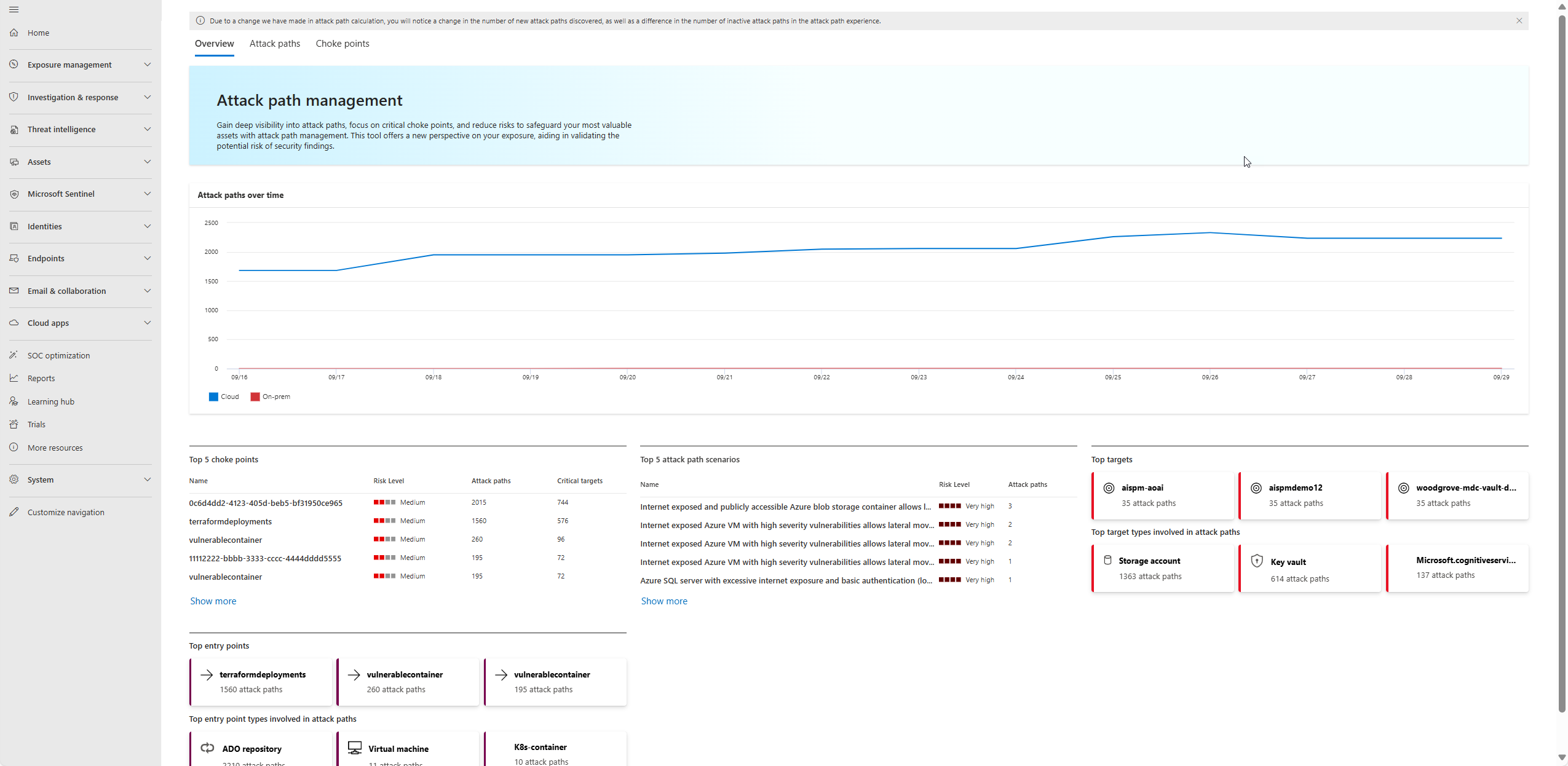
Attack paths are generated from the live graph, so counts move as users log on or group membership changes. Each path runs from an entry point (internet exposed VM, leaked credential, misconfigured storage) to a critical asset. On premises paths stop at End Game assets: Domain Admins, Enterprise Admins, Administrators, Domain Controllers. Cloud paths include active reachability scans to confirm the exposure is reachable from outside. Choke points are nodes where many paths converge; fixing one closes several, and blast radius shows what else falls with that node. An empty attack path page is normal; the feature is tuned for imminent, exploitable paths.
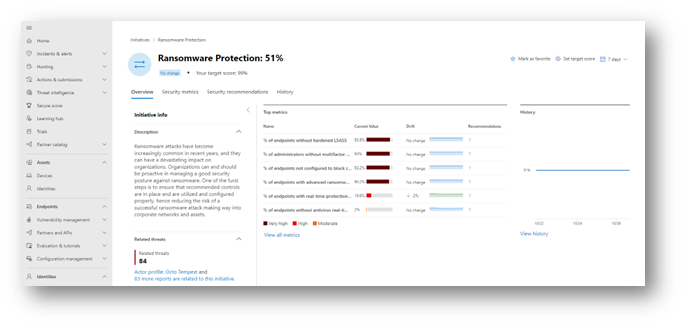
Initiatives are the scoring layer. Each has a score, 14 day trend and drift, metrics, recommendations, history and related threats. Domain initiatives (Code, Endpoint, Cloud, Identity, SaaS) feed the Overview dashboard; threat initiatives such as Ransomware and the Critical Asset Protection initiative track specific areas. Only recommendations currently active in Secure Score or Defender for Cloud and applied to assets appear under an initiative. A metric score drop raises an event under Exposure insights, Events.
Threat analytics
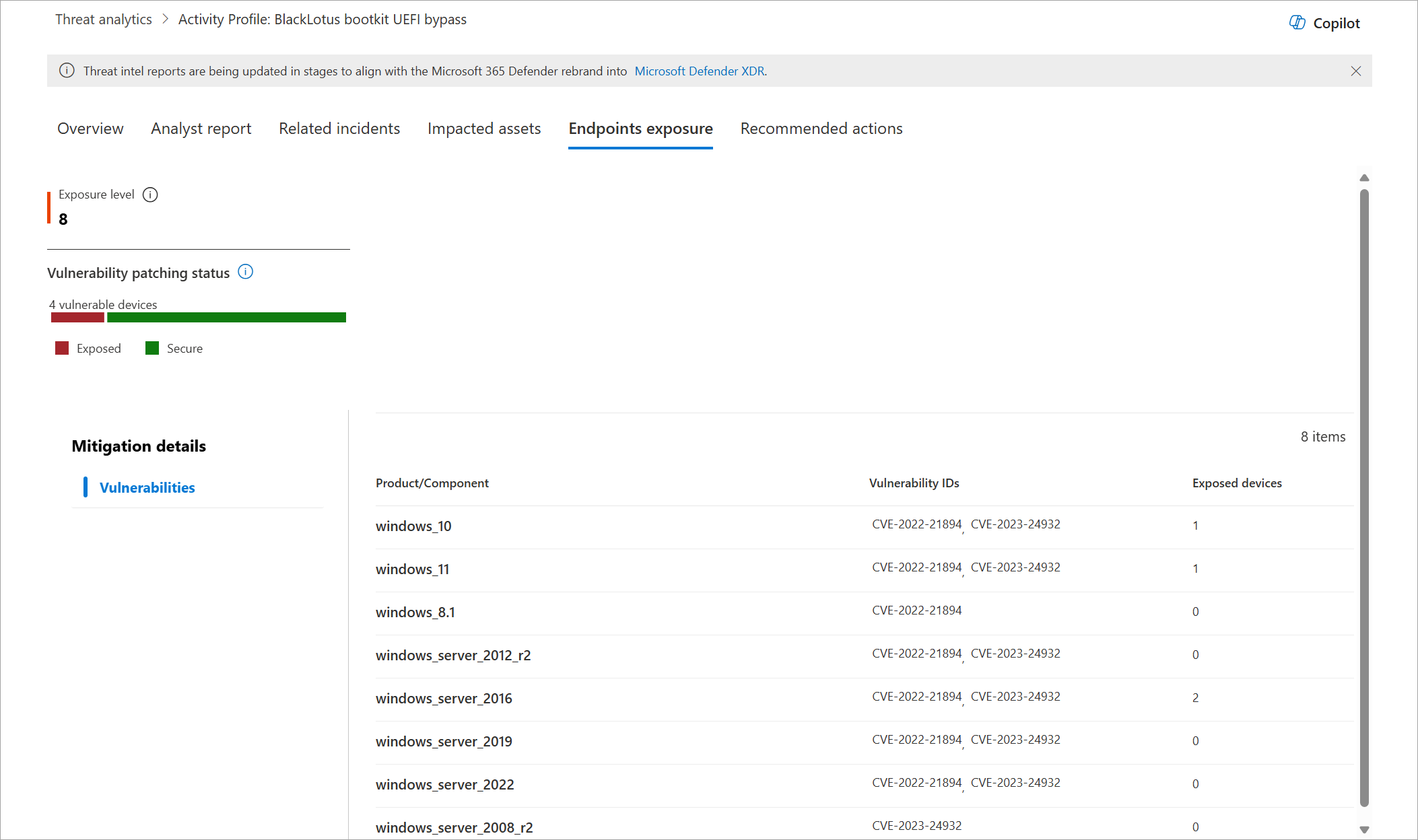
A report has seven parts: Overview, Analyst report, Related incidents, Impacted assets, Endpoints exposure, Recommended actions, and Indicators (verified customers only). Exposure level is the severity of the weaknesses the threat exploits times the number of devices that have them. Vulnerable devices come from MDVM CVE data; Misconfigured devices are those where the linked actions are off. Both show Not available when researchers have linked nothing. Recommended actions only lists Secure Score items, so the analyst report still matters.
Configure
- Portal
- PowerShell
- Graph API
Secure Score:
- Defender portal, Exposure management, Secure score, or
https://security.microsoft.com/securescore. Overview shows the score, the comparison bar and the breakdown by Identity, Data, Device, Apps and Infrastructure.
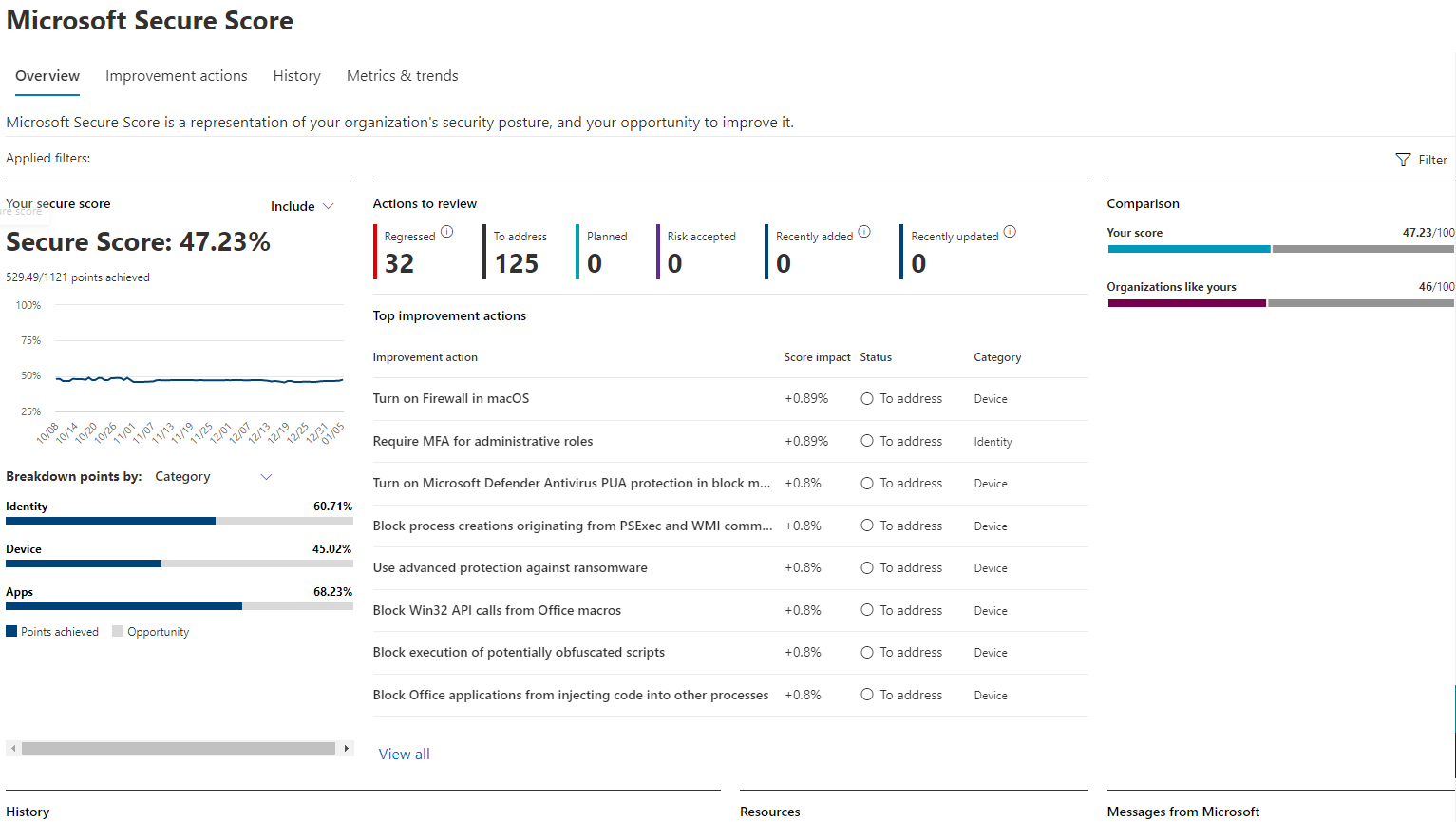
- Select Include to add Planned, Current license and Achievable score. Achievable is the number to put in front of a client.

- Recommended actions tab. Ranked by points remaining, implementation difficulty, user impact and complexity. Group, filter by status, or filter by your own tags.
- Open an action. The flyout has At a glance, User impact, Implementation (prerequisites including licences, steps, current state) and the status picker. Set the status, add Notes and tags. Manage in Microsoft Defender XDR jumps to the setting; Share copies a link for Teams, email or Planner.
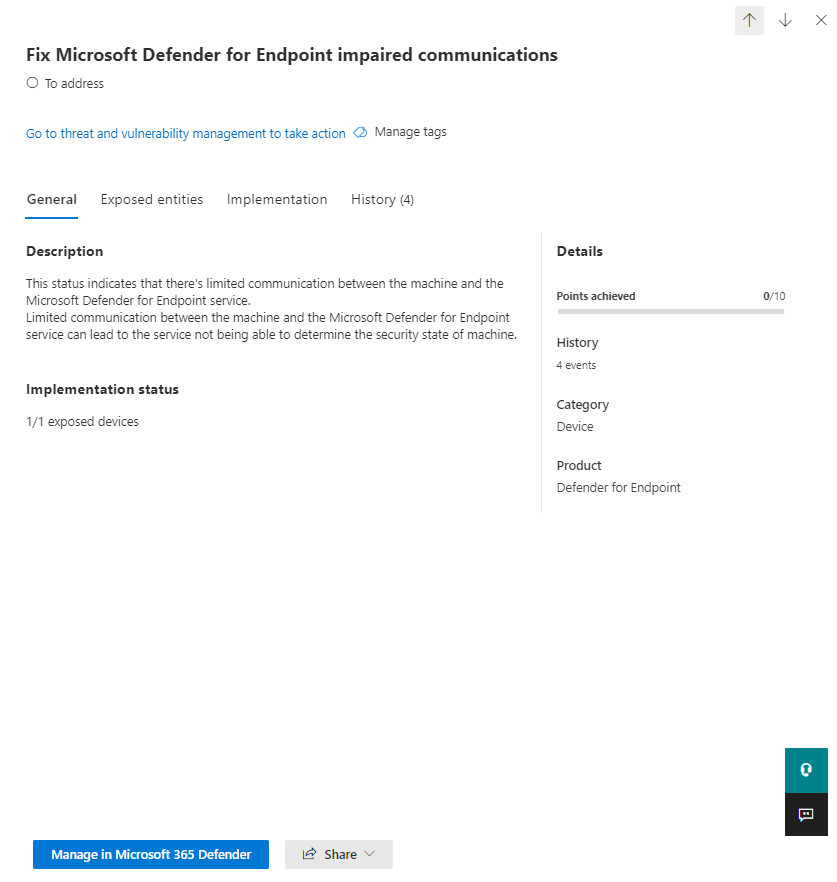
Status values and what they do:
| Status | Points | When to use it |
|---|---|---|
| To address | No | Default, also used for partially complete actions |
| Planned | No | Scheduled work. Shows in Planned score only |
| Risk accepted | No | Deliberate decision. Reversible, visible in history |
| Resolved through third party | Yes | A non Microsoft product covers the control |
| Resolved through alternate mitigation | Yes | An internal control covers it, for example security defaults covering risk policies |
| Completed | Yes | Microsoft confirmed it. You cannot set this by hand |
- Device category actions have no status picker. Follow the link to MDVM and use a global exception there if it must reflect in the score.
- Metrics and trends: set score zones, watch regression and risk acceptance trends. History: filter by category and date to show a client what moved.

Exposure Management:
- Exposure management, Overview. Resolve Now lists Patch, Mitigate and Fix items for internet exposed and critical assets. Monitor Exposure shows internet exposed resources and the five domain initiative scores against target.
- Attack surface, Attack path, or
https://security.microsoft.com/attack-paths. Open the Choke points tab, pick one, View blast radius. Open a path, hover nodes and edges, then Recommendations and Manage to remediate in the owning workload. View in map puts the asset in the attack surface map.
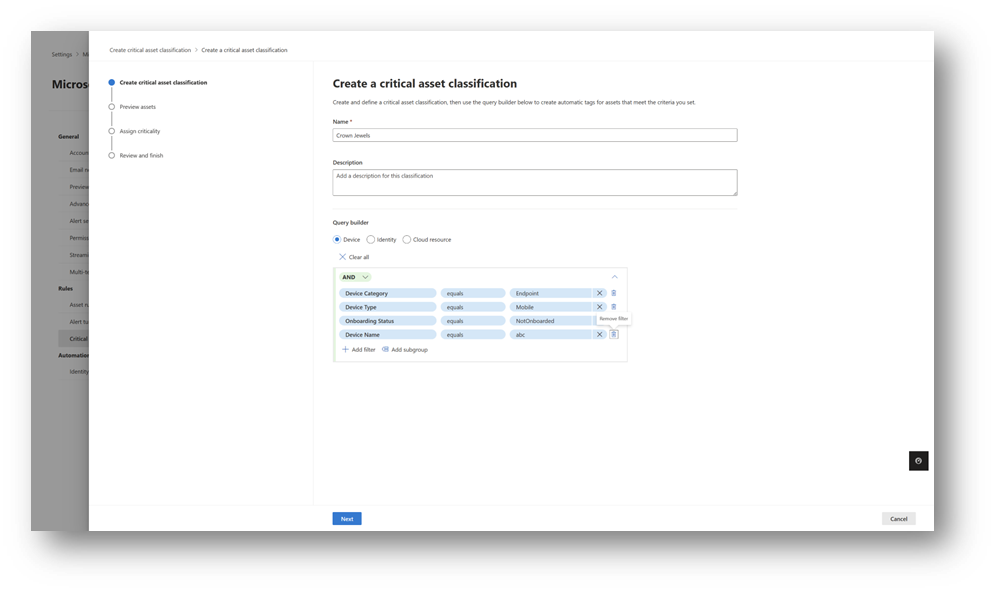
- Critical assets: Settings, Microsoft Defender XDR, Rules, Critical asset management. Review the predefined classifications first and re-level any the client disagrees with. Create a new classification: name, description, Boolean filters per device, identity or cloud resource (Learn's example is a device naming convention), Next, preview matches, pick a level, save. Check Pending approval for near misses. Predefined rules can be turned off or re-levelled, not deleted.
- Initiatives: Exposure insights, Initiatives, or
https://security.microsoft.com/exposure-initiatives. Star the ones that matter. Open initiative page, Set target score, enter a percentage, Apply. Work the Security recommendations and Security metrics tabs. Filter by device groups scopes endpoint data to one business unit.
Threat analytics:
- Threat intelligence, Threat analytics, or
https://security.microsoft.com/threatanalytics3. Sort by Highest exposure threats, not Latest. - Open a report. Endpoints exposure shows exposure level and patch status; Recommended actions shows the linked Secure Score items with your status.
- Set email notifications for report updates, and link custom detection rules to reports so their alerts land in Related incidents.
# Tested on: TODO. Microsoft.Graph PowerShell SDK, Invoke-MgGraphRequest against v1.0.
# Delegated or application permission: SecurityEvents.Read.All (read), SecurityEvents.ReadWrite.All (update).
Connect-MgGraph -Scopes 'SecurityEvents.Read.All'

# Latest daily score. Results come newest first, so $top=1 is today.
$latest = (Invoke-MgGraphRequest -Method GET -Uri 'https://graph.microsoft.com/v1.0/security/secureScores?$top=1').value[0]
[pscustomobject]@{
    Date          = $latest.createdDateTime
    Current       = $latest.currentScore
    Max           = $latest.maxScore
    Percent       = [math]::Round($latest.currentScore / $latest.maxScore * 100, 1)
    LicensedUsers = $latest.licensedUserCount
    Peers         = ($latest.averageComparativeScores | ForEach-Object { "$($_.basis)=$($_.averageScore)" }) -join ', '
}

# 90 days of history for a trend chart. 90 days is the documented default retention.
$history = (Invoke-MgGraphRequest -Method GET -Uri 'https://graph.microsoft.com/v1.0/security/secureScores?$top=90').value |
    Select-Object createdDateTime, currentScore, maxScore

# Join today's control scores to the control catalogue to build a prioritised list.
# controlScores carries the points achieved per control; the profile carries maxScore, rank, cost and impact.
$profiles = (Invoke-MgGraphRequest -Method GET -Uri 'https://graph.microsoft.com/v1.0/security/secureScoreControlProfiles').value
$byName = @{}
foreach ($c in $latest.controlScores) { $byName[$c.controlName] = $c }
$profiles |
    Where-Object { -not $_.deprecated } |
    ForEach-Object {
        $score = $byName[$_.id]
        [pscustomobject]@{
            Rank      = $_.rank
            Control   = $_.title
            Category  = $_.controlCategory
            Service   = $_.service
            Achieved  = if ($score) { $score.score } else { $null }
            Max       = $_.maxScore
            Remaining = if ($score) { $_.maxScore - $score.score } else { $_.maxScore }
            Cost      = $_.implementationCost
            UserImpact= $_.userImpact
            Tier      = $_.tier
            State     = ($_.controlStateUpdates | Select-Object -Last 1).state
        }
    } |
    Sort-Object -Property Remaining -Descending |
    Export-Csv -Path .\securescore-backlog.csv -NoTypeInformation

# Exposure graph from PowerShell goes through Advanced Hunting (ThreatHunting.Read.All).
# Example: critical devices and how many identities can authenticate to them.
$kql = @'
ExposureGraphNodes
| where set_has_element(Categories, "device")
| where isnotnull(NodeProperties.rawData.criticalityLevel)
| project NodeId, NodeName, Level = NodeProperties.rawData.criticalityLevel.criticalityLevel
| join kind=inner (ExposureGraphEdges | where EdgeLabel == "Can Authenticate As") on $left.NodeId == $right.SourceNodeId
| summarize Identities = dcount(TargetNodeId) by NodeName, tostring(Level)
| order by Identities desc
'@
$body = @{ Query = $kql } | ConvertTo-Json
(Invoke-MgGraphRequest -Method POST -Uri 'https://graph.microsoft.com/v1.0/security/runHuntingQuery' -Body $body -ContentType 'application/json').results
There is no PowerShell or Graph surface for attack paths, critical asset rules, initiatives or threat analytics reports. Those are portal only. The hunting tables are the documented programmatic route into the exposure graph.
Daily score, newest first. Page with $top and $skip; $filter and $count are supported.
GET https://graph.microsoft.com/v1.0/security/secureScores?$top=1
Response shape, trimmed from the Learn example:
{
  "value": [
    {
      "id": "00000001-0001-0001-0001-000000000001c_2019-03-19",
      "azureTenantId": "00000001-0001-0001-0001-000000000001c",
      "createdDateTime": "2019-03-19T15:21:00Z",
      "currentScore": 387.0,
      "maxScore": 697.0,
      "licensedUserCount": 100,
      "enabledServices": ["HasExchange", "HasSharePoint", "HasInTune"],
      "averageComparativeScores": [
        { "basis": "AllTenants", "averageScore": 37.0 },
        { "basis": "TotalSeats", "averageScore": 46.0 },
        { "basis": "IndustryTypes", "averageScore": 109.0 }
      ],
      "controlScores": [
        { "controlCategory": "Identity", "controlName": "AdminMFA", "description": "Requiring MFA for privileged roles", "score": 35.0 }
      ],
      "vendorInformation": { "provider": "SecureScore", "vendor": "Microsoft" }
    }
  ]
}
Control catalogue with max score, rank, tier, cost, user impact, threats and the tenant's state history:
GET https://graph.microsoft.com/v1.0/security/secureScoreControlProfiles
GET https://graph.microsoft.com/v1.0/security/secureScoreControlProfiles/{id}
Update. The resource page lists controlStateUpdates as updatable with states ignored, thirdParty and reviewed (Default is the fourth). The update method page only documents vendorInformation, mandatory on every PATCH. Permission SecurityEvents.ReadWrite.All; Prefer: return=representation returns the object instead of 204.
PATCH https://graph.microsoft.com/v1.0/security/secureScoreControlProfiles/{id}
Content-Type: application/json
Prefer: return=representation
{
  "controlStateUpdates": [
    {
      "state": "thirdParty",
      "assignedTo": "sohail@contoso.com",
      "comment": "Covered by the client's existing MDM, see ticket 1234"
    }
  ],
  "vendorInformation": {
    "provider": "SecureScore",
    "vendor": "Microsoft"
  }
}
TODO: confirm in the dev tenant that a PATCH with controlStateUpdates is accepted on v1.0 and that the state shows in the portal; Learn is inconsistent between the resource page and the update page.
Exposure Management has no documented Graph resource for attack paths, critical assets or initiatives at source check time. The exposure graph is reachable through the hunting endpoint:
POST https://graph.microsoft.com/v1.0/security/runHuntingQuery
Content-Type: application/json
{
  "Query": "ExposureGraphEdges | summarize by EdgeLabel"
}
Verify
- Secure Score: open the action flyout the next day. Implementation status should read complete, points moved, and the History tab should carry the entry with resulting points. A third party state shows at once.
- Graph:
GET /security/secureScores?$top=2and comparecurrentScoreand the control'sscoreacross the two days. - Critical assets: Assets, Devices, sort by Criticality level. The Security recommendations page gains a column with exposed critical assets per recommendation.
- Attack paths: allow up to 72 hours after a rule lands, then check Top targets. No paths can be a correct result.
- Initiatives: the Critical Asset Protection score should move once assets are classified. Events under Exposure insights fire on metric score drops.
- Threat analytics: a vulnerability report's Vulnerable devices should match MDVM for the same CVE.
// Critical assets by level and category, and whether the sensor is new enough for classification
ExposureGraphNodes
| where isnotnull(NodeProperties.rawData.criticalityLevel)
| extend Level = tostring(NodeProperties.rawData.criticalityLevel.criticalityLevel)
| summarize Count = count() by Level, tostring(Categories)
| order by Level asc
// Which internet facing devices also carry a privilege escalation weakness
ExposureGraphNodes
| where set_has_element(Categories, "device")
| where NodeProperties.rawData.IsInternetFacing == true
| where NodeProperties.rawData.VulnerableToPrivilegeEscalation == true
| project NodeName, NodeLabel
Troubleshoot
| Symptom | Likely cause | Fix |
|---|---|---|
| Setting changed, score has not moved | Daily sync, 24 to 48 hours; Entra actions also on a weekly refresh, Teams monthly | Wait two days before escalating. Check the flyout's implementation status first |
| Device action stuck at To address after an MDVM exception | Exception was per device group, which Secure Score ignores | Use a global exception in MDVM, allow about two hours |
| Action completed but still To address | Partially complete, for example MFA covers some users | Check Users affected in the flyout; proportional actions show as To address until 100 percent |
| Cannot change status on an action | Read only role, or Device category action, or Completed state | Assign Exposure Management (manage) or Security Administrator; Device actions are managed in MDVM; Completed cannot be edited |
| Unified RBAC role assigned but user still cannot edit | Elevated Entra role still present and taking precedence | Remove the Entra role so the custom RBAC role applies |
| Graph returns 403 on secureScores | Unified RBAC does not apply to Graph yet | Use an Entra role or an app registration with SecurityEvents.Read.All |
| Score dropped with no admin change | Regression: user, device or configuration drift, or a recommendation recategorised | History tab filtered to the date; March 2026 moved some Cloud apps actions to Identity without changing the total |
| Attack paths page empty | No critical assets defined, missing licences for the workloads in the path, or genuinely no exploitable path | Classify critical assets, confirm MDVM and Defender for Cloud CSPM are on, then wait 72 hours |
| Critical asset rule matches nothing on endpoints | Sensor older than 10.3740 | Update the MDE sensor, confirm with DeviceInfo ClientVersion |
| Identity rule cannot pick an Entra group | Query builder supports AD groups only | Use the AD group, or classify by role through the predefined rules |
| Initiative shows no recommendations | Only recommendations active in Secure Score or Defender for Cloud and applied to assets appear | Check the source workload; a preview or disabled recommendation will not surface |
| Threat analytics shows Not available for devices | No actions or CVEs linked by researchers for that report | Read the analyst report for manual actions |
| Threat analytics tabs missing | MDE P1 only, or Sentinel only, or missing per product licence | Needs a qualifying Defender product and the matching role |
| Scores differ between Defender portal and Azure portal | Different products: Microsoft Secure Score, Cloud secure score (risk based, 0 to 100) and the classic Defender for Cloud score (MCSB, weighted per subscription) | Do not compare them. Report each on its own terms |
Gotchas and limits
- Score inflation is easy. Third party and alternate mitigation states pay full points with no evidence. Keep Notes honest and review resolved states quarterly; Learn says to change the status if the covering tool stops covering.
- Planned is a label, not a credit. It only moves the Planned score line.
- Risk accepted removes points from Achievable score but stays in the Risk acceptance trend. A rising line is itself a finding in someone else's tenant.
- Three scores share the name. Microsoft Secure Score (identity, apps, data, devices via MDVM), Cloud secure score (risk based, 0 to 100, Defender portal, includes exposure and criticality) and the classic Defender for Cloud score in the Azure portal (MCSB only, weighted per subscription, recalculated about every eight hours, previews excluded). The last two use different models and give different values for the same subscription. See Defender for Cloud secure score and compliance.
- The score is the same regardless of licence; what you can act on is not. Current license score is the honest number for an E3 client.
- Portal comparison is by seat count. Graph adds AllTenants and IndustryTypes bases the portal does not show.
- Graph retains 90 days of Secure Score by default. Pull it monthly if a client wants a year of trend.
- Exposure Management data can be 72 hours old, retention is at least 14 days, and there is no graph history. Initiative history is 14 days and the top 100 changed assets. Microsoft reserves the right to shorten all of these.
- Attack path counts fluctuate because the graph is live. Report choke points fixed, not path counts.
- Device group scoping changes the numbers. A scoped analyst sees fewer paths and a recalculated initiative score, so two people can read different values off the same initiative.
- Critical asset identity rules are AD only. Entra group based crown jewels need the predefined role classifications or manual marking.
- Some on premises attack paths arrive with no linked recommendation. The fix lives on the device page under MDVM.
- The Secure Score what's coming page returned an error at source check and the what's new page body stops at February 2024. TODO: re-check both. The Exposure Management what's new page is the better changelog for both products.
- Unified RBAC for Secure Score is portal only. Anything pulled over Graph still needs an Entra role on the identity.
Using it to prioritise a client's work
The three surfaces rank differently. Secure Score ranks by points remaining and ease. Exposure Management ranks by reachability and criticality. Threat analytics ranks by what is being exploited now. Order for a new client:
Report three numbers monthly: current against achievable Secure Score, domain initiative scores against target, and choke points closed. Pull the first from Graph so history survives the 90 day window. Keep the raw percentage out of the executive summary; it rewards clicking Resolved.
Further reading
- Prioritize exposure resolution with a new dashboard experience (public preview), Microsoft Security Exposure Management blog, July 2026. Explains the thinking behind the Resolve Now and Monitor Exposure dashboard that the Learn get started page only describes.
- Containment Strategies for AI now available in Secure Now, Ronit Reger, Microsoft Security Exposure Management blog, August 2026. Covers the AI agent classifications and containment guidance that landed in Exposure Management after the June 2026 critical asset additions.
- Introducing the updated exposure score in Microsoft Defender Vulnerability Management, Microsoft Defender Vulnerability Management blog, May 2026. Describes the new MDVM exposure score model in preview, which is what feeds the Device side of Secure Score and the Endpoints exposure tab in Threat analytics.
- Mastering CSPM and Secure Score: A Guide to Cloud Posture Management, Mirko Peters, M365.fm, August 2026. Covers the Defender for Cloud side of the score and attack path analysis; useful as the counterpart to this article, but it does not distinguish the Defender portal score from the Azure one.
My notes
TODO: Sohail's notes after verification.
Changelog
| Date | Change | Source |
|---|---|---|
| 2026-10-22 | Drafted from Learn, with Learn images and diagrams | [1] |