The Settings console: every page and what it controls
What it is
Settings in the Defender portal (security.microsoft.com, left nav under System) is one menu that fronts five or more products. Each top-level entry is owned by a different service team, has its own permission model until you activate unified RBAC, and in several places a toggle in one product changes what another product does. Learn's portal overview only documents the Microsoft Defender XDR entry; the other entries are documented product by product. This article stitches them together so you know which product you are really configuring when you click.
The top-level entries you will see depend on licences. Learn states that the portal shows only the features your subscription includes, so a tenant with Defender for Office 365 and no Defender for Endpoint will not see Endpoints. The entries covered here: Microsoft Defender XDR, Endpoints, Email & collaboration, Identities, Cloud apps, Device discovery, and the Exposure management pieces that live under Microsoft Defender XDR. Microsoft Sentinel, Defender for IoT and Security Copilot have their own entries when provisioned; those are out of scope here beyond a pointer.
This is not an RBAC deep dive (see rbac) and not the product integration map (see integrations-map). It is the page inventory you need before either.
Licensing and prerequisites
- Settings pages appear per licensed product. Endpoints needs Defender for Endpoint P1 or P2 (Advanced features is a P2 page). Email & collaboration needs Exchange Online Protection or Defender for Office 365. Identities needs Defender for Identity. Cloud apps needs Defender for Cloud Apps. Device discovery is a P2 feature.
- Portal access comes from Entra roles (Global Administrator, Security Administrator, Security Operator, Global Reader, Security Reader) or from product RBAC and unified RBAC custom roles.
- Changing most settings needs Security Administrator, or the matching unified RBAC permission. MDE legacy RBAC splits this: "Manage portal system settings" (advanced features, roles, device groups, SIEM and API settings) is only in the default Microsoft Defender for Endpoint Administrator role, while "Manage security settings in Security Center" covers suppression, onboarding, email notifications and indicator lists.
- Activating unified RBAC needs at least Security Administrator in Entra.
- Some pages carry Microsoft 365 E5 or add-on licences: Exposure management, Enterprise IoT, Security Copilot.
How it works
Think of Settings as a router. The Defender XDR entry holds tenant-wide things (RBAC activation, notifications, tuning, streaming, asset rules, critical assets). Each product entry holds that product's own knobs. A handful of toggles are bridges: they are stored in one product but consumed by another.
Microsoft Defender XDR
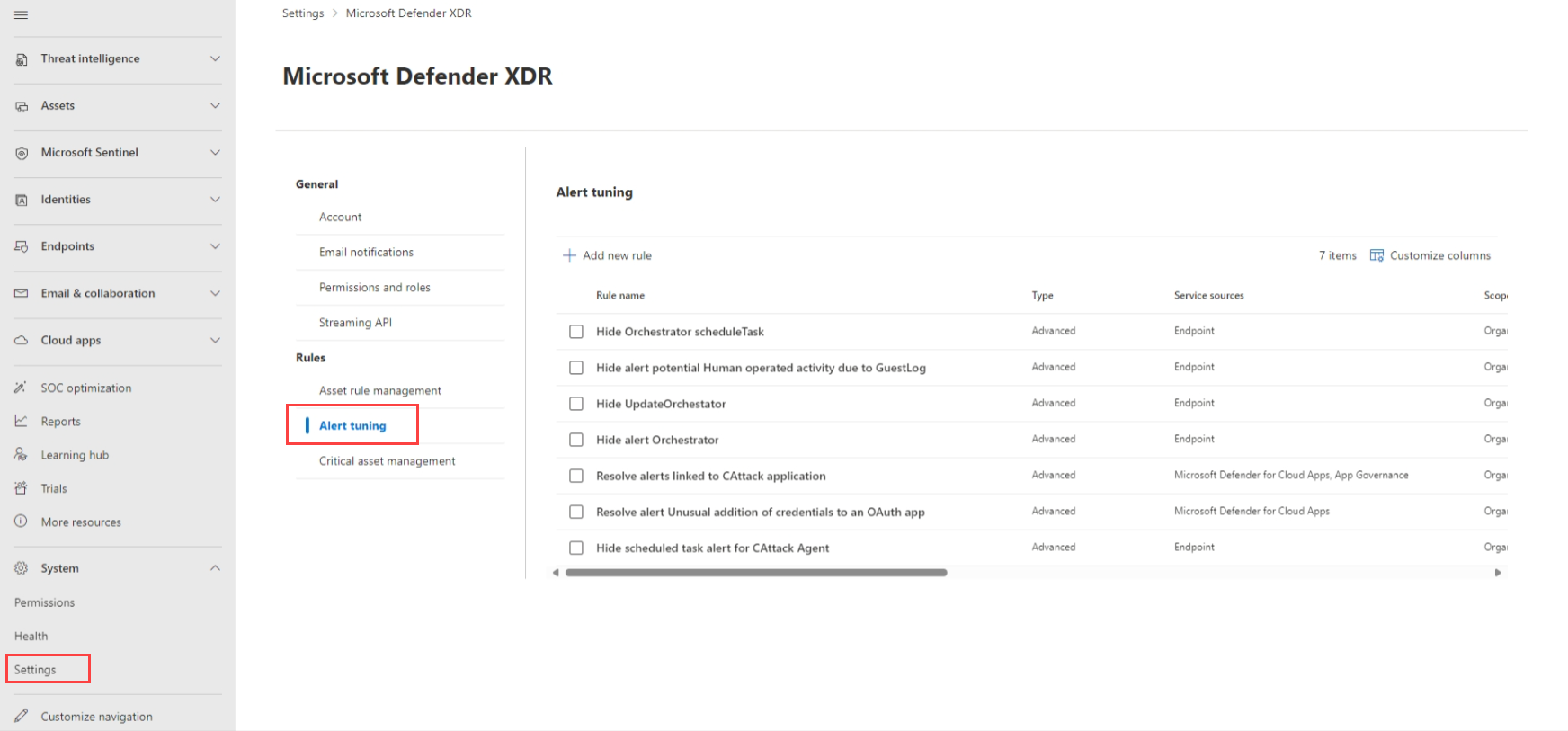
Learn's portal overview lists these under Settings > Microsoft Defender XDR: Email notifications (incidents, response actions, threat analytics), Permissions and roles, Streaming API, Asset rule management, Alert tuning, and Critical asset management. The preview and alert pages add Preview features, Alert service settings and Rules.
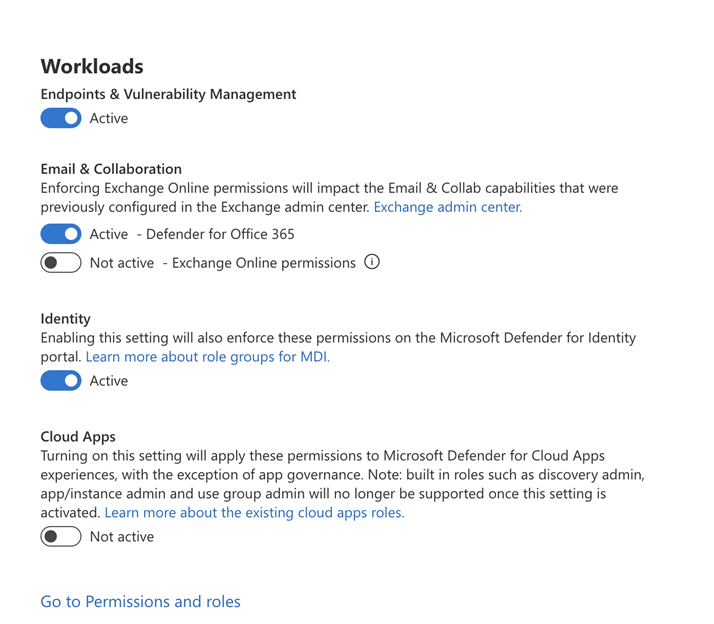
- Permissions and roles (General). Opens the Activate unified RBAC page. Toggle a workload (Defender for Endpoint P2, Defender XDR, Defender for Identity, Defender for Office 365 P2, Vulnerability Management, Defender for Cloud, Defender for Cloud Apps, Exposure Management, Sentinel per workspace) and select Activate. Until a workload is active, its own RBAC model stays in charge. Defender for Cloud is active by default. Exposure Management needs no activation. Exchange Online permissions need Defender for Office 365 active first. Deactivation drops the workload back to its old model and unified roles stop applying. New MDE and MDI tenants since 2025 start on unified RBAC with no export of old roles; new MDO P2 organisations from July 2026 do the same. Activation changes who controls access to every other Settings page for that product, so do it last, after roles are imported.
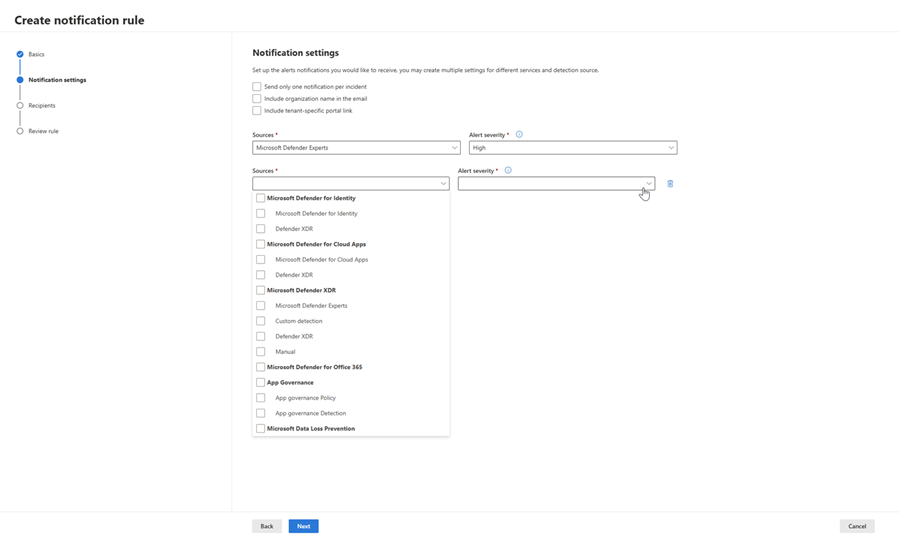
- Email notifications. Incidents tab: severity, device group scope (all or selected), one notification per incident, organisation name, tenant-specific link, recipients. Service source and detection source filtering with per-source severity thresholds is in prerelease. Response actions and threat analytics have their own tabs. Needs Manage security settings; under RBAC you can only create rules inside your device group scope.
- Alert tuning (Rules). Formerly suppression. Pick service sources, optionally detection sources, up to 200 conditions, then Hide alert (MDE only), Resolve alert, or Set as behavior (not MDO or Defender for Cloud). Built-in rules ship enabled, do not affect AIR or email notifications, and can be disabled from the rule pane. Detection source scoping takes effect 8 November 2026; untouched rules keep applying to all detection sources, custom detections included.
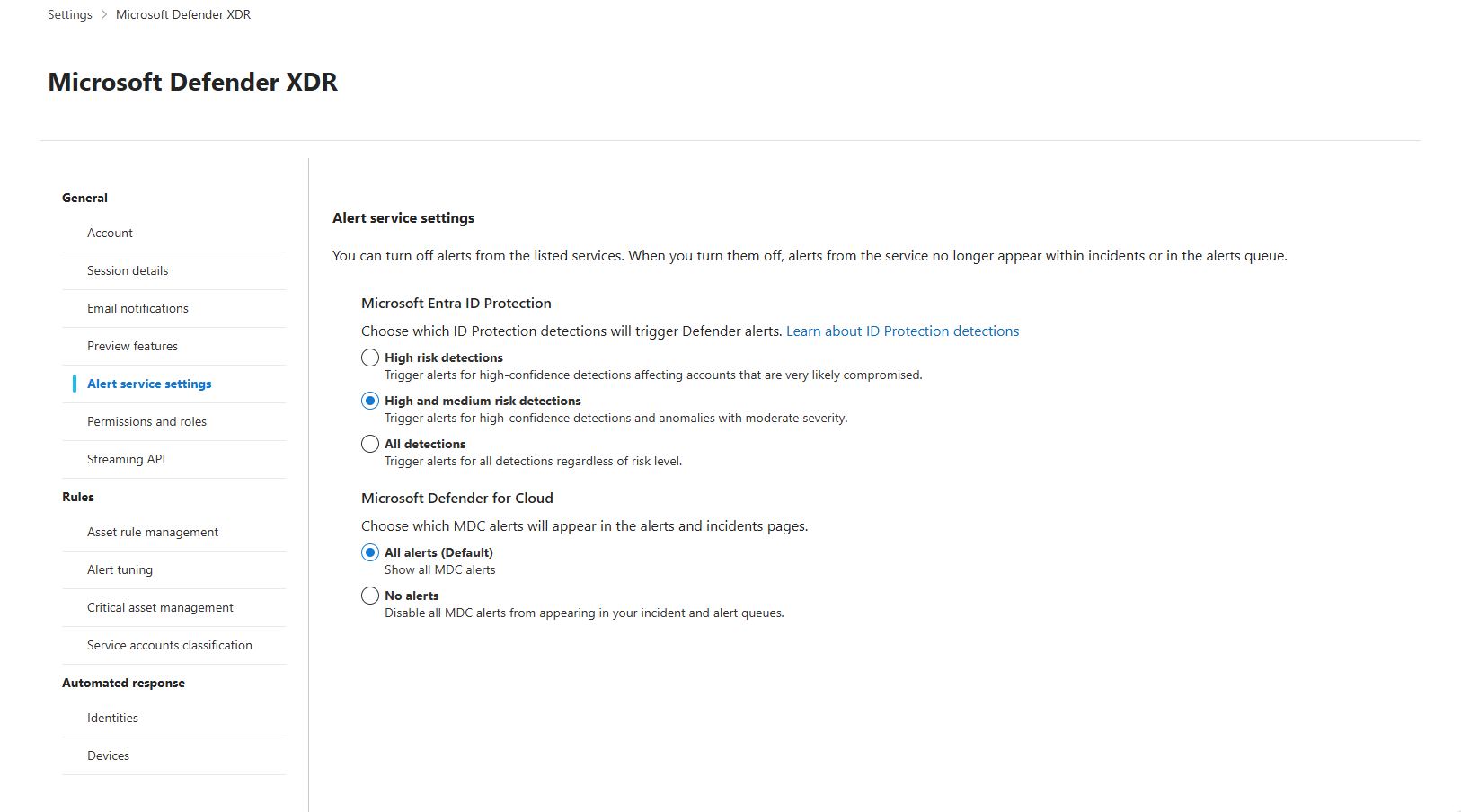
- Alert service settings. Entra ID Protection alert granularity (public preview): default High-risk detections only, options High + Medium or All detections. Also reachable from the Incidents page.
- Streaming API. Add a rule, name it, choose Event Hubs or Storage, paste the namespace resource ID, pick Advanced Hunting tables. Needs Security Administrator in Defender plus Contributor on the Event Hubs namespace, and
Microsoft.Insightsregistered on the subscription. Up to 10 tables per rule unless the namespace is in a cluster. Events can take up to an hour to land. Learn now recommends the Graph security API for new integrations. - Asset rule management. Dynamic rules that apply tags or device values based on device name, domain, OS platform, internet-facing status, onboarding status and manual tags. Tags set by a rule cannot be edited by hand and are not used by DVM security baseline assessment. Up to an hour to apply. Defender for Identity now relies on this page to remove the legacy Unified Sensor RPC Audit tag.
- Critical asset management. Exposure management's classification engine. Predefined classifications (domain controllers, databases with sensitive data, privileged roles, cloud resources) plus custom ones. Criticality shows in device inventory, attack paths, the attack surface map, alerts and incidents as a crown. Managing it requires access to all MDE device groups, and devices need sensor 10.3740 or later. External connector data (Qualys, Rapid7, Tenable, ServiceNow CMDB) can feed criticality too.
- Preview features. Tenant-wide opt-in. Global Administrator, Security Administrator or Security Operator can set it. MDE and Defender for Cloud Apps keep per-service copies (Endpoints > Advanced features > Preview features, Cloud apps > General > Preview features) which you can set independently once the XDR toggle is on.
Endpoints
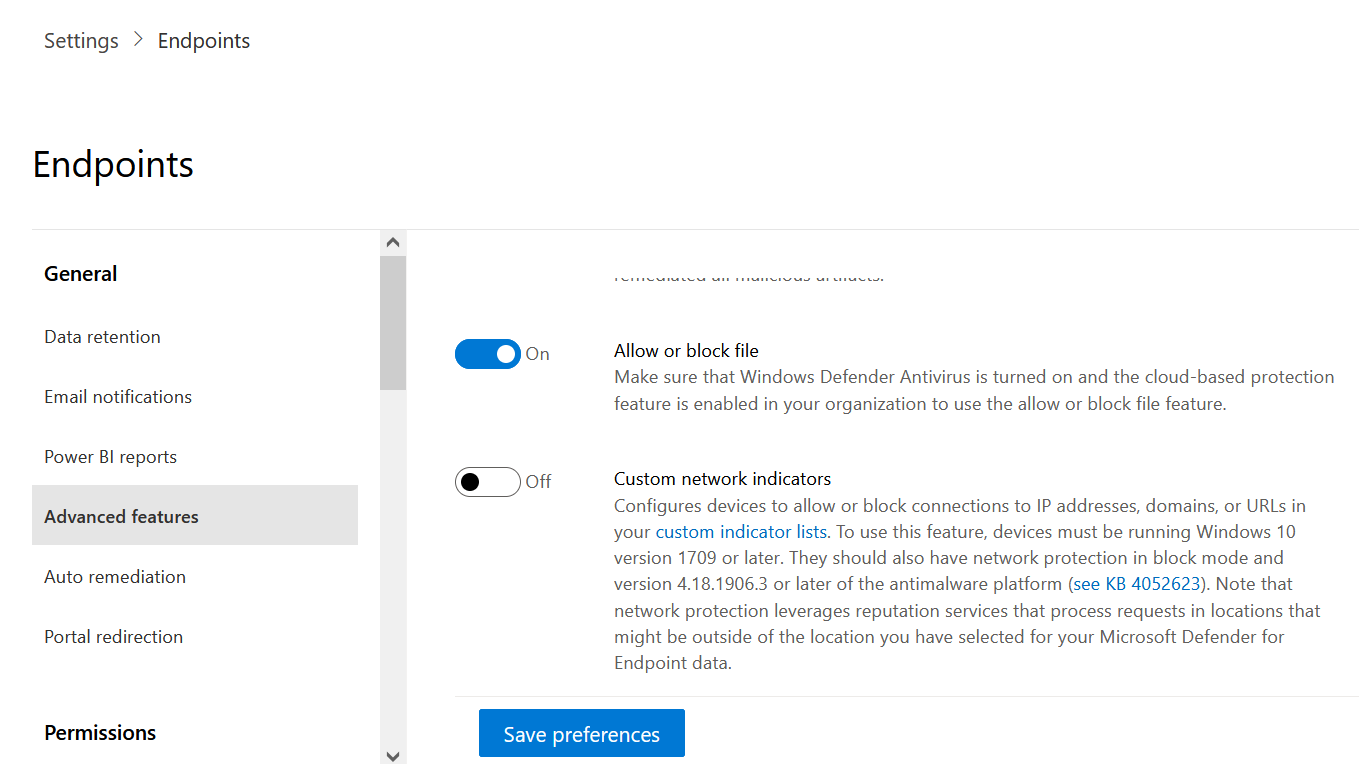
- General > Advanced features. The page with the most cross-product reach. Every toggle on the Learn page, grouped:
- Correlation and alerts: Restrict correlation to within scoped device groups (splits incidents per device group, future correlations only), Automatically resolve alerts (affects device risk level, never overwrites analyst-set states).
- Protection: EDR in block mode, Allow or block file (needs Defender AV active with cloud protection; then block from a file page), Custom network indicators (Windows 10 1709 or later; reputation lookups may process data outside your MDE geo), Tamper protection, Web content filtering, Authenticated telemetry.
- Inventory: Hide potential duplicate device records (on by default, hides from inventory, DVM and machine APIs but not hunting or alerts), Device discovery, Default to streamlined connectivity, Download quarantined files (on by default).
- Investigation: User details display (pulls Entra photo, title, department into alerts), Live response, Live response for servers, Unsigned script execution in live response, Automatic attack disruption, Endpoint Attack Notifications.
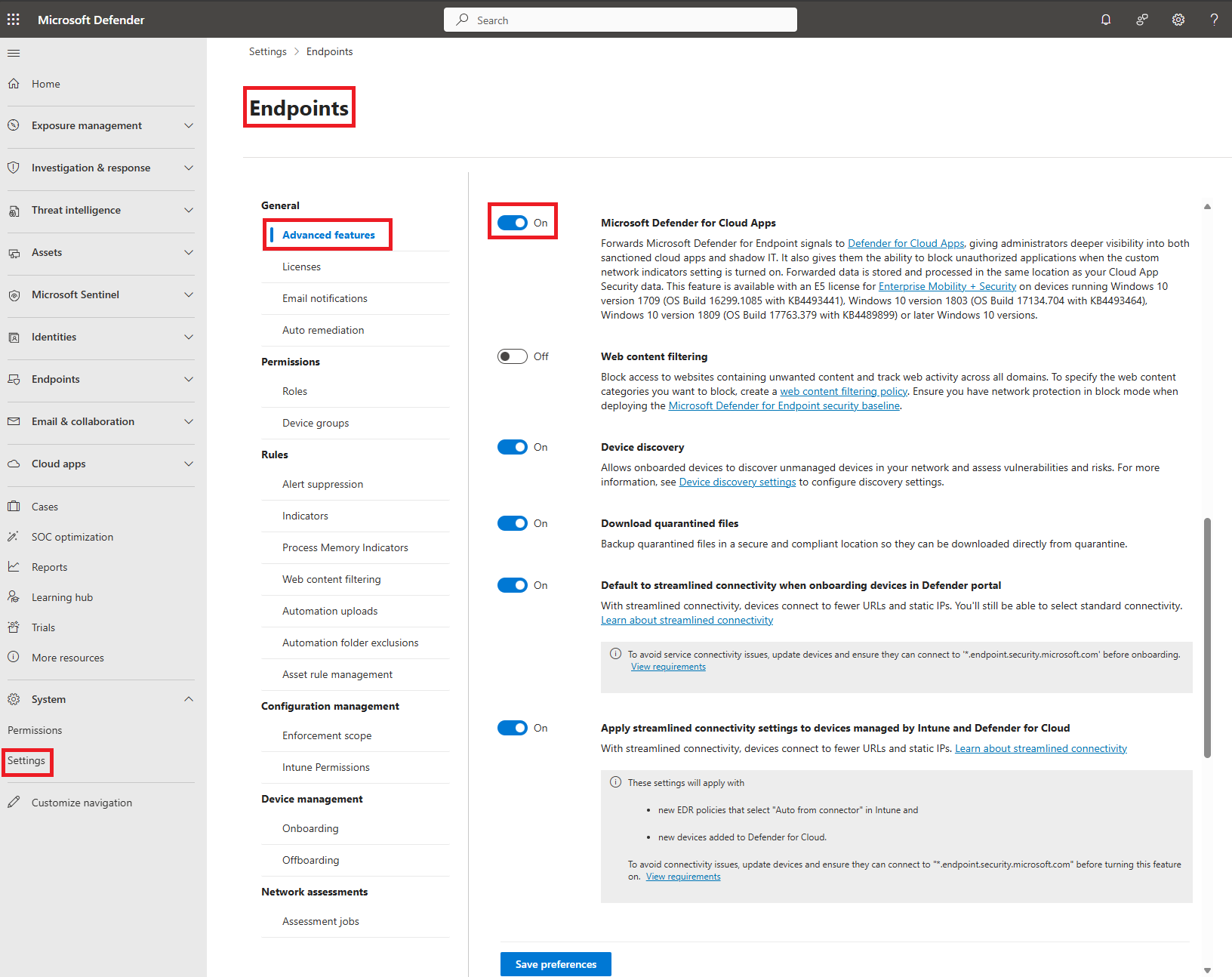
- Integrations: Skype for Business, Microsoft Defender for Cloud Apps (forwards MDE network signals; stored in your MDCA location), Unified audit log (writes MDE user and admin activity to Purview audit), Share endpoint alerts with Microsoft Compliance Center (feeds insider risk management; stored in your Office 365 location), Microsoft Intune connection (device risk to Intune compliance and Conditional Access; needs Intune and Entra CA licences and the matching toggle on the Intune side).
- Preview features.
- Permissions > Roles. Legacy MDE RBAC, present only in tenants created before 16 February 2025 that did not activate unified RBAC. Permissions: View data (SecOps, DVM), Active remediation actions, DVM exception, remediation and application handling, Security baselines, Alerts investigation, Manage portal system settings, Manage security settings in Security Center, Live response basic and advanced. A role is assigned to an Entra group; a device group then decides which devices that group's permissions apply to.
- Permissions > Device groups. Up to 2,000 groups. Each has a name, a remediation level (No automated response, three Semi levels, Full remediation), a matching rule (device name, domain, tags, OS platform; same type rows OR, different types AND; up to 10 rows per property) and Entra groups with access. A device joins only the highest ranked matching group; the rest fall into Ungrouped devices (default), which you cannot delete or re-rank but can set remediation and access on. A device group with no Entra groups assigned is visible to everyone with portal access. Device groups are the scoping unit for both legacy and unified RBAC, for email notification rules, for Restrict correlation, and for Exposure Management's "all device groups" requirement. Changes can take minutes to hours to propagate.
- General > Email notifications. MDE's own alert notification rules: severity, all devices or device groups, include device info, recipients. "All devices" rules are Global Administrator only.
- Other pages under Endpoints (Data retention, Onboarding, Offboarding, Indicators, Automation uploads and folder exclusions, Security baselines, Enforcement scope for security settings management, Licenses) are covered in edr-and-hunting and the MDE folder. TODO: confirm the exact current sub-page list in the dev tenant; Learn has no single inventory page.
Email & collaboration
- Policies & rules > Threat policies. Anti-spam, anti-phishing, anti-malware, Safe Links, Safe Attachments, quarantine policies, advanced delivery and the rest. These are Exchange Online objects; each portal policy is a policy plus a rule pair in PowerShell (for example
HostedContentFilterPolicyandHostedContentFilterRule). Change rights come from Organization Management or Security Administrator in Exchange Online, or the unified RBAC Core security settings permission once Defender for Office 365 is active (portal only, PowerShell unaffected). - User reported settings. Monitor reported messages in Outlook on or off, built-in Report button versus third-party add-in, pre and post report pop-ups, destination (Microsoft and mailbox, mailbox only, Microsoft only), results emails, sender address and logo, report from quarantine. The reporting mailbox must be Exchange Online, should be a SecOps mailbox in advanced delivery, and should be excluded from DLP. Government clouds only allow mailbox only. The policy object does not exist until someone opens this page or creates it in PowerShell, and the rule object only exists once a mailbox is saved.
- Evaluation mode. Lets you run Defender for Office 365 in audit or blocking mode on a trial. TODO: the Learn page for evaluation mode failed to fetch at source check; verify audit versus blocking behaviour and policy names before relying on this bullet.
- Email & collaboration roles live under Permissions, not Settings, at
security.microsoft.com/emailandcollabpermissions. That page disappears once unified RBAC is activated for Email & collaboration, so import roles first.
Identities
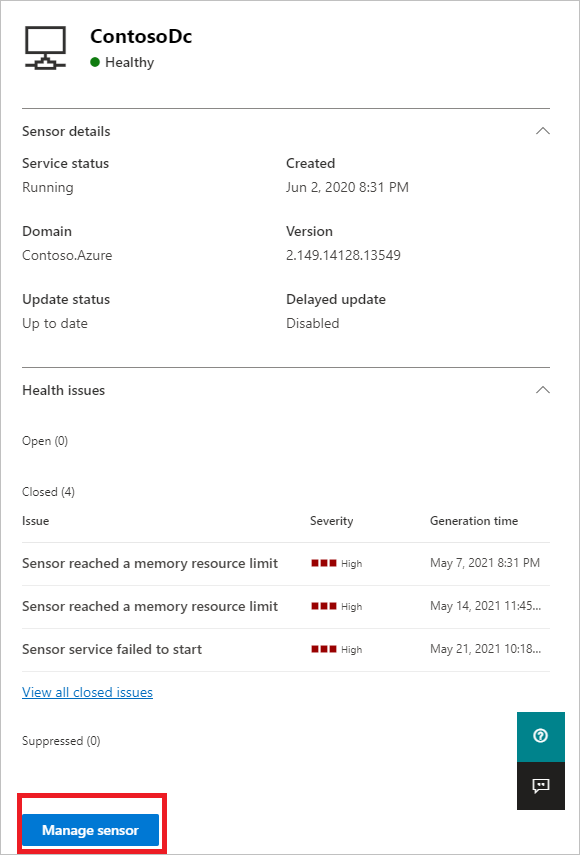
- Sensors (On-premises > Sensor management). Lists every sensor with type (Domain controller, AD FS, AD CS, Standalone, Entra Connect), version, delayed update flag, service status, sensor status, migration state (v2.x to v3.x) and health. Manage sensor sets Description, Domain Controllers FQDN (required for standalone, AD FS and AD CS sensors; list every mirrored DC and at least one global catalog) and Capture network adapters. Delayed update holds a v2.x sensor 72 hours behind; v3.x sensors ignore it and update through Windows Update. Add sensor and Download onboarding package live here too.
- Directory service accounts. The read account for AD queries, SAM-R lateral movement paths, Deleted Objects, trust mapping and cross-domain LDAP. gMSA recommended, up to 30 entries, one per untrusted forest. v3.x sensors do not use a DSA at all; they run as LocalSystem. The action account for remediation is a separate setting.
- Advanced features. Automatic sensor v3.x activation (turns on the identity capability on MDE-onboarded Windows Server 2019+ DCs, AD FS, AD CS and Entra Connect servers without a package) and Automatic Windows auditing configuration.
- Entity tags. Sensitive (users, devices, groups; many AD groups and server roles are auto-tagged, plus Okta, CyberArk, Entra and SailPoint admin roles), Honeytoken (users and devices; any sign-in alerts), Exchange server (devices, tagged Sensitive by default). Sensitive drives detections such as sensitive group changes.
- Excluded entities. Exclusions by detection rule (per detection, entity types vary) or Global excluded entities (IPs, subnets, devices, domains, all detections). Learn now recommends alert tuning instead and warns that exclusions do not carry over as MDI detections move to the XDR engine.
- Notifications and About (version check) complete the entry.
Cloud apps
- System > Organization details. Display name, environment name, logo, managed domains. Managed domains decide who counts as internal; people outside them are not scanned.
- System > Identity Inventory Integration. One-way switch that pushes cloud app accounts into the shared Identity inventory. Cannot be disabled. Unavailable if MDCA scoped deployment is on.
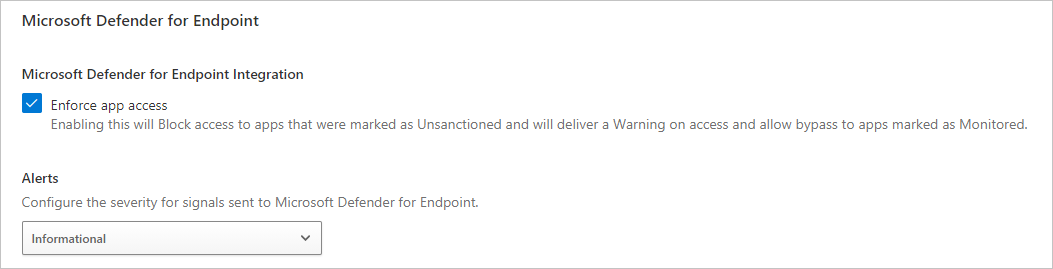
- Cloud Discovery > Microsoft Defender for Endpoint. The receiving side of the MDE bridge. Set the global alert severity sent back to MDE and Save. The MDE side is the Advanced features toggle above. Data shows up to two hours later. Needs MDE P2 or Defender for Business, Windows 10 1709+ or macOS with network protection on.
- Other Cloud Discovery sub-pages (score metrics, app tags, exclusions, log collectors, user enrichment, anonymisation), Connected apps and Conditional Access App Control: TODO, Learn's overview page only links to them; walk them in the tenant. See the MDCA overview.
Device discovery
Its own top-level entry, fed by the Endpoints Advanced features toggle. Discovery mode Basic (passive) or Standard (default, active probes under 50 KB per device, at most once every three weeks). Monitored networks overrides the corporate-network heuristic. Exclusions by IP or device group stop active probing only. Authenticated scans (SNMP, Windows scan deprecated from 18 December 2025) and Enterprise IoT (needs the Enterprise IoT Security licence or Microsoft 365 E5) sit here too. Results land in Assets > Devices and Exposure management > Recommendations. See the MDE folder.
Sentinel, Defender for IoT, Security Copilot
Sentinel unified RBAC is activated per workspace (Security Administrator plus Subscription Owner, or User Access Administrator plus Sentinel Contributor; service principals and GDAP groups are not supported). Sentinel is Defender-portal-only after 31 March 2027. Defender for IoT must be onboarded from the portal for OT discovery. TODO: Settings pages for Sentinel, IoT and Security Copilot were not sourced; document them once provisioned in the dev tenant.
Cross-product settings table
| Setting | Page | Products affected | What it does |
|---|---|---|---|
| Microsoft Intune connection | Endpoints > Advanced features | MDE, Intune, Entra Conditional Access | Shares device risk with Intune for compliance and risk-based CA. Must also be enabled in Intune. |
| Microsoft Defender for Cloud Apps | Endpoints > Advanced features | MDE, MDCA | Forwards endpoint network logs for Cloud Discovery. Severity returned is set under Cloud apps > Cloud Discovery > MDE. |
| Unified audit log | Endpoints > Advanced features | MDE, Purview | Writes MDE admin and user activity to the unified audit log. |
| Share endpoint alerts with Microsoft Compliance Center | Endpoints > Advanced features | MDE, Purview Insider Risk | Sends endpoint alerts and triage state to insider risk management; needs policy indicators set there. |
| Device discovery | Endpoints > Advanced features and Settings > Device discovery | MDE, DVM, Exposure Management, Defender for IoT | Enables discovery; mode, networks, exclusions and IoT live on the Device discovery entry. |
| User details display | Endpoints > Advanced features | MDE, Entra ID | Pulls Entra profile data into alert and device pages. |
| Restrict correlation to within scoped device groups | Endpoints > Advanced features | MDE, Defender XDR incidents | Stops incident correlation across device groups. |
| Preview features | XDR > General, Endpoints > Advanced features, Cloud apps > General | Defender XDR, MDE, MDCA | XDR toggle is tenant-wide; MDE and MDCA can be set per service once it is on. |
| Device groups | Endpoints > Permissions | MDE, Defender XDR notifications, unified RBAC, Exposure Management, MDI scoped access | Automation level per group, data scope for roles, scope for notification rules, "all device groups" gate for critical asset management. |
| Permissions and roles | XDR > General | Every activated workload | Moves the workload off its own RBAC. Hides Email & collaboration roles and some MDCA scoped roles. |
| Alert tuning | XDR > Rules | MDE, MDI, MDO, MDCA, Defender for Cloud, custom detections | Hides, resolves or converts alerts by service and detection source. Replaces MDI exclusions over time. |
| Asset rule management | XDR > General | MDE, DVM, MDI, Exposure Management | Dynamic tags and device values used by device groups, critical asset rules and MDI RPC audit. |
| Critical asset management | XDR > General | Exposure Management, Defender XDR incidents, Defender for Cloud | Criticality shown across inventory, incidents, attack paths; external connector data feeds it. |
| Alert service settings | XDR > General | Defender XDR, Entra ID Protection | Risk threshold for Entra ID Protection alerts in the queue. |
| Identity Inventory Integration | Cloud apps > System | MDCA, MDI identity inventory | Pushes SaaS accounts into the shared identity inventory. Irreversible. |
| Automatic sensor v3.x activation | Identities > Advanced features | MDI, MDE | Turns on the MDI capability on servers already onboarded to MDE. |
| Streaming API | XDR > General | Defender XDR, Azure Event Hubs or Storage | Exports Advanced Hunting tables from every product to Azure. |
Configure
- Portal
- PowerShell
- Graph API
The walk, in the order the menu shows it:
- Settings > Microsoft Defender XDR > General. Preview features on or off. Alert service settings for Entra ID Protection. Email notifications (Incidents, Response actions, Threat analytics tabs). Permissions and roles (activate unified RBAC workloads). Streaming API (add export rules). Asset rule management. Critical asset management.
- Settings > Microsoft Defender XDR > Rules > Alert tuning. Review built-in rules first; disable any that hide alerts you want, then add your own with service and detection source scope.
- Settings > Endpoints > General > Advanced features. Set each toggle and select Save preferences. For a new tenant the usual set to turn on is EDR in block mode, Allow or block file, Custom network indicators, Tamper protection, Live response, Automatic attack disruption, Unified audit log, Intune connection (with the Intune side), Defender for Cloud Apps, Device discovery. Leave Unsigned script execution off unless you need it.
- Settings > Endpoints > Permissions > Device groups. Create groups before roles have scope. Set remediation level per group, rank them, and set Ungrouped devices to a safe level.
- Settings > Endpoints > Permissions > Roles. Legacy only. Skip if the tenant is on unified RBAC.
- Settings > Endpoints > General > Email notifications. MDE alert rules by severity and device group.
- Settings > Email & collaboration. Policies & rules > Threat policies for the EOP and MDO policy set. User reported settings for the Report button and reporting mailbox. Evaluation mode if trialling.
- Settings > Identities. Sensors (Manage sensor, delayed update), Directory service accounts, Advanced features (automatic v3.x activation, automatic auditing), Entity tags, Excluded entities, Notifications.
- Settings > Cloud apps. System > Organization details and Identity Inventory Integration. Cloud Discovery > Microsoft Defender for Endpoint to complete the MDE bridge.
- Settings > Device discovery. Discovery mode, Monitored networks, Exclusions, Authenticated scans, Enterprise IoT.
- Return to Permissions and roles and activate unified RBAC per workload once roles are imported.
Most Settings pages have no PowerShell or CLI surface. The MDE API list has no endpoint for advanced features, device groups or roles. The Graph security API does not expose them either. Two areas do have PowerShell:
# Tested on: TODO
# Email & collaboration > Policies & rules. Exchange Online PowerShell.
Connect-ExchangeOnline
Get-HostedContentFilterPolicy | Format-Table Name, SpamAction, HighConfidenceSpamAction, BulkThreshold
Get-HostedContentFilterRule -State Enabled
Set-HostedContentFilterRule -Identity "Marketing Department" -Priority 2

# Email & collaboration > User reported settings
Get-ReportSubmissionPolicy
Get-ReportSubmissionRule
# Both return nothing until the portal page has been opened once or the policy was created here.
$usersub = "reportedmessages@contoso.com"
New-ReportSubmissionPolicy -ReportJunkAddresses $usersub -ReportNotJunkAddresses $usersub -ReportPhishAddresses $usersub -PreSubmitMessageEnabled $false -PostSubmitMessageEnabled $false
New-ReportSubmissionRule -Name DefaultReportSubmissionRule -ReportSubmissionPolicy DefaultReportSubmissionPolicy -SentTo $usersub

# Identities > Directory service accounts: check the DSA is not over-privileged
Test-MDIDSA -Identity "mdiSvc01" -Detailed

# Who changed a setting (see Verify)
Search-UnifiedAuditLog -StartDate (Get-Date).AddDays(-30) -EndDate (Get-Date) -Operations SetAdvancedFeatures -ResultSize 500
Unified RBAC does not affect Exchange Online PowerShell or Security & Compliance PowerShell; those still use Exchange Online role groups.
What the Graph security API exposes versus what stays portal-only:
| Area | Graph security API | Portal only |
|---|---|---|
| Alerts, incidents | GET /security/alerts_v2, GET /security/incidents, PATCH on both | |
| Advanced hunting | POST /security/runHuntingQuery | |
| MDI sensors | GET /security/identities/sensors, GET /security/identities/healthIssues; sensor description, delayed update and the Entra query DC can be managed | DSAs, entity tags, exclusions |
| Secure Score | GET /security/secureScores, PATCH /security/secureScoreControlProfiles/{id} | |
| Audit log | Audit log query API | |
| MDE advanced features, device groups, legacy roles, email notifications, alert tuning, streaming API rules, asset rules, critical asset classifications, unified RBAC roles | Not documented in the Graph security overview or the MDE API list | Yes |
| MDE indicators | MDE API ti-indicator (not Graph) | |
| Device groups | Learn's device groups page links a Graph call to list a tenant's device groups; no create or update is documented | Create, rank, remediation level, access |
GET https://graph.microsoft.com/v1.0/security/identities/sensors
GET https://graph.microsoft.com/v1.0/security/alerts_v2?$filter=serviceSource eq 'microsoftDefenderForEndpoint'
TODO: confirm the device group list route named on the machine-groups page and whether it is beta.
Verify
Auditing of Settings changes is automatic for Defender XDR and MDE once the Unified audit log advanced feature is on and Purview auditing is enabled in the tenant. Learn lists changes to data retention, advanced features, indicators, security roles, custom detections, suppression rules and incident assignments as audited. Search at security.microsoft.com/auditlogsearch or Purview > Audit. Needs View-Only Audit Logs or Audit Logs in Exchange Online (Organization Management and Compliance Management have it by default).
Record types to filter on, from the Defender Experts auditing page: MS365DSuppressionRule (alert tuning), MS365DIncident, MSDEIndicatorsSettings, MSDEResponseActions. The Purview activity reference groups MDE under general settings, indicator settings, response actions and roles settings. The operation name for an advanced feature change is SetAdvancedFeatures (practitioner-confirmed, see Further reading). TODO: pull the exact record type names for MDE general settings and roles settings from the Purview activity reference; the page was too long to fetch in full at source check.
# Who flipped an advanced feature in the last 30 days
Search-UnifiedAuditLog -StartDate (Get-Date).AddDays(-30) -EndDate (Get-Date) -Operations SetAdvancedFeatures -ResultSize 500 |
  Select-Object CreationDate, UserIds, Operations, AuditData
If the Microsoft 365 app connector in Defender for Cloud Apps is connected with activity ingestion, the same records land in Advanced Hunting:
CloudAppEvents
| where Timestamp > ago(30d)
| where ActionType in ("SetAdvancedFeatures", "UpdateSuppressionRule", "CreateSuppressionRule", "AddRole", "UpdateRole", "DeleteRole")
| project Timestamp, AccountDisplayName, ActionType, RawEventData
| order by Timestamp desc
TODO: confirm the exact ActionType strings for suppression and role operations in the dev tenant; only SetAdvancedFeatures is confirmed by a practitioner source. Also check the MDE side effects directly: a device that should be in a device group shows the group on its page after propagation; MDCA Cloud Discovery shows a Defender for Endpoint data source within two hours; Intune device compliance shows Defender risk once both toggles are on.
Troubleshoot
| Symptom | Likely cause | Fix |
|---|---|---|
| A top-level Settings entry is missing | Product not licensed or not provisioned in the tenant | Check licences; the portal only shows licensed features |
| Advanced features page missing or toggles greyed | MDE P1 only, or user lacks Manage portal system settings (legacy) or the unified Core security settings permission | Confirm P2; use Security Administrator or the MDE Administrator role |
| Cannot create a device group or assign access | Entra group has no RBAC role yet | Create and assign the role first, then the device group |
| Email & collaboration roles page gone | Unified RBAC activated for Email & collaboration | Expected; manage roles under Permissions and roles |
| Settings change not taking effect | Propagation delay: device groups minutes to hours, asset rules up to 1 hour, MDCA discovery data up to 2 hours, streaming up to 1 hour | Wait, then re-check |
| Intune connection on but no device risk in Intune | Integration not enabled on the Intune side, or devices not Entra joined and Intune managed | Enable the Defender connector in Intune; check device state |
| Allow or block file toggle on but block does nothing | Defender AV not active or cloud protection off | Make Defender AV the active engine with cloud-delivered protection |
| Custom network indicators not enforced | Network protection off, or OS older than Windows 10 1709 | Turn on network protection in block mode |
| Unified RBAC role grants nothing | Workload not activated, or Sentinel permission managed in Azure portal causing sync error | Activate the workload; manage Sentinel permissions in the Defender portal |
| Global Administrator cannot see a workspace | Global Administrator has no automatic data access under unified RBAC | Assign a role; Global Administrator can assign one to themselves |
| Alert still appears after an MDI exclusion | Detection moved to the XDR engine; exclusions do not carry over | Recreate as an alert tuning rule |
| Streaming API rule will not save | Signed-in user lacks Contributor on the Event Hubs namespace, or Microsoft.Insights not registered | Fix the Azure role and provider registration |
| Reporting mailbox cmdlets return nothing | Policy object never created | Open the User reported settings page once, or run New-ReportSubmissionPolicy |
| Critical asset management not available | User lacks access to all MDE device groups | Use an unscoped admin account |
| No audit records for Settings changes | Purview auditing off, or no audit role | Turn auditing on in Purview; grant View-Only Audit Logs |
Gotchas and limits
- Email notifications exist twice: under Microsoft Defender XDR (incidents, response actions, threat analytics) and under Endpoints > General (MDE alerts). They are different rule sets. Deleting a device group deletes any notification rule that used only that group.
- A device group with no Entra group assigned is visible to every portal user. Scoping is opt-in per group.
- Ranking matters. A device matching two groups lands only in the higher ranked one, which also decides its automation level.
- Unified RBAC activation hides legacy role pages and some MDCA scoped roles. Export or import before you activate. New MDE and MDI tenants since 2025 cannot export at all.
- Unified RBAC does not reach Exchange Online PowerShell, Security & Compliance PowerShell, the Purview portal or the Exchange admin center. DLP and Insider Risk stay under Purview RBAC.
- Preview features is three toggles, not one. The XDR toggle is the master; MDE and MDCA then allow per-service opt-out.
- Alert tuning detection source scoping changes behaviour on 8 November 2026. Untouched rules still apply to custom detections.
- Built-in tuning rules are on by default and the Security Copilot Phishing Triage Agent needs one of them disabled (Auto-Resolve - Email reported by user as malware or phish).
- Identity Inventory Integration in Cloud apps cannot be turned off.
- Dynamic tags from asset rules cannot be edited by hand and are ignored by DVM baseline assessment.
- Data location: MDCA forwarding and Compliance Center sharing store data in that product's region, not MDE's.
- Device discovery Standard mode probes unmanaged devices. Tell the network team before enabling it on sensitive segments, or add exclusions.
- External data connectors for Exposure Management are free in preview and will be consumption billed at GA.
Further reading
- Auditing Microsoft Defender and Intune Configuration Changes, Jeffrey Appel, August 2026. Shows the
SetAdvancedFeaturesoperation in CloudAppEvents with a KQL query that extracts the changed setting and value, plus custom detections for tamper protection changes. - Unified RBAC becomes the default in Microsoft Defender, Tobias Asböck, Topedia, August 2026. Tenant rollout picture for the September to December 2026 default enablement window and the Message Center reference to watch.
- MC1481318: Detection source support in alert tuning rules, Merill Fernando's Message Center archive, September 2026. The preview and GA dates for detection source scoping and the warning that untouched rules keep applying to all sources.
- MC1222979: New Built-in Alert Tuning Rules optimize your incident and alert queues, Merill Fernando's Message Center archive, January 2026. The list of 12 built-in MDO tuning rules that arrived enabled in February 2026 and how they reopen alerts after AIR.
My notes
TODO: Sohail's notes after verification.
Changelog
| Date | Change | Source |
|---|---|---|
| 2026-10-22 | Drafted from Learn, with Learn images and diagrams | [1] |