Analytics rules, incidents, UEBA and threat intelligence
What it is
Analytics rules are the detection layer of Sentinel. A rule queries the data the connectors have landed in the workspace, and a match becomes an alert. Alerts are correlated into incidents, and incidents are what the SOC works. Automation rules and playbooks hang off both alerts and incidents; those are covered in automation and playbooks.
Three other pieces feed the same pipeline. UEBA builds behaviour baselines per user, host and IP and writes anomalies to tables you can query from a rule. Threat intelligence brings in indicators over TAXII, the upload API or the Microsoft feed and matches them against your logs. Watchlists are reference data you join against inside the query.
What it is not: once the workspace is onboarded to the Defender portal, Sentinel no longer creates incidents on its own. The Defender XDR correlation engine does. Microsoft now recommends custom detections in Defender for new rules, and says scheduled rule incident creation must stay enabled so XDR can pick the alerts up. Most of the Azure portal steps below still apply, but see the XDR section before you rely on Fusion, Microsoft security rules or incident reopening. Microsoft Sentinel in the Azure portal is retired after 2027-03-31. The Defender XDR incidents article covers the other side.
Licensing and prerequisites
- Sentinel is billed on ingestion. Analytics rules, UEBA, Fusion and threat intelligence have no separate charge. UEBA writes to new tables, so it adds ingestion and storage cost. TI data is re-ingested every 7 to 10 days and is billed at standard rates for paid tables.
- Microsoft Sentinel Contributor to create rules, install Content hub solutions and set up TAXII. Microsoft Sentinel Responder to triage incidents and write automation rules. Deleting a comment needs Contributor even for the author. Guest users who assign incidents need Directory Reader in Entra.
- Enabling UEBA needs Security Administrator in Entra plus Owner or Contributor on the resource group, or Sentinel Contributor on the workspace plus Log Analytics Contributor on the resource group. No resource locks on the workspace.
- Upload indicators API: an Entra app registration with Microsoft Sentinel Contributor at workspace level, token scope
https://management.azure.com/.default. - Fusion needs 30 days of history to train, and needs the connectors for the scenarios you care about. Entra ID Protection, Defender XDR, Defender for Cloud Apps, Defender for Endpoint and Defender for Identity are the main feeders.
- The Defender Threat Intelligence Analytics rule needs at least one supported connector: CEF, Syslog, Windows DNS, Office 365, Azure Activity, Windows Firewall or ASIM network sessions. No premium MDTI licence.
- Watchlists: local upload up to 3.8 MB, Azure Storage upload up to 500 MB (preview), 10 million active rows per workspace.
How it works
Rule types
| Type | Runs | Customisable | Notes |
|---|---|---|---|
| Scheduled | Every 5 min to 14 days, lookback 5 min to 14 days | Yes | The workhorse. 512 enabled per workspace, 1,024 on a dedicated cluster. |
| NRT | Every minute, on ingestion time | Yes, same features as scheduled | 50 enabled, 100 total. Max 30 alerts per run. Two minute delay instead of five. Sources must ingest within 12 hours. |
| Microsoft security incident creation | Real time from other Microsoft alerts | Filter by product, severity, name | Disabled automatically when the Defender XDR connector is on or the workspace is in the Defender portal. |
| Fusion, advanced multistage attack detection | Continuous ML | One rule, can exclude sources and patterns | On by default. Output is incidents, in SecurityIncident, not alerts. Disabled in the Defender portal. |
| ML behaviour analytics | Continuous ML | No | Preview. Anomalous SSH and RDP logons by IP, geo and user history. |
| Threat intelligence, Microsoft Defender Threat Intelligence Analytics | Scheduled, read only | No | Matches domain and IPv4 indicators from Microsoft against CEF, Syslog, DNS, Office, Azure Activity, firewall and ASIM tables. |
| Anomaly | Batch ML | Duplicate and tune in Flighting mode | Writes to Anomalies. Never creates alerts. Query it from a scheduled rule. |
Anatomy of a scheduled rule
The parts, in wizard order. The numbers come from the scheduled rules overview and the service limits page.
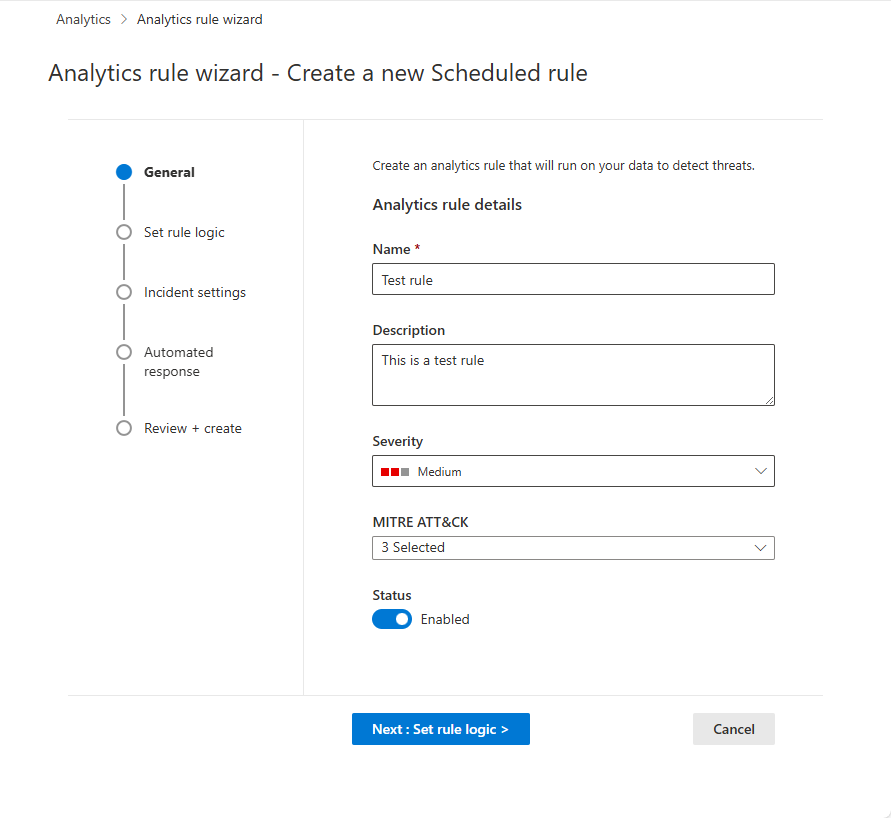
- General: name, description, severity, MITRE tactics and techniques, enabled or disabled. Tactics and techniques flow to alerts and incidents and drive the MITRE coverage blade. Fusion ignores a rule with no tactics.
- Query: 1 to 10,000 characters, no
search *orunion *, must returnTimeGeneratedbecause that is the lookback reference. ASIM parsers over raw tables where possible. Usecolumn_ifexistsafterbag_unpack. - Frequency and lookback: both 5 minutes to 14 days, and the interval cannot exceed the lookback. The engine runs five minutes behind the schedule to absorb ingestion delay. Start time can be deferred 10 minutes to 30 days.
- Threshold: greater than, less than, equal to, or 0 to disable. Evaluated per run, not cumulatively.
- Event grouping: one alert per run (default) or one alert per row. Per row caps at 150 alerts; the 150th alert summarises the rest.
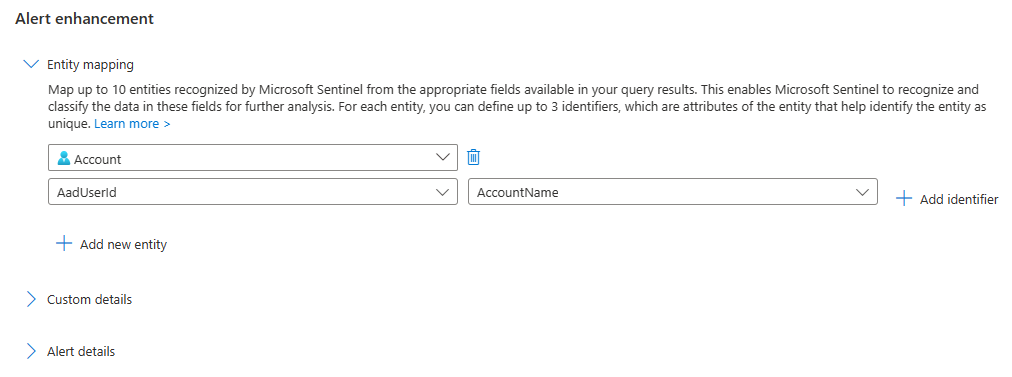
- Entity mapping: up to 10 mappings, up to 3 identifiers each, 500 entities per alert split evenly across mappings, 64 KB for the whole Entities field. Overflow is dropped silently. Prefer strong identifiers. Map source and destination IP as two separate IP entities.
- Custom details: 20 per rule, 50 values each, 2 KB total. Stored in
ExtendedProperties. - Alert details: dynamic name, description, severity and tactics from columns. 256 bytes for name, 5 KB for description. In the Defender portal the XDR engine names incidents, so a custom alert name does not become the incident name.
- Suppression: pause the rule for up to 24 hours after an alert.
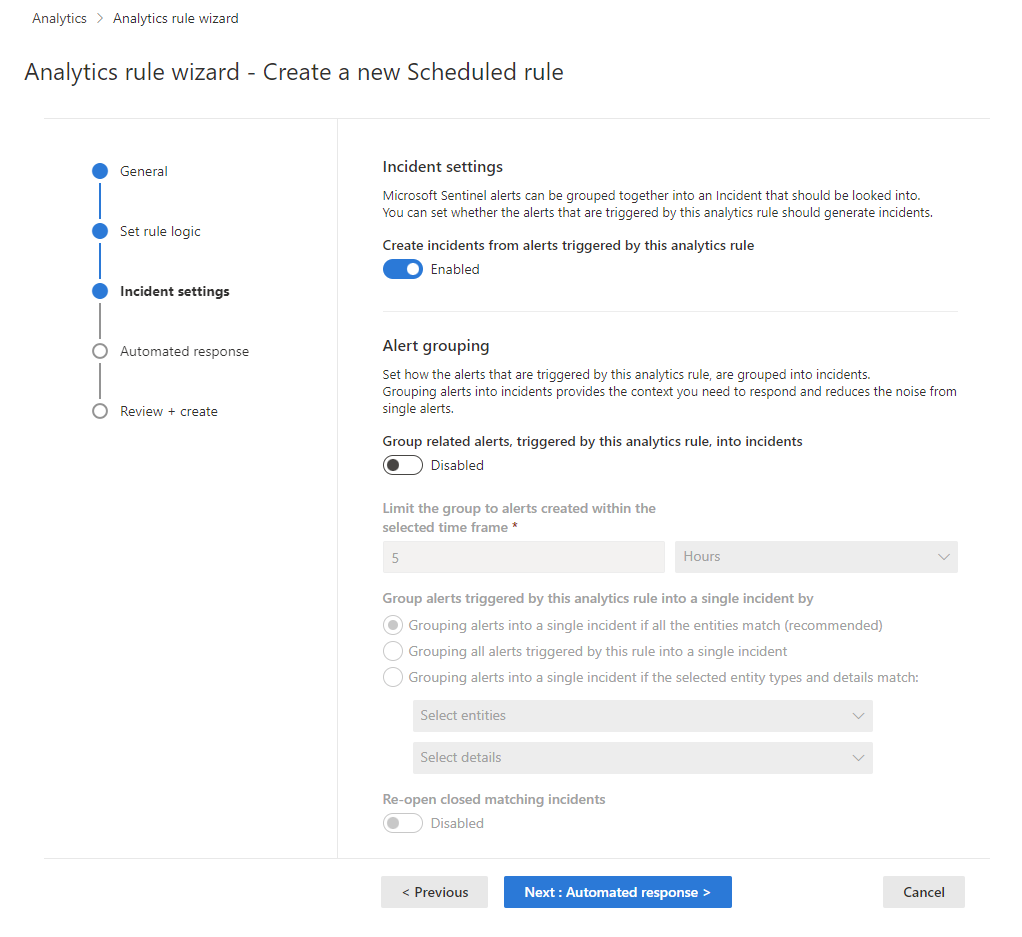
- Incident settings: create incidents on or off. Alert grouping on or off, window 5 minutes to 7 days (default 5 hours), 150 alerts per incident, match on all entities (recommended), on everything from this rule, or on selected entities, alert details and custom details. Reopen closed incidents is not available in the Defender portal.
- Automated response: automation rules on alert created, incident created or incident updated. Classic alert playbooks are deprecated from March 2026.
Templates and tuning
Rule templates come with Content hub solutions. A template lists its required data sources, and the wizard checks they are connected and ingesting before it lets you create the rule. Rules made from a template carry an In use tag on the template, and when Microsoft updates the template the rule shows Update so you can merge or revert. Tuning is editing the query to exclude false positives, adjusting threshold and schedule, and running Results simulation, which replays the last 50 scheduled runs against current data. Anomaly rules are tuned by duplicating the built-in rule, running the copy in Flighting next to the original in Production, and promoting it.
Incident lifecycle
An incident has a status (New, Active, Closed), a severity (Informational to High), an owner (user or group), tags, comments and tasks. Closing requires a classification: True Positive with reason suspicious activity, Benign Positive with reason suspicious but expected, False Positive with reason incorrect alert logic or incorrect data, or Undetermined. Limits: 100 comments of up to 30,000 characters, 40 tasks, 20 bookmarks, 150 alerts, 180 days retention for entities, and the investigation experience is available for 90 days from last update.
The incident page gives you the timeline of alerts and bookmarks, similar incidents (up to 20, scored on shared entities, same rule and same alert details over the previous 14 days), top insights, the Entities widget with Info, Timeline and Insights, and an activity log that records every human and automated action. From an entity you can open the full entity page (accounts, hosts, IPs, Azure resources, IoT devices), add an IP, URL, domain or file hash to TI, or run a playbook. The entity Timeline card covers seven days and includes alerts outside the incident; a plus button pulls them in. Investigate opens the graph, which needs mapped entities and works on incidents up to 30 days old. Hunting from the incident is the Logs panel: a blank query, or Events, Alerts and Bookmarks prefilled. Select rows and Add bookmark to the current incident to attach evidence. Tasks are a checklist on the right of the incident; analysts add them by hand, automation rules add static ones, playbooks add conditional ones and can mark them complete.
TODO: the brief asks for the incident workbook. None of the incident pages I fetched describe a specific incident workbook. The Analytics Health and Audit workbook and the Threat Intelligence workbook are documented; an incident overview workbook ships with the content hub but I have not sourced it here.
UEBA
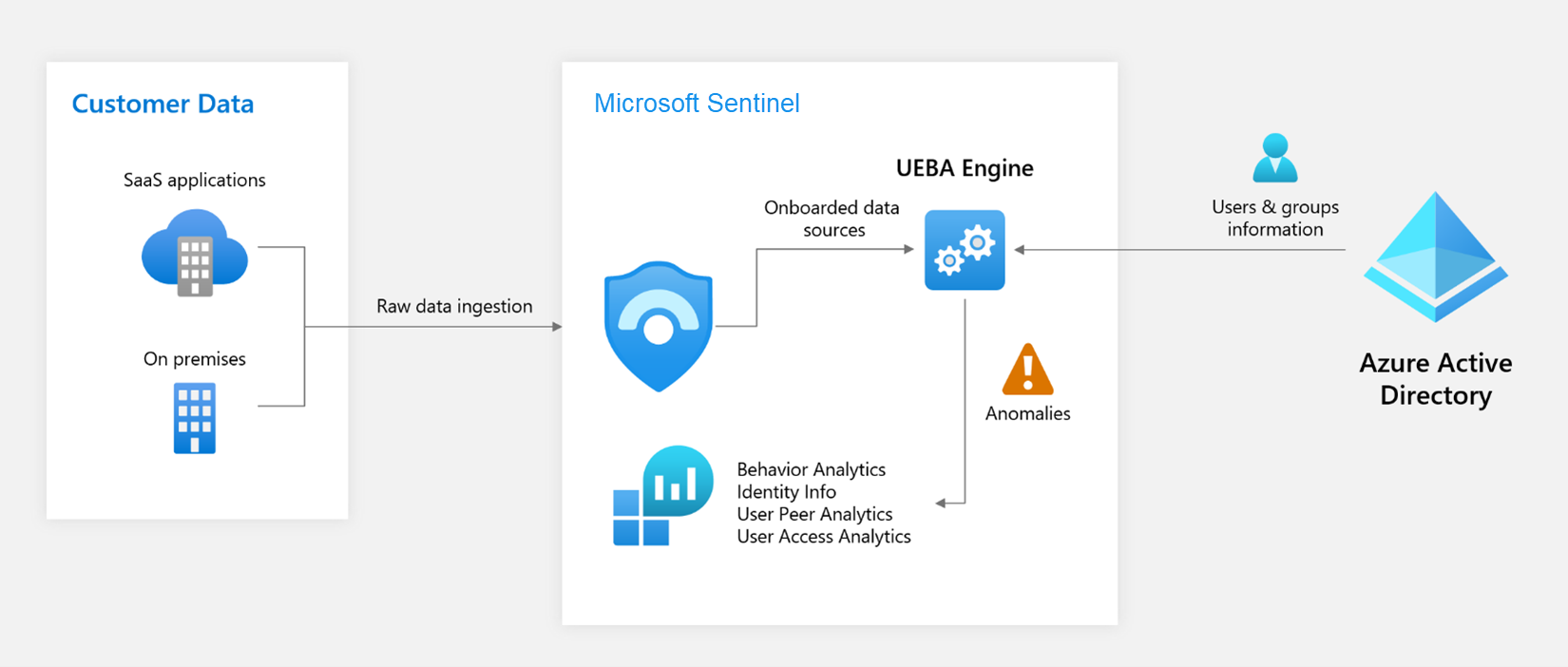
UEBA profiles users, hosts, IPs and apps against three rings: the user's own history, peers, and the organisation. It needs Entra ID as the identity source and optionally Defender for Identity for on-premises AD. Data sources it scores are Entra sign-in and audit logs, Azure Activity and Security Events in both portals, plus managed identity and service principal sign-ins, AWS CloudTrail, GuardDuty, GCP audit, Okta, Device Logon Events and selected CommonSecurityLog vendors in the Defender portal only. Tables it writes:
| Table | Content |
|---|---|
IdentityInfo | User, device and group profiles. Refreshed every 14 days, so retention cannot drop below 14 days. 500 groups max in GroupMembership. |
BehaviorAnalytics | Per event deviations with InvestigationPriority 0 to 10, geolocation and TI enrichment. Near real time. |
UserPeerAnalytics | Top 20 peers per user, weighted by TF-IDF so small groups count more. |
Anomalies | Batch ML anomalies with AnomalyScore 0 to 1. Also the output of anomaly rules. |
SentinelBehaviorInfo and SentinelBehaviorEntities | Only with the separate UEBA behaviours layer. Natural language summaries with MITRE mapping. |
Investigation priority and anomaly score are correlated but not the same. A first ever Azure operation can score high on priority and low on anomaly. The Anomalies table is context, not a verdict; Learn is clear that anomalies are not necessarily malicious.
Threat intelligence
Four ways in: the Microsoft Defender Threat Intelligence connector (standard free, premium adds Microsoft IOCs), the Threat Intelligence TAXII connector for TAXII 2.0 and 2.1 servers, the upload API for TIPs and scripts, and the legacy TIP connector on the Graph tiIndicators API, which is being deprecated. All are in the Threat Intelligence solution in Content hub.
The tables changed in 2025. ThreatIntelIndicators and ThreatIntelObjects hold STIX indicators and objects. The old ThreatIntelligenceIndicator table stopped receiving data after 2025-07-31. Every custom rule, workbook and playbook that references it has to move. Content hub content is already updated. Deduplication key is Id, built from the base64 source system, three dashes and the STIX id, and the newest TimeGenerated wins, so always arg_max by Id before you join. Ingestion rules filter or modify what the connectors bring in, run in order, and take up to 15 minutes to apply; they do not touch upload API or manual objects.
The template rules that join your logs to the indicator table are grouped by indicator type: domain, email, file hash, IP and URL. Each alert creates an incident, grouped by matched indicator. The brief calls them TI map rules; the Learn pages I used describe the templates by type but do not use that name, so treat TI map as the template naming convention you will see in the portal rather than something sourced here.
Watchlists, MITRE and the XDR relationship
Watchlists live in the Watchlist table and are read with _GetWatchlist('alias'). Use the SearchKey column for in lookups; Learn says that is the fastest path. Watchlists refresh every 12 days and the table retains 28 days, which is why a tight time filter can make _GetWatchlist look empty.
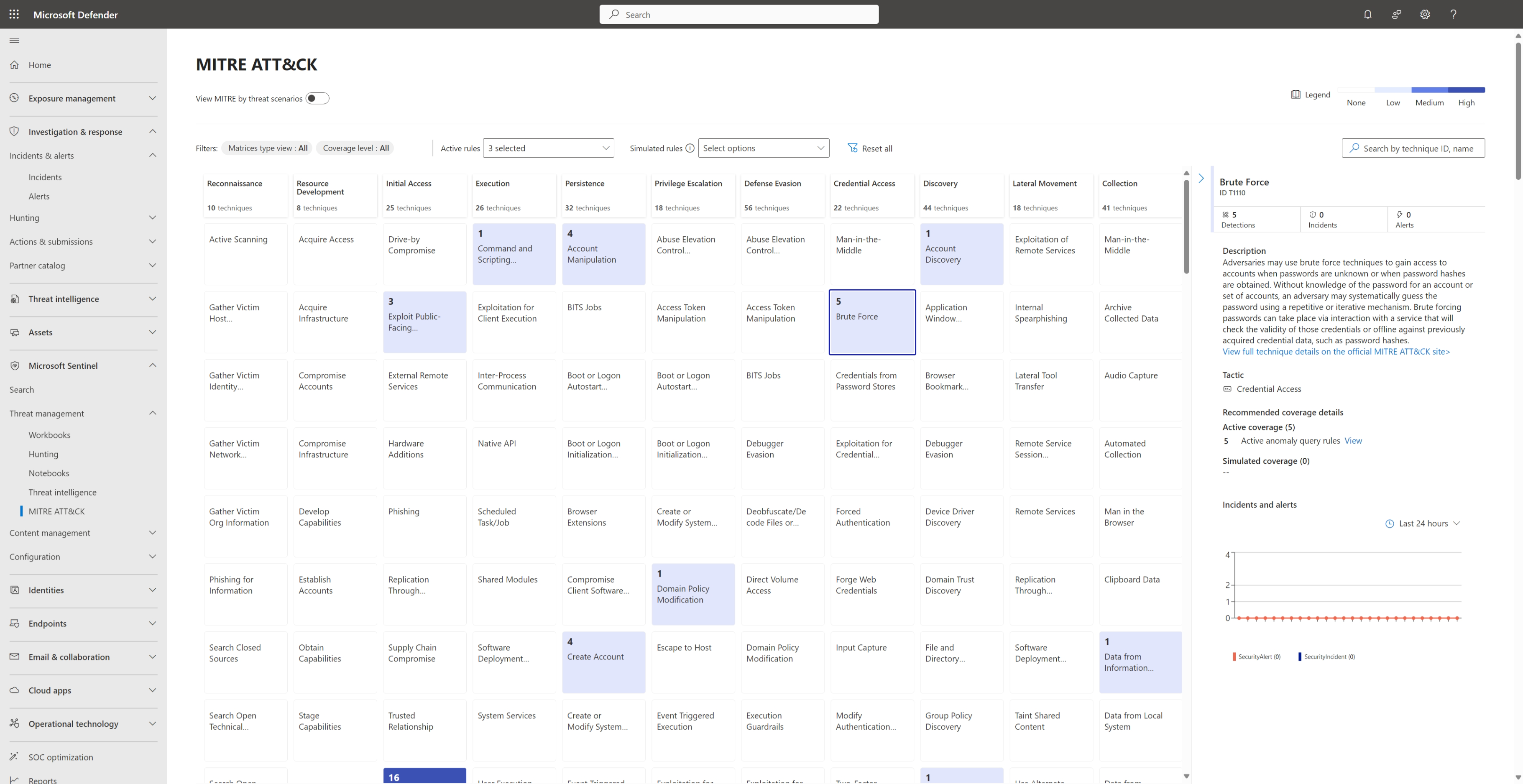
The MITRE ATT&CK blade under Threat management shows active coverage from scheduled and NRT rules, and simulated coverage when you select rule templates. Sentinel is aligned to ATT&CK v18. The blade is in preview.
In the Defender portal, or with the Defender XDR connector on, XDR incidents stream into SecurityIncident and SecurityAlert free of charge within about five minutes, and sync both ways: title, severity, tags, comments and owner. Status Active maps to New in Sentinel, and the classification reasons are translated. An XDR incident with more than 150 alerts shows as 150+ with a deep link. When XDR merges incidents the source closes with a redirected tag. Microsoft security incident creation rules switch off for XDR products, the individual Defender alert connectors disconnect, and Fusion is disabled because the XDR engine does the correlation. Automation rules that match on incident title break because XDR names incidents; use tags or rule name instead. After onboarding, several updates to one incident inside 5 to 10 minutes collapse into one update sent to Sentinel.
Configure
- Portal
- PowerShell / Azure CLI
- REST / ARM
Create a scheduled rule from a template:
- Microsoft Sentinel > Configuration > Analytics > Rule templates. Filter by data source or search. Select the template, check Required data sources is green, Create rule.
- General: keep the name, set severity, confirm the MITRE tactics and techniques are populated. Status Enabled.
- Set rule logic: the query is prefilled. Expand Entity mapping under Alert enhancement. Add new entity, pick Account, identifier FullName or Name plus UPNSuffix, value the user column. Add IP with Address. Add Host with HostName if present. Add custom details for anything an analyst should see without opening the query.
- Query scheduling: run every and lookup from the last. Keep interval at or below lookback. Threshold, then Event grouping. Use Test with current data to see the last 50 runs.

- Incident settings: Create incidents Enabled. Alert grouping Enabled, window 5 hours, Group alerts into a single incident if all the entities match. Leave reopen off unless you want closed incidents coming back.
- Automated response: pick or add an automation rule. Review and create, wait for Validation passed, Create.
Enable or check Fusion (Azure portal, not applicable once onboarded to Defender):
- Analytics > Active rules, filter Rule type Fusion. Advanced Multistage Attack Detection should be Enabled.
- Edit > General for status, Next: Configure Fusion to exclude source signals or severities. Review and update, Save.
- To exclude a pattern, open a Fusion incident, Description > Show more > exclusion link. Future matches are auto closed as Undetermined with tag
ExcludedFusionDetectionPattern.

Enable UEBA:
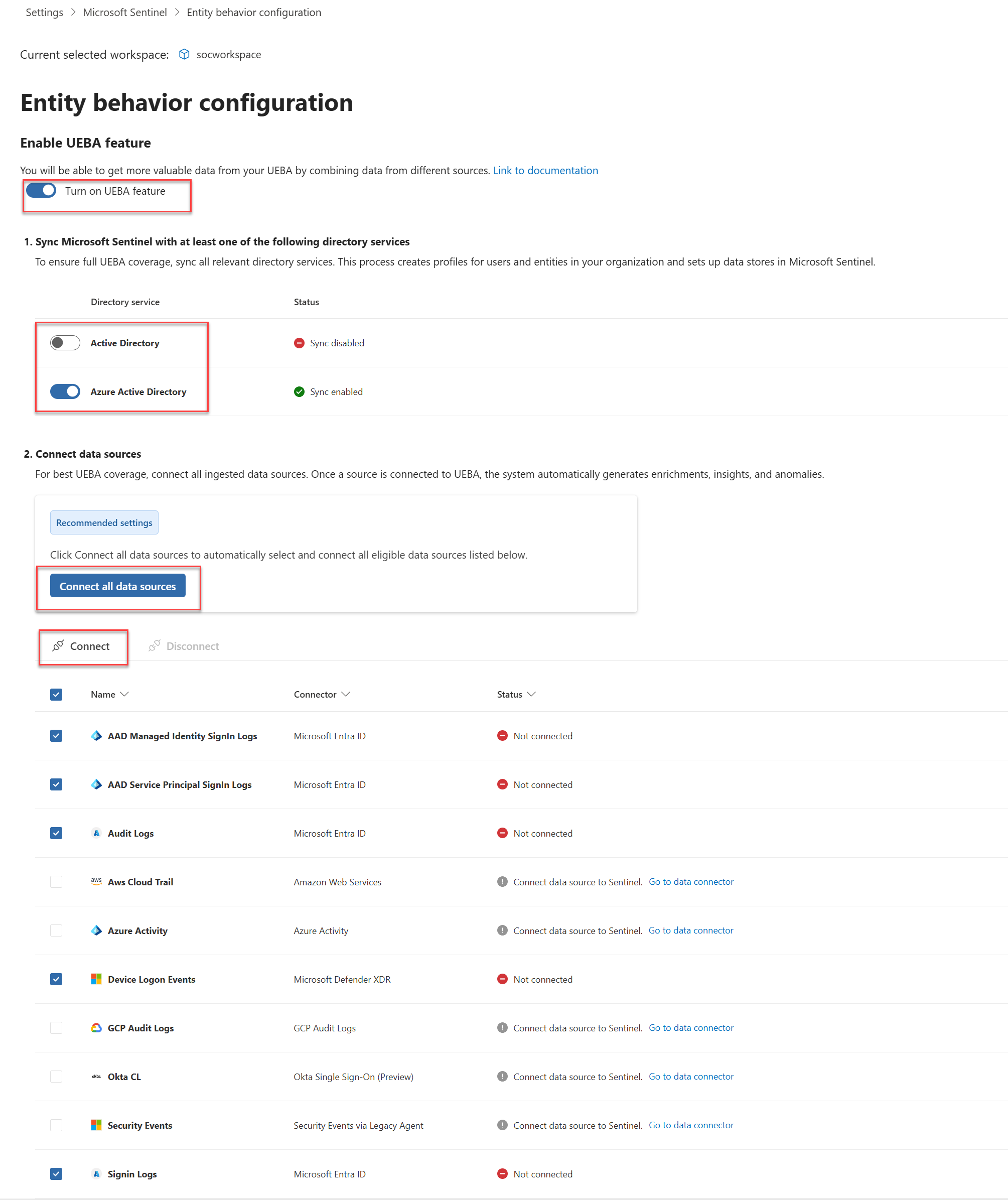
- Defender portal > System > Settings > Microsoft Sentinel > UEBA tab. Turn on UEBA feature.
- Select directory sources: Microsoft Entra ID, and Active Directory if Defender for Identity is deployed. Select Connect all data sources or pick specific ones. Connect.
- Settings > Microsoft Sentinel > SIEM workspaces > workspace > Anomalies > Detect Anomalies on.
- Content hub > UEBA Essentials > Install for the hunting queries. Optionally enable the UEBA behaviours layer.
Add a TAXII feed:
- Content hub > Threat Intelligence > Install/Update.
- Data connectors > Threat Intelligence - TAXII > Open connector page.
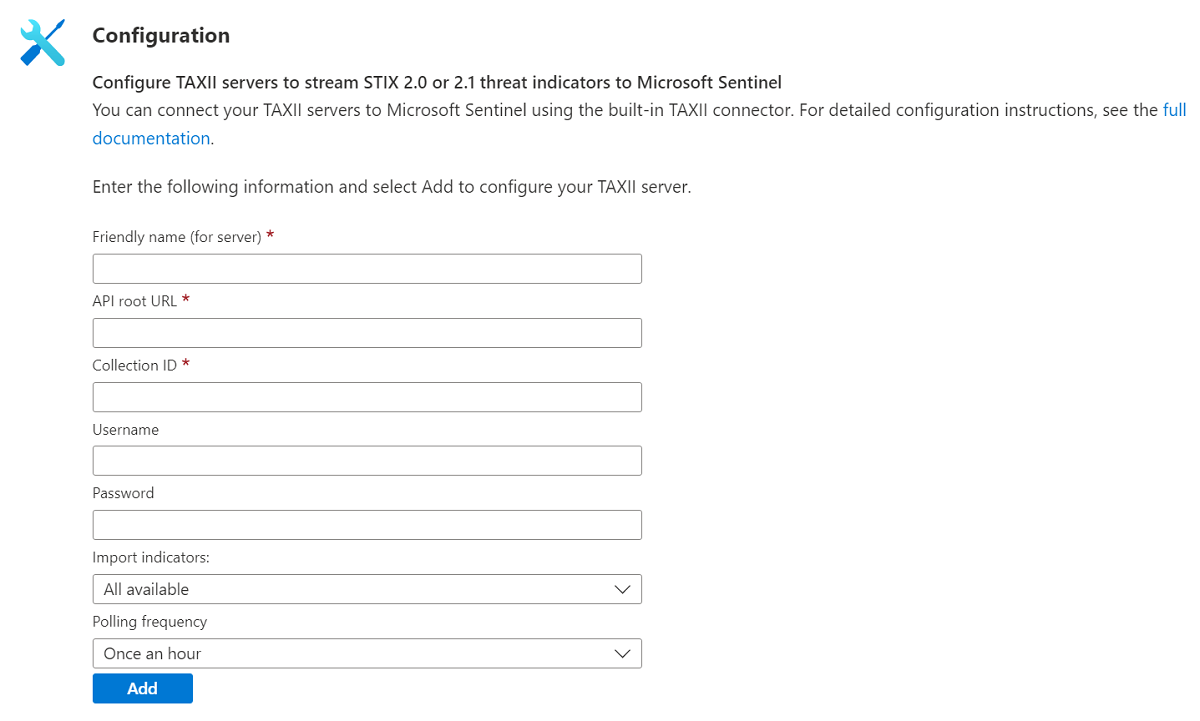
- Friendly name, API root URL, Collection ID, username and password if required, indicator group, polling frequency. Add. Repeat per collection.
- If the provider only gives a discovery endpoint, curl it to find the API root. FS-ISAC and some others need the Sentinel TAXII client IPs allowlisted; the list is on the Learn page.
Enable the Microsoft Defender Threat Intelligence Analytics rule: Analytics > Rule templates > search threat intelligence > Create rule > Review > Create. It is read only.
# Tested on: TODO
# Az.SecurityInsights. Query must be a single line. -TriggerOperator valid values are not listed on the cmdlet page; GreaterThan matches the REST enum.
Install-Module Az.SecurityInsights -Scope CurrentUser
Connect-AzAccount

$rg  = 'rg-sentinel'
$ws  = 'law-sentinel'

New-AzSentinelAlertRule -ResourceGroupName $rg -WorkspaceName $ws -Kind Scheduled -Enabled `
  -DisplayName 'PH - User added to privileged Entra role' `
  -Severity High `
  -Query 'AuditLogs | where OperationName == "Add member to role" | extend Role = tostring(TargetResources[0].modifiedProperties[1].newValue) | where Role has_any ("Global Administrator","Privileged Role Administrator","Security Administrator") | extend Target = tostring(TargetResources[0].userPrincipalName), Actor = tostring(InitiatedBy.user.userPrincipalName), IP = tostring(InitiatedBy.user.ipAddress)' `
  -QueryFrequency (New-TimeSpan -Minutes 15) `
  -QueryPeriod (New-TimeSpan -Minutes 15) `
  -TriggerOperator GreaterThan -TriggerThreshold 0 `
  -Tactic PrivilegeEscalation,Persistence `
  -CreateIncident -GroupingConfigurationEnabled -MatchingMethod AllEntities `
  -LookbackDuration (New-TimeSpan -Hours 5) `
  -EventGroupingSettingAggregationKind AlertPerResult

# Entity mapping through -EntityMapping needs EntityMapping objects. The cmdlet page does not show how to build them.
# Practical route: create the rule, export it as ARM from the portal, keep JSON as the source of truth and push with New-AzResourceGroupDeployment.

# List and bulk export every rule to one ARM-style JSON (what the portal Export button does per page, limited to one page at a time)
Get-AzSentinelAlertRule -ResourceGroupName $rg -WorkspaceName $ws |
  Select-Object DisplayName, Kind, Enabled, Severity, QueryFrequency, QueryPeriod

# Incident triage
Get-AzSentinelIncident -ResourceGroupName $rg -WorkspaceName $ws | Where-Object Status -eq 'New' |
  Select-Object IncidentNumber, Title, Severity, CreatedTimeUtc

# TAXII and UEBA have no documented Az.SecurityInsights cmdlets for enablement in the pages used here. Portal or REST.
# Azure CLI sentinel extension. Every alert-rule command is marked Experimental.
az extension add --name sentinel

# Payload follows the REST alertRules schema under "properties"
cat > scheduled-rule.json <<'EOF'
{
  "displayName": "PH - Brute force then success",
  "severity": "High",
  "enabled": true,
  "query": "let f = SigninLogs | where ResultType != 0 | summarize Fails = count() by UserPrincipalName, IPAddress, bin(TimeGenerated, 1h) | where Fails >= 20; SigninLogs | where ResultType == 0 | join kind=inner f on UserPrincipalName, IPAddress | where TimeGenerated > TimeGenerated1 | project TimeGenerated, UserPrincipalName, IPAddress, Fails",
  "queryFrequency": "PT1H",
  "queryPeriod": "PT2H",
  "triggerOperator": "GreaterThan",
  "triggerThreshold": 0,
  "suppressionDuration": "PT1H",
  "suppressionEnabled": false,
  "tactics": ["CredentialAccess", "InitialAccess"],
  "techniques": ["T1110"],
  "entityMappings": [
    { "entityType": "Account", "fieldMappings": [ { "identifier": "FullName", "columnName": "UserPrincipalName" } ] },
    { "entityType": "IP", "fieldMappings": [ { "identifier": "Address", "columnName": "IPAddress" } ] }
  ],
  "incidentConfiguration": { "createIncident": true, "groupingConfiguration": { "enabled": true, "reopenClosedIncident": false, "lookbackDuration": "PT5H", "matchingMethod": "AllEntities" } }
}
EOF

az sentinel alert-rule create -g rg-sentinel -w law-sentinel -n ph-bruteforce-success --scheduled @scheduled-rule.json
az sentinel alert-rule list -g rg-sentinel -w law-sentinel -o table
az sentinel alert-rule template list -g rg-sentinel -w law-sentinel --query "[].{name:displayName,kind:kind}" -o table

# Export rules as ARM: Analytics > select rules > Export gives Azure_Sentinel_analytic_rules.json, workspace independent.
# Import is capped at 50 rules per file. Deploy with:
az deployment group create -g rg-sentinel --template-file Azure_Sentinel_analytic_rules.json --parameters workspace=law-sentinel
Create or update a scheduled rule. 2025-09-01 is the version on the Learn page used here.
PUT https://management.azure.com/subscriptions/{subscriptionId}/resourceGroups/{resourceGroupName}/providers/Microsoft.OperationalInsights/workspaces/{workspaceName}/providers/Microsoft.SecurityInsights/alertRules/{ruleId}?api-version=2025-09-01
{
  "kind": "Scheduled",
  "properties": {
    "displayName": "PH - New country then mass download",
    "description": "Sign-in from a country not seen for the user in 30 days, followed by 100 or more SharePoint or OneDrive downloads within 2 hours",
    "severity": "High",
    "enabled": true,
    "tactics": ["InitialAccess", "Exfiltration"],
    "techniques": ["T1078", "T1530"],
    "query": "see KQL example 2, single line",
    "queryFrequency": "PT1H",
    "queryPeriod": "P1D",
    "triggerOperator": "GreaterThan",
    "triggerThreshold": 0,
    "suppressionDuration": "PT1H",
    "suppressionEnabled": false,
    "eventGroupingSettings": { "aggregationKind": "AlertPerResult" },
    "customDetails": { "Country": "Country", "Downloads": "Downloads" },
    "entityMappings": [
      { "entityType": "Account", "fieldMappings": [ { "identifier": "FullName", "columnName": "UserPrincipalName" } ] },
      { "entityType": "IP", "fieldMappings": [ { "identifier": "Address", "columnName": "IPAddress" } ] }
    ],
    "incidentConfiguration": {
      "createIncident": true,
      "groupingConfiguration": {
        "enabled": true,
        "reopenClosedIncident": false,
        "lookbackDuration": "PT5H",
        "matchingMethod": "Selected",
        "groupByEntities": ["Account"],
        "groupByAlertDetails": [],
        "groupByCustomDetails": []
      }
    }
  }
}
Required properties are displayName, enabled, suppressionDuration and suppressionEnabled. With matchingMethod Selected at least one group-by list must be non-empty. 200 means updated, 201 created. The same route with kind NRT, Fusion, MicrosoftSecurityIncidentCreation, MLBehaviorAnalytics or ThreatIntelligence handles the other types.
Update an incident, close it and assign an owner:
PUT https://management.azure.com/subscriptions/{subscriptionId}/resourceGroups/{resourceGroupName}/providers/Microsoft.OperationalInsights/workspaces/{workspaceName}/providers/Microsoft.SecurityInsights/incidents/{incidentId}?api-version=2025-09-01
{
  "etag": "\"<current etag>\"",
  "properties": {
    "title": "PH - Brute force then success",
    "severity": "High",
    "status": "Closed",
    "classification": "FalsePositive",
    "classificationReason": "IncorrectAlertLogic",
    "classificationComment": "Password spray test from pen test range, see change CHG0001",
    "owner": { "objectId": "<user object id>", "ownerType": "User" }
  }
}
status is New, Active or Closed. classificationReason is SuspiciousActivity, SuspiciousButExpected, IncorrectAlertLogic or InaccurateData. The list route returns at most 1,000 incidents per request.
Upload indicators:
POST https://api.ti.sentinel.azure.com/workspaces/{workspaceId}/threat-intelligence-stix-objects:upload?api-version=2024-02-01-preview
Authorization: Bearer <token for https://management.azure.com/.default>
Content-Type: application/json
{
  "sourcesystem": "PatchHourTIP",
  "stixobjects": [
    {
      "type": "indicator",
      "spec_version": "2.1",
      "id": "indicator--3f1c2a7e-9b1d-4c3e-8e2a-0a1b2c3d4e5f",
      "created": "2026-10-22T00:00:00.000Z",
      "modified": "2026-10-22T00:00:00.000Z",
      "name": "C2 IP from client IR",
      "pattern": "[ipv4-addr:value = '203.0.113.45']",
      "pattern_type": "stix",
      "valid_from": "2026-10-22T00:00:00.000Z",
      "valid_until": "2026-11-22T00:00:00.000Z",
      "indicator_types": ["malicious-activity"],
      "confidence": 80
    }
  ]
}
100 objects per request, 100 requests per minute, about 10,000 objects per minute. sourcesystem cannot be Microsoft Sentinel. A 200 with an errors array means some objects failed validation; recordIndex is zero based. Threat intelligence objects created in the portal are also exposed under Microsoft.SecurityInsights/threatIntelligence/main/indicators on the management plane, but the upload API is the documented path for bulk.
Verify
Rule runs: Analytics > Active rules shows the rule Enabled with no AUTO DISABLED prefix. Health logging must be on for the workspace; then _SentinelHealth() has a row per run.
// Last runs of a rule, with returned rows and alerts
_SentinelHealth()
| where SentinelResourceType == "Analytics Rule"
| where SentinelResourceName startswith "PH - "
| extend Rows = ExtendedProperties["QueryResultsCount"], Alerts = ExtendedProperties["AlertsGeneratedAmount"]
| project TimeGenerated, SentinelResourceName, SentinelResourceKind, Status, Reason, Rows, Alerts
| order by TimeGenerated desc
Incident created and entities mapped:
SecurityAlert
| where TimeGenerated > ago(1d)
| where ProviderName == "ASI Scheduled Alerts" and AlertName startswith "PH - "
| extend Ents = parse_json(Entities)
| mv-expand Ents
| summarize Entities = make_set(tostring(Ents.Type)) by SystemAlertId, AlertName
| join kind=leftouter (
    SecurityIncident
    | mv-expand AlertIds
    | extend SystemAlertId = tostring(AlertIds)
    | summarize arg_max(TimeGenerated, IncidentNumber, Status, Severity) by SystemAlertId
  ) on SystemAlertId
| project AlertName, IncidentNumber, Status, Severity, Entities
An empty Entities set means the mapping did not resolve. UEBA is live when BehaviorAnalytics and IdentityInfo return rows; UserPeerAnalytics follows. TI is live when ThreatIntelIndicators | summarize count() by SourceSystem shows your TAXII friendly name or sourcesystem value, and the Threat intelligence blade lists the objects. Watchlists: _GetWatchlistAlias lists the alias and _GetWatchlist('alias') | count is non-zero. In the Defender portal, Investigation and response > Incidents and alerts shows the incident with provider Microsoft XDR.
Detection examples
All five are drafts to test in the dev tenant before they go near production. Mark each with tactics and map Account and IP at minimum, otherwise Fusion and incident grouping get nothing to work with.
// 1. New user added to a privileged Entra role. Frequency 15m, lookback 15m, alert per row.
let PrivRoles = dynamic(["Global Administrator","Privileged Role Administrator","Security Administrator","Exchange Administrator","Privileged Authentication Administrator"]);
AuditLogs
| where OperationName in ("Add member to role", "Add eligible member to role")
| mv-apply TR = TargetResources on (
    extend Role = tostring(TR.modifiedProperties[1].newValue), Target = tostring(TR.userPrincipalName)
  )
| extend Role = trim('"', Role)
| where Role in (PrivRoles)
| extend Actor = coalesce(tostring(InitiatedBy.user.userPrincipalName), tostring(InitiatedBy.app.displayName)),
         IPAddress = tostring(InitiatedBy.user.ipAddress)
| project TimeGenerated, OperationName, Role, Target, Actor, IPAddress, CorrelationId
// 2. Sign-in from a country not seen for the user in 30 days, then 100 or more downloads within 2 hours. Frequency 1h, lookback 1d.
let Known = SigninLogs
  | where TimeGenerated between (ago(31d) .. ago(1d))
  | where ResultType == 0
  | summarize by UserPrincipalName, Country = tostring(LocationDetails.countryOrRegion);
let NewCountry = SigninLogs
  | where TimeGenerated > ago(1d) and ResultType == 0
  | extend Country = tostring(LocationDetails.countryOrRegion)
  | join kind=leftanti Known on UserPrincipalName, Country
  | project SigninTime = TimeGenerated, UserPrincipalName, Country, IPAddress;
OfficeActivity
| where TimeGenerated > ago(1d)
| where Operation in ("FileDownloaded", "FileSyncDownloadedFull")
| extend UserPrincipalName = tolower(UserId)
| join kind=inner (NewCountry | extend UserPrincipalName = tolower(UserPrincipalName)) on UserPrincipalName
| where TimeGenerated between (SigninTime .. SigninTime + 2h)
| summarize Downloads = count(), FirstDownload = min(TimeGenerated) by UserPrincipalName, Country, IPAddress, SigninTime
| where Downloads >= 100
| extend TimeGenerated = FirstDownload
// 3. MDE alert on a device whose primary user had an Entra risk detection in the last 24h. Frequency 1h, lookback 1d.
let Risky = AADUserRiskEvents
  | where TimeGenerated > ago(1d) and RiskLevel in ("medium", "high")
  | summarize RiskTypes = make_set(RiskEventType), RiskTime = max(TimeGenerated) by UserPrincipalName = tolower(UserPrincipalName);
let Owners = DeviceInfo
  | where TimeGenerated > ago(7d) and isnotempty(LoggedOnUsers)
  | summarize arg_max(TimeGenerated, LoggedOnUsers) by DeviceName
  | mv-expand LoggedOnUsers
  | extend AccountName = tolower(tostring(LoggedOnUsers.UserName)), Domain = tolower(tostring(LoggedOnUsers.DomainName))
  | project DeviceName, AccountName, Domain;
SecurityAlert
| where TimeGenerated > ago(1d) and ProductName == "Microsoft Defender Advanced Threat Protection"
| extend Ents = parse_json(Entities)
| mv-expand Ents
| where tostring(Ents.Type) == "host"
| extend DeviceName = tolower(tostring(Ents.HostName))
| join kind=inner (Owners | extend DeviceName = tolower(DeviceName)) on DeviceName
| join kind=inner (Risky | extend AccountName = tostring(split(UserPrincipalName, "@")[0])) on AccountName
| project TimeGenerated, AlertName, AlertSeverity, DeviceName, UserPrincipalName, RiskTypes, RiskTime, SystemAlertId
// 4. Rare process on servers: first time this process name has run on any server in 30 days. Frequency 1h, lookback 1h. Needs the XDR connector tables.
let Baseline = DeviceProcessEvents
  | where TimeGenerated between (ago(30d) .. ago(1h))
  | join kind=inner (DeviceInfo | where OSPlatform startswith "WindowsServer" | distinct DeviceId) on DeviceId
  | summarize by FileName = tolower(FileName);
DeviceProcessEvents
| where TimeGenerated > ago(1h)
| join kind=inner (DeviceInfo | where OSPlatform startswith "WindowsServer" | distinct DeviceId) on DeviceId
| extend FileName = tolower(FileName)
| join kind=leftanti Baseline on FileName
| summarize Hosts = make_set(DeviceName), Count = count(), TimeGenerated = min(TimeGenerated) by FileName, FolderPath, InitiatingProcessFileName, AccountName = InitiatingProcessAccountName, SHA256
| extend DeviceName = tostring(Hosts[0])
// 5. Brute force then success: 20 or more failures from one IP against one account in an hour, then a success from the same IP. Frequency 1h, lookback 2h. Also a good NRT candidate at lower threshold.
let Fails = SigninLogs
  | where TimeGenerated > ago(2h) and ResultType in ("50126", "50053", "50055", "50056")
  | summarize Fails = count(), FirstFail = min(TimeGenerated), LastFail = max(TimeGenerated) by UserPrincipalName, IPAddress
  | where Fails >= 20;
SigninLogs
| where TimeGenerated > ago(2h) and ResultType == 0
| join kind=inner Fails on UserPrincipalName, IPAddress
| where TimeGenerated > LastFail
| project TimeGenerated, UserPrincipalName, IPAddress, Fails, FirstFail, SuccessTime = TimeGenerated, AppDisplayName, Country = tostring(LocationDetails.countryOrRegion)
Watchlist use inside a detection, from the Learn pattern:
// Suppress known scanner IPs held in a watchlist with SearchKey = IPAddress
SigninLogs
| where ResultType != 0
| where IPAddress !in ((_GetWatchlist('KnownScanners') | project SearchKey))
Troubleshoot
| Symptom | Likely cause | Fix |
|---|---|---|
| Rule never fires though the query returns rows in Logs | Query does not return TimeGenerated, lookback shorter than ingestion delay, threshold wrong, or the rule is in the five minute delay window | Add TimeGenerated to the projection, run Results simulation, widen lookback, check _SentinelHealth() for QueryResultsCount |
| Rule name starts with AUTO DISABLED | Permanent failure: table or function removed, permissions changed, or the query was flagged for resource drain | Read the reason appended to the description, fix the cause, edit and save to reset, re-enable |
| Health message insufficient access to resource | Cross-workspace or cross-tenant rule runs as its creator and that user lost access | Restore access or recreate the rule as a user with access |
| Too many incidents from one rule | Event grouping per row with no alert grouping, or grouping on all entities when the IP changes constantly | Turn on alert grouping, match on Account only via Selected, or aggregate in the query and alert once |
| Incidents appear but entities are empty | Mapping points at a column that is not in the final projection, or the identifier is not the required one | Project the columns, pick a required identifier, check for the entity mapping issues reason in _SentinelHealth() |
| Entities missing on big alerts | 500 entity or size limit hit; Learn gives 64 KB on the mapping page and 32 KB in the health message | Aggregate in the query, map fewer entity types, or use per row grouping |
| Alert Query field is unusable | Per row grouping stores a compressed 10 KB record | Use the OriginalQuery field instead |
UEBA enabled but BehaviorAnalytics empty | No data sources selected, Entra connector missing, or baseline still building | Check the UEBA tab data sources, confirm SigninLogs and AuditLogs flow, wait for the learning period |
IdentityInfo missing on-prem attributes | Active Directory source needs Defender for Identity | Onboard MDI and select Active Directory in the UEBA tab |
| TAXII connector added but no indicators | Wrong API root or collection ID, server needs IP allowlisting, credentials rejected | curl the discovery endpoint, allowlist the Sentinel client IPs, check the indicator group and polling frequency |
| TI rule from an old solution finds nothing | Still querying ThreatIntelligenceIndicator, which stopped ingesting 2025-07-31 | Update the solution from Content hub or rewrite against ThreatIntelIndicators with arg_max by Id |
| Upload API returns 200 but objects missing | Validation errors in the response body | Read the errors array and fix the object at recordIndex |
| Fusion rule missing or disabled | Workspace is onboarded to the Defender portal or the XDR connector is on | Expected. XDR correlation replaces it |
| Microsoft security rules turned themselves off | XDR connector enabled | Expected. Defender creates those incidents |
_GetWatchlist returns nothing in a rule | Query time range narrower than the 12 day refresh, or workspace hit the daily cap | Widen the time scope for the lookup or check the ingestion cap |
| Custom incident title ignored in Defender portal | XDR correlation engine names incidents | Match automation rules on analytics rule name or tags, not title |
Gotchas and limits
- Frequency and lookback are both 5 minutes to 14 days, and interval must be at or below lookback. Add the five minute engine delay to your mental model when you compare rule output with a manual query.
- NRT: 50 enabled, 100 total, 30 alerts per run, runs on ingestion time not
TimeGenerated, two minute delay. Pointless on a source that ingests slowly. If a run fails the window rolls into the next minute for up to 60 minutes. - Per row event grouping caps at 150 alerts, and the last one is a summary. Alert grouping caps at 150 alerts per incident and spills into a new incident with the same details. XDR incidents with more than 150 alerts show as 150+.
- Scheduled rule failures retry up to five more times on the same window. Six failures means a skipped window. Query
_SentinelHealth()grouped byQueryStartTimeUTCto find them. - Entity limits are silent. 10 mappings, 3 identifiers, 500 entities split evenly, and a size cap that Learn states as 64 KB in one place and 32 KB in another. TODO: confirm which applies in the dev tenant.
- Automation rules run in order within each trigger queue, create rules before update rules, never in parallel. Rules created by API or CLI need the order set by hand, and duplicates run in random order. A playbook longer than two minutes does not block the next action. After Defender onboarding, intermediate incident updates within 5 to 10 minutes are collapsed.
- Fusion needs connectors with entity mapped, tactic tagged alerts; a scheduled rule without tactics or entities is invisible to it. Training data is not covered by customer managed keys. One rule only, and it is gone in the Defender portal.
- Microsoft security incident creation rules and incident reopening are both gone in the Defender portal. Plan replacements with scheduled rules or XDR alert tuning.
- Anomaly rules never alert. If you want an incident from an anomaly, write a scheduled rule over
Anomalies. IdentityInforefresh is 14 days, so 14 days is the floor for its retention.GroupMembershipholds 500 groups.- TI re-ingests every 7 to 10 days and bills for it. Deduplicate with
arg_max(TimeGenerated, *) by Idin every TI join or you will match expired versions. Ingestion rules do not apply to the upload API or manual objects, and take up to 15 minutes. - Upload API: 100 objects per request, 100 requests per minute. TAXII export connectors cannot be edited; reinstall to change them.
- Watchlists: 10 million active rows, 100,000 changes per month, one concurrent large upload per workspace, not supported across Lighthouse. Refresh every 12 days, table retention 28 days.
- Incident retention: entities 180 days, investigation experience 90 days from last update, graph only for incidents under 30 days old. 100 comments, 40 tasks, 20 bookmarks per incident. The
SecurityIncidentrow is 64 KB; old comments get truncated in the table but not in the incident itself. - The portal Export button only exports one page of rules at a time, and Import takes 50 rules per file.
- Classic alert playbooks are deprecated from March 2026. Move them to automation rules with the alert created trigger.
Further reading
- Turn Complexity into Clarity: Introducing the New UEBA Behaviors Layer in Microsoft Sentinel, Microsoft Sentinel Blog, January 2026. Explains what the behaviours layer adds on top of
BehaviorAnalyticsand how theSentinelBehaviorInfosummaries are meant to be used in hunting. - Custom detections are now the unified experience for creating detections in Microsoft Defender, Microsoft Defender Blog, October 2025. The reasoning behind the Learn banner that points new rules at custom detections instead of analytics rules, and what that means for Sentinel-only workspaces.
- Microsoft Sentinel to Defender Portal Migration: A Field Guide for Lean Security Teams, Tiago S. Carvalho, July 2026. Field notes on what happens to rule output, Fusion and incident counts after onboarding, which Learn spreads across several pages.
Only three qualified in the October 2025 to October 2026 window. Rod Trent's ThreatIntelligenceIndicator retirement post and the Table Talk post on the new TI tables are both earlier in 2025.
My notes
TODO: Sohail's notes after verification.
Changelog
| Date | Change | Source |
|---|---|---|
| 2026-10-22 | Drafted from Learn, with Learn images and diagrams | [1] |