Automation rules, playbooks and SOAR
What it is
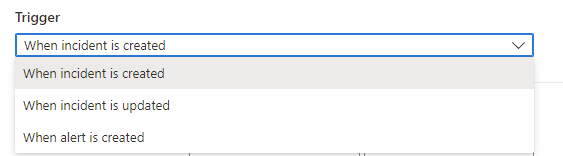
Sentinel has two automation layers. Automation rules live inside the workspace. They fire on incident created, incident updated or alert created, check conditions, and run a short list of built-in actions: change status or severity, assign an owner, add tags, add incident tasks, or call a playbook. They run sequentially in an order you set, and they can expire. Most triage, suppression and assignment work belongs here and needs no Logic App at all.
Playbooks are Azure Logic Apps workflows that start with a Microsoft Sentinel trigger. They are separate Azure resources in their own resource group, billed on their own meter, and they do the work the built-in actions cannot: enrich an incident, post to Teams, open a ServiceNow ticket, isolate a device in Defender for Endpoint, disable a user in Entra. An automation rule is the normal way to run a playbook. You can also run one by hand on an incident, alert or entity.
What this is not: it is not the Defender XDR automated investigation engine, and it is not the newer Python playbook generator in the Defender portal, which is a different runtime with its own trigger and limits. Both are mentioned where they overlap. For how incidents arrive in the first place see analytics rules and incidents and Defender XDR incidents and alerts. For what changes once the workspace is in the Defender portal see SOC optimisation and the unified portal.
Licensing and prerequisites
- Sentinel itself. Automation rules carry no extra meter. Playbooks run on Azure Logic Apps and Learn repeats on every page that extra Logic Apps charges may apply. Consumption is pay per execution. Standard is billed on a hosting plan tier whether the workflow runs or not, plus storage transactions for stateful workflows.
- Roles on the workspace resource group. Microsoft Sentinel Contributor to create automation rules and attach playbooks. Microsoft Sentinel Responder to open an incident. Microsoft Sentinel Playbook Operator to run a playbook manually. Logic App Contributor to create or edit a Consumption playbook, or the Logic Apps Standard Developer or Contributor roles for Standard.
- Owner or User Access Administrator on the playbook resource group, once, to grant the Sentinel service account the Microsoft Sentinel Automation Contributor role. That role exists only for this purpose and is never assigned to a human.
- A system-assigned managed identity on the Logic App, with Microsoft Sentinel Responder on the workspace if the playbook writes back (comment, update, task, watchlist) or Microsoft Sentinel Reader if it only receives the incident. Plus whatever the target connector needs: MDE application permissions such as
Machine.IsolateandMachine.Read.All, Entra roles for disabling a user, Azure Firewall rights for a block. - Health monitoring turned on for the workspace so the
SentinelHealthtable gets populated, and Logic Apps diagnostics sent to the same workspace if you want run-level detail. - Standard playbooks: the Sentinel connector does not support stateless workflows, templates cannot target Standard from the Automation page, and private endpoints need an access restriction policy before Sentinel can trigger the workflow.
How it works
Automation rule evaluation
Every rule has a trigger, zero or more conditions, and an ordered action list. Rules of the same trigger type share one queue and run one at a time by order number. Create-trigger rules run first; update-trigger rules spawned by those changes run after all create rules finish. Each rule sees the incident as the previous rule left it, so a rule that drops severity to Low can stop a later rule scoped to Medium or higher. Within a rule, actions also run in order.
Conditions compare incident properties, entity properties, the analytics rule that produced the incident, tags and custom details. The update trigger adds state operators: changed, changed from, changed to, added, and an Updated by condition that tells apart a user, an application, a playbook, another automation rule, AIR, and alert grouping. Alert-trigger rules can only filter on analytics rule name and can only run a playbook. All text conditions are case insensitive.
Tag conditions have two forms. Any individual tag passes if at least one tag matches. Collection of all tags evaluates the whole set, which is what you want for negative conditions such as does not contain.
Playbook actions do not block the rule for long. Under a second, the rule continues as soon as the playbook returns. Under two minutes, it continues at most 10 seconds after completion. Over two minutes, the rule moves on at the two-minute mark whether or not the playbook finished.
Playbooks as Logic Apps
A Consumption logic app holds one workflow in multitenant Azure Logic Apps. A Standard logic app holds many workflows in single-tenant Logic Apps, with VNet integration, private endpoints, fixed pricing and higher limits. Both are supported by automation rules. For Sentinel the practical rule is Consumption unless the playbook must reach something inside a VNet.
The Microsoft Sentinel connector gives three triggers. The incident trigger is the recommended one: it delivers the incident plus all alerts and entities, and it is the only one an automation rule can call on incident events. The alert trigger is for Scheduled or NRT rules that do not create incidents and for manual runs on an alert; it cannot run on alerts from Microsoft security rules or Defender XDR. The entity trigger is manual only, for hunting and investigation. Renaming a trigger breaks the Sentinel integration, so leave the generated name alone.
Connector actions cover the write path: Update incident, Add comment to incident (V3), Add task to incident, Add or Remove alert from incident, the Entities - Get Hosts, IPs, Accounts, URLs, FileHashes, DNS parsers, bookmarks, threat intelligence uploads, and watchlist CRUD. Update and comment need the Incident ARM ID, so an alert-triggered playbook calls Alert - Get incident first. The connector is throttled at 600 calls per connection per 60 seconds, and connections are not shareable.
Authentication goes through an API connection resource in the playbook resource group. The three choices are managed identity (recommended and the default in the playbook wizard), a service principal, or a signed-in user. The managed identity is the Logic App itself; you assign it Sentinel Responder or Reader on the workspace through Access control, picking Logic App as the assignee type. Every other connector in the workflow needs its own connection and its own permissions on its own resource.
Common patterns
The Content hub and the Azure-Sentinel GitHub repo ship these as templates, and they map to the connector landscape above.
| Pattern | Connector and identity | Notes from the templates |
|---|---|---|
| Notify Teams or email | Teams or Office 365 Outlook connector, delegated user connection | The Teams adaptive card template can also change severity or close the incident from the card. Simple Flows now covers plain case emails without a playbook. |
| Enrich with TI or user details | Sentinel connector plus Graph or TI connector | Write results back with Add comment. Entity parsers give you typed fields for the loop. |
| Isolate device | Microsoft Defender ATP connector (wdatp), managed identity | Template Isolate-MDEMachine. Needs Machine.Isolate and Machine.Read.All app roles on the identity, Responder on the workspace. See MDE response actions. |
| Disable user | Entra ID connector | The Learn tutorial scenario: Block or Ignore buttons by email, Block disables the user and tells the firewall to block the IP. |
| Block IP | Azure Firewall connector | Same tutorial flow. Entities - Get IPs feeds the loop. |
| Ticket | ServiceNow or Jira connector | Use the update trigger plus a second playbook to keep the ticket in sync. The Defender portal drops the incident Description field, so tickets lose it. |
Permissions model
Three identities matter and they are easy to confuse.
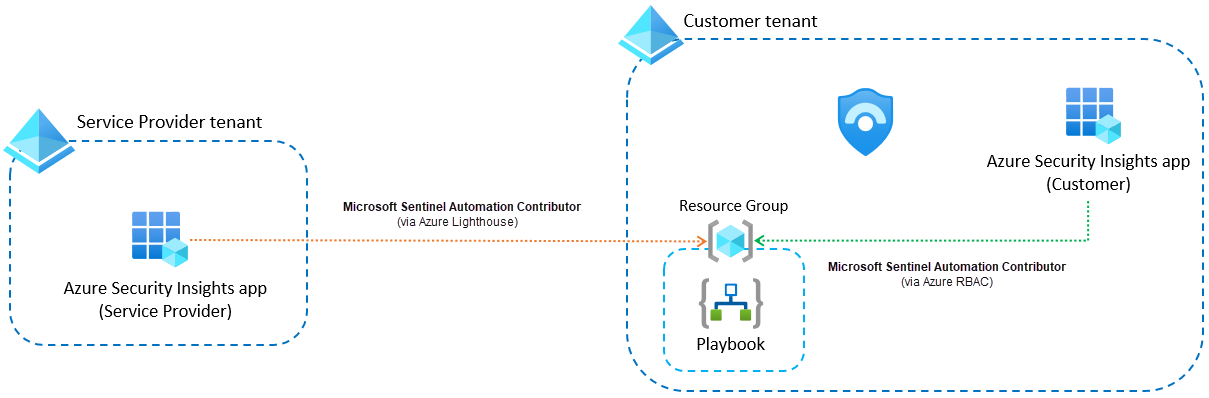
- The Sentinel service account (enterprise app Azure Security Insights) runs the playbook. It needs Microsoft Sentinel Automation Contributor on the playbook resource group. Granting it is done once per resource group from Settings, Playbook permissions, Configure permissions, or from the Manage playbook permissions link in the rule editor, and you need Owner on that resource group to do it. After that, any rule can run any playbook in that resource group.
- The playbook managed identity acts inside the workflow. Responder or Reader on the workspace, plus target permissions.
- The human. Contributor to attach, Responder plus Playbook Operator to run by hand, Logic App Contributor to edit.
Cross-tenant: permissions are defined where the playbook lives, not where the rule lives. In the MSSP case where the rule is in the provider tenant and the playbook in the customer tenant, you also add the Azure Security Insights app to the Lighthouse delegation with role definition f4c81013-99ee-4d62-a7ee-b3f1f648599a.
Automation in the Defender portal
Once the workspace is onboarded, incidents are created in Defender and forwarded to Sentinel. That changes several things. Up to 10 minutes can pass between an alert and the rule running, and up to 5 minutes before a Defender incident is visible to a playbook. Several changes to one incident inside a 5 to 10 minute window are coalesced into one update, so intermediate states never reach your update-trigger rules. The Incident provider condition is gone, every incident reports Microsoft XDR as provider, and the Description field is missing from SecurityIncident, so conditions on it stop matching. Incident titles can change through correlation, so filter on analytics rule name and tags instead. The Updated by values changed too; old rules that referenced Microsoft 365 Defender were rewritten to Other.
Alert-trigger rules only see Sentinel alerts. Covering Defender XDR alerts means the Enhanced Alert Trigger, which is tenant level, supports one action per rule, has no ordering or expiry, runs the new Python generated playbooks, and does not write to SentinelHealth. Manual runs on an alert or an entity are not supported in the Defender portal; manual runs on an incident are. Creating an automation rule from inside an incident is Azure portal only. Simple Flows (preview) adds Case created and Case updated triggers and five built-in actions: three fixed-template emails, Update Case and Add Task, and Update Alert on the alert trigger. The Azure portal experience retires after 31 March 2027.
Configure
- Portal
- PowerShell / Azure CLI
- REST / ARM
Create an automation rule:
- Microsoft Sentinel, Configuration, Automation, Create, Automation rule.
- Name it and pick the trigger. Case triggers appear only on Defender-onboarded workspaces.
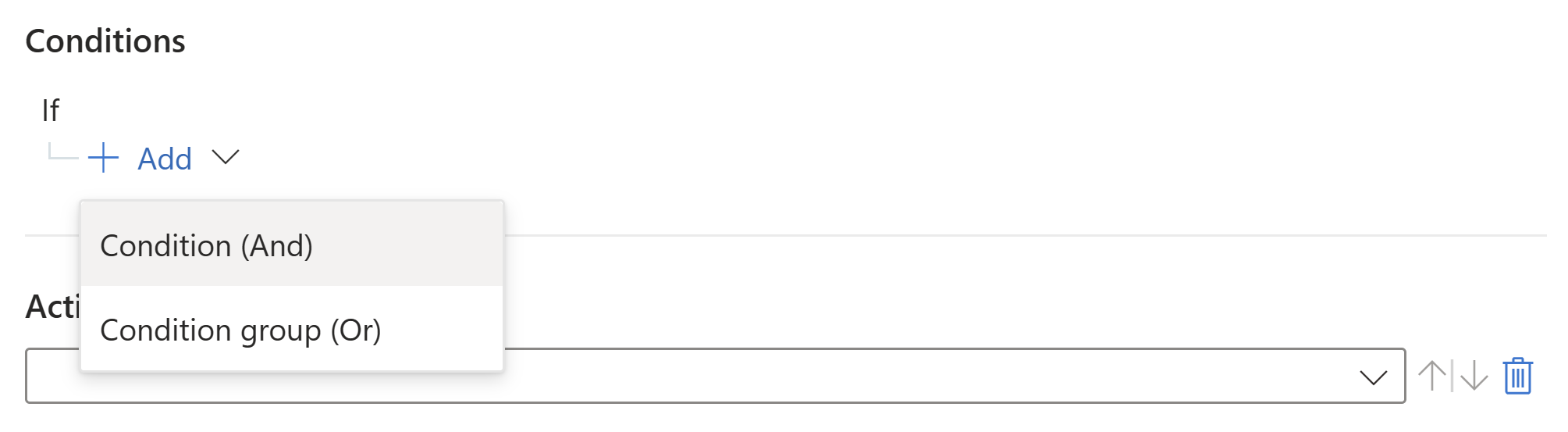
- Add conditions. On onboarded workspaces you get AND conditions and OR condition groups. Prefer Analytic rule name over Title. For tags choose the individual or collection operator on purpose.
- Add actions. Assign owner, Change status, Change severity, Add tags, Add task, Run playbook. Reorder with the arrows. Alert-trigger rules offer Run playbook only.
- Set expiration (Indefinite by default) and Order. Order is prefilled with the next free number for that trigger type. Apply.
Deploy a template playbook:
- Content hub, Content type = Playbook, install the solution. Then Automation, Playbook templates tab.
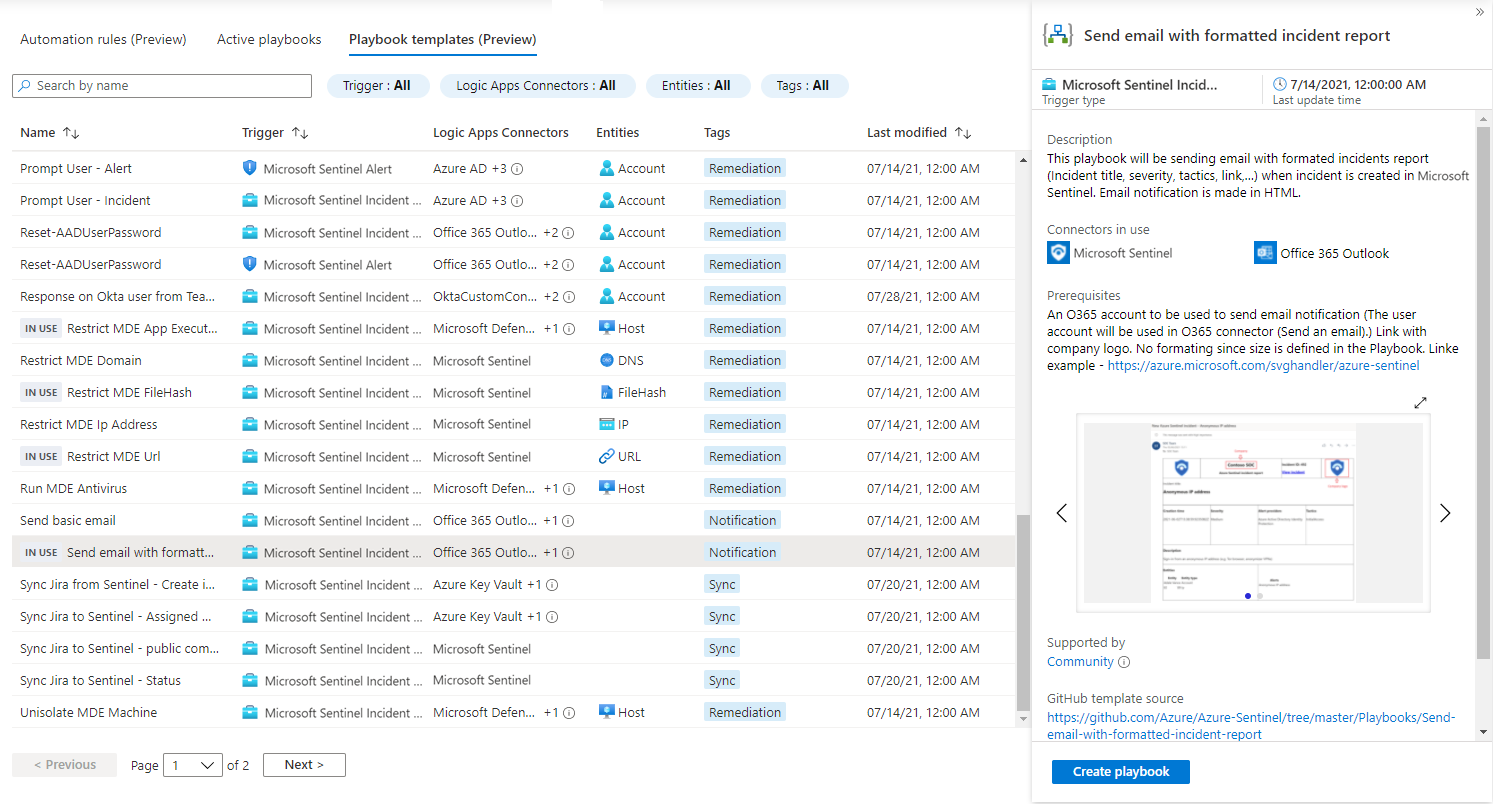
- Select the template, Create playbook. Basics: name and resource group. Parameters: recipient, channel, custom connector name. Connections: Sentinel defaults to managed identity; other connectors can be left as Create new connection after deployment.
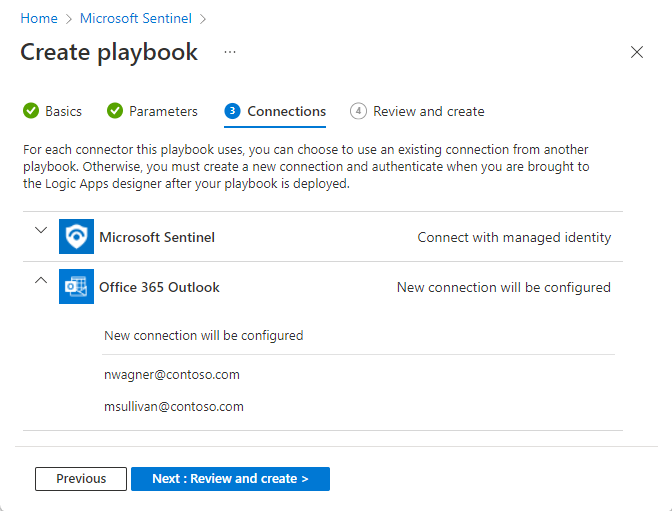
- Review and create. The designer opens. Fix every step with an error badge by adding or selecting a connection, or edit the API connection resource directly. Save.
Grant the managed identity:
- Logic App, Settings, Identity, System assigned, On.
- Sentinel, Settings, Workspace settings, Access control (IAM), Add role assignment, Microsoft Sentinel Responder (or Reader), Assign access to Logic App, pick the playbook.
- In the designer, open the Sentinel trigger, Change connection, Add new, Connect with managed identity, System-assigned.
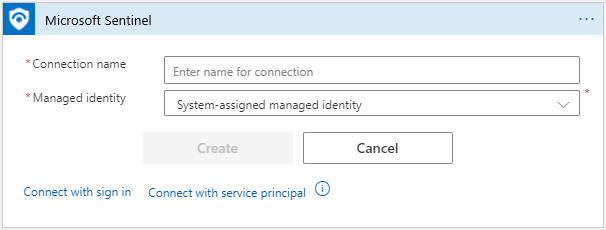
- Grant target permissions. For MDE isolate, assign
Machine.IsolateandMachine.Read.Allapp roles on the MDE app (app IDfc780465-2017-40d4-a0c5-307022471b92) to the identity.
Attach to a rule:
- Back in the automation rule, action Run playbook. If the playbook is grey, select Manage playbook permissions, tick its resource group, Apply. You need Owner on that resource group.
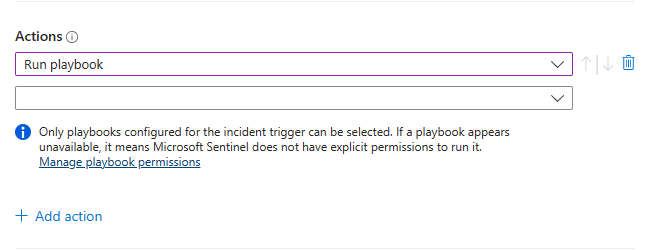
- Apply. To test by hand: Incidents, pick one, Actions, Run playbook, Run. The Runs tab on the same panel shows history.
# Tested on: TODO
# Deploy a playbook from a workflow definition file and give it a system-assigned identity.
# az logic workflow needs Azure CLI 2.55.0 or later; the extension installs on first use.
az logic workflow create \
  --resource-group rg-sentinel-playbooks \
  --name Notify-Comment-Incident \
  --location eastus \
  --definition workflow.json \
  --mi-system-assigned true

# Principal ID of the identity, then Responder on the workspace.
PID=$(az logic workflow show -g rg-sentinel-playbooks -n Notify-Comment-Incident --query identity.principalId -o tsv)
WS=/subscriptions/<sub>/resourceGroups/rg-sentinel/providers/Microsoft.OperationalInsights/workspaces/law-sentinel

az role assignment create \
  --assignee-object-id "$PID" \
  --assignee-principal-type ServicePrincipal \
  --role "Microsoft Sentinel Responder" \
  --scope "$WS"

# Let the Sentinel service account (Azure Security Insights) run playbooks in the RG.
# Object ID comes from Entra ID > Enterprise applications > Azure Security Insights.
az role assignment create \
  --assignee-object-id "<azure-security-insights-object-id>" \
  --assignee-principal-type ServicePrincipal \
  --role "Microsoft Sentinel Automation Contributor" \
  --scope /subscriptions/<sub>/resourceGroups/rg-sentinel-playbooks
The role assignment commands are standard Azure CLI. The Sentinel authentication page documents the portal path only; the CLI equivalent is not on that page.
# Tested on: TODO
# Az.SecurityInsights: automation rule that runs a playbook. From the New-AzSentinelAutomationRule examples.
$la = Get-AzLogicApp -ResourceGroupName "rg-sentinel-playbooks" -Name "Notify-Comment-Incident"
$action = [Microsoft.Azure.PowerShell.Cmdlets.SecurityInsights.Models.AutomationRuleRunPlaybookAction]::new()
$action.Order = 1
$action.ActionType = "RunPlaybook"
$action.ActionConfigurationLogicAppResourceId = $la.Id
$action.ActionConfigurationTenantId = (Get-AzContext).Tenant.Id

New-AzSentinelAutomationRule -ResourceGroupName "rg-sentinel" -WorkspaceName "law-sentinel" `
  -Id ((New-Guid).Guid) -DisplayName "Comment on new incidents" -Order 2 `
  -Action $action -TriggeringLogicIsEnabled

# Second example from Learn: modify a property instead of running a playbook.
$sev = [Microsoft.Azure.PowerShell.Cmdlets.SecurityInsights.Models.AutomationRuleModifyPropertiesAction]::new()
$sev.Order = 1
$sev.ActionType = "ModifyProperties"
$sev.ActionConfigurationSeverity = "Low"
New-AzSentinelAutomationRule -ResourceGroupName "rg-sentinel" -WorkspaceName "law-sentinel" `
  -Id ((New-Guid).Guid) -DisplayName "Change severity to Low" -Order 3 -Action $sev -TriggeringLogicIsEnabled

# Learn gives no cmdlet to build -TriggeringLogicCondition objects. For conditions use
# -JsonString or -JsonFilePath with the REST body shape shown in the next tab.
Automation rule. order is 1 to 1000 and is not validated for duplicates.
PUT https://management.azure.com/subscriptions/{subscriptionId}/resourceGroups/{resourceGroupName}/providers/Microsoft.OperationalInsights/workspaces/{workspaceName}/providers/Microsoft.SecurityInsights/automationRules/{automationRuleId}?api-version=2025-09-01
{
  "properties": {
    "displayName": "Suspicious user sign-in events",
    "order": 1,
    "triggeringLogic": {
      "isEnabled": true,
      "triggersOn": "Incidents",
      "triggersWhen": "Created",
      "expirationTimeUtc": null,
      "conditions": [
        {
          "conditionType": "Property",
          "conditionProperties": {
            "propertyName": "IncidentRelatedAnalyticRuleIds",
            "operator": "Contains",
            "propertyValues": [
              "/subscriptions/{subscriptionId}/resourceGroups/{resourceGroupName}/providers/Microsoft.OperationalInsights/workspaces/{workspaceName}/providers/Microsoft.SecurityInsights/alertRules/{ruleId}"
            ]
          }
        }
      ]
    },
    "actions": [
      {
        "order": 1,
        "actionType": "AddIncidentTask",
        "actionConfiguration": {
          "title": "Reset user passwords",
          "description": "Reset passwords for compromised users."
        }
      },
      {
        "order": 2,
        "actionType": "RunPlaybook",
        "actionConfiguration": {
          "logicAppResourceId": "/subscriptions/{subscriptionId}/resourceGroups/{playbookRg}/providers/Microsoft.Logic/workflows/{workflowName}",
          "tenantId": "{tenantId}"
        }
      }
    ]
  }
}
Allowed action types are AddIncidentTask, ModifyProperties and RunPlaybook. The sample above is the Learn response body with a playbook action added in the same shape as the PowerShell example.
Playbook. A trimmed notify playbook: Sentinel incident trigger, then a comment written back through the managed identity. The trigger and action blocks are taken from the Microsoft templates in the Azure-Sentinel GitHub repo (Isolate-MDEMachine and Send-Teams-adaptive-card), which use the same structure.
PUT https://management.azure.com/subscriptions/{subscriptionId}/resourceGroups/{resourceGroupName}/providers/Microsoft.Logic/workflows/{workflowName}?api-version=2019-05-01
{
  "location": "eastus",
  "identity": { "type": "SystemAssigned" },
  "properties": {
    "definition": {
      "$schema": "https://schema.management.azure.com/providers/Microsoft.Logic/schemas/2016-06-01/workflowdefinition.json#",
      "contentVersion": "1.0.0.0",
      "parameters": { "$connections": { "defaultValue": {}, "type": "Object" } },
      "triggers": {
        "Microsoft_Sentinel_incident": {
          "type": "ApiConnectionWebhook",
          "inputs": {
            "host": { "connection": { "name": "@parameters('$connections')['azuresentinel']['connectionId']" } },
            "body": { "callback_url": "@listCallbackUrl()" },
            "path": "/incident-creation"
          }
        }
      },
      "actions": {
        "Add_comment_to_incident_(V3)": {
          "runAfter": {},
          "type": "ApiConnection",
          "inputs": {
            "host": { "connection": { "name": "@parameters('$connections')['azuresentinel']['connectionId']" } },
            "method": "post",
            "path": "/Incidents/Comment",
            "body": {
              "incidentArmId": "@triggerBody()?['object']?['id']",
              "message": "<p>Automation acknowledged incident @{triggerBody()?['object']?['properties']?['incidentNumber']}</p>"
            }
          }
        }
      },
      "outputs": {}
    },
    "parameters": {
      "$connections": {
        "value": {
          "azuresentinel": {
            "connectionId": "/subscriptions/{subscriptionId}/resourceGroups/{resourceGroupName}/providers/Microsoft.Web/connections/azuresentinel-Notify",
            "connectionName": "azuresentinel-Notify",
            "id": "/subscriptions/{subscriptionId}/providers/Microsoft.Web/locations/eastus/managedApis/azuresentinel",
            "connectionProperties": { "authentication": { "type": "ManagedServiceIdentity" } }
          }
        }
      }
    }
  }
}
The Microsoft.Web/connections resource must exist first; the templates create it in the same ARM deployment. Do not rename Microsoft_Sentinel_incident.
Verify
SentinelHealthlogs two operations once health monitoring is on.Automation rule runwith Success, Partial success or Failure, andExtendedProperties.TriggeredPlaybookslisting each playbook run ID.Playbook was triggeredfor manual runs. Success there only means the trigger was accepted, not that the playbook finished.- Logic Apps diagnostics to the same workspace add
AzureDiagnosticsrows for workflow and action start and end. Enable per playbook: Diagnostic settings, Send to Log Analytics workspace. - Automation health workbook: rule health, playbook trigger health, playbook run health (needs the diagnostics), and automation per incident. Drill from a playbook to its runs to the actions in a run.
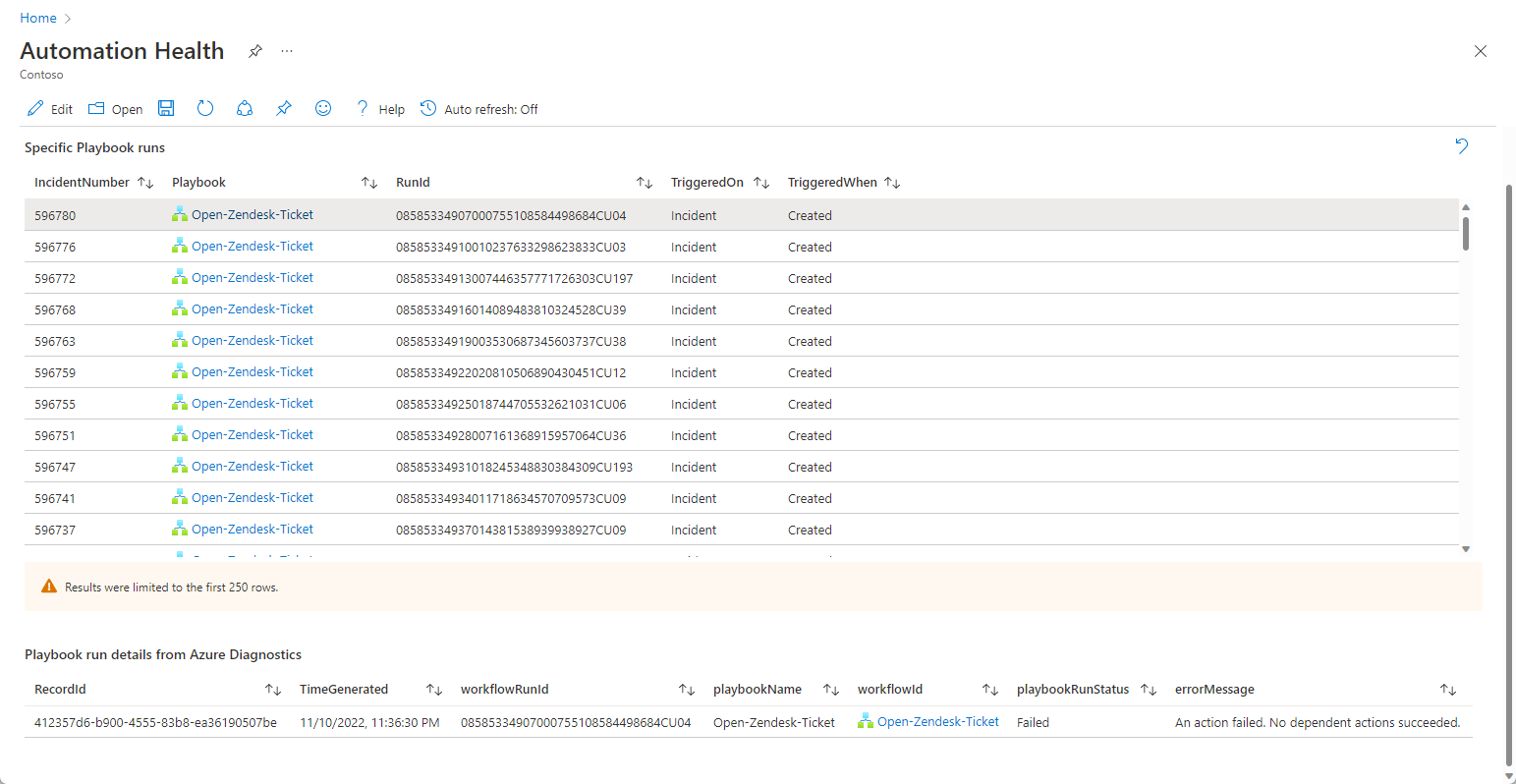
- Portal run history: the Runs tab on the Run playbook panel for an incident, alert or entity, and the Logic App resource itself under Overview, Runs history. The Defender portal Enhanced Alert Trigger runs show only on the incident Activities tab.
- Incident side:
SecurityIncidentrows withModifiedBycontaining Automation.
// Join rule runs to the playbook outcome. From Learn, monitor-automation-health.
SentinelHealth
| where SentinelResourceType == "Automation rule"
| mv-expand TriggeredPlaybooks = ExtendedProperties.TriggeredPlaybooks
| extend runId = tostring(TriggeredPlaybooks.RunId)
| join (AzureDiagnostics
    | where OperationName == "Microsoft.Logic/workflows/workflowRunCompleted"
    | project resource_runId_s, playbookName = resource_workflowName_s, playbookRunStatus = status_s)
    on $left.runId == $right.resource_runId_s
| project TimeGenerated, AutomationRuleName = SentinelResourceName, AutomationRuleStatus = Status,
          Description, workflowRunId = runId, playbookName, playbookRunStatus
// Which rules are failing and why, last 7 days
SentinelHealth
| where TimeGenerated > ago(7d)
| where OperationName == "Automation rule run" and Status != "Success"
| summarize count() by SentinelResourceName, Status, Description
| order by count_ desc
Troubleshoot
| Symptom | Likely cause | Fix |
|---|---|---|
| Playbook grey in the Run playbook list | Sentinel service account has no rights on the playbook resource group | Manage playbook permissions, tick the RG, Apply. Needs Owner on that RG |
Playbook never triggers, no SentinelHealth row | Conditions never true, or rule order let an earlier rule change the property | Check order numbers and the condition on current state. Audit with SecurityIncident ModifiedBy |
| Health shows Failure, "playbook not found or Sentinel lacks permissions" | Playbook moved or RG grant missing | Edit the rule, reselect the playbook, save. Regrant |
| Health shows "not migrated to new permissions model" | Old rule created before the service account model | Grant permissions and resave the rule |
| "Access forbidden" or 403 on run | Managed identity missing Responder or target app roles, or IP restriction on the Logic App | Check Azure role assignments on the identity, check MDE app roles, remove IP restriction blocking Sentinel |
| "Caller is missing required playbook triggering permissions" | The user running it manually lacks Logic App Contributor or Playbook Operator on the playbook RG | Assign Playbook Operator plus Responder, or Logic App Contributor |
| Step with error badge after template deploy | Connection deferred during wizard or OAuth token expired | Designer, Add new connection, or edit the API connection resource and reauthorise |
| Run errors with empty body when started from the Logic App | Used the Run trigger button | Start from Sentinel, from an automation rule, Resubmit a past run, or POST an incident to the callback URL |
| Comment or update step fails with null ARM ID | Alert or entity trigger, no incident attached | Call Alert - Get incident first, or add a condition Incident ARM ID is not equal to null |
| Incident updated repeatedly, runs pile up | Update-trigger rule reacting to its own playbook comments | Add Updated by does not equal Playbook or Automation rule, or scope on changed to |
| Parallel updates clobber each other | For each loop runs in parallel by default | Set the loop to sequential when iterations touch the same incident |
| Waiting workflow runs exceeded limit | Trigger concurrency cap | Raise maximumWaitingRuns in the trigger concurrency settings |
| Rule runs 5 to 10 minutes late in the Defender portal | Incident forwarded from Defender, then batched | Expected. Do not design for sub-minute response on incident triggers |
| Rule conditioned on Description stops matching | Defender portal removed Description from SecurityIncident | Switch to analytics rule name, tags or custom details |
| Standard playbook visible but fails to run | Private endpoint without an access restriction policy, or stateless workflow | Define the access restriction policy; use stateful |
Gotchas and limits
- Rule order is yours to manage. The portal assigns the next number, but API and CLI created rules need an explicit order, duplicates are not blocked, and rules sharing a number run in random order. Each rule evaluates the current state after earlier rules, so a severity change in rule 1 can silently skip rule 2.
- Update trigger storms. A playbook that comments on an incident is itself an update. Without an Updated by exclusion you loop. Alert grouping and AIR also raise update events. In the Defender portal the 5 to 10 minute coalescing hides intermediate states, which breaks workflows that expect each transition.
- Playbooks are fire and forget after two minutes. Anything that waits for a human (approval cards, Block or Ignore emails) runs on past the rule; later actions in the same rule do not wait for the answer.
- Consumption billing is per action execution, per connector call and per trigger poll, so a chatty enrichment loop on a noisy rule adds up. Standard is a flat plan whether used or not. Learn gives no numbers; the pricing page does.
- Cross-subscription and cross-tenant. A playbook is only visible in its own subscription until you grant the service account on its resource group. In the MSSP layout permissions sit in the playbook tenant and the Lighthouse delegation must include the Azure Security Insights app with the Automation Contributor role.
- Granting the service account on a resource group is a blanket grant. Every rule can run every playbook there. Put production playbooks in their own resource group.
- Managed identity for the Sentinel connector is still labelled preview on Learn, and the connector itself is listed as preview, despite wide use.
- Incident tasks are capped per incident; Add task fails once the limit is hit. Add Task in Simple Flows does not deduplicate on reruns.
- Alert-trigger rules only see Sentinel Scheduled and NRT alerts. Analytics-rule-attached playbooks were deprecated in June 2023 and Learn says those legacy attachments ran until March 2026; migrate anything left.
- Enhanced Alert Trigger rules are a separate table with their own caps: 500 active rules per tenant, one action per rule, no order, no expiry, no
SentinelHealthlogging, 10 minute runtime for generated playbooks, 100 generated playbooks per tenant. Not a replacement for Logic Apps playbooks yet. - Standard logic apps: no templates from the Automation page, no stateless workflows, and private endpoints need an access restriction policy or the run fails even though the playbook is selectable.
- Do not rename the Sentinel trigger, do not use the Logic Apps Run trigger button, and set For each to sequential when writing to the same incident.
- Defender portal: no manual run on alerts or entities, no rule creation from an incident, no adding or removing alerts from incidents (so playbooks cannot either), and the Azure portal goes away after 31 March 2027.
Further reading
- How to Set Up Microsoft Sentinel Playbooks Using Logic Apps, Nawaz Dhandala, February 2026. End-to-end build of notify, disable-user, block-IP and TI enrichment playbooks in one walkthrough, which Learn spreads across six pages.
- Automate Your SOC: A Guide to Sentinel Playbook Generation, Adam the Automator, June 2026. Hands-on with the Defender portal Python playbook generator and the Enhanced Alert Trigger, including a staged rollout against a ticketing system.
Only two posts in the October 2025 to October 2026 window qualified. The Microsoft Sentinel blog series on automation (Playbook Fundamentals, Automate the mundane away) is from mid 2025 and the monthly What's New posts could not be read in full at source check time.
My notes
TODO: Sohail's notes after verification.
Changelog
| Date | Change | Source |
|---|---|---|
| 2026-10-22 | Drafted from Learn, with Learn images and diagrams | [1] |