Data connectors, the Defender XDR connector and ingestion design
What it is
A data connector is the thing that gets a source into the Log Analytics workspace behind Sentinel. Everything downstream, analytics rules, hunting, UEBA, workbooks, depends on the tables the connectors fill. Pick connectors badly and you either miss the signal or pay for noise you never query. This article is the ingestion design layer that sits under the Sentinel overview and feeds analytics and incidents.
Learn groups connectors by how they move data. Service-to-service connectors are built on the Azure platform and stream Microsoft and AWS sources in near real time. Diagnostic settings connectors route Azure resource logs through Azure Monitor, often via Azure Policy. Agent connectors use the Azure Monitor Agent (AMA) with data collection rules (DCRs) for Windows events, Syslog and CEF. Custom connectors come through the Codeless Connector Framework (CCF), the Logs Ingestion API from a Function or Logic App, Logstash, or AMA directly. The legacy HTTP Data Collector API loses support after 14 September 2026, so anything still on it moves to the Logs Ingestion API or CCF.
The one connector that changes how you think about the rest is Microsoft Defender XDR. It is a single service-to-service connector that brings incidents, alerts and raw Advanced Hunting events from every Defender product. Once it is on, the standalone MDE, MDI, MDO, MDCA and Entra ID Protection alert connectors are disconnected in the background. This article spends most of its time on that connector, then on the plumbing underneath it: DCRs, transformations, tiering and ASIM. For the Defender side of the same story see the Defender XDR overview. For Defender for Cloud alerts into Sentinel see alerts and Sentinel. Query patterns for the tables named here are in KQL for Sentinel.
Licensing and prerequisites
- Sentinel bills per GB on the analytics tier, pay-as-you-go or a commitment tier starting at 100 GB per day. The data lake tier has separate ingestion, processing, storage and query meters. The first 90 days of analytics retention are free.
- Free data types:
AzureActivity,SentinelHealth,OfficeActivityfor SharePoint, Exchange and Teams, andSecurityAlertandSecurityIncidentfrom Defender XDR, Defender for Cloud, MDE, MDI, MDO, MDCA, Defender for IoT and Entra ID Protection. Raw Defender and Entra logs are paid. - Microsoft 365 E5, A5, F5, G5 and the E7 and Security variants get up to 5 MB per user per day of Microsoft 365 data at no charge under an EA, EAS or CSP agreement. The grant covers the Entra sign-in and audit tables, the Defender XDR Advanced Hunting tables such as
DeviceEvents,EmailEvents,IdentityLogonEventsandCloudAppEvents,McasShadowItReportingandInformationProtectionLogs_CL. That list is on the Azure offer page, not Learn. - Defender XDR connector: a Defender XDR licence, Security Administrator on the source tenant or equivalent, read and write on the Sentinel workspace, an account in the same Entra tenant as the workspace, and the Microsoft Defender XDR solution from the Content hub. Entity sync for on-premises AD needs UEBA on and the Defender for Identity sensor deployed.
- Entra ID connector: Microsoft Sentinel Contributor on the workspace, Security Administrator on the tenant, and read and write on Entra diagnostic settings. Sign-in logs need Entra ID P1 or P2.
AADRiskyServicePrincipalsandAADServicePrincipalRiskEventsneed Workload ID Premium. Other log types work with any Entra licence. - AMA connectors: the Syslog or Common Event Format solution installed, Monitoring Contributor to create DCRs, Virtual Machine Contributor or Azure Connected Machine Resource Administrator to deploy the agent, a role with
Microsoft.Resources/deployments/*for the template. Non-Azure machines must be Azure Arc-enabled before you enable the connector. The forwarder needs Python 2.7 or 3, rsyslog or syslog-ng, and outbound 443 to Sentinel. - Content hub: Microsoft Sentinel Contributor at the resource group level to install, update or delete solutions.
- Diagnostic settings connectors driven by Azure Policy need Owner on the policy assignment scope.
How it works
Ingestion paths by connector type
Every path ends at the workspace, but the control point differs. Service-to-service and diagnostic settings connectors are configured in the portal and processed by hardcoded workflows plus the workspace transformation DCR. AMA paths are controlled by standard DCRs that the agent downloads. API paths carry the DCR ID in the call.
Content hub and solutions
Connectors ship inside solutions. A solution bundles the connector with analytics rules, hunting queries, workbooks, parsers and playbooks. The Data connectors page only lists connectors from installed solutions, so if a connector is missing, install its solution first. Solutions that use the AMA connectors for CEF, Syslog or custom logs have dependencies; Install with dependencies pulls the shared connector solution in. Standalone content updates itself, solutions you update in bulk from list view. The same packages can be deployed as code: the Get Product Package API returns properties.mainTemplate, an ARM template you deploy with REST, CLI or PowerShell.
The Defender XDR connector in depth
The connector has three independent parts on its page: incidents and alerts, entities, and events.
Incidents and alerts. Defender XDR correlates alerts from MDE, MDI, MDO and MDCA, plus Purview DLP, Entra ID Protection and Insider Risk Management, into incidents. The connector syncs those incidents with all their alerts into the Sentinel queue, typically within five minutes, then into SecurityIncident a few minutes later. SecurityAlert and SecurityIncident are free. The sync is bi-directional: status, owner and closing reason sync with zero delay, title, severity, tags, comments and additional data sync as is, and classification is translated between the two models (Defender True Positive becomes Sentinel True Positive, Suspicious activity, and so on). When Defender merges incidents, the surviving incident keeps all alerts and the other is closed with a redirected tag. A Sentinel incident holds at most 150 alerts; larger Defender incidents show 150+ with a link back.
Deduplication. When you connect, tick Turn off all Microsoft incident creation rules for these products. That stops Sentinel creating a second incident for every alert Defender already grouped. In the Defender portal those rules are unsupported anyway, because Defender's correlation engine owns incident creation. Consequences: alert filtering moves to alert tuning in Defender or to automation rules, incident titles come from Defender so automation conditions on title break (use tags), and products outside XDR, such as Insider Risk Management, need scheduled analytics rules instead of incident creation rules. Defender for Cloud incidents arrive through the XDR connector but come in empty unless the Defender for Cloud connector is also on.
Entities. Connect entities turns on the on-premises AD entity feed through UEBA. It needs UEBA enabled and the Active Directory checkbox applied on the Entity behavior configuration page.
Events. This is the paid part. Connect events streams Advanced Hunting tables into the workspace with the same schema as the Defender portal, grouped by product: Defender for Endpoint (DeviceInfo, DeviceNetworkInfo, DeviceProcessEvents, DeviceNetworkEvents, DeviceFileEvents, DeviceRegistryEvents, DeviceLogonEvents, DeviceImageLoadEvents, DeviceEvents, DeviceFileCertificateInfo), Defender for Office 365, Defender for Identity, Defender for Cloud Apps and Defender alerts. Each table is a checkbox, so you choose what you pay for. Retention can exceed Defender's 30 days through workspace or per-table retention. The TVM tables (DeviceTvmSoftwareInventory, DeviceTvmSoftwareVulnerabilities and the other ten DeviceTvm* tables) appear in the schema but are never ingested; queries return nothing.
Workspace scope. Learn describes the connector in terms of one Sentinel workspace tied to one Entra tenant, and the Defender portal onboarding wires one primary workspace to the tenant's Defender XDR. TODO: confirm on Learn the current rule for a second workspace in the same tenant before relying on it.
Entra ID, Microsoft 365, Azure Activity and Defender for Cloud
Entra ID is a diagnostic settings connector exposed as checkboxes: SigninLogs, AuditLogs, AADNonInteractiveUserSignInLogs, AADServicePrincipalSignInLogs, AADManagedIdentitySignInLogs, ADFSSignInLogs, AADProvisioningLogs, MicrosoftGraphActivityLogs, NetworkAccessTraffic, RemoteNetworkHealthLogs, EnrichedOffice365AuditLogs and the four Identity Protection tables. The role requirement for read and write on Entra diagnostic settings tells you what the page does under the hood. Non-interactive and service principal sign-ins are usually the biggest volume; decide per table.
Microsoft 365 is service-to-service and free: OfficeActivity for Exchange, SharePoint and Teams. Azure Activity uses the diagnostic settings pipeline through an Azure Policy assignment scoped to a subscription or management group, with a remediation task for existing subscriptions, and is free. If subscriptions were connected with the legacy method, Disconnect All first. Defender for Cloud has a tenant-based connector (preview) and a legacy subscription-based one, both landing in SecurityAlert with optional bi-directional sync. In the Defender portal the tenant-based connector is hidden because XDR already carries those alerts.
The MDE streaming API alternative
If you only want raw MDE telemetry somewhere else, Defender has its own export. Settings > Endpoints > Data export settings sends chosen Advanced Hunting tables to an Event Hubs namespace or a storage account. Each record carries a category of AdvancedHunting-<TableName> and the event JSON in properties. Defender XDR's streaming API covers 21 GA tables including the Device, Email, Identity, CloudAppEvents, UrlClickEvents and Alert tables. One namespace holds 10 event hubs unless dedicated, and exported volume can exceed estimate_data_size(). This is the path for a third-party SIEM or a data lake outside Sentinel; for Sentinel itself the XDR connector is simpler and the E5 grant applies.
Data collection rules and transformations
A DCR is an Azure resource under Microsoft.Insights/dataCollectionRules that says what to collect, the incoming schema, the transformation and the destination. For AMA it is attached to a machine through a data collection rule association; a machine can carry up to 30 DCRs. For the Logs Ingestion API the DCR ID goes in the call. A workspace transformation DCR is attached to the workspace itself and applies to all traffic into a supported table, which is how you filter diagnostic settings and service-to-service feeds like Entra ID and Office 365 that have no DCR of their own.
transformKql runs KQL against each record before storage. Filter rows or columns to cut cost, enrich with parsed values, mask sensitive fields, or normalise into ASIM tables. With Sentinel on the workspace, transformations into analytics tables are exempt from Azure Monitor's filtering charge no matter how much you drop; basic tables are charged when a transformation drops more than half the data. Legacy codeless connectors and Azure Functions connectors do not support transformations. For Windows events the cheapest filter is upstream of the DCR transformation: the XPath in the data source, which the agent applies at the machine.
Tier per table
Learn now describes two tiers. The analytics tier holds primary security data: EDR, authentication, cloud audit, TI, external alerts. It has 90 days interactive retention by default, up to two years, and unlimited queries at no per-query cost. The data lake tier holds secondary data: storage access logs, NetFlow, VPC flow, TLS certificate logs, proxy, firewall and IoT logs. It is cheap to keep and query on demand, and KQL jobs can summarise it back into the analytics tier. By default a connector's tables go to analytics and are mirrored to the lake with the same retention. Switching a table to Data lake tier only stops analytics ingestion for it. The older basic and auxiliary plans are not named on the current Learn pages; TODO: check the Azure Monitor table plan page for how an existing basic-plan table maps to the new tiers.
ASIM in one paragraph
ASIM is the normalisation layer: a set of schemas (Authentication, Network Session, Process Event, DNS, Web Session, File, Registry, Audit, Email, User Management and more) and KQL parsers that map each source into them. Source-specific parsers read one product's table; unifying parsers such as imAuthentication union them so one rule covers Okta, AWS and Entra at once. Query-time parsing leaves data untouched but can be slow at scale, so Sentinel can also normalise at ingestion through DCR transformations into native ASim*Logs tables. Install the ASIM parsers when you use Windows Forwarded Events or any CEF source you intend to write rules against.
Configure
- Portal
- Azure CLI
- REST / ARM
Defender XDR connector, Azure portal path (in the Defender portal the connector is enabled automatically at onboarding):
- Content hub > search Microsoft Defender XDR > Install.
- Configuration > Data connectors > Microsoft Defender XDR > Open connector page.
- Under Connect incidents and alerts, tick Turn off all Microsoft incident creation rules for these products, then Connect incidents & alerts. The checkbox disappears once connected.
- Under Connect entities, follow the UEBA link, set the toggle On, tick Active Directory (Preview), Apply.
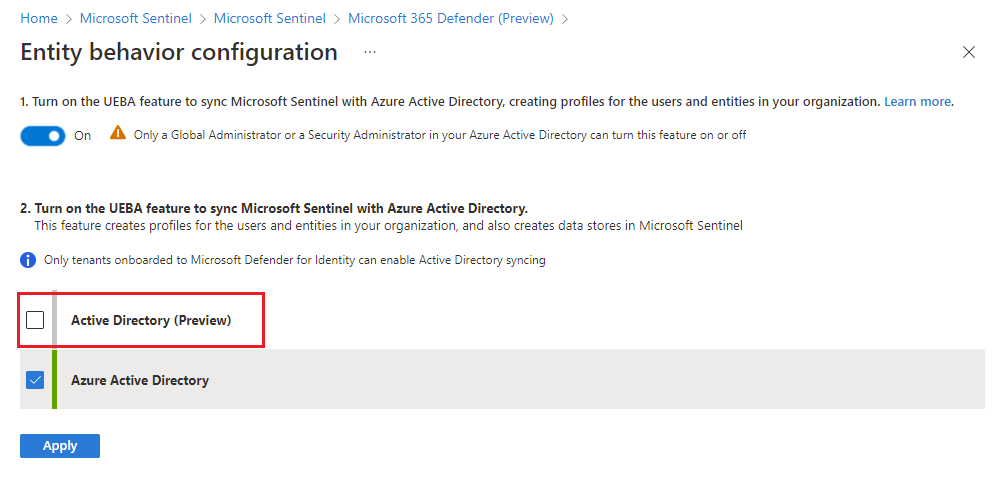
- Under Connect events, open each product tab and tick only the tables you will query or that the E5 grant covers. Apply Changes.
- Expect component connectors (MDE, MDI, MDO, MDCA alerts, Entra ID Protection) to show as connected but carry no data from now on.
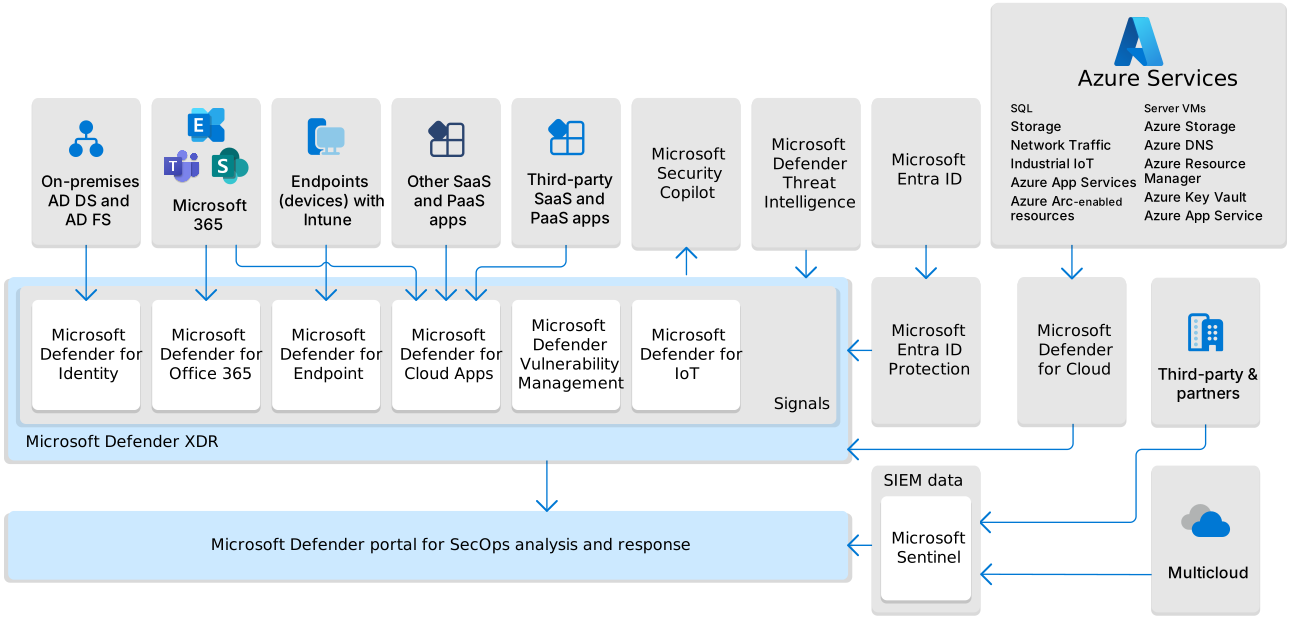
Entra ID connector:
- Content hub > Microsoft Entra ID > Install.
- Data connectors > Microsoft Entra ID > Open connector page.
- Tick the log types. Start with
SigninLogs,AuditLogs,AADNonInteractiveUserSignInLogs,AADServicePrincipalSignInLogs,AADManagedIdentitySignInLogsand the four risk tables. Apply changes. - Data takes time to arrive; the connector page then shows a Data received graph and per data type status.
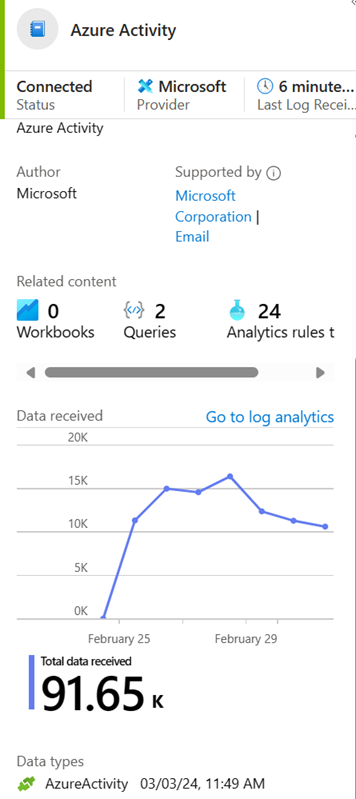
Syslog or CEF via AMA with a DCR:
- Content hub > install Syslog or Common Event Format.
- Data connectors > Syslog via AMA or Common Event Format (CEF) via AMA > Open connector page > +Create data collection rule.
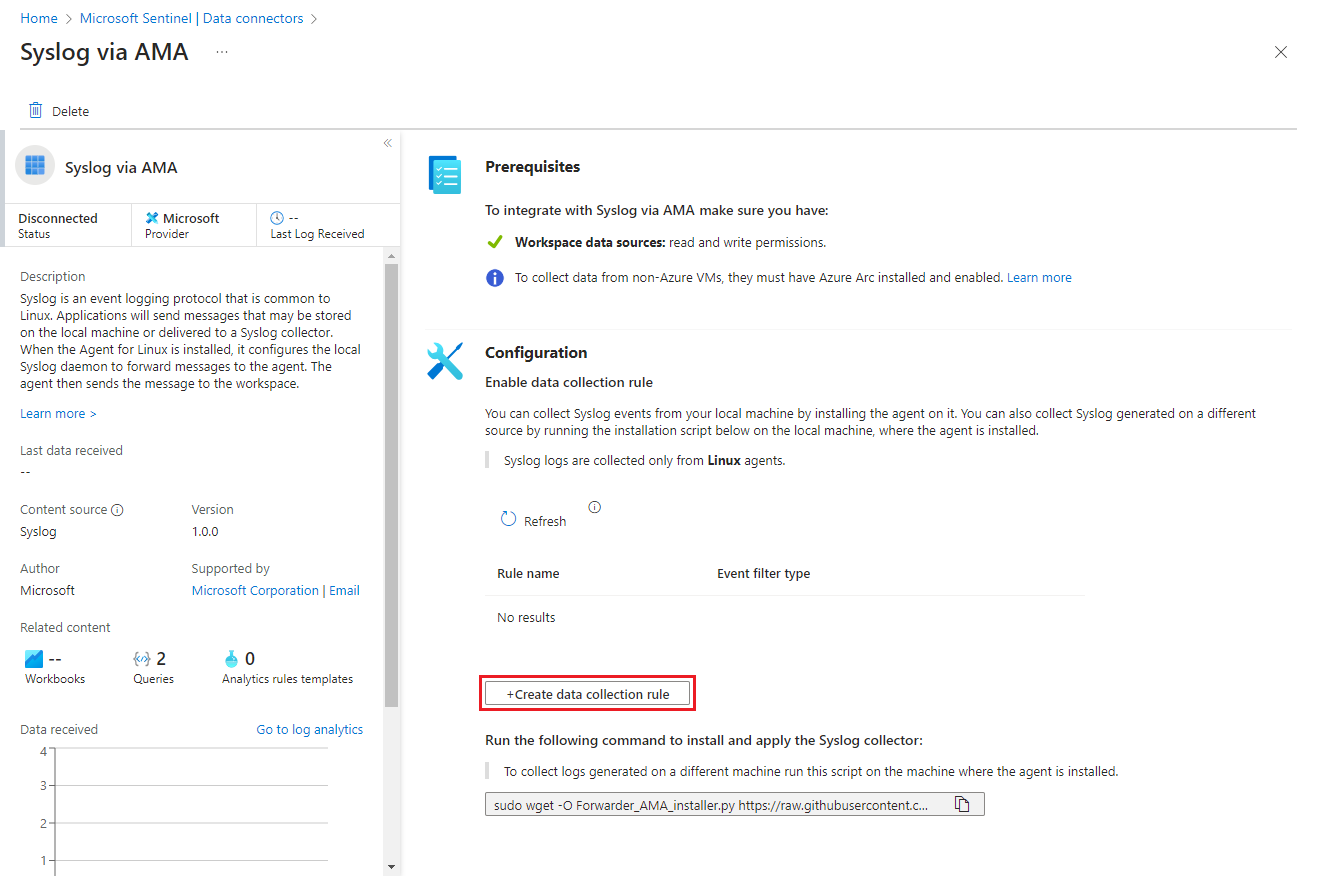
- Basics: name, subscription, resource group. Resources: pick the forwarder VM. If it is missing, the Arc Connected Machine agent is not installed.
- Collect: choose the minimum log level per facility. A level includes everything more severe, so LOG_ERR also brings CRIT, ALERT and EMERG.

- Review + create. The connector installs AMA on the selected machines. Refresh the connector page to see the DCR.
- On the forwarder run the installation script from the connector page. It configures rsyslog or syslog-ng, opens 514 UDP and TCP and restarts the daemon. Read it before running it as root.

- Point the appliances at the forwarder on 514. Device-specific steps are in the CEF via AMA and Syslog via AMA device articles.
Windows Security Events via AMA follows the same wizard with +Add data collection rule, resources can be subscriptions, resource groups or machines, and Collect offers All events, Common, Minimal or Custom XPath (up to 20 expressions per box, 100 boxes per rule, XPath 1.0 only).
Tier per table: on the connector page under Table management, select the table > Manage table, set Analytics retention and Total retention, or select Data lake tier only.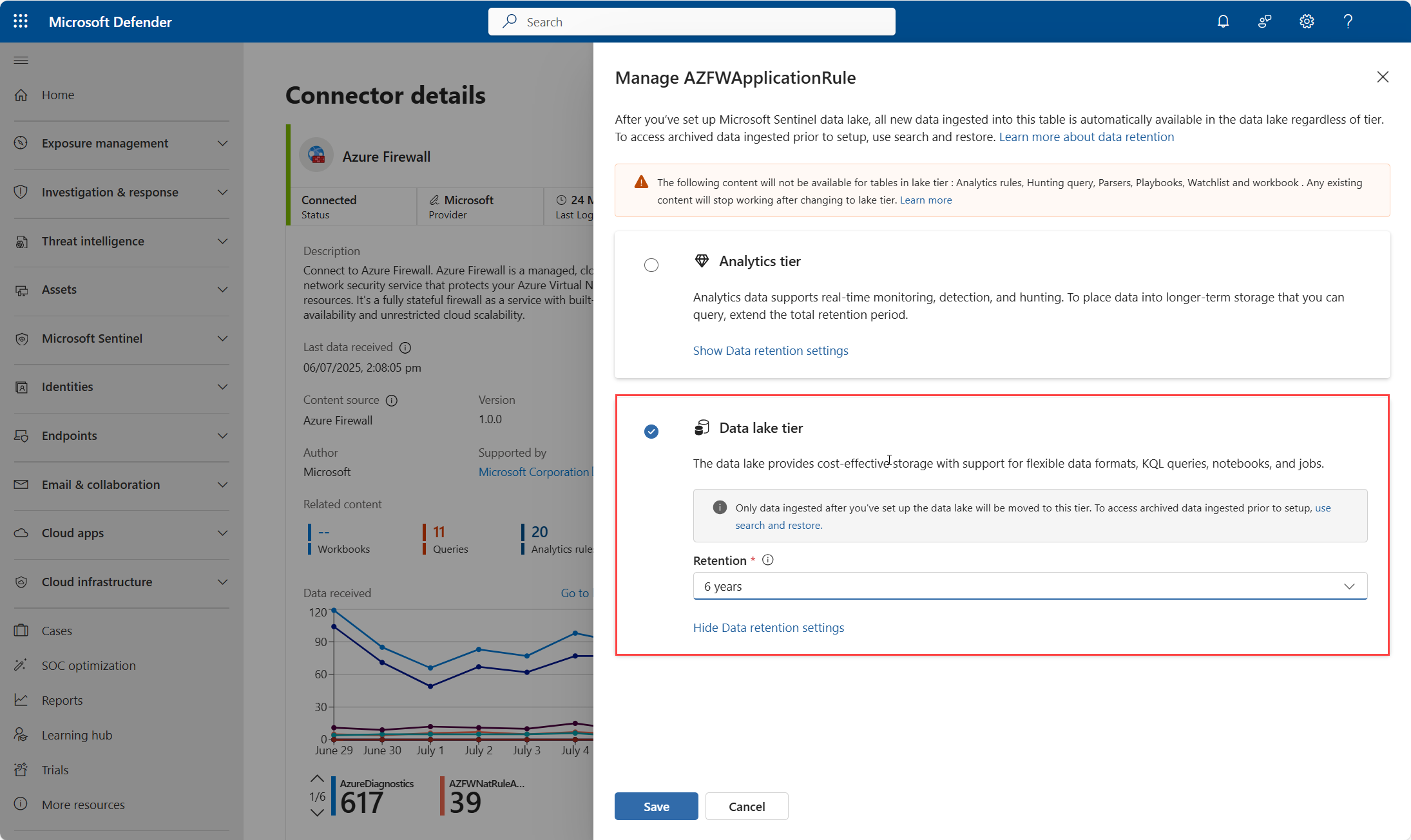
# Tested on: TODO
# Needs the monitor-control-service extension (auto-installs, az 2.61+)

# Create a DCR from a JSON file (Syslog sample from Learn in dcr-syslog.json)
az monitor data-collection rule create \
  --resource-group rg-sentinel --location eastus \
  --name dcr-syslog-fwd --rule-file ./dcr-syslog.json \
  --description "Syslog from forwarder, daemon and syslog warning and above"

az monitor data-collection rule list --resource-group rg-sentinel -o table
az monitor data-collection rule show --name dcr-syslog-fwd --resource-group rg-sentinel

# Sentinel connectors (sentinel extension, experimental)
az sentinel data-connector list -g rg-sentinel -w law-sentinel -o table
az sentinel data-connector show -g rg-sentinel -w law-sentinel --data-connector-id <guid>
{
  "location": "eastus",
  "properties": {
    "dataSources": {
      "syslog": [
        {
          "name": "syslogBase",
          "streams": ["Microsoft-Syslog"],
          "facilityNames": ["daemon", "syslog"],
          "logLevels": ["Warning", "Error", "Critical", "Alert", "Emergency"]
        }
      ]
    },
    "destinations": {
      "logAnalytics": [
        {
          "workspaceResourceId": "/subscriptions/<sub>/resourceGroups/rg-sentinel/providers/Microsoft.OperationalInsights/workspaces/law-sentinel",
          "name": "centralWorkspace"
        }
      ]
    },
    "dataFlows": [
      {
        "streams": ["Microsoft-Syslog"],
        "destinations": ["centralWorkspace"],
        "transformKql": "source",
        "outputStream": "Microsoft-Syslog"
      }
    ]
  }
}
# Az PowerShell, from Learn: validate and push a DCR JSON with the REST API
param (
    [Parameter(Mandatory = $true)][string]$ResourceId,
    [Parameter(Mandatory = $true)][string]$FilePath
)
$DCRContent = Get-Content $FilePath -Raw
try { $null = $DCRContent | ConvertFrom-Json } catch { Write-Host "Invalid JSON"; exit 1 }
Invoke-AzRestMethod -Path ("$ResourceId" + "?api-version=2023-03-11") -Method PUT -Payload $DCRContent

# Read an existing DCR for editing
$DCR = Invoke-AzRestMethod -Path ("$ResourceId" + "?api-version=2023-03-11") -Method GET
The association command (az monitor data-collection rule association create) and New-AzDataCollectionRule exist but the Learn pages fetched here did not show their syntax. TODO: confirm parameters with --help and Get-Help before adding them.
Data connectors live under the workspace:
PUT https://management.azure.com/subscriptions/{subscriptionId}/resourceGroups/{resourceGroupName}/providers/Microsoft.OperationalInsights/workspaces/{workspaceName}/providers/Microsoft.SecurityInsights/dataConnectors/{dataConnectorId}?api-version=2025-09-01
{
  "kind": "Office365",
  "properties": {
    "tenantId": "{tenantId}",
    "dataTypes": {
      "sharePoint": { "state": "Enabled" },
      "exchange": { "state": "Enabled" },
      "teams": { "state": "Enabled" }
    }
  }
}
The 2025-09-01 kind enum covers AzureActiveDirectory, AzureSecurityCenter, MicrosoftCloudAppSecurity, ThreatIntelligence, Office365, AmazonWebServicesCloudTrail, AzureAdvancedThreatProtection, MicrosoftDefenderAdvancedThreatProtection, MicrosoftThreatIntelligence, PremiumMicrosoftDefenderForThreatIntelligence and RestApiPoller. No Defender XDR kind is in that stable list, so treat the XDR connector as portal and onboarding driven. TODO: check the preview api-versions for a MicrosoftThreatProtection kind. GET on the dataConnectors collection lists what is configured.
Data collection rules:
PUT https://management.azure.com/subscriptions/{subscriptionId}/resourceGroups/{resourceGroupName}/providers/Microsoft.Insights/dataCollectionRules/{dataCollectionRuleName}?api-version=2023-03-11
Body is the same DCR JSON as the CLI tab. For Windows Security Events the Learn sample uses stream Microsoft-SecurityEvent with an xPathQueries entry such as Security!*[System[(EventID=4688) or (EventID=4624) or (EventID=4663)]]. The API returns fuller compile errors than CLI or PowerShell, which matters when a transformKql fails validation. Solutions can be deployed as code by taking properties.mainTemplate from the Get Product Package API and deploying it as an ARM template.
Verify
- Connector page: status Connected, Data received graph populated. For Azure Policy driven connectors the green status only means data arrived in the last 14 days.
- Turn on health monitoring (Settings > Auditing and health monitoring > Enable) so
SentinelHealthrecords data fetch status changes and hourly failure summaries for supported connectors. Install the Data collection health monitoring workbook from the Content hub for ingestion volume, EPS, anomalies and agent heartbeat. - Forwarder side:
sudo ss -lnp | grep -E "28330|514"should show rsyslogd on 514 and mdsd on 28330,systemctl status azuremonitoragentactive, and the VM extension AzureMonitorLinuxAgent at Provisioning succeeded. Allow up to 20 minutes for first data.
// XDR incidents arriving
SecurityIncident
| where ProviderName == "Microsoft XDR"
| summarize count() by bin(TimeGenerated, 1d)
// Which tables are actually populating, and how much, last 24h (billable only)
Usage
| where TimeGenerated > ago(1d) and IsBillable
| summarize GB = round(sum(Quantity) / 1024, 2) by DataType
| order by GB desc
// Agent heartbeat per machine
Heartbeat
| where TimeGenerated > ago(1h)
| summarize LastBeat = max(TimeGenerated) by Computer, Category, Version
// Latest connector failure per resource (from Learn)
SentinelHealth
| where TimeGenerated > ago(3d)
| where OperationName == 'Data fetch status change'
| where Status in ('Success', 'Failure')
| summarize TimeGenerated = arg_max(TimeGenerated, *) by SentinelResourceName, SentinelResourceId
| where Status == 'Failure'
// CEF test message landed in the right table
CommonSecurityLog
| where TimeGenerated > ago(1d) and DeviceProduct == "MOCK"
TODO: the Usage and Heartbeat queries are standard Log Analytics tables and were not taken from the Sentinel pages used here. Confirm columns in the dev tenant.
Troubleshoot
| Symptom | Likely cause | Fix |
|---|---|---|
| Connector shows Connected but tables are empty | Status reflects the last 14 days, or data types were never ticked, or the event checkboxes on the XDR page were not applied | Check per data type status on the connector page, re-apply the table selection, query Usage by DataType |
XDR events missing for DeviceTvm* tables | TVM tables are in the schema but never ingested | Run TVM queries in Defender Advanced Hunting or build a custom ingestion path |
| Duplicate incidents for the same alerts | Microsoft incident creation rules still active for XDR products, or a standalone Defender connector plus XDR in the same workspace | Disable the incident creation rules, rely on the XDR connector only |
| Defender for Cloud incidents arrive with no alerts or entities | Only the XDR connector is on | Enable the Defender for Cloud connector as well |
| Automation rule stopped matching on incident title | Titles now come from Defender's correlation engine | Condition on tags or alert product name instead |
| DCR created but forwarder sends nothing | DCR not associated with the VM, or AMA has not pulled it | grep -r SECURITY_CEF_BLOB /etc/opt/microsoft/azuremonitoragent/config-cache/configchunks; if empty, fix the association and wait |
| Forwarder not listed in the DCR Resources tab | Non-Azure machine without the Arc Connected Machine agent | Install and connect Arc first, then rerun the wizard |
CEF events land in Syslog instead of CommonSecurityLog | Same facility used for both Syslog and CEF, or a malformed header | Remove CEF facilities from the Syslog DCR, or add a transformKql dropping rows where ProcessName or SyslogMessage contains CEF; validate the header has all pipe-separated fields and CEF:0 |
CEF fields end up in AdditionalExtensions | Vendor keys do not map to standard CEF fields | Expected; parse them in a function or ASIM parser |
TimeGenerated and EventTime disagree by hours | Forwarder and source in different time zones; EventTime has no zone and is converted with the forwarder offset | Align the forwarder clock and zone, or use TimeGenerated for rules |
| AMA stops sending | Forwarder disk full | Configure rsyslog or syslog-ng not to store unneeded logs; size per the AMA performance benchmark |
| Built-in Windows rules never fire on forwarded events | Data is in WindowsEvent, rules query SecurityEvent | Use Windows Security Events via AMA, or rewrite the rule for WindowsEvent or an ASIM parser |
| Transformation rejected on PUT | KQL not supported in transformations | Push through the REST API for the full compile error, then simplify the query |
| Entra ID connector page shows no status | Account lacks read and write on Entra diagnostic settings | Grant Security Administrator or the diagnostic settings permissions |
| Legacy Azure Activity subscriptions duplicate rows | Old and new pipelines both active | Disconnect All under the legacy section, keep the Policy assignment |
Gotchas and limits
- Enabling the XDR connector silently disconnects the MDE, MDI, MDO, MDCA alert and Entra ID Protection connectors. They still look connected. Expect alert schema differences compared with the standalone connectors; existing queries on
SecurityAlertmay need changes. - The free table list is a moving target. Today it is alerts, incidents,
AzureActivity,OfficeActivityandSentinelHealth. The E5 grant covers specific raw tables up to 5 MB per user per day and nothing beyond. Re-check the billing page before quoting a client. - Workspace onboarding to the Defender portal is one primary workspace per tenant in the Learn text used here; the full multi-workspace rule is a TODO above. Do not design for two XDR-connected workspaces without checking.
- Transformations are free into analytics tables when Sentinel is on the workspace, but data lake processing is a separate meter, and basic tables pay when more than 50 percent is dropped. Dropping columns is not free in effort: every rule that referenced them breaks.
- Retention is per table. Analytics interactive retention tops out at two years; Total retention extends into the lake. Setting a table to lake only is a one-way change for new data, so do it after you have moved any analytics rules off that table.
- A machine takes at most 30 DCRs. Workspace transformation DCRs need time to take effect after you change them.
- The portal DCR wizard only sets a minimum severity per facility. Finer filtering needs a DCR written by hand or through the API.
SyslogandCommonSecurityLogduplication is the most common cost surprise on a shared forwarder. Fix facilities at the source or add the transform before volume builds.- The HTTP Data Collector API ends 14 September 2026. The Azure portal for Sentinel ends 31 March 2027. Any new connector design should assume the Defender portal and the Logs Ingestion API.
- Data lake records cannot be purged for GDPR requests; only the analytics tier supports purge. Plan lake retention with that in mind.
Further reading
- How to store Defender XDR data for years in Sentinel data lake without expensive ingestion cost, Jeffrey Appel, October 2025. Walks through a workspace transformation that routes XDR tables such as
DeviceProcessEventsinto lake-tier custom tables, which Learn describes only in the abstract. - Sentinel Connector to Table Mapping, Marcus Burnap, December 2025. Argues for designing ingestion from the table outward and points at an open-source MCP server that maps connectors to the tables and content they feed.
- Master Log Tiering With Microsoft Sentinel data lake, Charbel Nemnom, February 2026. End-to-end tiering walkthrough with KQL jobs and summary rules pulling lake data back into analytics, with cost trade-offs Learn does not quantify.
- Understand your Sentinel tables at a glance: Monitor with table insights, Microsoft Security Community, June 2026. Introduces the Table insights panel for per-tier ingestion volume, the quickest way to see what a connector change did to cost.
My notes
TODO: Sohail's notes after verification.
Changelog
| Date | Change | Source |
|---|---|---|
| 2026-10-22 | Drafted from Learn, with Learn images and diagrams | [1] |