KQL for Sentinel, hunting, workbooks and notebooks
What it is
KQL is the one language under everything in Sentinel. Analytics rules, hunting queries, workbooks, watchlists, notebooks via Kqlmagic, the Logs blade, the Advanced hunting page in the Defender portal: all of it is a read-only KQL query against a Log Analytics workspace. Learn's own estimate is that the basics cover 75 to 80 percent of daily queries. This article is that 80 percent, plus the Sentinel-specific surfaces around it.
Sentinel data falls into four buckets. Connector data in predefined tables such as SigninLogs and CommonSecurityLog. Custom tables from custom connectors. Data Sentinel creates itself: SecurityAlert, SecurityIncident, HuntingBookmark, UEBA tables, SentinelHealth. And support data you upload: threat intelligence and watchlists. Every table has TimeGenerated, and that column is indexed, which drives most of the performance advice below.
What this article is not: a Defender XDR Advanced hunting guide. Same language, different tables, no bookmarks, different result handling. That lives in EDR and hunting. It also does not cover rule authoring, which is in analytics and incidents. Where the data comes from is in data connectors, and the workspace model in the overview.
Licensing and prerequisites
- Querying needs a Sentinel-enabled Log Analytics workspace. There is no separate KQL licence. Query cost on Analytics tables is zero; Basic and Auxiliary tables bill per GB scanned.
- Roles. Reading and running functions:
Microsoft.OperationalInsights/workspaces/query/*/read, which Log Analytics Reader has. Saving functions and hunting queries:savedSearches/write, which Log Analytics Contributor has. Hunts: Microsoft Sentinel Contributor or a custom role withMicrosoft.SecurityInsights/hunts. Search jobs:tables/writeandsearchJobs/write. Restore:tables/writeandrestoreLogs/write. Workbooks: Workbook reader or Workbook contributor on the resource group of the workspace. - Notebooks need an Azure Machine Learning workspace on top of Sentinel Reader, Responder or Contributor. Compute is billed as Azure ML compute.
- Defender XDR raw tables (
DeviceProcessEvents,EmailEventsand friends) only exist in the workspace if the Defender XDR connector is streaming them. See data connectors. - Azure Lighthouse delegated access does not work for search jobs or restore, even with a delegated role that holds the right action.
- After 31 March 2027 the Azure portal Sentinel experience is retired. Everything here that says "Logs blade" has an Advanced hunting equivalent in the Defender portal, with the exceptions called out in Gotchas.
How it works
The pipeline model
A query is a tabular expression: a table name, then operators chained with |. Each operator takes a table in and hands a table out. Order matters for results and for cost. Learn's best-practice order is: name only the tables you need, where on TimeGenerated first because that column is indexed and whole shards get skipped, then string and dynamic predicates by selectivity, then numeric, then the full-scan predicates like contains. let statements go first and end with ;. KQL is case sensitive for table names, columns, operators and functions.
Operators that earn their place
| Operator | What it does | Note |
|---|---|---|
where | Row filter | Put datetime predicates first. has matches whole tokens and uses the index; contains scans substrings. Use == and in over =~ and in~ when case is known. |
project, project-away, extend | Column shaping | extend adds and keeps the rest; project keeps only what you name. Filter on table columns, not on a column you just extended. |
summarize | Aggregation | count(), dcount(), make_set(), make_list(), arg_max(TimeGenerated, *) for latest row per key, by bin(TimeGenerated, 1h) for buckets. |
join kind= | Correlate two tables | Default is innerunique, which dedupes the left side and surprises people. Use inner, leftouter, leftanti or leftsemi on purpose. Smaller table on the left. in beats a left semi join on one column. lookup beats join when the right side is small. |
union | Stack tables | Name the tables. union * and search * are the two fastest ways to a timeout. |
let | Variables, subqueries, functions | Wrap a let that is used twice in materialize(). |
parse, extract() | Pull fields from strings | parse when the string format is fixed, extract() with a regex when it is not. Several extract() calls on one column is a smell. |
mv-expand | Explode a dynamic array to rows | Needed for SecurityAlert.Entities, AuditLogs.TargetResources, AuthenticationDetails. |
ago(), between, startofday() | Time | ago(7d) is relative to now in UTC. Use between (datetime(...) .. datetime(...)) for fixed windows. |
datatable | Inline table | Test data, small lookup lists, mapping tables in a let. |
take, top, sort, distinct, count | Sampling and ordering | End a new query with take 20 or count until you know its shape. |
Table map by source
The tables you will touch most:
SecurityEvent: Windows events from the AMA Security Events connector. About 250 columns.EventID,Computer,Account,TargetUserName,IpAddress,LogonType,NewProcessName,ParentProcessName,CommandLine. Supports Basic and Auxiliary plans and DCR transformations.SigninLogs: Entra interactive sign-ins.ResultTypeis a string,"0"is success.RiskLevelDuringSignIn,RiskLevelAggregated,RiskState,ClientAppUsed,AuthenticationRequirement,ConditionalAccessStatus.MfaDetailis deprecated; useAuthenticationDetails. Non-interactive, service principal and managed identity sign-ins are separate tables.AuditLogs: Entra directory changes.OperationName,InitiatedBy,TargetResourcesas dynamic.SecurityAlertandSecurityIncident: what Sentinel and connected Defender products raised.Entitiesis a JSON string you parse. With the XDR connector,SecurityIncidentcarriesProviderName == "Microsoft XDR".OfficeActivity: Exchange, SharePoint, Teams audit via the Office 365 connector.CommonSecurityLog: CEF over AMA, firewalls and proxies.Syslog: raw Linux syslog.- Defender XDR raw tables: the connector streams the ten
Device*tables from MDE, plus Office 365, Identity, Cloud Apps and alert tables selected in the connector.DeviceTvm*tables appear in the schema but return nothing in Sentinel; query those in Advanced hunting. Heartbeat: one row per agent per minute.Usage: hourly billable MB per table,DataType,Solution,Quantity,IsBillable.
ASIM parsers
ASIM normalises at query time. A parser is a KQL function that maps a source table to a schema such as Authentication, Dns, NetworkSession or ProcessEvent. The unifying parser _Im_<schema> calls every source-specific parser _Im_<schema>_<source>V<n> and unions them. _ASim_<schema> is the legacy form with no filtering parameters. Built-in parsers exist in every workspace; workspace-deployed ones come from the GitHub ARM template under slightly different names, for development or customised copies.
Use the unifying parser when you want "all DNS" or "all authentication" regardless of vendor, and when writing content that should survive a firewall swap. Learn recommends parsers over raw tables in workbooks for that reason. Always pass the filtering parameters as named arguments, because they filter before the parse and Learn says prefiltered parsers often beat raw tables. Skip ASIM when you need vendor-specific fields the schema drops, unless the parser supports pack=true, which stuffs the extras into AdditionalFields.
// ASIM: NXDOMAIN bursts across every DNS source, prefiltered
_Im_Dns(starttime=ago(1d), responsecodename='NXDOMAIN')
| summarize count() by SrcIpAddr, bin(TimeGenerated, 15m)
| where count_ > 200
Functions and saved queries
A function is a saved query callable by name. Solution functions ship with Azure Monitor and are read-only; workspace functions are yours. Names cannot have spaces or special characters and cannot start with _, which is reserved. Parameters have a type, name and optional default; parameters without defaults are ordered before those with defaults, whatever order you created them in. Under the hood a function is a savedSearches resource with functionAlias set. A plain saved query is the same resource without the alias.
The hunting blade
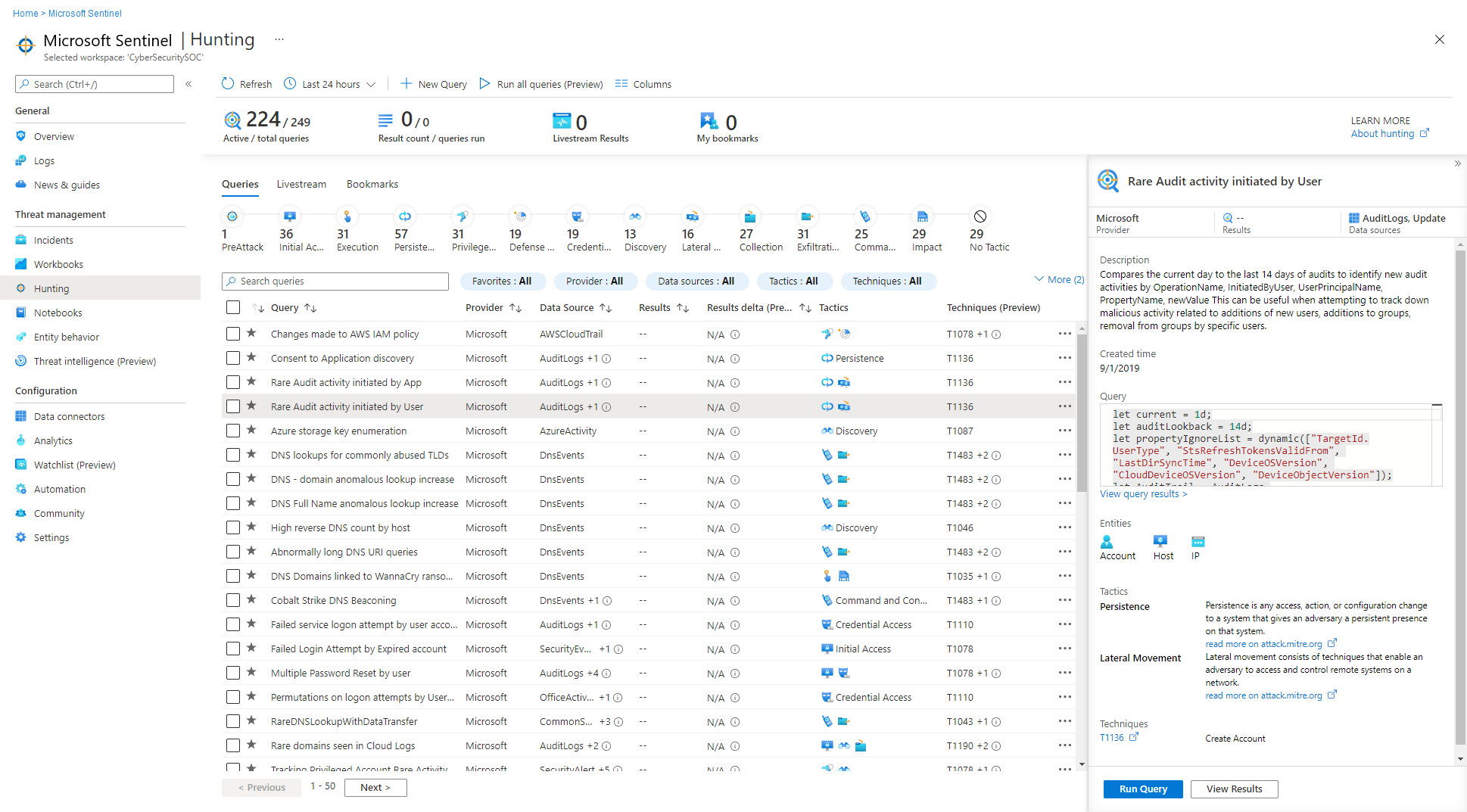
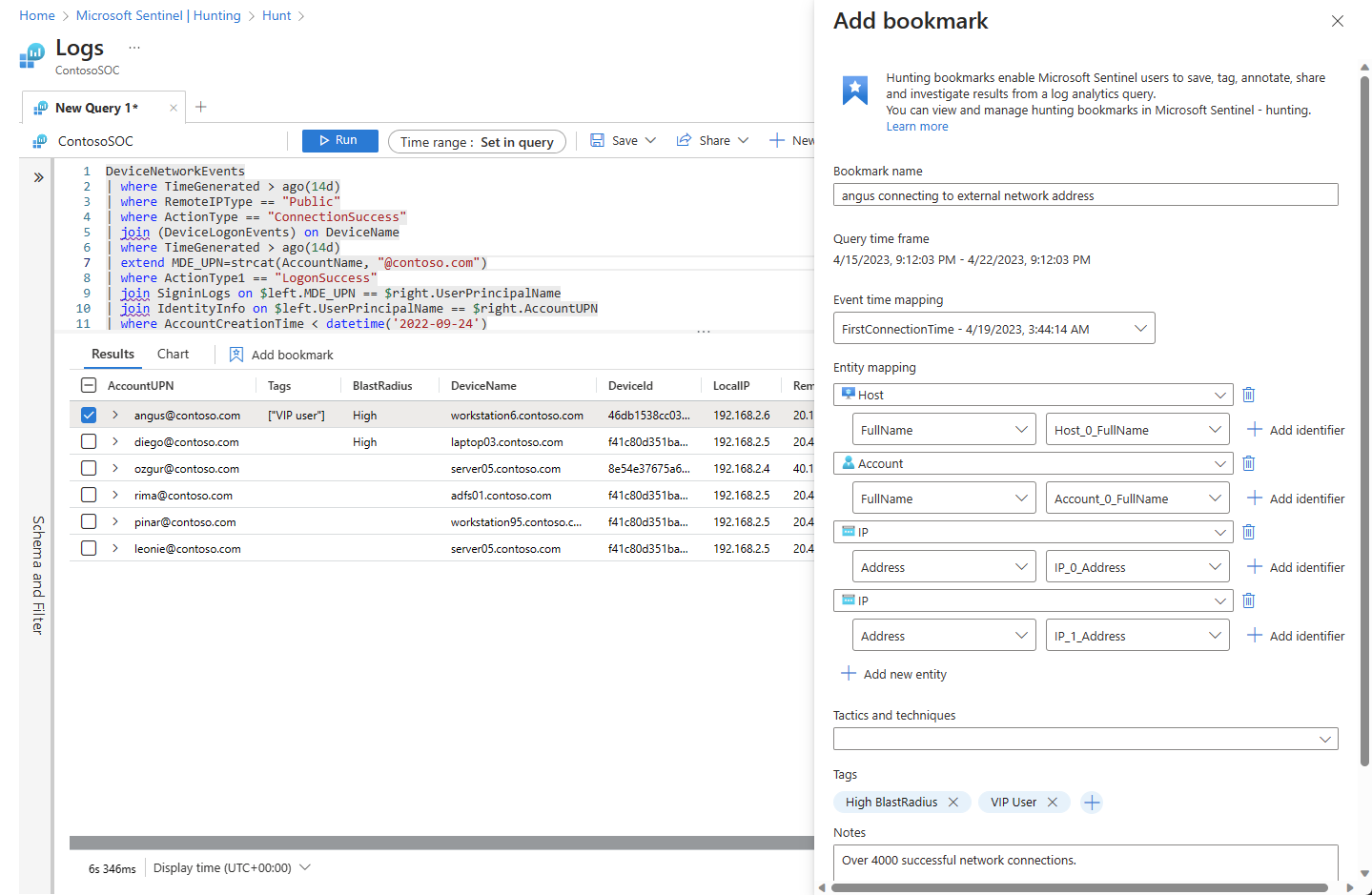
Hunting in Sentinel has four parts. Queries: content hub and custom KQL grouped by MITRE tactic, with a Results column and a Results delta that compares the last 24 hours against the 24 to 48 hours before. N/A means the required table is not connected. Bookmarks: rows you keep, with the query, time range, entity mapping, tactics, tags and notes. Each save writes a row to HuntingBookmark; deletes write a row with SoftDelete true, so the table is history, not state. Hunts: a container that clones queries, holds bookmarks and entities, tracks hypothesis state and links the analytics rules and incidents that came out of it. Livestream: gone. Learn now says livestreams are no longer available and points at KQL jobs, analytics rules and playbooks.
Workbooks
Sentinel workbooks are Azure Monitor workbooks. Each saved workbook is an Azure resource in the workspace resource group, tagged with the workspace, under Azure RBAC. Templates arrive with content hub solutions. Saving a template creates a resource that holds only the JSON definition, no data. Query items use the Logs data source against one or more workspaces; the Azure Resource Graph query type lets a workbook build its own scope from subscriptions, management groups or the tenant; the Azure Resource Manager data source does GET, GETARRAY and POST against management.azure.com without you supplying a token; the Merge control joins results across those sources with the same join kinds KQL has, plus union and duplicate table. Auto refresh runs from 5 minutes to 1 day, pauses in edit mode and is off by default.
Notebooks
Jupyter notebooks run on Azure Machine Learning compute, not on a local Jupyter. Kqlmagic runs KQL against the workspace from a cell; MSTICPy adds enrichment, timelines, process trees and entity graphs. Use a notebook when you need something the portal cannot do: Python ML, a custom visualisation, or joining in an external data set. Do not bother for anything a KQL query, a workbook or a hunt can do; the compute costs money, the setup takes an hour, and a notebook is harder to hand to the next analyst than a saved hunting query.
Performance and cost
Rules of thumb straight from the best-practices page:
- Time filter first, on
TimeGenerated, before anything else. - Never start with
search *orunion *across unknown tables. Name the table. hasovercontains; case-sensitive operators over case-insensitive;Col =~ "x"overtolower(Col) == "x".- On a dynamic column,
where Col has "rare"beforewhere Col.key == "rare"so the JSON parse only runs on survivors. summarizedown before youjoin, smallest side on the left,lookupwhen the right side is small,hint.shufflekeywhen both sides are large and the key has high cardinality.- Wrap reused
letexpressions inmaterialize()and push filters inside it. - End exploratory queries with
takeorcount. - The
Usagetable tells you which tables cost money. Query it monthly.
Limits that bite: the query API and portal return up to 500,000 rows or about 100 MB, dashboards 2,000 rows, the Logic Apps connector about 16 MB. Query timeout is 10 minutes maximum, 3 minutes default on the API. Five concurrent Analytics queries per user, 200 queries per 30 seconds, and a queue that fails with 429 after 3 minutes.
Search jobs and restore
Both reach data beyond interactive retention or beyond the 10-minute timeout.
A search job is an asynchronous query over one table that writes matches into a new Analytics table named <name>_SRCH. Only where, extend, project variants, parse and parse-where are allowed, contains is blocked, and the query must start with a table name. Limits: 24 hours runtime, 100 million records, 10 concurrent jobs, 200 result tables and 200 executions per workspace per day. You pay per GB scanned in long-term retention or in Basic and Auxiliary tables, plus Analytics ingestion for the results. Scanning data still inside Analytics retention is free.
Restore brings a time range of a table back into the hot cache as <name>_RST, full KQL, original TimeGenerated. Minimum 2 days, maximum 60 TB, 2 concurrent per workspace, one active per table, 4 per table per week. Billing is per GB per day with a floor of 2 TB and 12 hours, so a 700 GB restore left up for an hour is billed as 2,000 GB for half a day. Delete the _RST table to stop the meter. Auxiliary tables cannot be restored; search job them instead.
Configure
- Portal
- PowerShell / Azure CLI
- REST / ARM
Logs blade:
- Azure portal > Microsoft Sentinel > General > Logs. Defender portal > Investigation and response > Hunting > Advanced hunting. The Tables tab lists schema; double-click inserts a name. The time picker greys out when the query sets its own time range.
- Column chooser sets default columns; the default time range is a setting, not a query property.
Save a function:
- Write the query with literal values, run it, confirm the shape.
- Replace literals with parameter names.
- Save > Save as function. Function name with no spaces or leading underscore, legacy category, then one row per parameter with type, name and default.

- To edit a solution function, load its code into the editor and save under a new unique name. Solution functions cannot be changed in place.
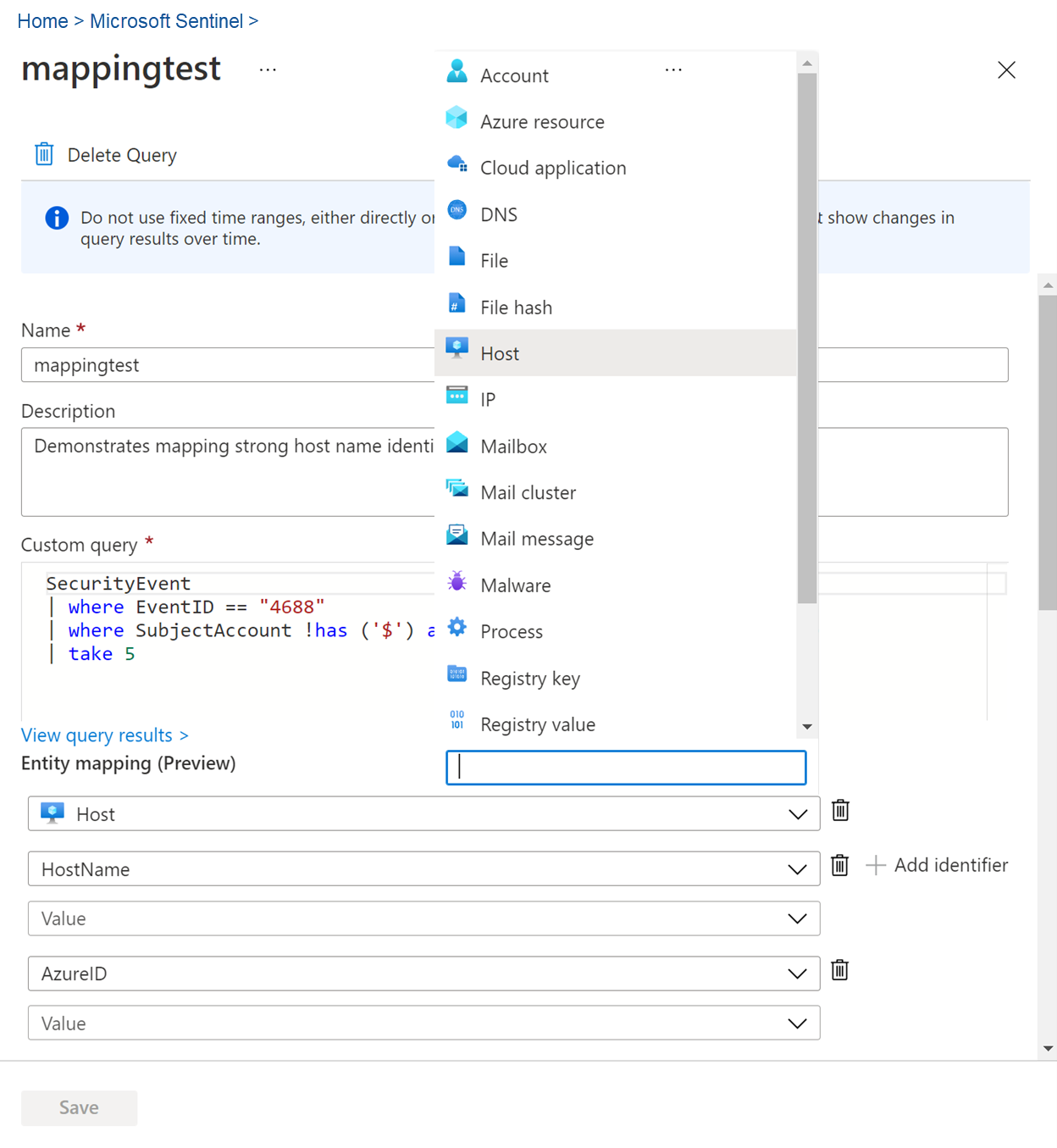
Create a hunting query with entity mapping:
- Threat management > Hunting > Queries > New query.
- Paste the KQL. Columns you want as entities must be projected.
- Entity mapping: pick the entity type, the identifier and the result column. Repeat for Account, Host, IP as the query allows. At least one mapped entity is needed for a bookmark from this query to appear in the investigation graph.
- MITRE ATT&CK: tactic, technique, sub-technique.
- Create. Clone a content hub query with the ellipsis > Clone when you want to edit one; content hub queries are read-only in place.
Run a hunt:
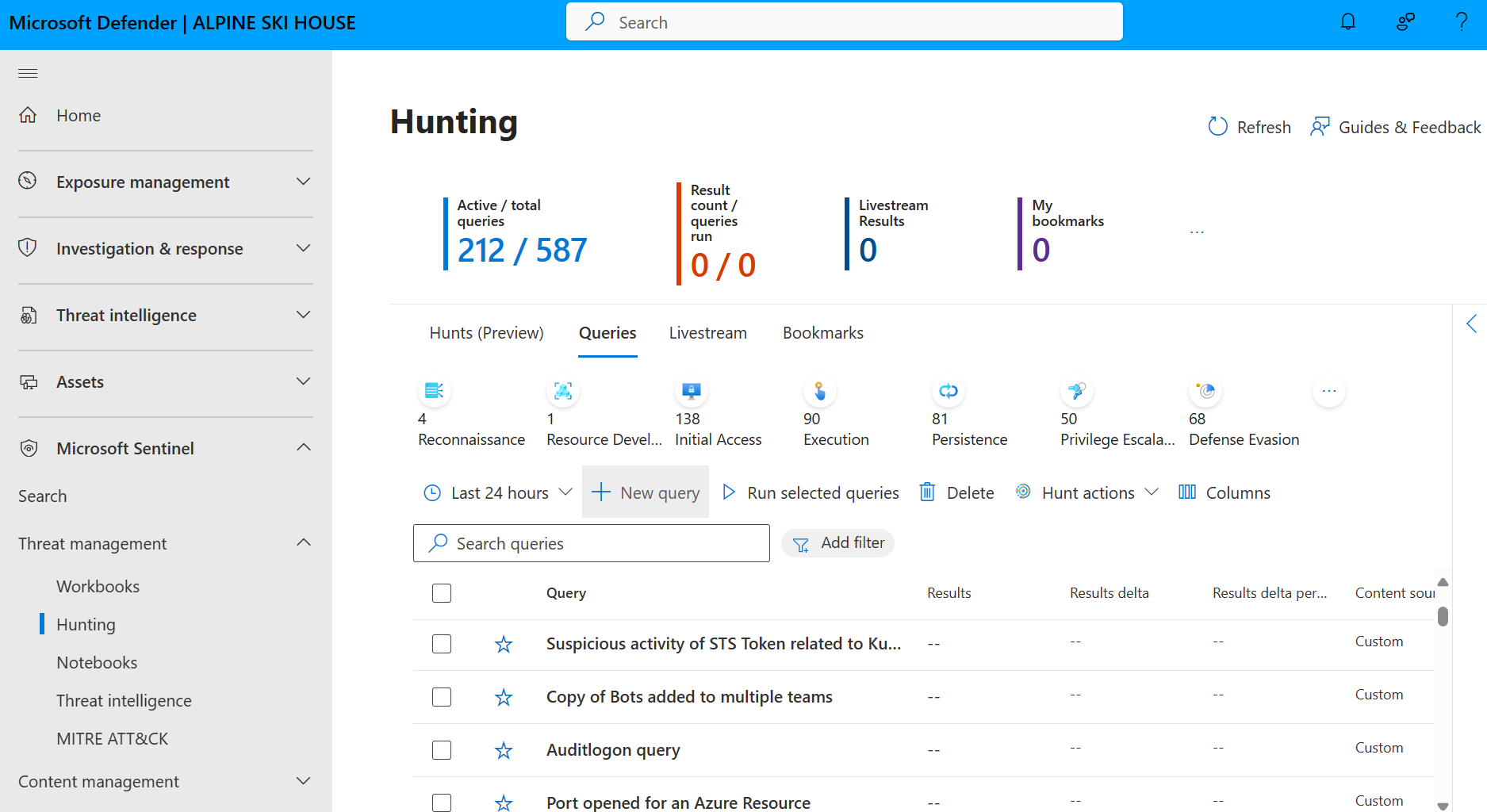
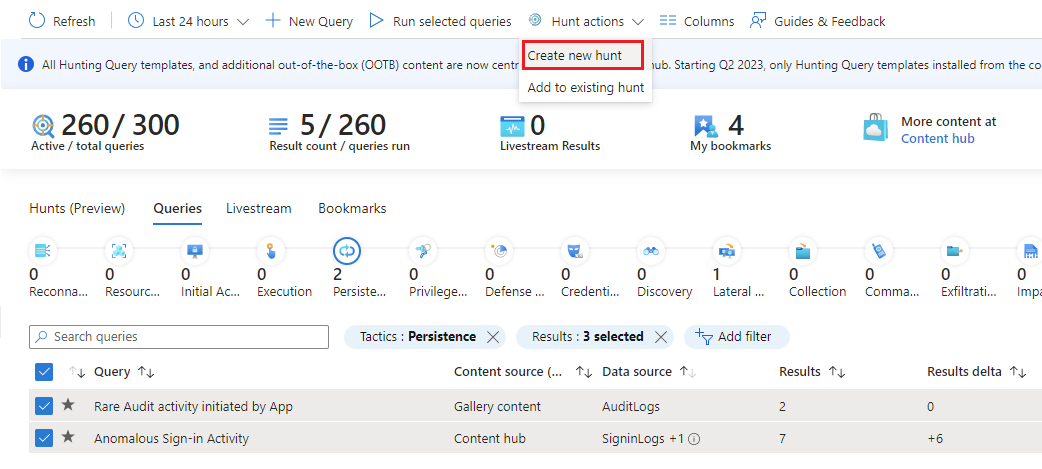
- Queries tab, select queries, Hunt actions > Create new hunt. Or Hunts tab > New Hunt with a name, description holding the hypothesis, owner, status, hypothesis state.
- Run all queries. Right-click a query for Edit, Clone, Create analytics rule.
- Select rows in results > Add bookmark. Name, event time column, entity mapping, tactics, tags, notes.
- Bookmarks tab > Incident actions > Create new incident or Add to existing incident.
- Update hypothesis state as evidence lands; close the hunt when rules, incidents and TI are done.
Build a workbook from a template:
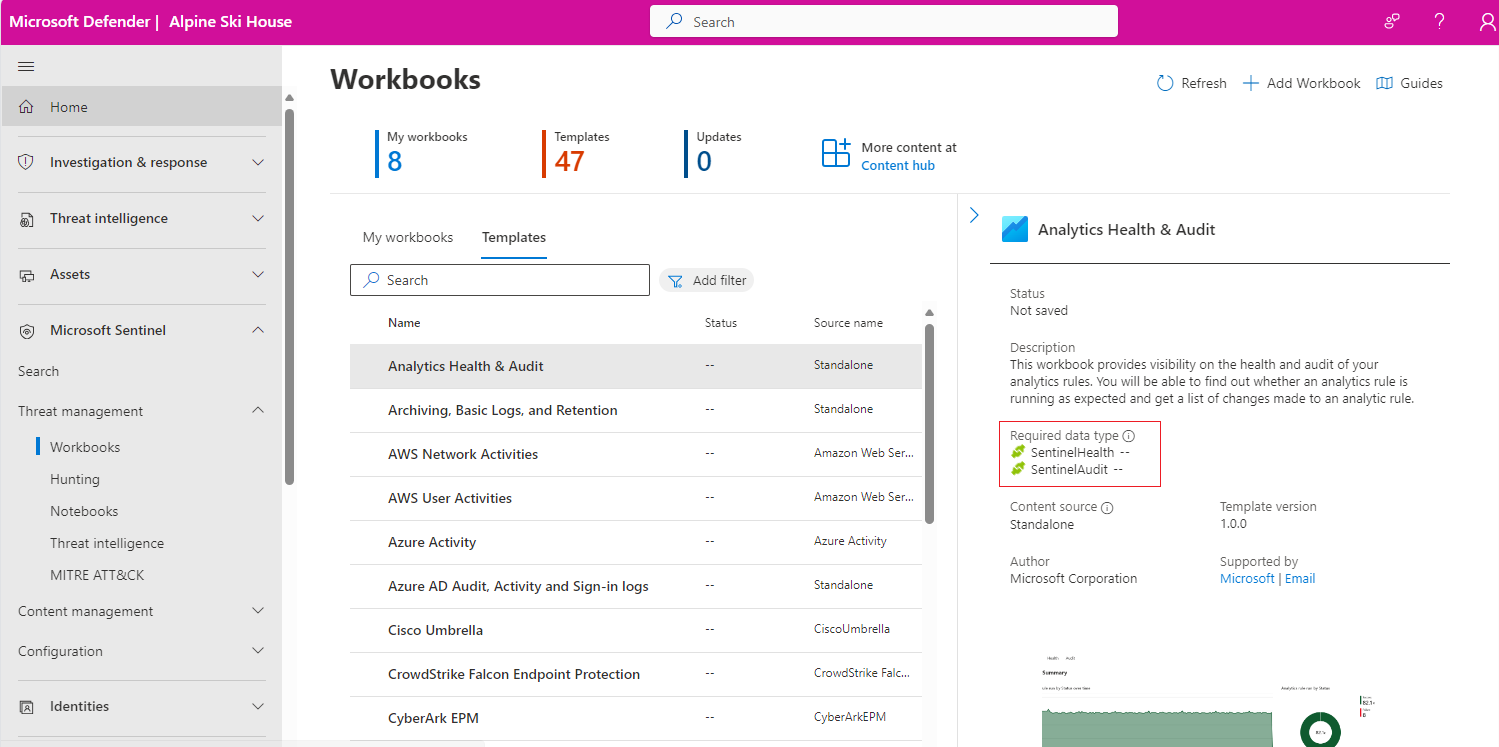
- Threat management > Workbooks > Templates. Open a template, check Required data types against what is actually connected.
- Save, pick a location. View saved workbook > Edit.
- Change TimeRange, use the ellipsis on a section to add, move, clone or remove. Save as for a copy under My workbooks. Done Editing.
Build a simple workbook:
- Workbooks > Add workbook > Edit.
- Add a parameter item for TimeRange. TODO: Learn's Sentinel page documents only TimeRange; the Azure Monitor workbook parameters page covers dropdowns and resource pickers and was not sourced here.
- Add query. Data source Logs, Resource type Log Analytics, choose workspaces. Prefer an ASIM parser over a raw table.
- Paste the week-over-week query from the Verify section, visualisation Line or Column.
- Optional: add a query item with Query type Azure Resource Graph scoped to subscriptions, then a Merge item to join its output to the Logs item on a resource ID.
- Done editing > Save with name, subscription, resource group.

Search job:
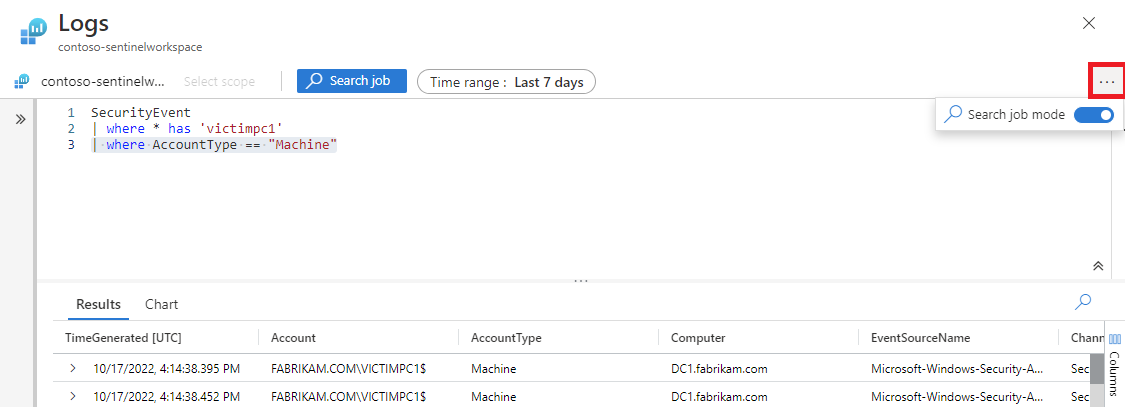
- Sentinel > Search (Defender portal) or General > Search (Azure portal). Pick a table, enter a term, Start. Switch Simple mode to KQL mode for the editor.
- Ellipsis > Search job. Set the time range; if the KQL also sets one, the union of both is used. Name the result table. Run search job.
- Search > Saved Searches > View search results. Bookmark rows from here if needed.
Restore: Search > Restore, choose table and time range, Restore. Track under the Restoration tab; Data Available opens Logs with the time range preset. Delete from the same tab when done.
# Tested on: TODO (Az.OperationalInsights, azps-16.4.0 docs)
# Run a query. Results come back as IEnumerable; convert to an array for large sets.
$ws = "<workspaceId>"
$q  = @"
SigninLogs
| where TimeGenerated > ago(1d)
| where RiskLevelDuringSignIn in ("high","medium")
| summarize count() by UserPrincipalName, RiskLevelDuringSignIn
"@
$r = Invoke-AzOperationalInsightsQuery -WorkspaceId $ws -Query $q -Timespan (New-TimeSpan -Hours 24) -Wait 600 -IncludeStatistics
[System.Linq.Enumerable]::ToArray($r.Results) | Format-Table
$r.Statistics          # CPU, data scanned, for the cost section
# If you see "HttpClient.Timeout of 100 seconds elapsing", raise -Wait.
# Azure CLI. The log-analytics extension installs on first use.
az monitor log-analytics query \
  --workspace "<workspaceId>" \
  --analytics-query "Usage | where TimeGenerated > ago(7d) | where IsBillable == true | summarize GB=sum(Quantity)/1000. by DataType | top 20 by GB" \
  --timespan "P7D" -o table

# Restore two days of SecurityEvent from long-term retention
az monitor log-analytics workspace table restore create \
  --resource-group "<rg>" --workspace-name "<ws>" \
  --name "SecurityEvent_RST" --restore-source-table "SecurityEvent" \
  --start-restore-time "2026-09-01T00:00:00Z" --end-restore-time "2026-09-03T00:00:00Z" --no-wait
az monitor log-analytics workspace table show --resource-group "<rg>" --workspace-name "<ws>" --name "SecurityEvent_RST" --query provisioningState
Saving a hunting query or a function from PowerShell or CLI is not documented on the pages sourced here; use the REST tab or an ARM template.
Run a query. Default wait 3 minutes, Prefer: wait= up to 600 seconds, 504 on timeout. If timespan is in both the URL and body the intersection is used.
POST https://api.loganalytics.azure.com/v1/workspaces/{workspaceId}/query
Authorization: Bearer {token}
Content-Type: application/json
Prefer: wait=120
{
  "query": "SecurityIncident | where TimeGenerated > ago(1d) | summarize arg_max(TimeGenerated, *) by IncidentNumber | summarize count() by Severity, Status",
  "timespan": "P1D"
}
Response is a tables array with columns and rows; the first table is PrimaryResult. New RBAC takes minutes to propagate and returns 403 until it does.
Save a function. Same resource without functionAlias is a plain saved query.
PUT https://management.azure.com/subscriptions/{subscriptionId}/resourceGroups/{resourceGroupName}/providers/Microsoft.OperationalInsights/workspaces/{workspaceName}/savedSearches/{savedSearchId}?api-version=2026-03-01
{
  "etag": "*",
  "properties": {
    "category": "PatchHour",
    "displayName": "LegacyAuthSuccess",
    "functionAlias": "LegacyAuthSuccess",
    "functionParameters": "lookback:timespan=1d",
    "query": "SigninLogs | where TimeGenerated > ago(lookback) | where ResultType == \"0\" | where ClientAppUsed !in (\"Browser\", \"Mobile Apps and Desktop clients\") | summarize count() by UserPrincipalName, ClientAppUsed, AppDisplayName",
    "version": 2
  }
}
Sentinel hunting queries are stored as the same savedSearches resource with category set to Hunting Queries and tags named description, tactics and techniques. TODO: the sourced Learn pages do not document that convention; confirm against an exported hunting query in the dev tenant before relying on it. Example shape:
{
  "etag": "*",
  "properties": {
    "category": "Hunting Queries",
    "displayName": "New privileged role assignments",
    "query": "AuditLogs | where TimeGenerated > ago(7d) | where OperationName in (\"Add member to role\", \"Add eligible member to role\") | mv-expand mp = TargetResources[0].modifiedProperties | where mp.displayName == \"Role.DisplayName\" | extend Role = trim('\"', tostring(mp.newValue)), Target = tostring(TargetResources[0].userPrincipalName), Actor = tostring(InitiatedBy.user.userPrincipalName) | project TimeGenerated, Actor, Target, Role",
    "tags": [
      { "name": "description", "value": "Role adds in the last 7 days" },
      { "name": "tactics", "value": "PrivilegeEscalation,Persistence" },
      { "name": "techniques", "value": "T1098" }
    ],
    "version": 2
  }
}
Verify
Fifteen queries. Each has the time filter first and ends bounded. Replace thresholds to taste.
Identity:
// 1. Risky sign-ins still at risk, last 24h
SigninLogs
| where TimeGenerated > ago(1d)
| where RiskLevelDuringSignIn in ("high", "medium") or RiskLevelAggregated in ("high", "medium")
| where RiskState == "atRisk"
| summarize Attempts = count(), Apps = make_set(AppDisplayName, 10), IPs = make_set(IPAddress, 10), Success = countif(ResultType == "0")
    by UserPrincipalName, RiskLevelDuringSignIn, Location
| sort by Success desc, Attempts desc
// 2. Successful legacy authentication, last 7d
SigninLogs
| where TimeGenerated > ago(7d)
| where ResultType == "0"
| where ClientAppUsed !in ("Browser", "Mobile Apps and Desktop clients")
| summarize Count = count(), LastSeen = max(TimeGenerated), Users = dcount(UserPrincipalName) by ClientAppUsed, AppDisplayName
| sort by Count desc
// 3. MFA failures per user, last 24h. 500121 is the strong auth failed code.
SigninLogs
| where TimeGenerated > ago(1d)
| where AuthenticationRequirement == "multiFactorAuthentication"
| where ResultType != "0"
| summarize Failures = count(), Codes = make_set(ResultType, 5), Reasons = make_set(ResultDescription, 3), IPs = dcount(IPAddress)
    by UserPrincipalName
| where Failures >= 5
| sort by Failures desc
// 4. New admin role assignments, last 7d, with actor
AuditLogs
| where TimeGenerated > ago(7d)
| where OperationName in ("Add member to role", "Add eligible member to role")
| mv-expand mp = TargetResources[0].modifiedProperties
| where mp.displayName == "Role.DisplayName"
| extend Role = trim('"', tostring(mp.newValue)),
         Target = tostring(TargetResources[0].userPrincipalName),
         Actor = coalesce(tostring(InitiatedBy.user.userPrincipalName), tostring(InitiatedBy.app.displayName))
| project TimeGenerated, OperationName, Actor, Target, Role, Result
| sort by TimeGenerated desc
Endpoint:
// 5. MDE alerts by device, last 7d, entities parsed from the JSON string
SecurityAlert
| where TimeGenerated > ago(7d)
| where ProductName == "Microsoft Defender Advanced Threat Protection"
| extend Ent = parse_json(Entities)
| mv-expand Ent
| where tostring(Ent.Type) == "host"
| extend Host = tostring(Ent.HostName)
| summarize Alerts = count(), High = countif(AlertSeverity == "High"), Names = make_set(AlertName, 10) by Host
| sort by High desc, Alerts desc
// 6. Rare parent-child process pairs, last 7d. Needs DeviceProcessEvents streamed by the XDR connector.
DeviceProcessEvents
| where TimeGenerated > ago(7d)
| where isnotempty(InitiatingProcessFileName)
| summarize Count = count(), Devices = dcount(DeviceId), Sample = any(ProcessCommandLine)
    by Parent = tolower(InitiatingProcessFileName), Child = tolower(FileName)
| where Count <= 3 and Devices == 1
| sort by Count asc
| take 100
// 7. Windows failed logons by account and source, last 24h (Learn example)
SecurityEvent
| where TimeGenerated > ago(24h)
| where EventID == 4625
| summarize FailedAttempts = count() by Computer, TargetAccount, IpAddress, FailureReason
| order by FailedAttempts desc
Email:
// 8. Phish delivered, then a URL in it clicked, last 7d
let phish = EmailEvents
| where TimeGenerated > ago(7d)
| where ThreatTypes has "Phish" and DeliveryAction == "Delivered"
| project EmailTime = TimeGenerated, NetworkMessageId, RecipientEmailAddress, SenderFromAddress, Subject;
UrlClickEvents
| where TimeGenerated > ago(7d)
| where ActionType == "ClickAllowed"
| join kind=inner phish on NetworkMessageId
| project ClickTime = TimeGenerated, EmailTime, RecipientEmailAddress, AccountUpn, SenderFromAddress, Subject, Url
| sort by ClickTime desc
Cost:
// 9. Billable ingestion per table per day, last 31d (Learn)
Usage
| where StartTime >= startofday(ago(31d)) and EndTime < startofday(now())
| where IsBillable == true
| summarize BillableDataGB = sum(Quantity) / 1000. by bin(StartTime, 1d), DataType
| render columnchart
// 10. Ingestion by solution and table, last 31d (Learn). SecurityInsights is Sentinel.
Usage
| where TimeGenerated > ago(32d)
| where StartTime >= startofday(ago(31d)) and EndTime < startofday(now())
| where IsBillable == true
| summarize BillableDataGB = sum(Quantity) / 1000. by Solution, DataType
| extend Solution = iff(Solution == "SecurityInsights", "AzureSentinel", Solution)
| sort by BillableDataGB desc
Operations:
// 11. Connectors whose latest health event is a failure, last 3d (Learn). Needs health monitoring on.
SentinelHealth
| where TimeGenerated > ago(3d)
| where OperationName == 'Data fetch status change'
| where Status in ('Success', 'Failure')
| summarize TimeGenerated = arg_max(TimeGenerated,*) by SentinelResourceName, SentinelResourceId
| where Status == 'Failure'
// 12. Which analytics rules are firing, last 7d, and how many became incidents
let alerts = SecurityAlert
| where TimeGenerated > ago(7d)
| summarize Alerts = count(), Severities = make_set(AlertSeverity) by AlertName, ProviderName;
SecurityIncident
| where TimeGenerated > ago(7d)
| summarize arg_max(TimeGenerated, *) by IncidentNumber
| mv-expand AlertIds
| extend SystemAlertId = tostring(AlertIds)
| join kind=inner (SecurityAlert | where TimeGenerated > ago(7d) | project SystemAlertId, AlertName) on SystemAlertId
| summarize Incidents = dcount(IncidentNumber) by AlertName
| join kind=rightouter alerts on AlertName
| project AlertName = coalesce(AlertName, AlertName1), ProviderName, Alerts, Incidents = coalesce(Incidents, 0), Severities
| sort by Alerts desc
// 13. Agents silent for more than an hour
Heartbeat
| where TimeGenerated > ago(7d)
| summarize LastBeat = arg_max(TimeGenerated, Computer, OSType, Category) by Computer
| where LastBeat < ago(1h)
| project Computer, OSType, Category, LastBeat, SilentFor = now() - LastBeat
| sort by SilentFor desc
// 14. Week over week event volume for a workbook (Learn)
SecurityEvent
| where TimeGenerated > ago(14d)
| summarize count() by bin(TimeGenerated, 1d)
| extend Week = iff(TimeGenerated>ago(7d), "This Week", "Last Week"), TimeGenerated = iff(TimeGenerated>ago(7d), TimeGenerated, TimeGenerated + 7d)
// 15. Live bookmarks, latest version only, deletes removed. Confirm the id column name in the dev tenant.
HuntingBookmark
| where TimeGenerated > ago(90d)
| summarize arg_max(TimeGenerated, *) by BookmarkId
| where SoftDelete != true
| project TimeGenerated, BookmarkName, Tags, Notes, Entities
Other checks:
- A saved function shows under the Functions pane; hover shows parameters in call order.
- A hunting query shows on the Queries tab with its tactic; run it, confirm the Results column populates and
N/Adoes not appear. - A bookmark appears on the Bookmarks tab within a few minutes and as a new row in
HuntingBookmark. az monitor log-analytics workspace table showreturnsprovisioningState: Succeededon a_RSTtable before you query it.$r.Statisticsfrom the PowerShell tab reports data scanned; compare before and after moving the time filter to the top of a slow query.
Troubleshoot
| Symptom | Likely cause | Fix |
|---|---|---|
| Query times out at 10 minutes or returns 504 | No time filter, search *, union *, contains on a big column, join of two raw tables | Filter TimeGenerated first, name the table, use has, summarize before join. For history, run a search job or restore |
| Portal says results truncated | Over the row or size limit, 500,000 rows or about 100 MB; dashboards cap at 2,000 rows; Logic Apps connector at about 16 MB | Aggregate, project fewer columns, page by time window |
| TODO older guidance quoted a 30,000 row display limit in the Logs blade | Learn service limits now list 500,000 for portal and API | Verify in the dev tenant what the Logs grid actually renders |
| Join returns fewer rows than expected | Default kind=innerunique dedupes the left side on the key | State kind=inner or the kind you mean |
| Join fails with right side too large | lookup or broadcast strategy on an oversized right table | Swap sides, summarize the right side, or use hint.shufflekey |
parse returns empty columns | Pattern does not match the string exactly, including spaces and quotes | Test on take 5 output; switch to extract() with a regex when formats vary |
mv-expand on SecurityAlert.Entities gives nothing | Entities is a string, not dynamic | parse_json() first |
| Times look several hours off | All datetime values are UTC, ago() is UTC | datetime_utc_to_local(TimeGenerated, 'Asia/Karachi') for display only; never filter on the converted column |
SentinelHealth does not exist | Health monitoring not turned on for the workspace | Enable it under Settings; the table appears at the first connector event |
DeviceTvm* queries return nothing in Sentinel | Those tables are in the schema but not streamed by the connector | Query them in Advanced hunting or build a custom ingestion |
| REST query returns 403 right after role assignment | RBAC propagation to the query API | Wait several minutes and retry |
| HTTP 429 | Over 5 concurrent queries, queue over 3 minutes, or 200 queries per 30 seconds | Serialize, cache in a workbook, reduce auto refresh |
| Search job rejected | Operator outside the allowed set, contains, query not starting with a table | Rewrite with where, extend, project, parse and has |
| Restore fails to start | Under 2 days, second restore on the same table, 2 running already, Auxiliary table | Widen the range, delete the earlier _RST, wait, or use a search job |
Hunting query shows N/A | Required table not connected | Connect the source or clone and retarget the query |
| Cannot add a bookmark | Logs opened from Azure Monitor not Sentinel, or in the Defender portal | Open Logs from Sentinel in the Azure portal; Defender portal can view bookmarks, not add them |
| Invoke-AzOperationalInsightsQuery dies at 100 seconds | HttpClient timeout | Set -Wait higher |
Gotchas and limits
ResultTypeinSigninLogsis a string.ResultType == 0silently matches nothing; write"0".inneruniqueis the default join. Half the "missing rows" tickets are this.HuntingBookmarkis an append log. Every edit and delete is a new row; alwaysarg_maxby bookmark and dropSoftDelete == true.- A search job's time range is the union of the picker and the query. A query API
timespanin URL and body is the intersection. Opposite rules, same word. - Restore bills a 2 TB and 12 hour minimum per restore. A quick look at 50 GB costs the same as 2 TB for half a day. Use a search job for small, targeted pulls.
- Bookmarks cannot be created in the Defender portal, only viewed. Workbooks with certain visualisations also need Open in Azure. Both matter for the March 2027 retirement; Learn has not said what replaces bookmark creation yet. TODO: re-check.
- Livestream is gone. Content and blog posts that say "elevate livestream to alert" are stale. KQL jobs in the data lake are the replacement for scheduled monitoring queries.
_ASim_parsers take no parameters and parse everything before filtering. On a busyCommonSecurityLogthat is the difference between 5 seconds and a timeout. Use_Im_with named parameters.- Functions without a default parameter are ordered first regardless of creation order. Check the details pane before calling with positional arguments.
- Function names cannot start with
_. If you try to deploy your own ASIM-style name you will get rejected; that prefix belongs to solution functions. - Content hub hunting queries cannot be edited in place. Clone, then edit the clone. Hunt queries are clones too, so a fix in a hunt does not fix the workspace copy.
- Query concurrency is per user, not per workspace. A workbook with twenty tiles on a 5-minute auto refresh eats the whole budget of whoever has it open.
- Cross-tenant and Lighthouse delegated search jobs and restores do not work. For MSP work, run them inside the customer tenant with a direct role.
Usagereports MB inQuantityandQuantityUnitis alwaysMbytes. Divide by 1000 for GB as Learn does, not 1024.- The workspace query limit is 100 resources per cross-workspace query. Big MSP union queries hit it.
Further reading
- Introducing the Must Learn KQL Learning Hub: Your AI-Powered Interactive KQL Companion, Rod Trent, January 2026. Free interactive playground and lesson track for the operators above, useful for the juniors you mentor.
- How to Create Custom Microsoft Sentinel Workbooks Using KQL Queries, Nawaz Dhandala, February 2026. Walks parameters, tiles, a sign-in map and sharing, which is the part Learn's Sentinel workbook page skips.
- Reduce Microsoft Sentinel Ingestion Costs with Smarter Tiering, ATA Learning, June 2026. Pairs the
Usagequeries with DCR filtering and tier moves, with_BilledSizequeries that complement queries 9 and 10. - Automating IOC hunts in Microsoft Sentinel data lake, Microsoft Sentinel blog, November 2025. Shows KQL jobs and notebooks on the data lake doing the scheduled hunting that livestream used to do.
My notes
TODO: Sohail's notes after verification.
Changelog
| Date | Change | Source |
|---|---|---|
| 2026-10-22 | Drafted from Learn, with Learn images and diagrams | [1] |