Overview: what Sentinel is, licensing and workspace design
What it is
Microsoft Sentinel is a cloud SIEM and SOAR that runs on a Log Analytics workspace. Learn's definition of a Sentinel workspace is exactly that: a Log Analytics workspace with Sentinel enabled. Every log you ingest lands in a table in that workspace, every detection is a KQL query over those tables, and every response is an Azure Logic App or a built-in action. There is no separate Sentinel database. That is why workspace decisions, retention and Log Analytics RBAC matter so much here.
The product now lives in the Defender portal. Sentinel is generally available there with or without Defender XDR and without an E5 licence. After 31 March 2027 the Azure portal experience is gone and only the Defender portal remains. Since July 2025 a tenant's first Sentinel workspace is onboarded to the Defender portal automatically if the person enabling it holds Owner or User Access Administrator on the subscription and is not a Lighthouse-delegated user. New features land in the Defender portal first; the Azure portal gets parity fixes only. Treat the Azure portal as a legacy management plane for RBAC and billing, and the Defender portal as the SOC.
What Sentinel is not: it is not a replacement for Defender XDR correlation, and it is not free with E5. E5 gives you a data grant and free alert tables, not the product. Sentinel is also not immutable storage in the compliance sense. It inherits Azure Monitor's append-only model, with deletion provisions for compliance.
Deeper articles in this folder: data connectors, analytics rules and incidents, KQL for Sentinel, automation and playbooks and SOC optimization and the unified portal. For the XDR side see the Defender XDR overview.
Components
| Component | What it is | Where in the Defender portal |
|---|---|---|
| Workspace | Log Analytics workspace with Sentinel enabled. Holds all tables. | System > Settings > Microsoft Sentinel > Workspaces |
| Data connectors | Microsoft and third-party ingestion, plus CEF, Syslog, REST and custom connectors. ASIM normalises at query or ingest time. | Microsoft Sentinel > Configuration > Data connectors |
| Analytics rules | Scheduled, NRT and other rule types that turn low-fidelity alerts into incidents. | Configuration > Analytics |
| Incidents | Unified queue with Defender XDR when the workspace is primary. Attack story, incident graph, entity pages. | Investigation and response > Incidents and alerts |
| Workbooks | Interactive reports on workspace data. Primary workspace only in the Defender portal. | Threat management > Workbooks |
| Hunting | MITRE-mapped queries, bookmarks, livestream. Hunting queries can be promoted to detections. | Threat management > Hunting |
| Notebooks | Jupyter notebooks in Azure Machine Learning, and data lake notebooks for the lake tier. | Threat management > Notebooks |
| Automation rules and playbooks | Central incident-handling rules that call Logic Apps playbooks. AI-generated playbooks in the Defender portal. | Configuration > Automation |
| Watchlists | Your own lists, for example high-value assets or leavers, joined in queries, rules and playbooks. | Configuration > Watchlists |
| Threat intelligence | Indicator import and management, including the premium Microsoft Threat Intelligence feed in the Defender portal. | Threat intelligence > Intel management |
| UEBA | ML baselines per user, host, IP and app. Produces BehaviorAnalytics, IdentityInfo, UserPeerAnalytics and Anomalies. No extra charge beyond the data. | Entity pages under Assets, and Advanced hunting |
| Content hub | Solutions that package connectors, rules, workbooks, playbooks and hunting queries. | Content management > Content hub |
| Data lake | Lake tier storage up to 12 years, KQL exploration, notebooks, jobs. GA. | Microsoft Sentinel > Data lake exploration |
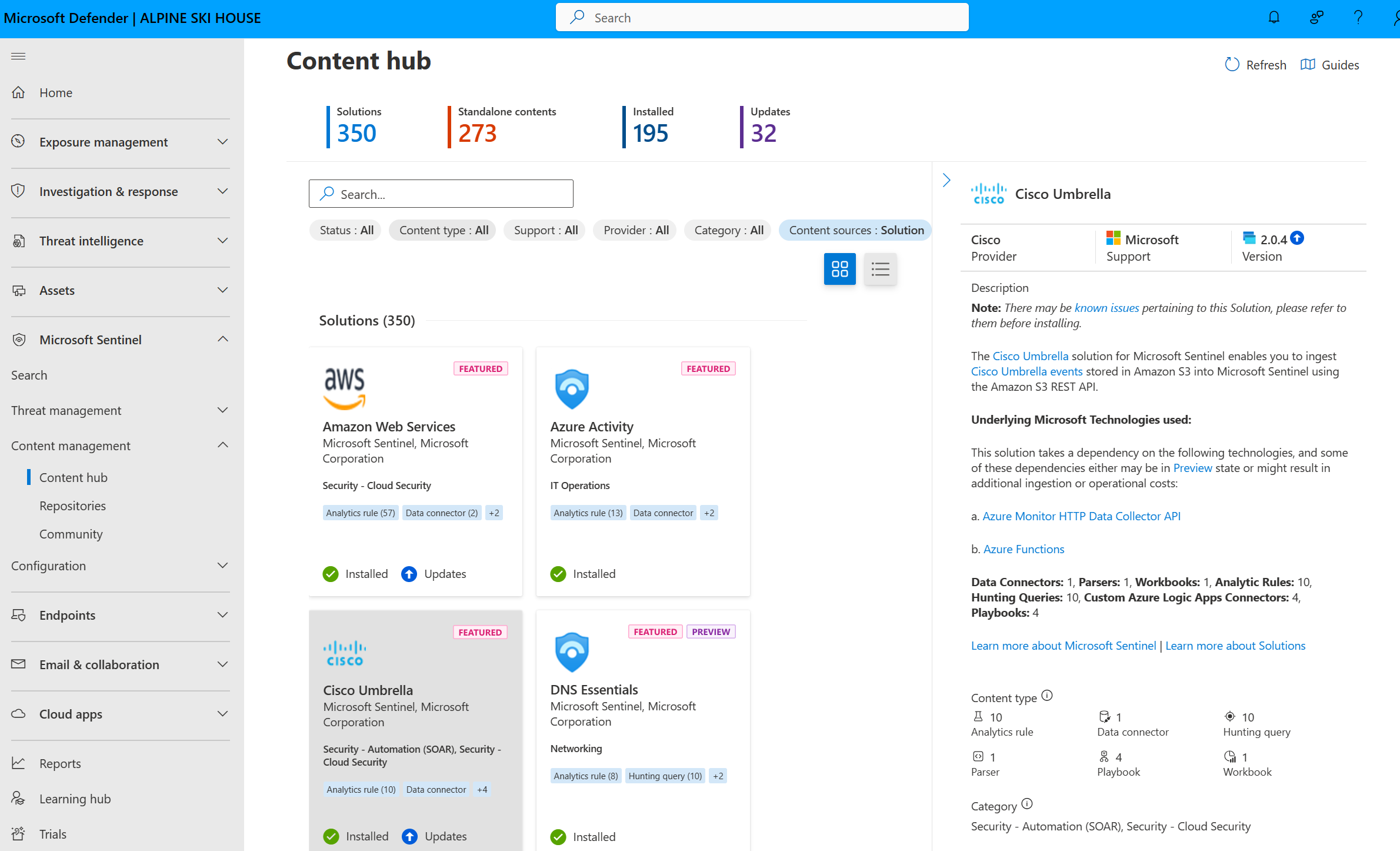
Licensing and prerequisites
There is no per-user Sentinel SKU. You pay per GB on the workspace, plus Logic Apps, Azure ML, Functions and data lake meters where used.
Analytics tier billing:
- Pay-as-you-go is the default. Billed on GB ingested, retention beyond 90 days extra.
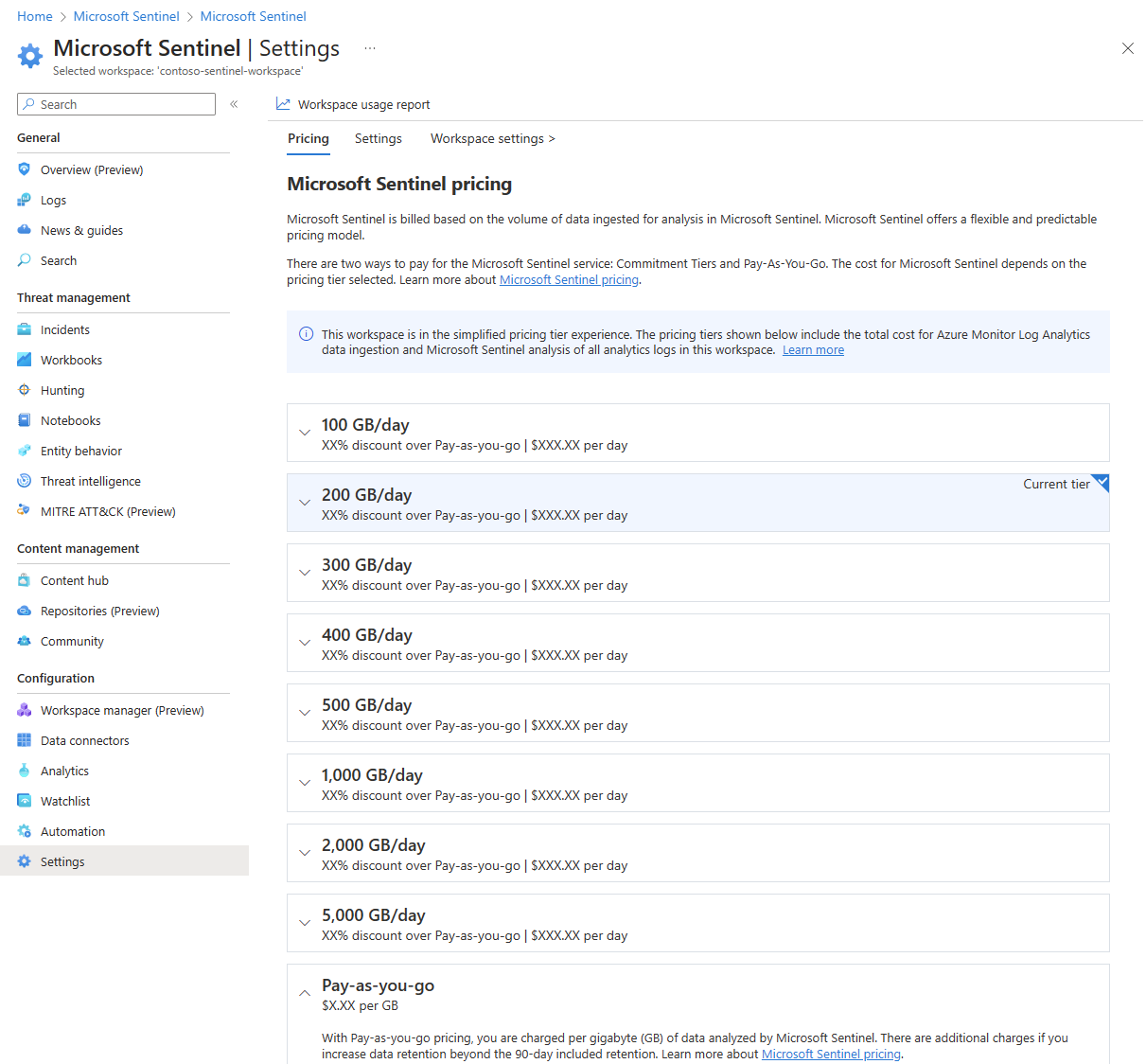
- Commitment tiers start at 100 GB per day. Usage inside the commitment is a fixed daily price, overage is billed at the same effective per-GB rate. You can raise the tier any time, which restarts a 31-day commitment. You can lower it or go back to pay-as-you-go only after the 31 days. Billing is daily. Changing it needs Contributor or Owner on the workspace.
- Simplified pricing tiers (workspaces from July 2023, or opted in) bill Log Analytics and Sentinel as one
Sentinelservice line. Classic tiers bill them separately and show asClassicon the invoice. - A one-year pre-purchase plan of Sentinel commit units deducts eligible analytics costs automatically.
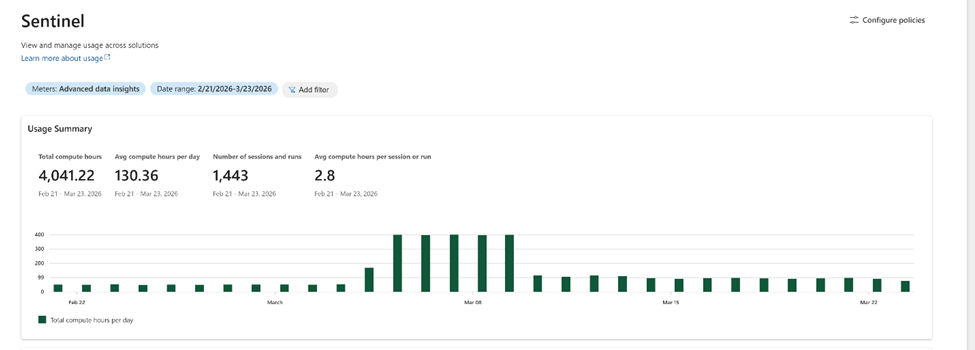
Data lake tier billing applies only to tables set to lake-only retention: data lake ingestion per GB, data processing per GB, data lake storage per GB per month at a 6:1 compression rate, data lake query per GB of uncompressed data scanned, and advanced data insights per compute hour on 12, 32 or 80 vCore notebook pools. Tables that keep both analytics and lake retention do not pay lake ingestion or processing. Once a tenant onboards to the lake, the old archive, search and auxiliary logs meters are replaced by lake meters, which Learn warns can raise costs for existing customers.
Free sources, always: AzureActivity, SentinelHealth, OfficeActivity for SharePoint, Exchange admin and Teams, and SecurityAlert and SecurityIncident from Defender XDR, Defender for Cloud, Defender for Office 365, Defender for Identity, Defender for Cloud Apps, Defender for Endpoint and Entra ID Protection. Alerts are free, raw logs from those products are paid.
Microsoft 365 E5 data grant: up to 5 MB per user per day of Microsoft 365 data. Qualifying licences are Microsoft 365 E7, E5, A5, F5 and G5 and their Security variants, on EA, EAS or CSP. Qualifying tables are Entra ID sign-in and audit logs (SigninLogs, AuditLogs, AADNonInteractiveUserSignInLogs, AADServicePrincipalSignInLogs, AADManagedIdentitySignInLogs, AADProvisioningLogs, ADFSSignInLogs), McasShadowItReporting, InformationProtectionLogs_CL, and the Defender XDR advanced hunting tables such as DeviceEvents, EmailEvents, CloudAppEvents, IdentityLogonEvents and AlertEvidence. It applies automatically and shows on the bill as zero-dollar M365 meters.
Free trial: 31 days, first 10 GB per day free on the analytics plan, up to 20 workspaces per tenant. Automation, BYO-ML and data lake charges are not waived.
Retention tiers, from the Azure Monitor and Sentinel pages:
| Tier or plan | Interactive window | Total retention | Notes |
|---|---|---|---|
| Analytics | 90 days default on a Sentinel workspace, up to 730 days | Up to 4,383 days (12 years) | First 90 days of retention free on a Sentinel workspace. 31 days of analytics retention is included in ingestion, so going below 31 saves nothing. |
| Data lake tier | 30 days of ad hoc hunting in the lake | Up to 12 years | Secondary data: NetFlow, firewall, proxy, storage access logs. Queried through lake exploration, KQL jobs and notebooks. |
| Basic (legacy plan) | Fixed 30 days | Up to 4,383 days | Long-term data reached through search jobs. |
| Auxiliary (legacy plan) | 30 days | Up to 4,383 days | Queryable for its whole total retention. Becomes part of the lake once the tenant onboards and leaves advanced hunting. |
Prerequisites:
- Entra tenant and an Azure subscription. Contributor on the subscription to enable Sentinel. Microsoft Sentinel Contributor on the resource group to install content hub solutions.
- A Log Analytics workspace with no resource lock, on pay-as-you-go or a commitment tier (legacy tiers unsupported), and not inside a network security perimeter. A perimeter disables analytics rules.
- A dedicated resource group holding only the workspace, playbooks and workbooks, so one set of role assignments covers everything.
- To onboard to the Defender portal: Security Administrator in Entra plus either unconditional Owner at subscription scope, or User Access Administrator plus Microsoft Sentinel Contributor. If the tenant already has more than one Sentinel workspace, Security Administrator is mandatory. GDAP through Lighthouse is not supported for Sentinel data in the Defender portal; use B2B.
- To onboard the data lake: direct Owner on the billing subscription (management group ownership is not enough), Global Administrator or Security Administrator to authorise Entra, Microsoft 365 and Azure asset ingestion, read on every workspace to attach. CMK workspaces are not reachable from lake experiences.
How it works
Data arrives through connectors into tables. Diagnostic settings, the Azure Monitor Agent with data collection rules, the Defender XDR connector, CEF and Syslog forwarders, Logic Apps and the Logs Ingestion API all write to the same workspace. Analytics rules run KQL on a schedule or near real time, raise alerts, and group alerts into incidents. In the Defender portal the primary workspace's incidents merge with Defender XDR incidents into one queue, with cross-domain correlation done by Defender. Automation rules fire on incident create or update, set owner, severity and tags, and call playbooks. Hunting, workbooks and notebooks read the same tables. UEBA builds baselines from Entra ID, Defender for Identity and Office 365 data and writes its own tables. Watchlists and threat intelligence are reference data joined into all of the above.
Two tiers, one copy
The analytics tier is the Log Analytics table store you have always had: 90 days interactive, real-time rules, high-performance queries, no per-query charge, and expensive per GB. The data lake tier is Parquet on Azure storage with compute separated out. Analytics tier data is mirrored to the lake so only one copy exists; the lake tier adds long-term retention and a place to send high-volume secondary logs that never need a scheduled rule. You query the lake with full KQL in the data lake exploration editor, or Python in notebooks, and you can run one-time or scheduled KQL jobs that summarise lake data and promote the result into an analytics table. Lake onboarding is tenant-wide: it provisions in the primary workspace's region and attaches every Defender-connected workspace in that region. You cannot pick which. You also cannot offboard without a support request. Data takes 90 to 120 minutes to appear after a tier change. A managed identity named msg-resources- plus a GUID gets Azure Reader on the subscriptions; do not strip it.
Unified SecOps: what moves, what stays
In the Defender portal, Sentinel's nodes sit in the left navigation under Microsoft Sentinel, and the shared features move into Defender's own areas. Incidents go to the unified queue. Logs become Advanced hunting, which can query tenant XDR tables and workspace tables together, and run workspace() cross-workspace queries. Entity behavior pages become the Sentinel events tab on Defender's user and device pages. News and guides, and Workspace manager, do not exist in the Defender portal. Settings move to System > Settings > Microsoft Sentinel. Raw Defender XDR data no longer needs the Defender XDR connector; it is integrated. Without Defender XDR licensing you still get Sentinel, but Exposure Management, custom detection rules and the Action center are limited or missing.
Access is still Azure RBAC on the workspace, managed in the Azure portal and reflected in the Defender portal. The Defender portal adds unified RBAC with row-level support, and the data lake uses Entra roles and Defender XDR unified RBAC rather than Azure RBAC.

Workspace limits in the Defender portal
One Entra tenant, exactly one primary workspace, and any number of secondary workspaces. The primary carries the Defender XDR connector and the unified SOC queue, and is the only place custom detections, API queries and workbooks run. Secondary workspaces keep their own incidents and correlation, show up as Sentinel-only, and can still ingest Defender tables through the Tables page. Onboarding disconnects the standalone MDO, Entra ID Protection, MDA, MDE and MDI alert connectors from secondaries, because those alerts are tenant-wide and only surface in the primary. Any workspace that was previously connected to Defender XDR but is not chosen as primary becomes secondary and loses its XDR-based rules until you re-point them at ingested tables. Changing the primary moves the Defender XDR connector automatically.
Workspace architecture decision
Learn's guidance starts from one workspace and adds another only for a concrete reason. Evaluate each criterion on its own, because they conflict.
Points behind the tree:
- Enabling Sentinel on a workspace makes all data in it subject to Sentinel pricing, including operational data. But a combined 50 GB per day of ops plus 50 GB of security reaches the 100 GB tier, which Learn quotes as a 15 percent Azure Monitor discount and 50 percent Sentinel discount. Run the numbers both ways.
- If you run Defender for Cloud and Sentinel, Learn recommends one workspace for both.
- Most Azure resources can only send to a workspace in their own tenant. Agents on VMs can cross tenants.
- MSSP models are distributed (one workspace per customer tenant, reached through Lighthouse or B2B), centralized (one provider workspace, VM and PaaS data only, no SaaS connectors, hard to separate customers), or hybrid (per-tenant workspaces plus a central summary workspace fed by a pipeline). Cross-workspace queries cap at 100 workspaces and get slow past a few dozen without a dedicated cluster. In the Defender portal, Lighthouse with GDAP does not work for Sentinel data; multi-tenant organisations use B2B and Defender's multitenant management.
- Dedicated clusters: at least 100 GB per day, a 100 GB per day minimum Log Analytics commitment, two clusters per region per subscription, 1,000 workspaces per cluster, same region only, and no moving an existing workspace into a CMK cluster.
- Resilience: ingest critical data into workspaces in two regions. Rules and workbooks do not fail over; keep ARM templates with alternate workspace settings ready.
RBAC
Azure RBAC built-in roles, assigned at the Sentinel resource group so playbooks and workbooks inherit them:
| Role | Can |
|---|---|
| Microsoft Sentinel Reader | View data, incidents, workbooks, recommendations |
| Microsoft Sentinel Responder | Reader plus manage incidents |
| Microsoft Sentinel Contributor | Responder plus install solutions and create or edit rules, workbooks and other resources |
| Microsoft Sentinel Playbook Operator | List, view and run playbooks |
| Microsoft Sentinel Automation Contributor | Service role so Sentinel can attach playbooks to automation rules. Not for users |
| Logic App Contributor | Create and edit playbooks |
| Workbook Contributor | Needed on top of a Sentinel role to create or delete workbooks |
Learn's recommended pattern: analysts get Responder plus Playbook Operator, engineers get Contributor plus Logic App Contributor, service principals get Contributor. Guest users need Directory Reader in Entra to be assignable to incidents. Granting the Sentinel service account rights on a playbook resource group needs Owner. Role assignments are cumulative, and plain Reader or Contributor on the subscription override table-level restrictions. Connecting data sources needs write on the workspace.
Table-level RBAC comes from Log Analytics, not Sentinel. The recommended method is granular RBAC: a custom role with the Microsoft.OperationalInsights/workspaces/tables/data/read data action (already in Log Analytics Data Reader) plus an ABAC condition on the Table Name attribute, for example ForAnyOfAllValues:StringNotEquals with SigninLogs and SecurityEvent. The legacy method lists Microsoft.OperationalInsights/workspaces/query/<TableName>/read actions and NotActions; it works in both access control modes but cannot target single custom tables or rows. Protected tables flip a table to deny-by-default. The workspace access control mode also matters: Use resource or workspace permissions (default since March 2019) lets anyone with read on a VM see that VM's logs; Require workspace permissions turns that off.
Data lake roles are Entra and unified RBAC: Global Reader, Security Reader, Security Operator or Security Administrator read every attached workspace; Security Operator and Security Administrator can write through jobs and notebooks and manage jobs; a custom Defender unified RBAC role with security data basics read covers system tables.
Configure
- Portal
- Azure CLI / PowerShell
- REST / ARM
Create the workspace and enable Sentinel:
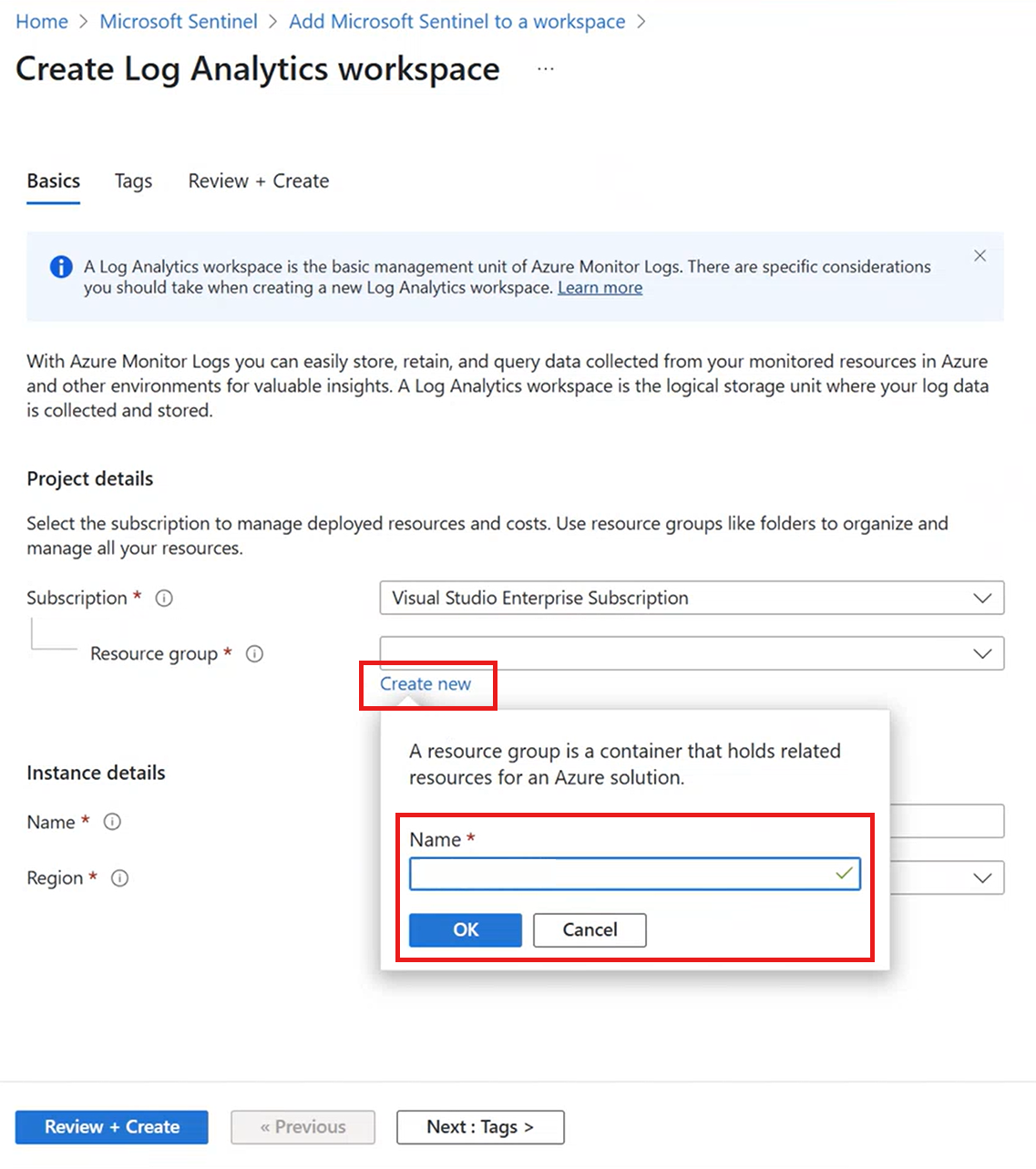
- Azure portal > search Microsoft Sentinel > Create > Create a new workspace.
- Pick the subscription, create a dedicated resource group, name the workspace, choose the region that satisfies residency. The region cannot change later and Sentinel does not support moving the workspace to another resource group or subscription.
- Review and create. Then back on the Sentinel Create page select the workspace and Add.
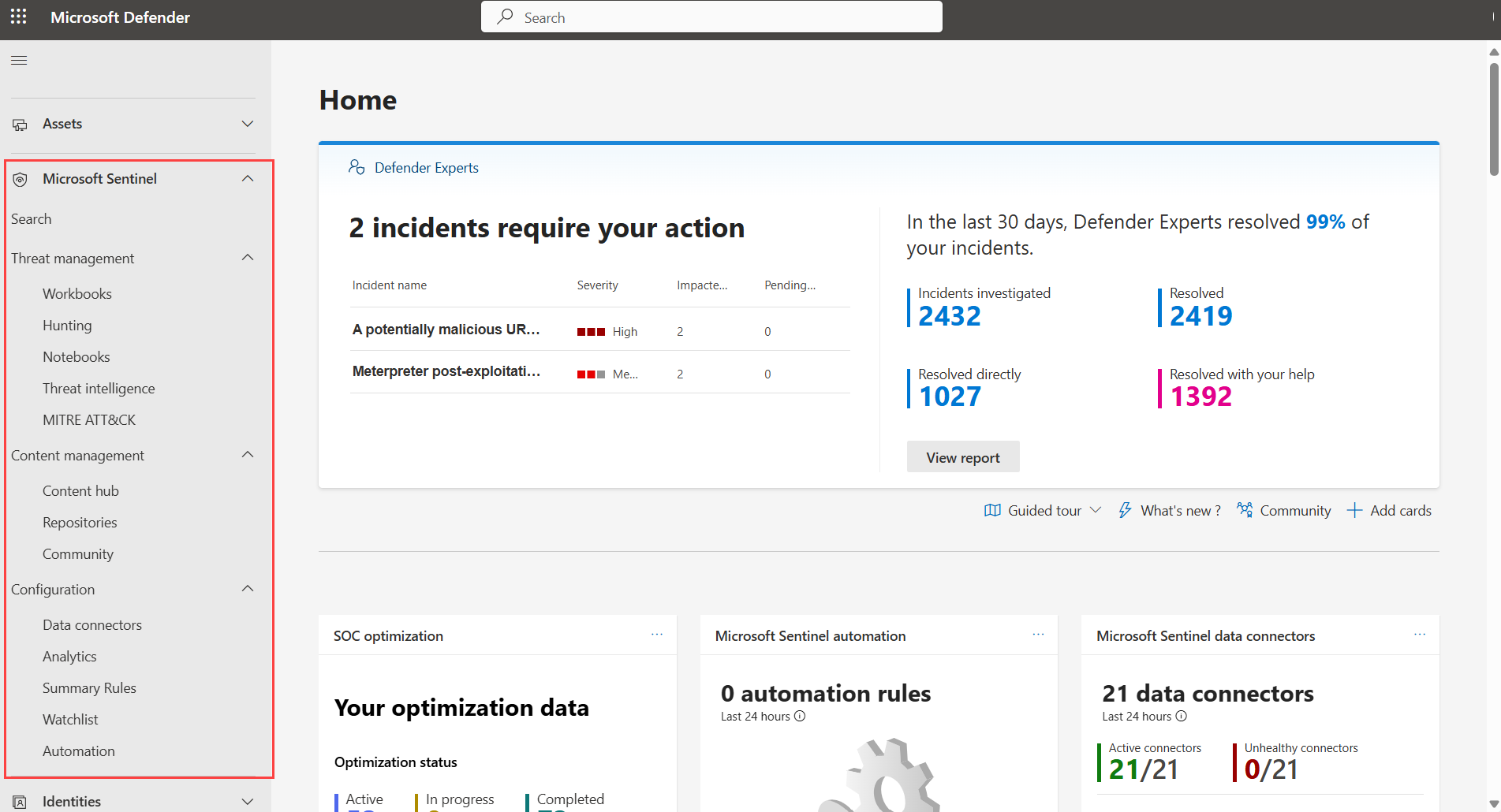
Onboard to the Defender portal (skip if auto-onboarded):
- security.microsoft.com > System > Settings > Microsoft Sentinel > Connect a workspace.
- Tick the workspaces, Next, choose the primary workspace, read the product changes, Connect. The Home page banner confirms when the environment is ready and Sentinel appears in the left navigation. Change the primary later from Settings > Microsoft Sentinel > Workspaces > Set as primary.

Set the pricing tier:
- Sentinel > Settings > Pricing. Current tier is labelled. Pick a commitment tier and Apply once you know your daily GB. Needs Contributor or Owner on the workspace.
Set retention:
- Workspace default: Log Analytics workspace > Usage and estimated costs > Data Retention > slider > OK. Sentinel defaults to 90 days; raise a legacy 30-day workspace to 90 so all Sentinel features work.
- Per table: workspace > Tables > table menu > Manage table > Data retention settings. Set analytics retention and total retention separately. On a Defender-connected workspace, do this in the Defender portal under Data management > Tables instead; Learn says tiering and retention for connected workspaces must be managed there.

Assign roles:
- Resource group > Access control (IAM) > Add role assignment. Analysts: Microsoft Sentinel Responder and Microsoft Sentinel Playbook Operator. Engineers: Microsoft Sentinel Contributor and Logic App Contributor. Add Workbook Contributor for anyone who authors workbooks. Assign to groups, not users.
- Table-level: workspace > IAM > Add role assignment > a role carrying the
tables/data/readdata action > Conditions > Add condition > Add action > Read workspace data > Table Name attribute.
Watch the bill:
- Defender portal > Microsoft Sentinel > Cost management shows lake and insights usage by meter, and Configure Policies lets a Billing or Security Administrator set thresholds with optional enforcement. Enforcement takes up to four hours to bite.
# Tested on: TODO
# Azure CLI 2.37.0 or later. The sentinel extension installs itself on first use.
az extension add --name sentinel

# Workspace
az group create -n rg-sentinel-prod -l westeurope
az monitor log-analytics workspace create \
  -g rg-sentinel-prod -n law-sentinel-prod -l westeurope \
  --retention-time 90

# Enable Sentinel (onboarding state, name must be default). Experimental command.
az sentinel onboarding-state create \
  -g rg-sentinel-prod -w law-sentinel-prod -n default \
  --customer-managed-key false

az sentinel onboarding-state show -g rg-sentinel-prod -w law-sentinel-prod -n default

# Per-table retention. --total-retention-time up to 4383 days on current CLI,
# older builds cap at 2556. Check: az monitor log-analytics workspace table update --help
az monitor log-analytics workspace table update \
  -g rg-sentinel-prod --workspace-name law-sentinel-prod -n SecurityEvent \
  --retention-time 90 --total-retention-time 730

# Roles at the resource group
az role assignment create --assignee-object-id <group-object-id> \
  --assignee-principal-type Group \
  --role "Microsoft Sentinel Responder" \
  --scope /subscriptions/<sub>/resourceGroups/rg-sentinel-prod
# Tested on: TODO
# Az.SecurityInsights (documented at azps 16.4.0) and Az.OperationalInsights
Install-Module Az.SecurityInsights, Az.OperationalInsights -Scope CurrentUser
Connect-AzAccount

New-AzOperationalInsightsWorkspace -ResourceGroupName rg-sentinel-prod `
  -Name law-sentinel-prod -Location westeurope -Sku PerGB2018 -RetentionInDays 90

New-AzSentinelOnboardingState -ResourceGroupName rg-sentinel-prod `
  -WorkspaceName law-sentinel-prod -Name default -CustomerManagedKey:$false

Get-AzSentinelOnboardingState -ResourceGroupName rg-sentinel-prod -WorkspaceName law-sentinel-prod

# Table retention
Update-AzOperationalInsightsTable -ResourceGroupName rg-sentinel-prod `
  -WorkspaceName law-sentinel-prod -TableName SecurityEvent `
  -RetentionInDays 90 -TotalRetentionInDays 730
Connecting the workspace to the Defender portal and onboarding the data lake are portal-only in Learn. No CLI or PowerShell is documented for either.
Create or update the workspace:
PUT https://management.azure.com/subscriptions/{subscriptionId}/resourceGroups/{resourceGroupName}/providers/Microsoft.OperationalInsights/workspaces/{workspaceName}?api-version=2025-02-01
{
  "location": "westeurope",
  "properties": {
    "sku": { "name": "PerGB2018" },
    "retentionInDays": 90,
    "publicNetworkAccessForIngestion": "Enabled",
    "publicNetworkAccessForQuery": "Enabled"
  }
}
Enable Sentinel on it. The onboarding state name must be default.
PUT https://management.azure.com/subscriptions/{subscriptionId}/resourceGroups/{resourceGroupName}/providers/Microsoft.OperationalInsights/workspaces/{workspaceName}/providers/Microsoft.SecurityInsights/onboardingStates/default?api-version=2025-09-01
{
  "properties": {
    "customerManagedKey": false
  }
}
A 201 means created, 200 means it already existed and was updated. GET on the same route tells you whether a workspace is Sentinel-enabled; DELETE removes Sentinel but keeps the workspace and its charges.
Per-table retention:
PUT https://management.azure.com/subscriptions/{subscriptionId}/resourceGroups/{resourceGroupName}/providers/Microsoft.OperationalInsights/workspaces/{workspaceName}/tables/{tableName}?api-version=2025-02-01
{
  "properties": {
    "retentionInDays": 90,
    "totalRetentionInDays": 730
  }
}
To hold data for exactly 30 days, set the workspace retentionInDays to 30 and immediatePurgeDataOn30Days to true through the Workspaces Update API; otherwise a 30-day workspace keeps data for 31. Defender portal connection and data lake onboarding have no documented public REST route. TODO: confirm the current api-version values against the OperationalInsights REST reference.
Verify
- Defender portal > System > Settings > Microsoft Sentinel > Workspaces lists the connected workspaces and marks the primary. Microsoft Sentinel appears in the left navigation and the Home page shows connector and automation rule counts.
- Azure portal > Microsoft Sentinel lists the workspace. If the tenant was auto-onboarded, the Azure blade shows a redirect to the Defender portal instead.
- Sentinel > Settings > Pricing shows the tier you expect as Current tier.
- Workspace > Tables shows analytics and total retention per table.
- Ingestion and cost, from Learn's monitoring page:
// Billable GB per day per solution, last 31 days. SecurityInsights is Sentinel.
Usage
| where StartTime >= startofday(ago(31d)) and EndTime < startofday(now())
| where IsBillable == true
| summarize BillableDataGB = sum(Quantity) / 1000. by bin(StartTime, 1d), Solution
| extend Solution = iff(Solution == "SecurityInsights", "AzureSentinel", Solution)
| render columnchart
// Which tables cost the most. Pair with the free-table list above.
Usage
| where TimeGenerated > ago(32d)
| where StartTime >= startofday(ago(31d)) and EndTime < startofday(now())
| where IsBillable == true
| summarize BillableDataGB = sum(Quantity) / 1000. by Solution, DataType
| sort by BillableDataGB desc
- Cost Management > Cost analysis, filter Service name to Sentinel, Log Analytics and Azure Monitor. Group by meter and search M365 to see the E5 grant as zero-dollar lines.
- Workbooks > Workspace Usage Report for free versus billable split per table.
- Data lake: Microsoft Sentinel > Data lake exploration opens the KQL editor against lake tables once onboarding completes.

Troubleshoot
| Symptom | Likely cause | Fix |
|---|---|---|
| Workspace missing from Connect a workspace list | Caller lacks the role, or Owner is assigned with a condition | Assign Owner unconditionally at subscription scope, or UAA plus Sentinel Contributor, plus Security Administrator in Entra |
| Onboarding blocked with more than one Sentinel workspace in the tenant | Security Administrator missing | Add Security Administrator, it is mandatory once the tenant has two or more Sentinel workspaces |
| Lighthouse engineers cannot see Sentinel in the customer Defender portal | GDAP with Lighthouse is unsupported for Sentinel data there | Use Entra B2B guests with Azure RBAC on the workspace |
| Workspace not offered when enabling Sentinel | It is a Defender for Cloud default workspace, has a resource lock, or is on a legacy tier | Create a new workspace on pay-as-you-go or commitment tier |
| Analytics rules all disabled | Network security perimeter enabled on the workspace | Remove the perimeter, it is unsupported for Sentinel workspaces |
| Rules on Defender XDR data stopped after onboarding | Workspace became secondary, XDR connector moved to the primary | Ingest Defender tables through Tables on the secondary, or move the rules to the primary |
| Duplicate Defender alerts | Standalone MDO, MDE, MDI, MDA or Entra ID Protection connector still on a secondary | Disconnect them from secondaries, they are tenant-wide and belong on the primary |
| Table data invisible for a table-restricted user | A broad Reader or Contributor assignment higher up overrides the restriction, or the user has API-only access | Remove the broad role, or expect portal access to need workspace read |
| Cost spike after lake onboarding | Archive, search and auxiliary meters replaced by lake meters | Review Cost management in the Defender portal, set Configure Policies thresholds, move tables that never need rules to lake-only |
| Cost spike with no new connectors | Paid raw logs enabled alongside free alerts, or AdditionalExtensions bloat on CEF | Run the Usage by DataType query, deselect paid types on the connector, filter at the DCR |
| Commitment tier cannot be lowered | Inside the 31-day commitment period | Wait until the period ends, then lower it or return to pay-as-you-go |
| Lake deployment error DL103 | Azure Policy blocks the platform services resource | Add a policy exemption for Microsoft.SentinelPlatformServices/sentinelplatformservices on the onboarding resource group |
| Still paying after removing Sentinel | Log Analytics workspace and its retention remain | Delete or shrink the workspace retention, removing Sentinel does neither |
Gotchas and limits
- Portal date: after 31 March 2027 only the Defender portal. New customers since July 2025 may never see the Azure experience at all. Build runbooks for the Defender portal now.
- Enabling Sentinel on a workspace charges Sentinel rates on every table in it, ops data included. Keep non-security data out unless the combined volume buys you a tier.
- You cannot move a Sentinel workspace between resource groups or subscriptions, and the region is fixed. Get the subscription, resource group and region right the first time.
- Commitment tier raise restarts the 31-day clock. Lower only after it ends.
- 31 days of analytics retention is in the ingestion price. Setting 4 to 30 days saves nothing. Setting a Sentinel workspace below 90 days turns off features Learn does not enumerate; the quickstart just says 90 is needed to use all of them. TODO: confirm which features in the dev tenant.
- Shortening total retention does not delete data for 30 days, so the change can be undone. Lengthening it applies to data already in the workspace.
- Data lake onboarding is irreversible without a support ticket, attaches every connected workspace in the region without a choice, and converts auxiliary tables out of advanced hunting into lake exploration. Existing customers on archive and auxiliary meters can see the bill move.
- Lake tier gives 30 days of ad hoc hunting; past that it is lake KQL, jobs and notebooks, which bill per GB scanned and per compute hour. Enforcement limits in Cost management lag by up to four hours.
- Only the primary workspace gets workbooks, custom detections, API queries and the XDR connector in the Defender portal. Cross-workspace advanced hunting results do not show which workspace a row came from.
- Table-level RBAC is defeated by any
*/readrole at a higher scope. Subscription Owners and administrators see everything regardless. - The E5 data grant covers Microsoft 365 tables only and only on EA, EAS and CSP. Free alert tables do not include raw logs from the same products; the connector page shows paid types unticked for a reason.
- Removing Sentinel leaves the workspace and its retention bill in place.
- The Defender XDR connector in Learn's older sense still exists for the primary, but raw XDR tables in the Defender portal are integrated and do not need it. The connector is what streams XDR incidents into the workspace tables.
Further reading
- Reducing Microsoft Sentinel Costs Without Compromising Detection, Part 1: The Summary Rules Quest, NVISO Labs, June 2026. Field comparison of the storage tiers with summary rules feeding analytics rules from cheaper tiers, and why they chose summary rules over KQL jobs.
- Microsoft Sentinel Cost Estimation and Optimization: The Definitive Guide, Charbel Nemnom, March 2026 (updated June 2026). Worked cost estimates across analytics and lake meters with a sizing method Learn does not give you.
- Microsoft Sentinel data lake FAQ, Microsoft Sentinel Blog, March 2026. Answers the onboarding, billing and migration questions that the lake overview and onboarding pages leave to cross-references.
Only three qualified in the October 2025 to October 2026 window with a clear practitioner author or Microsoft team byline.
My notes
TODO: Sohail's notes after verification.
Changelog
| Date | Change | Source |
|---|---|---|
| 2026-10-22 | Drafted from Learn, with Learn images and diagrams | [1] |