SOC optimization, the unified Defender portal and MSSP operation
What it is
This article covers the operating layer on top of a working Sentinel workspace. Four things, in the order you meet them in a real SOC.
SOC optimization is a recommendation engine inside Sentinel. Every 24 hours it compares what you ingest and which analytics rules are on against what Microsoft research says a given threat needs. It tells you which billable tables nobody has queried in 30 days, which detections are missing for a threat such as human-operated ransomware, and which data sources organisations like yours ingest and you do not. It is a to-do list with a cost and coverage argument attached, not an automated change.
The unified SecOps platform is Sentinel running inside the Defender portal. Learn now calls the broader preview the Integrated Security Operations Center, ISOC. Onboarding a workspace gives one incident queue shared with Defender XDR, one Advanced Hunting surface over Sentinel tables and XDR tables, Security Copilot, exposure management and case management. After 31 March 2027 the Azure portal experience goes away and Azure portal users are redirected. Some things stay Azure-side, and that split is the heart of the How it works section.
MSSP operation is the question of how one SOC team reaches many customer tenants. For Azure resources that is Azure Lighthouse. For the Defender portal it is Entra B2B or GDAP plus the multitenant portal at mto.security.microsoft.com. The two models do not fully overlap and Sentinel data in the Defender portal does not support GDAP. Health and audit tables, content hub updates and repositories are the housekeeping that makes any of this sustainable.
This article assumes you have read the Sentinel overview, data connectors, analytics and incidents and automation and playbooks. The Defender side is in the Defender XDR overview and Defender RBAC.
Licensing and prerequisites
- Sentinel itself is pay-as-you-go on the workspace. No Defender XDR or E5 licence is needed to use Sentinel in the Defender portal. Without Defender XDR, Home, Incidents and Advanced Hunting show Sentinel data only.
- The unified incident queue with XDR needs Defender XDR licensing and the Defender XDR account in the same Entra tenant as the workspace.
- ISOC preview eligibility: Microsoft Defender Suite, Microsoft 365 E5 or E7, and no active Sentinel workspace. Learn says do not disconnect a production workspace to qualify.
- Onboarding roles: Security Administrator in Entra ID, plus either Owner on the subscription with an unconditional assignment, or User Access Administrator plus Microsoft Sentinel Contributor. Owner with the condition "Allow user to assign all roles (highly privileged)" is what Learn shows. If the tenant has more than one Sentinel workspace you need Security Administrator as well.
- Day-to-day: Microsoft Sentinel Reader to view, Microsoft Sentinel Contributor to act on incidents. Azure RBAC continues to apply in the Defender portal and is still managed in Azure.
- SOC optimization uses standard Sentinel roles. Content hub install, update and delete need Microsoft Sentinel Contributor at resource group level. Repositories need Owner on the resource group that holds the workspace, and the account must be in the home tenant. B2B guests and delegated accounts cannot create a repository connection.
- Workspace manager needs Microsoft Sentinel Contributor on the central workspace and every member. Cross-tenant members need Lighthouse.
- Lighthouse: the customer-side deployer needs
Microsoft.Authorization/roleAssignments/write,deleteandreadon the subscription, which Owner has. The managing tenant needsMicrosoft.OperationalInsightsandMicrosoft.SecurityInsightsregistered on at least one of its own subscriptions, and each customer tenant needs them too. - Multitenant Defender portal: Defender XDR prerequisites per tenant, B2B or GDAP access, and Lighthouse if you want
workspace()queries into secondary workspaces of other tenants. Maximum 100 target tenants. - Custom detection rules as code: Microsoft 365 E5 or equivalent and the workspace onboarded to the Defender portal.
How it works
SOC optimization
The engine evaluates billable tables that ingested data in the last 30 days and the active analytics rules, predefined and custom. It emits four families of recommendation.
| Family | Trigger | Actions offered |
|---|---|---|
| Data value | Table not used by any analytics rule in 30 days, or used only by workbooks and hunting, or used only by Azure Monitor | Turn on rule templates from Content hub, change plan to Basic logs if eligible, stop ingestion, or move to a non-security workspace |
| Threat-based coverage | Logs and rules compared with what a named attack type needs | Turn on templates, connect sources, or install a solution. Spider chart by tactic and technique, link to the prefiltered MITRE page |
| Risk-based coverage, preview | Same comparison against operational, financial, reputational, compliance and legal risk | Same three actions |
| AI MITRE tagging, preview | Untagged detections | Apply suggested tactics and techniques to one rule, all rules, or none |
| Similar organizations | ML finds tables peers with similar ingestion and industry profile have and you lack | Connect the suggested sources. Excludes custom tables, multi-source tables such as Syslog and CommonSecurityLog, and tables seen in fewer than 10 workspaces |
Tables used by UEBA or the threat intelligence matching rule never get an ingestion-change recommendation. Unused column detection, in preview, flags ConditionalAccessPolicies in SignInLogs and AADNonInteractiveUserSignInLogs. The Overview tab also grades threat-based coverage: High above 75 percent of Microsoft-recommended rules active, Medium 30 to 74, Low below 30.
Each item is Active by default. You mark it In progress, Completed or Dismissed, and the engine auto-completes items the environment has made irrelevant. Reactivating one triggers a recalculation of up to an hour. When the workspace is onboarded to the Defender portal, recommendations draw on coverage from the other Defender services, and with several workspaces the data is aggregated across them.
What the Defender portal adds, and what stays in Azure
Onboarding is a setting under System > Settings > Microsoft Sentinel. You pick the workspaces and one primary. The Defender XDR connector then attaches to the primary and only the primary. Defender XDR alerts and incidents sync into that workspace, status and assignment sync both ways, and the provider name on every incident becomes Microsoft XDR. Fusion is disabled because Defender correlation replaces it. Microsoft security incident creation rules are deactivated to stop duplicates. The standalone Microsoft alert connectors, Defender for Office 365, Entra ID Protection, Defender for Cloud Apps, Defender for Endpoint and Defender for Identity, are disconnected on secondary workspaces automatically and hidden from the Defender portal connector page, although they still show in Azure.
The tenant supports one primary and an unlimited number of secondaries. Secondaries keep their own incident creation and correlation and never see XDR incidents. They can still ingest Defender table data. Global search, the incident queue, alerts and entity pages aggregate across every workspace you can read. Advanced Hunting lets you pick a workspace or use workspace() across several, but custom detections and API queries run against the primary only, and workbooks show the primary only.
What stays in Azure: the Log Analytics workspace itself, tables, retention, customer-managed keys, Azure RBAC assignments, diagnostic settings, Lighthouse, and workspace manager, which Learn lists as Not available in the Defender portal. News and guides also went away. After onboarding, Microsoft Sentinel Contributor is granted to the Microsoft Threat Protection and WindowsDefenderATP apps in the subscription.
Known changes that bite automation: the SecurityIncident table loses Description, incident titles can change through correlation, the incident provider condition in automation rules is removed, alert-only rules are not visible, manual or API-created incidents do not sync, comments cannot be edited in Defender, and a closed incident never reopens. Up to five minutes for a Defender incident to reach Sentinel and up to ten minutes from alert to automation run. Table-level RBAC on IdentityInfo is not available in the Defender portal.
Retirement timeline from the overview page: new customers onboarding their first workspace from July 2025 with Owner or User Access Administrator, and not Lighthouse-delegated, are onboarded to the Defender portal automatically. Existing tenants and Lighthouse users see no redirect. After 31 March 2027 Sentinel is Defender portal only.
MSSP topology
Lighthouse is a logical projection. The customer deploys an ARM template that creates a Microsoft.ManagedServices/registrationDefinitions resource at subscription scope, holding managedByTenantId and an authorizations array of principal plus built-in role, and a registrationAssignments resource at the delegated scope. When a managing-tenant user calls ARM, Resource Manager checks both resources exist in the customer tenant and authorises accordingly. No guest account is created. Actions land in the customer's activity log. Owner cannot be delegated, nor roles with DataActions or Microsoft.Authorization write actions. User Access Administrator works only for assigning roles to managed identities and must carry delegatedRoleDefinitionIds. Add the Managed Services Registration Assignment Delete Role so you can remove your own delegation later.
The recommended data model is one workspace per customer tenant, managed centrally. Costs then land on each customer's subscription, data stays in their geography, and offboarding is removing a delegation. Analytics rules and hunting queries must live in each customer workspace. Playbooks and workbooks can live in the managing tenant without sharing the code. Cross-workspace analytics rules can reference up to 20 workspaces, five recommended, and the resulting incidents exist only in the workspace that owns the rule.
The Defender portal side is different. Sentinel data in the Defender portal is reachable through Entra B2B only. GDAP gives Defender XDR data, not Sentinel data. The multitenant portal takes up to 100 tenants, shows one incident and case queue, hunts across tenants, and supports one primary plus secondaries per tenant. To query a secondary workspace in another tenant from Advanced Hunting, analytics rules or workbooks you still need Lighthouse and the workspace() operator. Connectors cannot be deployed into a managed workspace with Lighthouse alone; GDAP must also be in place.
Health, audit and content lifecycle
SentinelHealth records data connector fetch status, automation rule runs with partial success, playbook trigger success and scheduled and NRT analytics rule runs. It is free. SentinelAudit currently records analytics rule write and delete, with caller name and IP, old and new state and the diff in ExtendedProperties. It is billable. Both are created by one Auditing and health monitoring setting that writes a diagnostic setting for you, and the tables appear on the first event. Query them through _SentinelHealth() and _SentinelAudit() so schema changes do not break you. Playbook internals are in AzureDiagnostics from Logic Apps. Control-plane actions on every other Sentinel resource type are in AzureActivity under MICROSOFT.SECURITYINSIGHTS. Query text is in LAQueryLogs, off by default, five minutes behind, and only for the Logs blade, not for Advanced Hunting or scheduled rules.
Content hub delivers solutions and standalone items. Standalone items auto-update. Solutions show Update in list view and you update them one at a time or in bulk; your active rules created from templates are left untouched. Repositories connect a GitHub or Azure DevOps repo, five connections per workspace, Bicep or ARM JSON, and overwrite portal edits on the next run. Smart deployments only redeploy changed files, tracked in a CSV under .sentinel. Older SecurityInsights API versions retire from June 2026; move to 2025-09-01.
Configure
- Portal
- Azure CLI / PowerShell
- REST / ARM
SOC optimization:
- Defender portal > SOC optimization. Nothing to enable; it runs on every Sentinel workspace and recalculates daily.
- Overview tab for the four metrics. Optimizations tab for the cards. Filter by type.
- View details on a card. For threat-based items toggle the spider chart between tactics and techniques, then View full threat scenario.
- Act from the bottom of the pane: Go to Content Hub, Change plan, or connect a source. Install the whole solution, not just the template, or only that one template shows.
- Mark Complete, In progress or Dismiss. Reactivate from the Completed or Dismissed tabs.


Onboard a workspace to the Defender portal:
- Confirm the onboarding account holds Security Administrator and unconditional Owner on the subscription, or User Access Administrator plus Sentinel Contributor.
- Disconnect any standalone Microsoft alert connectors on workspaces that will become secondary, and move Insider Risk Management to the primary.
- Defender portal > System > Settings > Microsoft Sentinel > Connect a workspace.
- Select the workspaces, Next, choose the Primary workspace, review the product changes, Connect.
- Home shows a ready banner and Microsoft Sentinel appears in the left navigation. To change primary later: Workspaces > select > Set as primary. The XDR connector moves with it.


Lighthouse delegation, customer side:
- Customer tenant, Owner on the subscription: Service providers > Service provider offers > Add offer > Add via template. Upload
subscription.jsonand the parameters file from the Azure-Lighthouse-samples repo, Review and create, Create. - Managing tenant: My customers > Customers shows the subscription under the offer name within 15 minutes. Users need at least Reader to see it.
- Both tenants: Subscriptions > Resource providers, register
Microsoft.OperationalInsightsandMicrosoft.SecurityInsightsif NotRegistered. - Azure portal > Directory + subscription filter, tick the delegated directories and subscriptions, open Microsoft Sentinel. The customer workspaces appear alongside your own.
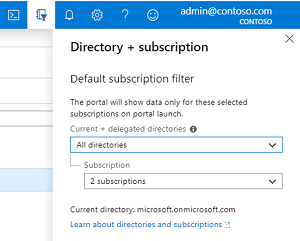
Multitenant Defender portal:
- Verify access per tenant at myaccount.microsoft.com > Organizations for B2B, or Partner Center for GDAP.
mto.security.microsoft.com> Add tenants > select > Add. Group them under Multi-tenant management > Tenant groups.
Workspace manager, Azure portal only:
- Central workspace > Settings > Make this workspace a parent. A Workspace manager (preview) item appears under Configuration.
- Add workspaces, pick members. Cross-tenant members need Lighthouse already in place.
- Add > Group, name it, select workspaces, select content. All content takes a point-in-time snapshot of active items, not templates.
- Select the group > Publish content. Last publish status goes In progress, then Succeeded or Failed.
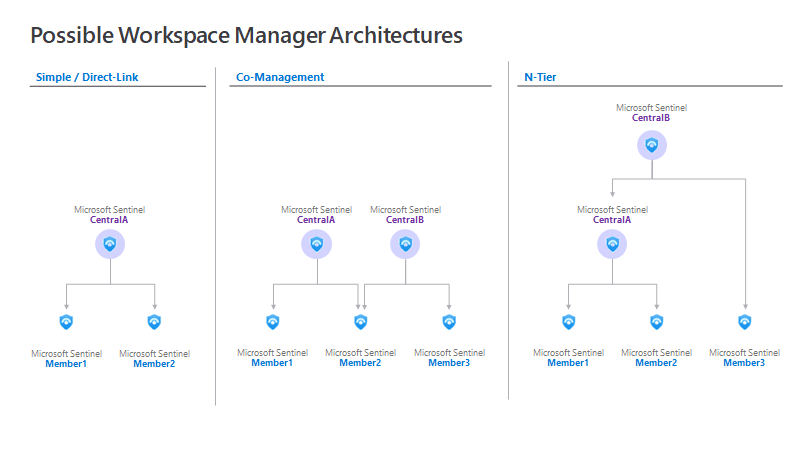
Health and audit:
- Defender portal > System > Settings > Microsoft Sentinel > Auditing and health monitoring. Azure: Settings > Settings > Auditing and health monitoring.
- Enable for everything into this workspace, or Configure diagnostic settings to pick categories and add destinations. Save.
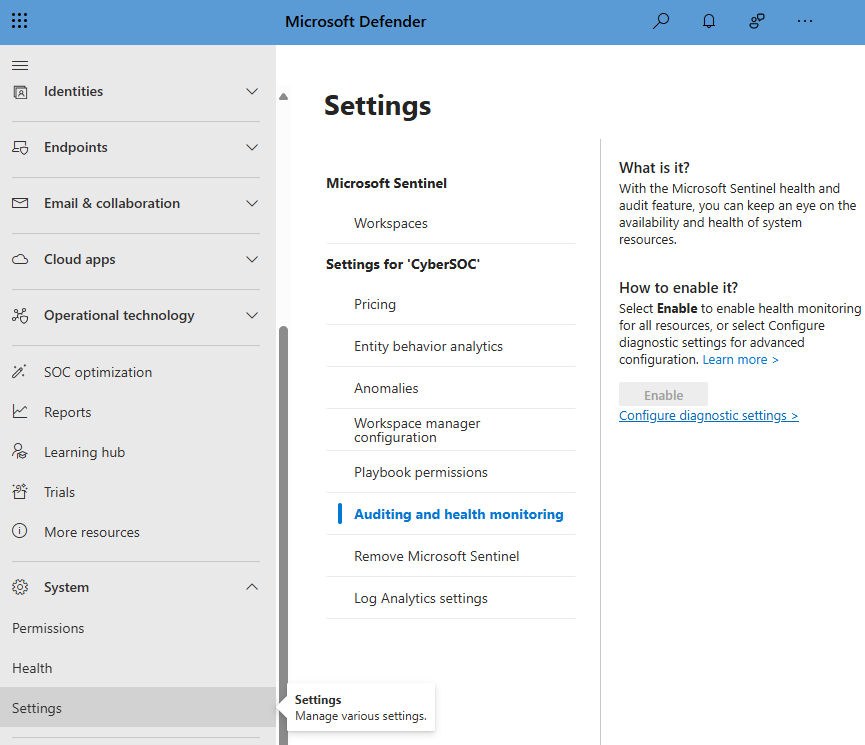
Repositories:
- Sign in to GitHub or Azure DevOps with the account you want bound to the connection.
- Microsoft Sentinel > Content management > Repositories > Add new. Name, Source control, Authorize, pick repository and branch, pick Content types, Create.
- A workflow or pipeline is written into the repo and runs. Status and a log link appear on the Repositories page.
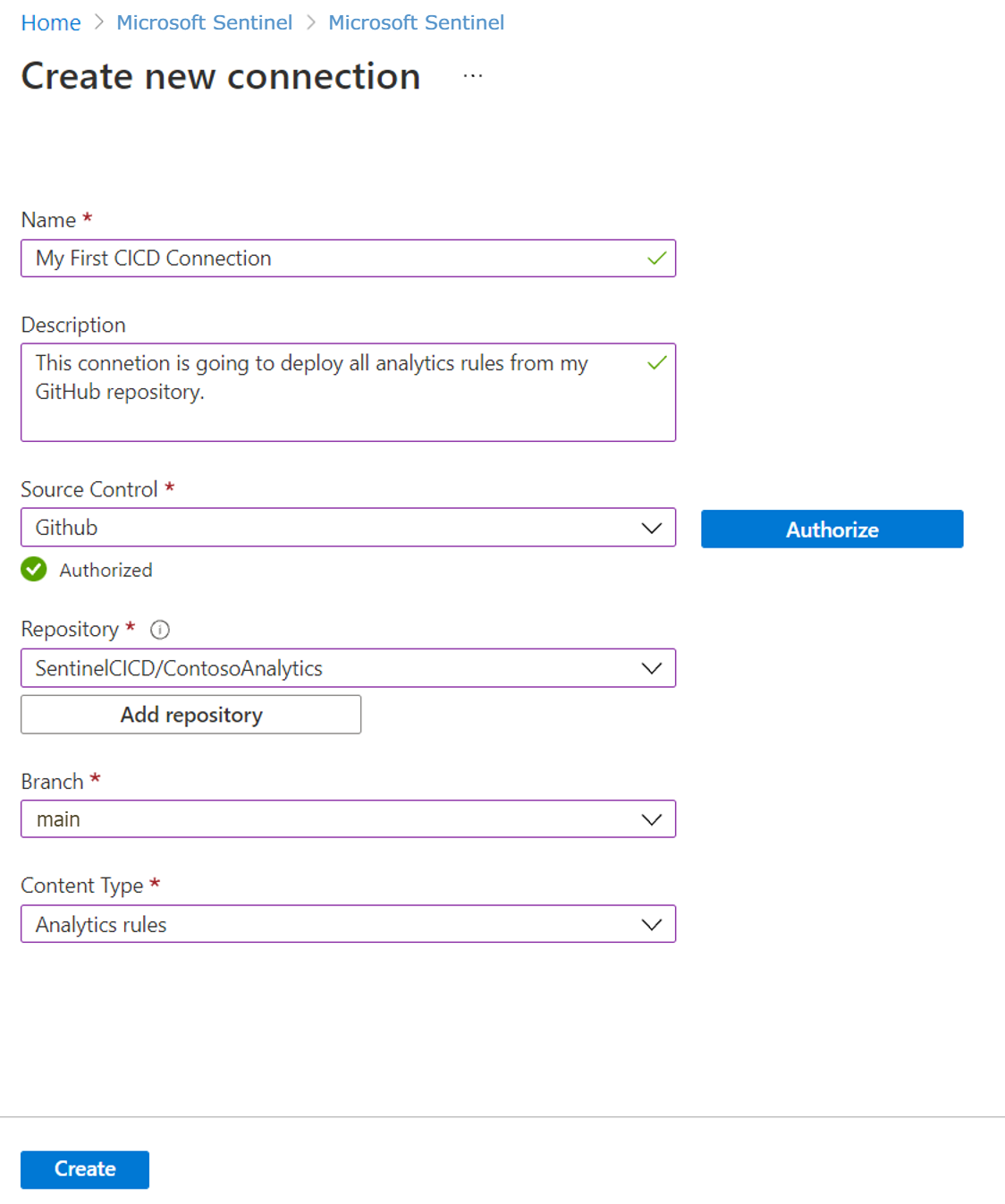
# Tested on: TODO
# Lighthouse delegation, run in the CUSTOMER tenant as subscription Owner.
# Template and parameter files from https://github.com/Azure/Azure-Lighthouse-samples/
# templates/delegated-resource-management/subscription/
az login --tenant <customer-tenant-id>
az account set --subscription <customer-subscription-id>
az provider register --namespace Microsoft.ManagedServices   # normally automatic
az deployment sub create \
  --name lighthouse-sentinel \
  --location westeurope \
  --template-file subscription.json \
  --parameters subscription.parameters.json

# Confirm, from either tenant
az managedservices definition list
az managedservices assignment list

# MSSP tenant: register the providers Sentinel needs on one of your own subscriptions
az provider register --namespace Microsoft.OperationalInsights
az provider register --namespace Microsoft.SecurityInsights
The az deployment sub create and az managedservices syntax above follows the Azure CLI reference. The Learn onboarding page carries the commands in CLI tabs that did not render during source check. TODO: confirm against the live page before first use.
# Tested on: TODO
# Az.SecurityInsights has no cmdlets for content hub, workspace manager,
# repositories or SOC optimization. It does cover rules, so the content loop is:
# read a template, create a rule from it, and push that to each customer workspace.
Install-Module Az.SecurityInsights -Scope CurrentUser

$rg  = 'rg-sentinel'
$ws  = 'law-sentinel'
Get-AzSentinelAlertRuleTemplate -ResourceGroupName $rg -WorkspaceName $ws |
  Where-Object DisplayName -like '*ransom*' |
  Select-Object Name, DisplayName, Kind, Severity

# Health of the lot, delegated or not, by workspace
Get-AzSentinelOnboardingState -ResourceGroupName $rg -WorkspaceName $ws
# Export existing content for a repo. Hunting queries and parsers are saved searches.
az monitor log-analytics workspace saved-search list \
  --resource-group rg-sentinel --workspace-name law-sentinel \
  --query "[?category=='Hunting Queries']" -o json > hunting.json

# Analytics and automation rules: use the Export button in the portal, or the
# Export Analytics Rules PowerShell script Learn links from ci-cd-custom-content.
# Then decompile ARM JSON to Bicep. Remove the id property first and set the
# schema to 2019-04-01 for a cleaner result.
az bicep decompile --file analytics-rule.json

# Custom detection rule as code, direct deploy
az deployment group create \
  --resource-group rg-sentinel \
  --template-file detectionRule.bicep \
  --name mtp-deployment
Lighthouse delegation as a resource, the two objects the ARM template creates in the customer subscription:
PUT https://management.azure.com/subscriptions/{subscriptionId}/providers/Microsoft.ManagedServices/registrationDefinitions/{registrationDefinitionId}?api-version=2022-10-01
{
  "properties": {
    "registrationDefinitionName": "Contoso SOC - Sentinel",
    "description": "Sentinel operations",
    "managedByTenantId": "<mssp-tenant-id>",
    "authorizations": [
      { "principalId": "<group-id>", "principalIdDisplayName": "Sentinel Responders", "roleDefinitionId": "3e150937-b8fe-4cfb-8069-0eaf05ecd056" },
      { "principalId": "<group-id>", "principalIdDisplayName": "Sentinel Contributors", "roleDefinitionId": "ab8e14d6-4a74-4a29-9ba8-549422addade" },
      { "principalId": "<group-id>", "principalIdDisplayName": "Delegation removal", "roleDefinitionId": "91c1777a-f3dc-4fae-b103-61d183457e46" }
    ]
  }
}
PUT https://management.azure.com/subscriptions/{subscriptionId}/providers/Microsoft.ManagedServices/registrationAssignments/{registrationAssignmentId}?api-version=2022-10-01
{
  "properties": {
    "registrationDefinitionId": "/subscriptions/{subscriptionId}/providers/Microsoft.ManagedServices/registrationDefinitions/{registrationDefinitionId}"
  }
}
TODO: the role definition GUIDs above are the built-in IDs for Microsoft Sentinel Responder, Microsoft Sentinel Contributor and Managed Services Registration Assignment Delete Role; verify against the built-in roles page before deploying. The sample Learn shows uses Contributor b24988ac-6180-42a0-ab88-20f7382dd24c.
SOC optimization, preview API:
GET https://management.azure.com/subscriptions/{subscriptionId}/resourceGroups/{resourceGroupName}/providers/Microsoft.OperationalInsights/workspaces/{workspaceName}/providers/Microsoft.SecurityInsights/recommendations?api-version=2024-01-01-preview
PATCH https://management.azure.com/subscriptions/{subscriptionId}/resourceGroups/{resourceGroupName}/providers/Microsoft.OperationalInsights/workspaces/{workspaceName}/providers/Microsoft.SecurityInsights/recommendations/{recommendationId}?api-version=2024-01-01-preview
Statuses accepted: Active, In Progress, Completed, Dismissed, Reactivate. POST .../recommendations/{recommendationId}/triggerEvaluation forces a recalculation. Learn does not publish the PATCH body on the how-to page; take it from the Get Recommendations reference.
Content hub packages:
GET https://management.azure.com/subscriptions/{subscriptionId}/resourceGroups/{resourceGroupName}/providers/Microsoft.OperationalInsights/workspaces/{workspaceName}/providers/Microsoft.SecurityInsights/contentPackages?api-version=2025-09-01
Lists installed packages. Install and Uninstall are separate operations under the same contentPackages route; the Install page did not fetch during source check. TODO: confirm the Install body fields. The documented alternative is the Get Product Package API, whose properties.mainTemplate is a full ARM template you deploy with a normal deployment call.
Workspace manager, make a workspace a parent:
PUT https://management.azure.com/subscriptions/{subscriptionId}/resourceGroups/{resourceGroupName}/providers/Microsoft.OperationalInsights/workspaces/{workspaceName}/providers/Microsoft.SecurityInsights/workspaceManagerConfigurations/default?api-version=2025-07-01-preview
{
  "properties": { "mode": "Enabled" }
}
Members, groups, assignments and assignment jobs are sibling resources, workspaceManagerMembers, workspaceManagerGroups, workspaceManagerAssignments and their jobs, under the same workspace path.
Health and audit are enabled with a standard diagnostic setting on the Microsoft.SecurityInsights/settings scope through the Monitor Diagnostic Settings API, Bicep or ARM.
Verify
- Onboarding: Defender portal Home shows the Sentinel banner and connector and automation counts. Incidents show provider Microsoft XDR. In Azure, the Microsoft Defender XDR connector shows Connected on the primary only.
- Lighthouse: My customers lists the subscription within 15 minutes.
az managedservices assignment listreturns the assignment from the managing tenant context. The customer's activity log shows your actions with your UPN. - Multitenant portal: the tenant appears in Settings and in Tenant groups, and its incidents show in the queue.
- Workspace manager: Last publish status Succeeded, and the rule or workbook exists in the member workspace with the same name.
- Health and audit: run the two functions below after the first rule run or connector poll.
_SentinelHealth()
| where TimeGenerated > ago(1d)
| summarize count() by SentinelResourceType, OperationName, Status
_SentinelAudit()
| where TimeGenerated > ago(7d)
| extend Caller = tostring(ExtendedProperties.CallerName), Diff = ExtendedProperties.ResourceDiffMemberNames
| project TimeGenerated, OperationName, SentinelResourceName, Status, Caller, Diff
// Cross-workspace, MSSP side. Save as a function and reuse.
union
  workspace("/subscriptions/<subA>/resourcegroups/<rgA>/providers/microsoft.operationalinsights/workspaces/<wsA>").SecurityIncident,
  workspace("/subscriptions/<subB>/resourcegroups/<rgB>/providers/microsoft.operationalinsights/workspaces/<wsB>").SecurityIncident
| where TimeGenerated > ago(1d)
| summarize arg_max(TimeGenerated, Status, Severity) by IncidentNumber, TenantId
// Who changed what in Sentinel outside the audit table, needs the Azure Activity connector
AzureActivity
| where OperationNameValue startswith "MICROSOFT.SECURITYINSIGHTS"
| where ActivityStatusValue == "Succeeded"
| project TimeGenerated, Caller, OperationNameValue, ResourceGroup
- SOC optimization: the Overview tab populates once 30 days of billable data exist. The Microsoft Sentinel Optimization Workbook has a SOC Optimization tab that reads the same API.
Troubleshoot
| Symptom | Likely cause | Fix |
|---|---|---|
| Workspace missing from Connect a workspace list | Account lacks unconditional Owner or UAA plus Sentinel Contributor, or Security Administrator with several workspaces | Fix the role at subscription scope, remove the Owner condition, retry |
| Workspace onboarded but XDR incidents absent | It is a secondary. XDR connector only binds the primary | Set as primary, or accept table ingestion only |
| Automation rules stopped firing after onboarding | Rule used Incident provider, incident title or Description, or rules sit on a secondary | Rewrite conditions on analytics rule name or tags, move rules to the primary |
| Customer subscription not in My customers | Under 15 minutes, no Reader in authorizations, or providers not registered | Wait, add Reader, register Microsoft.ManagedServices on the customer subscription |
| Lighthouse deployment fails | managedByTenantId equals the customer tenant, duplicate mspOfferName at the scope, Owner or DataActions role in authorizations, M365 group instead of security group | Correct the parameters file and redeploy |
| Cannot deploy a connector into a delegated workspace | Lighthouse alone does not cover it | Add GDAP for that customer |
| Sentinel data not visible in multitenant portal | Access is through GDAP only | Sentinel needs Entra B2B; GDAP covers XDR data only |
workspace() query to another tenant fails in Advanced Hunting | No Lighthouse delegation for that workspace, or it is a secondary in another tenant | Delegate the subscription, use the full resource ID form |
| Cross-workspace rule stopped after staff change | Creator lost access to a workspace in another subscription or tenant | Recreate under a group-held identity or re-delegate |
| SOC optimization page empty | New workspace, fewer than 30 days of billable data, or recalculation pending | Wait 24 hours. Similar organizations needs enough peer workspaces and may never appear |
| Workspace manager publish Failed | Deleted content item, deleted member, contributor rights removed, or over 2,000 operations in one group | Open job details, fix the pair, split the group |
| Repository connection cannot be created | Guest or delegated account, no Owner on the resource group, five connections already | Use a home-tenant account with Owner, delete a connection |
| Deployment QuotaExceeded in repo pipeline | 800 deployments in resource group history | Clear old deployments |
SentinelAudit has no rows | Only analytics rule write and delete are audited, or setting not enabled | Enable Auditing and health monitoring, change a rule, check AzureActivity for other types |
Gotchas and limits
- One primary per tenant, and the XDR connector follows it. Tenant-wide alerts from Microsoft services only land in the primary. Design the primary for the global SOC and let business-unit workspaces stay secondary.
- Secondary workspaces can ingest Defender tables but their incidents never correlate with XDR. Learn says some incidents simply cannot be merged.
- Lighthouse is Azure control plane only. It delegates Azure RBAC on subscriptions and resource groups and projects nothing into Entra ID or the Defender portal. B2B puts a guest in the customer directory and is now the route for Sentinel data in the Defender portal. GDAP is Partner Center and covers XDR data, not Sentinel. Most MSSPs end up with all three.
- Lighthouse users creating a new workspace are not auto-onboarded to the Defender portal and see no redirect, even after July 2025. Someone in the customer tenant with the right roles has to onboard it.
- Repository connections cannot be created by B2B guests or delegated accounts. For an MSSP that means a customer-tenant identity or a per-customer service setup.
- Workspace manager is Azure portal only, preview, and absent from the Defender portal. Learn's alternatives are repositories, the multitenant portal, and content hub packages. Treat it as a bridge until March 2027, not a foundation.
SentinelHealthis free.SentinelAuditis billable and only covers analytics rules today. Retention follows the workspace, 90 days free then standard Log Analytics pricing. Learn gives no separate retention rule for these tables. If an auditor needs a year of rule changes, set table-level retention or export.LAQueryLogsdoes not see Advanced Hunting, the Hunting page, scheduled rules or the investigation graph. After the portal move it audits less than it used to.- Content hub solutions do not auto-update; standalone items do. Updates leave your active rules alone, so a template fix does not reach a rule you already created from it. Build a monthly pass over Update available.
- Repositories win over portal edits. Either lock portal edits to MSSP users or prefix MSSP content so analysts know what will be overwritten.
- Cross-workspace rules: 20 workspaces maximum, 5 recommended, every referenced workspace must have Sentinel, incidents only in the home workspace, and if the repo deploys the rule the destination workspace must sit in the same resource group as the connected one.
- After onboarding, alerts and incidents are no longer CMK-encrypted. Logs and rules stay CMK. Say so in the customer's data handling record.
- SecurityInsights API versions older than 2025-06-01 and 2025-09-01 retire from June 2026. Incident response bodies changed;
providerIncidentUrlis the link for ticketing,incidentUrlstill points at the Azure portal.
30-60-90 day plan for a mid-size client
Days 1 to 30. Decide one workspace or several and which is primary. Set retention, decide on CMK before onboarding since alerts lose CMK afterwards. Create three Entra security groups in the managing tenant for Reader, Responder and Contributor and delegate through Lighthouse, or invite B2B guests through entitlement management with MFA trust. Onboard to the Defender portal with an unconditional Owner. Connect the free Microsoft sources first: Entra ID, Azure Activity, Defender XDR tables you need beyond 30 days. Turn on Auditing and health monitoring on day one so the baseline exists.
Days 31 to 60. Install solutions from Content hub for every connected source, with dependencies. Stand up a repository connection with Bicep, smart deployments on, one shared folder and one customer folder. Move all automation rules to the primary and rewrite anything that keyed on provider or description. Host playbooks in the managing tenant where the customer should not see the logic. Bring in third-party CEF and Syslog through AMA.
Days 61 to 90. Run SOC optimization end to end: move tables nobody queries to Basic logs or stop them, close the top threat scenario gaps, apply MITRE tags. Write the runbook: monthly Update available pass, weekly _SentinelHealth() failure review, monthly _SentinelAudit() and AzureActivity review, quarterly Lighthouse authorization review. Add the tenant to the multitenant portal and move ticketing to case management or Graph security API. Hand over with the gotchas list above attached.
Further reading
- 6 truths about migrating Microsoft Sentinel to the Defender portal, Microsoft Sentinel blog, October 2025. Microsoft's own list of what changes operationally, written for teams that already run Sentinel in Azure.
- Notes on multi-tenant Defender and Sentinel management, Mikko Koivunen, November 2025. Practical B2B pattern for MSSP access with cross-tenant sync, dynamic groups, PIM and Defender RBAC, which Learn only gestures at.
- Microsoft Sentinel Migration Guide: Extended Timeline to 2027, Cloud Factory, February 2026. A phased migration plan aimed at partners with customer outreach steps.
- Custom Detection Rules as Code in Sentinel Repositories: What Your Pipeline Owns Now, Marcel Graewer, July 2026. Argues for pre-merge checks on retired tables, columns, entity mappings and rule IDs now that the repo overrides the portal.
My notes
TODO: Sohail's notes after verification.
Changelog
| Date | Change | Source |
|---|---|---|
| 2026-10-22 | Drafted from Learn, with Learn images and diagrams | [1] |